-
Golden Palace Vertex issues
In both pictures the geograft is merged, the difference is in the first picture you didn't transfer morphs aka you didn't fit the geograft, so it doesn't follow and stays rigid. Easy import transfers morphs for you if you choose a genesis preset, that's the easy way. Or you can transfer morphs after from the figure to the geograft.
setup > morphs > transfer shapekeys
Golden Palace Vertex issuesI have been trying to fix this issue for a while now and I guess I did once, by mistake. After I merge geografts my golden palace mesh does not want to move with the rest of the body, so anything requiring the legs to be opened the verts just sit there rendering the graft useless. I have no idea what I am doing wrong but I have been dealing with this issue for months trying to brute force my way into fixing it by changing the way I import and what not. Below is a picture of what my normal imports of the grafts look like along with the one I fixed by mistake but have no idea what I did. Am I doing something wrong or not doing something at all?
List of Products Used - script [Commercial]jjoyner said:
If I load old Daz Studio products into a scene along with newer ones and 3rd-party ones, the newer Daz Studio products show up when I run List of Products. As expected, the old Daz Studio products and 3rd party products do not. Is there anything that I can manually add to the metadata of old Daz Studio products and 3rd-party products so that List of Products will display them when in a scene?
Below is an example. The scene contains
- Cow (SKU 354)
- Grumpy Santa (SKU 106421)
- Bench (SKU 102789)
- Abacus (SKU 21250)
- Dragon (SKU 487)
- Baseball (SKU 32221)
- 14MU Worker (SKU 13537)
- Barrel (SKU 23591)
- Mantle clock (Renderosity).
Prior to saving the scene, List of Products listed the products containing newer Daz3D content - Grumpy Santa, the bench, the abacus, the baseball and 14MU Worker. After saving the scene and reloading it, List of Products only listed the products containing the abacus, the baseball and 14MU Worker.
I don't know anything about setting metadata to products... It is a QA work for us, so I never had the oportunity to work with the metadata set up... Sorry!
Is there a way to convert genesis 8 textures to genesis 9?I woke up today to work on this for a game project I am making in Unity and conveniently had looked it up to see what solutions there were and saw this thread and can't believe someone posted same day about it when I was planning on trying to find a quick solution.
I used an old template, and lining it up perfectly wasn't right...
So, I decided to start from scratch, so anyone can do it in a matter of minutes.
This took about 5 minutes from opening Daz to taking the video showing the results.
I used Blender 2.79, I can't get it to bake properly on newer Blenders.
Daz steps:
1. Load Genesis 9 dev load into scene, set to base, change to show hidden in parameter preferences, search Genesis 8 Female, dial it up to 100
2. Load Genesis 8 Female, set to base
3. Move left thigh -7 and right thigh 7 on side to side on Genesis 9 to line the thighs
Your Genesis 9 will now match your Genesis 8 perfectly and you are done with Daz after export.
Export your two Genesis 8 and Genesis 9 FBX together to Blender with Collect textures
Blender steps:
1. Import FBX with pre/post rotation set to off
2. Select Genesis9.Shape, go to UV editor, deselect all, under materials click Select so it is the only thing selected in blender, you should see the UV editor is blank with the arms to the right of the UV map.
3. Press A in the UV editor and drag the arms, body, head, or legs (whatever currently you need) with G and hold CTRL to snap it into place
4. Click NEW texture in the uv/editor still, set a texture as 4096x4096 name it G9_Arms. "Save as" and save the image <- This is very important! (or you will get circular dependency errors and your texture will not complete)
5. Repeat this for the legs, head, torso.
6. You should have template files now on your HD called G9_Arms, G9_Head, G9_Body, G9_Legs
7. Check your Genesis 8 has materials assigned, you DO NOT NEED UV EDITOR for the Genesis 8.
8. Shift Click the Genesis 8 first and then the Genesis 9 as your active object.
9. Go to the Render settings (The camera icon). Make sure you are in Cycles or you will not see the bake settings. Go to the bake settings. Change it to "Texture" (and not Full Render) Click Bake.
You now have any Genesis 8 texture on Genesis 9 and as long as you can line up any generation this process is the same.
Here is a video of the texture baking from a Genesis 8 to a Genesis 9. I am working on scripts to automate this process in Blender since right now swapping textures to make roughness, specular, normal maps is a lot of clicking and re-saving the template files etc.
NSFW for nudity texture:https://streamable.com/jrmcdf
I'll post more screenshots or a video of the whole process if needed.FBX Mystery solved?FBX is a well defined industry standard of course. Problem is it comes in too many versions and it is extremely flexible aka there's a lot of features to implement, most importers only implement a few features and fail to comply with others. Both daz studio and blender recently improved their support to FBX, as reported in the discussion linked by Crosswind above I was able to import FBX from blender to daz studio, using the standard FBX exporter.
https://www.daz3d.com/forums/discussion/comment/8938351/#Comment_8938351
Alienator Pro II problemsThanks for the help, Barbult. I wrote to Renderosity for the problem encountered, I hope that EVERYPlant can fix the errors on the meshes. I followed your advice to scale the model in X-Y-Z coordinates to 100% (see the screenshots), I saved it in .obj format and the file became quite heavy (about 46 mb). I then imported it and applied 10000% (Lightwave 1 unit = 1 mt) because with the DS scale the model remained unchanged and then I saved it in Prop Asset. The textures were automatically and correctly applied to the .obj file and therefore I did not have to save them separately to then apply them to the model. At this point I created a test ground with trees with US 2 and loaded the Alienator menu to import the model to replace with the vegetation. I immediately noticed that the dimensions were very different from the unscaled originals and applying them to the test vegetation the result was correct
 At this point, given the amount of transformations to be done for each individual model, I don't think EVERYPlant will do anything
I ask Totte who is an excellent programmer: is it possible for you to create a batch file (like Photoshop) or an action to automatically save the models that need to be resized? Considering that the EVERYPlant libraries to be converted are about 30 and that inside there are 20 versions of vegetation, to convert about 600 models it could take me a few years
I think other users like me would appreciate a script like that because it could be useful.
Sorry for my bad EnglishFBX Mystery solved?My experience with FBX models I obtain from other online sites not only will not import into DAZ, but also fail being imported in Blender, 3D Coat, Vue and MODO.
Until there is a defined indsutry standard for FBX, I believe it should be avoided.
OBJ is the format I have the least issues with in DAZ and other 3D apps.
Not sure why everyone is rushing to a file format that there is no standards for?
Where's my Gizmo?Make sure you use the same preset in the export and import dialogues to avoid scaling issues.
DAZ Studio with different configurationsHaving al the morphs slows loading and, to an extent, posing/shaping as DS has to trace through and build al the links (on load) and trace through and apply the net effect of changes (when posing/shaping) so yes, it can have an impact on performance (though recent builds have addressed that to an extent). Having a content set with just the stuff you needed for the character etc. would probably be beneficial there, rather than on memory usage. http://docs.daz3d.com/doku.php/public/software/dazstudio/4/referenceguide/scripting/api_reference/samples/metadata/list_products_used/start would list the Daz products used in a character and could be tweaked to build a list of all products used for the shaping, to help with creatring a custom content set.
Daz Studio 2025, "Global" variables, Scoping, and LifetimeRichard Haseltine said:
The changes in scripting listed in the evergreen thread are not bugs or things Rob has chosen to do, they are changes in the underlying Qt Script engine. That means that daz, and we, are stuck with them (though Rob has ameliorated some of their effects where possible). On variables from included scripts,s ee under the Modular Code section:
An includee (inner) script no longer has visibility of variables in the scope of the includer (outer) script
I don't know how useful it is, but this page comes fairly high in the search results when looking up the terms mentioned under that same heading https://www.freecodecamp.org/news/modules-in-javascript/
Thanks for the reference Richard. It is talking about modules, which are different.
I am not knocking all the work Rob is doing. He is doing an incredible job. DS is so big and there is so much work. However, with global variables and include files, I have been scouring the web and finding nothing about the behavior changed between ECMA 5 and 7. As someone who has exposed an application through a scripting interface before, I know it is a lot of work and you make choices. I think he made a choice, perhaps thinking that it is too much work or it won't break compatibility with lots of scripts. I am saying it does for myself, as a major vendor of scripts. I am hoping he will revisit that choice.
There are also things I would consider bugs, like global variables and functions defined for the lifetime of DS. I find that behavior dangerous at worse and leading to a lot of unintended bugs in scripts at best. IMO, scripts should be scoped and not allowed to play outside their sandbox, unless there is a specific mechanism scripters would have to do, such as having a globalThis exposed, where only variables added to it deliberately would live after the script is done. The "Lifetime of imported ES modules coincide with the lifetime of the script engine (application)" statement, which is similar to how the global variables/functions are acting, is less dangerous as you have to explicitly import things from these modules.
Daz keeps overwriting my path to textures with path to cloudI don't know if this matters, I will have to test, but I realized it might since it started happening right after I did this... I imported a poser object, changed materials and then saved as a scene object. I will try (after a rest since got frustrated...) to import the poser object and save it before doing anything with the materials to see if that effects it. I had been converting poser objects then coming back and changing materials and that didn't seem to give me an issue thinking back on it, so I will test this. Also, it has been with this specific product. I didn't test another product so there is that. Will post results of further tests. Meanwhile, if anyone has thoughts I'd be glad to hear them, and tyvm Richard for looking at it. You are alway attentative and patient whenever I have seen you post and that is appreciated. I continue to try to emulate your patience but I have a ways to go yet. ;)
Flatten Sleeve of Sweater?n.aspros123 said:
crosswind said:
n.aspros123 said:
crosswind said:
Well, the initial shape of the sleeves (at least the right side) was not well set for being draped for sitting poses ~~ even if you gave them optimal settings on dynamic surfaces. As usual, I still suggest you reshape (grab / smooth) the sleeves (directly or after a simulation) in Blender. Then import OBJ as a fixing shape ...
BTW, thanks for the hot coffee !
Glad you liked the coffee! @crosswind
Does the whole sweater need to be exported to Blender with weight node?
Which Blender sculpting tools do you recommend using and are they used only on the curves parts of the sleeve?
How is the sweater imported as fixing shape, not sure how? Can it be imported as a Morph using Morph Loader Pro?
I remember that the sleeves are not a separate wearable, so yes, you need to export the whole sweater. It doesn't matter if it is with or without weight node.
As usual, export the sweater with Base Resolution plus the figure (Filter Objects > Selected Roots). In Blender, reshape the sleeves with Grab brush and Smooth brush... so as to align the sleeves to the figure to make a "draping result" as needed.
As usual again, Export the sweater to OBJ file. Import it in DS with Morph Loader Pro. Set Reverse Deformations as Yes, Overwrite Existing as Delta Only.
When we set up the dForce dynamic weight node if I remember correctly, the top quarter of the sweater was selected but the sleeves were not.
In this sitting pose, can the weight node be applied to just the sleeves or the whole sweater?
If the dynamic weight node is only applied to the sleeves, will it flatten them especially the curved one to make it flat? @crosswind
If the sleeves are a separate wearable, you should be able to see its Node in Scene pane. Then you just export it to Blender for manipulation.
Technically, you surely can add dForce modifier weight node to the sleeves if they're a single wearable. But as I said above, their initial shape are not good for a draping with a sitting pose ... e.g. the sunken shape on the right of the sleeves ~~ You probably will get an ugly result after simulation.
You can give it a try anyway if you want to go for the way of dforce + weight node.
Flatten Sleeve of Sweater?crosswind said:
n.aspros123 said:
crosswind said:
Well, the initial shape of the sleeves (at least the right side) was not well set for being draped for sitting poses ~~ even if you gave them optimal settings on dynamic surfaces. As usual, I still suggest you reshape (grab / smooth) the sleeves (directly or after a simulation) in Blender. Then import OBJ as a fixing shape ...
BTW, thanks for the hot coffee !
Glad you liked the coffee! @crosswind
Does the whole sweater need to be exported to Blender with weight node?
Which Blender sculpting tools do you recommend using and are they used only on the curves parts of the sleeve?
How is the sweater imported as fixing shape, not sure how? Can it be imported as a Morph using Morph Loader Pro?
I remember that the sleeves are not a separate wearable, so yes, you need to export the whole sweater. It doesn't matter if it is with or without weight node.
As usual, export the sweater with Base Resolution plus the figure (Filter Objects > Selected Roots). In Blender, reshape the sleeves with Grab brush and Smooth brush... so as to align the sleeves to the figure to make a "draping result" as needed.
As usual again, Export the sweater to OBJ file. Import it in DS with Morph Loader Pro. Set Reverse Deformations as Yes, Overwrite Existing as Delta Only.
When we set up the dForce dynamic weight node if I remember correctly, the top quarter of the sweater was selected but the sleeves were not.
In this sitting pose, can the weight node be applied to just the sleeves or the whole sweater?
If the dynamic weight node is only applied to the sleeves, will it flatten them especially the curved one to make it flat? @crosswind
Daz keeps overwriting my path to textures with path to cloudWas fighting with trying to insert pictures... wouldn't let me insert inline... had to add as attachment. And yes, that' is what I am running into... it is switching out a path to the local file with an absolute path to a connect folder. On top of that, this product was installed using DIM, not connect. There should be no reference to connect at all. It is not giving a missing file prompt either, it is simply broken, i.e. pink. Basically, when I save the file, I manually am selecting the file in the path in the 'correctpath' image. I have even reopened the image paths to make sure they are correct before saving as scene asset. I also have made sure there are no other objects in the scene just to avoid any possible confusion that way. When I clear the scene, or create a new scene, and try to import the object, the path is always pointing to the second 'badpath' for all textures in the object.
I should add, I have also tried saving over old object and saving as new object. Neither worked.
To further clarify, I am opening a new scene, totally clean, importing an object and modifying the materials on that object. Any references to materials are all local and are verified as such before saving. The whole process has been isolated as much as possible to avoid any possible cross reference to anything outside the direct immediate asset.
Renderocity purchase not showing up in DazI can provide screen shots when I get home later, if still needed, but I install stuff from R-osity, R-hub and other places quite often. There are tools here at DAZ that can greatly help you install your files, even selecting multiple zips in one go, (manually) assigning metadata and installing at the click of a button - super quick and handy. The https://www.daz3d.com/content-wizard that WendyLuvsCatz mentioned is AMAZING!
Here's my manual process:
1. Download zip file.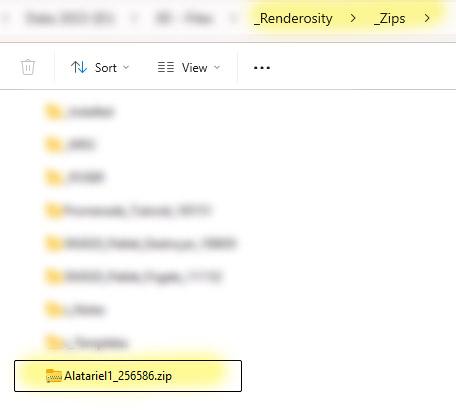
2. Double click zip file in File Manager to "look inside" - no need to unzip unless it is a zip file within a zip file. Highlight all the relevant folders (sometimes there are promo images, or other stuff that is not required) and COPY, then in the same, or another file manager go to the folder where your DAZ content is installed, typically something like:C:\Users\<YourUsername>\Documents\DAZ 3D\Studio\My Library
Get to one level ABOVE "My Library" and then right mouse click on "My Library" and choose 'PASTE'. The files will be automatically extracted from the zip and installed properly, into all the correct folders (providing the PA created the proper structure - some don't. OOF!).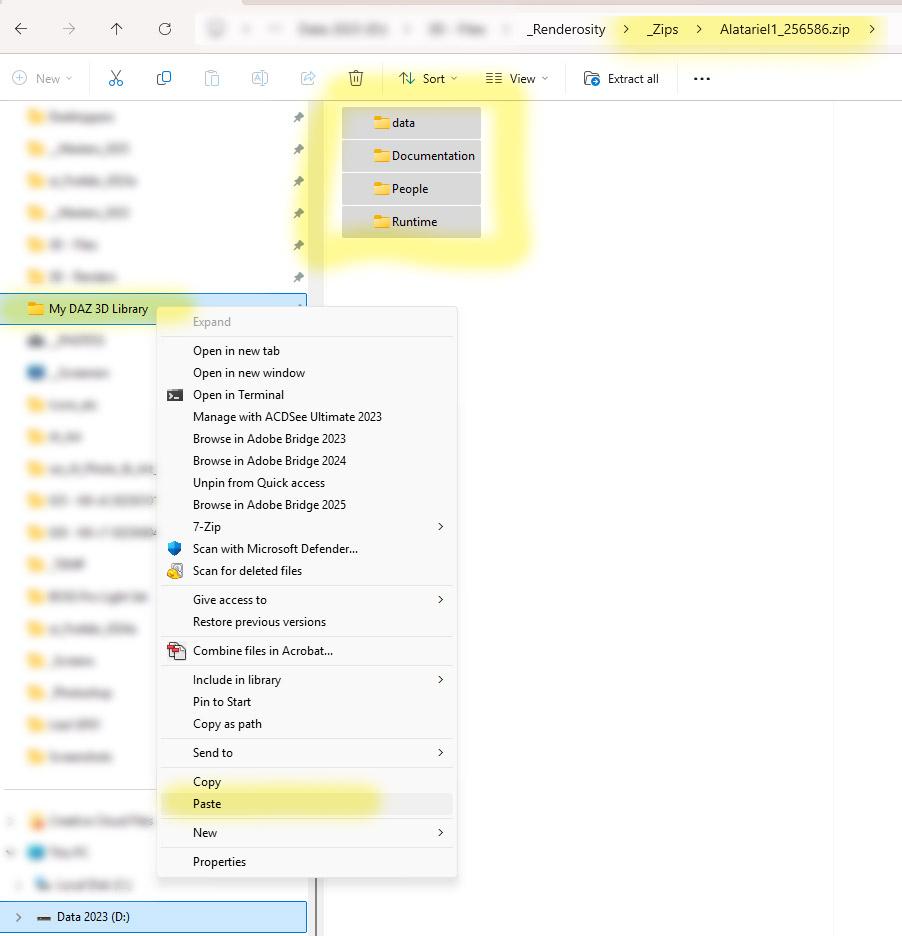
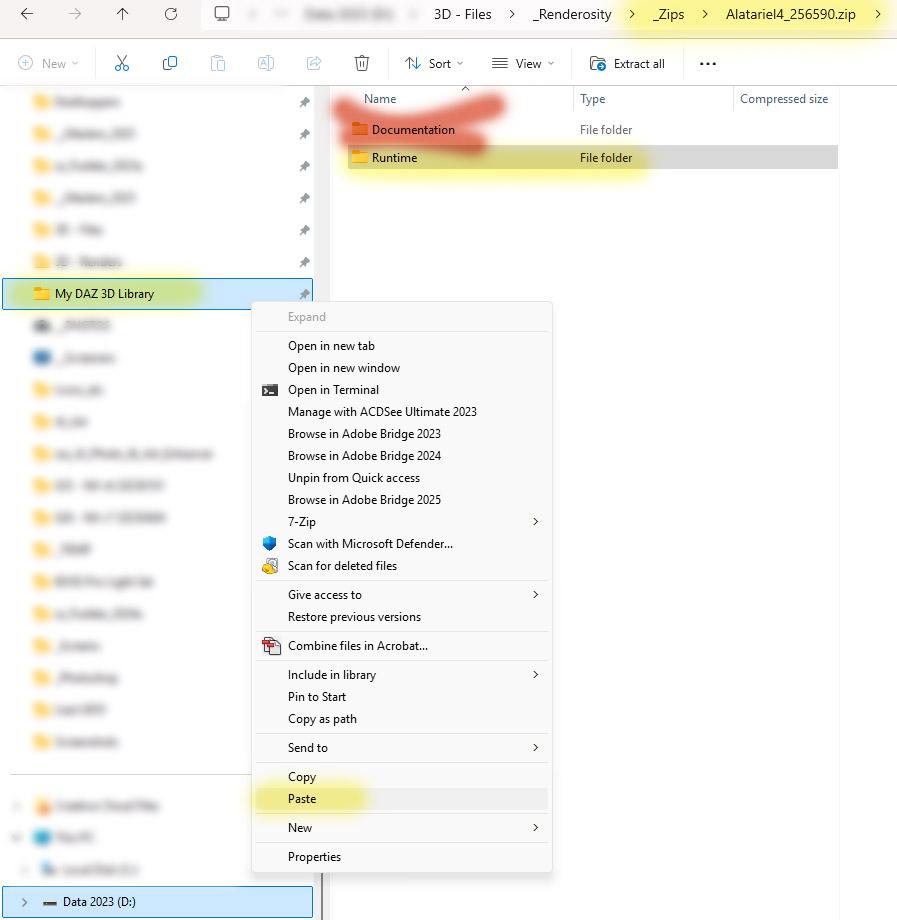
4. If DAZ Studio was open, go to the top of your Content Library within DAZ Studio and right mouse click on the parent folder, and choose "REFRESH" (you can also go to the parent of your file, in this case, \People\Genesis 8 Female and choose that folder to REFRESH, or just restart DAZ Studio). You'll need to load the base Genesis 8 Female Actor, then go to the Sangriart\Alatariel folder to apply her figure to that.
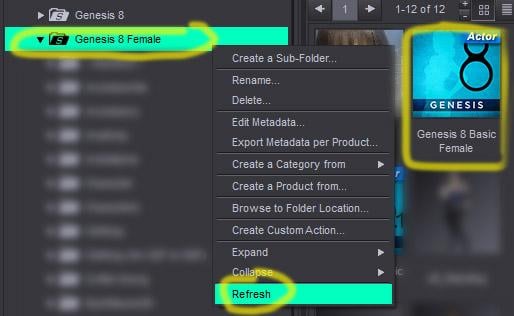
5. I, personally, only ever use Content Library (not Smart Content) and just navigate to it by obvious indicators, or via where the read me file says it is. In this case, Alatrial SHOULD show up as an icon of the character under the "Characters" folder for Genesis 8 Female, or else as a folder under G8F Characters \Sangriart\Alatariel. Don't panic if the character icon doesn't show up, not everyone provides them, but also some PAs use some part of their name, so if Alatariel isn't there, look under S (something) Alatariel.
I have some Sangriart characters and don't recall ever having any issues with them - always nice work! I'm pretty sure I have this character and can check if there is a character icon, if there are any issues loading, etc. after I get home later tonight.
I have been using this method for over a decade and it always works for me.Good Luck!
<sometime later...>
No Character icon, but certainly in the Content Library under (This is my exact path - yours may vary)
D:\My DAZ 3D Library\People\Genesis 8 Female\Characters\Sangriart\Alatariel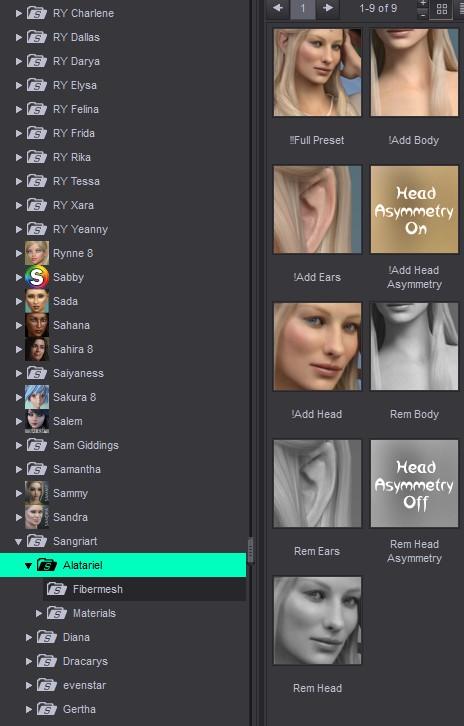
Alienator Pro II problemshergal3d said:
Hi Totte. I changed the scale of 3 EVERYPlant objects in the three X-Y-Z axes from the original 10000.0% to 100% and saved them as props. The objects have shrunk so much, almost to the point of disappearing. I created a simple scene in UltraScenery 2 and then imported the 3 objects into Alienator Pro II. As you can see from the screenshot, nothing changed, the dimensions remained identical to the unscaled models. The rendering did not show the objects replaced by Alienator on the scene but placed them horizontally and in very small dimensions far below the ground. I don't understand anything...
And that is because the mesh is wrongly scaled. The 10000% scale is because the mesh itself has the wrong scale (when the person importing them to Daz Studio and making a product of them).
So you need to contact the producer of the product and tell them to resave the plants at the correct scale (They need to import them into Daz Studio so they are perfectly scaled at 100%, not import them at the wrong scale and then rescale them i Saz Studio.If you look closely as I pointed outv before, the original scale of the trees are 10cm x 12cm x 8cm (not much of a scale), but multiplybthat with 10000 and you get 10m x 12m x 8m which is the scale they should have.
Or, you export them to obj, then import them at scale=10000% and they will look correct (then you reapply the mateirals and save as > Figure/Prop and then use those newsly saved props in studio ( but that is what the maker of these trees needs to do).
I guess that the person who made them has no real experience with Daz Studio in the first place.Flatten Sleeve of Sweater?n.aspros123 said:
crosswind said:
Well, the initial shape of the sleeves (at least the right side) was not well set for being draped for sitting poses ~~ even if you gave them optimal settings on dynamic surfaces. As usual, I still suggest you reshape (grab / smooth) the sleeves (directly or after a simulation) in Blender. Then import OBJ as a fixing shape ...
BTW, thanks for the hot coffee !
Glad you liked the coffee! @crosswind
Does the whole sweater need to be exported to Blender with weight node?
Which Blender sculpting tools do you recommend using and are they used only on the curves parts of the sleeve?
How is the sweater imported as fixing shape, not sure how? Can it be imported as a Morph using Morph Loader Pro?
I remember that the sleeves are not a separate wearable, so yes, you need to export the whole sweater. It doesn't matter if it is with or without weight node.
As usual, export the sweater with Base Resolution plus the figure (Filter Objects > Selected Roots). In Blender, reshape the sleeves with Grab brush and Smooth brush... so as to align the sleeves to the figure to make a "draping result" as needed.
As usual again, Export the sweater to OBJ file. Import it in DS with Morph Loader Pro. Set Reverse Deformations as Yes, Overwrite Existing as Delta Only.
Flatten Sleeve of Sweater?crosswind said:
Well, the initial shape of the sleeves (at least the right side) was not well set for being draped for sitting poses ~~ even if you gave them optimal settings on dynamic surfaces. As usual, I still suggest you reshape (grab / smooth) the sleeves (directly or after a simulation) in Blender. Then import OBJ as a fixing shape ...
BTW, thanks for the hot coffee !
Glad you liked the coffee! @crosswind
Does the whole sweater need to be exported to Blender with weight node?
Which Blender sculpting tools do you recommend using and are they used only on the curves parts of the sleeve?
How is the sweater imported as fixing shape, not sure how? Can it be imported as a Morph using Morph Loader Pro?
How to close AJC college times jacketWell, if you know some sculpting software like Blender / ZB, you can make a "closing shape" there, by using Grab brush (plus Mask). Then import OBJ to the jacket in DS as a morph.
Flatten Sleeve of Sweater?Well, the initial shape of the sleeves (at least the right side) was not well set for being draped for sitting poses ~~ even if you gave them optimal settings on dynamic surfaces. As usual, I still suggest you reshape (grab / smooth) the sleeves (directly or after a simulation) in Blender. Then import OBJ as a fixing shape ...
BTW, thanks for the hot coffee !
Daz 3D is part of

Connect
DAZ Productions, Inc.
7533 S Center View Ct #4664
West Jordan, UT 84084Licensing Agreement | Terms of Service | Privacy Policy | EULA
© 2026 Daz Productions Inc. All Rights Reserved.