-
Shader Creating & Settings for Carrara - Q&A - Come One, Come All
Here's another little article I wrote before I was entirely used to using them:

Being mostly self-taught, learning by asking questions, reading what other's ask and say... it's really different to start taking occasional online courses on the subjects - learning that there are 'basics' that all animators/filmmakers know, that I had no clue about. I discovered "Iris Gleam" through my own observations, and was always planningon getting my characters fixed to be able to display such a thing without special lighting - at least not a LOT of special lighting. My solution fell in my lap - I didn't need to persue altering the original iris mesh shapes anymore! ;) Funny how that happens!
A forum pal bought and sent to me the latest edition of Jeremy Birn's Digital Lighting and Rendering book, which is a tremendous help. It was Jeremy who has illustrated the common ways that CGI professionals use to create this Iris Gleam, so I immediately went into my V4 Rosie character, saved as a CAR file, and did a quick edit to her Iris shape to make them concave instead of their default convex curve, which was kinda easy, but I did a very quick job of it - so to do a 'saved' version, I'd need to start over.
 It was just that time when Daz3d added Runtime DNA to the store! Arki, an artist for both RDNA and Daz3d, had this great RDNA product (now at Daz3d), EYEdeas 3+ for Victoria 4 and Michael 4, which is modeled just the way Jeremy recommends! What a time saver, I bought them immediately!
 Earlier on than the subject of Iris Gleam, Jeremy was talking about light-linking - the process where a light only affects certain (linked) things in the scene - and that it's common to adjust the mood of a scen by linking to the eyes alone. Well in Carrara, we cannot link to specific bones of a rigged figure. Not a real issue because we could just copy the mesh and paste it in separately - Carrara will let us link lights to items that are parented to specific bones!
 Much better than that (in my opinion), Arki's EYEdeas don't need to parent (but the kit includes models meant for that as well), but actually can be loaded as a single, conforming item, which puts both eyes exactly where they need to be, with a plethora of useful adjustment morphs, which then turn perfectly along with the eyes pose dials on the figure! Parented ones would too... but this makes it super-simple to select for light linking... Handy!
As it turns out, with the special shaders I made and Arki's modeling, I don't need special light linking... they just work with whatever light is already available. Special tweaking of Highlight and Shininess was the real trick - well... along with this nice eye model!
I've just added this to my characters in early August of this year... so you see how I'm still tweaking even my main figures. But I suppose full production still won't change that either. The cool part is that, even though I now render with full refraction and reflection enabled, it hasn't changed my render times! ;) Love that!
Shader Creating & Settings for Carrara - Q&A - Come One, Come AllSomething I just grabbed that I wrote in another thread:
At the risk of sounding like a broken record, I've really taken a liking to using my "Invisible" shader (set everything to invisible) on all eye parts except the lacrimals, then replacing the eyes using Arki's EYEdeas 3+ eyes. There is an enormous amount of really good eye maps made for M4 and V4, and EYEdeas 3+ includes remapped UV versions for both of those, plus the ones that use Arki's maps, which are also really cool.
This is one of Rosie's eyes. The shot on the right shows how the refraction of the cornea fills the cornea with colors from the iris (instead of seeing straight through the cornea), which might look a little strange here, but looks great when placed in the living figure.
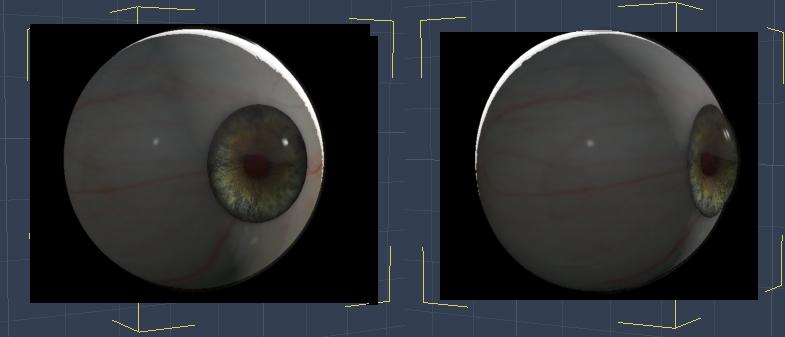
(two quick renders of just one eye model)
I really like having the flexibility of using these eyes. For Genesis figures, I've been using the separate Right and Left individual eyes. After setting up the character's final shape, I bring in the eyes and copy over the actual scale from the Motion tab, then parent them each to their respective eye. But I can further tweak their size if I like, which is really valuable to have.
As an added bonus, we can now link lights specifically to these eyes - we cannot do that on the actual figure's eyes because we cannot separate parts of a rigged figure for light linking in Carrara.
I never heard of Eyedeals before, but now I'm thinking it might just be a 'must have'. Looks like the V4/M4 version is on sale at the moment, so it might be an 'ideal' time to pick it up :)
They've only been made for M4/V4. But EYEdeas 3+ for Victoria 4 and Michael 4 is a really special product in many ways.
Again, not trying to be a salesperson for this.
For Gen 4 figures, the conforming figure set of eyes is incredible. They follow whatever morphs and/or pose dials we might use as well as being a separate figure for light linking besides all of the shader bliss we get for them being modeled the way they are.
No matter what model or figure we're using, however, there are individual figure eyes as well, available both in Arki's own UV mapping or Gen 4 eye texture mapping, so we can choose between the huge assortment included with the product and those we might already have in our Gen 4 texture collections. What's cool about that is that Arki has some really cool expansion textures using her own mapping, and Gen 4 eye maps are very easy to find on sale or whatever. It's also easy to see (in a photo editor) how we could use any eye maps to make our own to use either mapping solution - so there's that too.
For Genesis, I've used the individual figure EYEdeas
First I setup the character's final shape, then use the motion tab to copy the scale of the original Genesis eye (I click the size number, then hit Enter to make sure the entire (non-rounded) value gets selected (not just what's visible in the box)) and paste that value into the new EYEdeas, then use Align to place them where they should go.
Once that's all done, I simly drag them into the Genesis Actor, onto the appropriate eye, to parent them... Done
The only thing here is that they won't 'follow' any shaping morphs, but they will follow pose controls for the eyes. So if I end up changing the character's shape to where the eyes might be effected, I simply unparent them first, then scale and align them again as above. It might sound like a process, but it really isn't - and I find it totally worth it!
They do take a little getting used to - they actually have a lens, inner eye mapping, individual morphs... I love 'em!!!
Celebrity Look-a-Likes for 3D figures Part 2This character looks so much like Famke Janssen.. https://www.daz3d.com/p3d-fara-for-victoria-8 The creator said that's what she was going for, so pretty!
I see a likeness too.
Opinions?I've just finished redoing my Daz runtime (thank you Daz for the simplicity). Now I'm moving on to making my nightmarish Poser ones. What I'm wondering, and yes I realize you can do it however you want, I'm wondering if it really makes any difference whether you say, have a Victoria 4 top folder with sub folders of hair and clothing, etc, or since so many designers make clothes to fit V4, A4, G4, S4 too, and hair with some adjusting will fit any character, should I just put Clothes and Hair, etc in their own top folders outside of the V4 one??
Thoughts?
Thanks!
* closed* RRRR The're ba....ack! Render contestTag: Chameo #4
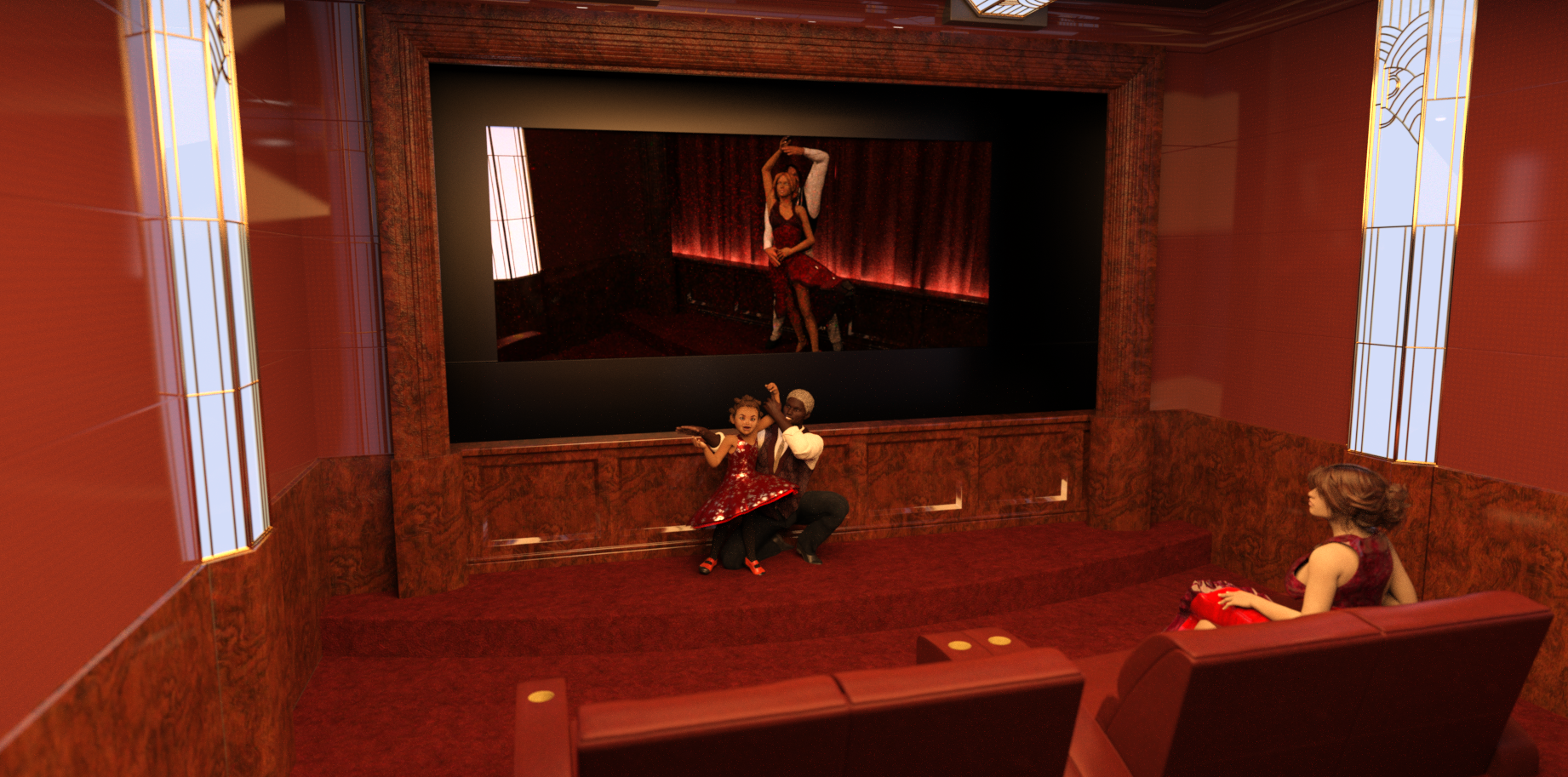
Title: Gonna Be Mom When I Grow Up
After a long day of filming, salsa starlet Lola just wants to fall into bed - but sleep will have to wait until little Lana and Daddy put on a special show just for Mommy.
Used:
Jade for The Kids 4
Latin Stage
Navy Blues for Grantham Hall Suit
Private Art Deco CinemaAlso Used:
- Cool Coils
- Sparkles for Studio
- Victoria 4.2 Base
- Sweetheart for Kids 4
- Michael 4 for Genesis 2 Male
- Selena Hair for Genesis 3 Female(s)
- Novarys for Genesis 3 Female(s)
- Dash for Michael 7
- Casual Style for Genesis 3 Male(s)
- Hipster Chic for Men
- Josette Pumps
 Fit Genesis, Genesis 2 Shoes to Victoria 8?
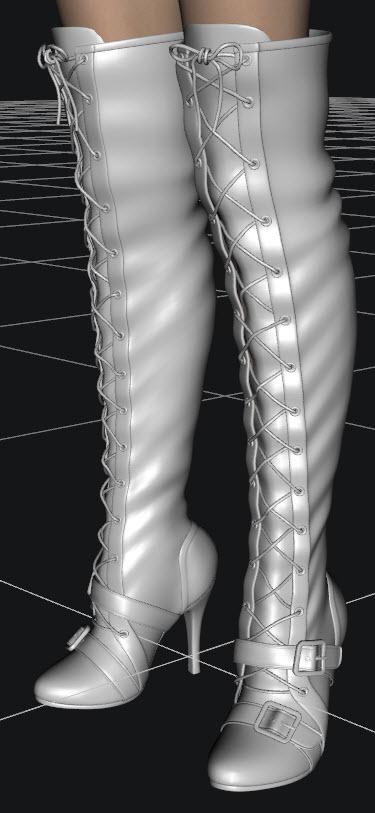
I am trying to fit Over the Knee Lace Up Boots for G2F to Victoria 8. I am using SickleYield's tutorial for fitting V4 shoes to Genesis 2 / Genesis 3 and am not having much luck.
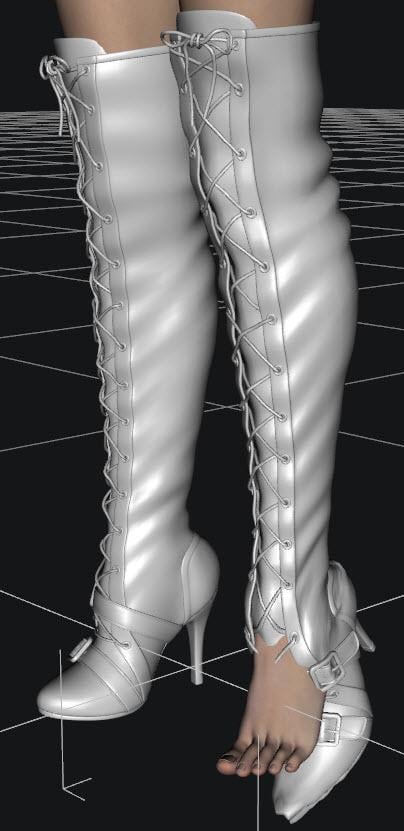
Below is a screen shot of the boots manually fitted to V8 without using autofit. I had to adjust the scale and even select parts of the boot in the scene tab and manually pose them. After transferring the rigging, I tried the autofit for the G2F clone, and Full Body - with no luck. Is there a new method that will work for V8?
After Autofit:
 How do I make Victoria 4 figure smile?
If I wanted to make my Victoria 4 figure smile, how would I make this happen?
Been a while since I really used Victoria, but choose head. In the parameters tab, choose all. Then in the search bar, type in smile. There should be a few choices that come up.
Animation QuestionDaz Studio ships with Animate Lite. You can open the Animate2 pane (usually at bottom or go to Windows > Panes > Animate2) and then view the walks in the dropdown menu.
Note, the canned walks work with older figures like victoria 4 through genesis 2. If you're using newer figures, you'll likely need to find another source like aniblock products.
Victoria 4 Skinshader from 3DLight to IrayDS should convert them at render time, or you can select teh surfaces and apply the Iray Uber Base shader (from Shaders>Iray). Of course those won't be optimised, but if you manually apply the base shader you can adjust settings - look at a figure already set-up with Iray materials for an example, but bear in mind that it's unlikely that a Victoria 4 character will have all of the map types used by many Iray set-ups.
Victoria 4 Skinshader from 3DLight to IrayIs there a skinshader for V4 that converts the 3DLight materials of the skin so I can use them in Iray?
Genesis 3/8 UVs for Genesis...?@Inkubo and at all.
Yes thats totaly right. If i want to bring another Skin (UV) on my Charakter, than i want a better Skin, which looks more natural. And beyond all doubt Victoria 8 has a better, more natural looking Skin than everything i can find for G2. So a backward Converter would make more sense than to convert a not so nice skin to a Charakter which already has a better one. I would buy a bachward converter. A forward Converter makes no sense for UVs. A forward Converter makes sense for poses and morphs but not for UVs.
But in my case the best solution would be a set of Poser Companion Files for G3 and G8 and the clothes for them.
Yes, of cause, not every one has Poser, because it's not Free. But if we are fair, if you want to bring DS to the functionality of Poser and buy all the addons and so on, then you can easly spend the Same amount what you have to pay for Poser
Greets
Jan
Hair in FW Kamilla for V8 product? *solved*https://www.daz3d.com/fw-kamilla-hd-for-victoria-8
If anyone can make out the dark hair blending into the dark background, anyone recognize it? I keep thinking it's an april hair, but don't think I recognize it.
How do I make Victoria 4 figure smile?Sorry, I have to ask, why are you using Victoria 4 given the many newer options? No offense intended...I'm just honestly curious.
Carrara Challenge #36 - Pinups and Cheesecake and Hunks - Oh My! - WIP Thread --Meet Ringo Monfort!Thanks for the link, HW. Very interesting. Apparently, Queen Victoria inspired more lasting virtue than the Puritans. Sort of goes against the general reputation of Australians, though.
 Can definitely see the point of the anti-sugar folks. And Stezza, I'll let her know about the Cricket. She is a sports fan..
I now return you to your regularly scheduled WIPs. Nothing new to post from me, yet. "Art Frahm in a kilt" is still on my agenda. Have thrown together a quick elevator set, but still need a formal top for G3M to go with the kilt. Do you think it would be better to have a one-man scene with his drawers around his ankles (and celery), or multiple guys in kilts (and holding celery), only one of whom has his drawers around is ankles while the other guys look at him like he is not supposed to be wearing anything underneath the kilt?
Carrara Challenge #36 - Pinups and Cheesecake and Hunks - Oh My! - WIP Thread --Meet Ringo Monfort!thank you @diomede and @Unified Brain :)
@Bunyip02, love that landscape - great feeling of depth
@PhilW that looks much better
@Diomede, as for Halloween, we look on it as an American thing which is invading our country - keep that to yourself. So Halloween is hand in Hand with McDonalds Registered Trademark.
I think the Irish that got dragged out here by the English as convicts were too busy trying to stay alive at first to worry about being Pagans ;)
EDIT: Oh here's something
In my 60 years of being an Aussie, I have never seen Halloween as being high on my list of things to celebrate, even though celebrating is high on my list of things to do.
Most Aussies have come to know about Halloween from the many Hollywood movies that include the Halloween celebration in their movie script.
So Aussies have generally come to view Halloween as a particularly North American celebration that like Thanksgiving and Independence Day, has no real relevance to us 'down-under'. Even more so, by refusing to celebrate Halloween, many of us see ourselves as rejecting a US cultural influence that seems by stealth, to be overtaking much of our independence and home-grown culture.
So it's kind-of-weird to now realise that Halloween is actually a Celtic tradition that was embraced by the USA but not by Australia, even though Australian culture has lovingly embraced most Celtic traditions.
Smarter people than me who have researched this phenomenon have come to the conclusion that it was an accident of history that explains why this Celtic tradition of Halloween was embraced by USA but not by Australia. How British colonialism determined whether your country celebrates Halloween.
See, at a particularly formative time in Australia's history, the then monarch of Great Britain and Australia, Queen Victoria, introduced a strict Victorian social code that among other things, called for a deep disdain for all things that might be perceived as indulgent - like celebrating the Celtic Halloween.
The Victorian backlash against Halloween just happened to coincide with the colonization of Australia but was at a time that was well after the American colonies had broken away from the British crown.
So it appears to be just an accident of history as to why Australia did not embrace or celebrate Halloween. Methinks that the push back against perceived American cultural influences, kids wandering the streets at night and the high-sugar rewards, continue to keep Halloween from gaining mainstream popularity in Australia - despite its beloved Celtic origins.
that's from here https://www.quora.com/Why-dont-Australians-celebrate-Halloween
Brooklyn HD issuesHi,
Can anyone with Brooklyn HD help me? I run into some issues with her:
+ When I load Brooklyn HD character into Daz Studio, the Viewport become very laggy, when I pan around or rotating the view.
+ On the scene tab, the character is shown as "Victoria" (her based model) and not Brooklyn HD.
These issues is minor, and actually don't affect my work. However I want to know if anyone else has these issues, or there is something wrong with my installation.
Thank you very much
Morphing Fantasy Dress issue - anyone else?That's really weird! I don't think it's a G8F issue, as the G2F version of the Morphing Fantasy Dress fits fine on G8F. Here's the G2F version of MFD on Victoria 8:

I even tried dialling in some pretty extreme shapes to V8, but the G2F version of the dress fits great (though some poses require smoothing turned up) and it doesn't have any of the issues I'm seeing here. I hope they fix it, as I was interested in getting the "Iconic MFD Bundle 1" as I figure it probably has more movement morphs and would be more updated. But so far what I'm seeing isn't inspiring confidence in moving from my trusty G2F version (or even Genesis 1 version).
Not To Worry, Friend, "There's Always Another Sale™"Today was a pretty good haul for a newbie like me; We'll Match That rocked my world! But now I've got two Goblars, which is two more than I think I'll ever use. I also accidently got two different when-will-I-ever-use-this horror nurse uniforms, but I'm somehow okay with that. These 22 products cost a total of $20, and include the head and body morphs for both G2M and G3M, which alone would have been worth that price.
Cyclorama: Halloween Backgrounds
Sin - Character and Outfit for V4
Crazy Locks Hair for Genesis Male
Genesis 2 Male Head Morphs
Genesis 2 Male Body Morphs
West Park Treatment Room Specimen
Good Nurse / Bad Nurse
Dark Trees Pack 1
Halloween Fun
Horror Nurse
Cody Hair for M6
Fiora Hair for Genesis 2 Females and Victoria 4
MHE: Fruit
Iconic MFD Bundle 1 for Genesis 8 Female(s)
Pure Hair: Catwalk for Genesis
Cafeteria Eating Area
School Hallway
Genesis 3 Male Body Morphs
Genesis 3 Male Head Morphs
Goblar
Impish Delight for Goblar
Vampyres Bane Poses for Genesis 3If you're refering to Goblar and Impish Delight for Goblar, the second product is a pose pack, which can be used on any G3 character, though it was developed to work with Toon Generations 2 and specifically Goblar. (Poses for G3M work fairly well on the females and vice-versa.)
However, if you're saying you needed two carts in order to get both the Halloween freebies and the Match It freebies, you can contact Customer Service, (use the Contact Us link at the bottom of the page,) and request a refund for the duplicate product. Daz has the best Customer Service I've ever seen, and they will be happy to refund the cost of the duplicate, when a single cart should have worked correctly with both offers. (Store credit is the norm, but if you want a refund to the payment source, Paypal or Credit Card, just ask. They'll do that, too.)
I'm glad you're happy with the purchase, and welcome to this insanity we like to call Shopping Cart Jenga. But be careful you don't get addicted to it! (Like most of the rest of us...!)
Not To Worry, Friend, "There's Always Another Sale™"Today was a pretty good haul for a newbie like me; We'll Match That rocked my world! But now I've got two Goblars, which is two more than I think I'll ever use. I also accidently got two different when-will-I-ever-use-this horror nurse uniforms, but I'm somehow okay with that. These 22 products cost a total of $20, and include the head and body morphs for both G2M and G3M, which alone would have been worth that price.
Cyclorama: Halloween Backgrounds
Sin - Character and Outfit for V4
Crazy Locks Hair for Genesis Male
Genesis 2 Male Head Morphs
Genesis 2 Male Body Morphs
West Park Treatment Room Specimen
Good Nurse / Bad Nurse
Dark Trees Pack 1
Halloween Fun
Horror Nurse
Cody Hair for M6
Fiora Hair for Genesis 2 Females and Victoria 4
MHE: Fruit
Iconic MFD Bundle 1 for Genesis 8 Female(s)
Pure Hair: Catwalk for Genesis
Cafeteria Eating Area
School Hallway
Genesis 3 Male Body Morphs
Genesis 3 Male Head Morphs
Goblar
Impish Delight for Goblar
Vampyres Bane Poses for Genesis 3Daz 3D is part of

Connect
DAZ Productions, Inc.
7533 S Center View Ct #4664
West Jordan, UT 84084Licensing Agreement | Terms of Service | Privacy Policy | EULA
© 2026 Daz Productions Inc. All Rights Reserved.