Fit Genesis, Genesis 2 Shoes to Victoria 8?
 dracorn
Posts: 2,384
dracorn
Posts: 2,384
I am trying to fit Over the Knee Lace Up Boots for G2F to Victoria 8. I am using SickleYield's tutorial for fitting V4 shoes to Genesis 2 / Genesis 3 and am not having much luck.
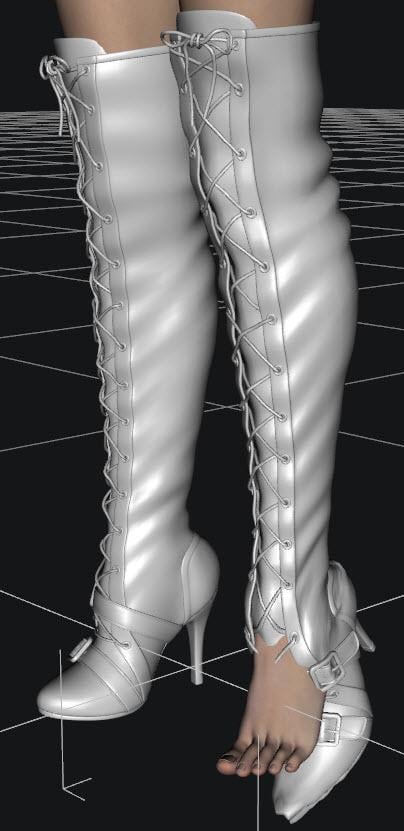
Below is a screen shot of the boots manually fitted to V8 without using autofit. I had to adjust the scale and even select parts of the boot in the scene tab and manually pose them. After transferring the rigging, I tried the autofit for the G2F clone, and Full Body - with no luck. Is there a new method that will work for V8?
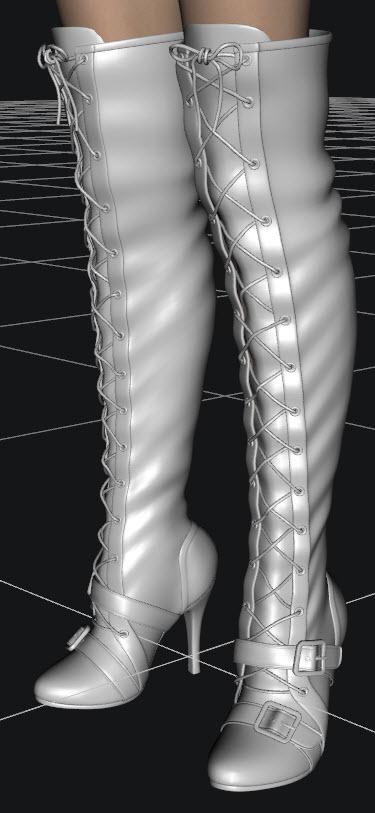
After Autofit:

Daz 3D is part of 
Connect
DAZ Productions, Inc.
7533 S Center View Ct #4664
West Jordan, UT 84084
Licensing Agreement | Terms of Service | Privacy Policy | EULA
© 2026 Daz Productions Inc. All Rights Reserved.
Comments
One thing to try is when initally fitting the boots to G8 do not allow autofit to use the clones.. What you have to do is just leave both options as not supported, when that is done do unfit from model do the adjustments and what not of the tutorial and go from there.. But in some cases some shoes will not fit properly no matter how hard you try, and one last thing you will have to create the foot pose manually as using the original pose even though it may look like it worked can screw things up..
Ok I just gave it a try with doing it the completely manual way and ended up with the same problem, so not entirely sure how to fix it..
Well, thanks for trying, Ghostly12.
It seems shoes are notoriously difficult to transfer between generations - with a lot of hit and miss and some shoes just don't seem to want to transfer no mater what you do. Perhaps try hiding the feet in the scene tab? I know that's not a great solution. I'm sorry I couldn't be more help. :( If someone ever figured out a product or method that transfers any shoes across generations, they'd probably make a lot of money with it.
Thanks for your comments, but hiding the feet won't change the warping of the shoes.
I tried saving it out as an object, but my tutorial was older and some menu items have changed, so no luck there without further research.
I suppose I could message dx30 and ask for a Genesis 8 update to the boots.
Oh, yeah, and don't you just love Leopard Shoes? They are only for V4 and I would love and update on these too.
https://www.daz3d.com/leopard-shoes
Well I managed to get it to work - at least for the Lilim boots (the only boots I've tried it on so far). :)
I couldn't get Lilim Boots to work on G8F, so hid the feet and turned smoothing off for the boots - that got rid of the distortions.
I think it turned out pretty good. Just hide the legs and turn smoothing off. Worth a shot anyway. :)
Thanks Divamakeup. I tried your method, but needed to specify what part of G8's leg to hide, so I used geometry editor. I didn't turn off the smoothing, though.
V8 in Over The Knee Lace Up Boots for G2:
V8 showing the hidden Geometry Editor surface:
I think I'll make several surfaces to hide using Geometry Editor for my needs. Do you or anyone else know how to save a new surface as a preset that I can apply to ANY G8 character? I'm not sure what settings to use.
You can probably save the figure as a Scene Subset. And then when you want to wear ill-fitting boots, you can load that scene subset figure and dial in the character that you want to use. Edit: I just tested it, and sadly it didn't save the edited geometry if saved as a scene subset. :(
But there's an easier way to hide parts of the leg. Just grab the Universal Tool, click on the body part, it highlights that body part in the Scene Tab, and just click on the little eyeball to hide it.
It can hade the toes, the foot, and the legs up to the knee.
But yes, if you want to hide more points than that, your method probably works pretty well! I think you'd probably have to save it as a scene subset. Well poo, scratch that idea. I guess that doesn't work. :( If there is another way to save it to keep those edited surface zones, I don't know. :( Sorry I couldn't be more help.
I wrote a tutorial on how to do this using Geometry Editor. You can also find the link in my signature under "Fitting Old Shoes to Genesis 8."
https://www.daz3d.com/forums/discussion/comment/2952096/#Comment_2952096
Great! Thank you, dracorn! :)