-
Importing DAZ Decals into Blender?
Diffeomorphic is capable to import decals and they were improved some time ago, but I suspect the support is limited compared to what daz studio can do. Unless there's a regression. I'm on holidays will look at this the next week and let you know what I find.
https://bitbucket.org/Diffeomorphic/import_daz/issues/792/better-decals
Daz Studio 6 Beta - version 6.25.2026.14722! (Updated May 28, 2026)jbowler said:
Richard Haseltine said:
The headlamp is part of the camera, it is not separately selectable, so it should be hidden when the camera is - and hiding lights turns them off. You can disagree, but you can't call it a bug.
I can't recall, which Drawstyle is this using? None of the other light types you list has ever shown in Texture Shaded (except for domes made of scene lights, up to the - low - maximum number of lights that can be drawn).
Scene lights didn't show in 4.23.0.4. I attached a scene (created in 4.23.0.4, uncompressed) for your perusal. It's a sphere, a camera and a point light. All headlights are disabled; I admit this is not normal with Studio but I don't like headlights, they make light balance difficult. Note that the "preview lights" option must be turned off for this repro; it's always on (aargh).
In that scene I can toggle the pointlight "visible" and the "visible in viewport" on and off and this has no effect. Likewise for the camera; **the headlight is not being used**; I always turn headlights off!
It's like I said before, "texture shaded" in 4 is a weird, really weird, but most of the time convenient and fast way to do editing; it's the equivalent of Word "Normal view" from the bad old days when Word couldn't render fast enough to allow proper page editing.
With DS6 loading exactly the same scene the sphere does appear, even though the **camera** has no headlight; just like DS4. However the sphere goes "black" if I make the camera invisible in either the viewport or globally. Since the camera is not providing any light that doesn't make any sense, particularly as the "pointlight" is still there. Swapping to "Universal" (what that is) does not help but "Filament" shows the sphere because it is using the scene lighting. In my example DUF the pointlight ends up contributing nothing of import; the light comes from something else. I don't know enough about Filament to fathom where it is coming from.
John Bowler
I noticed the other day that with Filament, in a scene I had which had an environment dome which lite the scene as well as lights, that the lights didn't show, but the dome, environment lighting did.
I have no problems with Filament and cameras, whether visible or not, but the texture shaded mode is very annoying. I shouldn't have to make a camera visible to see through it. It's not IMPORTANT to hide or show camera lights in TEXTURE SHADED mode as we won't be RENDERING in that mode! It is use solely for setting up the scene and so, as it ALWAYS HAS, it should show everything when I look through it so I can adjust what is needed. Even in an IRAY render, without the camera lights YOU STILL SEE THE SCENE LIT UP with something else! So stating that everything going BLACK as being normal is the response of a person who refuses to admit when he was wrong (Richard).
Daz Studio 6 Beta - version 6.25.2026.14722! (Updated May 28, 2026)Richard Haseltine said:
The headlamp is part of the camera, it is not separately selectable, so it should be hidden when the camera is - and hiding lights turns them off. You can disagree, but you can't call it a bug.
I can't recall, which Drawstyle is this using? None of the other light types you list has ever shown in Texture Shaded (except for domes made of scene lights, up to the - low - maximum number of lights that can be drawn).
Scene lights didn't show in 4.23.0.4. I attached a scene (created in 4.23.0.4, uncompressed) for your perusal. It's a sphere, a camera and a point light. All headlights are disabled; I admit this is not normal with Studio but I don't like headlights, they make light balance difficult. Note that the "preview lights" option must be turned off for this repro; it's always on (aargh).
In that scene I can toggle the pointlight "visible" and the "visible in viewport" on and off and this has no effect. Likewise for the camera; **the headlight is not being used**; I always turn headlights off!
It's like I said before, "texture shaded" in 4 is a weird, really weird, but most of the time convenient and fast way to do editing; it's the equivalent of Word "Normal view" from the bad old days when Word couldn't render fast enough to allow proper page editing.
With DS6 loading exactly the same scene the sphere does appear, even though the **camera** has no headlight; just like DS4. However the sphere goes "black" if I make the camera invisible in either the viewport or globally. Since the camera is not providing any light that doesn't make any sense, particularly as the "pointlight" is still there. Swapping to "Universal" (what that is) does not help but "Filament" shows the sphere because it is using the scene lighting. In my example DUF the pointlight ends up contributing nothing of import; the light comes from something else. I don't know enough about Filament to fathom where it is coming from.
John Bowler
[Solved] Problems Creating Morph for OOT's Dark Ponytail Hairbarbult said:
crosswind said:
barbult said:
You can also select to delete unused vertices when exporting.
That won't work... because the unused vertices are still on the hair, you'll still get the "mismatch error" when importing OBJ with no unused vertices ~~
It has always worked for me, but I'm generally using decimated clothing rather than hair. Daz Decimator leaves extra vertices. If I export with the option to remove unused vertices, I can import and make a morph with MLP. If I export without checking that box, I get the geometry mismatch in MLP. Why would hair be different?
Oh, I understand what you are saying now.and what I am doing differently.Ah, Decimator... I got what you meant as well.
Daz2Blender Issue - suddenly larger scale and error on importRecently I've had great success transferring two of my Daz G8F/Sakura8 characters into Blender, but when I tried a third the other day I was greeted with a different larger scale than before, visible bones and an error (screencap attached).
The only possible cause I can currently think of seems unrelated - in between my successful imports and this morning's failure, I did "export to .obj" and "export to .fbx" in an attempt to learn how shape keys work in Blender. I know I changed the scale and axis presets in "export to obj" due to issues, as well as trying different presets. The "export to fbx" options were left at defaults. Would changing settings in these Daz dialogs change the way "Send To Blender" handles the export to Blender? I assumed the various kinds of exports were separate, but I did notice that there are FBX options in the D2B dialog. Did it inherit the settings changes when I was exporting the Shape Key models?
[Solved] Problems Creating Morph for OOT's Dark Ponytail Haircrosswind said:
barbult said:
You can also select to delete unused vertices when exporting.
That won't work... because the unused vertices are still on the hair, you'll still get the "mismatch error" when importing OBJ with no unused vertices ~~
It has always worked for me, but I'm generally using decimated clothing rather than hair. Daz Decimator leaves extra vertices. If I export with the option to remove unused vertices, I can import and make a morph with MLP. If I export without checking that box, I get the geometry mismatch in MLP. Why would hair be different?
Oh, I understand what you are saying now.and what I am doing differently.DAZ Dragon 3 doesn't work in Poser 13Same here. I like the new figures in DAZ but I am using Poser and will not quit to use :)
If there is a Genesis or something other I want to use in Poser, I load it into DAZ, poser it, morph it, maybe dress it and export the whole thing as obj and import the obj into Poser. It is static but for my needs absolutely ok.:) I really love to combine multiple characters in DAZ, this is a bit more fun than in Poser :)
Importing DAZ Decals into Blender?Hi,
Is there a way to import DS decals into Blender?
I have this Dega Extreme Wound Decals asset, and can't figure out how to get the generated decals into Blender via Diffeo.
Each decal consists of a diffuse, additional underlying diffuse, normal and bump map.
The effect looks pretty good in DS, but I can't figure out how to achieve this in Blender.I know, it looks pretty gross, but that's what my script calls for.
Any idea on how to import or at least replicate this effect in Blender?Thanks!
Can I actually save my Dforce Clothing simulation as a morph slider?dForce2Morph repositions figure to 0,0,0 ... if your figure is not at the world center. The author has not fixed it up to now... which is annoying.
You can always make it in the standard way but with correct settings:
- After simulation is done, select the skirt, set its Resolution Level to Base in Parameters pane. Export it to OBJ file with the settings shown in screenshot 1.
- Clear simulated result in Simulation Settings pane.
- Import OBJ file in Morph Loader Pro with the settings shown in screenshot 2. Dial the morph slider. Done.Be noted, if you're making an animation, remember to move the pointer to the keyframe that you need the morph as the final result, then dial it to 100% or as what you need ~~
Can I actually save my Dforce Clothing simulation as a morph slider?If you export the clothing to import as a morph, it should preferably be done with the base figure, and with character unmoved, else the character and/or movement gets part of the morph. Else you can use 'with reverse deformations' in morph loader, which might be best only for that specific character.
Diffeomorphic import issues with Golden Palace - weird lighting/glowHello, I'm struggling to import Golden Palace without this weird lighting effect and some discoloration. I have searched through everything I can find online and i am not seeing other people with this issue and I cannot find a fix for it myself. Admittedly, I am not the most knowledgeable with Blender, Diffeomorphic, or Daz, but I have watched every tutorial related to this and cannot find an answer. Everything looks fine in DAZ, but once I have imported it to Blender with diffeo it seems to be glowing or something. I appreciate any help and apologize if this is a simple or basic issue. Does anyone have any ideas?
Genesis 9
Blender version 4.4
Diffeomorphic version 4.5
Daz Studio 4.24
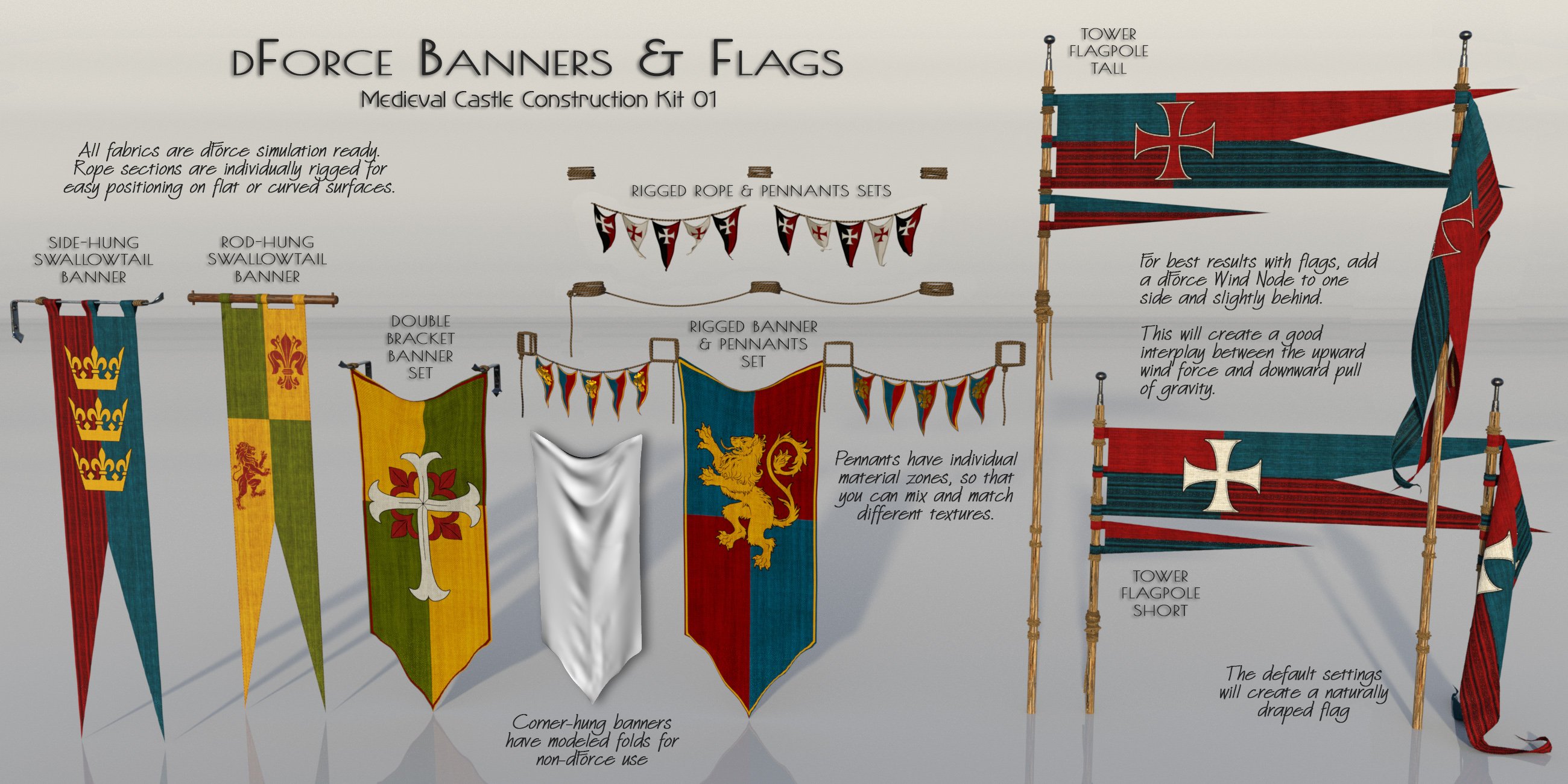
The New Medieval CastleSo I'm running into a problem with this set. When I try to load any of the round towers, it says I'm missing a bunch of assets and doesn't load some of the geometry of the towers. Other subsets load fine. The round tower parts load, except for the ones that have doors as those doors seem to not be in this set.
I tried re-installing the set and that didn't work. On the product page, it seems to say that some of the assets come from "Medieval Castle Construction Kit 01". So wondering if this was the problem I tried to search for this product. I can't find it anywhere on Daz's site or on your store page. Wondering what I'm doing wrong as I ended up needing a round tower for a render and the round towers in this set are perfect. Any help on this would be greatly appreciated, thanks.
The Alchemist said:
memcneil70 said:
I adjust Smart Content to my own needs too. Architecture that comes with pieces that can be mixed and matched with other kits I created a new sub-category for - Component Modular Parts as opposed to Building Components that are for bits for one buidling/room only. But some shader kits I have found are better using the Content Library for best usage. Smart Content just can't hack it.
I absolutely will buy your Notre Dame. One of my favorite memories of Paris in the early 1970s is sitting at a table along the Seine and while I ate, looking at Notre Dame in the afternoon and people watching. I was crushed when it burned down and have devoured every story/picture about its rebirth. Thank you for taking on this jewel.
Mary
Content management is definitley an ongoing issue in DAZ. Like you, I have created many custom Smart Content categories (and sub-sub-sub categories!) for organizing things the way I like. For shaders, I always assign them to my own personal categories and then save out the metadata to a new dsx so that it overwrites the DAZ created metadata. I also work offline and manually install all my files so my metadata doesn't get overwritten by an update. But I know most people obviously don't do any of this, so I need to be more mindful of the general end user experience!
Lucky you for having such lovely memories of Notre Dame! Ultimately, though, the fire was a fortuitous event, as the whole structure is getting a much-needed cleaning and resoration, so we will be able to see it much as it looked when first built, in all its shimmering glory. Like a trip back in time. Just an amazing masterwork of construction.
Is this a bug in Diffeomorphic or am I being stupid?I do actually remember seeing the Anime head setting earlier on, and thought it just made the Base G9 look weird, I didnt see the other body settings so didnt think anything of it. Unfortunately all I am now getting are these python script errors when I try to import, but your instructions are very helpful and I will hopefully know how to proceed if/when I can get the importer working again.
Your help is greatly appreciated.
Is this a bug in Diffeomorphic or am I being stupid?bart203040 said:
Okay when I import with the mesh fitting as morphed it just brings in a standard G9 character
Yes, that's correct. Then you import needed morphs of Anime, dial them to shape the G9 Base to G9 Toon Feminine or Musculine by using imported morphs... Instead of using a baked G9 Toon, this way of Mesh Fitting is called "Morphed".
In this way, you can activate "two stages' controlling" in Blender.
I would suggest a quicker way: marked dialed morphs on G9 Anime figure as Favorites (ss1), then Diffeomorphic > Setup > Morphs > Import DAZ Favorites.
Dial Base Anime Feminine or Masculine (ss2). You'll get the morphed G9 Anime Feminine or Masculine ~~ Then import other morphs as needed.
Is this a bug in Diffeomorphic or am I being stupid?Okay when I import with the mesh fitting as morphed it just brings in a standard G9 character
Is this a bug in Diffeomorphic or am I being stupid?Oh, sorry, I mainly thought about body cbs but you want FACS and FACS cbs.
Okay, I checked BaseAnime_facs_cbs_EyeBlinkLeft and BaseAnime_facs_cbs_EyeBlinkRight. They have two Controllers, one is Eye Blink, another one is Base Anime Head (BaseAnime_head_bs_Head), which means both Controllers need to have value to trigger cbs. (ss1)
However, if you import Daz scene by using DBZ, Base Anime Head (BaseAnime_head_bs_Head) just has zero value because it's baked. You need to import the DS scene in the way of Mesh Fitting > Morphed. (ss2)
Then import all necessary morphs (Anime, FACS, JCMs...). Dial Base Anime Head and Eye Blink, you'll see corrective morphs triggered. (ss3)
Released: HedgeMaker [Commercial]I have a question. Is there a resource anywhere with Set Builder sets premade for other artists' plant assets? I don't mean providing the assets. I mean somewhere I can get Hedgemaker - Set Builder sets for products like the various Martin J Frost plant products. Basically so I don't have to import them all, name them correctly, etc. :)
Thanks in advance.
I have a question about Ron's BokehJumbotron said:
Hey Richard,
Thanks for the reply. Since both are .ABR files, I assumed that they are installed the same way, so I just got them imported into the non Beta version of Photoshop (which is the one I actually use) using the import function from within the Brushes window.
I still have a lot to learn about doing post work in Photoshop. When it comes to FX brushes, I usually stamp them on a new empty layer on top of the image I want to modify.
Yes, or in white into a mask used to apply an effect.
Exporting to OBJ with materials includedgregsgraphics_cafd0962a0 said:
kenmo said:
As I said above, I mostly use 3DCoat to texture my models, even the ones I modeled in Blender. When I export from 3DC and import into Blender the textures appeal.
Yet when I export the same model from Blender they do not.
You mentioned you use the "Copy" method for materials when exporting from Blender. With that method, I believe the textures assigned to your materials need to be in the same directory as the model upon export. However, if your mtl file that is generated does not at least contain the names of the textures, then something went wrong there. Copy will not copy the textures to where you export the files like it will for FBX export. They have to be there already. Try using AUTO or either ABSOLUTE or RELATIVE for the materials. Either that or copy the materials you know are attached to that model into the same folder as the .blend file before exporting the object. You'll need to change the paths of the materials in Blender after you do that to point to the new location, assuming they weren't in that same folder to begin with.
Thanks, I'll try that.
I have a question about Ron's BokehHey Richard,
Thanks for the reply. Since both are .ABR files, I assumed that they are installed the same way, so I just got them imported into the non Beta version of Photoshop (which is the one I actually use) using the import function from within the Brushes window.
I still have a lot to learn about doing post work in Photoshop. When it comes to FX brushes, I usually stamp them on a new empty layer on top of the image I want to modify.
Daz 3D is part of

Connect
DAZ Productions, Inc.
7533 S Center View Ct #4664
West Jordan, UT 84084Licensing Agreement | Terms of Service | Privacy Policy | EULA
© 2026 Daz Productions Inc. All Rights Reserved.