-
Fitting Victoria 4 materials on G8M
You would need legacy UVs for Genesis 8 Male, the female versions won't transfer across. Or you could try making Gensis 8 Female match the male character
[Mature Content] Dicktator morphs no longer exporting over Daz to Unity bridge.Previously I was working on a project on the Unity game engine, an adult project, where I use the dicktator asset.
In the project I had managed to export many characters with all of their 'blend shapes' for the Dicktator morph to Unity successfully.
I since took a break from the project and went to get started again, it seems that whenever I try to re-import these old models even with all of the correct blend targets/morphs selected in the export options the Dicktator morphs/blend shapes are not exported to Unity. What am I doing differently that is causing these to new longer be exported? I remember I had trouble way back getting Daz3D to export the 'blend shapes' for the Dicktator morphs in the past but I had solved it. Now I can't seem to be able to figure it out anymore and anytime I re-import a modified model it breaks the previous work because these 'blend shapes' get removed.
If anyone can help me solve this, or link me to a forum post that discusses it (I remember finding one previously that explained how to solve it, I vaguely recall it requiring me to use the 'Export' option instead of the bridge and a certain FBX version but I cannot recall) I would greatly appreciate it and could even throw in some frree useful Unity asset(s) for any other Unity developer who can help me solve this.
Anybody else notice the lack of variety in g8m characters?PixelSploiting said:
G3 HD morphs won't transfer to G8. Rebaking textures from G3 Daz Originals core characters to standard G3.G8 UVs will be necessary because of their use of custom unwraps.
Aside of not being able to transfer G3 HD morphs and extra work with map transfer, moving a character from G3 to G8 is very straightforward.
This solves the G3M Core Figure UV problem. From the Details: "This product contains re-mapped UVs for all 13 of the Daz Original '7' figures that use unique UV maps, allowing your Genesis 8 Male to wear those skins and have them fit perfectly. Simply apply the materials and makeup options to Genesis 8 Male as you would to Genesis 3 Male."
Anybody else notice the lack of variety in g8m characters?G3 HD morphs won't transfer to G8. Rebaking textures from G3 Daz Originals core characters to standard G3.G8 UVs will be necessary because of their use of custom unwraps.
Aside of not being able to transfer G3 HD morphs and extra work with map transfer, moving a character from G3 to G8 is very straightforward.
Genesis 9 to Character Creator 4Probably. but the transform tool made one thing great. It converted the character to a CC character. therefore you could make the character shape as a morph, or apply CC morphs to it. or auto comfort the clothes to the character. Can you do the same with AccuRig?
Dial Fusion for Genesis 2 to 8.1 (Commercial)it isn't immune to that eternal problem of morph dials refusing to show up when you load a test figure. It's almost random. I've got details that show when you load the head and body separately but won't show when you load the main head and body controller. I've tried baking and redoing an ERC freeze and can't fix these errors. It's a pity it doesn't eliminate daisy chains too. I also have a big problem with it refusing to delete dials it created, it tells me it can't delete dials it didn't create when I just created them using DF without any alteration at all. I get it won't save dials that have been saved in the wrong place by whatever creator it was that made them. I have a big list of dials that it's totally ignoring for no reason though.
You really need to make sure you've got a raw back up of a figure before you create dials for it.
Foot \HandUnlike G8.XF, there're only few of hands/ feet morphs and zero nail morph in G9 Essentials... you have to buy characters / shape products, etc...
Tell Me What Was The Early-bird Benefit of Buying Daz Horse 3 in Dec 2022?barbult said:
The extra 10% discount on the DA product was based on Daz Horse 2 and 3 ownership. Anyone could have purchased Daz Horse 3 at any time to qualify. The 10% discount message said nothing about being related to the Sleight Ride Bundle purchase that promised "Plus, for a limited time only, the Sleigh Ride Bundle includes early access to Daz Horse 3. You'll also get upgraded access to all Daz Horse 3 features once released, including morphs for different sizes and breeds, improved mane and tail, additional textures, and more!" So, as far as I can tell, we've received nothing for being an early purchaser. I have submitted a ticket to ask about this, but there's no reply yet.
Then right after thanking me for owning Daz Horse 2 and Daz Horse 3, they offered my a chance to get Daz Horse 2 free if I purchased a newly mad release. How dumb is that?
Thanks for the actual quote. I guess the wiggle room is to be found in "upgraded access," a nebulous phrase at best. There have been additional textures, a mane and tail expansion---neither of which had an upgrade in access---but no morphs for different sizes and breeds, unless they mean the misnamed thoroughbred morph that un-coneheaded and de-bug-eyed the first morph. I'm not really expecting a satisfactory resolution.
Can't seem to change Victoria 8.1 brow colorsI'm not really sure what that means to be honest. All I did was load in Victoria 8.1 from smart library directly into the scene (not by morph dials or loading presets onto base model). I don't know what mesh eyebros are, but is loading them in something I'm supposed to do?
Ethan WintersI thought Shinteo may have converted him, but I can't find anything. Did you just want the character morph, or did you want the morph and clothing?
Any news of a Pose Architect for Genesis 9 in production?Seriously? i could never figure out that product worked. Any pose you create for G8 you can save and then use the free converter to convert to G9
https://www.renderosity.com/freestuff/items/93219/g8fm-pose-transfer-to-g9
Curly hair for males?I would probably try https://www.daz3d.com/luc-hair-for-genesis-8 which has a morph to make it curlier and move the bangs away from the eyes.
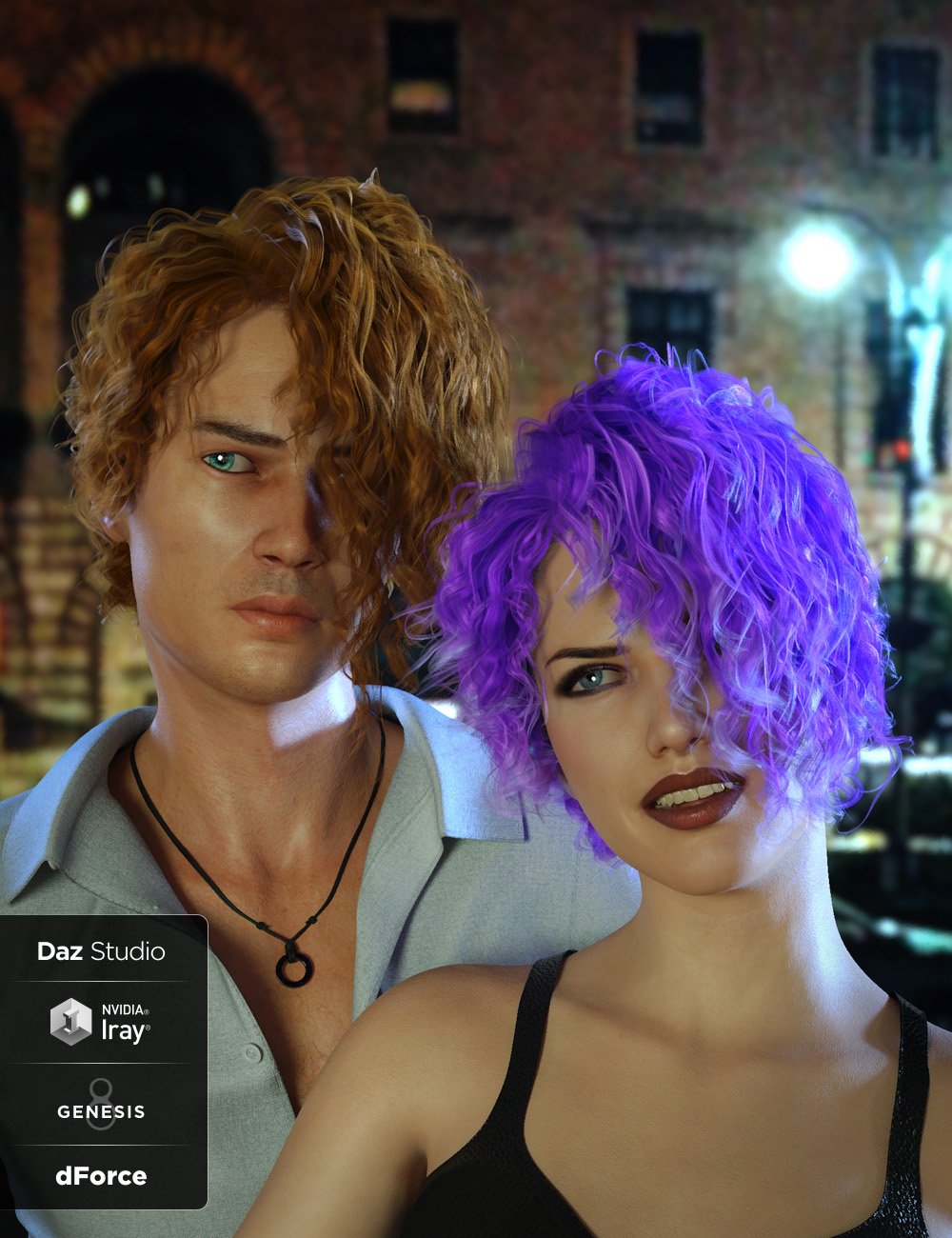
or https://www.daz3d.com/yarden-hair-for-genesis-8 which has a load of morphs
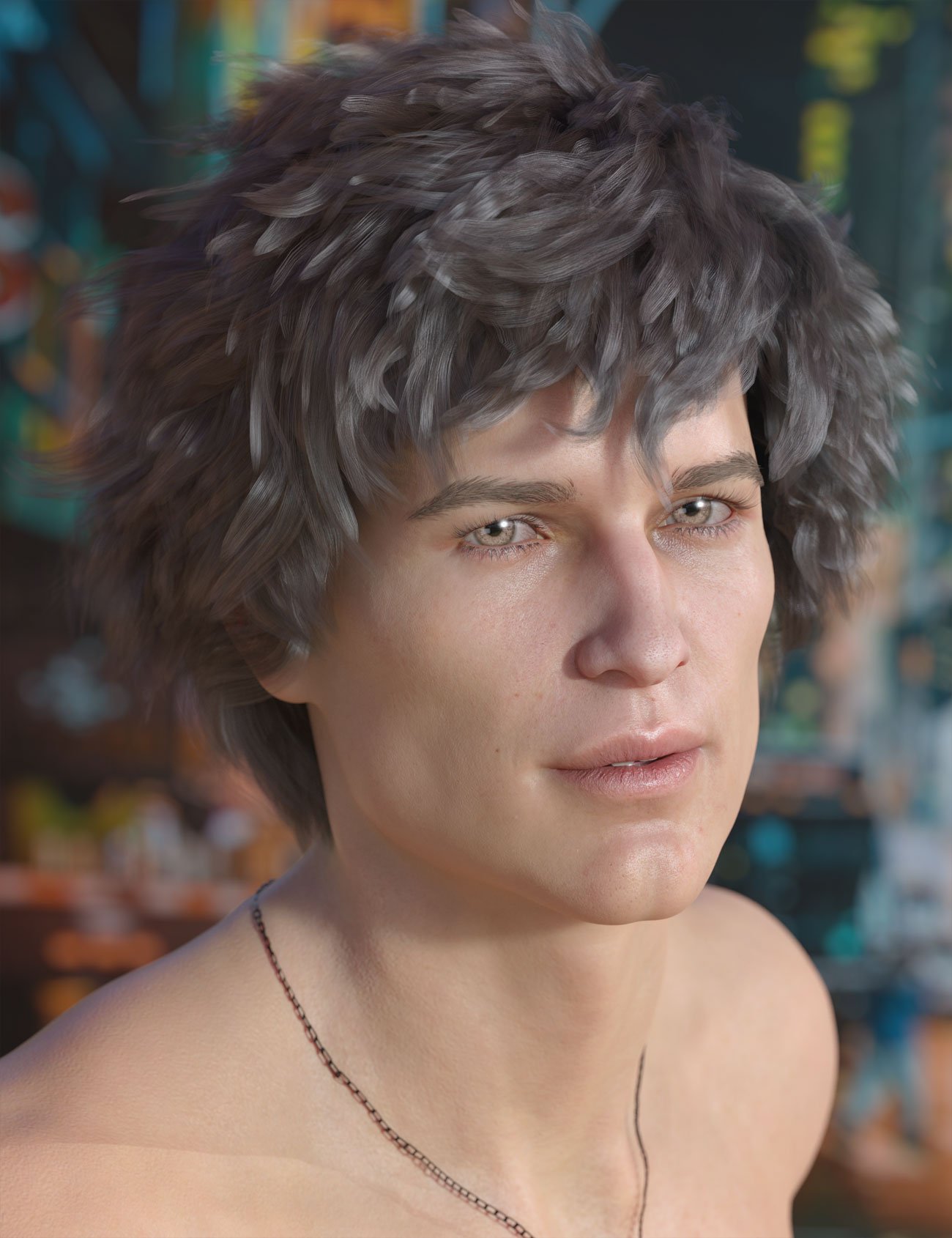 Convert G1 poses to G3, G8taiuri said:
richardandtracy said:
I'd say there is a freebie pose transfer available which does the job too. https://www.daz3d.com/forums/discussion/502771/victoria-5-g1f-to-g8f-pose-transfer-script. Regards, Richard.
It worked very well! Thank you! Just to say I needed it for all G3/G8 Males and Females figures, but only I converted them once I had them in G8F
TBH, there isn't really a great difference between G8F & G8M when applying a G1 pose to a G8 character. It's something I never really checked at the time when writing the script, but have done twice since (wow, such depth of experience!). Anyway, glad you found the script worked. Regards, Richard.
Convert G1 poses to G3, G8richardandtracy said:
I'd say there is a freebie pose transfer available which does the job too. https://www.daz3d.com/forums/discussion/502771/victoria-5-g1f-to-g8f-pose-transfer-script. Regards, Richard.
It worked very well! Thank you! Just to say I needed it for all G3/G8 Males and Females figures, but only I converted them once I had them in G8F
Supercape for gen 1 corrupted in 4.21Richard Haseltine said:
Can you redo the simulation? It looks as if that is missing, or repalced with bad data - what happens elsewhere on the Timeline?
Simulation? That item is a very old one, that existed long before simulations.... I didn't make any simulations, and that item was great, because you could morph it really well in a superhero fly scene without making a really long simulation...
Thanks for answering
G9 to G8 Base poseI keep getting reminders about a G9 to G8 pose transfer script. I've not done one yet, and I'm not sure anyone else has yet, either. Mea culpa. I've been meaning to start on one for well over a month, now. Sorry. Regards, Richard.May I trouble you for hardware advice, please?Hi Grizzly!
I'm a Mac owner who has recently purchased a PC strictly for running DAZ Studio and doing some image editing.
I still do a lot of my initial set up work on the Mac, but then transfer a scene subset file over to the PC for final rendering and sometimes initial image editing.
Here's what my systems are:
- Apple M1 iMac (16GB RAM, 2TB SSD.) This is my main desktop system. Use it for my daily needs and working with DAZ Studio including some final renders.
- HP Omen 40L (6 core Intel i5, NVIDIA 3060 with 12GB VRAM, 16GB RAM, and 1TB SSD.) Recently upgraded RAM to 48GB and added a second 1TB NVME M.2 SSD.) This is my main DAZ Studio system now. It renders much faster than any of my Macs with respect to Iray.
- M1 MacBook Air (16GB RAM, 1TB SSD.). Travel laptop.
- Intel i9 16" MacBook Pro (32GB RAM, 2TB SSD.) Mostly my media hub system now.
Instead of having a PC custom built, I went with a name brand pre-built system. The HP Omen 40L is quick enough to run DAZ Studio smoothly and the 12GB VRAM on the NVIDIA 3060 renders so much quicker than any of the Macs. It's also pretty quiet and I'm using a 4K Samsung LCD monitor and Bose Companion 2 speakers with it.
I valued having additional VRAM (12GB vs. 8GB) which is what lead me to the configuration I got. Same renders I typically do on the M1 iMac take about 1.5 to 2.5 minutes, while on the Omen they're done in about 10-15 seconds. That's a very nice improvement for what I do.
For my uses, the HP Omen 40L has been great. It looks like your needs mirror what I was going for in a render box.
To summarize: I think the extra VRAM is more important than more cores, but your needs may vary from mine. DAZ Studio worked well with 16GB system RAM, but I decided to increase that to 48GB RAM. Do note that the HP Omen family is particular about RAM upgrades. Some upgrade kits don't work or slow down memory speed a bit. Windows 11 is not my favorite OS - not bad to use, but seems to be a bit nosey with user data. The price was great -- I picked mine up at a nearby Best Buy for around $1400. Transferring my DAZ data from the Mac to the PC wasn't terrible. I put the Mac DAZ folders on a portable USB drive (Samsung SSD) and copied them to the PC, then adjusted DAZ and DIM to find where they were. Works great.
Here's the exact model I picked up: OMEN by HP 40L GT21-0014
You can find a spec sheet for it on the HP website by searching for that model number/name. Might help guide you on what changes you'd make for your system of choice (regardless of brand.) I'm happy with what I got as a cheap, basic, render box. :)
Hope some of this helps!
Lee
DazStudio fatal errorHm...was looking for this or similar....i just got this one "dzcore.dll" at 0033:00000000BD9B4519, DzFacetVertexDelta::operator=()+1129 byte(s)"
Only it happens after i try to use a specific morph for Nabi and Minjun for Genesis 9 that i just bought from the Daz Store not long ago...figured i'd try searching the forum for the error first before contacting the seller...this was the closest one i came across, i have the newest version of daz etc. and nothing else crashes my daz before or after except just that...just the two morph sliders that belong to those characters heads....tried removing and reinstalling it but eh lol
As far as i know everything else works and my pc specs and such shouldn't be an issue though i do have windows 11 but i removed the cloud right after getting it and did some other stuff but it was all done long before i installed daz.
Is there a way to transfer morphs from G8 to G9 yet?Hi all,
As the title says? Is there a way to transfer morphs from G8 to G9 yet? Not character morphs, but individual morphs to shape hands, legs, arms, feet etc...
Even if the solution would involve software like 3DS Wrap, I'd love to hear about it. Up until G8, there were very easy to use scripts that took care of everything in a few clicks, so if that exists, even better :)
Any solution that works (without causing issues with eg the edges of the eyes, mouth, nose, ...) , please post it here!
Thanks a lot,
Kind regards,Me
Can anyone tell me what's going on here? ( posing error )friends i made blender morph then it happened like this
Daz 3D is part of

Connect
DAZ Productions, Inc.
7533 S Center View Ct #4664
West Jordan, UT 84084Licensing Agreement | Terms of Service | Privacy Policy | EULA
© 2026 Daz Productions Inc. All Rights Reserved.