-
dForce Verified Functional Clothing [Out of the Box]
Ok, here's a quick step by step. This is just how I do, there might be better ways to do it, but this is just how I, personally, do it. In this walkthrough I'll be using Victoria 6, but you can probably use any Genesis figure. I've not tried it with Victoria 4, I think, but I've heard some have had trouble using dForce with her. I don't think I've tried it with her though, so for now I'm just using Genesis 2 for this.
- Load your figure.
- Go to the Parameters tab and turn the "Resolution Level" to "Base".
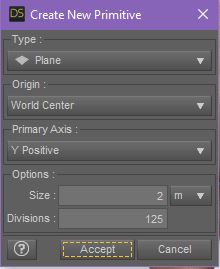
- Create a Plane Primitive for the ground plane (Create >> New Primitive >> Plane) - I set it at 2 M and 125 Divisions.
- Select the Plane in the Scene tab then make it a dForce Static Surface (Edit >> Object >> Geometry >> Add dForce Modifier: Static Surface).
- Pose your figure.
- Load the clothing item to your figure. For this wallkthrough I'm using the Morphing Fantasy Dress for G2F.
- Add the dForce Modifier "Dynamic Surface" to the clothing item (Edit >> Object >> Geometry >> Add dForce Modifier: Dynamic Surface).
- With the clothing item selected, go to the Surfaces tab and turn Self Collide to Off.
- Use smoothing and shaping morphs to make sure that the clothing is completely OUTSIDE the figure (no poke-through) and that the clothing item is 100% ABOVE the Primitive Ground Plane (look under the plane to make sure none of the cloth is poking through it).
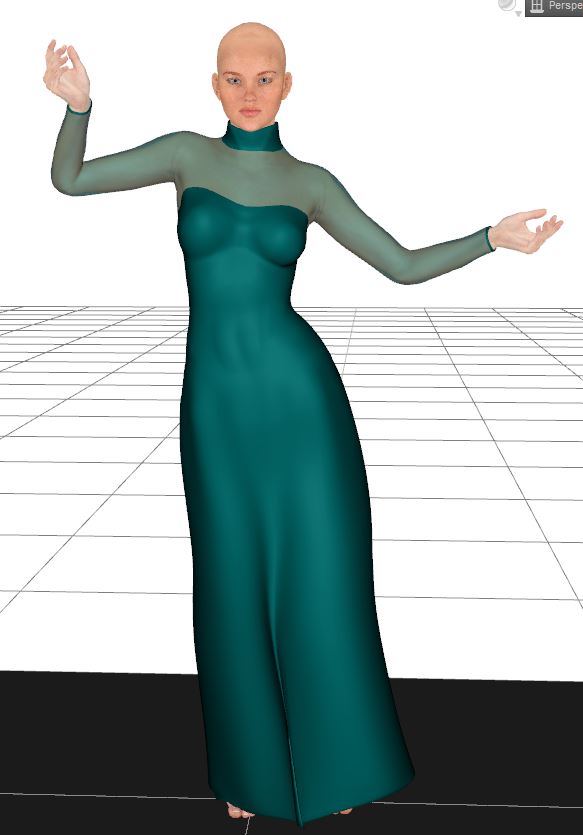
- Go to the Simulation Settings and turn Start From Memorized Pose to Off.
- Turn Frames to Simulate to "Current Frame".
- Run the Simulation.
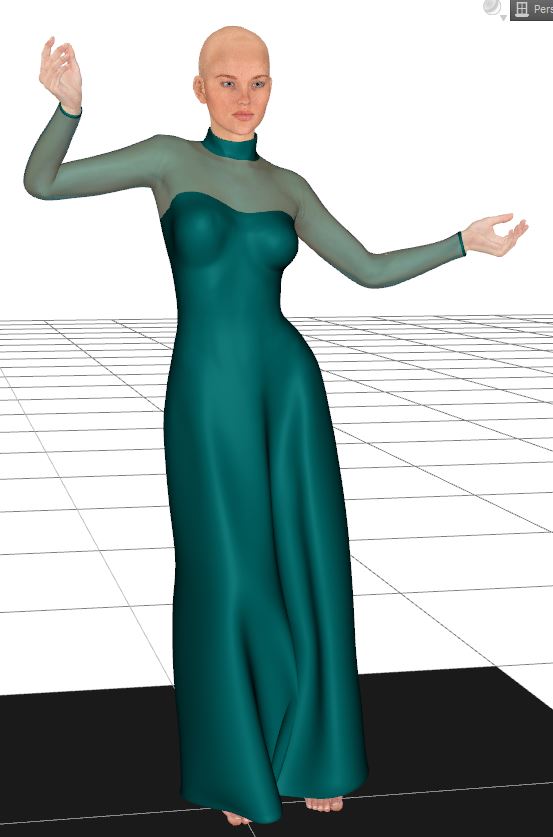
See if that works for you. Once you get the steps down you can do more complex things like using the Time Line and/or using the "Start Bones from Memorized Posed". Both of which require a bit more thought in the pose and making sure that at no time during the simulation the clothing drops below the primitive plane and that the figure's fingers or feet don't collide too much with the cloth (which can cause clothing explosions). But like I said, once you get a feel for it and doing the static pose simulations, you can branch off into the more complex simulations.
aaaaa HAAAAAAAAAA... I knew I was missing something.. NO where did anyone mention Item #10 in your instructions... So I have to shape the dress around the mannequin BEFORE i simulate! I'm so excited.. gonna try that now... I have G2 and the MFD for her.. Brb.. lol. Now I can't sleep... lol
I hope it works for you. Let me know how it goes! :) The key is to make sure that the cloth is outside and above anything that it's going to collide with. Make sure it's not touching the floor plane and that it's not poking through the body.
dForce Verified Functional Clothing [Out of the Box]Ok, here's a quick step by step. This is just how I do, there might be better ways to do it, but this is just how I, personally, do it. In this walkthrough I'll be using Victoria 6, but you can probably use any Genesis figure. I've not tried it with Victoria 4, I think, but I've heard some have had trouble using dForce with her. I don't think I've tried it with her though, so for now I'm just using Genesis 2 for this.
- Load your figure.
- Go to the Parameters tab and turn the "Resolution Level" to "Base".
- Create a Plane Primitive for the ground plane (Create >> New Primitive >> Plane) - I set it at 2 M and 125 Divisions.
- Select the Plane in the Scene tab then make it a dForce Static Surface (Edit >> Object >> Geometry >> Add dForce Modifier: Static Surface).
- Pose your figure.
- Load the clothing item to your figure. For this wallkthrough I'm using the Morphing Fantasy Dress for G2F.
- Add the dForce Modifier "Dynamic Surface" to the clothing item (Edit >> Object >> Geometry >> Add dForce Modifier: Dynamic Surface).
- With the clothing item selected, go to the Surfaces tab and turn Self Collide to Off.
- Use smoothing and shaping morphs to make sure that the clothing is completely OUTSIDE the figure (no poke-through) and that the clothing item is 100% ABOVE the Primitive Ground Plane (look under the plane to make sure none of the cloth is poking through it).
- Go to the Simulation Settings and turn Start From Memorized Pose to Off.
- Turn Frames to Simulate to "Current Frame".
- Run the Simulation.
See if that works for you. Once you get the steps down you can do more complex things like using the Time Line and/or using the "Start Bones from Memorized Posed". Both of which require a bit more thought in the pose and making sure that at no time during the simulation the clothing drops below the primitive plane and that the figure's fingers or feet don't collide too much with the cloth (which can cause clothing explosions). But like I said, once you get a feel for it and doing the static pose simulations, you can branch off into the more complex simulations.
aaaaa HAAAAAAAAAA... I knew I was missing something.. NO where did anyone mention Item #10 in your instructions... So I have to shape the dress around the mannequin BEFORE i simulate! I'm so excited.. gonna try that now... I have G2 and the MFD for her.. Brb.. lol. Now I can't sleep... lol
dForce Verified Functional Clothing [Out of the Box]Ok, here's a quick step by step. This is just how I do, there might be better ways to do it, but this is just how I, personally, do it. In this walkthrough I'll be using Victoria 6, but you can probably use any Genesis figure. I've not tried it with Victoria 4, I think, but I've heard some have had trouble using dForce with her. I don't think I've tried it with her though, so for now I'm just using Genesis 2 for this.
- Load your figure.
- Go to the Parameters tab and turn the "Resolution Level" to "Base".
- Create a Plane Primitive for the ground plane (Create >> New Primitive >> Plane) - I set it at 2 M and 125 Divisions.
- Select the Plane in the Scene tab then make it a dForce Static Surface (Edit >> Object >> Geometry >> Add dForce Modifier: Static Surface).
- Pose your figure.
- Load the clothing item to your figure. For this wallkthrough I'm using the Morphing Fantasy Dress for G2F.
- Add the dForce Modifier "Dynamic Surface" to the clothing item (Edit >> Object >> Geometry >> Add dForce Modifier: Dynamic Surface).
- With the clothing item selected, go to the Surfaces tab and turn Self Collide to Off.
- Use smoothing and shaping morphs to make sure that the clothing is completely OUTSIDE the figure (no poke-through) and that the clothing item is 100% ABOVE the Primitive Ground Plane (look under the plane to make sure none of the cloth is poking through it).
- Go to the Simulation Settings and turn Start From Memorized Pose to Off.
- Turn Frames to Simulate to "Current Frame".
- Run the Simulation.
- I like to convert the clothing item to Sub D when it's done, as it often helps to smooth out the cloth (Edit >> Object >> Geometry >> Convert to SubD). It's optional though, I think.
See if that works for you. Once you get the steps down you can do more complex things like using the Time Line and/or using the "Start Bones from Memorized Posed". Both of which require a bit more thought in the pose and making sure that at no time during the simulation the clothing drops below the primitive plane and that the figure's fingers or feet don't collide too much with the cloth (which can cause clothing explosions). But like I said, once you get a feel for it and doing the static pose simulations, you can branch off into the more complex simulations.
Character skin textures & M4/V4 to G2As I recall both Genesis 2 figures have the same mesh, so the Victoria 4 UV set for Genesis 2 Female should work. I can't, however, recall if it will just call the UV set from the Genesis 2 Female Data folder or if it has to be manually copied over to the Genesis 2 Male folder in Data.
The UV file has to be manually copied over. Studio doesn't read across genders that way.
Slosh has a freebie at ShareCG to make it work automatically: http://www.sharecg.com/v/73633/gallery/21/DAZ-Studio/UVSetterGen2-Revised-10-2014
hurray! Slosh's awesome preset pack freebie did the trick! my G2M figure is now proudly featuring Logan's shape AND the "Angel" V4 free skin by Ravensdream! so glad it worked! (without having to buy V4 for G2F, which i wouldn't have used, leaving $$ for a more useful item).
thanks Richard & vwrangler for the great help! and happy holidays :)
Compatible figures and required products. How restrictive are these?Don't want to start a new topic, because my problem is kinda related to the one of the OP:
There are quite a few Characters for DazStudio available. Some can be applied to the basic G3F figure. Others ask for Victoria 7 (= the Victoria for the G3F figure) or other "named" figures.
If I would now apply one of these characters, which require Victoria 7 to the basic G3F figure, what would be the outcome?
- it won't work at all?
- it will work, but the result will be buggy (= textures out of place or similiar graphic problems)?
- it will work, but it will not look like shown in the examples of the download, due to the needed figure's special textures not being available?
- none of the above but... (additional details needed)
I'm asking, because I'm on a limited budget and right now I would prefer to work with the G3F figure and already got some stuff for her (Body and Head mod plugin and "anatomical parts" *cough*) which I (probably?) can't use on the Victoria 7 model, which would mean a further investment in stuff I kinda already have...
Character skin textures & M4/V4 to G2As I recall both Genesis 2 figures have the same mesh, so the Victoria 4 UV set for Genesis 2 Female should work. I can't, however, recall if it will just call the UV set from the Genesis 2 Female Data folder or if it has to be manually copied over to the Genesis 2 Male folder in Data.
The UV file has to be manually copied over. Studio doesn't read across genders that way.
Slosh has a freebie at ShareCG to make it work automatically: http://www.sharecg.com/v/73633/gallery/21/DAZ-Studio/UVSetterGen2-Revised-10-2014
Character skin textures & M4/V4 to G2As I recall both Genesis 2 figures have the same mesh, so the Victoria 4 UV set for Genesis 2 Female should work. I can't, however, recall if it will just call the UV set from the Genesis 2 Female Data folder or if it has to be manually copied over to the Genesis 2 Male folder in Data.
Posing Genesis 8 & Victoria 8The shapes differ (that is, in part, the point of Victoria 8) so a pose that has the hands on the hips for one may hae the hands buried inside the hips or floating in mid air for the other, and so on. Poses that don't involve contact, or near contact, between body parts may be usable on either shape but others will need to be adapted.
Posing Genesis 8 & Victoria 8I see packages that contain different sets of poses for Genesis 8 & Victoria 8. I had thought that they would be the same. What are the body differences that cause the need for separate posing versions?
The TRADITIONAL bodysuitA LONG time ago a tradition was started. Mayhap it wasn't intended to be one, but perhaps it was intentional. DAZ never does anything without reason, yeah? Yeah! SO anyway, there has been a regular BODYSUIT created and released generationally since Generation 3 for sure. David and Stephanie 3 Petite as well as M1/M2/V3/M3 had, no HAVE a full fledged Bodysuit. And Gen4 V4/M4/K4 have a Bodysuit.
Use this for reference: https://www.daz3d.com/victoria-4-2-bodysuit. ; They all load up in basic medium gray.
I have several Bodysuits of different styles for Genesis 2, but I wonder what happened to the DAZ Originals Bodysuits for G2F/M? And that includes coming with Poser Companion Files. I see a few more of different styles I like, but can't use as there is no Poser support. Sorry, don't use Studio. I am still looking for the DAZ produced Genesis 2 Bodysuit.
Thanks for your time,
Merry Christmas everyone!
Michael
I think two things happened. First, the genesis tech allowed previous generations of products to be used on newer generation figures more easily in DS... especially for form fitting items like bodysuits (versus things like dresses, which is why we keep getting new versions of the MFD.) Second, the Supersuit for Genesis completely changed the general direction of bodysuits, as the ability to add shaping moprhs increased the versatility of the suit exponentially. At that point PAs started to jump on the supersuit idea and began producing similar items, so DAZ didn't see a need to keep producing a basic bodysuit themselves, especially since a significant portion of the Poser user base was being rather vocal about sticking with V4/M4. Yes, that did end up leaving many Poser users out in the cold, though there is a freebie old-style bodysuit for G2F with Dson support at shareCG by cybrea...(link below in case the mods want to remove it) and Wilmap also made some basic bodysuits for both G2M and G2F, but I don't think she did Poser versions. Theoretically, you could fit the M4 & V4 suits to the G2s using the fitting room in the newer editions of poser, or (I've admittedly never tried this) cross fitting them in DS and exporting them to Poser, but I think the odds of DAZ ever continuing with their own bodysuits at this point, especially for a base that's now "outdated" by two generations, are pretty much non-existant.
http://www.sharecg.com/v/74922/related/21/DAZ-Studio/G2F-Bodysuit-and-Top
Daz Studio Nvidia Iray Interactive & Photoreal Animation TestsHere's my first go at a mostly successful animation render.
Render and dForce device = Nvidia Geforce GTX 1080 ti
This is created from the new "aniMate Belly Dancing for Victoria 8" set, with some little modifications (using graphMate and keyMate) to fix the arms intersecting with the body for the dForce sim.
The animation is cut a little short because I missed a spot where her knees came together and piched the cloth causing an explosion in the dForce sim.
**************************************************************************************************
2017-12-23 23:23:15.637 Total Simulation Time: 7 minutes 0.16 seconds
(723 Frames @ 24fps)
**************************************************************************************************
2017-12-24 06:32:12.344 Total Rendering Time: 6 hours 48 minutes 59.5 seconds
(Render covergence target = 20%, Resolution = 1280x960, Frames = 723)
(34 seconds average render time pre frame)
**************************************************************************************************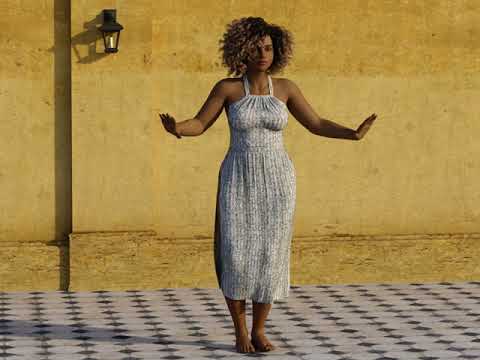
Fantastic results, love the dynamics of her dress
Daz Studio Nvidia Iray Interactive & Photoreal Animation TestsHere's my first go at a mostly successful animation render.
Render and dForce device = Nvidia Geforce GTX 1080 ti
This is created from the new "aniMate Belly Dancing for Victoria 8" set, with some little modifications (using graphMate and keyMate) to fix the arms intersecting with the body for the dForce sim.
The animation is cut a little short because I missed a spot where her knees came together and piched the cloth causing an explosion in the dForce sim.
**************************************************************************************************
2017-12-23 23:23:15.637 Total Simulation Time: 7 minutes 0.16 seconds
(723 Frames @ 24fps)
**************************************************************************************************
2017-12-24 06:32:12.344 Total Rendering Time: 6 hours 48 minutes 59.5 seconds
(Render covergence target = 20%, Resolution = 1280x960, Frames = 723)
(34 seconds average render time pre frame)
**************************************************************************************************The TRADITIONAL bodysuitA LONG time ago a tradition was started. Mayhap it wasn't intended to be one, but perhaps it was intentional. DAZ never does anything without reason, yeah? Yeah! SO anyway, there has been a regular BODYSUIT created and released generationally since Generation 3 for sure. David and Stephanie 3 Petite as well as M1/M2/V3/M3 had, no HAVE a full fledged Bodysuit. And Gen4 V4/M4/K4 have a Bodysuit.
Use this for reference: https://www.daz3d.com/victoria-4-2-bodysuit. ; They all load up in basic medium gray.
I have several Bodysuits of different styles for Genesis 2, but I wonder what happened to the DAZ Originals Bodysuits for G2F/M? And that includes coming with Poser Companion Files. I see a few more of different styles I like, but can't use as there is no Poser support. Sorry, don't use Studio. I am still looking for the DAZ produced Genesis 2 Bodysuit.
Thanks for your time,
Merry Christmas everyone!
Michael
what are differences between GN3 and Victoria 7I've not heard it called "GN3" - I guess you mean G3?
Victoria 7 is a Genesis 3 Female morph and texture. She has her own UV separate from the base Genesis 3 Female.
If a product says "for Victoria 7" it usually requires Victoria 7. In the case of characters is usually means that it requires the Victoria 7 morph and in some cases the Victoria 7 UV.
what are differences between GN3 and Victoria 7How do the differences work with a simple Genesis 3F character and one that's for Victoria 7? I look around and see that a GN3 character but is for Victoria 7 which has me confused because aren't they basically the same thing? being anything GN3 would be 7. For a character that is meant for V7 wouldn't that mean that would be for just Genesis 3??? what would happen if I was to use a Victoria 7 female model on just a GN3F figure would it not work or something? someone please help me out on this confusion.
JamesJAB's Art Studio Full of Renders and Incomplete Projects!Animantion time!
This is created from the new "aniMate Belly Dancing for Victoria 8" set, with some little modifications (using graphMate and keyMate) to fix the arms intersecting with the body.
**************************************************************************************************
2017-12-23 23:23:15.637 Total Simulation Time: 7 minutes 0.16 seconds
(723 Frames @ 24fps)
**************************************************************************************************
2017-12-24 06:32:12.344 Total Rendering Time: 6 hours 48 minutes 59.5 seconds
(Render covergence target = 20%, Resolution = 1280x960, Frames = 723)
(34 seconds average render time pre frame)
**************************************************************************************************Show Us Your Iray Renders. Part VIAnimantion time!
This is created from the new "aniMate Belly Dancing for Victoria 8" set, with some little modifications to fix the arms intersecting with the body.
**************************************************************************************************
2017-12-23 23:23:15.637 Total Simulation Time: 7 minutes 0.16 seconds
(723 Frames @ 24fps)
**************************************************************************************************
2017-12-24 06:32:12.344 Total Rendering Time: 6 hours 48 minutes 59.5 seconds
(Render covergence target = 20%, Resolution = 1280x960, Frames = 723)
(34 seconds average render time pre frame)
**************************************************************************************************Let's see your dForce renders/experiments/interesting results!Animantion time!
This is created from the new "aniMate Belly Dancing for Victoria 8" set, with some little modifications to fix the arms intersecting with the body.
**************************************************************************************************
2017-12-23 23:23:15.637 Total Simulation Time: 7 minutes 0.16 seconds
(723 Frames @ 24fps)
**************************************************************************************************
2017-12-24 06:32:12.344 Total Rendering Time: 6 hours 48 minutes 59.5 seconds
(Render covergence target = 20%, Resolution = 1280x960, Frames = 723)
(34 seconds average render time pre frame)
**************************************************************************************************Why can't I use some G8F expressions on G3F?I've noticed that some of my G8F expressions don't work on G3F for example Expressive Faces - One-Click Morph Expressions for Victoria 8 https://www.daz3d.com/expressive-faces-one-click-morph-expressions-for-victoria-8
While others work like this one https://www.daz3d.com/she-warrior-action-poses-and-expressions-for-genesis-8-female-s
Can I make the first one work somehow on G3F? When I click on it nothing happens.
RRRR - What can go wrong? Render Contesttag: luci45 #5
An Elf Christmas Party
Tamesis wondered if she had made a mistake in inviting the Christmas elves to her party. Some of them arrived early and were pretty rowdy. Oh well, understandable she thought since Santa has had them couped up so long in the workshop.Used:
Dreamland Models Movie Sets Low Poly Three
Dream Home: Great Room Details -- Eclectic
Rons Birds
Tamesis Other Worldly
MFD for Genesis Wonderland Expansion (LB)
Party Time Balloons (LB)
Classic Furniture Assortment (LB)
Challenger Poses for Tween Ryan 7 (LB)
Casual Days for Bella 6 (LB)
Victoria 4.2 Bodysuit Expansion Pack (LB)
Teahouse Treasures (LB)Also Used
Victorian Santa for Genesis 3 Male(s)
DG Iray Holiday Fabrics
Elijah 7
Morley Hair for Genesis 3 & 8 Male(s)
Marble Shaders for Iray
Eat Me
Esidor Hair
Bloomingwood Hair
Redhouse Christmas Carol Exp 1 Tree
The Night Before Christmas
Peterken for Genesis 2 Male(s) shoes
Daz 3D is part of

Connect
DAZ Productions, Inc.
7533 S Center View Ct #4664
West Jordan, UT 84084Licensing Agreement | Terms of Service | Privacy Policy | EULA
© 2026 Daz Productions Inc. All Rights Reserved.