-
GENERAL FREEBIE REQUESTS Part 2
Also, is there any free vampire outfit I could download for a Victoria 4, Michael 4 or Genesis 3 Male or Female figure? Even if it means separate items, such as fangs, outfit, etc.?
Try Here http://www.sharecg.com/
GENERAL FREEBIE REQUESTS Part 2Also, is there any free vampire outfit I could download for a Victoria 4, Michael 4 or Genesis 3 Male or Female figure? Even if it means separate items, such as fangs, outfit, etc.?
Carrara Challenge #37 - Dungeons Deep - Winners Announced!entry #21
title: egyptian doom
artist: shlomi laszlo
vips:
https://www.daz3d.com/forums/discussion/216796/carrara-challenge-37-dungeons-deep-wip-thread/p10
https://www.daz3d.com/forums/discussion/216796/carrara-challenge-37-dungeons-deep-wip-thread/p11
products:
https://www.daz3d.com/victoria-4-2-base
https://www.daz3d.com/pharaohs-of-the-sun-for-v4
https://www.daz3d.com/children-of-aten
https://www.daz3d.com/children-of-aten-2
https://www.daz3d.com/v4-elite-texture-marie
https://www.daz3d.com/gkd-skin-ultimate
https://www.daz3d.com/queens-from-the-nile-for-bast-v4
https://www.daz3d.com/bundle-bast-for-v4
https://www.daz3d.com/bast-textures
https://www.daz3d.com/temple-of-the-pharaohs
https://www.daz3d.com/forgotten-dynasties
a tentcle from:
http://docs.daz3d.com/doku.php/public/read_me/index/39/start
https://www.daz3d.com/sensational-she-freak-v4
v4 general poses
https://www.daz3d.com/facial-expressions-for-v4
veloute
Celebrity Look-a-Likes for 3D figures Part 2Can anyone place MRL Brienne for me? She's definitely reminding me of someone, I know Mihrelle usually does look a likes, and it's driving me batty!
Save me, Look-a-like thread. You're my only hope.
99% sure she's a softened up likeness of Gwendoline Christie.
EDIT: Or Tilda Swinton, but the name Brienne rather suggests the former.
Black / dark eye browsIt will depend on the lighting. People's hair looks different colors in different types of light. That is normal.
Also if you are rendering Victoria 4.2 then you are likely not using fibre mesh brows. I've noticed V4/M4 hair often turns out glossier in iRay than 3DL because the people that modeled the hair for 3DL made it glossier than it should be so that it would render faster in 3DL.
Celebrity Look-a-Likes for 3D figures Part 2Can anyone place MRL Brienne for me? She's definitely reminding me of someone, I know Mihrelle usually does look a likes, and it's driving me batty!
Save me, Look-a-like thread. You're my only hope.
Black / dark eye browsI am not sure if it is Fibermesh brows. I have taking a strong liking to Victoria 4.2
Saving PosesThe closest thing Carrara has to that is an NLA clip or NLA master pose. So that's what the "Clips" tab will be for.
Master poses will also pick up morph dial data - so just be aware of that. NLA clips only store what has been changed over time in an animation.In all cases, we can open the hierarchy during the saving process and deselect what we don't want the clip to record.
Select the Figure, like in V4's case select Victoria 4, and in the NLA tab, chose Make NLA Clip or Make Master Pose.
When clips are made they will reside in your Clips try om the bottom right of the interface. The only way to get clips onto the timeline is from that clips tray - so when we store them to the browser, we cannot just drag them onto the character, we drag them to that clips tray first, then onto the NLA Track of the figure.
We can add additional NLA tracks to any figure by right-click on a track and chose to add a new track.
I almost always use at least two tracks. One for a main motion clip and another for suibtle nuance clips I make, like blinking.
Mimic Pro for Carrara uses NLA clips to create lip sync - awesome!
[Released] Biometric ExpressionsThese look outstanding but I do have one question/concern. Considering that these are primarily morphs, how much do they alter already existing dialed face morphs?
If the existing morphs are frozen to the character, then it shouldn't be a problem. However, if you dial up morphs, but don't freeze them, and then try to apply these expressions, they will overide those morphs. This means that characters that you've purchased (like Victoria 7 or Ophelia 7, won't be changed, nor will characters that you've morphed and then frozen, just the ones that you morph and don't freeze. I know that adds an additional step to the workflow, but there is no way around it that I'm aware of.
How to import skinned body part or cloth?I created a body part for Victoria 8 that should go around the eye (look at the pic below). It should work similar to default Eyelashes. In particular, it should move with the eyelids, but not with the eyes. It's skinned to eyelid bones and works well in maya: when I close or move eyelids it moves with them exactly like I want. Now, the part I don'understand:
How do I make it work with the rest of the body in Daz? I imported the mesh (fbx), it shows up in the correct place, now what?
I tried transfer utility, but it totaly destroys the skinning.
Any help?
[Released] Biometric ExpressionsThe sliders are really the way to get the most out of this new way of making expressions. For instance, here's a lovely beaming smile on a Victoria 7 figure:
The recipe was:
Bright Smile 28.8%
Bright Smile Top 51.2%
Delighted Smile Bottom 90%Note that in this case, Delighted Smile Bottom is layering over Bright Smile's bottom portion, and creating a whole new smile! I discovered this functionality when I was developing this product, and I love that this is possible. It makes a nearly infinite number of smiles and laughs possible. Additionally, you'll notice that each smile setting has different and subtle ways of reacting with the others, and after you play with the sliders a bit, you start to discover a lot of things are possible.
Which DAZ Genesis 8 M/F characters are the most realistic/beautiful?This same question about G8 characters was asked not too long ago and my favorite remains Elizabeth for Victoria 8 but I have now bought G8 males too and my favorite is Lucus 8. I almost would have picked Tyrone for Darius 8 (both regular and albino) as for most renders he and his hair are great quality but for nude render there is visible seam when he has anatomical elements attached. I've written a ticket and they gave me a solution of uninstalling and reinstalling my G8 content that worked all of one render before the problem returned. Its not that frustrating since it was only a test render but you have to evaluate and rate a product from head to toe and that one has a problem. My tests with Lucas 8 & Michael 8 no longer have this problem after the DAZ 3D suggested remedy.
I look at Elizabeth and I see a character whose skin is cartoonish and lacking any sign of realism.. no sign of pours, hairs, veins or any real details.. it's a beautifully shaped morph in a really generic rapper...
Agreed a thousand times over. FW characters have beautiful morphs but for realistic skin they are not where you point someone.
Which DAZ Genesis 8 M/F characters are the most realistic/beautiful?This same question about G8 characters was asked not too long ago and my favorite remains Elizabeth for Victoria 8 but I have now bought G8 males too and my favorite is Lucus 8. I almost would have picked Tyrone for Darius 8 (both regular and albino) as for most renders he and his hair are great quality but for nude render there is visible seam when he has anatomical elements attached. I've written a ticket and they gave me a solution of uninstalling and reinstalling my G8 content that worked all of one render before the problem returned. Its not that frustrating since it was only a test render but you have to evaluate and rate a product from head to toe and that one has a problem. My tests with Lucas 8 & Michael 8 no longer have this problem after the DAZ 3D suggested remedy.
I look at Elizabeth and I see a character whose skin is cartoonish and lacking any sign of realism.. no sign of pours, hairs, veins or any real details.. it's a beautifully shaped morph in a really generic rapper... to me personally, I want to be able to zoom in on that character and see something that already has details built into it that make it looks real.
If Elizabeth is really that good then, see if you can do a close up and let's see how real she is because the promo pictures just aren't impressing me... What am I missing?I don't see such things. All the models look good and realistic but I favored the ones that give me the more character creation flexibility as purchased and that is Elizabeth for Victoria 8, Lucas 8, and Tyrone for Darius 8 andf the G8 DO morph packages for head, body & expressions. I don't look for 'wow the model looks real' when I buy it. I like it or I don't and I see flexbility in it or I don't. I only buy the specifically realistic when I want to create a specifically realistic render. For example, I have Michael 8 and he is very, very realistic and looks like John Travolta. For my general purposes the realism is impressive but he is too realistically like John Travolta in looks. In Elizabeth (although I think Elizabeth is actually based on Elizabeth Taylor in her National Velvet - Cat on a Hot Tin Roof period), I see a reasonable 3D model that looks good in renders and is a good basis for other characters too using morphs and LIE or other texture sets. She can be made to look more realistic if it is wanted as supplied on purchase but for me a nice classic artistic and meticulously painted look is nice also.
Which DAZ Genesis 8 M/F characters are the most realistic/beautiful?beauty is in the eye of the beholder
Indeed, but I think he said realistic. Maybe that's subjective too because he wanted for super model couple?
Anyway, my two cents as a beginner who can use them quickly with a minimum of tweaking.
Victoria 8
Monique 8
Stephanie 8 (She looks a little jaundiced, but is probably average height. Adjust weight as needed?)
I missed out on Charlotte. Killisto is cool, but I have to dial down super pin-up body. ; )
---
Males are more difficult for me because they all look to have had wax jobs. : 0 !FWSA Gunner (for Lucas 8)
Owen 8 (quickly becoming a favorite)
Faber's Garret (for M8)
I couldn't fit Milo (for Lucas 8) into top 3 but he is my favorite 'go to' guy if I want a male actor who isn't Mr. hardbody. Goes well with Stephie, but he needs face morphs & think OP wanted straight out of box.
Quick compare render since I had nothing else to do


Victoria 8, Monique 8, Stephanie 8

FWSA Gunner for Lucas 8, Owen 8, Faber's Garrett for M8
Which DAZ Genesis 8 M/F characters are the most realistic/beautiful?This same question about G8 characters was asked not too long ago and my favorite remains Elizabeth for Victoria 8 but I have now bought G8 males too and my favorite is Lucus 8. I almost would have picked Tyrone for Darius 8 (both regular and albino) as for most renders he and his hair are great quality but for nude render there is visible seam when he has anatomical elements attached. I've written a ticket and they gave me a solution of uninstalling and reinstalling my G8 content that worked all of one render before the problem returned. Its not that frustrating since it was only a test render but you have to evaluate and rate a product from head to toe and that one has a problem. My tests with Lucas 8 & Michael 8 no longer have this problem after the DAZ 3D suggested remedy.
I look at Elizabeth and I see a character whose skin is cartoonish and lacking any sign of realism.. no sign of pours, hairs, veins or any real details.. it's a beautifully shaped morph in a really generic rapper... to me personally, I want to be able to zoom in on that character and see something that already has details built into it that make it looks real.
If Elizabeth is really that good then, see if you can do a close up and let's see how real she is because the promo pictures just aren't impressing me... What am I missing?Which DAZ Genesis 8 M/F characters are the most realistic/beautiful?This same question about G8 characters was asked not too long ago and my favorite remains Elizabeth for Victoria 8 but I have now bought G8 males too and my favorite is Lucus 8. I almost would have picked Tyrone for Darius 8 (both regular and albino) as for most renders he and his hair are great quality but for nude render there is visible seam when he has anatomical elements attached. I've written a ticket and they gave me a solution of uninstalling and reinstalling my G8 content that worked all of one render before the problem returned. Its not that frustrating since it was only a test render but you have to evaluate and rate a product from head to toe and that one has a problem. My tests with Lucas 8 & Michael 8 no longer have this problem after the DAZ 3D suggested remedy.
Which DAZ Genesis 8 M/F characters are the most realistic/beautiful?That's very much about tastes, to show my precedent tastes first:
My favorite G7 male character are from DarwinMishaps, my 1st would be Damen, followed by Iain, and Ahmad. I am awaiting for his take on more G8 with the same style.
My favorite G7 Female are from chevybabe, my 1st would be Aibell followed by Draupadi and VIncenzina. I am awaiting for her/his take on more G8 with the same style.
all vyktoria G7 characters are very a must have G7 too. I bought almost all from her instead the Daz G7 pro bundles.
Now going toy answer our question:
I bought ALL G8 pro bundles released, and the most realistic and beautiful of females tor me are 1st Aisling for Charlotte, 2nd FW Laverne HD for Monique 8, 3rd Monique, 4th BD Jayde for Teen Josie 8, 5th Charlotte, 6th Xanthe for Stephanie 8, 7th Pei and Petit Suit for genesis 8, 8th Alondra for Monique 8, 9th FW Marieke HD for Charlotte 8 , 10th Hyuna for genesis 8, 11th Kim for genesis 8. 12th FWHP Eris HD for Genesis 8 Female. 13th BD Corsen for Victoria 8, 14th FWSA Lavana HD for Stephanie 8, 15th VYK Raine for Genesis 8 Female, 16th FWSA Elizabeth HD for Victoria 8
for G8 males I would say the 1st is Alexander for Darius 8, 2nd Tyrone for Darius 8, 3rd Darius 8, 4th FWSA Nick HD for Owen 8, 5th Giuseppe for Lucas 8, 6th FWSA Gunner HD for Lucas 8, 7th Lucas 8, 8th Owen 8, 9th FW Kasper HD for Owen 8, 10th Chance for Owen 8, 11th Ren for Genesis 3 Male and Genesis 8 Male, 12th FW Quinton HD for Michael 8, 13th FWSA Zander HD for Michael 8, 14th EJ Hiroshi and Masao for Genesis 8 Male.
Special mention for this G8 pack of male morphs https://www.daz3d.com/m3d-dalton-hd-for-genesis-8-male that's the best G8 male characters pack for realism and doing renders without porcelain male models.
Overall, the better G8 pro bundle is Charlotte and Monique oand the third would be Stephanie, on that order. On males it is Darius and Owen and the third would be Lucas, on that order.
For everyday very action centered renders I would pick gothic pale light skin and asian women from the bottom of my female list, similar gothic and asian handsome guys if I have or the 3d dalton hd for genesis 8 male.from the bottom of my male list.
The top beautiies of my lists deserves more quiet, romanceable and dramatic hearthbreaking stories, because realistic top beauty helps to not fall in boredom when all slow pacing.
dForce Verified Functional Clothing [Out of the Box]Peony Kimono for Genesis 2 Female fitted to V7 Anna via SY Ultra Templates for G3F (using the option for big dress) out of the box. It worked like a charm. The only thing I did was use the timeline (pose her at 30 frames and adjusted the dress, then let it run for 30 more frames), turn off self collision and freeze the obi (so it remained rigid). Also, I forgot to freeze the bow, so it ended up sliding down. You can sort of see a bit of it poking through her back (just below her bum).
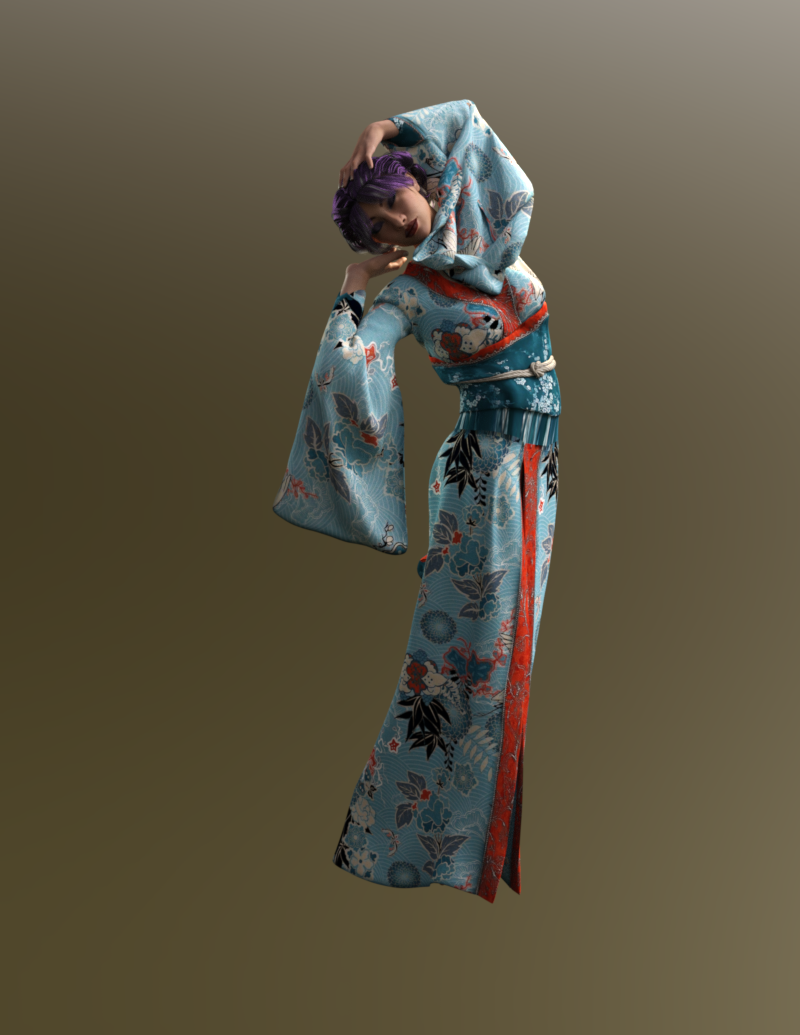
Updated: It also works on Gen8 (Sakura).
 Genesis products
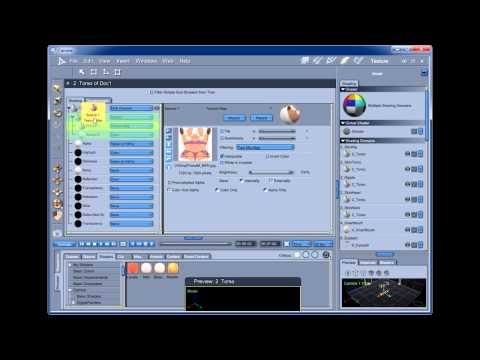
Here's my walkthrough for Victoria 4. The actual shader techniques work for anything though.
 Fit Control for Genesis 8 (Commercial)
@dijidave_a64850a362 "I mean all the morphs listed in your product description which aren't being applied to the clothing, ie in this screenshot of Hongyu's Bikini 2 on Victoria 8, there are these"
The morphs are available in the product. They are "excluded" in the case you show because you haven't chosen to apply them. The interface has been changed from the previous version such that you start by slected the morphs you want to apply rather than transferring all morphs (as in G3 versions), then deleting those that aren't used.
A cleaner and more logical application in my opinion.
Daz 3D is part of

Connect
DAZ Productions, Inc.
7533 S Center View Ct #4664
West Jordan, UT 84084Licensing Agreement | Terms of Service | Privacy Policy | EULA
© 2026 Daz Productions Inc. All Rights Reserved.