-
Mesh grabber for Daz 2025 Alpha?
stripe6499_9253833ae8 said:
joshua.r.fletcher said:
Here's a simple example. Meshgrabber was used in 4.24 to grab the bottom of the shirt, and I can load, restart, etc. that file until the cows come home and it stays. Load it in 2025 alpha? It's gone for the above reason. What I am hoping for is confirmation that geometry sculpter in premier doesn't work that way.
Well, I just loaded up a scene in 2025 that I created in 4.24 that had morphs on a skirt and shorts. They loaded up in 2025 just as created. So... here's a question,: Once you've created your morph, are you saving it in Mesh Grabber or DFormer, and then doing File/Save As/Support Asset/Modifier Asset?
You don't have to save deltas as Modifer Asset... Saving them as morph property will just do.
Freebie Challenge August 2025 - "Pure Cinema" - Entries ThreadEnd of the Line
"No matter what you tell me or tell yourself, you’ll ultimately die fighting these bastards. So what I’m asking is this. Wouldn’t you rather give it all at once to something real...I burn my decency for someone else’s future. I burn my life to make a sunrise that I know I’ll never see." - Luthen Rael
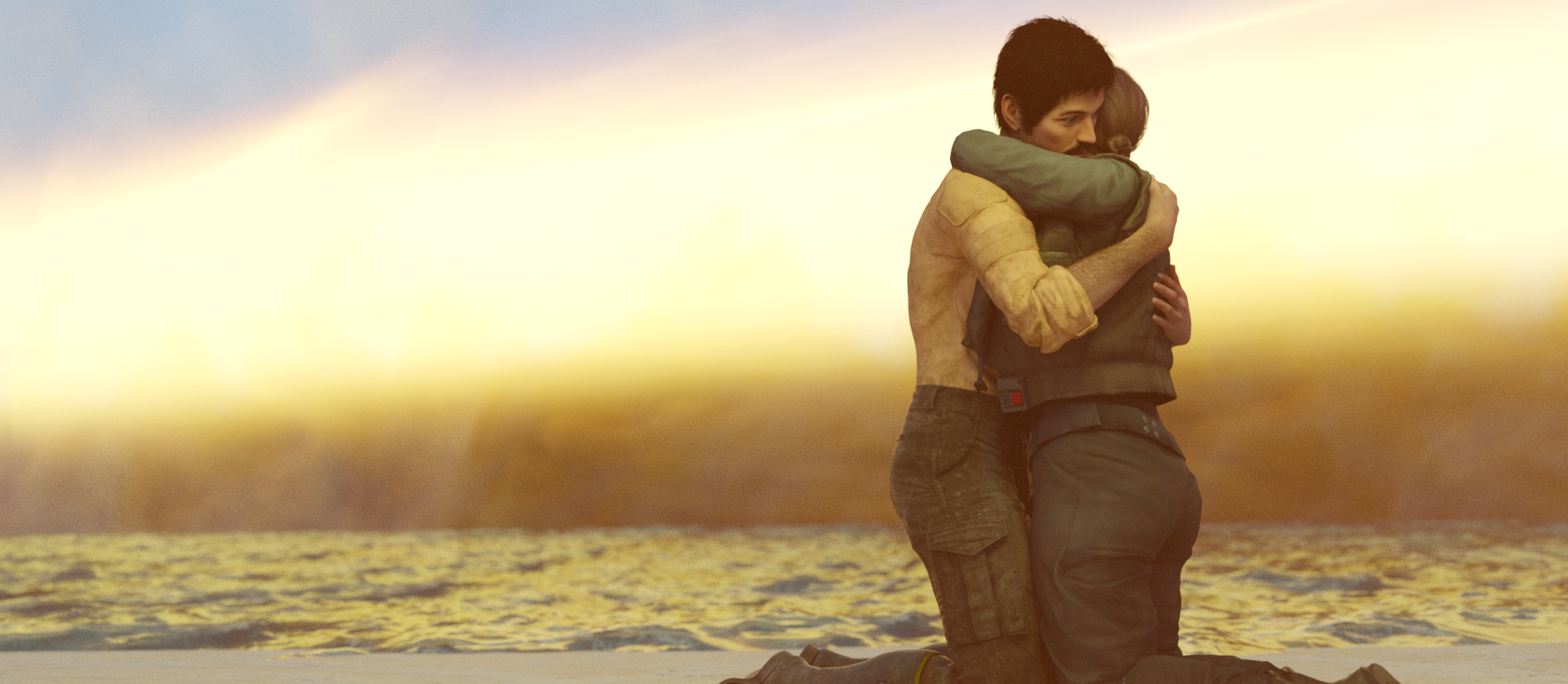
FREE
magnus1871 DLuna G9 morph https://www.deviantart.com/magnus1781/art/G9-Upgrade-v5-1155126306
magnus1871 DLuna G3 material https://www.deviantart.com/magnus1781/art/Facegen-Textures-8-899857401
Joel (hair) https://www.patreon.com/posts/joel-for-g8m-40154646
Cal Kestis (clothing) https://www.patreon.com/posts/cal-kestis-82732903
Jyn https://www.patreon.com/posts/jyn-erso-for-g8f-55595467
ocean https://www.renderosity.com/freestuff/items/96105/free-deep-ocean-for-daz
HDRI https://polyhaven.com/a/industrial_sunset_puresky
sandy ground (3 parts) https://www.renderosity.com/freestuff/items/97285/sandy-ground-daz3d-iray-obj-included-part-1-of-3
https://www.renderosity.com/freestuff/items/97286/sandy-ground-daz3d-iray-obj-included-part-2-of-3
https://www.renderosity.com/freestuff/items/97291/sandy-ground-daz3d-iray-obj-included-part-3-of-3
Fogsphere https://www.renderosity.com/freestuff/items/79716/prop-fogspherePAID
Legacy UVs for G9: G3M, G8M, G8.1M
Top knot hair (beard & mustache)
Epic Props: Dynamic Lens Flare & Starburst for Iray
MMX VDB Smoke FX 01Mesh grabber for Daz 2025 Alpha?joshua.r.fletcher said:
stripe6499_9253833ae8 said:
joshua.r.fletcher said:
Here's a simple example. Meshgrabber was used in 4.24 to grab the bottom of the shirt, and I can load, restart, etc. that file until the cows come home and it stays. Load it in 2025 alpha? It's gone for the above reason. What I am hoping for is confirmation that geometry sculpter in premier doesn't work that way.
Well, I just loaded up a scene in 2025 that I created in 4.24 that had morphs on a skirt and shorts. They loaded up in 2025 just as created. So... here's a question,: Once you've created your morph, are you saving it in Mesh Grabber or DFormer, and then doing File/Save As/Support Asset/Modifier Asset?
Ah I think that was the difference. It works if you save it as a morph slider, but just doesn't save it like it does in 4.24. Thanks.
Was it a morph or a Mesh Grabber modifier? A Mesh Grabber modifer is using Mesh Grabber directly, so it requires the plug-in (and so won't be usable beyond DS 4.x) but a morph is just data and will load fine using saved asset files or embedded in a Scene, Scene Subset, or Character/Persona preset used to load a new figure.
Errors with the new updatesfelis said:
When you have had such a case, try to attach your log. It might tell more.
Log can be found in Help > Troubleshooting > View Log
2025-08-16 14:40:44.880 [WARNING] :: \src\sdksource\fileoutput\dzassetoutfile.cpp(11541): No geometries match the vertex count of morph "PHMEyelashesCurl"
That's the only “warning” it gives me, and then it just keeps loading forever.
I think it's an old model, but I don't remember.Mesh grabber for Daz 2025 Alpha?stripe6499_9253833ae8 said:
joshua.r.fletcher said:
Here's a simple example. Meshgrabber was used in 4.24 to grab the bottom of the shirt, and I can load, restart, etc. that file until the cows come home and it stays. Load it in 2025 alpha? It's gone for the above reason. What I am hoping for is confirmation that geometry sculpter in premier doesn't work that way.
Well, I just loaded up a scene in 2025 that I created in 4.24 that had morphs on a skirt and shorts. They loaded up in 2025 just as created. So... here's a question,: Once you've created your morph, are you saving it in Mesh Grabber or DFormer, and then doing File/Save As/Support Asset/Modifier Asset?
Ah I think that was the difference. It works if you save it as a morph slider, but just doesn't save it like it does in 4.24. Thanks.
Mesh grabber for Daz 2025 Alpha?joshua.r.fletcher said:
Here's a simple example. Meshgrabber was used in 4.24 to grab the bottom of the shirt, and I can load, restart, etc. that file until the cows come home and it stays. Load it in 2025 alpha? It's gone for the above reason. What I am hoping for is confirmation that geometry sculpter in premier doesn't work that way.
Well, I just loaded up a scene in 2025 that I created in 4.24 that had morphs on a skirt and shorts. They loaded up in 2025 just as created. So... here's a question,: Once you've created your morph, are you saving it in Mesh Grabber or DFormer, and then doing File/Save As/Support Asset/Modifier Asset?
Mesh grabber for Daz 2025 Alpha?stripe6499_9253833ae8 said:
joshua.r.fletcher said:
crosswind said:
joshua.r.fletcher said:
But can you render in premier on a 5090?
You can render in Alpha version with a 5090 card for which the Alpha version is just mainly developed.
So would a morph stay if created in Premier? The issue with 4.24/Alpha is a 4.24 MeshGrabber morph won't stay when loaded in Alpha for rendering. The site says "Your changes are automatically saved with your scene, and you can even store them as morphs for future use" but would Alpha pick up those saved changes
without having to load saved morphs?
As I understand it, mesh grabber morphs created in Daz 4.23 will load up in Daz 2025. So you can create the morphs in the current Daz, save them, and they will load up when you open the morphed objects in 2025.
That hasn't been my experience. Meshgrabber morphs only load in 4.24. If I open the same scene in Alpha, they aren't there. I'm told that's because meshgrabber doesn't make a 'real' morph, and they require meshgrabber to properly show. Meshgrabber of course does not work in Alpha.
Mesh grabber for Daz 2025 Alpha?joshua.r.fletcher said:
crosswind said:
joshua.r.fletcher said:
But can you render in premier on a 5090?
You can render in Alpha version with a 5090 card for which the Alpha version is just mainly developed.
So would a morph stay if created in Premier? The issue with 4.24/Alpha is a 4.24 MeshGrabber morph won't stay when loaded in Alpha for rendering. The site says "Your changes are automatically saved with your scene, and you can even store them as morphs for future use" but would Alpha pick up those saved changes
without having to load saved morphs?
As I understand it, mesh grabber morphs created in Daz 4.23 will load up in Daz 2025. So you can create the morphs in the current Daz, save them, and they will load up when you open the morphed objects in 2025.
Mesh grabber for Daz 2025 Alpha?joshua.r.fletcher said:
crosswind said:
joshua.r.fletcher said:
But can you render in premier on a 5090?
You can render in Alpha version with a 5090 card for which the Alpha version is just mainly developed.
So would a morph stay if created in Premier? The issue with 4.24/Alpha is a 4.24 MeshGrabber morph won't stay when loaded in Alpha for rendering. The site says "Your changes are automatically saved with your scene, and you can even store them as morphs for future use" but would Alpha pick up those saved changes without having to load saved morphs?
As long as you save the deltas as morph property by using Save option.. in Mesh Grabber or Premier > Geometry Sculptor, the morph data (data of vertex positions) will be saved within the Scene file (or Preset files...). Then they can work properly in both DS 4.24 and DS 2025 Alpha.
Another way is to save the morphs as Modifier Assets... then the morphs will be completely "plugins independant" ~~
Mesh grabber for Daz 2025 Alpha?crosswind said:
joshua.r.fletcher said:
But can you render in premier on a 5090?
You can render in Alpha version with a 5090 card for which the Alpha version is just mainly developed.
So would a morph stay if created in Premier? The issue with 4.24/Alpha is a 4.24 MeshGrabber morph won't stay when loaded in Alpha for rendering. The site says "Your changes are automatically saved with your scene, and you can even store them as morphs for future use" but would Alpha pick up those saved changes without having to load saved morphs?
PA Names as part of product nameI still use Content Directories instead of Smart Content, but personally I prefer to have everything organized into the PA subfolder with PA names in the file. I allows me to search for the PA product better. I can just type in NG and I will find my own products quickly. It keeps things organized too, as I often remember a product based on the PA who created it, so I can find it faster. Everyone is going to have their own personal preference for organization, but as stated before, files at DAZ need to have a product identifier at the beginning to distinguish from other similarly named products and avoid conflicts at even deeper levels of controlling geometry, such as morph conflicts. Adding the PA short form, "NG" for me, that is entirely optional, but I think helps organize things better.
As for the "vanity" naming... I always use "NG" to define my products as a way to distinguish them as mine. This is not to be vain, but entirely the opposite. My most recent product is named "NG Portrait Studio" for example. I don't have the audacity to believe that I have the rights to the name "Portrait Studio" as other PAs may want to make their own version of said product. The "NG" allows me to create my version and still leave the option open for others to create their own version. I cringe everytime I hear people use the "vanity" label for naming products.
Just my two cents. Everyone will have their own opinion. But wanted to provide another viewpoint.
Diffeomorphic Add-ons Version 5.0.0 ReleasedHi. When I import a Gen 9 character I get lots of Python errors when on the Mac. I don't get any morphs imported either (I am using the Gen 9 preset). When I try with Gen 8 everything works fine. When I try this on the PC everything works fine. I'm using latest 4.5 stable and latest blender 4.5.1 LTS.
I've tried removing scripts & addons and re-installing but cannot get it to work. All DAZ content is installed via DIM and root dirs set up properly.Could there be some cached/hidden files left over that I'm not removing before a re-install? I'm at a loss to know what to try. The errors are python tracebacks and I can work around the morph issue by importing them afterwards but I'm not sure what else my be broken broken. I don't want to work on the PC as it's old and has a limited content install, so I'd like to get it working on the mac.
UPDATE: Well, I went through all my DAZ and Blender folders in my ~Library and deleted everything to do with Diffeomorphic. Then downloaded the latest dev build and installed that, as well as the scripts and Whoop-de-Doop! It's working perfectly.. There was some old stuff from 2022 in there so I guess that was the issue.
CheersHow to morph new hair modelsxueyt9518 said:
crosswind said:
Certainly they're strand-based hair (SBH). The base geometry of an SBH is polyline. ZB is not able to import polyline.
Well, you can manipulate polylines with Blender. Firstly, activate Geometry Editor tool in DS, export SBH to OBJ file. Import OBJ into Blender and deform polylines as you wish (in Edit mode).
Then export to OBJ, import OBJ in DS with Morph Loader Pro to create morphs on SBH ~~
Oh thank you so much! I think I need to learn some blender now XD
No problem ~
 How to morph new hair models
crosswind said:
Certainly they're strand-based hair (SBH). The base geometry of an SBH is polyline. ZB is not able to import polyline.
Well, you can manipulate polylines with Blender. Firstly, activate Geometry Editor tool in DS, export SBH to OBJ file. Import OBJ into Blender and deform polylines as you wish (in Edit mode).
Then export to OBJ, import OBJ in DS with Morph Loader Pro to create morphs on SBH ~~
Oh thank you so much! I think I need to learn some blender now XD
How to morph new hair modelsCertainly they're strand-based hair (SBH). The base geometry of an SBH is polyline. ZB is not able to import polyline.
Well, you can manipulate polylines with Blender. Firstly, activate Geometry Editor tool in DS, export SBH to OBJ file. Import OBJ into Blender and deform polylines as you wish (in Edit mode).
Then export to OBJ, import OBJ in DS with Morph Loader Pro to create morphs on SBH ~~
How to morph new hair modelsFor some older hair models, I could import them into ZBrush and then use GoZ to import them into DAZ for hair shape adjustments to accommodate specific poses. However, with newer hair models, I get an "error encountered while importing a file" message when importing into ZBrush, and they appear as a cube, making adjustments impossible. I’d like to ask about these new hair models (likely not strand-based hair). They are the kind with PS Hair and PR Hair (sorry if my terminology isn’t precise, as I’m not very familiar with this). How can I adjust the shape of such hair models? Thank you so much!
Characters loading with SubD set to 5Try uninstalling Genesis 8 Starter Essentials product, then re-install it ~~ Check this thread: https://www.daz3d.com/forums/discussion/673996/subd-level-changes-arbitrarily
Or check if there's any problematic morph by referring to this thread: https://www.daz3d.com/forums/discussion/725541/daz-changes-the-subd-of-genesis-8-1-characters-randomly
Is there a way to save morphed characters as standalone new characterbarcgwcc said:
export to where? Hex? Blender? Or just export to an .obj file on my harddrive?
obj
and package it all up in loadable formats (duf, dsf, etc) with runtime (textures), data, and people/character folders.
Saving out a material preset makes a duf wherever you decide to save it. That is all it does.
A material preset does not need to write out any files in the /data subdirectories of a content library. It is not data asset. Presets like 'Material Preset' and 'Character Preset' and 'Wearable Preset' dont write out any files into /Data or /Runtime. They just make .DUF that either calls existing files from their respective locations (data assets or texture maps), or they embed the necessary files into the preset itself.
So you need to ensure any shader definition assets are already in the content directory (which if youre using default shaders they will be) and any textures are in /Runtime before setting up and saving out the material preset.
If you insist the textures be called from a /runtime folder, then I shall amend what I said in my previous post:
For materials, I guess, collect all the used maps into a /runtime folder in your relevant content directory. Then set up the materials using those maps. Then save as material preset.
I'm pretty sure DS can do this with the tools that it has (other than the actual scuplting). Or am I wrong?
Yes, if you are savving something like a data assets, Daz will ask you which product and content directory it is for, and then based on that information it will automatically write out all the necessary /data files for that asset. For example, when you are saving your morphs, it will ask you which product and which content directory, and then write the morph files into the /data folder for that content directory and product.
Material Preset is not an asset, it's a preset, so it will not ask you anything except where you want preset to be saved.
Daz cannot write out texture maps to relevant locations. You need to do that manually where you want them to be called from.
Smooth Out Imperfections in Clothing When Posed?Masterstroke said:
n.aspros123 said:
crosswind said:
n.aspros123 said:
crosswind said:
Okay, but they're different in terms of design ~ It's tight under figure's breasts on the one you're using while that Rendo's one is obviously with a looser design. If the figure has larger breasts, you won't get the expected result with that Shrug Style Top... no matter you simulate in whatever way.
I suggest another way around since I ever mentioned that the initial shape of the cloting is important before simulation. You can make a morph with Blender to give the top a "looser style". (screenshot 1)
Then you'll get the expected result afer simulation and you won't have to tweak it each time after simulation. (screenshot 2)
Which tools did you use in Blender to make the morph?
As usual, Draw brush and Smooth brush in Sculpt mode.
I don't know what's going on with Blender. When scuplting the top using the draw and smooth brushes, it looks okay. See Top Blender 1 and Top Blender 2. When I change back to Object mode the top doesn't look as smooth while in sculpt mode. Top Blender 3. I've tried more smoothing and drawing sculpting. Best I can without someone having a look for me.
Did I have the Draw and Smooth brushes Radius and Strength set correctly?
When I dForce the top with the Blender Morph, it doesn't look smooth under the breasts. See Top After Blender 1 and Top Blender 4 p. I also have the use Mesh Grabber to pull the bottom of the top out as it clips with the skirt.
I can share any files if needed to be troubleshooted.
Can I try your top morph.obj ? @crosswind . I think the mesh in yours might be better than mine possibly. When the silk shader is applied, the imperfections standout more possibly?
Is your figure the base figure or a character morph?
There is one big annoying issue in DS, that is a downer.
When you make changes in body proportions of your character, as part of a full body morph, you will get those ugly creases all the time.
It happens on clothes and also on hair.
I have not yet found a solution to avoid this. I have fixed it in zbrush and saved it as a character morph on the cloth set, but when loading the clothing the next time the same ugly creases are back.
It might go away with a dforce simulation, but not permanently.
Maybe send a ticket with these issues to the DAZ Devs so that they're aware of them. I've applied a Smoothing Iterations and it helps a little but not fully. Maybe it's a limitation of DAZ's programming.
Be good if DAZ had some sculpting brushes like Zbrush or Blenders brushes, so everything can be done in DAZ and just make a morph when done. DAZ's animation needs a revamp as well.
impossible to export DRAGON 3 with feathers to blender.Gordig said:
Which feathers are you trying to use?
I have a custom morph and the pixiedragon feathers, I think it's because it's a simulation or something strange is happening.
Daz 3D is part of

Connect
DAZ Productions, Inc.
7533 S Center View Ct #4664
West Jordan, UT 84084Licensing Agreement | Terms of Service | Privacy Policy | EULA
© 2026 Daz Productions Inc. All Rights Reserved.