-
Gen 9 pelvic bulge in outfits
as long as you have it fitted to the base figure in the zero pose at base resolution, sending to Hexagon and using the smoothing brush there and sending back to DAZ studio as a morph is also an option
Gen 9 pelvic bulge in outfitsbilyatboring said:
Are you saying that I create a morph for each of my outfits and lose the deails by smoothing out the bulge. I'm sorry but thats not a solution I'm looking for.
That's a common issue of weight projection when Auto-Fitting clothing on G9 which has a different skeleton / weights from previous Genesis generations.
So, yes, to remove that triangle bulge, you have to fix the clothing shape after Auto-Fit is done... but you don't have to create a morph, just use the function: Figure > Geometry > Update Base Geometry.... It'll only update the garment's vertex postions without creating any morphs.
Besides, if you go for the way of using Smoothing Modifier, you also can avoid losing details by using : Morph Loader Pro > Attenuate By option, i.e. to just update the bulge area (on which you create a Selection Set firstly...) with the smoothed garment object.
If with Blender or Premier Tier's Geometry Sculptor or Sculpt Tool plugin, the process of fixing will be much simpler ~ ~ The ways that Elor suggested would work ~
The screenshots show the result that I fixed an auto-fitted skirt by using Smoothing Modifier + Update Base Geometry, with no morph created, almost all details preserved.
Edit: Finally, optimizing weight maps / corrective morphs might be needed... dForce ready clothing may save you some time depending how well it works on the garments.
Gen 9 pelvic bulge in outfitsbilyatboring said:
Are you saying that I create a morph for each of my outfits and lose the deails by smoothing out the bulge. I'm sorry but thats not a solution I'm looking for.
Don't worry, none of Elor's suggestions actually solve the problem, at best they just hide it, as long as you don't bend the legs, or try to run a dforce sim on it.
The real solution, is worse.
You have to correct the rigging and weight mapping to better match the original figure.
Unfrotunately autofit can screwup the mesh so bad, you may need to take it into a modeler program to fix the squashed polys.
In most cases, you might as well start from scratch with the amount of time it's going to take to fix.
I've attached a couple images to give a better idea of what's going on here.
Genesis 10nightwolf1982 said:
Genesis 10 would be a mistake at this point in time. Genesis 9 is pushing the technical limitations of Daz Studio, whether you're using DS4 or DS6. There really isn't anything feature-wise that can be implemented that would make an entire new figure necessary or viable.
I don't think, that especially G9 pushes technical limits.
Those limits have been pushed with G8. G9 has infact been stepping down.
There is nothing really, that can be improved with figures. The DAZ Studio application has to be improved now.
Better animation
Feet/Hands floor contact
Better rigging system for more realistic joint bendings
Soft body tissue simulation (Bones, muscles and fat)
Way better universal expression tools. Those current FACS don't work better than Morph Targets.
Smoothing modefier for more than just one host figure, in order to avoide poke throughs on layered clothes.
Much more important, than another Genesis figure would be finally a new real time Hair and clothes simulation.Gen 9 pelvic bulge in outfitsAre you saying that I create a morph for each of my outfits and lose the deails by smoothing out the bulge. I'm sorry but thats not a solution I'm looking for.
Gen 9 pelvic bulge in outfitsI don't have any of them so I don't know how good it is, but Sickleyield is selling tools to deal with that triangle shape:
- https://www.daz3d.com/sy-detriangulator-genesis-8
- https://www.daz3d.com/sy-detriangulator-tunic-genesis-9
The other way to deal with the problem is to create, for the clothes, a morph that will replace the one generated by auto-follow (which can be done by using Blender, Zbrush or other softwares like that). An example, on a simple dress:
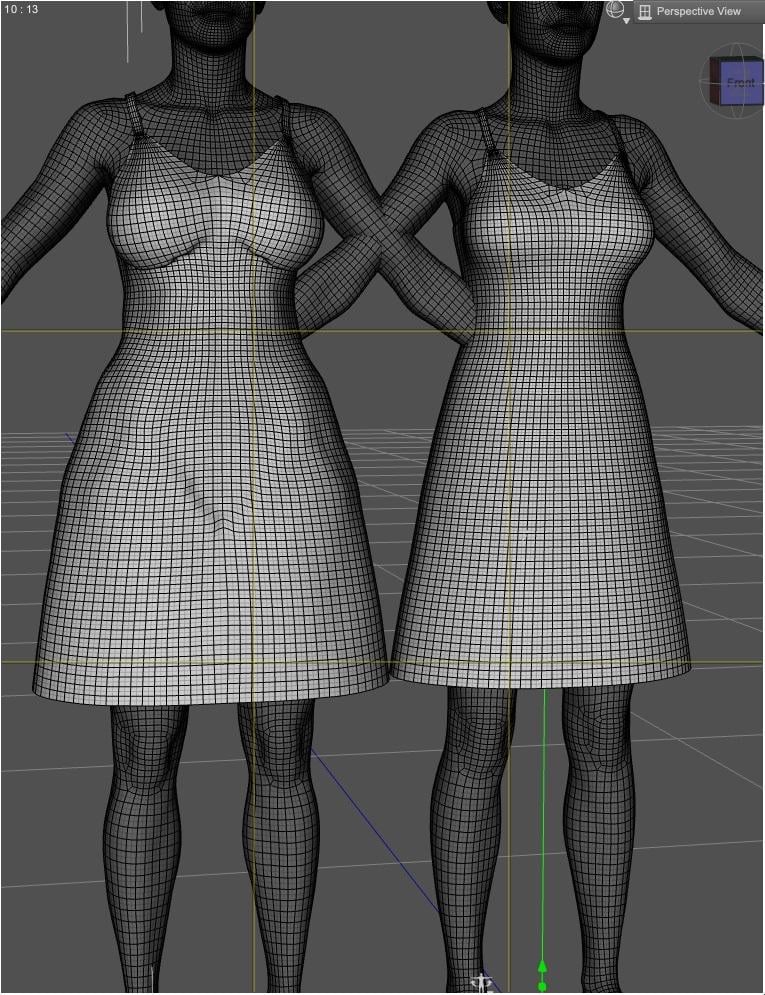
On the left, the dress worn by a character for which there is no such morph was created (smoothing is disabled to show the problem more), on the right, a character with a morph created.
Jay Versluis has a couple of videos on the subject:

It's also possible to create such morph by using the Smoothing Modifier in Daz Studio, setting it to very high values (@crosswind has some explanations somewhere on the subject), but the downside is that you'll lose details you could retain creating it yourself, so on some clothes it may not be an option.
Heads-up HID crafters: Requesting a model lookalike of Hayley WilliamsAnd there you have it.
Alternatives to paid/subscription tools:
- SimpliGen -> Comfy UI (free)
- Topaz -> Comfy UI
- FaceApp -> Invoke (free)
- Paid morph packages -> Free morph packages like SickleYield's free G8F/G9 package or free packages on sites like DeviantArt
- Marvelous Designer -> HiPhy physics simulator for Blender (119 dollars plus tax, one-time price) plus Blender core (free; you can make 2D shapes as clothing patterns, use free techniques to make them polygonal and make them sewn together, and then use HiPhy to animate and use physics quicker and better than Blender's own physics engine)
- Marvelous Designer -> Divine Cut for Blender (current price: 39.75 dollars plus tax; less money overall than HiPhy, one-time price, easier to work with than Blender core app)
- For shoes, Marvelous Designer -> Blender core app (I made shoes in Blender before I learned to make them in Marvelous Designer. MD is quicker, though.
Heads-up HID crafters: Requesting a model lookalike of Hayley WilliamsThe Head and Body Shape (Continued)
- I imported all three pics into Topaz's photo enhancer (latest version requires a subscription at 199 dollars a year, but I have a previous version that I still use that required a one-time purchase), upscaled them to 4K resolution, sharpened them, and denoised them, and then saved them as new images.
- I imported the 4K images into FaceGen Artist Pro (140 dollars, last I checked, for a new account, but I paid 70 dollars for an upgrade to version 4 from version 3 in 2024), and it made a head shape resembling the pics for Genesis 8 Female.
- For the skins, I used a previously made set of skins from Skin Builder 8 for Genesis 8 Female (on sale right now for half off, normal price is 35 to 40 dollars, including tax), that I made in 2020 or so, as the reference skins.
- I made the body shape based on Hayley Williams' height (5 ft., 2 in.; 157.5 cm in Daz units), but I made up the body proportions with morphs from 8 paid morph packages for Genesis 8 Female (each one's price varies
Continued...
Transferring G8 morphs to G9Is this feature in Daz Studio 6 located at Figure > Shape > Transfer Active Morphs?
I don't know which step went wrong.
 Genesis 10
SnowSultan said:
Why do you assume G9 is hated?
If G9 weren't a commercial success, then either Daz would have already replaced it or we would have seen them rolling back to primarily G8; they are a medium-sized business, they can't afford to keep pushing a failed campaign for four years out of spite.
There are a mix of criticisms around G9.
- Some are reasonably well founded - having everything on the same base increases load times and makes smart content filtering less capable if you don't want butt-out pin-up poses.
- Others are a question of trade-offs - lack of nipple geometry gives less flexibility on nude characters, but improves morph following on clothes.
- A few make complaints that are equally if not more true about its predecessors - such as the occasional claim that the edge loops on G9 are in the wrong place, so the correctives are a nuisance and figure doesn't bend right (but then, anyone who's ever tried making ThighSide JCMs for G8 will know that the edge flow straight across that bend is awful)
- And some that are really just conspiracies that have persisted despite considerable evidence to the contrary. For example, despite being a androgynous base, there hasn't been any influx of transgender/gender-neutral content like some said would happen. Indeed, none of G9's 100+ core characters have been marketed that way* (whereas we had a few explicitly queer core characters or DO bundles in G8) - if anything, I would argue that G9 being an androgynous base has actually discouraged the production and marketing of that kind of content; when it's a standard feature of the figure, there's really nothing new to sell.
* Sure, we've had things like Victoria Male, Michael Female, Xola Feminine, etc, but they're variants of the figure rather than being a "canon" point of the characters' identities.
However, whatever those criticisms are, they can't reasonably add up to saying that G9 is universally hated, because if it really were, the money would have already talked.
And, to be clear, I say that as someone who is so-so on G9 and still predominantly uses G8.
Genesis 10Some people really just need to learn how to turn morph dials.
Genesis 10Ruthven said:
What I hope is a 3 figure set: masculine, feminine, and gender-neutral (more similar to Genesis 1 than 9) for creatures, all with cross/figure features for wearables and similar.
What benefit are you imagining this would add? Unless they have different weight maps (which would break clothing compatibility), then there's not going to be any meaningful difference from a unisex base. And it would *absolutely* break geografts.
Admittedly, one thing I'm peeved that Daz did not set up as a standard for G9 was to have masculine figures all built on top of the base masculine shape and feminine figures all built off base feminine so that clothes could at least rely on being able to have those two base shapes supported rather than having to approximate the entirety of any unknown morph with auto-follow.
Genesis 10RawArt said:
All new generation figures will be hated by anyone who does not want to adapt to change. Thats just a human reaction.
As someone who works with g9 all day every day, I can safely say it is the best generation of figures produced for d/s. It is way more versitile than any previous generation and can easier adapt to even the extreme shapes I make for it.
But that said, there will really be no need for a G10 until there is some marked improvement in what can be done with d/s. If there is no serious technical growth, then it would just be change for the sake of change and not really becoming an improvement. Right now G9 is perfectly suited for the current state of d/s
Get the basic figures right first, so they look, and bend like real people ( men and women ), and have basic detail like nipples. Provide the end user with the ability to morph the figures across the wide range of real human shapes Once all that is working, then is the time to consider extreme shapes.
Culprits or Fixes for Teeth Issues on G8.1F?I had a similar issue with G8. Turned out to be a breast morph package causing it despite not being actually in use. Once uninstalled, problem gone. Can't remember exactly which one it was now though.
Genesis 10The generational changeover seems to be around 4 years. I think both V4 & G8 are causing DAZ issues with such a long tail to their usage that G9 probably hasn't reach its full potential away from the DAZ store, especially given the lack of a major technological leap compared to G8. As for a G10.. I suspect few people have an appetite for it yet, and will only do so once there is a visible and significant benefit to using G10. And that will involve completion of the transfer of script tools to DS6 as well as a real 'something' that makes it easier to use or makes the images have a 'wow' factor compared to ones featuring the current in-use generations.
I think it's getting a lot harder to get the required step change to justify a complete new generation, because DS is such a mature & evolved product. That in itself means that the easy, middling and moderately hard stuff has already been done, leaving only the 'extremely hard' improvements to be made.
Regards,
Richard
Face Transfer failed to generate. Try a different source imageA morph is just moving the vertices that define the base shape around - you can't add or remove parts. We don't have acces to HD morphs, so we are limited to the base resolution - even with HD that shape would not be practical. The horns should be attachments (probably GeoGrafts) while the face could be a regular morph - you could get close by using whatever tools your available modelling application has for projecting one shape into another, or painting with a sculpting tool to conform the target mesh to the desied shape so that the Genesis 9 shape matched the head model, with the rest of the figure untouched, then loading that as a morph.
Face Transfer failed to generate. Try a different source imageThanks @WendyLuvsCatz for your response and I believe that you are corrrect
I have made the head of the character the exact same size as a G8M model - see attached screenshot - followed by using the Morph loader on the obj file that I made, but I received the following error
2026-09-17 17:50:17.063 [WARNING] :: QLayout: Attempting to add QLayout "" to DzMorphLoadDlg "Morph Loader Advanced", which already has a layout
2026-09-17 17:50:52.475 [INFO] :: Reading devil-head.obj
2026-09-17 17:50:55.189 [INFO] :: Vertex count mismatch in Morph Loader
2026-09-17 17:50:55.192 [INFO] :: Morph Loader reported no effect for the following file(s):
2026-09-17 17:50:55.192 [INFO] :: E:/temp/09-16-26-tim-curry-devil/devil-head.obj
There has to be a way to create this figure, with the ability to use all the other features that a G8M figure has
I know that I can import in a file that I have made on it's own, but just importing an obj file, would result in not being able to use Facemotion to animate the character speaking
If you think of anything, then please let me know
Culprits or Fixes for Teeth Issues on G8.1F?crosswind said:
In short, yes, the issue comes from a combined auto-follow morph when you (or a content creator) customize or convert a character, especially with Mouth Realism set as 100%. They're sort of baked rather than hidden, so you have no way to find them from Parameters pane. Therefore better always zero Mouth Realism first of all when customizing especially converting characters ~~
If you get such an issue on G8 and want to fix it, the common ways can be:
1) Clear all morphs / deltas from the geometry of mouth (incl. teeth), re-rig it and update Full Head Morph or create as a fix morph
2) Or, zero Mouth Realism 1stly, then fix the teeth by using some products, e.g.
https://www.daz3d.com/easy-teeth-for-genesis-8-female-s-and-merchant-resource
https://www.daz3d.com/teeth-master-control-for-genesis-8-femaleoof, right in the wallet. wishlisted for now thanks
Gentleman Poses Compatibility HelpThey're from this: https://www.daz3d.com/dforce-mi-two-piece-business-suit-for-genesis-8-and-81-males, as listed on the product page. Aeon Soul might have made their own morph to open the pocket, I cannot recall if those pants have a morph for that by default, and I cannot check right now as I'm not on my computer.
Culprits or Fixes for Teeth Issues on G8.1F?In short, yes, the issue comes from a combined auto-follow morph when you (or a content creator) customize or convert a character, especially with Mouth Realism set as 100%. They're sort of baked rather than hidden, so you have no way to find them from Parameters pane. Therefore better always zero Mouth Realism first of all when customizing especially converting characters ~~
If you get such an issue on G8 and want to fix it, the common ways can be:
1) Clear all morphs / deltas from the geometry of mouth (incl. teeth), re-rig it and update Full Head Morph or create as a fix morph
2) Or, zero Mouth Realism 1stly, then fix the teeth by using some products, e.g.
https://www.daz3d.com/easy-teeth-for-genesis-8-female-s-and-merchant-resource
https://www.daz3d.com/teeth-master-control-for-genesis-8-femaleDaz 3D is part of

Connect
DAZ Productions, Inc.
7533 S Center View Ct #4664
West Jordan, UT 84084Licensing Agreement | Terms of Service | Privacy Policy | EULA
© 2026 Daz Productions Inc. All Rights Reserved.