-
The new "blender to Daz plugin"
evacyn said:
It works really well with KitBash stuff. You can download the native Blender files from Kitbash, and it keeps the textures without any additional work to import them individually. Definitely the coolest thing I've bought here in a long time.

@evacyn, I'm wondering: Do you have to save the buildings separately to separate the buildings, or are they already separate on import? I've been using Poser 11 Pro's FBX to get KB3D into Studio, and the real tedium is separating the buildings, as Wendy said. Thanks for testing this!
Old User, old version of Studio HelpHi all,
I am still on version 3.1 of Daz Studio because I never wanted to upgrade as I am only a very casual user. I last used Daz Studio around a month ago and everything loaded and worked properly as it has done for many years. Now, however, very few of my scenes load in. They will get to 100% but Studio will hang and then crash (closes) to desktop. If someone would kindly look through the log file and possibly point me in a direction to fix any issues. I've downgraded and upgraded GPU drivers (RTX 3080ti) but to no avail. This is a sudden issue and although I recently re-installed windows 10, I have done so many times before without issue. I simply can't understand what is missing or happening that causes a crash.
I did install the most recent version of Studio but loading an old scene crashed studio with an error once at 100%.
Opening file Bot.daz...
Reading Bot.daz
Loaded image V4LanaFaceM1.jpg
Loaded image Inked_Vol8_Tat24.jpg
Loaded image V4LanaFaceM1_!Tattoo 24.dsi
Loaded image Inked_Vol8_Tat24.jpg
Loaded image V4LanaFaceM1_!Tattoo 24_!Tattoo 24.dsi
Loaded image Inked_Vol8_Tat24.jpg
Loaded image V4LanaFaceM1_!Tattoo 24_!Tattoo 24_!Tattoo 24.dsi
Loaded image Inked_Vol8_Tat24.jpg
Loaded image V4LanaFaceM1_!Tattoo 24_!Tattoo 24_!Tattoo 24_!Tattoo 24.dsi
Loaded image Inked_Vol8_Tat24.jpg
Loaded image V4LanaFaceM1_!Tattoo 24_!Tattoo 24_!Tattoo 24_!Tattoo 24_!Tattoo 24.dsi
Loaded image New Spec Map private 2.bmp
Ran tdlmake on image L:/Daz/Clothes - Bodysuit - cybersuit/Runtime/Textures/Ra Graphics/Cyber Suit Mark II/Cybersuit-Torso-bump.jpg
Ran tdlmake on image L:/Daz/Char - Young AnuV4A4/runtime/textures/FrejaSveva/Anu/FRAnuTorsoS.jpg
Ran tdlmake on image L:/Daz/Clothes - Bodysuit - cybersuit/Runtime/Textures/Ra Graphics/Cyber Suit Mark II/Cybersuit-Torso-White.jpg
Ran tdlmake on image L:/Daz/Clothes - High Heels - Arrin Noemi High Heel/Runtime/Textures/Arrin/V4GlamourNoemi/GN_Refl512_1.jpg
Ran tdlmake on image L:/Daz/Clothes - Bodysuit - cybersuit/Runtime/Textures/Ra Graphics/Cyber Suit Mark II/Cybersuit-Torso-Fab-bump.jpg
Ran tdlmake on image C:/Users/sneak/Documents/DAZ 3D/Studio3/content/Runtime/textures/DAZ/Characters/MilWom/V4/MLIE/V4LanaTorsoMbutt2 brown tanned.jpg
Ran tdlmake on image L:/Daz/Studio/content/Runtime/textures/DAZ/Characters/MilWom/V4/V4LanaTorsoB.jpg
Ran tdlmake on image L:/Daz/Clothes - Bodysuit - cybersuit/Runtime/Textures/Ra Graphics/Cyber Suit Mark II/Blue-Cybersuit-Torso.jpg
Ran tdlmake on image L:/Daz/Char - Exciting Mouth/Runtime/textures/ava_odnajdy/EM_4generationPack/EM_4generationPack_TX.jpg
Ran tdlmake on image L:/Daz/Char - Exciting Mouth/Runtime/textures/ava_odnajdy/EM_4generationPack/EM_4generationPack_Bump.jpg
Ran tdlmake on image L:/Daz/Studio/content/Runtime/textures/DAZ/Characters/MilWom/V4/V4LanaInMouthB.jpg
Ran tdlmake on image L:/Daz/Char - Finnia for V4/Runtime/Textures/RMFinnia/RMFniaLsh2.jpg
Ran tdlmake on image L:/Daz/Studio/content/Runtime/textures/DAZ/Characters/MilWom/V4/V4LanaTR.jpg
Ran tdlmake on image L:/Daz/Clothes - Bodysuit - cybersuit/Runtime/Textures/Ra Graphics/Cyber Suit Mark II/Cybersuit-Torso-White other2.jpg
Ran tdlmake on image C:/Users/sneak/Documents/DAZ 3D/Studio3/content/Runtime/textures/DAZ/Characters/MilWom/V4/V4LanaFaceB1.jpg
+++++++++++++++ DAZ Studio 3.1.2.32 starting +++++++++++++++++
DAZ Studio Raw Version: 50397728
Qt Version: 4.5.2
Running on Windows Unknown, Build 9200, No Service Pack Installed
Total Physical Memory: 32686 Mb (34273816576)
Available Physical Memory: 20481 Mb (21476339712)
Total Virtual Memory: 134217727 Mb (140737488224256)
Available Virtual Memory: 134213391 Mb (140732940754944)
Current Memory Usage: 37%
Fri 8. Aug 17:06:50 2025
Temp folder: C:/Users/sneak/AppData/Roaming/DAZ 3D/Studio3/temp
Total temp disk size: 231710 Mb, Available: 121529 Mb
Locale: en_GB
No translator found.
Reading style definition L:/Daz/Studio/resources/style/Carrara.style
Creating managers
Reading help file L:/Daz/Studio/resources/dazhelp.dsh
Reading help file L:/Daz/Studio/resources/hexbridge.dsh
Reading help file L:/Daz/Studio/resources/lipsync.dsh
Reading help file L:/Daz/Studio/resources/optitexcloth.dsh
Reading help file L:/Daz/Studio/resources/puppeteer.dsh
WARNING: .\interface\dialogs\dzbasicdialog.cpp(176): No parent specified for DzBasicDialog!
Scanning import folders
Scanning content folders
Supported OpenGL extensions:
GL_AMD_multi_draw_indirect : NOT INITIALIZED
GL_AMD_seamless_cubemap_per_texture : NOT INITIALIZED
GL_AMD_vertex_shader_viewport_index : NOT INITIALIZED
GL_AMD_vertex_shader_layer : NOT INITIALIZED
GL_ARB_arrays_of_arrays : NOT INITIALIZED
GL_ARB_base_instance : NOT INITIALIZED
GL_ARB_bindless_texture : NOT INITIALIZED
GL_ARB_blend_func_extended : NOT INITIALIZED
GL_ARB_buffer_storage : NOT INITIALIZED
GL_ARB_clear_buffer_object : NOT INITIALIZED
GL_ARB_clear_texture : NOT INITIALIZED
GL_ARB_clip_control : NOT INITIALIZED
GL_ARB_color_buffer_float : NOT INITIALIZED
GL_ARB_compatibility : NOT INITIALIZED
GL_ARB_compressed_texture_pixel_storage : NOT INITIALIZED
GL_ARB_conservative_depth : NOT INITIALIZED
GL_ARB_compute_shader : NOT INITIALIZED
GL_ARB_compute_variable_group_size : NOT INITIALIZED
GL_ARB_conditional_render_inverted : NOT INITIALIZED
GL_ARB_copy_buffer : NOT INITIALIZED
GL_ARB_copy_image : NOT INITIALIZED
GL_ARB_cull_distance : NOT INITIALIZED
GL_ARB_debug_output : NOT INITIALIZED
GL_ARB_depth_buffer_float : NOT INITIALIZED
GL_ARB_depth_clamp : NOT INITIALIZED
GL_ARB_depth_texture
GL_ARB_derivative_control : NOT INITIALIZED
GL_ARB_direct_state_access : NOT INITIALIZED
GL_ARB_draw_buffers : NOT INITIALIZED
GL_ARB_draw_buffers_blend : NOT INITIALIZED
GL_ARB_draw_indirect : NOT INITIALIZED
GL_ARB_draw_elements_base_vertex : NOT INITIALIZED
GL_ARB_draw_instanced : NOT INITIALIZED
GL_ARB_enhanced_layouts : NOT INITIALIZED
GL_ARB_ES2_compatibility : NOT INITIALIZED
GL_ARB_ES3_compatibility : NOT INITIALIZED
GL_ARB_ES3_1_compatibility : NOT INITIALIZED
GL_ARB_ES3_2_compatibility : NOT INITIALIZED
GL_ARB_explicit_attrib_location : NOT INITIALIZED
GL_ARB_explicit_uniform_location : NOT INITIALIZED
GL_ARB_fragment_coord_conventions : NOT INITIALIZED
GL_ARB_fragment_layer_viewport : NOT INITIALIZED
GL_ARB_fragment_program
GL_ARB_fragment_program_shadow
GL_ARB_fragment_shader
GL_ARB_fragment_shader_interlock : NOT INITIALIZED
GL_ARB_framebuffer_no_attachments : NOT INITIALIZED
GL_ARB_framebuffer_object : NOT INITIALIZED
GL_ARB_framebuffer_sRGB : NOT INITIALIZED
GL_ARB_geometry_shader4 : NOT INITIALIZED
GL_ARB_get_program_binary : NOT INITIALIZED
GL_ARB_get_texture_sub_image : NOT INITIALIZED
GL_ARB_gl_spirv : NOT INITIALIZED
GL_ARB_gpu_shader5 : NOT INITIALIZED
GL_ARB_gpu_shader_fp64 : NOT INITIALIZED
GL_ARB_gpu_shader_int64 : NOT INITIALIZED
GL_ARB_half_float_pixel : NOT INITIALIZED
GL_ARB_half_float_vertex : NOT INITIALIZED
GL_ARB_imaging : NOT INITIALIZED
GL_ARB_indirect_parameters : NOT INITIALIZED
GL_ARB_instanced_arrays : NOT INITIALIZED
GL_ARB_internalformat_query : NOT INITIALIZED
GL_ARB_internalformat_query2 : NOT INITIALIZED
GL_ARB_invalidate_subdata : NOT INITIALIZED
GL_ARB_map_buffer_alignment : NOT INITIALIZED
GL_ARB_map_buffer_range : NOT INITIALIZED
GL_ARB_multi_bind : NOT INITIALIZED
GL_ARB_multi_draw_indirect : NOT INITIALIZED
GL_ARB_multisample
GL_ARB_multitexture
GL_ARB_occlusion_query
GL_ARB_occlusion_query2 : NOT INITIALIZED
GL_ARB_parallel_shader_compile : NOT INITIALIZED
GL_ARB_pipeline_statistics_query : NOT INITIALIZED
GL_ARB_pixel_buffer_object : NOT INITIALIZED
GL_ARB_point_parameters
GL_ARB_point_sprite
GL_ARB_polygon_offset_clamp : NOT INITIALIZED
GL_ARB_post_depth_coverage : NOT INITIALIZED
GL_ARB_program_interface_query : NOT INITIALIZED
GL_ARB_provoking_vertex : NOT INITIALIZED
GL_ARB_query_buffer_object : NOT INITIALIZED
GL_ARB_robust_buffer_access_behavior : NOT INITIALIZED
GL_ARB_robustness : NOT INITIALIZED
GL_ARB_sample_locations : NOT INITIALIZED
GL_ARB_sample_shading : NOT INITIALIZED
GL_ARB_sampler_objects : NOT INITIALIZED
GL_ARB_seamless_cube_map : NOT INITIALIZED
GL_ARB_seamless_cubemap_per_texture : NOT INITIALIZED
GL_ARB_separate_shader_objects : NOT INITIALIZED
GL_ARB_shader_atomic_counter_ops : NOT INITIALIZED
GL_ARB_shader_atomic_counters : NOT INITIALIZED
GL_ARB_shader_ballot : NOT INITIALIZED
GL_ARB_shader_bit_encoding : NOT INITIALIZED
GL_ARB_shader_clock : NOT INITIALIZED
GL_ARB_shader_draw_parameters : NOT INITIALIZED
GL_ARB_shader_group_vote : NOT INITIALIZED
GL_ARB_shader_image_load_store : NOT INITIALIZED
GL_ARB_shader_image_size : NOT INITIALIZED
GL_ARB_shader_objects
GL_ARB_shader_precision : NOT INITIALIZED
GL_ARB_shader_storage_buffer_object : NOT INITIALIZED
GL_ARB_shader_subroutine : NOT INITIALIZED
GL_ARB_shader_texture_image_samples : NOT INITIALIZED
GL_ARB_shader_texture_lod : NOT INITIALIZED
GL_ARB_shading_language_100
GL_ARB_shader_viewport_layer_array : NOT INITIALIZED
GL_ARB_shading_language_420pack : NOT INITIALIZED
GL_ARB_shading_language_include : NOT INITIALIZED
GL_ARB_shading_language_packing : NOT INITIALIZED
GL_ARB_shadow
GL_ARB_sparse_buffer : NOT INITIALIZED
GL_ARB_sparse_texture : NOT INITIALIZED
GL_ARB_sparse_texture2 : NOT INITIALIZED
GL_ARB_sparse_texture_clamp : NOT INITIALIZED
GL_ARB_spirv_extensions : NOT INITIALIZED
GL_ARB_stencil_texturing : NOT INITIALIZED
GL_ARB_sync : NOT INITIALIZED
GL_ARB_tessellation_shader : NOT INITIALIZED
GL_ARB_texture_barrier : NOT INITIALIZED
GL_ARB_texture_border_clamp
GL_ARB_texture_buffer_object : NOT INITIALIZED
GL_ARB_texture_buffer_object_rgb32 : NOT INITIALIZED
GL_ARB_texture_buffer_range : NOT INITIALIZED
GL_ARB_texture_compression
GL_ARB_texture_compression_bptc : NOT INITIALIZED
GL_ARB_texture_compression_rgtc : NOT INITIALIZED
GL_ARB_texture_cube_map
GL_ARB_texture_cube_map_array : NOT INITIALIZED
GL_ARB_texture_env_add
GL_ARB_texture_env_combine
GL_ARB_texture_env_crossbar : NOT INITIALIZED
GL_ARB_texture_env_dot3
GL_ARB_texture_filter_anisotropic : NOT INITIALIZED
GL_ARB_texture_filter_minmax : NOT INITIALIZED
GL_ARB_texture_float : NOT INITIALIZED
GL_ARB_texture_gather : NOT INITIALIZED
GL_ARB_texture_mirror_clamp_to_edge : NOT INITIALIZED
GL_ARB_texture_mirrored_repeat
GL_ARB_texture_multisample : NOT INITIALIZED
GL_ARB_texture_non_power_of_two
GL_ARB_texture_query_levels : NOT INITIALIZED
GL_ARB_texture_query_lod : NOT INITIALIZED
GL_ARB_texture_rectangle : NOT INITIALIZED
GL_ARB_texture_rg : NOT INITIALIZED
GL_ARB_texture_rgb10_a2ui : NOT INITIALIZED
GL_ARB_texture_stencil8 : NOT INITIALIZED
GL_ARB_texture_storage : NOT INITIALIZED
GL_ARB_texture_storage_multisample : NOT INITIALIZED
GL_ARB_texture_swizzle : NOT INITIALIZED
GL_ARB_texture_view : NOT INITIALIZED
GL_ARB_timer_query : NOT INITIALIZED
GL_ARB_transform_feedback2 : NOT INITIALIZED
GL_ARB_transform_feedback3 : NOT INITIALIZED
GL_ARB_transform_feedback_instanced : NOT INITIALIZED
GL_ARB_transform_feedback_overflow_query : NOT INITIALIZED
GL_ARB_transpose_matrix
GL_ARB_uniform_buffer_object : NOT INITIALIZED
GL_ARB_vertex_array_bgra : NOT INITIALIZED
GL_ARB_vertex_array_object : NOT INITIALIZED
GL_ARB_vertex_attrib_64bit : NOT INITIALIZED
GL_ARB_vertex_attrib_binding : NOT INITIALIZED
GL_ARB_vertex_buffer_object
GL_ARB_vertex_program
GL_ARB_vertex_shader
GL_ARB_vertex_type_10f_11f_11f_rev : NOT INITIALIZED
GL_ARB_vertex_type_2_10_10_10_rev : NOT INITIALIZED
GL_ARB_viewport_array : NOT INITIALIZED
GL_ARB_window_pos
GL_ATI_draw_buffers
GL_ATI_texture_float
GL_ATI_texture_mirror_once : NOT INITIALIZED
GL_S3_s3tc : NOT INITIALIZED
GL_EXT_texture_env_add
GL_EXT_abgr
GL_EXT_bgra
GL_EXT_bindable_uniform : NOT INITIALIZED
GL_EXT_blend_color
GL_EXT_blend_equation_separate
GL_EXT_blend_func_separate
GL_EXT_blend_minmax
GL_EXT_blend_subtract
GL_EXT_compiled_vertex_array
GL_EXT_Cg_shader
GL_EXT_depth_bounds_test
GL_EXT_direct_state_access : NOT INITIALIZED
GL_EXT_draw_buffers2 : NOT INITIALIZED
GL_EXT_draw_instanced : NOT INITIALIZED
GL_EXT_draw_range_elements
GL_EXT_fog_coord
GL_EXT_framebuffer_blit : NOT INITIALIZED
GL_EXT_framebuffer_multisample : NOT INITIALIZED
GL_EXTX_framebuffer_mixed_formats : NOT INITIALIZED
GL_EXT_framebuffer_multisample_blit_scaled : NOT INITIALIZED
GL_EXT_framebuffer_object : NOT INITIALIZED
GL_EXT_framebuffer_sRGB : NOT INITIALIZED
GL_EXT_geometry_shader4 : NOT INITIALIZED
GL_EXT_gpu_program_parameters : NOT INITIALIZED
GL_EXT_gpu_shader4 : NOT INITIALIZED
GL_EXT_multi_draw_arrays
GL_EXT_multiview_texture_multisample : NOT INITIALIZED
GL_EXT_multiview_timer_query : NOT INITIALIZED
GL_EXT_packed_depth_stencil : NOT INITIALIZED
GL_EXT_packed_float : NOT INITIALIZED
GL_EXT_packed_pixels
GL_EXT_pixel_buffer_object
GL_EXT_point_parameters
GL_EXT_polygon_offset_clamp : NOT INITIALIZED
GL_EXT_post_depth_coverage : NOT INITIALIZED
GL_EXT_provoking_vertex : NOT INITIALIZED
GL_EXT_raster_multisample : NOT INITIALIZED
GL_EXT_rescale_normal
GL_EXT_secondary_color
GL_EXT_separate_shader_objects : NOT INITIALIZED
GL_EXT_separate_specular_color
GL_EXT_shader_image_load_formatted : NOT INITIALIZED
GL_EXT_shader_image_load_store : NOT INITIALIZED
GL_EXT_shader_integer_mix : NOT INITIALIZED
GL_EXT_shadow_funcs
GL_EXT_sparse_texture2 : NOT INITIALIZED
GL_EXT_stencil_two_side
GL_EXT_stencil_wrap
GL_EXT_texture3D
GL_EXT_texture_array : NOT INITIALIZED
GL_EXT_texture_buffer_object : NOT INITIALIZED
GL_EXT_texture_compression_dxt1 : NOT INITIALIZED
GL_EXT_texture_compression_latc : NOT INITIALIZED
GL_EXT_texture_compression_rgtc : NOT INITIALIZED
GL_EXT_texture_compression_s3tc
GL_EXT_texture_cube_map : NOT INITIALIZED
GL_EXT_texture_edge_clamp : NOT INITIALIZED
GL_EXT_texture_env_combine
GL_EXT_texture_env_dot3
GL_EXT_texture_filter_anisotropic
GL_EXT_texture_filter_minmax : NOT INITIALIZED
GL_EXT_texture_integer : NOT INITIALIZED
GL_EXT_texture_lod : NOT INITIALIZED
GL_EXT_texture_lod_bias
GL_EXT_texture_mirror_clamp : NOT INITIALIZED
GL_EXT_texture_object
GL_EXT_texture_shadow_lod : NOT INITIALIZED
GL_EXT_texture_shared_exponent : NOT INITIALIZED
GL_EXT_texture_sRGB : NOT INITIALIZED
GL_EXT_texture_sRGB_R8 : NOT INITIALIZED
GL_EXT_texture_sRGB_decode : NOT INITIALIZED
GL_EXT_texture_storage : NOT INITIALIZED
GL_EXT_texture_swizzle : NOT INITIALIZED
GL_EXT_timer_query : NOT INITIALIZED
GL_EXT_transform_feedback2 : NOT INITIALIZED
GL_EXT_vertex_array
GL_EXT_vertex_array_bgra : NOT INITIALIZED
GL_EXT_vertex_attrib_64bit : NOT INITIALIZED
GL_EXT_window_rectangles : NOT INITIALIZED
GL_EXT_import_sync_object : NOT INITIALIZED
GL_IBM_rasterpos_clip : NOT INITIALIZED
GL_IBM_texture_mirrored_repeat
GL_KHR_context_flush_control : NOT INITIALIZED
GL_KHR_debug : NOT INITIALIZED
GL_EXT_memory_object : NOT INITIALIZED
GL_EXT_memory_object_win32 : NOT INITIALIZED
GL_NV_memory_object_sparse : NOT INITIALIZED
GL_EXT_win32_keyed_mutex : NOT INITIALIZED
GL_KHR_parallel_shader_compile : NOT INITIALIZED
GL_KHR_no_error : NOT INITIALIZED
GL_KHR_robust_buffer_access_behavior : NOT INITIALIZED
GL_KHR_robustness : NOT INITIALIZED
GL_EXT_semaphore : NOT INITIALIZED
GL_EXT_semaphore_win32 : NOT INITIALIZED
GL_NV_timeline_semaphore : NOT INITIALIZED
GL_KHR_shader_subgroup : NOT INITIALIZED
GL_KTX_buffer_region : NOT INITIALIZED
GL_NV_alpha_to_coverage_dither_control : NOT INITIALIZED
GL_NV_bindless_multi_draw_indirect : NOT INITIALIZED
GL_NV_bindless_multi_draw_indirect_count : NOT INITIALIZED
GL_NV_bindless_texture : NOT INITIALIZED
GL_NV_blend_equation_advanced : NOT INITIALIZED
GL_NV_blend_equation_advanced_coherent : NOT INITIALIZED
GL_NVX_blend_equation_advanced_multi_draw_buffers : NOT INITIALIZED
GL_NV_blend_minmax_factor : NOT INITIALIZED
GL_NV_blend_square
GL_NV_clip_space_w_scaling : NOT INITIALIZED
GL_NV_command_list : NOT INITIALIZED
GL_NV_compute_program5 : NOT INITIALIZED
GL_NV_compute_shader_derivatives : NOT INITIALIZED
GL_NV_conditional_render : NOT INITIALIZED
GL_NV_conservative_raster : NOT INITIALIZED
GL_NV_conservative_raster_dilate : NOT INITIALIZED
GL_NV_conservative_raster_pre_snap : NOT INITIALIZED
GL_NV_conservative_raster_pre_snap_triangles : NOT INITIALIZED
GL_NV_conservative_raster_underestimation : NOT INITIALIZED
GL_NV_copy_depth_to_color
GL_NV_copy_image : NOT INITIALIZED
GL_NV_depth_buffer_float : NOT INITIALIZED
GL_NV_depth_clamp
GL_NV_draw_texture : NOT INITIALIZED
GL_NV_draw_vulkan_image : NOT INITIALIZED
GL_NV_ES1_1_compatibility : NOT INITIALIZED
GL_NV_ES3_1_compatibility : NOT INITIALIZED
GL_NV_explicit_multisample : NOT INITIALIZED
GL_NV_feature_query : NOT INITIALIZED
GL_NV_fence
GL_NV_fill_rectangle : NOT INITIALIZED
GL_NV_float_buffer
GL_NV_fog_distance
GL_NV_fragment_coverage_to_color : NOT INITIALIZED
GL_NV_fragment_program
GL_NV_fragment_program_option : NOT INITIALIZED
GL_NV_fragment_program2
GL_NV_fragment_shader_barycentric : NOT INITIALIZED
GL_NV_fragment_shader_interlock : NOT INITIALIZED
GL_NV_framebuffer_mixed_samples : NOT INITIALIZED
GL_NV_framebuffer_multisample_coverage : NOT INITIALIZED
GL_NV_geometry_shader4 : NOT INITIALIZED
GL_NV_geometry_shader_passthrough : NOT INITIALIZED
GL_NV_gpu_program4 : NOT INITIALIZED
GL_NV_internalformat_sample_query : NOT INITIALIZED
GL_NV_gpu_program4_1 : NOT INITIALIZED
GL_NV_gpu_program5 : NOT INITIALIZED
GL_NV_gpu_program5_mem_extended : NOT INITIALIZED
GL_NV_gpu_program_fp64 : NOT INITIALIZED
GL_NV_gpu_program_multiview : NOT INITIALIZED
GL_NV_gpu_shader5 : NOT INITIALIZED
GL_NV_half_float
GL_NV_light_max_exponent
GL_NV_memory_attachment : NOT INITIALIZED
GL_NV_mesh_shader : NOT INITIALIZED
GL_NV_multisample_coverage : NOT INITIALIZED
GL_NV_multisample_filter_hint
GL_NV_occlusion_query
GL_NV_packed_depth_stencil
GL_NV_parameter_buffer_object : NOT INITIALIZED
GL_NV_parameter_buffer_object2 : NOT INITIALIZED
GL_NV_path_rendering : NOT INITIALIZED
GL_NV_path_rendering_shared_edge : NOT INITIALIZED
GL_NV_pixel_data_range
GL_NV_point_sprite
GL_NV_primitive_restart
GL_NV_primitive_shading_rate : NOT INITIALIZED
GL_NV_query_resource : NOT INITIALIZED
GL_NV_query_resource_tag : NOT INITIALIZED
GL_NV_register_combiners
GL_NV_register_combiners2
GL_NV_representative_fragment_test : NOT INITIALIZED
GL_NV_sample_locations : NOT INITIALIZED
GL_NV_sample_mask_override_coverage : NOT INITIALIZED
GL_NV_scissor_exclusive : NOT INITIALIZED
GL_NV_shader_atomic_counters : NOT INITIALIZED
GL_NV_shader_atomic_float : NOT INITIALIZED
GL_NV_shader_atomic_float64 : NOT INITIALIZED
GL_NV_shader_atomic_fp16_vector : NOT INITIALIZED
GL_NV_shader_atomic_int64 : NOT INITIALIZED
GL_NV_shader_buffer_load : NOT INITIALIZED
GL_NV_shader_storage_buffer_object : NOT INITIALIZED
GL_NV_shader_subgroup_partitioned : NOT INITIALIZED
GL_NV_shader_texture_footprint : NOT INITIALIZED
GL_NV_shading_rate_image : NOT INITIALIZED
GL_NV_stereo_view_rendering : NOT INITIALIZED
GL_NV_texgen_reflection
GL_NV_texture_barrier : NOT INITIALIZED
GL_NV_texture_compression_vtc
GL_NV_texture_dirty_tile_map : NOT INITIALIZED
GL_NV_texture_env_combine4
GL_NV_texture_multisample : NOT INITIALIZED
GL_NV_texture_rectangle
GL_NV_texture_rectangle_compressed : NOT INITIALIZED
GL_NV_texture_shader
GL_NV_texture_shader2
GL_NV_texture_shader3
GL_NV_transform_feedback : NOT INITIALIZED
GL_NV_transform_feedback2 : NOT INITIALIZED
GL_NV_uniform_buffer_unified_memory : NOT INITIALIZED
GL_NV_uniform_buffer_std430_layout : NOT INITIALIZED
GL_NV_vertex_array_range
GL_NV_vertex_array_range2
GL_NV_vertex_attrib_integer_64bit : NOT INITIALIZED
GL_NV_vertex_buffer_unified_memory : NOT INITIALIZED
GL_NV_vertex_program
GL_NV_vertex_program1_1 : NOT INITIALIZED
GL_NV_vertex_program2 : NOT INITIALIZED
GL_NV_vertex_program2_option : NOT INITIALIZED
GL_NV_vertex_program3 : NOT INITIALIZED
GL_NV_viewport_array2 : NOT INITIALIZED
GL_NV_viewport_swizzle : NOT INITIALIZED
GL_NVX_conditional_render
GL_NVX_linked_gpu_multicast : NOT INITIALIZED
GL_NV_gpu_multicast : NOT INITIALIZED
GL_NVX_gpu_multicast2 : NOT INITIALIZED
GL_NVX_progress_fence : NOT INITIALIZED
GL_NVX_gpu_memory_info : NOT INITIALIZED
GL_NVX_multigpu_info : NOT INITIALIZED
GL_NVX_nvenc_interop : NOT INITIALIZED
GL_NV_shader_thread_group : NOT INITIALIZED
GL_NV_shader_thread_shuffle : NOT INITIALIZED
GL_KHR_blend_equation_advanced : NOT INITIALIZED
GL_KHR_blend_equation_advanced_coherent : NOT INITIALIZED
GL_OVR_multiview : NOT INITIALIZED
GL_OVR_multiview2 : NOT INITIALIZED
GL_SGIS_generate_mipmap : NOT INITIALIZED
GL_SGIS_texture_lod : NOT INITIALIZED
GL_SGIX_depth_texture : NOT INITIALIZED
GL_SGIX_shadow : NOT INITIALIZED
GL_SUN_slice_accum : NOT INITIALIZED
GL_WIN_swap_hint : NOT INITIALIZED
WGL_EXT_swap_control
: NOT INITIALIZED
WGL_ARB_buffer_region
WGL_ARB_create_context : NOT INITIALIZED
WGL_ARB_create_context_no_error : NOT INITIALIZED
WGL_ARB_create_context_profile : NOT INITIALIZED
WGL_ARB_create_context_robustness : NOT INITIALIZED
WGL_ARB_context_flush_control : NOT INITIALIZED
WGL_ARB_extensions_string
WGL_ARB_make_current_read : NOT INITIALIZED
WGL_ARB_multisample : NOT INITIALIZED
WGL_ARB_pbuffer
WGL_ARB_pixel_format
WGL_ARB_pixel_format_float : NOT INITIALIZED
WGL_ARB_render_texture
WGL_ATI_pixel_format_float
WGL_EXT_colorspace : NOT INITIALIZED
WGL_EXT_create_context_es_profile : NOT INITIALIZED
WGL_EXT_create_context_es2_profile : NOT INITIALIZED
WGL_EXT_extensions_string
WGL_EXT_framebuffer_sRGB : NOT INITIALIZED
WGL_EXT_pixel_format_packed_float : NOT INITIALIZED
WGL_EXT_swap_control
WGL_EXT_swap_control_tear : NOT INITIALIZED
WGL_NVX_DX_interop : NOT INITIALIZED
WGL_NV_DX_interop : NOT INITIALIZED
WGL_NV_DX_interop2 : NOT INITIALIZED
WGL_NV_copy_image : NOT INITIALIZED
WGL_NV_delay_before_swap : NOT INITIALIZED
WGL_NV_float_buffer
WGL_NV_multisample_coverage : NOT INITIALIZED
WGL_NV_multigpu_context : NOT INITIALIZED
WGL_NV_render_depth_texture
WGL_NV_render_texture_rectangle
: NOT INITIALIZED
OpenGL features for current hardware:
OpenGL provider: NVIDIA Corporation
OpenGL renderer: NVIDIA GeForce RTX 3080 Ti/PCIe/SSE2
OpenGL version: 4.6.0
Maximum number of lights: 8
Number of auxiliary buffers: 4
Number of texture units: 4
Depth buffer bit resolution: 24
Maximum OpenGL texture size: 32768 x 32768
Current OpenGL Texture Quality Setting: Good Performance
RGBA color bitplane resolutions: 8 8 8 0
GLSL version: 4.60 NVIDIA
Shadow mapping supported
VBO supported
Clearing the Scene...
*** Scene Cleared ***
Loading plugins:
daznews.dll
dz3dconnexion.dll
dz3dmouse.dll
dzalignace.dll
dzautoshaderbakeractions.dll
dzbrycebridge.dll
dzbvh.dll
dzcolladax.dll
dzcomponents.dll
dzdelightrenderer.dll
dzdformeditor.dll
dzdynlod.dll
dzeasyloader.dll
dzfbxexporter.dll
dzfiguremixer.dll
dzhexagonbridge.dll
dzimageio.dll
dzmanualshaderbaker.dll
dzmaptransfer.dll
dzmorphfollower.dll
dzobjexporter.dll
dzprimitives.dll
dzpuppeteer.dll
dzpz3importer.dll
dzquickstart.dll
dzrenderedit.dll
dzsavefilters.dll
dzsceneinfo.dll
dzscriptedrenderer.dll
dzscriptedsteps.dll
dzshaderbaker.dll
dzshaderbuilder.dll
dzshadermixerbase.dll
dzshadermixergui.dll
dzspotrendertool.dll
dzstartupwizard.dll
dzu3dexporter.dll
dzwinvideo.dll
MoodMaster.dll
dzpowerpose.dll
Total class factories: 687
WARNING: 3DConnexion Plug-in Error: Could not create Device, CoCreateInstance failed
3D mouse support library could not be loaded.
Creating interface
Successfully created OpenGL viewport for view1.
Successfully created OpenGL viewport for view2.
Successfully created OpenGL viewport for view3.
Successfully created OpenGL viewport for view4.
Executing startup script...
Started in: L:/Daz/Studio
DAZ Studio Started
Creating Pixel Buffer
Pixel buffer - Width: 1024 Height: 1024
Compiling OpenGL Shader...
Fragment Shader:
Fragment Shader compiled successfully.
Linking Shader:
Shader Program successfully linked.
WARNING: Unrecognised OpenGL version
Content Labeling StandardsI actually started thinking about it from a different direction. Rather than focusing trying to wrangle a content schema on top of the existing content management system (i.e. it's a lot of work and gets out of sync too quickly once you have a large library), I'm wondering if it might be simpler to use an LLM toolchain to vectorize your content information and then just ask the LLM the questions you wanted to ask in plain language and get back a response that tells you what content you own, what content is availble from the store, etc.
For example, if I ask: "Do I have any Victorian steampunk vehicles in my collection?" can return content that was explicitly categorized as vehicles, but also can return content that was not but can be inferred as such from the product description and other metadata. I suppose you could also expand it to include the entire Daz catalog so it could also return information about products you don't own as well. :-) -- Hmmm, maybe for Version 2.
Anyway, I'm starting to tinker with a system to parse content and make it available for LLM search, with links to "apply" the content potentially. I think I have the bare bones of a project plan, so time to start experimenting. I'll post here if anything comes of it, for those that are interested. And if you're interested in being a tester (assuming it gets that far) let me know. :-)
The new DAZ to Blender PluginDBlendRMaster said:
Singular3D said:
Elor said:
TheNathanParable said:
I'm really confused. So is the FAST animation studio tools just the free Diffeomorphic plugin bundled with a bunch of other addons? The diffeomorphic website doesn't mention anything about it, but i'm assuming they must have permission.
I don't know if the FAST animation studio tools is what you think it is (I don't do animation) but if I'm reading diffeomorphic's website correctly, diffeomorphic is shared under a GPL2 licence so someone doesn't need permissions to include it in another product:
https://en.wikipedia.org/wiki/GNU_General_Public_License#Terms_and_conditions
GPLv2 is a viral license and it might be necessary to release combined code under GPLv2 as well.
There is the term 'larger work' in the GPL terms.Oh, yes — the FAST Animation Studio Tools add-on is completely GPL-licensed. Every Python file in the add-on (and the add-on’s base folder) includes the GPL v3-or-later license notice. Since Diffeomorphic is licensed under GPL v2 or later, it’s compatible with GPL v3 as well — so it’s perfectly fine to include it inside another GPL-licensed add-on... I also got a nod from developers that they weren't offended that I was doing this... I report issues when I get them and send feature request in fact in diffeomorphic the activate diffuse texture that's my feature request It's based on some code I wrote a while back and also the current state of the I think it's the import daz materials and actually probably quite a bit more... Not to take anything away from the developers of diffeomorphic their add-on is one of the most genius and best maintained and their support offering is definitely one of the best in the business.
"I'm really confused. So is the FAST animation studio tools just the free Diffeomorphic plugin bundled with a bunch of other addons? The diffeomorphic website doesn't mention anything about it, but i'm assuming they must have permission."....
TheNathanParable About the couple sentences previous to this ...
Thanks for joining into the conversation, I hope this answers your questions...
FAST Animation Studio Tools isn’t simply the free Diffeomorphic add-on bundled with other scripts — it’s a fully integrated, production-grade pipeline for Blender with around 600 custom operators we wrote ourselves. We’ve wrapped and extended Diffeomorphic’s Easy Import DAZ and Import DAZ Materials features into a much faster and more capable import system. For example, during import you can optionally add a Mixamo animation, a pose preset animation, or an Azure Lip Sync animation (similar to DAZ Mimic) so that the character arrives in Blender already moving and speaking your chosen dialogue.
We also bundle the Rokoko add-on for retargeting, but redesigned it so Mixamo-to-DAZ retargeting works correctly every time with no manual tweaking. The Rokoko add-on is free for anyone to download, update, or fork from GitHub. On top of that, we include the Mixamo add-on — while Mixamo itself is free on Adobe’s website, starting with Blender 3.6 they stopped updating the add-on, so we took over, made it more reliable, added new features (including a bulk Mixamo downloader), and now ship it as Mixamo Pro inside FAST. Diffeomorphic, Rokoko, and Mixamo are all completely free, GPL-licensed add-ons that anyone can download at any time, so bundling them doesn’t hurt anyone — it simply makes our pipeline more seamless. We’ve confirmed with the Diffeomorphic developers that they’re fine with this approach — they created an API specifically for others to build upon, and bundling the add-on is the logical way to make that API work out of the box.
Beyond imports, FAST streamlines every stage of scene creation — from animation editing, lighting, and camera work to scene organization and rendering. It includes one-click restarts, automatic optimization of Blender’s default settings, a collection-based scene system, and full AWS Deadline Studio integration for parallel rendering. That means you can output at least two minutes of finished Cycles scenes per day — something not feasible in DAZ Studio alone, where rendering the same amount of content could take over 60 hours. With FAST, you can get it done in about three hours without even using your own computer.
If you have any more questions feel free to ask or send them here:
The new DAZ to Blender PluginSingular3D said:
Elor said:
TheNathanParable said:
I'm really confused. So is the FAST animation studio tools just the free Diffeomorphic plugin bundled with a bunch of other addons? The diffeomorphic website doesn't mention anything about it, but i'm assuming they must have permission.
I don't know if the FAST animation studio tools is what you think it is (I don't do animation) but if I'm reading diffeomorphic's website correctly, diffeomorphic is shared under a GPL2 licence so someone doesn't need permissions to include it in another product:
https://en.wikipedia.org/wiki/GNU_General_Public_License#Terms_and_conditions
GPLv2 is a viral license and it might be necessary to release combined code under GPLv2 as well.
There is the term 'larger work' in the GPL terms.Oh, yes — the FAST Animation Studio Tools add-on is completely GPL-licensed. Every Python file in the add-on (and the add-on’s base folder) includes the GPL v3-or-later license notice. Since Diffeomorphic is licensed under GPL v2 or later, it’s compatible with GPL v3 as well — so it’s perfectly fine to include it inside another GPL-licensed add-on... I also got a nod from developers that they weren't offended that I was doing this... I report issues when I get them and send feature request in fact in diffeomorphic the activate diffuse texture that's my feature request It's based on some code I wrote a while back and also the current state of the I think it's the import daz materials and actually probably quite a bit more... Not to take anything away from the developers of diffeomorphic their add-on is one of the most genius and best maintained and their support offering is definitely one of the best in the business.
(Eited by mod to fix quote)
Will DAZ ever improve animating?Don't worry, Wolf... the Ragdoll physics and many of those higher tier tools wouldn't work in Indie anyway
Just the auto posing/physics alone are worth
investing an indie version as long as you get FBX import/export.
NOW on the general matter editing mocap on G9 this can all be done with the DS graph editorand a FREE SCRIPT from “Mcasual”
without creating custom pose dials in advance
Sadly we have no word on if his scripts will make the migration to DS 2025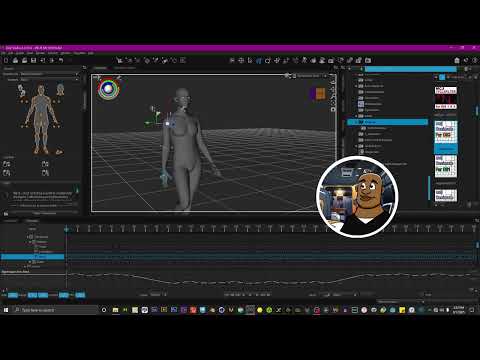
Second on foot contact solving
Nice Job!!
for one limb endpoint force pinned to
one object dependent upon a script that
(as of this writing) only works with DS 4.2X on a 40 series GPU.
(Please check the DS 2025 evergreen thread
for the latest news on scripts and plugins migration)@Imago does paid client work.
so limbstick should be able to process multiple hand and foot contacts during and stair or ladder climb animation requested by his paying clients , as seen in Blender here.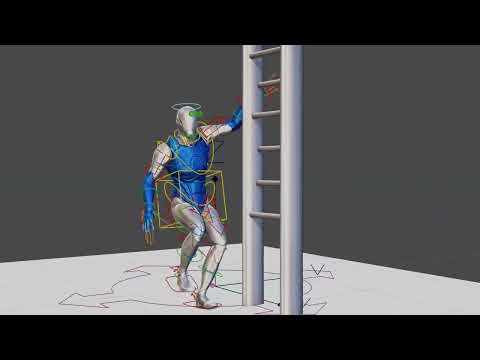
cool !!might be a good investment him like Cascadeur
thanks for the explainer video 3DU ROCKS!!
finally be sure to get your free 2000+ converted BVH archive of the entire Mixamo library for G8
see thread below for instruction on usage with G9.
(NEVER PAY FOR WHAT WAS MEANT TO BE FREE!!!)
https://www.daz3d.com/forums/discussion/comment/8860216/Off Topic Thread #2Interesting figures Headwax. Can anyone give me a good reason to buy full LAMH? It seems to have stability issues with DS. Allesandro said he was going to create a stand alone Version 2 at some point? Would be mostly using it to import into Blender. It has some interesting features, just not sure how well they will work.
invalid node selection for "preset properties" type error ...I decided to just save the Poser runtime files to my Poser content folder and now I can acess what I need. But would not import and save as a prop preset.
FBX import problemWhen I get a character from another source, it is usually in the FBX format. It typically won’t import properly into DAZ. But if I take it into Unreal Engine and then re-export it as an FBX, DAZ will usually open it. Albeit the character's bones are visible and it is always laying flat on the ground, facing downward.
The FBX import dialog box doesn't have orientation options like the OBJ import dialog box has. Is there any way to make the figures come in head’s up and facing forward?
I ask because (after standing the character on its feet) some of the Translate and Rotate tools don't move or spin in the correct direction.
Smart Content not filtering by figure [Solved]For some reason, my smart content is no longer filtering by figure type. For example, with a Genesis 8.1 Female figure selected, when I navigate to Poses / By Function / Standing, I see poses for all figures, not just Genesis 8 female; I see male and prior versions of Genesis as well. They are properly filtered to show only standing poses.
Any suggestions how I can correct this? I have already tried resetting the database and re-importing metadata.
Studio playing up, plan on a clean install - any tips?junkgoshere said:
Thanks Crosswind for clarifying my points
Reference backing up library, will be reinstalling everything from scratch, but will save those folders (Scenes and Scene subsets. Appreciate the input on saving plug-ins suggestion.
I have Daz on an M2 SSD, why install on C (which has less room)?
So you have a dedicated drive to locate your Daz Libray, then what I mentioned doesn't apply for your case. You know quite a lot of users still keep using the default Daz Libary there on C drive...
Also, not fully understanding the connect suggestion. I do not want anything to install at all, as it leaves blue thumbnails in my library I cannot get rid of. Is there a way to not have it install things?
The way of not having it install things is : 1) DO NOT Update Metadata when Login... Daz Connect; 2) DO NOT right-click on a Product pushed from Cloud to Install in Smart Content. If you have point 1) done, you'll never have to worry about point 2).
But I don't quite understand what are blue thumbnails... any screenshot ? If you mean you find those thumbnails after Update Metadata, you can easily Delete them by: right-click on it > Show Product in Content Libray, then right-click > Delete.The issues I am experiencing are due to mesh grabber, and its not the first time its happened, I accidentily grab the figure and not the clothing and it srews up that base figure everytime I load one, reinstall figure does not fix. First time was with G8F and it did not matter as moved my Daz to a new machine, this time its with G8M, and will be a full reinstall on that machine.
I don't understand... I've been using Mesh Grabber for years but haven't experienced such issue you mentioned. Did you ever Saved the morph in MG's Tool Settings, then saved the figure asset to overwrite the default Base figure ?
Just got a notice about 3Delight being retired.....My personal opinion is that iray is capable enough to convert 3delight shaders, indeed this is how we import 3dl in blender converting it first to iray. There may be some bump map to adjust as iray can't convert the bump height correctly, or some complex materials may need some adjustement too, but in general the conversion is good. As for the speed iray used with the cpu is far superior to 3dl with full ray tracing, while for 3dl without raytracing you can use filament instead, though in this case the shader conversion is not that good unfortunately as filament can't do most iray features, particularly transmapped hairs don't come good with filament.
The real advantage of 3dl is memory, as iray requires a vast amount of ram to render the scene while 3dl is tiled thus a small ram is enough. But ram alone doesn't cost much and most PCs can be upgraded for that.
Workflow for making static clothing mesh poseable?As @Elor linked, I also strongly recommend Mada's series that can make you an expert. They helped me a lot. Very appreciated !
Then I'd like to share some useful tricks from my workflow.. though it's not a tutorial ~~
- Depending on the style of wearables (whatever armors, garments, accessories...), different wearable styles may bring yout different results after rigging them with Transfer Utility (TU). You have to spend a lot of time on weight mapping, fixing corrective morphs, e.g. with long skirt, long robe, etc. So each time you're happy with a certain style of such a "complex type" of wearable, better save it as a Projection Template. When you rig another similar style, you can re-use the Projection Template with TU so as to save quite a lot of time for tweaking and fixing...
(I showed you a case in screenshot 1. On the left, rigged with None or DS templates; On the right, rigged with my saved template)
Well, you can use other garment product with similar style as a template, which is also a pretty good way ~- When weight mapping, if the garment is symmetrical, try using Symmetry option or Weight Map Symmetry... That'll save you more time.
- When fixing things in ZB or Blender, the same, fix them with Symmetry if you can do. Then you can import OBJ to update corrective morphs on different sides with Attenuate option.
- Or, if you just fix one side, you can use Mirroring option to update the corrective morph on the other side. (Left to Right or Right to Left...)
All these tricks can significantly help with speeding up your workflow. Hope you'll find them helpful when practicing with your workflow. Good luck !
LEM Extra Styles for G9 Toon BrowsThis project was a result of three things:
- I wanted certain eyebrow styles for my own FilaToon renders.
- Was curious to create and properly package a DAZ asset product, so it is usable for others.
- On that last point, wanted to give back after all these years of enjoying others' freebies. My PC is too weak for modeling, but I can texture with it.
This freebie was initially uploaded to my DAZ deviantART account. It can be found here: LEM Extra Styles for G9 Toon Brows by MimicMolly on DeviantArt. In case you're not on deviantART, I've uploaded the ZIP file as an attachment, but I removed the ReadMe just to be 100% sure it wasn't too big for the forums. If you still need a ReadMe for your own personal records, just copy-paste the deviantART description. It's also up on Renderhub and Renderosity, should you need to have it available elsewhere. (It's for both commercial and personal use. Basically, to be used like any other DAZ asset you'd buy from the DAZ3D store.)
There's 8 different eyebrows in the three styles -- black, tinted, and solid. They come in 4 colors: Chocolate, Dark Roast, Mousy Blonde, and Terracotta.
I designed them to be interchangeable with the DAZ Originals eyebrows. They are all hand drawn by me, created by my own natural, God-given intellgence. (No AI. I'll even link to my Art Studio thread where you can see part of my progress.) And here are some promo renders, in case you need them. The 4 colors are each showcased on two characters.
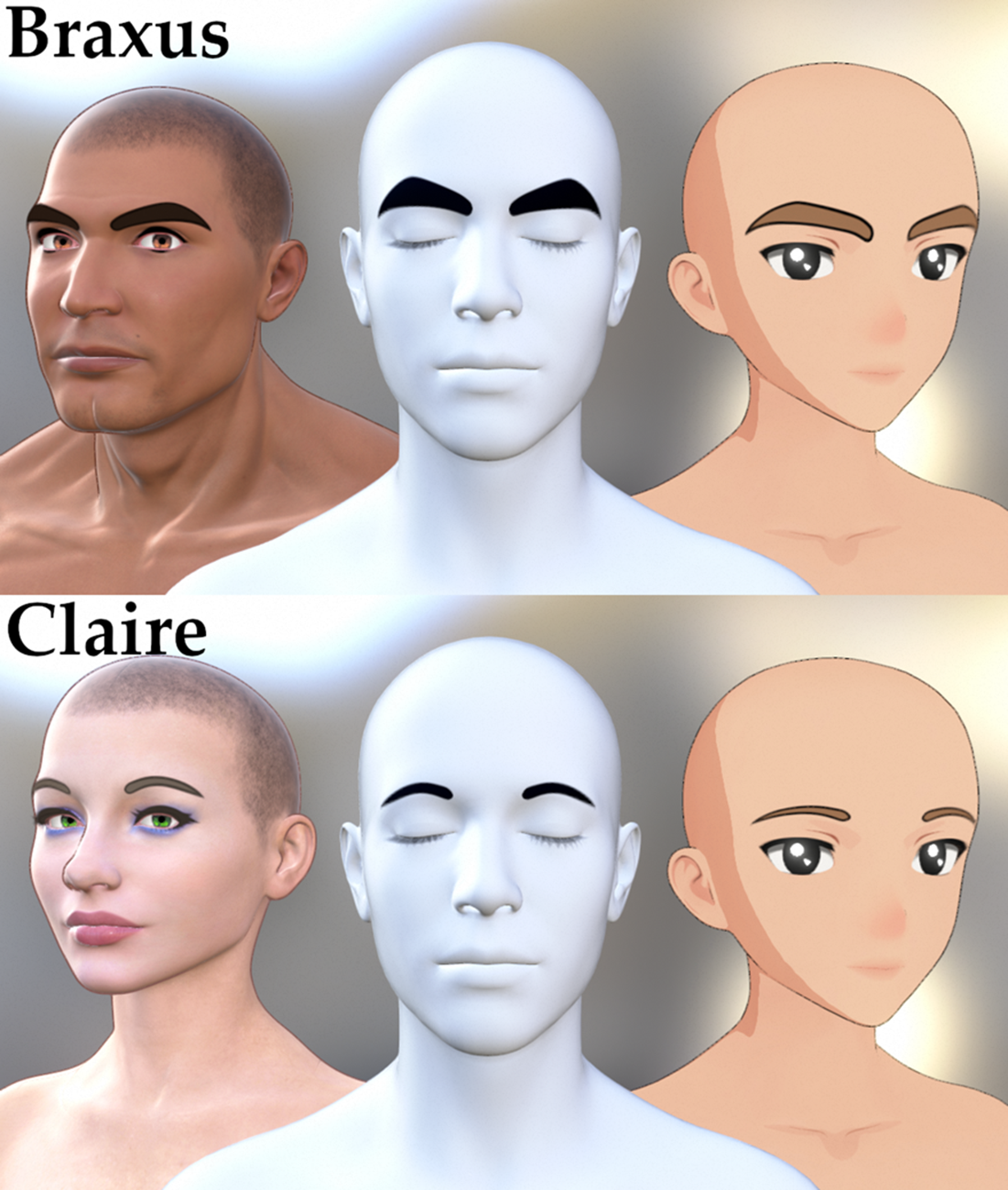


Special thanks to @Elor (sorry for all the pinging), who helped me with making the metadata, in case you guys want to access my freebie through the Smart Content tab. Please note that the DAZ forum attachment has an extra layer of folders because it renames ZIPs as letters and a buncha numbers. Just copy and paste to the correct folder structure, and you should be good.
Troubleshooting Invicta Couture Lingerie Set / Materials don´t loadHey Guys,
Have some Problems with the Asset Invicta Couture Lingerie Set from Herschel Hoffmeyer.
I loaded the Clothing on my Gen8 Model and as i wanted to load some new Material from the Midnight Gold Add-On i got just the following Message
An error occurred while reading the file, see the log file for more details
If i understand now the log text right, Daz can´t find the Files for the Midnight Gold Add-On in my Daz Folders, but instalt it manuel like any other Clothing Asset and Add-On before.
That the last Log of my test...may someone can help me to fix that problem :/
2025-08-04 19:40:13.830 [INFO] :: Unlocking viewport redraw...
2025-08-04 19:40:13.830 [INFO] :: Viewport redraw unlocked.
2025-08-04 19:44:24.022 [INFO] :: Prepare asset load (merge): /Clothing/Underwear/Invicta Couture/04 Materials/02D Thigh High Socks/InvictaCouture 01B ThighHighSocks CottonAthletic Black.duf
2025-08-04 19:44:24.022 [INFO] :: Locking viewport redraw...
2025-08-04 19:44:24.022 [INFO] :: Viewport redraw locked.
2025-08-04 19:44:24.070 [VERBOSE] :: Native format content directories: 3
2025-08-04 19:44:24.070 [VERBOSE] :: Poser format content directories: 3
2025-08-04 19:44:24.070 [VERBOSE] :: Other import format content directories: 0
2025-08-04 19:44:24.071 [INFO] :: Begin asset load (merge): /Clothing/Underwear/Invicta Couture/04 Materials/02D Thigh High Socks/InvictaCouture 01B ThighHighSocks CottonAthletic Black.duf
2025-08-04 19:44:24.086 [INFO] :: Determining missing assets...
2025-08-04 19:44:24.122 [WARNING] :: Invalid hierarchy for selected node(s) and "preset_hierarchical_material" type; no root(s) found.
2025-08-04 19:44:24.122 [WARNING] :: Error loading asset: D:/DAZ Studio Files/DAZ Studio Content/Clothing/Underwear/Invicta Couture/04 Materials/02D Thigh High Socks/InvictaCouture 01B ThighHighSocks CottonAthletic Black.duf
Operation failed
Filter by context gone blankcrosswind said:
Ah, no... that's not a "vanishing" but a "collapsing" because of a non-Default category there. You can see there're two Category groups on the left : Default and Shaders. As long as there're more than one category in the list, the category tree will be automatically collapsed.
You can just click Default category to expand it, you'll see your product thumbnails back.
That Shaders category usually comes from the wrong metadata in a Product ... if it was not created by you. Better re-assign a Default Category to the shader preset files under it, or delete that Shaders category. This "issue" will be totally gone.
OMG that was it! Thank you. I feel dumb now!
MimicMolly's Renders & WIPsHopefully I didn't make any mistake when archiving the relevant files

To keep the information about what this about, I archived a Metadata folder with a LEM Extra Styles for Toon Brows inside, this way even with the renaming done by Daz forums, it should still be easy to know what the archive was about.
In case you have some doubt about how to import metadata, the whole process is explained here, with the difference that the product to look for is 'LOCAL USER LEM Extra Styles for Toon Brows':
https://www.daz3d.com/forums/discussion/738806/render-presets-for-agent-unawares-skydomes
MimicMolly's Renders & WIPs@Elor you can attach both the metadata and the h.presets here as a reply. I'll try to repackage it later today and re-upload. Thank you.
The "original" product name was even more generic. It was just "Toon Brows" as it's written in the folder they're all found in. '^^;
MimicMolly's Renders & WIPsI don't know how Daz created their H.Mat color presets for the Toon brows, because saving a H.Mats created a file containing way more information that what is inside one of the H.Mat color presets by Daz, but it's not too hard to create them manually by modifiying your color presets to make them act like the presets from Daz.
The main changes:
- Change the type value to 'preset_hierarchical_material'
- Replace the whole 'materials' section by a 'nodes' section (copy-pasted from the H.Mats preset I created to see how they looked by default).
- Replace '@selection' by 'Genesis9ToonBrowsPaint'
I also created metadata for them, looking at how Daz did it. It's currently looking like that in Smart Content:
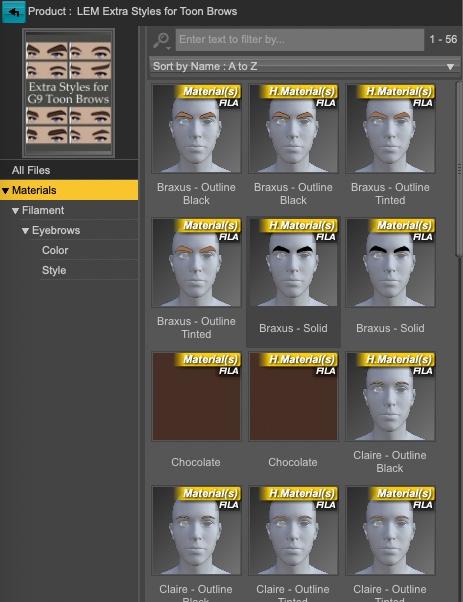
(I added LEM as a prefix because Extra Styles for Toon Brows felt a bit too generic and I wanted to avoid possible name conflict if someone else decided to create their own extra styles).
I used the main picture in your Deviantart message, just slightly ajusted to end with a 10:13 picture.
If it's okay with you, I can attach the metadata with the H.Mats color presets, with your picture used as a thumbnail, to another message.
Edit: I forgot, but thank you for the freebies :)
Render presets for Agent Unawares' SkydomesThank you Elor, for the preset and for the useful explanation on how to use metadata.:)
Daz 3D is part of

Connect
DAZ Productions, Inc.
7533 S Center View Ct #4664
West Jordan, UT 84084Licensing Agreement | Terms of Service | Privacy Policy | EULA
© 2026 Daz Productions Inc. All Rights Reserved.