Render presets for Agent Unawares' Skydomes

Hello,
Agent Unawares shared 26 skydomes on Deviantart a couple of years ago, covering various times of a day (links below).
While they are nice, by default, no render presets are provided to make applying them easily in Daz Studio, so after sleeping on the subject for many months, I decided to create them myself and I’m now sharing the result with anyone else.
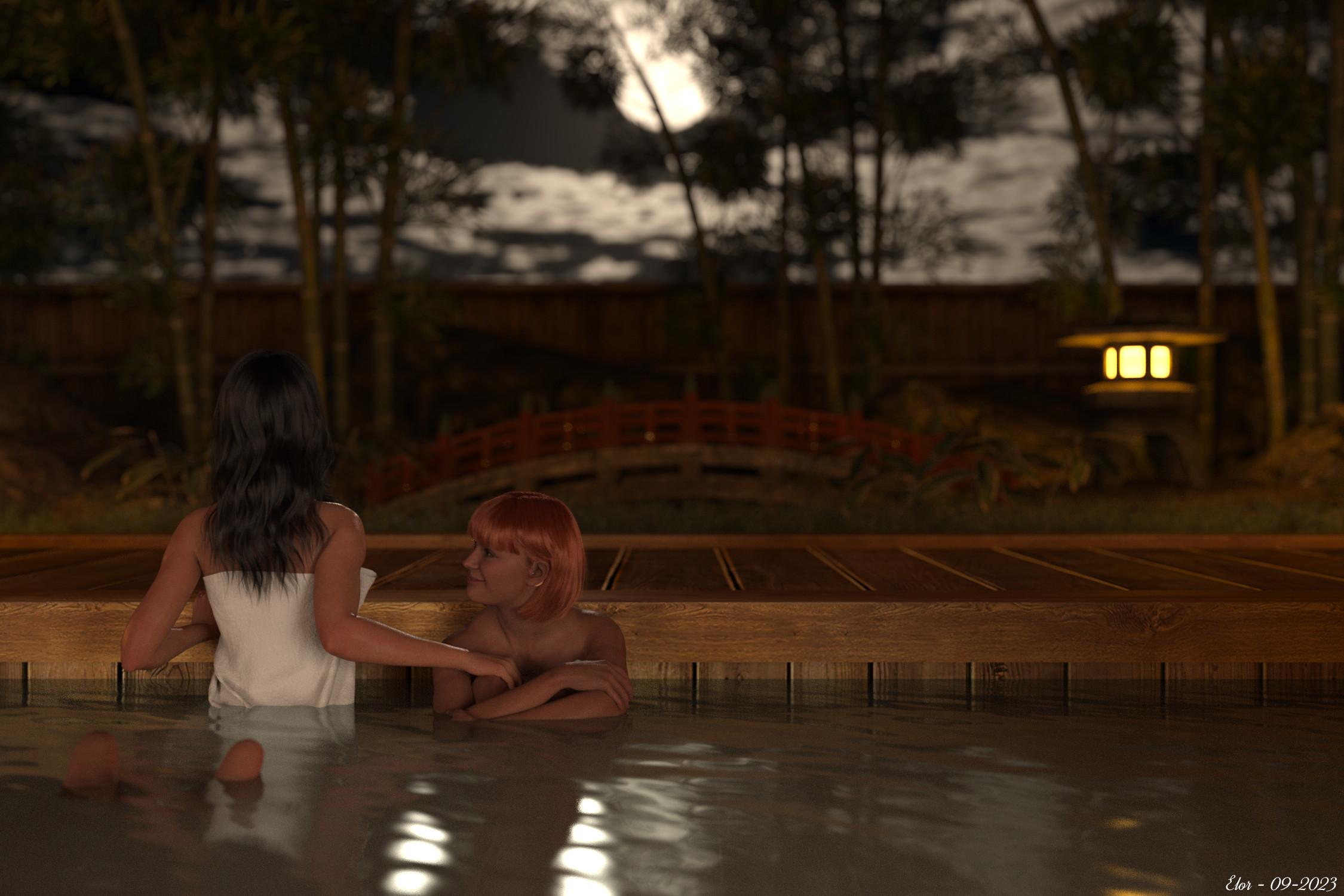
One I like a lot is the one with a full moon, used in a render from 2023, ‘The moon is beautiful, isn’t it?’:
An important note.
I’m not completely sure I’m allowed to share AgentUnawares’ skydomes and anyway, I don’t have online storage to easily share around 1.8 GB… so I’m not sharing the skydomes themselves, just render presets to load them more easily in Daz Studio than searching for them manually each time and you’ll have to download the 26 skydomes yourself and will need a (free) Deviantart account to do so.
What’s included.
- One render preset per skydome.
- The whole folders’ hierarchy to know where to move the skydomes files once downloaded.
- Metadata for people who like them.
Note: if you’re planning on using the metadata, you MUST respect the folders’ hierarchy.
If you just want to use the render presets from the Content Library, while it’s best to respect the folders’ hierarchy, you can at least move the render presets files themselves where you want: HDRI files on the other hand should be placed in the correct folder.
Licence
Agent Unawares set the following rule for using the HDRI:
These skydomes may be used in 2D and 3D art without restriction, including games. No attribution required.
Using the render presets to load the HDRI has obviously no impact on the licence set by Agent Unawares and should you feel the need to credit someone, please, give credits to Agent Unawares.
Regarding the render presets themselves, as with my previous freebie, as long as they are attached to this message, please refrain from sharing them elsewhere and redirect people here to make sure they will access the latest version. If the archive is not available anymore and if I’m not active anymore on the forum, feel free to share them as a freebie.
Installation instructions
Note: My advice is to NOT place the various files included in this archive into ‘My DAZ 3D Library’, especially if it’s managed by DIM.
It’s safer to install the needed files in another library (either ‘My Library’ or one you created yourself).
Warning: DO NOT REPLACE ANY EXISTING FOLDERS OR FILES, none of the ones I created should exist on your computer.
Steps
- Move the ‘Light Presets/AgentUnawares’ folder into the ‘Light Presets’ folder of the library you want to use. If ‘Light Presets’ doesn’t exist in that library, simply move the ‘Light Presets’ folder from this freebie.
- Move ‘LOCAL_USER_AU_Iray_Skysets.dsa’, ‘LOCAL_USER_AU_Iray_Skysets.dsx’ and ‘LOCAL_USER_AU_Iray_Skysets.jpg’ from the ‘Runtime/Support’ folder of this freebie to the ‘Runtime/Support’ folder of the library you’re using.
- Download the 13 skysets, using the following link (you’ll need a free Deviantart account):
- https://www.deviantart.com/agentunawares/art/Skyset-001-702365724
- https://www.deviantart.com/agentunawares/art/Skyset-002-705701571
- https://www.deviantart.com/agentunawares/art/Skyset-003-707491209
- https://www.deviantart.com/agentunawares/art/Skyset-004-711669600
- https://www.deviantart.com/agentunawares/art/Skyset-005-715173309
- https://www.deviantart.com/agentunawares/art/Skyset-006-716145005
- https://www.deviantart.com/agentunawares/art/Skyset-007-719515158
- https://www.deviantart.com/agentunawares/art/Skyset-008-719515877
- https://www.deviantart.com/agentunawares/art/Skyset-009-722742369
- https://www.deviantart.com/agentunawares/art/Skyset-010-726898177
- https://www.deviantart.com/agentunawares/art/Skyset-011-729804822
- https://www.deviantart.com/agentunawares/art/Skyset-012-731356738
- https://www.deviantart.com/agentunawares/art/Skyset-013-737291033
- Extract every archive.
- Check that each. hdr file is named ‘Skydome XXX.hdr’ with XXX replaced by a number from 001 to 026 (it’s their default name but better safe than sorry, right?)
- Move all. hdr files extracted into the ‘Runtime/Textures/AgentUnawares/AU Skysets’ of this freebie.
- Move the ‘Runtime/Textures/AgentUnawares’ folder into the ‘Runtime/Textures’ folder of your library. If the ‘Runtime/Textures’ or the ‘Runtime’ folder don’t exist, simply move the equivalent from this freebie.
At this point, you should have the following folders moved into the library you’re using:
- ’Light Presets/AgentUnawares/Skysets’ with 78 files in it (26. duf files, 26.png files and 26. tip.png files).
- ’Runtime/Support’ with at least ‘LOCAL_USER_AU_Iray_Skysets.dsa’, ‘LOCAL_USER_AU_Iray_Skysets.dsx’ and ‘LOCAL_USER_AU_Iray_Skysets.jpg’ in it (possibly alongside similar files from other products that came with metadata).
- ’Runtime/Textures/agentunawares/AU Skysets’ with 26. hdr files in them.
How to install metadata?
With the Content Library active (I’m reusing older screenshots but the text should be up-to-date):
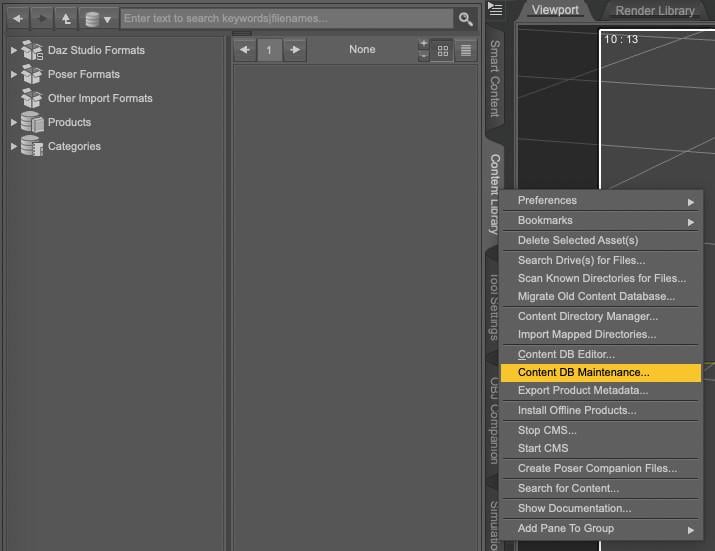
1. Open your Content Library, right-click on the tab to get the following menu and select Content DB Maintenance
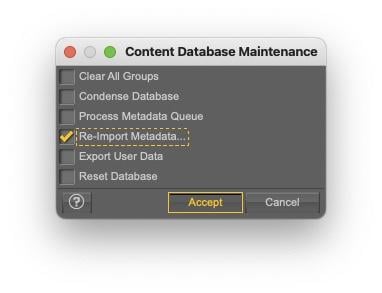
2. Select Re-import Metadata
3. UNSELECT everything by unchecking User Data and All Products, to avoid overwriting existing metadata (it’ll also be much faster to only import one product metadata than your whole library…).
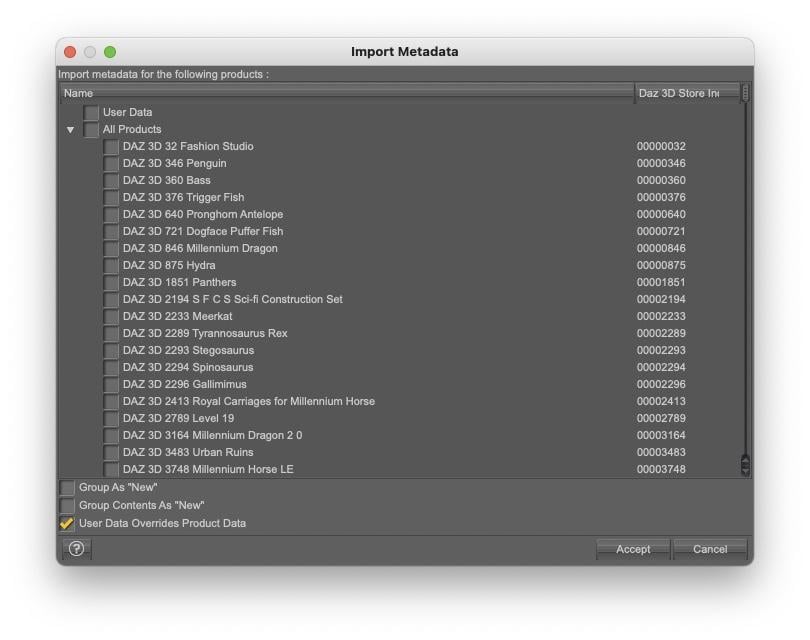
4. Select ‘LOCAL USER AU Iray Skysets’ (as announced, it’s an old screenshot done for another freebie) and click accept:
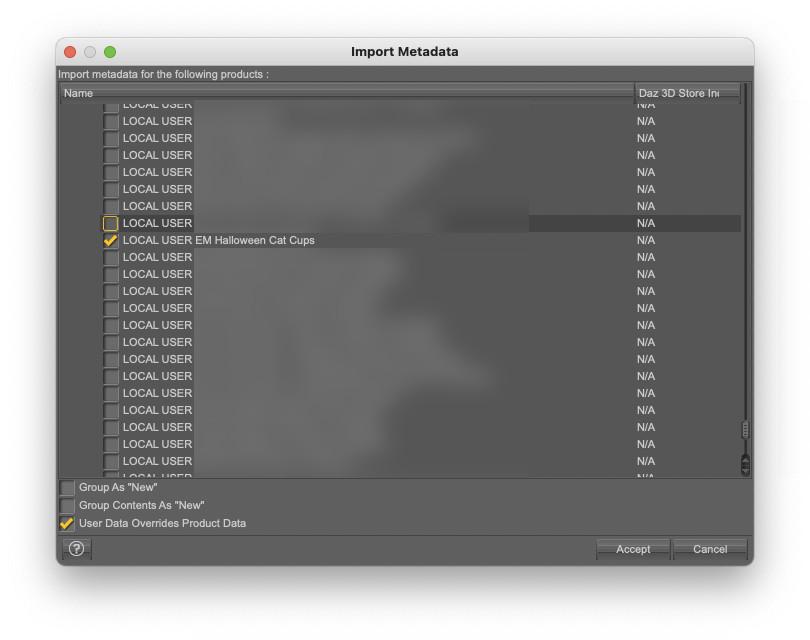
Once installed, you will be able to find the skysets in Smart Content:
- By searching for ‘skysets’
- By searching for the author, by typing 'key::AgentUnawares'
Or by looking into the 'Render-Settings' category.
What are each render preset doing?
Note: I looked at how the various skies from the Skies of the Economy were loaded to get a better understanding on how to do it.
Each .duf file will do the following actions, all impacting the Environment Options:
- set the 'Environment Mode' to 'Dome and Scene'.
- set the 'Dome Mode' to 'Infinite Sphere'.
- set the HDR file as the 'Environment Map'.
- set the 'Draw Dome' value to On.
- set the 'Dome Rotation' value so that the shadows will be cast on the X axis.
Every other settings of the Environment Options should stay as they were.
Small advice on how to use them.
Regarding the last action done (changing the Dome Rotation), if you want to change the Dome Rotation, I suggest using the 'Dome Rotation Y' setting: as it is not changed by the .duf files, once you’re happy with the direction the shadows are cast, you will be able to check if one of the other skydomes suits better the scene you’re currently creating and shadows will continue to be cast in the same direction once the new skydome is loaded (warning: some of these skydomes have the sun either on top of world centre or have enough clouds to diffuse the sun light so shadows will mainly be under the various objects and figures of your scene).
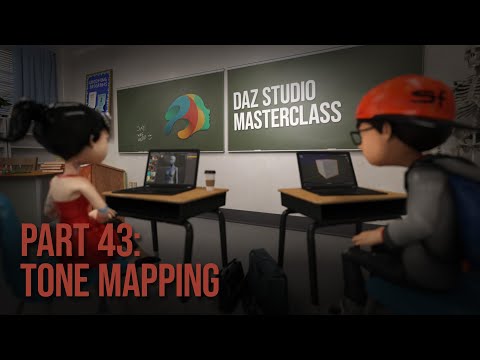
I didn’t change any other settings, and you will likely get better results by playing with the tone mapping options compared to the default values. If your reaction is 'tone mapping what ?', I can only suggest watching the Masterclass by Jay Versluis on the subject:
Conclusion
I used them a lot on my computers since I created them and I checked the content of 'LOCAL_USER_AU_Iray_Skysets.dsx' for the most common mistakes I’m usually making with a Shell script I wrote, so hopefully, if you’re following the instructions, you should end up with working render presets.
Should any problem arise, you should be free to ask a question and I’ll try to help you fix it.
The same is true if you have suggestions to improve any part of this freebie (except the HDR files of course).
In the meantime, happy rendering and my thanks to Agent Unawares for sharing these wonderful skydomes !



Daz 3D is part of 
Connect
DAZ Productions, Inc.
7533 S Center View Ct #4664
West Jordan, UT 84084
Licensing Agreement | Terms of Service | Privacy Policy | EULA
© 2026 Daz Productions Inc. All Rights Reserved.
Comments
Hopefully, everything is now alright with the formatting of the message and the content of the archive itself.
Thank you Elor, for the preset and for the useful explanation on how to use metadata.:)