-
Very Useful Daz Products IMHO (Converters, Lights, Utilities, Morphs, VRAM Optimizers, Shaders etc.)
Here's some input for the beginner who's trying to keep their DAZ spending low:
(Needless to say, it's all just my subjective opinion.)Converters:
- I think auto-fit is good enough for starting out, especially when combined with Fit Control (which I absolutely do recommend).
- You can auto-fit M4/V4 items by first auto-fitting to Genesis, then from Genesis to G8.
- That being said, I would actually recommend M4/V4 clones for G8, because it generally achieves better results than the above method, and there's a ton of free M4/V4 items out there.
- Hair that's longer than shoulder length shouldn't be auto-fitted at all and just parented manually.
- Convert heeled G3 shoes to G8 with this free method.
- Convert M4/V4/Genesis/G2 poses to G3 with this freebie, and G3 poses to G8 with these two freebies.
Hair and Skin:
- It's worth playing around with the material settings and/or manipulate maps in your graphics editor (such as GIMP or Photoshop) to save on products like skin builder and color werks. See also here.
Morphs:
- Agree that DAZ Original Morphs are essential, and I like the 200+ Head and Face Morphs a lot. I personally don't find Shape Shift necessary.
- I do quite like SWOLE for G8. Obviously only if you're into that kind of thing.
Others:
- Since you single out glasses, you can get a lovely collection of free glasses here and here.
Might have more to add later, but I think i should go back to work now... *:)
"Filter by Content" messed up?Hello,
I finally managed to edit the metadata of Generation 4 items with the help of some nice tutorial.
Now i assigned "compatibility" to my Gen. 4 Items to the certain core-Figures, as Victoria 4, Michael 4, Kids 4, and everything seemed to work fine, so now i'm able to select a Kids 4 figure, switch on "filter by context", and i can see all my kids 4 related stuff.
But somehow I've messed this up, and now, when i select a Kids 4 Figure with "filter by context" switched on, i see EVERYTHING BUT the kids 4 content.
Means, i see everything that is available with the current filter and categories settings, but without any of the Kids 4 content.
It only happened with the Kids 4. Selecting M4, V4 od A4 works as expected.
I don't have any clue what I've messed up?
Any suggestions anyone?
what is the name of that cloths??ok guys after finally get tired of endless search in that giant library i really get tired to try to find it, then i would love know if someone knows the links for that cloths:
https://www.daz3d.com/luma-for-genesis-3-female-s
https://www.daz3d.com/johanna-for-genesis-3-female
https://www.daz3d.com/leni-hair-for-genesis-3-and-8-females
i means the outfit they are using in the pain picture
and also leave a little "runt" toward it, about how many sellers (even daz studio) loves to use some "cloths" in they characters to be the "thumbnail, but this cloth is not included in the character (even in bundles), it's happen a lot in the base character thumb and only start and pro bundles does have the character wearing a cloth from his bundle, most of the bundles are like that and many non bundles aswell what is really annoying sometimes because you ending liking more the cloth than the character and in many cases is almost impossible to find it.
to be fair i'm not saying which they can't use outside cloths but they could at last give a link for the product being used like "others do", some sellers actually leave a link when they are using external pieces for they product which is really awesome but looks like a big ammount don't do that and is really a nightmare to find that cloths without it, specially when you have some cases where the character is like let's say a genesis 3 or 8 but in the thumb is using a "genesis 1 or 2 or victory 4 or michael 4 or others serie asset which make even more hard to find it.
anyway it's just me leting it go a little of frustration of it.
GENERAL FREEBIE REQUESTS part 3Does anyone here know if Beavis and Butthead (the characters themselves) morphs exist for Michael 4 or any of the Genesis models? I'd like to do some fan animation to my Beavis and Butthead impressions, but I find DAZ Studio faster and higher quality to do animation in than trying to do 2D animation. Thanks in advance for any answers on the subject!
Well, since no one had an answer, I've taken matters into my own hands, and used morphs (and edited surfaces in the eyes and armani hair that comes with G8M) to make Butt-Head using G8M base figure. I've even just made Beavis, and edited this post to add him. If anyone knows how I can share the character preset (and wants to use this), let me know how to properly do so.
I am very interested! Can you upload it for us please?

Sorry I haven't been on in a while to see this. Yes, I can upload both (you only need the morph and material files right? I think I saved them as one preset). PM me tomorrow to remind me, I have to find the files again (shouldn't be too hard).
 If an item in the store says compatible figure"Genesis".. is it compatible with Genesis 8?
I think the best investment I've made in the Daz3d store was buying the various clothing clones. They let me use clothing across all generations, although some items like shoes and gloves have issues. I generally work with Genesis 3, but most of their clothes are hand-me-downs from earlier generations
 .
.What are these clones? And how do they work?
Clones allow you to wear clothing and hair on a different generation figure than what it was originally made for.
This one is one of my favorites: https://www.daz3d.com/wear-them-all-autofitting-clones-and-clothing-smoothers-for-genesis-3-female-s
It's for Genesis 3 Female and allows her to wear clothing and hair that was made for Victoria 4, Michael 4, Genesis 1, and Genesis 2 males.
These ones are also good:
https://www.daz3d.com/wear-them-all-autofitting-clones-and-clothing-smoothers-for-genesis-3-male-s
And these are for Genesis 2, that allows Genesis 2 figures to wear clothing and hair made for Genesis 3:
https://www.daz3d.com/genesis-3-female-for-genesis-2-female-s
https://www.daz3d.com/genesis-3-male-for-genesis-2-male-s
And this one allows Genesis 2 Female to wear clothing and hair made for Victoria 4:
https://www.daz3d.com/victoria-4-for-genesis-2-female
Clones are fantastic because they can expand your favorite character's wardrobe by a LOT. :)
short sale on clothing converter? SOLVEDI've had the RSSY Clothing Converter from Michael 4 to Genesis 8 Male in my wishlist forever. This morning when I opened my email it said my wishlist item was on sale for $8.73. I immediately went to my wishlist page, and it says $24.95.
The email said:
RSSY Clothing Converter from Michael 4 to Genesis 8 Male
Normal price: $24.95
65% OFF: $8.73Is that a pricing error glitch? Or did it just go off sale that quick?
It was part of a flash sale yesterday night.
Ugh, I slept right through the sale item that's been in my wishlist since forever,. Waaaaaaahhhhhh.

Thx for the info though. Should have checked my email last night to see your email letting me know,
short sale on clothing converter? SOLVEDI've had the RSSY Clothing Converter from Michael 4 to Genesis 8 Male in my wishlist forever. This morning when I opened my email it said my wishlist item was on sale for $8.73. I immediately went to my wishlist page, and it says $24.95.
The email said:
RSSY Clothing Converter from Michael 4 to Genesis 8 Male
Normal price: $24.95
65% OFF: $8.73Is that a pricing error glitch? Or did it just go off sale that quick?
It was part of a flash sale yesterday night.
short sale on clothing converter? SOLVEDI've had the RSSY Clothing Converter from Michael 4 to Genesis 8 Male in my wishlist forever. This morning when I opened my email it said my wishlist item was on sale for $8.73. I immediately went to my wishlist page, and it says $24.95.
The email said:
RSSY Clothing Converter from Michael 4 to Genesis 8 Male
Normal price: $24.95
65% OFF: $8.73Is that a pricing error glitch? Or did it just go off sale that quick?
Thump! Thump! Thump! Update geometry errors for no good reason. [Solved]The thumping is my head hitting the desktop repeatedly out of sheer frustration.
I recently remembered a neat trick for upating the geometry for a clothing item to better fit a figure it was not originally designed for. E.g., Genesis 3 Jeans on MIchael 4:
The idea is to export the clothing item after you have applied some basic transforms to it. The geometry in the exported file differs from the original geometry of the clothing item only by having the transforms (translation, scaling, rotation) applied to it before export. The exported file is then used to update the geometry in the original clothing item, resulting in an item that fits better before the autofit or adjustments are used. There should be no change in the order or number of vertices or facets. I am less sure about - and avoid using - any of the adjustment morphs before exporting because that may alter the vertex count or order somehow - not sure why or even if this would be true - I'm just being cautious.
1. Load the clothing item into a scene with the figure you want it to fit. If DS attempts to autofit, undo this by setting "Conform to" to "None."
2. Set the resolution for the clothing item to "Base". Just to be sure, set SubD levels to Zero.
3. Use the transformations (not any morphs) for the clothing in the parameters panel so that they roughly fit it to the character figure. It will be less than perfect, but that is okay for now.
4. Export the clothing figure as an OBJ file, to a new directory under my main DS content directory under the data folder. I use the Poser preset for export options.
5. Clear the scene with Ctrl-N and load the same clothing item again from the content library. Set resolutiuon to base and subd to zero. (Not sure if this is necessary, but I do it anyway while chanting a "Hail Mary.")
6. Update the clothing geometry to the geometry in the file just exported.
- Edit->Figure->geometry->Update Base Geometry.
- Select the file.
- Select the Poser preset for import options.
- Do it.
7. DS displays "The loaded geometry does not match the geometry it is updating. Vertex and facet count must be the same." Sigh.
I know people encounter this with distressing regularity when attempting edit geometry in their favorite 3D editor. I have read all (ok most) ot their posts and possible solutions. Errors are typically the results of an import, export or editing error while using the other program. But I am not using another program . I am updating the geometry with the very same, unmolested, unadulterated file I just exported.
I have seen this work before. Maybe I should burn some incense first? Think happy thoughts?
Any help appreciated.
Genesis 8 Baby in Carrara - first impressionsAs regards using older clothes on Genesis 8 (ie Kids 4 on Genesis 8 baby) there are several ways of doing that.
There are clothing converers that work in DAZ Studio:- https://www.daz3d.com/rssy-clothing-converter-from-genesis-to-genesis-8-female
https://www.daz3d.com/rssy-clothing-converter-from-michael-4-to-genesis-8-male
https://www.daz3d.com/rssy-clothing-converter-from-victoria-4-to-genesis-8-female
Then there is a method of creating clones which gets a bit involved.
Fire Dancing Stick and Cat EarsI have been searching for a Poi / Fire Dancing Stick prop for the last 12 hours.
Also, hoping someone has a Cat / Lion Ears freebie for Victoria 4/Michael 4.
Does anyone know where to locate a free or paid version of these props ?
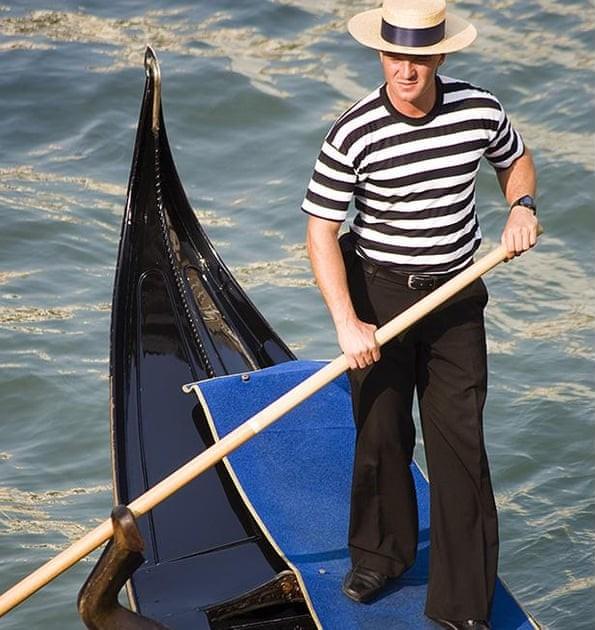
Looking for a gondolier shirtYou'd think that a shirt like this would be pretty easy to find. It isn't that complicated. But what I've found instead is that unless the artist UV mapped the shirt with horizontal stripes in mind, they are a pain to figure out. Other than an old Michael 4 outfit, I can't find anything with this look to it. Anyone have any suggestions?
 New Install and download
Connect and DIM use different locations (and mthods - Connect has a folder per product in the /Data/Cloud folder, Install manager amalgamates everything in the content directory). As long as the root content directory is selected and the foles are in their correct locations within that DS will be able to find them, and saved scenes or presets will work on another machine.
If you click the Download Filters button in Install Manager, on the Ready to Download tab, and uncheck Connect Installed at the end of the list you will not see the items awaiting download (that won't, however, hide entries in the ready to Install tab that haev already been downloaded).
Some content - e.g. ExP using figures such as Victoria 4 and Michael 4 - cannot currently be installed through Connect. Plug-ins, and some shadrs/scripts, are also not installed via Connect.
GENERAL FREEBIE REQUESTS part 3My first post in a freebie request thread in quite a while, but I'd like to ask, is there a free armored knight outfit for Michael 4, Victoria 4 or Genesis 1/2/3/8 that I could download?
https://www.renderosity.com/mod/freestuff/mongloid-s-nitro-knight-armor-set-for-m4/54177
GENERAL FREEBIE REQUESTS part 3My first post in a freebie request thread in quite a while, but I'd like to ask, is there a free armored knight outfit for Michael 4, Victoria 4 or Genesis 1/2/3/8 that I could download?
Morphs from G3 to G8It does not. I suspect it can, but I need to really study the format of the CR2 file, and generalized Poser-ness. I just don't know enough about it to be definitive. That said, The tools this product uses to work rely on Studio's internals, and I have noticed that there many cases where those tools do not like to work with legacy formats and post Genesis formats at the same time. So it might also not be possible.
Select the Victoria 4 or Michael 4 figure in the scene, go to Edit>Figure>Rigging>Convert Figure To Weight Map, now choose a weight map system you want to work with.
Once this is done with TriAx or General weights you can start to use for example the Node Weight Map Brush tool on those Legacy figures. Also more important the Transfer Utility will work on them.
Like always to transfer morphs they have to be once saved as Morph Assets go to File>Save As>Support Asset>Morph Asset.
But since the figure isn't saved yet as a Figure/Prop Asset you go here File>Save As>Support Asset>Figure/Prop Asset.
With this the morphs get saved along with it in the "data/Morphs/Base" folder. Now don't forget to delete the current Victoria 4 or Michael 4 figure from the scene because its still the old version. Restart DS and load your new V4 / M4 Figure/Prop Asset from the library to actualy use the new asset in the scene. Now try the Transfer Utility with them I'm pretty shure it will work.
Yeah, that doesn't allow legacy authoring. I do recognize that isn't what you asked, but my first goal would be bidirectional support. That said, I see some indications in the script API that you can do legacy authoring, and getting that to work with the existing code would still require converting the Legacy figure to weight mapping in order to get the ... stuff. That should be fine, as long as the converted figure is removed from the scene when it's done, but it does require that another copy of that Legacy figure be in the scene, unconverted, to act as the target. So, it may be possible. I'll still need to look into it.
More specific to your question, presently, the script relies on the ability to pose the figure as part of generating the transfered morphs. So it would be important that the conversion to weight mapping be accurate. I've noticed that this doesn't work so well with hair figures. You have to, basically, re do the weight maps. This is not insurmountable, but it would end up being a whole separate script (which is about what I expected). I will look into it in more depth, but it probably will still be an addon, even if it's unidirectional.
I'd prefer bidirectional, because V4 still has significant following, and that's worth supporting.ok licking my lips, does this mean we will get it soon?
The test crew will hear from me today. I hope I've ironed out the major issues, and will be ready to submit for products review by the end of the month. But I haven't been planning on that last. Still, I've just got a couple of hours worth of tests to do, and then I'll be ready for more beta. I really don't anticipate trouble, but the tests are necessary. I've already caught an issue with the way I formated Genesis 8, originally. It's incompatible with the clever solution I invented for baking morphs. But it's an absurdly easy fix. Took 10 minutes for G8M. I still need to G8F, but that's allI should need.
Do you have tried very extreme morphs for Genesis1 like Mavka, Sadie or Sam? I'm really interested in those results.
Anyway, great work, it looks amazing! Insta-buy for me!I was going to do these tests with Hiro 5, but I do have Sadie and Sam, so I'll do that, instead, I'll get back to you.
Morphs from G3 to G8It does not. I suspect it can, but I need to really study the format of the CR2 file, and generalized Poser-ness. I just don't know enough about it to be definitive. That said, The tools this product uses to work rely on Studio's internals, and I have noticed that there many cases where those tools do not like to work with legacy formats and post Genesis formats at the same time. So it might also not be possible.
Select the Victoria 4 or Michael 4 figure in the scene, go to Edit>Figure>Rigging>Convert Figure To Weight Map, now choose a weight map system you want to work with.
Once this is done with TriAx or General weights you can start to use for example the Node Weight Map Brush tool on those Legacy figures. Also more important the Transfer Utility will work on them.
Like always to transfer morphs they have to be once saved as Morph Assets go to File>Save As>Support Asset>Morph Asset.
But since the figure isn't saved yet as a Figure/Prop Asset you go here File>Save As>Support Asset>Figure/Prop Asset.
With this the morphs get saved along with it in the "data/Morphs/Base" folder. Now don't forget to delete the current Victoria 4 or Michael 4 figure from the scene because its still the old version. Restart DS and load your new V4 / M4 Figure/Prop Asset from the library to actualy use the new asset in the scene. Now try the Transfer Utility with them I'm pretty shure it will work.
Morphs from G3 to G8It's super hard to tell from the small image and viewing the arms bends from this angle but I'll try and guess, just for fun - I could be WAY off though: G2F, G8F, V4, G1
I PMed you if you want another beta tester. :)
That was a remarkably good guess. Only one wrong. :)
I wonder if this product offers a solution to get V4 / M4 morphs straight to G8?
https://www.daz3d.com/sy-victoria-4-and-michael-4-clones-for-genesis-8
For my understanding the autofit clones can be used as morph shapes. This will turn a G8 figure into V4 / M5 shape right?
It does not. I suspect it can, but I need to really study the format of the CR2 file, and generalized Poser-ness. I just don't know enough about it to be definitive. That said, The tools this product uses to work rely on Studio's internals, and I have noticed that there many cases where those tools do not like to work with legacy formats and post Genesis formats at the same time. So it might also not be possible. Thus:
GenX brings characters from V4 to G3GenX is really the best solution for this issue. Yes, it makes it two step, but I can't begin to say if my methods can get near a single step solution. GenX is the only certain solution I am aware of. I wanted to prove this one way or the other, but I simply don't see taking anouther 2 years to figure that out, and learning the legacy format to my standards would mean that much additional trial and error, (given how my current life makes everything take longer). If I figure out how to do it, there will be an addon, but the basic product will be Genesis only. Because Studio does not really convert legacy figures to the same standard as Genesis at run time, I have to invent a new module to do transfers. It's not just getting the right shape. If anyone know how to author Poser formats in Daz Studio 4, that would go a long way toward making this possible (not to say that I can't figure it out, if it can be done, just that it would save time). But it's definitely not as simple as getting the clone shapes.

Here we have everyone. (View the attachment to embiggen.) All seven Genesis figures, all using the same morph as transfered by the tool. While getting the previous example done was good fun, I find that texture's make it too easy to figure out the differences AND it makes it look like there are differences that don't exist. So, this time, I just did them in stone. There remain solid clues as to who's who and there remains one mystery guest in the first image :P
I never got around to having G3 deactivate the navel and realism morphs before executing a transfer, so I'll be doing that, then one more round of test transfers (so far, it's all been from G8, so I need to do some testing to make absolutely sure there remain no obvious issues. G8 to G8 was a thing that happened, otherwise there'd be six figures in the render, so I know it works for putting morphs on G8. I just need to make sure there are no gotchas). After that, I'll be releasing to beta. New tester hopefuls, if you PM'd, I will start contacting you as soon as it looks like I'm not getting enough feedback from existing testers. Or if I need specific tests run (I don't know that I will).Improviments for Bundlesi don't know if it already was discussed, but i really feel which it could help improve the site, others places like blizzard store, or steam or gog already have it and could be really cool have here.
bundle discounts for any stuff which you already had bought outside the bundle, many places when you buy a stuff which is part of a bundle if later you decide to buy the bundle, it get a discount from that stuff which you already get, i know which normally the bundles prices already are low and with many sales can go even furter but for many cases is weird you having to buy 2 times the same stuff, like you have a character like let's say michael 4 or 8, then you have many bundles with him, then for each time you have to puchuase a bundle you are also paying for him again then you ending buying him like 3, 4, 5, 6+ times because he is the base for all bundles, could be cool if the system could give a discount like let's say if the bundle cost 200, then when you open the page the bundle will be costing 180 instead of 200, because you are getting a discount of 20 due to that character value in the bundle, that could make more easy for peoples buy all bundles, or in cases where you buy a new cloth or asset and that asset is added in a bundle later and you want to buy that bundle just to find out which now you have to pay again for this cloth, even if you are paying less due to bundle discount.
another sugestion a way to make more clear what you already have from a bundle, like in the thumbnail appear a a green circle with a V marking which you alredy have it in your library, like when you mark something the wish list, then if you already have something from that bundle it will mark for you in a way you know what you already have, because sometimes i have to click in the thumbnail and open the page to know if i alread have something.
Morphs from G3 to G8I wonder if this product offers a solution to get V4 / M4 morphs straight to G8?
https://www.daz3d.com/sy-victoria-4-and-michael-4-clones-for-genesis-8
For my understanding the autofit clones can be used as morph shapes. This will turn a G8 figure into V4 / M5 shape right?
No, it won’t transfer morphs, it’s only for clothes. And again no, it won’t turn G8 in V4 or M4 shape. Autofit clones are indeed morphs, but they’re usually different from the source figure shape in some places so that the clothes convert better.
Daz 3D is part of

Connect
DAZ Productions, Inc.
7533 S Center View Ct #4664
West Jordan, UT 84084Licensing Agreement | Terms of Service | Privacy Policy | EULA
© 2026 Daz Productions Inc. All Rights Reserved.