-
Comic Book style rendering
There are ways:
1) There is the built-in toon renderer in DAZ Studio.
and 3 products in the DAZ Store (there are more):
2) https://www.daz3d.com/visual-style-shaders
3) https://www.daz3d.com/manga-style-shaders
4) https://www.daz3d.com/pwtoon
Another way to flatten the detail from a scene is to set the exposure setting in the Tone Mappings to a low value or use way too much light in a scene but those methods aren't very good.
Yeah, I use Visual Style Shaders in 3Delight. I have bought some IRAY toon shaders, but they look more like a pixar film than a comic book. I also use Photoshop, Topaz Simplicity, and Cip Paint Studio (Manga Studio) for postwork.
Comic Book style renderingI use either pwToon or Photoshop actions to create the 2D/drawn look. If you decide to use pwToon I have a freebie with a ton of shader presets for it: pwToon_CelShaders_r2.zip
Wow - many thanks!
Comic Book style renderingI use either pwToon or Photoshop actions to create the 2D/drawn look. If you decide to use pwToon I have a freebie with a ton of shader presets for it: pwToon_CelShaders_r2.zip
Comic Book style renderingI have personally used pwToon and I like it and I can render in 3DL or iRay with it and it looks good because since it's a toon style minimal calculations are done to render a scene.
The free built-in DAZ Toon style is also good but requires more surfaces setup work than pwToon - although pwToon does require surfaces setup too so far I like the pwToon results better.
Really? I haven't used it for a while, but I know it predates iRay, so I thought it would be all messed up
Comic Book style renderingI have personally used pwToon and I like it and I can render in 3DL or iRay with it and it looks good because since it's a toon style minimal calculations are done to render a scene.
The free built-in DAZ Toon style is also good but requires more surfaces setup work than pwToon - although pwToon does require surfaces setup too so far I like the pwToon results better.
Comic Book style renderingThere are ways:
1) There is the built-in toon renderer in DAZ Studio.
and 3 products in the DAZ Store (there are more):
2) https://www.daz3d.com/visual-style-shaders
3) https://www.daz3d.com/manga-style-shaders
4) https://www.daz3d.com/pwtoon
Another way to flatten the detail from a scene is to set the exposure setting in the Tone Mappings to a low value or use way too much light in a scene but those methods aren't very good.
Support for 3Delight - Is it Fading? . . . and why?I still see it often enough in the DAZ Gallery. I also use pwToon from time to time which is a 3DL subset. So it's still supported by DAZ Studio but I think it's mostly there for backwards and legacy compatibility.
Difference between NPR shaders?Hi everyone - total newbie here to this tool (I mean I've used Max, Maya, Photoshop, Lightroom, Illustrator, done simple 2d shaders based on normal directions - but never used Daz3d beyond the intro tutorials)
I'd like to get into it more but before going deep I just want to make sure I can get a look I could be excited about - doing away with anything that look 'CG'.
Btw, to my aesthetic this looks CG:
- https://www.daz3d.com/media/catalog/product/cache/1/image/9df78eab33525d08d6e5fb8d27136e95/v/i/visual-style-shaders-0.jpg
- http://docs.daz3d.com/lib/exe/fetch.php/artzone/pub/tutorials/dazstudio/toon/figure_03d.jpg )
- https://www.daz3d.com/media/catalog/product/cache/1/image/9df78eab33525d08d6e5fb8d27136e95/0/7/07-sketchy---toon-edge-and-art-style-shaders-for-iray-daz3d.jpg
- https://www.daz3d.com/media/catalog/product/cache/1/image/9df78eab33525d08d6e5fb8d27136e95/0/5/05-sketchy---toon-edge-and-art-style-shaders-for-iray-daz3d.jpg
- https://www.daz3d.com/media/catalog/product/cache/1/image/9df78eab33525d08d6e5fb8d27136e95/p/w/pwtoon-0.jpg
In my perfect ideal world I'd love to get looks like:
- https://www.daz3d.com/forums/uploads/thumbnails/FileUpload/d2/b73935f6a2f341e548a59a6494ce93.jpg
- https://www.daz3d.com/forums/uploads/thumbnails/FileUpload/f3/72f877b1fdc7b6fc21ed50e548890e.jpg
- https://www.daz3d.com/forums/uploads/thumbnails/FileUpload/b8/c1ab29dfc5b69194800dc005faea50.jpg
- https://www.daz3d.com/forums/uploads/FileUpload/21/859bfd7aeff2138bea954681a099b0.png
- http://www.daz3d.com/forums/uploads/FileUpload/47/1d6342feb44127c09377b62bd18df1.png
Or (if I were to look at non-CG I'd love to reach, I'd shoot for stuff like)
- T.Bradstreet http://art.cafimg.com/images/Category_4508/subcat_7559/Bradstreet_155x125.jpg
- Toonbox https://img00.deviantart.net/f64e/i/2012/052/e/a/cherry_pin_up_by_toonboxstudio-d4qhaug.jpg
- (SinCity stuff)
But I get that's unrealistic for starting out and that all those took a lot of work and deep knowledge past 'out of the box'... So I'd be happy to just go noir style and get stuff like
- https://www.daz3d.com/media/catalog/product/cache/1/image/9df78eab33525d08d6e5fb8d27136e95/v/i/visual-style-shaders-5.jpg

- https://www.daz3d.com/media/catalog/product/cache/1/image/9df78eab33525d08d6e5fb8d27136e95/p/o/popup_2_6.jpg
Or other 'over the top' stuff versions of NPR like that that go far enough people don't think of them as CG.. I guess if I had to define it, it would be stuff with non-uniform line width on strokes, and either no shadows / all black shadows / textured shadows.. Stuff like that.
There seem to be a few popular shader tools there, but at $20ish a pop I'd rather not buy every possible shader just to see which (if any) I'd like. For that matter, trying to figure out 'what is the difference between what these do', 'what can each of them not do', and if at all possible 'what have you done with these that pushed them without breaking out scripting'
- Visual Style Shader - https://www.daz3d.com/visual-style-shaders
- Manga Style Shader - https://www.daz3d.com/manga-style-shaders
- Sketchy - https://www.daz3d.com/sketchy-toon-edge-and-art-style-shaders-for-iray
- pwToon - https://www.daz3d.com/pwtoon
Thoughts?
Show us your 3Delight rendersPlaying around with Morpheus (a few bits plus the base skin) and Toon Generations 2. Used PWToon
That turned out really cool. He looks like a line drawn cartoon. :)
Looks female to me also.
PW toon - how much it will speed up rendering?Does it only work with 3DLelight materials?
You go through and select material presets that are pwToon presets and they are ultra simplified 3DL shaders. They will render in 3DL or in iRay. I've rendered in iRay when I did them and they look fine to me, being that they were meant to look cartoon style and even converted to iRay on the fly (unless the programmers did a trick and auto-switch the render engine to 3DL when 3DL pwToon shaders are detected before rendering with iRay)
There is a renderer called DAZ Toon in the renderer drop-drop but I haven't tried that yet. They are fast, so try it you may like it.
Show us your 3Delight rendersPlaying around with Morpheus (a few bits plus the base skin) and Toon Generations 2. Used PWToon
Very cool!
PW toon - how much it will speed up rendering?It is a 3Delight shader, yes, so only works with the 3delight renderer.
pwToon is very fast for me as well, but after coming back from a long break my renders have either been pwToon or else iray renders, so that's not a great comparison. So, they are fast, but not sure how much faster if you have slow renders with 3delight normally. Definitely faster than any shaders with things like refraction and sss though.
Show us your 3Delight rendersPlaying around with Morpheus (a few bits plus the base skin) and Toon Generations 2. Used PWToon
Looks really good.
Show us your 3Delight rendersPlaying around with Morpheus (a few bits plus the base skin) and Toon Generations 2. Used PWToon
PW toon - how much it will speed up rendering?Yes, my typical iRay renders with an 8 thread i7-3630 last anywhere from one half day to two days (43,200 - 172,800 seconds) and the current one I am rendering is at 16 hours & an astounding 131 iterations only (usually for a scene I get 120 iterations in 1 to 2 hours - I CPU render)!
The pwToon renders I do take about 30 - 60 seconds per render and the results are very nice, especially for models styled to look like caricatures to begin with.
pwToon is so simple and fast you don't even need an nVidia card to get relatively fast renders.
LineRender9000 [FAQ]This took about 25 mins. Could work it more, maybe do it larger and clean up a few bits. Or maybe use PWToon to simplify the colors, not sure.
pwToon Video Renders: Flickering Figure Outline ProblemI did my first video render on DAZ Studio this evening, but I do have one problem. How do I make the outline not flicker when moving the figure?
Here is a video to illustrate proof:
https://m.youtube.com/watch?feature=youtu.be&v=WtDNbzDCrek
OT: Laptop Render Benchmark Resultsnonesuch, thanks. Regarding your issue with component failure on your old laptop:
I think it's reasonable that if the cooling system can maintain the component temperatures at a safe level, like I showed with my piece of junk tests, then presumably as long as that cooling/fan system is functional then the temperatures would stay in the safe range (eg, 65C), even if you kept rendering for a month, right?
So then the question is, is the 65C safe temperature really safe over the long term? Or maybe it's safe for 24 hours but not 96 hours? Even though it's way below the "high" and "critical" temperature ratings?
Maybe designers set the cooling for a safe, continuous temperature that isnt' really safe and continuous, but I really doubt it. But when it comes to component damage I think it's a lot more complex than that, and a LOT of other things can cause damage, and those things can REALLY cause temps to spike and possibly cause damage (even though the BIOS should sense that and shut things down first). Stuff like failure of the BIOS to control the fans correctly, blocked fans and vents, component failure unrelated to temps (old age, etc.), mechanical damage, and so on.
Yeah, if temps regularly get up past the "high" range then I can understand component issues. But maybe if they do that there's something else going on?
Well your laptop is safe at 62C I think, even the GPU portion of it that doesn't reside on the CPU die (or so that is true if what I read was correct - they as an HP HW support tech should know more than I do about that). And if I were to continue to use my i5-3230m CPU I think that would last. With my i7-3630qm CPU though that I am using now, I think however were I to do sustained rendering frequently that over the course of a year or two my system board would be ruined at the area on it where the Intel HD Graphics 4000 chips and i/o controllers and whatever reside.
I plan to model and animate more in Blender and in DAZ do pose sets and animations but in both to use shader styles such as the pwToon instead of iRay PBR materials though so I likely won't burn out this laptop like the last one.
For your HP, I would probably look into setting a more agressive fan speed profile.
My Desktop GTX 1080 ti on the stock profile lets the GPU get up to 85c before setting the fans to 100% and at idle it shuts the fans off completely with gpu idle temps hitting around 60c...
I set mine so the fans never completely shut off and spin up to 100% at 70c. Now the card idles at 29c and renders at 73c.Your HP is probably turning off the cooling fan when it desn't think that it's needed. When you hit render the chip heats up quick and the computer says "Oh crap, where did this come from!" and kicks the fan up to 100% I would see if you can force the fan to 100% using system monitoring software before hitting render.
OT: Laptop Render Benchmark Resultsnonesuch, thanks. Regarding your issue with component failure on your old laptop:
I think it's reasonable that if the cooling system can maintain the component temperatures at a safe level, like I showed with my piece of junk tests, then presumably as long as that cooling/fan system is functional then the temperatures would stay in the safe range (eg, 65C), even if you kept rendering for a month, right?
So then the question is, is the 65C safe temperature really safe over the long term? Or maybe it's safe for 24 hours but not 96 hours? Even though it's way below the "high" and "critical" temperature ratings?
Maybe designers set the cooling for a safe, continuous temperature that isnt' really safe and continuous, but I really doubt it. But when it comes to component damage I think it's a lot more complex than that, and a LOT of other things can cause damage, and those things can REALLY cause temps to spike and possibly cause damage (even though the BIOS should sense that and shut things down first). Stuff like failure of the BIOS to control the fans correctly, blocked fans and vents, component failure unrelated to temps (old age, etc.), mechanical damage, and so on.
Yeah, if temps regularly get up past the "high" range then I can understand component issues. But maybe if they do that there's something else going on?
Well your laptop is safe at 62C I think, even the GPU portion of it that doesn't reside on the CPU die (or so that is true if what I read was correct - they as an HP HW support tech should know more than I do about that). And if I were to continue to use my i5-3230m CPU I think that would last. With my i7-3630qm CPU though that I am using now, I think however were I to do sustained rendering frequently that over the course of a year or two my system board would be ruined at the area on it where the Intel HD Graphics 4000 chips and i/o controllers and whatever reside.
I plan to model and animate more in Blender and in DAZ do pose sets and animations but in both to use shader styles such as the pwToon instead of iRay PBR materials though so I likely won't burn out this laptop like the last one.
Non-photorealistic Renders (NPR)Ok, something different from the last one, but similar principles and use of pwtoon. (A lot more work compositing the final image though than the last one) Still may work on the colors a bit, but I know I could keep adjusting the colors forever and need to make decisions at some point
 .
.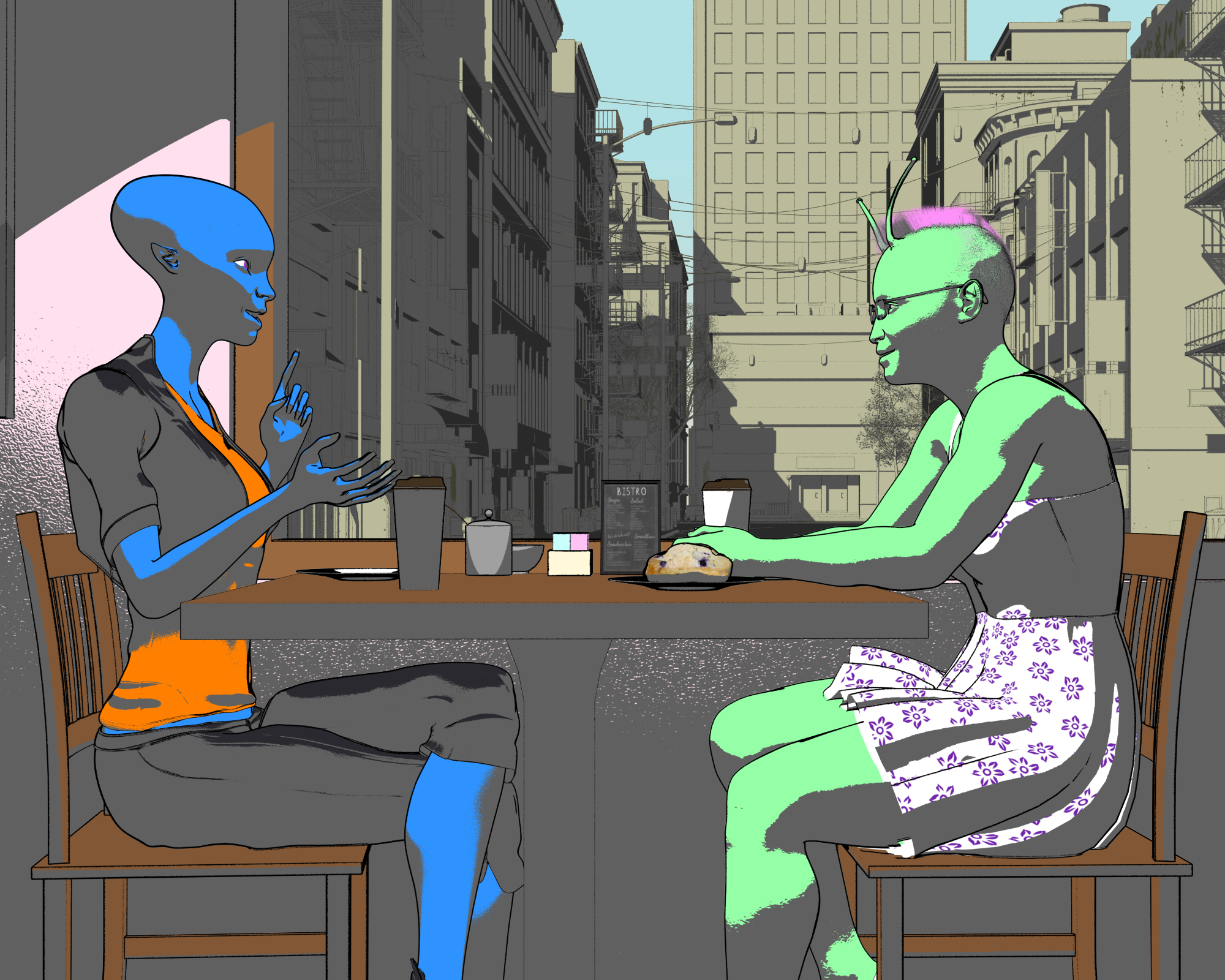
love the background in this, the lack of colour adds to the depth feeling
Daz 3D is part of

Connect
DAZ Productions, Inc.
7533 S Center View Ct #4664
West Jordan, UT 84084Licensing Agreement | Terms of Service | Privacy Policy | EULA
© 2026 Daz Productions Inc. All Rights Reserved.