-
Headshop 10?
I know there was a headshop 10 but did it have a 32 bit version? I think I got it but I cannot find a 32 bit version in my product library. Currently using a 32 bit computer.
or does the headshop one click have a 32 bit version? Do want to get it if I cannot use it with computer I have.
i really need to go to bed.
HeadShop OneClick Submitted to DAZ - Best in Class! (Commercial)I have Headshop 10.2
Two issues.
1. Attached is what I get if I open a previously created figure using HeadShop. The 'main' eyes appear to be the original Genesis2 and the fainter eyes underneath appear to be the HeadShop morph.How do I fix this?
2. I loaded both DAZ Studio 4.9 and HeadShop in their default locations. All the program files and saved work I have done are on Drive :C. If I export a newly created HeadShop to DAZ it works OK, but if I open a previously saved HeadShop project and try to export it, I get "One or more of the files had no effect. See the log for details." Why won't the export work?
In addition to my original post (above) I want to add firstly that I emailed HeadShop help and got a reply to Skype them but I have to figure out how Skype works before I can do that (yeah, I'm a technodweeb). I can't call because I live halfway around the world. Secondly, I have read this thread from start to finish and all my settings are correct as per previous posts. I appear to be getting the vortex count mismatch which I can't understand as I am using Headshop as a plugin. I have included the last few lines of the log below.
2017-08-06 23:41:05.157 WARNING: Object::connect: No such signal QButtonGroup::clicked(int) in dzfacemorphloaderdlg.cpp:190
2017-08-06 23:41:05.157 WARNING: Object::connect: (receiver name: 'DzFaceshopMorphLoaderDialog')
2017-08-06 23:41:24.217 WARNING: cloud\dzcloudtasknotifier.cpp(178): peer performed orderly shutdown errno=0
2017-08-06 23:42:44.085 Exporting File...
2017-08-06 23:42:44.147 Saving Geometry...
2017-08-06 23:42:44.352 File exported in: 258.158 ms
2017-08-06 23:42:44.352 Exported file: C:\Users\Graham\AppData\Roaming\DAZ 3D\Studio4\temp\FaceShop\fs3d.obj
2017-08-06 23:43:04.772 WARNING: cloud\dzcloudtasknotifier.cpp(178): peer performed orderly shutdown errno=0
2017-08-06 23:43:57.421 Reading fs.obj
2017-08-06 23:43:57.538 Vertex count mismatch in Morph Loader
2017-08-06 23:43:57.538 Morph Loader reported no effect for the following file(s):
2017-08-06 23:43:57.538 C:/Users/Public/Documents/My DAZ 3D Library/Runtime/FaceShop/fs/fs.objSorry to put a HeadShop 10.2 question in a OneClick thread, but the issues discussed here seem to match the ones I am having.
Thanks for any help anyone may be able to give.
Morphs from G3 to G8Redz!!!! Thank you SO MUCH! Spent an hour and a half trying to build up a Blender file for morphs (still haven't figured out the proper vertex count) - never dreamed it would be so easy to tranfer my old ones (and now with better expressions)! Also my Headshop investment is not obsolete! Thanks again!!!
Headshop 9.2 Mac error messageHis official thread for the product is here: https://www.daz3d.com/forums/discussion/57169/no-need-to-buy-hairshop-separately-it-is-included-in-headshop-9-commercial
Facegen now on sale...get it!oh this old chestnut yep I had problems here too ok what you gotta do is click the modify button to search now my daz and content is NOT on my main C drive but on another too mine being my F drive so navigate to there and find the folder My Daz Library - open that now look for a folder called - data - open it next scroll down to a folder called - Daz 3D (now there is other daz ones too but you want this one) open that and inside you'll see sub folders for Genesis, Genesis 2, Genesis 3 and other daz and inside each you'll find the folders for the female and male bases just click to highlight select it
now your textures when you want to import them will be located in the textures subfolder in your runtime folder and your morphs will be located in the data folder I mentioned, which in studio will be in the shaping tab section - with your charcter selected select head your morph may be near bottom of list. With the textures select surfaces and select torso for torso, legs for legs, arms for arms, for head though select face lips and ears to change this is g3 btw, g2 gotta select a lot of other parts
if you create a g2m/f character you need to edit the face texture in your desired paint program to get rid of the black just open up the texture and use your clone brush to copy the skin texture and paint over the black background had to do this with faces made in headshop too
when you change the textures you have to select more body parts to corospond to the facegen textures you made
for the face select to change Head, Lips, Face, Ears
for limbs select - Feet, Forearms, Hands, Legs, Shoulders
for torso select - Hips, Neck, Nipples, Torso
if you don't have each of these body parts selected for these specific textures you'll eith have black parts or weird mismatched colours
just had a look at the g3 textures could probably fix these in painting program but not as easy as replacing black in the g2 textures
Headshop Oneclick, the eyesI finally picked up oneclick and I was messing around with it learning the software. I decided to start with the character Daenerys Targaryen (Emillia Clarke) because I found a good frontal picture of the character with a neutral expression pretty fast.
Anyways, her eyes are a bit larger than normal and I had to adjust the dots for the lower eyelid and the corners. But the created morph streatches the eyeballs themselves so when I use standard Bree textures, the cornea and Pupils look oblong. How do I either fix this or keep this from happening?
Facegen now on sale...get it!I bought this during MM and just now starting to play with it. It is so much better than Headshop-One Click that my only regret is that I can't return HeadShop because I've had it more than 30 days.
Creating characters based on real peopleEven with Facegen, expect to do some tweaking to get the shape right. It's rare that you can get an exact match. It will help if you have well lit, hi res photos of your subject...neither too little or too much light. I find with over exposed noses, you often get crazy long ones.
I own Headshop as well. I don't recommend it, even though it does work. Comparatively, it is much harder to get a good result. And, the plugin tends to crash on my system. It does have potential. But, it just doesn't seem that they've ever ironed all the bugs out of it. The only think I do like better in Headshop is the ability to tweak shaping points and texture points. However, this isn't much help if the plugin crashes.
Both products suffer from export issues. I don't mean that it is all their fault. Because of the differences in the face making software meshes to the various output models of Genesis, G2, and G3, the face you get once exported will look just a bit different than it did inside the face software. If you're really trying to duplicate someone, you'll probably have to get used to how things are translated out of the software into Daz, then make adjustments.
It can be done...good luck!
Creating characters based on real peopleIf you really want to do this, the tools available are FaceGen and HeadShop.
https://www.daz3d.com/facegen-artist-pro
https://www.daz3d.com/headshop-oneclick-plugin-win
I second the facegen recommendation. It's easy to use and you can get good results assuming good source material. There is a "facegen" thread in this forum where you can see other people's renders of quite a few celebrities who are recognizable. It could give you an idea of what is possible when using facegen. I haven't tried headshop.
Creating characters based on real peopleIf you really want to do this, the tools available are FaceGen and HeadShop.
https://www.daz3d.com/facegen-artist-pro
https://www.daz3d.com/headshop-oneclick-plugin-win
Headshop One Click for MacI would seriously consider it.
Had a headshop product way back but didn't get on with it, this new product looks better.
Facegen now on sale...get it!if you create a g2m/f character you need to edit the face texture in your desired paint program to get rid of the black just open up the texture and use your clone brush to copy the skin texture and paint over the black background had to do this with faces made in headshop too
when you change the textures you have to select more body parts to corospond to the facegen textures you made
for the face select to change Head, Lips, Face, Ears
for limbs select - Feet, Forearms, Hands, Legs, Shoulders
for torso select - Hips, Neck, Nipples, Torso
if you don't have each of these body parts selected for these specific textures you'll eith have black parts or weird mismatched colours
just had a look at the g3 textures could probably fix these in painting program but not as easy as replacing black in the g2 textures
HeadShop 9.2 Macintosh FilesI have purchased HeadShop 9.2 Macintosh but found that it slowly downloaded. After that the folder didn't consist of all the files mentioned in the Youtube video. There was no for 64 bit type to click on it.
Please kindly help me.
Ta-one"FaceGen Artist Pro" or "HeadShop OneClick Plugin"I asked that question 3 weeks ago and got a lot of good feedback: http://www.daz3d.com/forums/discussion/150236/facegen-vs-headshop-oneclick
Mika Mika!yeah was on fence too but I kinda wanted to at least get all the base figs for the morphs and such and sometimes for a realistic look for say a fairy you don't want the fairy to look too realistic human wise if that makes sense they're humanoid in appearance yes but not like us exactly same with other humanoid creatures. Might be an interesting look to some characters using textures created in headshop of facegen
"FaceGen Artist Pro" or "HeadShop OneClick Plugin"I am thinking about getting one of these utilities. But I don't see much difference except FaceGen seems to make a slightly better morph. But is it woth the extra $100?
Anyone who has experence with either let me know what you think of the one you have.
Novica & Forum Members Tips & Product Reviews Pt 8Well, they're getting the gist of it, and the mouth was the first thing I noticed that seems pretty darned close, along with the philtrum area below the nose. Thanks for showing us the comparisons!
I think the place where HeadShop 1 Click really falls on its face is the skinmap textures it creates. It is silly that Abolone only takes the front of the face and doesn't try to wrap it around the head and blend it somehow with the rest of the body texture being used. The morphing may not be as good as FaceGen, but it seems to get close enough on the important details to recognize the person. Basically the FaceGen DEMO makes better textures for free than HeadShop 1 Click does as a paid program.
It is important to remember to name your morph and map texture at the first screen when Headshop launches. The default is FS, and if you don't do this, there is no way to change it once the actual program launches, and it will overwrite any previous morph without warning you.
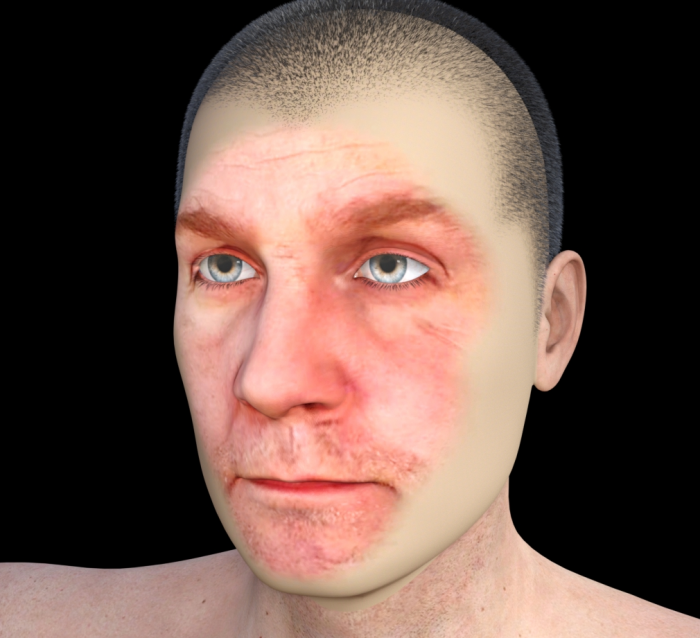
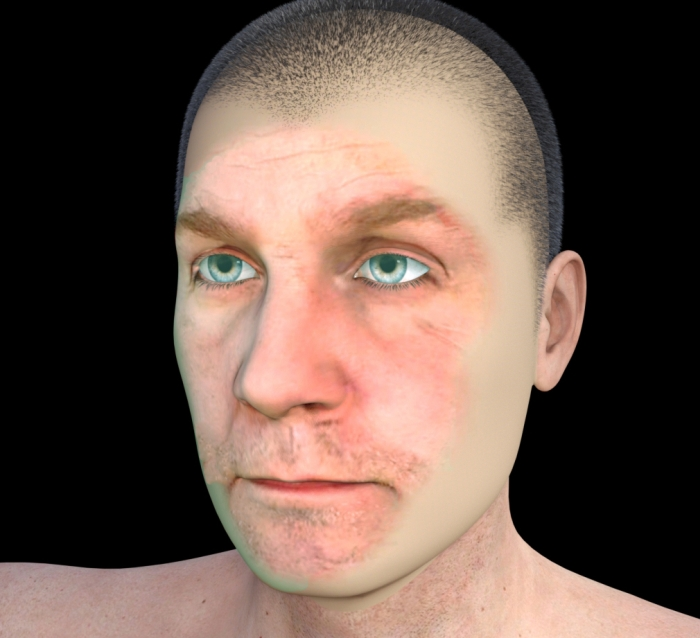
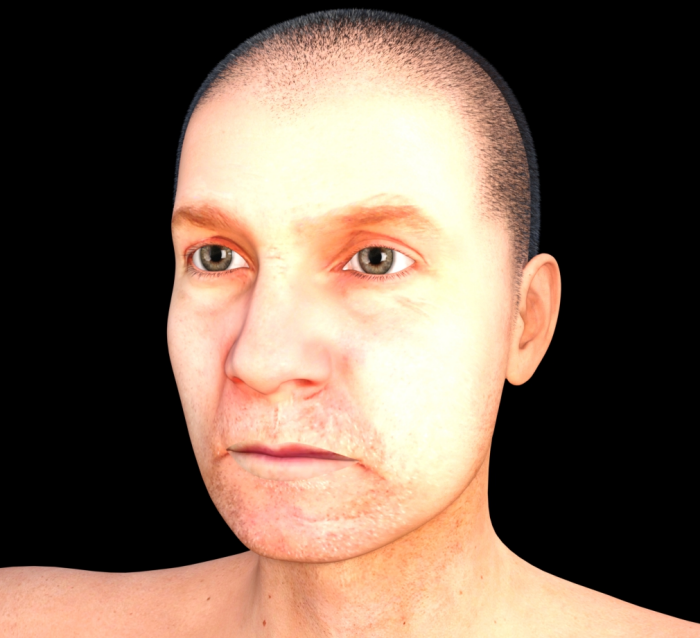
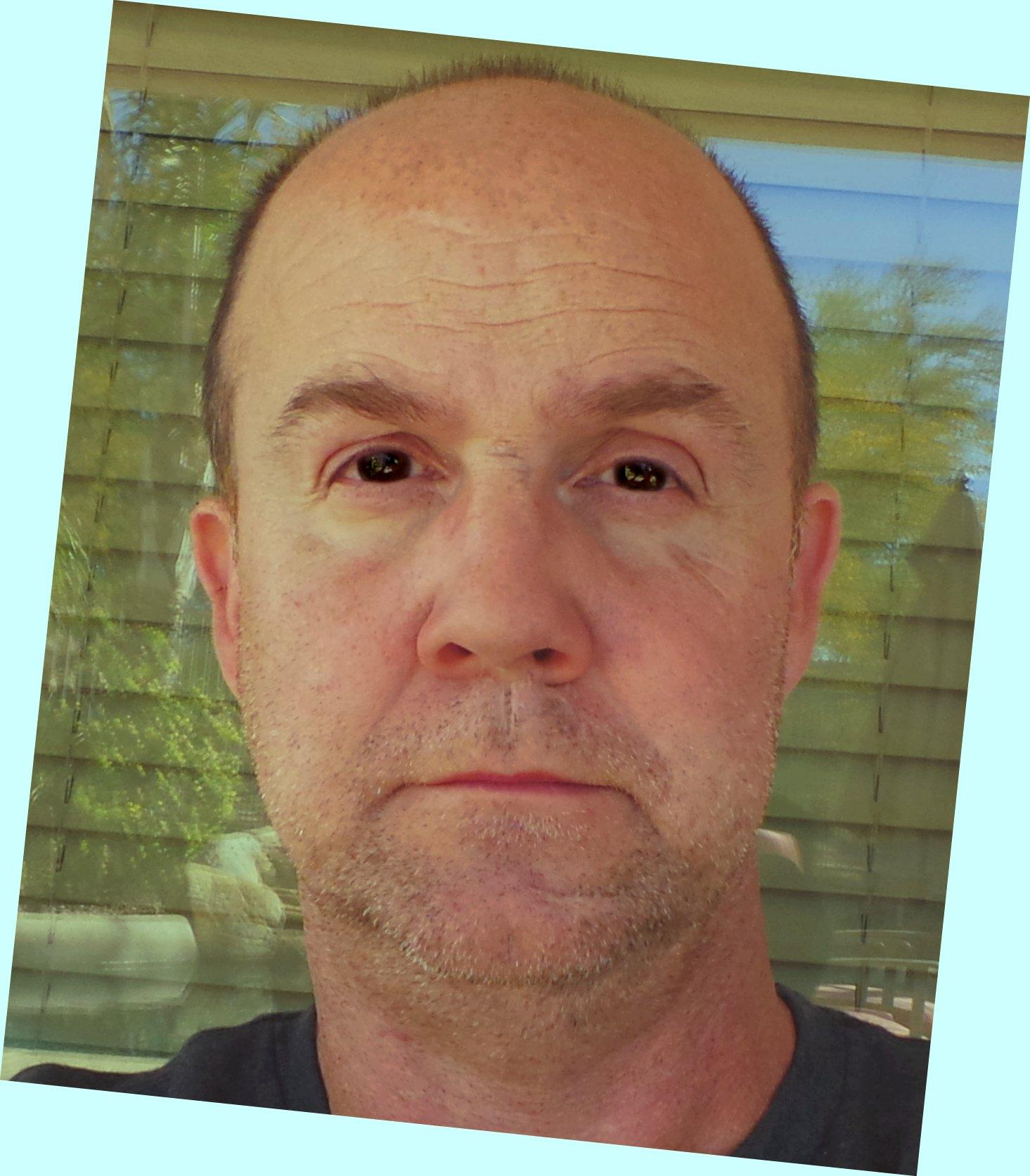
Novica & Forum Members Tips & Product Reviews Pt 8So, I spent all day wth FaceGen and HeadShop today and wanted to follow up on my mini-review above.
The first image is FaceGen Artist Demo morph and skin map.
The second is HeadShop 1 click morph and texture.
The third is HeadShop 1 click morph and texture, with some photoshop postwork to try and get a better color match.
The last is the HeadShop 1 click morph with some custom dialing of the cheeks and face length using the FaceGen textures.
And then, of course, the reference image I used for all of the imports.
HeadShop gets my nose right. I feel like FaceGen gets my chin, cheeks and eyes better. Maybe I could improve that by using a profile picture on Headshop. I feel like FaceGen takes about 20 years off me.
Now, for $10, when you generate the skin maps through FaceGen - it is a cheap, labor intensive way to get a character that looks vaguely like the person in the photograph.
But for $140 - clearly FaceGen runs circles around it. To me it looks like the difference between XBox 360 representations of real people and XBox One representations.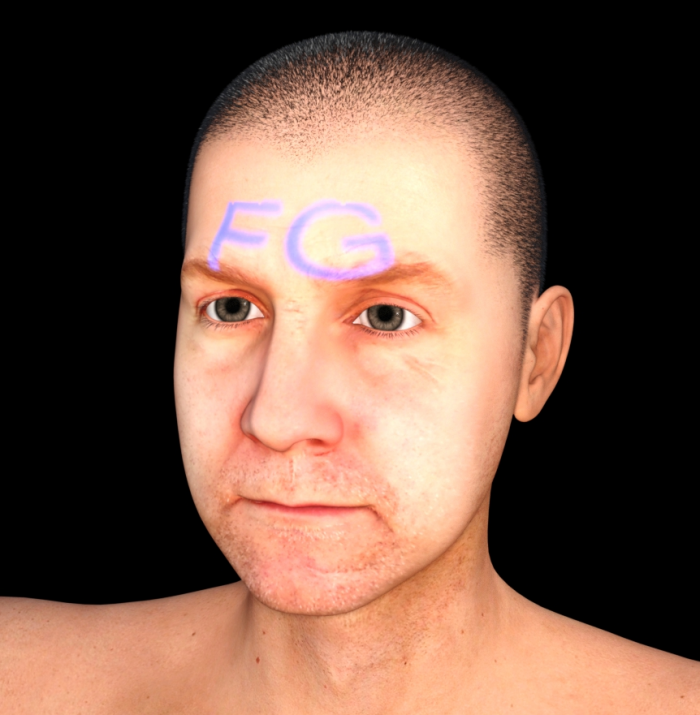
Novica & Forum Members Tips & Product Reviews Pt 8It is supposed to be all Pro 7 bundles. Get one for free, get another one for 80% off. I'd be on that - but alas, no orange banner. *sigh*
So... I've been kind of hard on Headshop OneClick.
After playing around with it for a couple of days... it is probably worth $10, and I don't think I'll return it.
Here is the deal - the FaceGen Demo is a much more stable, robust and full featured program than Headshop OneClick - but even there, your results are going to depend on the effort you put into it. A high quality picture with a neutral expression under ideal lighting is critical.
Headshop OneClick really seems to have evolved from a program designed for more generic importing into 3D modelling apps and for 3D Printing - and that kind of explains one of the worst limitations (and biggest advantages FaceGen seems to have,) the way the face texture that is created doesn't blend into the rest of the loaded figure. In fact, the face texture often doesn't really reach back to the side of the face. It creates this creepy "Genesis wearing the skin from your face," effect. I guess if you were going for a Silence of the Lambs, Buffallo Bill render, maybe that would be ideal. It puts the lotion on its skin... or blah blah blah...
I haven't had much time to play with it, but I did manage to make a render of myself that looked pretty darn accurate - it just looked like there was a spotlight shining on the figure's face.
Unfortunately, trying to create a second face import overwrote the morph and texture that was created, and that one looked lousy - and I wasn't paying attention to my original referrence photo so I can't just go back. This is another limitation of Headshop. It doesn't make it clear that unless you rename everything, you're going to overwrite any previous work when you create a subsequent face model. Related to this, you also can't use GenX to transfer the created morph to other generations. It doesn't find the headshop face morph that is created. FaceGen handles all of this much better if you plan on transferring morphs or textures from generation to generation.
Finally, exception handling is terrible with HeadShop OneClick and very cryptic. I took one photograph, tweaked it in Photoshop to make the expression more neutral, and tried to import it, and it crashed FaceGen every time. I don't know why. The image was flattened, I resized it to make it smaller, I tried it in different formats, jpg, png, bmp... no matter what, Headshop crashes on that image. It crashes in a lot of situations. It crashed on importing a profile picture. I have an i5 with 2GB Geforce 750ti and 32GB of memory - so my rendering PC is no slouch - I don't think it is memory issues.
With all of that said - I think that with pretty heavy postwork in Photoshop and a good reference picture, you could create a fairly good replica of a real person. In fact, doing two imports of the same person into FaceGen and HeadShop, there were some aspects of the morphology and texture that turned out better on the HeadShop attempt than in FaceGen. Overall, though - FaceGen is a more competent program for this kind of work. I don't think HeadShop is worth the full asking retail price, or anything near that. I think the regular price should be around $10 or $15, and on sale it would be a great deal at about $5, considering how unstable it is and the features it is missing.
I'll post some side by side renders using the FaceGen Demo and Headshop OneClick with the reference photos used later. I'm about to go on Spring Break and I've got a bunch of things to get done. It isn't the most frustrating plugin or addon I've bought. LAMH is awesome, but has a steep learning curve and just crushes my system performance. It really wants a DSLI GPU with lots of memory and a strong core CPU in order to be usable. I get frequent crashes in that PlugIn, too. HeadShop OneClick runs decent on a relatively modest PC rig, although it crashes more often than Vince Neil, Ted Kennedy, and Mark Hammil after a weekend hard-drinking and doing blow with hookers in Vegas.
It isn't a GOOD program. It is insanely overpriced. But at $10, it is a decent novelty.
And that is my kinder, gentler, more generous review of Headshop OneClick.
:)
Cool comparison. Very helpful. Thanks! I hope Facegen might be on sale for less one day. It was tempting, but hard to justify the price for my usage, and I doubt I'd ever buy Headshop OneClick based on your review. (I thought it looked jicky anyway.) Other topic, sorry so many of us didn't get an orange banner. :( Maybe DAZ will make it up to us.
Novica & Forum Members Tips & Product Reviews Pt 8It is supposed to be all Pro 7 bundles. Get one for free, get another one for 80% off. I'd be on that - but alas, no orange banner. *sigh*
So... I've been kind of hard on Headshop OneClick.
After playing around with it for a couple of days... it is probably worth $10, and I don't think I'll return it.
Here is the deal - the FaceGen Demo is a much more stable, robust and full featured program than Headshop OneClick - but even there, your results are going to depend on the effort you put into it. A high quality picture with a neutral expression under ideal lighting is critical.
Headshop OneClick really seems to have evolved from a program designed for more generic importing into 3D modelling apps and for 3D Printing - and that kind of explains one of the worst limitations (and biggest advantages FaceGen seems to have,) the way the face texture that is created doesn't blend into the rest of the loaded figure. In fact, the face texture often doesn't really reach back to the side of the face. It creates this creepy "Genesis wearing the skin from your face," effect. I guess if you were going for a Silence of the Lambs, Buffallo Bill render, maybe that would be ideal. It puts the lotion on its skin... or blah blah blah...
I haven't had much time to play with it, but I did manage to make a render of myself that looked pretty darn accurate - it just looked like there was a spotlight shining on the figure's face.
Unfortunately, trying to create a second face import overwrote the morph and texture that was created, and that one looked lousy - and I wasn't paying attention to my original referrence photo so I can't just go back. This is another limitation of Headshop. It doesn't make it clear that unless you rename everything, you're going to overwrite any previous work when you create a subsequent face model. Related to this, you also can't use GenX to transfer the created morph to other generations. It doesn't find the headshop face morph that is created. FaceGen handles all of this much better if you plan on transferring morphs or textures from generation to generation.
Finally, exception handling is terrible with HeadShop OneClick and very cryptic. I took one photograph, tweaked it in Photoshop to make the expression more neutral, and tried to import it, and it crashed FaceGen every time. I don't know why. The image was flattened, I resized it to make it smaller, I tried it in different formats, jpg, png, bmp... no matter what, Headshop crashes on that image. It crashes in a lot of situations. It crashed on importing a profile picture. I have an i5 with 2GB Geforce 750ti and 32GB of memory - so my rendering PC is no slouch - I don't think it is memory issues.
With all of that said - I think that with pretty heavy postwork in Photoshop and a good reference picture, you could create a fairly good replica of a real person. In fact, doing two imports of the same person into FaceGen and HeadShop, there were some aspects of the morphology and texture that turned out better on the HeadShop attempt than in FaceGen. Overall, though - FaceGen is a more competent program for this kind of work. I don't think HeadShop is worth the full asking retail price, or anything near that. I think the regular price should be around $10 or $15, and on sale it would be a great deal at about $5, considering how unstable it is and the features it is missing.
I'll post some side by side renders using the FaceGen Demo and Headshop OneClick with the reference photos used later. I'm about to go on Spring Break and I've got a bunch of things to get done. It isn't the most frustrating plugin or addon I've bought. LAMH is awesome, but has a steep learning curve and just crushes my system performance. It really wants a DSLI GPU with lots of memory and a strong core CPU in order to be usable. I get frequent crashes in that PlugIn, too. HeadShop OneClick runs decent on a relatively modest PC rig, although it crashes more often than Vince Neil, Ted Kennedy, and Mark Hammil after a weekend hard-drinking and doing blow with hookers in Vegas.
It isn't a GOOD program. It is insanely overpriced. But at $10, it is a decent novelty.
And that is my kinder, gentler, more generous review of Headshop OneClick.
:)
Daz 3D is part of

Connect
DAZ Productions, Inc.
7533 S Center View Ct #4664
West Jordan, UT 84084Licensing Agreement | Terms of Service | Privacy Policy | EULA
© 2026 Daz Productions Inc. All Rights Reserved.