-
G8 PowerPose Template on G8.1
PerttiA said:
marth_e said:
benniewoodell said:
I don't remember offhand, but if you search on google 8.1 power pose face controls, you'll find a thread here in the forums that outlines exactly how to get it to work. You have to go and take out certain folders that are installed and it works perfectly fine. And don't use Daz Central to install or if it asks you if you want to install something when you load Daz because it would put those files back, found that out the hard way and had to search for the thread again lol. But it works, it's just been like 8 months since I had to do it so I don't remember the exact process. Or hang tight for NorthOf45's way, I'd love to give that a try too!
Thanks for the tip Benniewoodell. I think I have seen that thread you mention but if I'm not mistaken that was a trick to make G8 expressions work with G8.1. Maybe I'm wrong... But what I wish I could do, besides that, is to be able to tweak the expressions directly with powerpose.
Cheers,
Same trick gets you the G8 powerpose templates for G8.1
Making the G8 base expressions (and any expressions that are using them) work on G8.1 requires removing dummy/placeholder expressions that are installed to G8.1 morph folders - These dummy/placeholder expression files have no other function than to prevent the base G8 expressions from loading.
The dummy/placeholder files are located in;
...\Data\DAZ 3D\Genesis 8\Female 8_1\Morphs\Daz 3D\Base Pose Head\ (255 files, can be more if you have additional DAZ expression packs)
...\Data\DAZ 3D\Genesis 8\Female 8_1\Morphs\Daz 3D\Expressions\ (24 files, can be more if you have additional DAZ expression packs)
...\Data\DAZ 3D\Genesis 8\Male 8_1\Morphs\Daz 3D\Base Pose Head\ (255 files, can be more if you have additional DAZ expression packs)
...\Data\DAZ 3D\Genesis 8\Male 8_1\Morphs\Daz 3D\Expressions\ (24 files, can be more if you have additional DAZ expression packs)Please make sure you are removing the files from G8.1 morph folders and not G8 morph folders.
Note 1; If you are logging in to DS and letting DAZ Connect (within DS) to install/update your content, you may have these also in an other location that has "\Data\Cloud\" in it's path
Note 2; Do not remove any files from "FACS" or "FACSExpressions" foldersThat's the one! I don't use premade expressions, I do everything with power pose, what PerttiA wrote here will work for you.
G8 PowerPose Template on G8.1marth_e said:
benniewoodell said:
I don't remember offhand, but if you search on google 8.1 power pose face controls, you'll find a thread here in the forums that outlines exactly how to get it to work. You have to go and take out certain folders that are installed and it works perfectly fine. And don't use Daz Central to install or if it asks you if you want to install something when you load Daz because it would put those files back, found that out the hard way and had to search for the thread again lol. But it works, it's just been like 8 months since I had to do it so I don't remember the exact process. Or hang tight for NorthOf45's way, I'd love to give that a try too!
Thanks for the tip Benniewoodell. I think I have seen that thread you mention but if I'm not mistaken that was a trick to make G8 expressions work with G8.1. Maybe I'm wrong... But what I wish I could do, besides that, is to be able to tweak the expressions directly with powerpose.
Cheers,
Same trick gets you the G8 powerpose templates for G8.1
Making the G8 base expressions (and any expressions that are using them) work on G8.1 requires removing dummy/placeholder expressions that are installed to G8.1 morph folders - These dummy/placeholder expression files have no other function than to prevent the base G8 expressions from loading.
The dummy/placeholder files are located in;
...\Data\DAZ 3D\Genesis 8\Female 8_1\Morphs\Daz 3D\Base Pose Head\ (255 files, can be more if you have additional DAZ expression packs)
...\Data\DAZ 3D\Genesis 8\Female 8_1\Morphs\Daz 3D\Expressions\ (24 files, can be more if you have additional DAZ expression packs)
...\Data\DAZ 3D\Genesis 8\Male 8_1\Morphs\Daz 3D\Base Pose Head\ (255 files, can be more if you have additional DAZ expression packs)
...\Data\DAZ 3D\Genesis 8\Male 8_1\Morphs\Daz 3D\Expressions\ (24 files, can be more if you have additional DAZ expression packs)Please make sure you are removing the files from G8.1 morph folders and not G8 morph folders.
Note 1; If you are logging in to DS and letting DAZ Connect (within DS) to install/update your content, you may have these also in an other location that has "\Data\Cloud\" in it's path
Note 2; Do not remove any files from "FACS" or "FACSExpressions" foldersRetarget Daz animation for Unreal Engine Mannequincatmaster said:
salefdp18 said:
Hello guys ! I'm lost and hopeless ...
I'm trying to retarget daz skelet (animation) into Unreal mannequin.
For this i followed different tutorial but mostly this one : https://www.youtube.com/watch?v=tG98Vn8UKbE&t
Foot and hand don't really work and "flying" a bit out of the ground
-I added new solver full body ik then goal IK Foot and IK Hand
- I also added chain only for IK Foot and IK Hand but when i match them with IK foot and IK HAND of unreal nothing happen.
Well i admit, Im stupid and I'm damn lost, I just want to convert genesis 8 animation into Unreal mannequin but it look a fcking maze for me.
Or someone could share a unreal engine save with daz retarget ? :(
Make sure the chain names of target IK rig are the same with the source IK rig, DazToUnreal bridge has working retargeter examples: G8IKRig and G81FixRotZeroRootIKRetargeter, turn on the show plugin content option in the content browser to find them.
I tried to turn on show plugin content in UE 5 - UE4 I have no example g8ikrig !
I have last version of daz to unreal bridge from daz central, something is wrong ?
G8 PowerPose Template on G8.1benniewoodell said:
I don't remember offhand, but if you search on google 8.1 power pose face controls, you'll find a thread here in the forums that outlines exactly how to get it to work. You have to go and take out certain folders that are installed and it works perfectly fine. And don't use Daz Central to install or if it asks you if you want to install something when you load Daz because it would put those files back, found that out the hard way and had to search for the thread again lol. But it works, it's just been like 8 months since I had to do it so I don't remember the exact process. Or hang tight for NorthOf45's way, I'd love to give that a try too!
Thanks for the tip Benniewoodell. I think I have seen that thread you mention but if I'm not mistaken that was a trick to make G8 expressions work with G8.1. Maybe I'm wrong... But what I wish I could do, besides that, is to be able to tweak the expressions directly with powerpose.
Cheers,
G8 PowerPose Template on G8.1I don't remember offhand, but if you search on google 8.1 power pose face controls, you'll find a thread here in the forums that outlines exactly how to get it to work. You have to go and take out certain folders that are installed and it works perfectly fine. And don't use Daz Central to install or if it asks you if you want to install something when you load Daz because it would put those files back, found that out the hard way and had to search for the thread again lol. But it works, it's just been like 8 months since I had to do it so I don't remember the exact process. Or hang tight for NorthOf45's way, I'd love to give that a try too!
The older generation: Victoria 2/3, Michael 2/3 and their children rendersI don't really know what to say. Five characters, all posed beautifully, perfect lighting, draping the central character in mystery and the use of dof is spot on. I'm left with a new appreciation of how far I have to go to turn my efforts from images into pictures. Wish I could do one tenth as well. Thank you for sharing. Regards, RichardCan't find "Daz to Blender" Add on in blendercgtyler said:
Before attempting any convuluted searches and repacking distros etc etc etc try this if the Blender side is not showing the plugin. Install the plugin from Daz Central. In Daz under File - Send To - Daz To Blender when the dialogue box opens tick on Advanced Settings, you will now see the plugin installer for Blender. Select your version etc etc and you should be good to go.
This... This right here solved the problem of the plugin not being available to enable in Blender. If you choose "Custom" as your option it'll just pop open a path chooser at the %appdata%/Blender Foundation/blender/ folder and let you pick your version of Blender to install into.
Lali's Bodystocking for female 8.1 doesnn't work anymoreAnd... If you do use DIM (or even DAZ Central) to install your content, do not log in to DAZ Studio, that is only needed when one makes an concious decision to use DAZ Connect inside DAZ Studio as ones primary means of installing content.
New Windows 11 PC - Want to reinstall the AppSofaCitizen said:
The best way to install Daz Studio is via either Daz Central or Daz Install Manager (DIM) - pick one of those and then use it exclusively (don't login via Daz Studio itself). Never tried to install JUST Daz Studio itself and I am not sure how that would work without the CMS too.
I manually install D/S all the time. The installer also installs the CMS. It's everything else that one needs to also install unless using DIM or Daz Central. [i.e. all the starter sets, dForce essentials, etc.]
New Windows 11 PC - Want to reinstall the AppThe best way to install Daz Studio is via either Daz Central or Daz Install Manager (DIM) - pick one of those and then use it exclusively (don't login via Daz Studio itself). Never tried to install JUST Daz Studio itself and I am not sure how that would work without the CMS too.
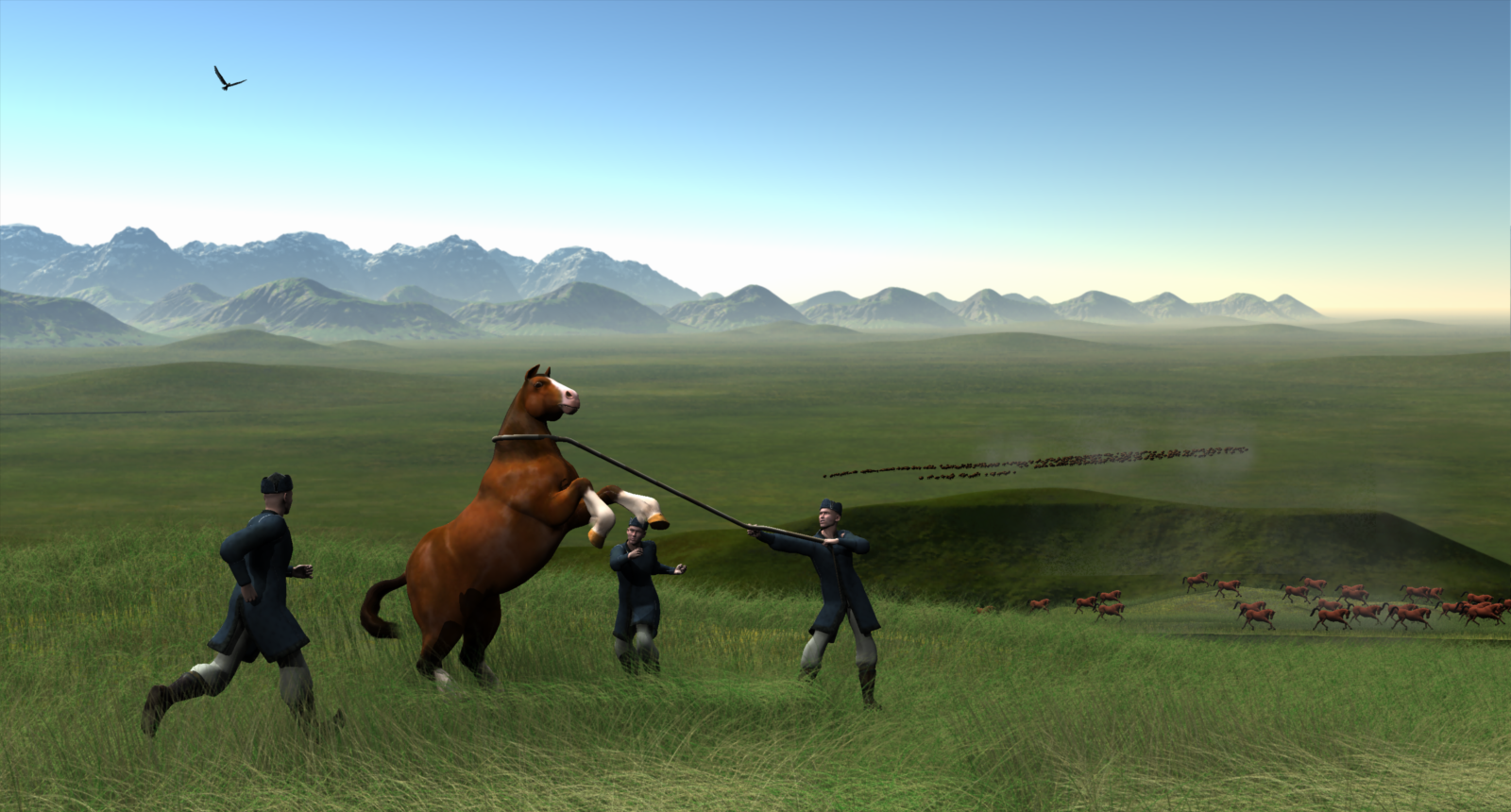
Carrara Challenge 65 - Turning Points - Voting ThreadEntry: 21
Title: - Horse Domestication in Central Asia
Artist: Diomede
WIP Links
- Background - https://www.daz3d.com/forums/discussion/comment/7985546/#Comment_7985546
- Foreground - https://www.daz3d.com/forums/discussion/comment/8025616/#Comment_8025616
Credits and Comments - Domestication of the horse in Central Asia was a pretty big turning point in human society. Daz charger horse, Poser 7 male, Genghis Khan for P7 male from the defunct Content Paradise site. Daz bison. Daz eagle. Terrains, sky, grass, rope, replicators, etc made with Carrara.
 Daz Studio/Bryce Bridge version select has no version
Boojum the brown bunny said:
OOOookaaay.. and Daz Central also only offers Daz Studio 4.2. Now I'm confused.
Version numbers are not decimals - they are whole numbers separated by dots (4.21.0.5 is the current General Release).
Daz Studio/Bryce Bridge version select has no versionOOOookaaay.. and Daz Central also only offers Daz Studio 4.2. Now I'm confused.
Daz Studio/Bryce Bridge version select has no versionOk, it turns out I don't have the latest version. the latest version of Daz Studio in Install Manager is 4.2. Anyone have an idea on why 4.5+ isn't there? I know that the new Daz Central I was told to not use because it doesn't install a bunch of stuff I needed.
Re-installing after a PC Crash and Now Missing Files [Resolved]That sounds like mis-matched paths. Daz Central and DIM both use the Manifests folder to tell them what is isntalled, and where - Daz Studio doesn't look at that as it doesn't have the same information 9and would probably be slower to access) and anyway some items may be installed but not in an active content directory. Check that Daz Studio is looking in the location to which you installed the Genesis 8 Starter essentials.
Re-installing after a PC Crash and Now Missing Files [Resolved]After re-installing the latest version of DAZ Studio after my PC crashed, I find my Genesis 9 Starter Essentials files and my Genesis 8.1 files are missing. Strangely, both DAZ Central and DIM report them as installed. The Smart Content and the Content Library do not agree. Has anyone any ideas what is going wrong? Thanks to all.
DAZ3D must unravel DIM, DAZ Central, and the installation and re-installation of DAZ Studio and its assets.
Can't install any content.No worries. As someone who has those bruises from walking the same path it makes sense to try to help others avoid the pitfalls.
I believe that Central and DIM are a bit more compatible and maybe would work together but Daz Connect that is inbuilt into Studio is definitely a different beast and does things it's own way so it is best to pick one and stick with it.
So if those existing products are still causing problems you will have to specifically uninstall those (to remove the DazConnect references) and then re-install via DIM
Can't install any content.The files are where DIM says they are. I"ve tried opening Daz Central after installing with DIM and Daz Central also recognizes that the files are installed. If i try to open them directly through Central the same thing happens, Studio opens and says the files don't exist.
Thank you SofaCItizen. I opened daz and hit work offline. Closed it and then used DIM to install a test asset. Upon reloading Studio that asset was found and working. I wouldn't have though to log out of daz to install daz content. You saved me a good deal of headache.
errorhello,im getting this error Unknown File Format
No importer for the file format can be found.when i try to load any file ive installed from daz central, i guess the location is wrong but how i can choose the right location?
i also tried installing everything manuallly and cant seem to find the actors in the library.
Confused by DS download, some questionsBendinggrass said:
Richard, I was on the DAZ Central page, and thought I was downloading DS from there. I was wrong as DAZ Central was involved in that then.
I assume if I download DS through DIM I will have more control over where DS is located, and where my content is stored.
Is that correct?
DIM will inherit the Daz Central settings (and vice versa) but yes, DIM allows paths for different purposes to be set independently. If you change the content location make sure you update it in DS too.
Daz 3D is part of

Connect
DAZ Productions, Inc.
7533 S Center View Ct #4664
West Jordan, UT 84084Licensing Agreement | Terms of Service | Privacy Policy | EULA
© 2026 Daz Productions Inc. All Rights Reserved.











