-
Custom slider problem
That'll be the very same steps as what you did for the first time, when you modify the dial's properties again. Assure when you resave the morph assets, you select the correct Asset Directory, Vendor and Product Name, they should be exactly the same as what you used when you saved the morph asset before.
CBS/ JCMs Help...----
What kind of a bug is this?
You guys seem to experience this often?There's no bug... I took a similar corrective morph from JS Sarah. You may check the setting and make sure you select the correct Vendor Name and Product Name when saving morph asset. Assure that you modify and save the corrective morph on G9 rather than the hijab. After saving, remove and reload the hijab.
Edit: If you happened to modify and save the one on the hijab, no worry but just delete it from the hijab's data folder.
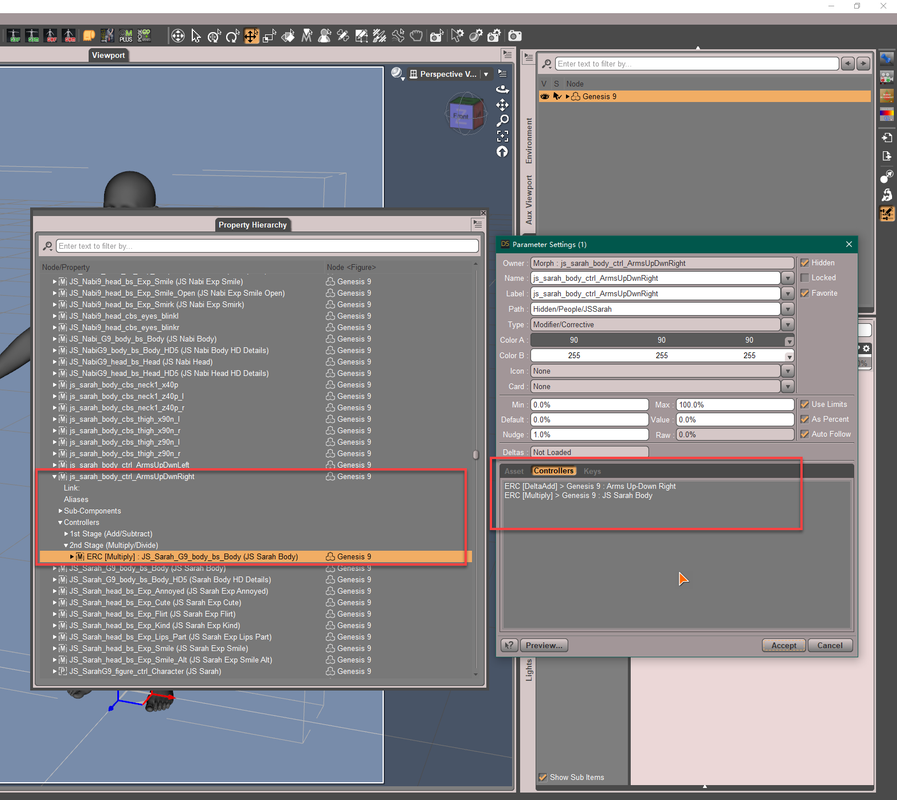
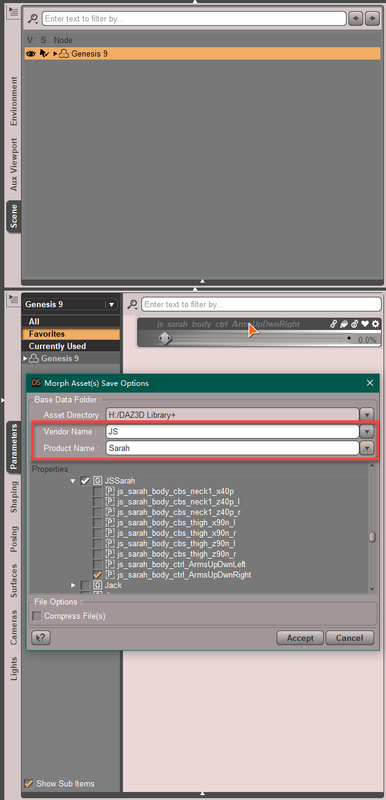 CBS/ JCMs Help
James said:
There should be a 2nd Stage Controller with ERC [Multiply] of Jenny's body morph. If there's not, it's an issue. You may submit a ticket... then drag Jenny's body morph to 2nd Stage controller of this CBS with Property Hierarchy and resave this CBS morph asset.
There is a controller on 1st stage
https://prnt.sc/nr32mABfax-4
But no controller on 2nd stage
I added Jenny body's morph to 2nd stage.
Save the morph.
At first it seems to solve the problem.
But then when I tested it again. Load the Hijab.
The 'js_jenny_body_cbs_shoulder_z55p_r'
still get's dial up
And the controllers 1st and 2nd stage are both now empty.----
What kind of a bug is this?
You guys seem to experience this often?Perhaps you didn't save the updated morph properly?
Are the missing controllers missing from the projected morph on the hijab (where you wouldnt expect them) or missing from the morph on the character?
Also might pay to consider that if the PA messed up that one CBS, there's a good chance they probably messed up all of them (?), so you probably are going to have to correct the PA's mistakes for all their CBS. Maybe easier to just uninstall the character at that rate. @mousso
Custom slider problemI can make a morph slider, colorize it, and add a Card thumbnail before saving it as a Morph asset. Afterward the thumbnail and color will hold true every time I load the character it was created for.
What I can’t seem to do is change the color or add a thumbnail to the card AFTER saving it as a Morph asset. It looks good at first, but it always defaults to the previously saved color and no card thumbnail when I try to apply it to the character at a later time.
Is there a way to do either things AFTER you save the morph asset? I have a set color for my siders which I would like to change to a new color for all of them, plus I now want to add thumbnails to all of the ones that don’t have one.
Help!
CBS/ JCMs HelpThere should be a 2nd Stage Controller with ERC [Multiply] of Jenny's body morph. If there's not, it's an issue. You may submit a ticket... then drag Jenny's body morph to 2nd Stage controller of this CBS with Property Hierarchy and resave this CBS morph asset.
There is a controller on 1st stage
https://prnt.sc/nr32mABfax-4
But no controller on 2nd stage
I added Jenny body's morph to 2nd stage.
Save the morph.
At first it seems to solve the problem.
But then when I tested it again. Load the Hijab.
The 'js_jenny_body_cbs_shoulder_z55p_r'
still get's dial up
And the controllers 1st and 2nd stage are both now empty.----
What kind of a bug is this?
You guys seem to experience this often?People for archviz...The best bang for your buck is Lorenzo and Loretta LoRez for background characters. If they need to hold up closer to the camera, you can get good results with any generation of Genesis, but more recent generations have higher-resolution textures and are optimized for PBR. Genesis 9 comes with a few different skin textures and a unisex figure, so you can get more mileage out of the starter essentials. A few morph packs, starting with the Daz basic packs, give you a lot of options for creating characters, and OutofTouch makes mega wardrobe packs that give you a lot of different options for clothing.
Freebie Challenge August 2023 - Fabulous Pink - Main ThreadLinwelly said:
luci45 said:
Roomates
Freebies
OnFleek for Genesis 3 & 8 Female(s) https://aprilsvanity.com/shop/onfleek-for-genesis-3-8-female-s.html
Iray car related shader presets 'megapackby Tom2099 deviantart.com/tom2099/art/Iray-car-related-shader-presets-megapack-539622361
Pd-Soft Leather Daz Studio Shaders for Iray https://www.renderosity.com/freestuff/items/75152/pd-soft-leather-daz-studio-shaders-for-iray
Iray Sequins Shaders https://www.renderosity.com/freestuff/items/93777/iray-sequins-shaders
Iray Fur Shaders https://www.renderosity.com/freestuff/items/88081/iray-fur-shaders
3D Bubbles https://www.daz3d.com/3d-bubbles
I13 Visions Of The Past Poses (includes trumpet and wine glass) https://www.daz3d.com/i13-visions-of-the-past-poses
BWC Manly https://www.daz3d.com/bwc-manly
G2F Pose Transfer To G8F https://www.renderosity.com/freestuff/items/89255/g2f-pose-transfer-to-g8f
Rustic Living Room https://www.daz3d.com/rustic-living-room
Ice Cream Container https://sharecg.com/v/92776/view/21/DAZ-Studio/Ice-Cream-Container
Bass https://www.daz3d.com/bassNo-count Freebies:
G2F Base Figure
80s Girl Fun (MEC4D 2015 - not available? https://www.daz3d.com/forums/discussion/58276/mec4d-s-celebration-with-freebies-commercial )
dForce Christmas Morning Nightie for Genesis 8 and 8.1 Female (Christmas 2022)
Genesis 2 Starter Essentials
Genesis 8 Starter Essentials
Toulouse HairPaid For:
Reizi for Genesis 8 Female https://www.daz3d.com/reizi-for-genesis-8-female
PTF Loves Me - Loves Me Not Expressions for Genesis 8.1 Female https://www.daz3d.com/ptf-loves-me--loves-me-not-expressions-for-genesis-81-female
iRadiance - Light Probe HDR Lighting for Iray - Expansion 5 https://www.daz3d.com/iradiance--light-probe-hdr-lighting-for-iray--expansion-5
DG Iray Tropical Fabrics Shaders https://www.daz3d.com/dg-iray-tropical-fabrics-shadersHi Luci
the Bass, the Rustic Living Room, and the i13 Visions of the Past Poses are not currently freebies, probably were at some point. I didn't keep track if that might have been recently,
If you move them into the No-count Freebies you are on the safe side and since you still have enough freebies you then can
Move to Entries
They were all freebies either this month (Bass) or last month, July (Rustic Living Room, and i13 Visions of the Past Poses.) Am I misunderstanding this part of rule 1?
The exception to this rule is all Daz Bi-Weekly Freebies will be allowed throughout the entire month in which they are free as well as the month following their release as a freebie (For a total of 2 months).
CBS/ JCMs HelpIndeed, there're so many such issues.... I don't have this figure, but you can click that Gear icon on the hidden dial of 'js_jenny_body_cbs_shoulder_z55p_r', check if there's a Controller from this character, in Controllers tab.
There should be a 2nd Stage Controller with ERC [Multiply] of Jenny's body morph. If there's not, it's an issue. You may submit a ticket... then drag Jenny's body morph to 2nd Stage controller of this CBS with Property Hierarchy and resave this CBS morph asset.
Trying to use Shattered to have a broken window with text and a log on it.The basic "Shattered" panes have a regular uv that is a simple square, but covers all the movable pieces. Any of the morphs will retain that mapping, so that any image placed on the glass pane will stick to the shards as they morph around. However, that is not what you are trying to achieve. You want the broken mirror to reflect the intact image on the window. The mirror must have the proper qualities to actually reflect. Note that "Shattered" is a 3DL product, so convert it to Iray first. Just apply the Iray Uber shader, then set it up as a mirror. Make sure Max Path Length (Render Settings->Optimization) is set to some reasonable value like 5 or 6 to ensure the light can travel long enough to reach the camera.
Trying to use Shattered to have a broken window with text and a log on it.Sounds like you need a model of a mirror that is tex mapped when everything is in the unbroken position and then can be morphed/have the individual bits moved into a broken position. That way there need only be a single texture map, the bits of the mirror carry their own mapping with themselves as they move. (There are two sets of vertices for each facet. The first is the real world 3D position and they define where the surface is in space. The second is an invisible 2D vertex that points to where on the texture map the facet gets its texture information from. This will remain fixed in 2D even if the 3D facet position moves.)
It has to be said that this is NOT easy to model realistically, which is why you don't often see it, though I'm sure it would be popular. (I modelled up some freebie broken bottle fragments and put them on Renderosity - over 1300 downloads have been made, so such things can do quite well.) Another thing to bear in mind is that mirrors show up facet triangulation in a really obvious way, so there has to be a lot of care taken in creating the facets in the mirror to go around the breaks and not to have the breaks show as distorted facets before the mirror break morph is activated.
Regards,
Richard
Cannot change "Selectable (in viewport)" setting - neither in scene navigator nor in parametersIn general you did nothing wrong but the culprit was just the shell. It was loaded with the mark of unselectable... i.e. the dial 'Selectable' was 'Off' as default, then you clicked on the icon to make it selectable, then the dial 'Selectable' was 'On', correct ? In that case, 'Selectable' had the value of 'On' in Currently Used, then you ERC Freeze on the dial of 'Ben', with the Geoshell attached. So 'Ben' was freezed as the Controller of 'Selectable' on the shell ... You could've found this 'Selectable' in the list of Freeze Properties, and should've unchecked it...
A better and safer way is: Use Dev Load to customize your new character, and do not attach anything as sub-node to the figure before ERC Freezing, at least do not change the value of any dial on the sub-nodes. But anyway, that geo-shell shouldn't have been set as unselectable as default, that was not correct, at least improper for the users...
Now, you can remove the controller from 'Selectable' and re-freeze ERC on Ben and re-save its morph asset.
Cannot change "Selectable (in viewport)" setting - neither in scene navigator nor in parametersThank you for this... I was able to follow along the click-path you described and I actually see a controller. For one of the cases I found out that the geoshell for Jepe's bodyhair actually was having the trouble: I was not able to make it unselectable again. For this geoshell there is a controller "ERC [DeltaAdd] > Ben : Ben". Ben is my character and I think that I worked on the figure mesh in Blender and imported it as a morph for Genesis 8 base male. After the import of the morph I did an ERC freeze and before that I adjusted the rig ("Adjust Rigging to Shape"). Did I do something wrong here?
CBS/ JCMs HelpNope... first there's no CBS for Front-Back. 2nd you mainly need to fix three CBS, body_cbs_shoulder_x30n, body_cbs_shoulder_x30p, body_cbs_shoulder_z55p. (if there's ugly distortion with Front-Back, you may create corrective morphs for them). Dont' modify weight, directly fix them with Blender. Fix one side with Symmetry, then use Mirroring or Attenuate in Morph Loader to update the other side. That's the most optimal and rapid way.
And don't care too much about 'combinations', CBS will be dialed proportionaly as the degrees of joint rotation. In case there's still distortion / poke-thru with a 'combination of rotations', create a MCM (morph corrective morph) for it... but don't make these things too complicated. You could never make a 100% perfect clothing... neither could a PA.
Smoothing modifier is irrelevant to corrective morphs... it just 'influences the mesh' to prevent or reduce poke-thru with smoothing iteration and collision. So in most of the cases, corrective morphs + smoothing will be fine enough. Beside, I found you've been dealing with poke-thru these days, another suggestion is that don't make high poly clothing, mid poly is good enough.
You may check the garments from those popular PAs (Mada, Su Yee, lilflame, etc.), the poly counts of the similar garments is less than 15K, many are just with 5K - 8K. Well your hijab has 31K faces, it's not really necessary. The more dense the mesh is, the more chance there's gonna be for poke-thru... You have to increase SubD of figure to be adaptive to it. Meanwhile don't make the clothing too tight in MD, try to optimize the partical distance ( better > 10 at least ) and skin offset (0.3 - 0.5)...
As for G9's default dials, 1st one is not, check your figure's pelvis Bend.. the last two are related to resting focal point of eyeballs (make them in the center of the eyeballs), which is by design. The morph could've been as default, I don't know why... maybe G9 was born with cross eyes
 Try to use Dev Load to make your clothing.Freebie Challenge August 2023 - Fabulous Pink - Main Thread
luci45 said:
Roomates
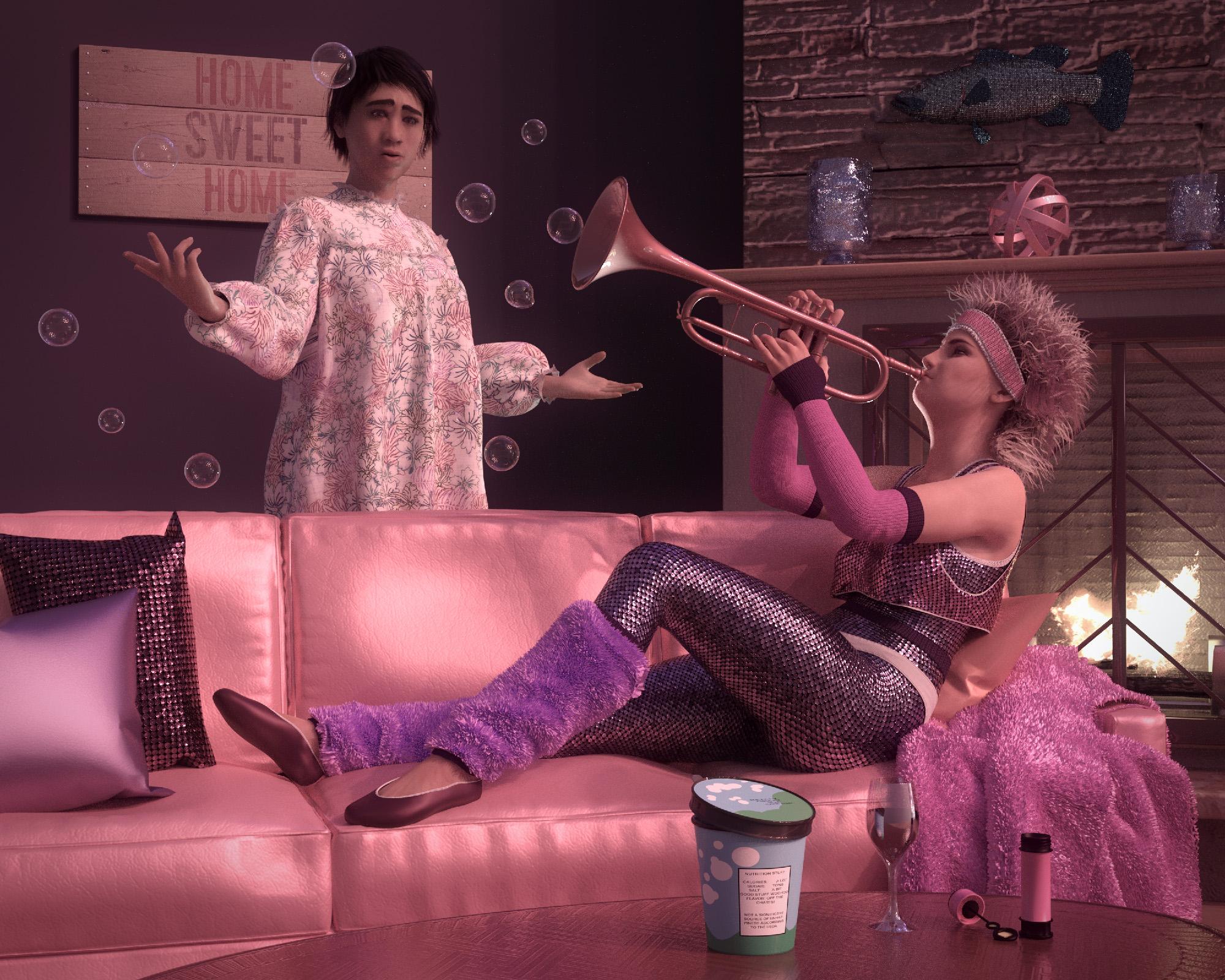
Freebies
OnFleek for Genesis 3 & 8 Female(s) https://aprilsvanity.com/shop/onfleek-for-genesis-3-8-female-s.html
Iray car related shader presets 'megapackby Tom2099 deviantart.com/tom2099/art/Iray-car-related-shader-presets-megapack-539622361
Pd-Soft Leather Daz Studio Shaders for Iray https://www.renderosity.com/freestuff/items/75152/pd-soft-leather-daz-studio-shaders-for-iray
Iray Sequins Shaders https://www.renderosity.com/freestuff/items/93777/iray-sequins-shaders
Iray Fur Shaders https://www.renderosity.com/freestuff/items/88081/iray-fur-shaders
3D Bubbles https://www.daz3d.com/3d-bubbles
I13 Visions Of The Past Poses (includes trumpet and wine glass) https://www.daz3d.com/i13-visions-of-the-past-poses
BWC Manly https://www.daz3d.com/bwc-manly
G2F Pose Transfer To G8F https://www.renderosity.com/freestuff/items/89255/g2f-pose-transfer-to-g8f
Rustic Living Room https://www.daz3d.com/rustic-living-room
Ice Cream Container https://sharecg.com/v/92776/view/21/DAZ-Studio/Ice-Cream-Container
Bass https://www.daz3d.com/bassNo-count Freebies:
G2F Base Figure
80s Girl Fun (MEC4D 2015 - not available? https://www.daz3d.com/forums/discussion/58276/mec4d-s-celebration-with-freebies-commercial )
dForce Christmas Morning Nightie for Genesis 8 and 8.1 Female (Christmas 2022)
Genesis 2 Starter Essentials
Genesis 8 Starter Essentials
Toulouse HairPaid For:
Reizi for Genesis 8 Female https://www.daz3d.com/reizi-for-genesis-8-female
PTF Loves Me - Loves Me Not Expressions for Genesis 8.1 Female https://www.daz3d.com/ptf-loves-me--loves-me-not-expressions-for-genesis-81-female
iRadiance - Light Probe HDR Lighting for Iray - Expansion 5 https://www.daz3d.com/iradiance--light-probe-hdr-lighting-for-iray--expansion-5
DG Iray Tropical Fabrics Shaders https://www.daz3d.com/dg-iray-tropical-fabrics-shadersHi Luci
the Bass, the Rustic Living Room, and the i13 Visions of the Past Poses are not currently freebies, probably were at some point. I didn't keep track if that might have been recently,
If you move them into the No-count Freebies you are on the safe side and since you still have enough freebies you then can
Move to Entries
Hitchens: A DAZ Studio to Blender Live LinkThis all sound amazing. It would really be great to be able to load and transfer Daz content to Blender without touching Daz Studio.
Have to thank all people that help to use Daz content in Blender like Thomas and TheMysteryIsThePoint! Thanks again also to Padone to support with his tips.
XTransfer Module 1- Genesis 3 to Genesis 8 Morph Converter (Commercial)Workflow
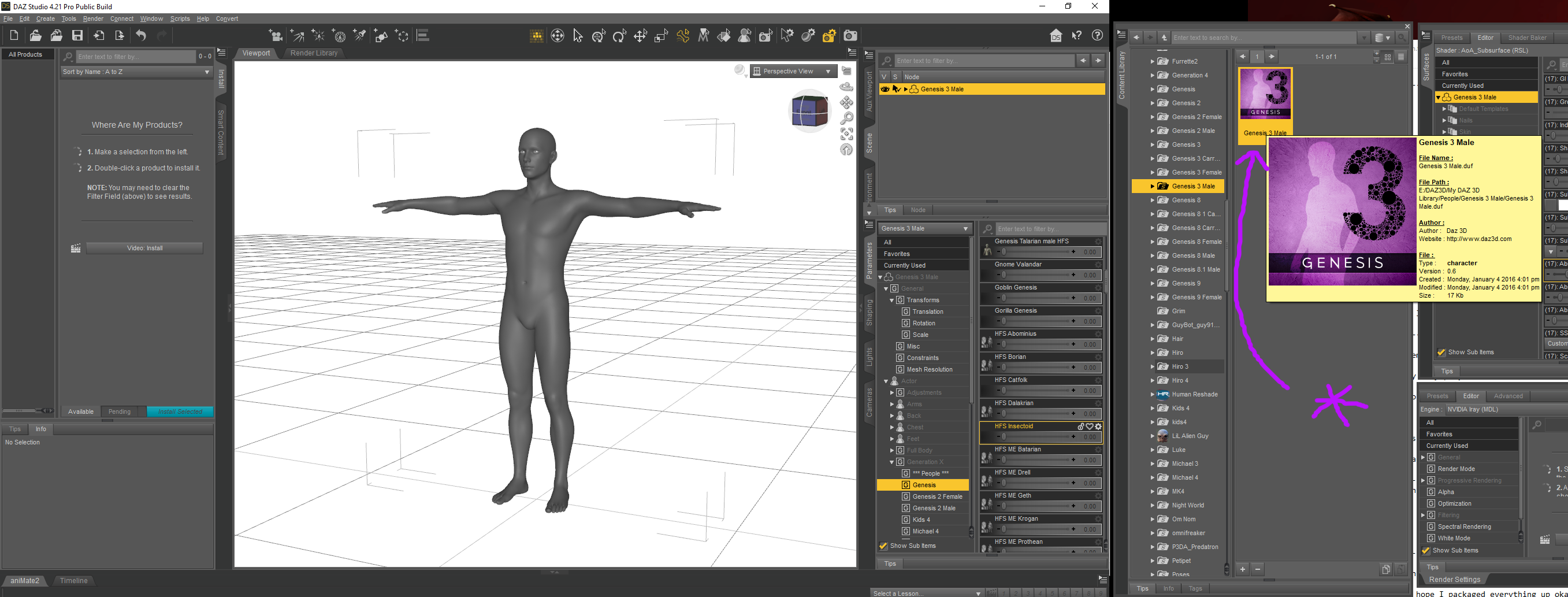
1. Load Base Genesis 3
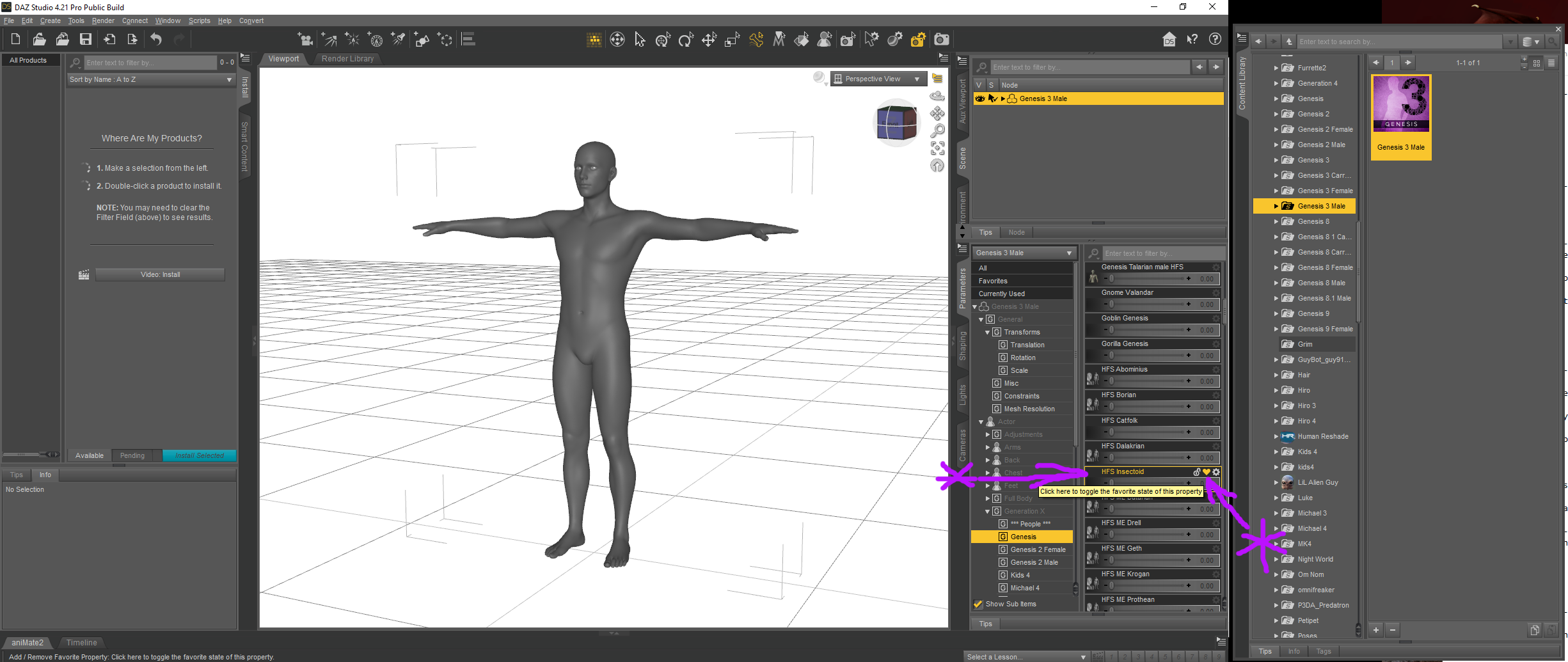
2. Select the morph you wish to convert on the Paramters Tab
3. Favourite the Morph by clicking on the Heart symbol - DO NOT dial the morph in
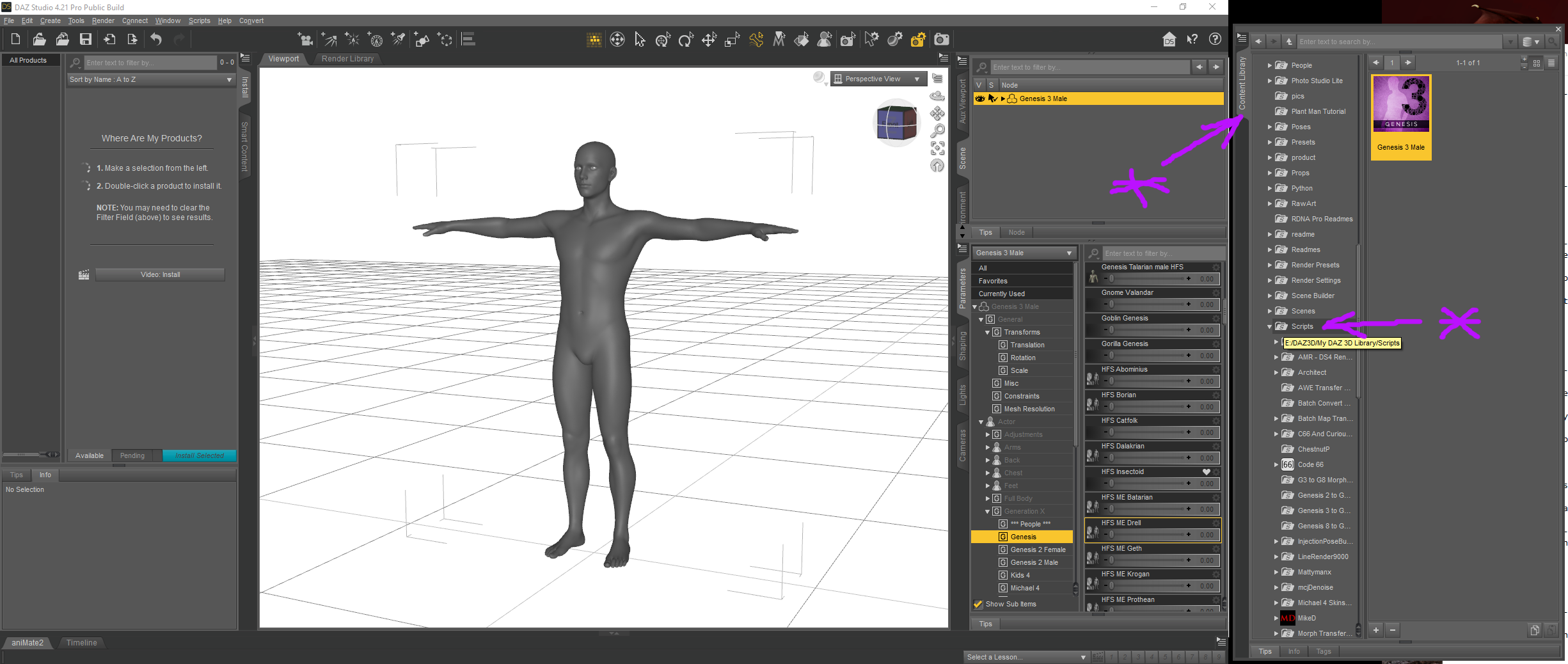
4. Click on the Content Library
5. Click on Scripts folder to open it
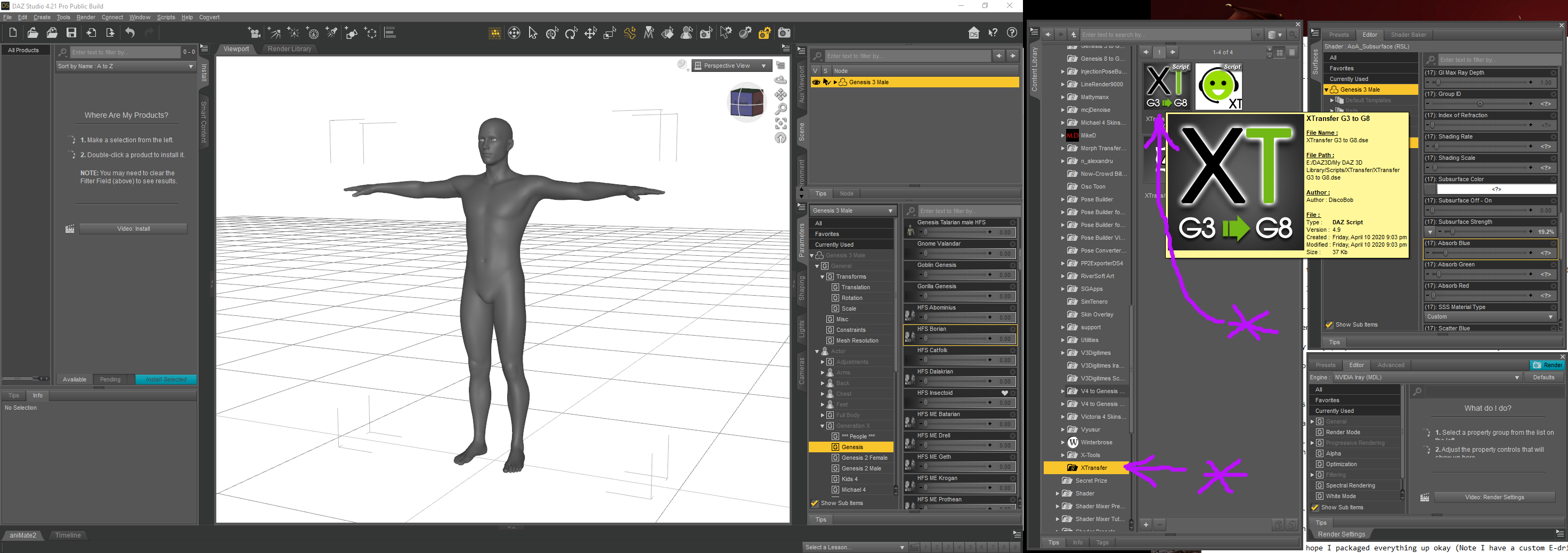
6. Click on XTransfer folder
7. Click on XTransfer G3 to G8 icon
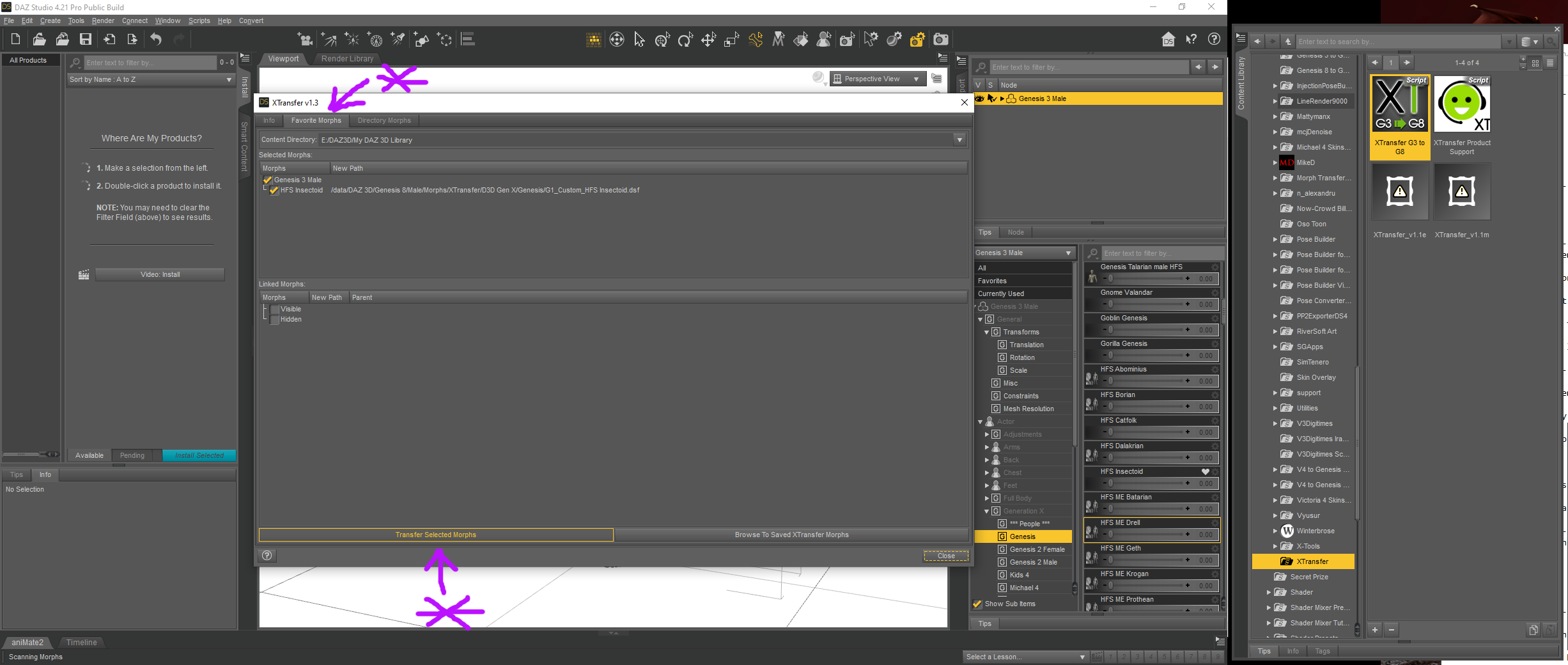
8. Click on the Favourite Morphs Tab
View everything listed, if you have a heap of linked morphs leave them enabled as they will be needed to run the final morph
9. Click on Transfer Selected Morphs
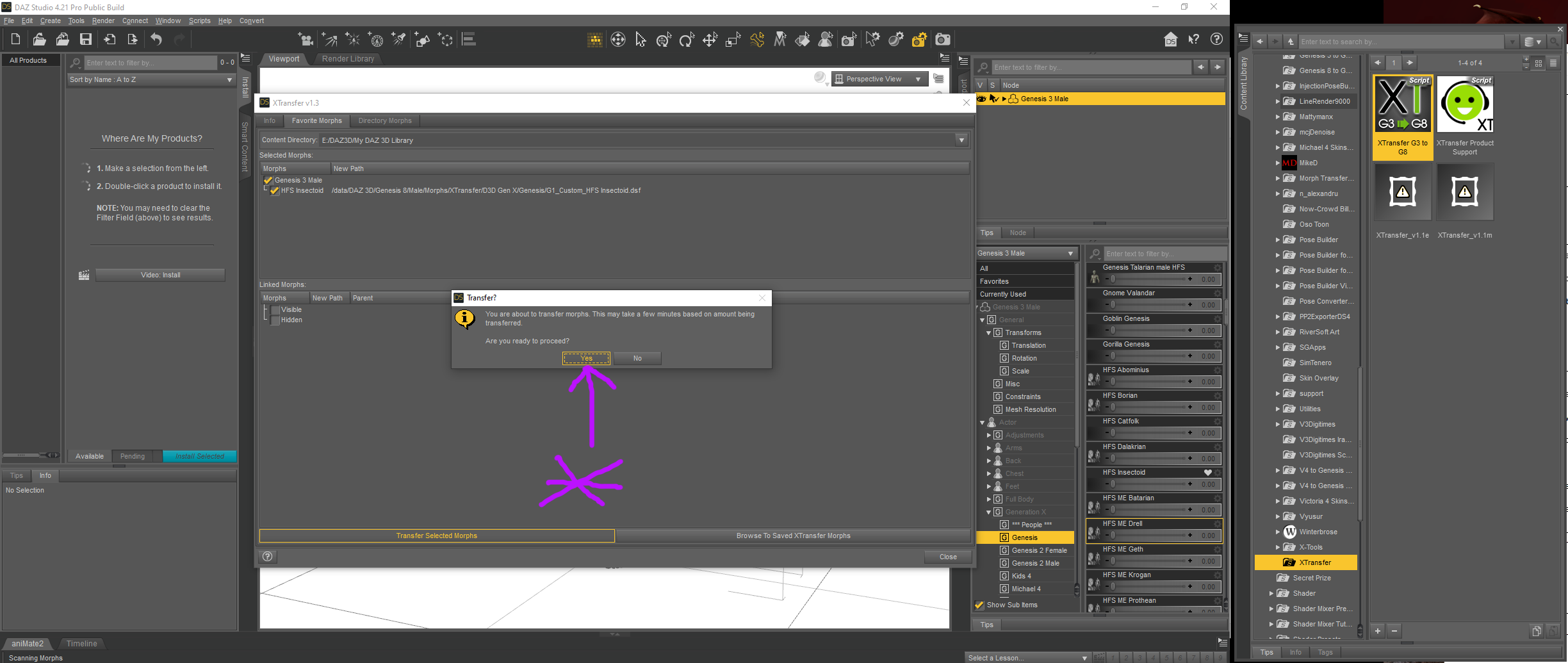
10. Click on Yes
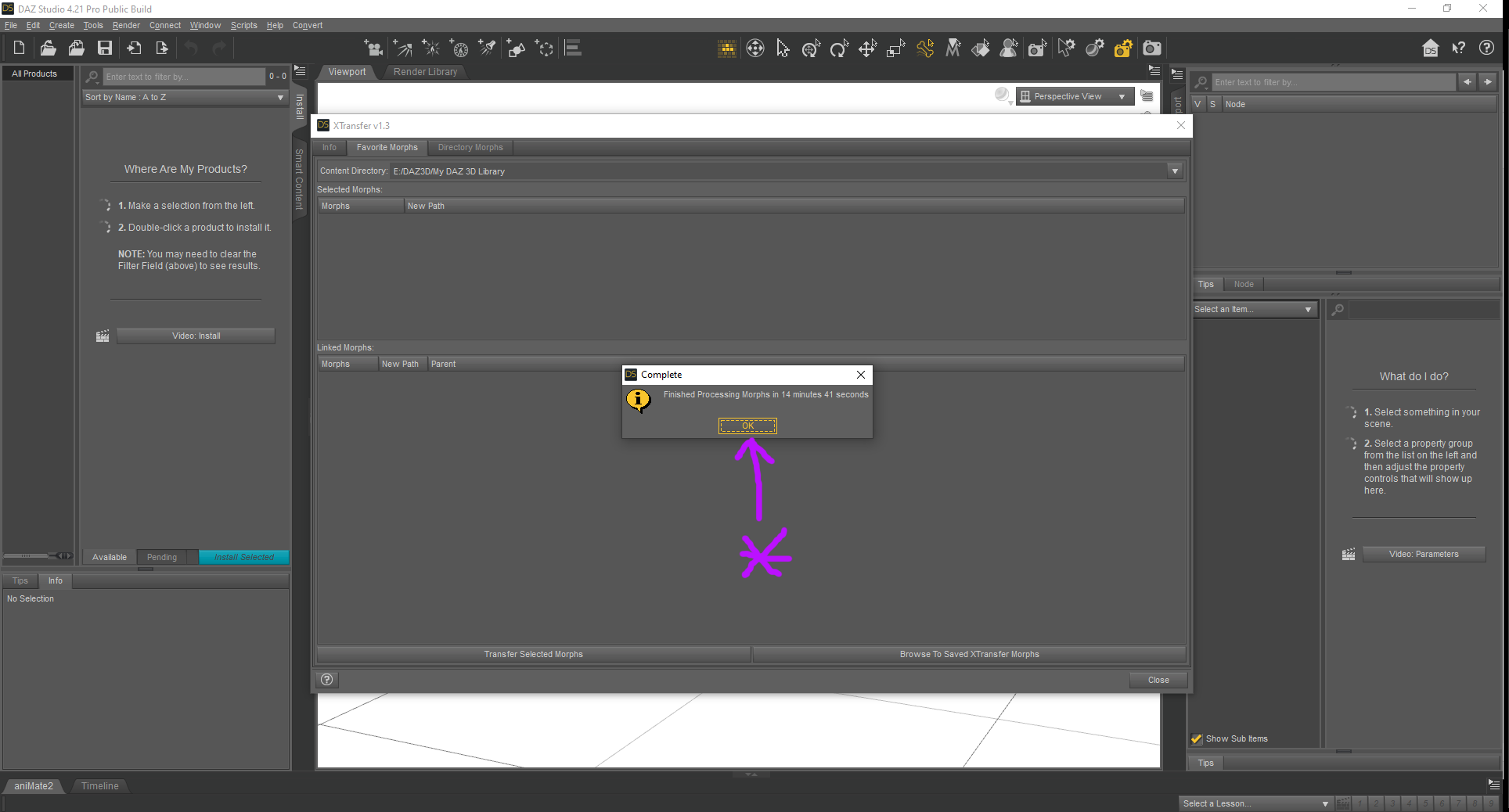
11. After a while the Finished Processing Tab will pop up. Note the time taken ! I have had some take nearly 30 minutes to convert. Click on OK to finish.
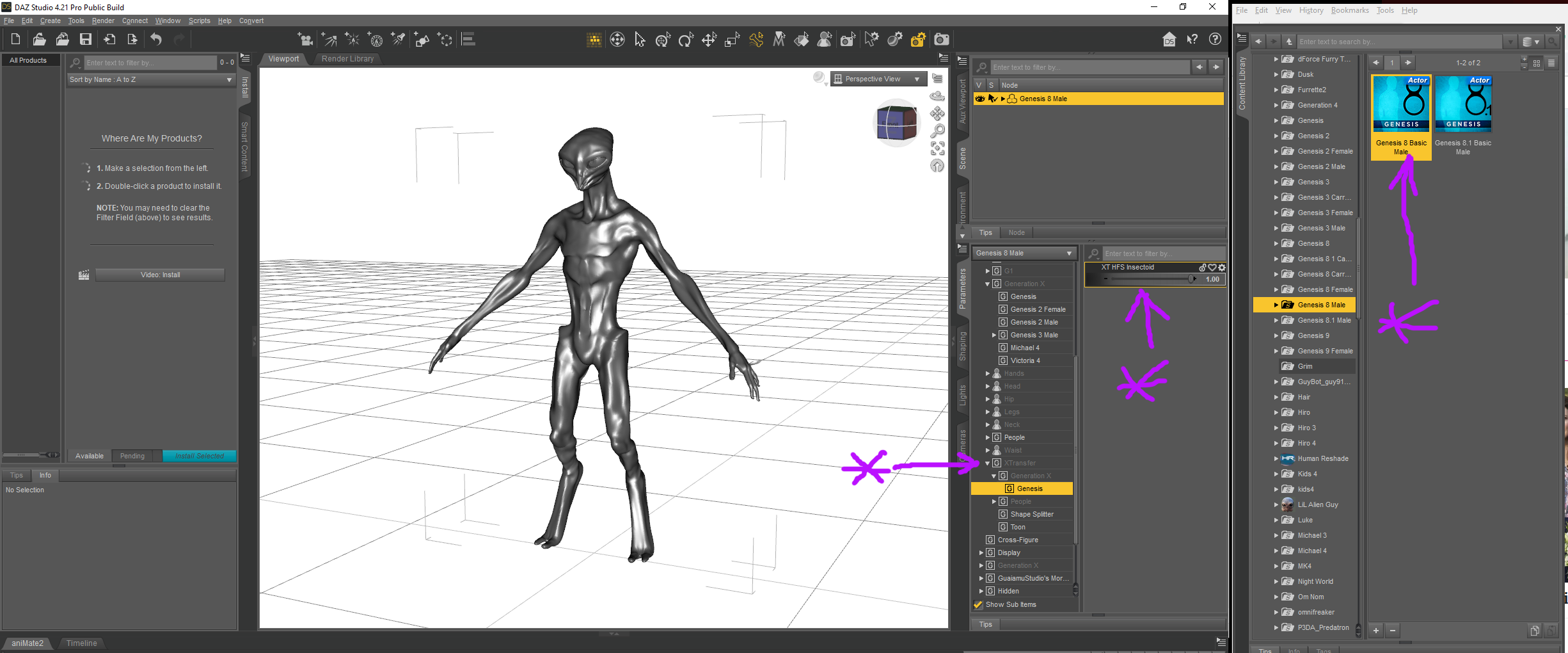
12. Load your Genesis 8 Base
13. In the Parameters Tab locate XTransfer
14. Dial in your morph
Freebie Challenge August 2023 - Fabulous Pink - Main ThreadRoomates
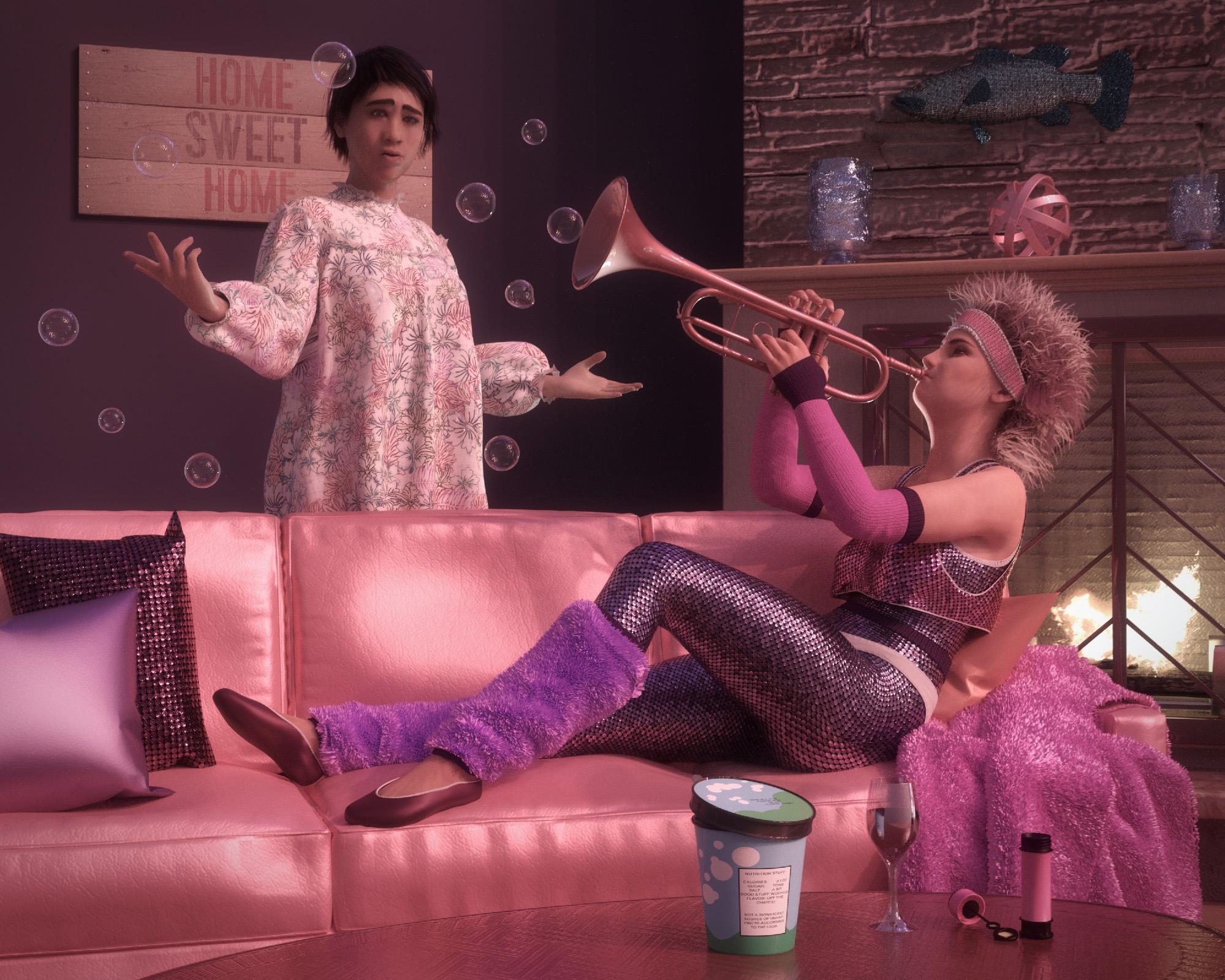
Freebies
OnFleek for Genesis 3 & 8 Female(s) https://aprilsvanity.com/shop/onfleek-for-genesis-3-8-female-s.html
Iray car related shader presets 'megapackby Tom2099 deviantart.com/tom2099/art/Iray-car-related-shader-presets-megapack-539622361
Pd-Soft Leather Daz Studio Shaders for Iray https://www.renderosity.com/freestuff/items/75152/pd-soft-leather-daz-studio-shaders-for-iray
Iray Sequins Shaders https://www.renderosity.com/freestuff/items/93777/iray-sequins-shaders
Iray Fur Shaders https://www.renderosity.com/freestuff/items/88081/iray-fur-shaders
3D Bubbles https://www.daz3d.com/3d-bubbles
I13 Visions Of The Past Poses (includes trumpet and wine glass) https://www.daz3d.com/i13-visions-of-the-past-poses
BWC Manly https://www.daz3d.com/bwc-manly
G2F Pose Transfer To G8F https://www.renderosity.com/freestuff/items/89255/g2f-pose-transfer-to-g8f
Rustic Living Room https://www.daz3d.com/rustic-living-room
Ice Cream Container https://sharecg.com/v/92776/view/21/DAZ-Studio/Ice-Cream-Container
Bass https://www.daz3d.com/bassNo-count Freebies:
G2F Base Figure
80s Girl Fun (MEC4D 2015 - not available? https://www.daz3d.com/forums/discussion/58276/mec4d-s-celebration-with-freebies-commercial )
dForce Christmas Morning Nightie for Genesis 8 and 8.1 Female (Christmas 2022)
Genesis 2 Starter Essentials
Genesis 8 Starter Essentials
Toulouse HairPaid For:
Reizi for Genesis 8 Female https://www.daz3d.com/reizi-for-genesis-8-female
PTF Loves Me - Loves Me Not Expressions for Genesis 8.1 Female https://www.daz3d.com/ptf-loves-me--loves-me-not-expressions-for-genesis-81-female
iRadiance - Light Probe HDR Lighting for Iray - Expansion 5 https://www.daz3d.com/iradiance--light-probe-hdr-lighting-for-iray--expansion-5
DG Iray Tropical Fabrics Shaders https://www.daz3d.com/dg-iray-tropical-fabrics-shadersNew figure and materialyuyu.atem said:
Hello,
If I create a new figure, for exemple with MakeHuman or blender, without to create a material for this figure, what material will apprear on Daz? Will the figure haven't any material or wil it receive a default material from Daz?
Thank you in advance for your answer!
As the best practice, if you create new character with Blender, pls use Genesis X figure as the base for sculpting, then you import the character's morph back to DS. In this way, you'll have a fully-rigged new character and you may load texture maps from other character on it or create new materials..
As for MakeHuman character that you wanna bring into Daz, one of the good ways is to use Wrap3D/4D, i.e. use Genesis base figure to wrap MakeHuman figure and import back to DS.
There're quite a few tutorials on Daz3D channel of youtube, you may take a look first.
[Released] Turbo Loader for Genesis 8 and 8.1 [Commercial]pixelquack said:
Come to think, what I'd need now is a script that extract all morph I ever used from all my scene dufs and tell me which I used most :P
Thanks.
You're welcome!
AIUTO...CHI CONOSCE L’ITALIANO? PARTE QUATTORDICISono morph per Maya non DAZ Studio. E' una linea di prodotti che hanno cercato di vendere un pò di tempo fa ma che non mi pare abbia avuto un gran seguito.
Di base si tratta di G1 con dei morph specifici applicati su cui hanno messo degli abiti provenienti dallo store e poi esportati in formato FBX per Maya. Ma siccome puoi fare la stessa cosa da solo con i prodotti del negozio per 30$ o giù di lì, non credo che averlo già fatto per 100$ sia molto interessante.
Alla fine gli FBX esportati da DAZ Studio sono perfetti, il problema è quando cerchi di importare.
Daz 3D is part of

Connect
DAZ Productions, Inc.
7533 S Center View Ct #4664
West Jordan, UT 84084Licensing Agreement | Terms of Service | Privacy Policy | EULA
© 2026 Daz Productions Inc. All Rights Reserved.














