-
L'Adair's WIPs
Real life has been persistent these past weeks. (We're in the long, slow process of getting the house ready to put up for sale. So many things we ignored for years, due to lack of funds, must now be taken care of first. Anyway…) I have made time to work in Daz Studio and now I have something I can share here.
First, I did a quick scene showcasing Jepe's newest product, the V8 Art Deco Statuettes package. I loaded one of the premade props, changed the face morph, added some hair and then tried different shaders on things until I liked the effect. I tinkered with both of LY's Leonine Pro lights sets until I found a light/background that set off the statuette and added one of the light presets to produce highlights. I'm pretty sure the HDRI and lights are both from the second set, LY Leonine Pro HDR Lighting Vol.2. The whole thing from opening DS to finished render took less than a day. For me, that's lightning fast. You can see the finished image in my gallery here. (Currently sitting at 23 likes. The best I've seen since "The Royal Mouser" last February!)
The statuettes product is awesome. The included poses are for V8, but they applied just fine to both Edie and Ollie. I assume they will apply nicely to any G8 character or figure. The pedastals have their own presets, but the other props used to create the 15 premade statuettes are only available with those presets. I think that's a smart move, though, as most of the time you're going to want them in that configuration. In spite of the "Prop" designation for the presets, these statuettes load multiple props parented to a fully functioning V8. You can modify the pose, change the shape with any morphs you own for G8F, even replace V8 with another figure and apply the same pose from the included poses.
And that's exactly what I did, replacing V8 on the left with Ollie and V8 on the right with Edie. I applied one of the mirror poses to Ollie, so his "up" leg was on the same side of the lamp as Edie's, effectively hiding from the camera the fact he has no "junk". This image took a couple of days to set up, as using figures other than V8 resulted in a lot of pose tweaking of the arms and hands, for this particular statuette. Here's the finished prop:

Edie is "wearing" a G2F hair, Lady Florence. It didn't want to play nice on the G8 fogure, so I added G2F to the scene, fit the hair to her, posed her so that her head, shoulders and back were in the right place to match Edie, and then hid her. I could have converted it to a prop, but that would limit my ability to tweak it, if that became necessary. Ollie is wearing the scalp cap from the Short Afro hair, which loads the cap separately and parents the hair to the cap. I deleted the hair, applied the shader to the cap, added a normal map from Mec4d's vol 1 PBS shaders tiled to 10, added back the opacity map for the scalp set to .10 tiling, letting the normal map add the texture for the hair. I also added a normal map from the same shader set to add lines to the Florence Hair.
I'll be adding some close ups soon, but it may take a couple of days. I have to babysit my render machine so can't leave it to render overnight. The fans are trying to die on the water cooling system. (I have a new one on order but it won't arrive for a week or so.)

Anyway… I used this prop—with some modifications—in the image I submitted for the PFDLives edition of Llola Lane's monthly challenge. I hid parts of the lamp, applied a shader from Mec4d's Vol 3 shaders to the remaining metal parts, and added a heart from RDNA Hearts. The heart uses the same glass shader from Jepe's product as the prop shown above, though the pattern doesn't show up in the image:

I admit, I hadn't set out to create a lamp with a heart for the challenge, but once the statuette was complete, it made perfect sense to use it that way.
The set is Stonemason's Downtown Loft : Living Area with the extra buildings gone and a plane with a stock image of NYC at night outside the windows. I didn't do much to the interior of the set. I removed any props from inside the loft that weren't in the camera frame to make the image render faster, and added an overhead ghost light to give the impression of a ceiling light on in the room behind the camera. I also moved and/or removed various props from the shelves.
The Doctor Appreciation threadAnyone find a look alike for Jodie Whittaker yet? I think with a little dial spinning we can make Edward 8 look close to Bradley Walsh. Not sure about who to use for Tosin Cole or Mandip Gil yet.
You might want to contact MGHSFAN2k who has been working upon a Whittaker likeness using Victoria 4. Here are the first example which lead into the next page or two.
https://www.daz3d.com/forums/discussion/comment/2695891/#Comment_2695891
Sincerely,
Bill
Do you need Stephanie 3 base to use S3 Petite?It's the same figure. They called her Petite because she is shorter thän Victoria 3. If I remember correctly Stephanie 3 can share skins with Victoria 3, but not clothes.
ok, got it thanks.
The petite base is the base for Stephanie, so you are fine with that.
Thank you.
Do you need Stephanie 3 base to use S3 Petite?It's the same figure. They called her Petite because she is shorter thän Victoria 3. If I remember correctly Stephanie 3 can share skins with Victoria 3, but not clothes.
[Released] Clothing Converter from Genesis 8 Female to Genesis 3 Female [Commercial]I see a product by RiverSoft, into the cart it goes.
Seriously though, I still prefer Genesis 3 (if I have to be really honest), so this is a huge, awesome thing for me. You are amazing!!! Thank you!!
LOL
 You are very welcome. I was slightly nervous about this one as it is for a legacy generation, but it is doing well.
For what it's worth, I don't consider the G3 figures to be "Legacy" yet by a long shot, given that there are still far more G3F products in the store than G8F and new ones are still being added fairly regularly... in fact, it's worth noting that there are now more G3F products out there than for any other figure that's been made since Victoria 4. Add in the facts that G3F still has a much wider range of available morphs and base shapes, works with a number of add-ons and external programs that still don't work with G8F yet, and that the technical differences and cross compatiblity issues between G3F and G8F are much less than between any previous generations(especially now that DAZ has more or less given up on the unique UV map nonsense,) and I think G8F is only just now starting to approach the point of being as usable and user friendly as her G3 counterpart.
True. And I have a soft spot for Genesis 3 as it was the generation I started using and selling DS with. I miswrote.
 [Released] Clothing Converter from Genesis 8 Female to Genesis 3 Female [Commercial]
I see a product by RiverSoft, into the cart it goes.
Seriously though, I still prefer Genesis 3 (if I have to be really honest), so this is a huge, awesome thing for me. You are amazing!!! Thank you!!
LOL
You are very welcome. I was slightly nervous about this one as it is for a legacy generation, but it is doing well.For what it's worth, I don't consider the G3 figures to be "Legacy" yet by a long shot, given that there are still far more G3F products in the store than G8F and new ones are still being added fairly regularly... in fact, it's worth noting that there are now more G3F products out there than for any other figure that's been made since Victoria 4. Add in the facts that G3F still has a much wider range of available morphs and base shapes, works with a number of add-ons and external programs that still don't work with G8F yet, and that the technical differences and cross compatiblity issues between G3F and G8F are much less than between any previous generations(especially now that DAZ has more or less given up on the unique UV map nonsense,) and I think G8F is only just now starting to approach the point of being as usable and user friendly as her G3 counterpart.
Where are the highly detailed, muscular HD-Addons for Genesis 8 female? Like Ophelia 7's HD-Addon?to see larger version click link to my gallery and the magnifying glass
Victoria 8 Hd
https://www.daz3d.com/gallery/#images/669706
 Victoria 7 normal torso map looks wrong
This has bothered me for quite a while, but Victoria 7 normal torso map seems wrong around the clavicle area. I have checked many others generation 3 figures normal maps and they are fine. I wonder if it is a mistake not solved or it is just made that way, but it seems obvious just by looking at the normal map that it's going to render bad.
Carnegie-Mellon mocap animations not working well in StudioI actually found the opposite, the CMU mocaps worked better in Studio as long as you used the DAZ studio versions on CGspeed
I've played a bit with the aniation by importing it into Genesis (1), make an AniBlock from it. Next I merged Michael 4 into the scene and copy/pasted the AniBlock from Genesis to Michael 4. Playing the same animation on both Genesis and Michael 4 shows that somehow Michael 4 has a problem with the hip placement which cause his feet to go through his legs when walking.
I imported the same BHV file once again over Micaehl 4's skeleton in Carrara and took a close look at how it animates. Sadly the same problem is there as well though with a slightly less severe clipping. My guess is that Michael 4 (and Victoria 4 as well BTW) has some hip/knee displacement making for this odd behavior. That'd mean I have a lot of corrections to make in the final version of my animations, but I think it'll be worth it in the end.
DAZ3D 4.10 Product UpdatesSome of my new products (installed via Install Manager) show an update available with the little circle-arrow in the upper right corner. I right click on the circle, and select "install update".
The thumbnail turns B&W, and slowly from top to bottom converts to color. When it is 100% done (watching the little progress bar in the status line at the bottom of the screen), the icon is back to color, and the circle-arrow is back.
Here are a few products that it keeps doing this with Basic Hair, Charm Hair, all of my Dream Home assets, Vianne for Victoria 6... just to name a few.
Why? And, is there something I can do to fix it?
Rigging to Genesis 3 CharactersThat is morph projection - the shape of the figure chnages and DS chnages the fitted item to keep the same relationship to the new shape as it has to the base. You probably want to apply Rigidity to the whole of each metal piece (which will stop it changing shape, so you may need to add some custom morphs to spae it out or pull it in) or in yoru modeller create a custom morph for each shape you want to use the item with.
Rigidity
- Activate the Geometry Editor tool
- in the Tool Settings pane use the Vertex mode button, or right-click>Selection Type>Vertex
- Select the vertices of oen metal piece - if they have their own surfaces you can probably just click the + next to that Surface group in Tool Settings, or select ne vertex and press ctrl * to seelct all connected
- right-click>Geometry Assignment>Create Rigidity Group from Selected
- repeat for the other piece
Custom morph
- Find the morph you want to support, click the gear icon on its slider and open parameetrs Settings, then copy the name (not the label). Make sure it's the actual morph (e.g. Victoria 7 Body) rather than a controller
- Export the morphed figure
- In your modeller move the bits of your model so they are placed to fit the new shape as you want - only move, don't add or remove anything
- Export just your model in its new shape, and give the file the name you copied from the morph
- In DS reset the figure shape
- Select your figure, go to Edit>Figure Clear generated Morphs
- Use Morph Loader Pro or Advanced to seelct and load the morph OBJ - make sure the import options preset matches the one you used for importing the base OBJ
You should now have a custom morph which applies automatically, and without distorting, when the base figure is morphed
microstock asking for model releaseCobble up a fake model release form and sign it "Victoria 8"or whatever Daz model you rendered.

that i will get my account close soon
microstock asking for model releaseCobble up a fake model release form and sign it "Victoria 8"or whatever Daz model you rendered.
My Daz "Can't live without" list.Most Bang for your Buck-- join PC+ club. Hands down. Then you get the Pro Bundles at a very nice discount (not to mention a bunch of the stuff other folks have listed up above). Even if you don't like the particular shape in the bundle, they usually come with a couple hairs, clothes, poses and a couple other things that you can get a lot of use out of. With the base morph sets that have already been listed (which get a nice discount), you can refine the shape to your liking AND you get a *ton* of JCMs to make bends even smoother and more natural with each base figure like Victoria, Michael, Vladmir, etc. Jack Tomalin's sets are all PC+. On top of all that, you get 2 coupons a month and one is for purchases from your friendly and helpful PAs *nudge, nudge, wink, wink*. Seriously, a lot of the buying clubs aren't worth it, but PC+ pays for itself *fast*.
Novica & Forum Members Tips & Product Reviews Pt 11Jepe's Art Deco Statuettes for Victoria 8 LY Leonine Pro HDR Lighting Vol.2 Short Afro Hair for Genesis 3 and 8
Jepe's statuette product is Still New, but it should lose that status at Daz Midnight. I'm really happy with this one. (And I try not to buy G8F stuff unless it includes both genders or G3F. Best is when it works for both genders of both generations.) Besides the poses and the props, you can choose one of 15 preset "props" for an instant statuette. The cool thing is, it uses the V8 figure, so you can use moprhs on it to change the look.
This is the #06 preset but with different shaders from the product applied, a different face, and the afro hair with the same shader as the body.

The fabric, pedastal and lamp glass, (the big white circle,) all have multiple material zones. I used a white semi-opaque glass shader on the front of the fabric, and a gold metal shader on the back. The glass round has a front, back and edge zones, so I changed the edge to gold to match the fabric. The pedastal has one main and two edge zones. I added the gold metal shader for an accent of the pedastal.
Here is a close up of the statuettes face.

I dialed the V8 head morph to zero and added 50% of P3D Hailey Head and 47.8% each of some male head morphs I made back when the Morphs from G3 to G8 thread was in it's infancy: the base G3M and Darius 7. (Please don't ask me how I did it. I don't think I could repeat the steps no matter how much I wanted to.) I also used the G8 Head morphs to further change her nose.
Rigging to Genesis 3 CharactersI have successfully imported an .obj and rigged it to G3 with the transfer utility. However when I use it on Victoria 7 or Adaline it distortes. I have tried a fresh import and tried to rig it to them directly but it still distorts.
What am I doing wrong?
3D Art Freebie Challenge-October 2018-Winners Announced"Annual Monster Mash" -Entries Thread OnlyMonster Rave … Halloween Really is Cool for Cats
Even the best known ‘A Listers’ can’t get a ticket. Lizzie Leopard is renowned for holding the most talked about Monster Raves on the planet, and to get in it’s personal invite only from the best known ‘cat’ in town. Only those really prepared to let their hair down (if they have any) gain entrance to this hot list party.
Rendered in 3Delight with a tiny amount of post work to fix a small texture line join issue on one figure.
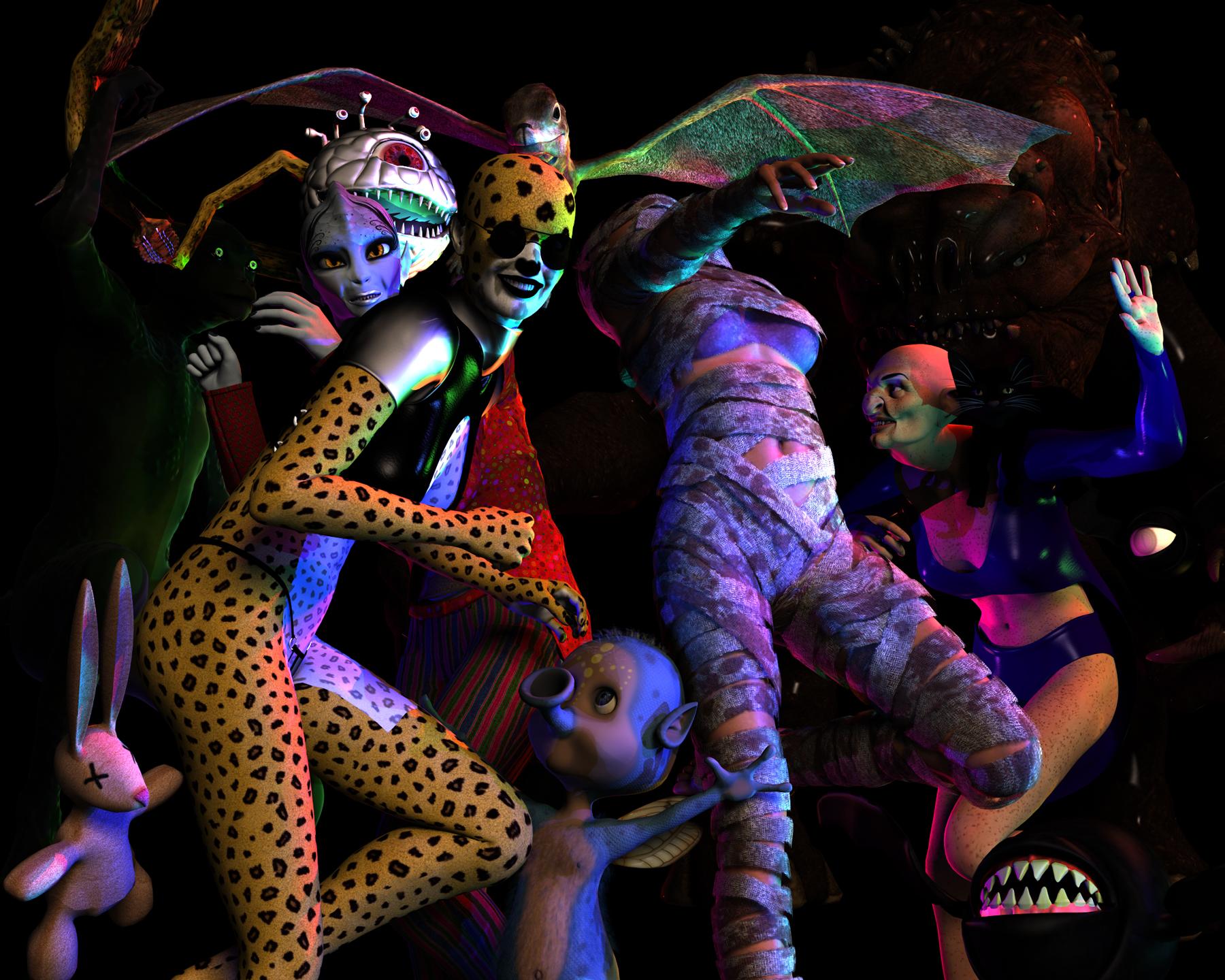
Paid for items:
- Rim Light Rig
- IBL Master For Daz Studio
- Juggling Act for V4
- Victoria 4 Creature Creator Morphs
- Photoshop
No Count:
- Genesis
- Victoria 4.2
Freebies Used:
HDRI: Studio Small 5 https://hdrihaven.com/hdri/?c=studio&h=studio_small_05
Haunted House Poses M4 & V4 https://www.renderosity.com/mod/freestuff/haunted-house-poses-m4-v4/74368
Incantata for V4 https://www.renderosity.com/mod/freestuff/incantata-for-v4/58013
Gothic Club Outfit for V4 https://www.renderosity.com/mod/freestuff/gothic-club-outfit-for-v4/52381
Skywing 3D Creature https://www.renderosity.com/mod/freestuff/skywing-3d-creature/73477
Owa Jaul for V4++ and V4 Creature Morphs https://www.renderosity.com/mod/freestuff/owa-jaul-for-v4-and-v4-creature-morphs/70801
Leopard for V4 http://www.sharecg.com/v/33339/Poser/Leopard-for-V4
Lamia for V4 https://www.renderosity.com/mod/freestuff/lamia-for-v4/70613
Moire for V4 (skin texture) http://www.sharecg.com/v/72168/browse/21/DAZ-Studio/Moire-for-V4
Lizzar for Genesis http://www.sharecg.com/v/67179/related/21/DAZ-Studio/Lizzar-For-Genesis-DS4.5
Beholder https://sharecg.com/v/79713/related/11/Poser/Beholder
Tentacurala MK-II for Poser/DAZ http://www.sharecg.com/v/52501/related/5/3D-Model/Tentacurala-MK-II-for-Poser-DAZ
Kitty Cat Blackie Figure https://www.renderosity.com/mod/freestuff/kitty-cat-blackie-figure/63544
BandageMania V4 https://sharecg.com/v/65749/gallery/11/Poser/BandageMania-V4
Free Sunglasses for V4, M4 http://www.sharecg.com/v/68924/gallery/11/Poser/Free-Sunglasses-for-V4-M4
Fairy Alien https://sharecg.com/v/66591/related/11/Poser/Fairy-Alien
Dead Bunny Character https://sharecg.com/v/36600/view/11/Poser/Dead-Bunny-Character
Rancor http://www.sharecg.com/v/82755/related/11/Poser/Rancor
Halloween Gob Bats & Eye Bats https://www.renderosity.com/mod/freestuff/halloween-gob-bats-eye-bats/74391
"Amalia, dance one" poses for v4 http://www.sharecg.com/v/53602/gallery/11/Poser/Amalia-dance-one-poses-for-v4
3D Art Freebie Challenge-October 2018-"Annual Monster Mash" -Main Thread OnlyMonster Rave … Halloween Really is Cool for Cats
Even the best known ‘A Listers’ can’t get a ticket. Lizzie Leopard is renowned for holding the most talked about Monster Raves on the planet, and to get in it’s personal invite only from the best known ‘cat’ in town. Only those really prepared to let their hair down (if they have any) gain entrance to this hot list party.
Rendered in 3Delight with a tiny amount of post work to fix a small texture line join issue on one figure.

Paid for items:
- Rim Light Rig
- IBL Master For Daz Studio
- Juggling Act for V4
- Victoria 4 Creature Creator Morphs
- Photoshop
No Count:
- Genesis
- Victoria 4.2
Freebies Used:
HDRI: Studio Small 5 https://hdrihaven.com/hdri/?c=studio&h=studio_small_05
Haunted House Poses M4 & V4 https://www.renderosity.com/mod/freestuff/haunted-house-poses-m4-v4/74368
Incantata for V4 https://www.renderosity.com/mod/freestuff/incantata-for-v4/58013
Gothic Club Outfit for V4 https://www.renderosity.com/mod/freestuff/gothic-club-outfit-for-v4/52381
Skywing 3D Creature https://www.renderosity.com/mod/freestuff/skywing-3d-creature/73477
Owa Jaul for V4++ and V4 Creature Morphs https://www.renderosity.com/mod/freestuff/owa-jaul-for-v4-and-v4-creature-morphs/70801
Leopard for V4 http://www.sharecg.com/v/33339/Poser/Leopard-for-V4
Lamia for V4 https://www.renderosity.com/mod/freestuff/lamia-for-v4/70613
Moire for V4 (skin texture) http://www.sharecg.com/v/72168/browse/21/DAZ-Studio/Moire-for-V4
Lizzar for Genesis http://www.sharecg.com/v/67179/related/21/DAZ-Studio/Lizzar-For-Genesis-DS4.5
Beholder https://sharecg.com/v/79713/related/11/Poser/Beholder
Tentacurala MK-II for Poser/DAZ http://www.sharecg.com/v/52501/related/5/3D-Model/Tentacurala-MK-II-for-Poser-DAZ
Kitty Cat Blackie Figure https://www.renderosity.com/mod/freestuff/kitty-cat-blackie-figure/63544
BandageMania V4 https://sharecg.com/v/65749/gallery/11/Poser/BandageMania-V4
Free Sunglasses for V4, M4 http://www.sharecg.com/v/68924/gallery/11/Poser/Free-Sunglasses-for-V4-M4
Fairy Alien https://sharecg.com/v/66591/related/11/Poser/Fairy-Alien
Dead Bunny Character https://sharecg.com/v/36600/view/11/Poser/Dead-Bunny-Character
Rancor http://www.sharecg.com/v/82755/related/11/Poser/Rancor
Halloween Gob Bats & Eye Bats https://www.renderosity.com/mod/freestuff/halloween-gob-bats-eye-bats/74391
"Amalia, dance one" poses for v4 http://www.sharecg.com/v/53602/gallery/11/Poser/Amalia-dance-one-poses-for-v4
All Links Check Out Plz Move To Entries Thread
Show Us Your Iray Renders. Part VIPlaying with some new toys today from yesterday's purchases: Jepe's Art Deco Statuettes for Victoria 8 and LY Leonine Pro HDR Lighting Vol.2
The only other product in this is the Short Afro Hair for Genesis 3 and 8
Art Deco Statuettes complete imageryI had successfully managed to ignore yet another product for Victoria 8, until I came across this thread and made the mistake of opening it and reading. I went to DA and looked at all the images there, I came back to Daz and looked at the product page. Into the cart it went.
And somewhere in all of that, Sonja, (IceDragonArt,) came in and raved about the Cinematic series, so while I was at it, I took a good long look at all five of those. I finally decided on getting the first one, and into the cart it went as well. A few hours later, with an abundance of great deals in my cart, I checked out.
And a few hours after that, I see the second product in the Cinematic series is PC+ for a Day. And into the cart it went.
Long story short, thank you for being so generous, @jepegraphics.

Thank you very much, L'Adair for your kind words - what a story. :D I wasn't even aware of that the Cinematic set went on sale today - I thought that including the item in the PC sale was maybe an opportunity to gain a bit of interest to a wider audience, you know, male content is usually not so well received by the customers, but especially with these 5 sets you're of course not tied to the male poses or the crazy materials.
Daz 3D is part of

Connect
DAZ Productions, Inc.
7533 S Center View Ct #4664
West Jordan, UT 84084Licensing Agreement | Terms of Service | Privacy Policy | EULA
© 2026 Daz Productions Inc. All Rights Reserved.