-
White anatomical parts
Sigh... the DAZ gens can be a real pain, in part because many PAs don't set up appropriate seperate texture setups for them, and with most DAZ characters one has to exactly copy multiple layers of textures as they are being used on the figure itself. Make one change and suddenly nothing matches, and things are further complicated by the increasing use of geoshells to do so many things on figures, as if the geoshell offsets aren't set up in the right order, you get what appears to be a white shell. Fortunately there are solutions at another site where the use of the anatomy is a more of a focus, Renderotica. Yes, it's a very adult NSFW site, but there are a lot of top notch PAs there, including many who also sell at DAZ. For ANY geoshell issues there's an amazing script called Universal Shell Fix from the PA LightBlue at Renderotica (currently on sale for $6.40) that automates the process of correctly organizing the geoshells on any figure for optimum visibility. As for the anatomy and texture issues, I recommend ditching the DAZ anatomy and trying one of the alternate geogrfts also available 'rotica, such as GoldenPalace and NewGen for females (and I hesitate to print the names of one of the most popular male alternate but the most popular ends in ....tator). All those come with utilities that automatically scan the figure you are using, create new textures from the existing Torso textures, and transfer all of the textures exactly as they are being used on the figure, with no special anatomy textures requred. Making a change to the body texture, just run the transfer utility again and everything matches perfectly again. The Palace and New Gen products also come with their own Geoshell conflict utilities, but if you have multiple geoshells being applied at once it can still end up being a bit like Jenga trying to get to the optimum order. The Universal Shell Fix script does it all perfectly, all at once, with a single button click in just a few seconds.
200 Plus Head and Face morphs for Genesis 8 (Commercial)OK, thanks. I got it. Now it's time to have fun!
****Edited to Add ****
I just bought the Aging morph bundle. Can you help give me the search string for that product?
Thanks
Controller properties not controllingIs your controller's type set as 'Modifier/Shape'?
I remember having problem when I forgot to set it the type of a controller to that (either a controller to dial both the head and the body of a character or a controller that should automatically dial a corrective morph when a character body shape and the morph corrected where dialed on a piece of clothing).
Maybe it's the same problem in your situation.
Auto-align d-former field and base to figure instead of global?At this time, Mesh Grabber is not expected to function with future versions of Daz. So I've been trying to get better at using d-formers. Yes, I understand that Mesh Grabber will continue to work in Daz 4.24 and if necessary, I can open that version, use Mesh Grabber, save the change as a morph and then reload the scene in the latest version of Daz, but just to do something like move a piece of hair out of the way, this round trip is just too slow considering it only takes me 5 seconds to do with Mesh Grabber today.
D-formers are pretty quicky, but I noticed that when you create one, the X Rotate, Y Rotate and Z Rotate seem to align with global rather than the figure or bone. This makes manipulating the dformer really difficult because when I'm working, I quickly loose any notion of where the global "front" of the scene is.
Here's a scenario:
1) start figure in the "A pose"
2) Increase figure's trunk node Y Rotate to +45 deg
3) Create d-former. Observe that d-former base and field have a Y Rotate of -45 deg
4) Select the handle, and increase the Z Translate. Instead of moving towards the front of the figure, it moves towards the front of the scene. To me, it's very difficult to use d-formers in this manner.
5) Increase/decrease the Z scale on the field. Instead of it scaling in alignment with the front/back of the figure, it scales in alignment with the front/back of the scene. Again, difficult to use in this manner.
So if I want to align the deformation with the front of the figure, I manually zero the X Rotate, Y Rotate, and Z Rotate on the d-former field and base (6 properties per d-former) every time I create one. This gets tedious very fast. Is here a way to auto align d-formers to the figure instead of global?Let's appreciate/discuss today's new releases - more ongoinger threadAdela said:
I'm not getting the characters we are getting since March Madness started, are they supposed to be relatives of existing Genesis 9 characters who don’t have the HD Addon, or something?
We could theorically say that Tristan 9 is basically a twin of John 9.
If you have John 9 you have Tristan's brother.
Is Ezekiel a Nathan "sibling"?
Is Gideon, Xola's?
Is Maxwell, Calum's?
Is Andre, Jib's for Thimor?
Is Darius, Dain's and Walter's cousin?
Here are John's and Tristan's head morphs:

Interesting comparison, I hadn't noticed how close those all are, but then again, I've barely used the G9 males in my library. As to what's going on, my suspicion is that it's what's called "this is what you get when DAZ want's a cheap promotionall item but didn't want to spend either the time and/or expense of creating full new characters, so instead we're getting a series of churned out morph-only products that use the existing base G9 textures". A few of them have been interesting enough to use as bases for further dial spinning, but I really hope they find something else to use as promos soon, as this is getting old really quickly.
Controller properties not controllingI made 15 "both" property sliders for a product that had only individual L and R property sliders, but I can't get them to persist. If I open a 2nd instance of Studio, they are available on G8F but don't do anything.
I created the new, empty "both" property, went to the left and right properties in the Property Hierarchy pane, and added the "both" slider to the left and right properties as a controller. Everything works. The one slider controls both L & R just like I want.
But when I open a new instance of Studio and load G8F, the sliders are all there but they no longer affect the L/R properties.
I tried doing an ERC Freeze on them and then saving them as Modifier Assets (both with and without the original L/R properties.) In the past I've used "Save as Morph Asset" for this kind of thing, but that's no longer an option. I have 2 questions:
- Which step am I missing?
- Is there something I have to do individually for all 15 properties, or is there a way to get them all in one go?
TIA
Hello how much will it cast for a bull's Head Morph for genesis 8.1 male?If @crosswind solution is too difficult, you can also potentially use https://www.daz3d.com/shape-splitter to separate the head morph. It has been long since I used it, but I remember it was intuitive.Let's appreciate/discuss today's new releases - more ongoinger threadWendyLuvsCatz said:
could also do what I do in real life with such tops, layer another one under it
or use a geoshell camisole on the character that covers the tummy
I don't think I have a geoshell product covering such situation, but yeah, these are possible solutions of course
 (I layered something under a dress by Lilflame in a recent render and then hide every un-needed polygons with a conditionnal graft)
memcneil70 said:
Thank you @Elor. I could also try taking it into Marvelous Designer I guess. I was just trying to find something quick to fix it in Daz Studio. @WendyLuvCatz has reminded me of one my frequent fixes. I am not making much sense right now, major headache.
You're welcome and I hope your headache will show itself out sooner than later.
Cybersox said:
Or a bodysuit with the top part hidden by an opacity map. Or a stylishly wide belt. As a photographer, filmaker, and tech theater major, I've had to deal a lot of last minute costume issues, but generally, as long as it looks good to the eye, you can get away with murder.
I'm partial to conditional graft to hide all the un-needed geometry from the part supposedly sitting under another piece of clothing
In this case though, I wanted a longer blazer.
Matt_Castle said:
For a case like you're talking about though (considerably less complicated than moving fabric around many different breast shapes), it could really just be addressed by a few fairly simple fit adjustment sliders to loosen different parts of the waist... and indeed, this is what vendors tend to do instead. Or rely on smoothing to handle a bit a of clipping.
Thank you for the long explanation

I thought about doing universal morphs (and maybe distribute the result of that work), but I could not decide between doing one expanding the bottom part of the blazer or ones capable of changing its width or its depth.
The former was something I know how to do, but I'm not it would have been that universal because some characters will have wider waist or hip than other while being as slim as they are otherwise. Victoria 9 and Mira 9 provide such example: they are both slim women, but Mira as wider hip than Victoria.
The later would provide more flexibility, but I honestly wasn't sure how to create them, so in the end, I decided to use the simpler solution relative to my skill level and do a custom morph for Mira 9 and set up a controller to not have to care about it later.
Let's appreciate/discuss today's new releases - more ongoinger threadElor said:
Back then, I thought it was because I did something wrong while creating the lenght morph, but the problem also happens with morphs created by PAs, so either it's a problem between a lot of chairs and keyboards, or it's not possible or hard to do. Maybe crosswind / barbult / Richard Haseltine know a super trick, but in the meantime, I'll continue to use the same approach (a controller to automatically dial the morph adjusting the lenght morph to a body shape).The "problem" as a whole is that the vertex deltas for a corrective fit (or an auto-generated fit) are based on the base shape and pose of the figure and clothing. If you pull part of the geometry away from its base position, then it still gets its shaping and posing instructions from the part of the mesh that it started next to. So if you have a character with a flat tummy but big breasts and try to use a morph that pulls a shirt up, then even though the bottom of the shirt is now over the chest, the vertices of the corrective morph for that character still take their shaping information from the waist of the figure, not the chest - and the end result is a baggy shirt around the collar and the shirt clipping through the breasts, because the way the style morph pulled the shirt up only adjusts its vertices based on the figure's normal shape.
It is possible to create corrective fits for every shaping morph, but it is an EXTREMELY intensive process to do; to be meaningfully effective, you have to generate hundreds of corrective fits for the clothing, then make a new version of that corrective fit for each of your style morphs and then load and link all of those correctives in.
I'm working my way through making those correctives for https://www.daz3d.com/morphs-for-everyday-2 in order to find out if it's actually practical to do this on the kind of scale necessary to be useful (and may eventually release that corrective set as a freebie), but even with a mostly scripted process that is capable of auto-generating, auto-importing and auto-linking all of those correctives, it's a slow process. It would be unthinkable to do without that toolkit - not only would it take forever, it would be extremely easy to make a huge number of errors loading and linking the morphs. (I'm very grateful to the person who helped me script the process).
It is also decidedly limited, because even with that work, it *still* will only work properly in the base pose, because the bone weights can't be updated, and it's outside the scope of what can be fixed with joint correctives. It'll provide a better starting point for dForce (rather than having to fade the entire morph in over the timeline), but it's only going to be a partial solution.
This is why vendors don't do it; it's in the middle of the Venn diagram of "extremely hard", "extremely tedious" and "only half a solution".
For a case like you're talking about though (considerably less complicated than moving fabric around many different breast shapes), it could really just be addressed by a few fairly simple fit adjustment sliders to loosen different parts of the waist... and indeed, this is what vendors tend to do instead. Or rely on smoothing to handle a bit a of clipping.
Hello how much will it cast for a bull's Head Morph for genesis 8.1 male?This thread links to a tutorial about splitting a morph into a separte head and body morph using just DAZ Studio.
Let's appreciate/discuss today's new releases - more ongoinger threadCybersox said:
WendyLuvsCatz said:
Elor said:
memcneil70 said:
I loaded the outfit on Victoria 9 and then started switching out skirts. Except for the dForce Pulp Safari Outfit skirt, so far the skirts have the same little gap the included skirt has. So I tried using Mesh Grabber to pull the blouse down to the top of the skirt edge. I didn't try to be finiky but it worked for a rough job. That might be the best solution in this case.
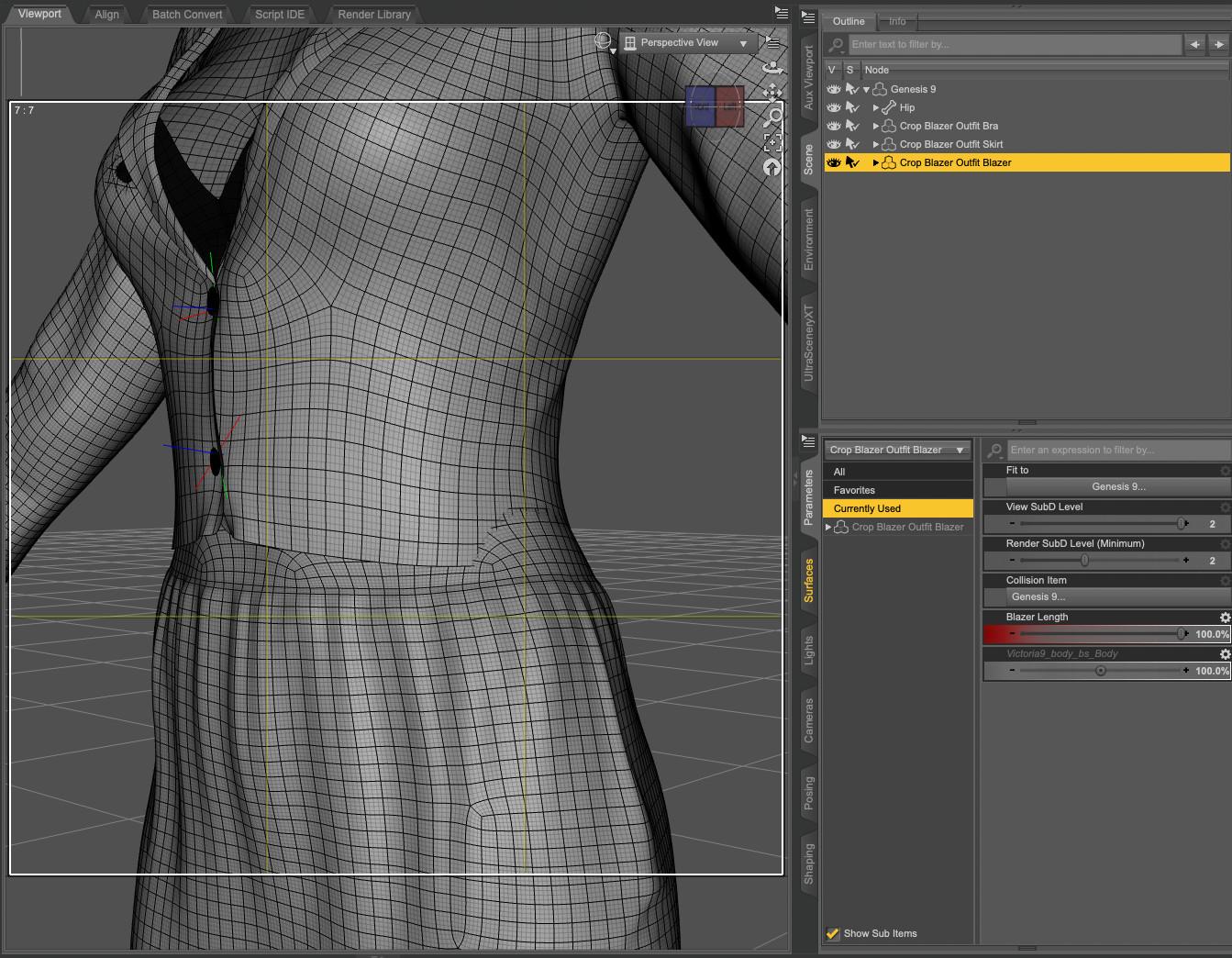
Creating a morph to get a top longer is usually not too hard (at least with Blender: it's been a while since I used Mesh Grabber), but there is a caveat: as far as I can tell, a length morph will not adjust to a different body shape than the one used to create it.
As an example, I created such morph for the blazer from 'dForce Crop Blazer Outfit Outfit for Genesis 9' and created it on Genesis 9 Base. Sadly, once I dialed another shape, let's say Victoria 9, the blazer clipped through her waist
 :
:
I didn't check if changing the smoothing modifier target to the skirt worked, and while it's likely possible to create morphs to change the width and depth of the top (I did try but wasnt successful), the solution I'm using is creating a corrective morph taking care of the difference between the base shape and the current one, with a controller property to automatically dial it when both the body morph and the lenght morph are active on the clothes. Here the result on Mira:
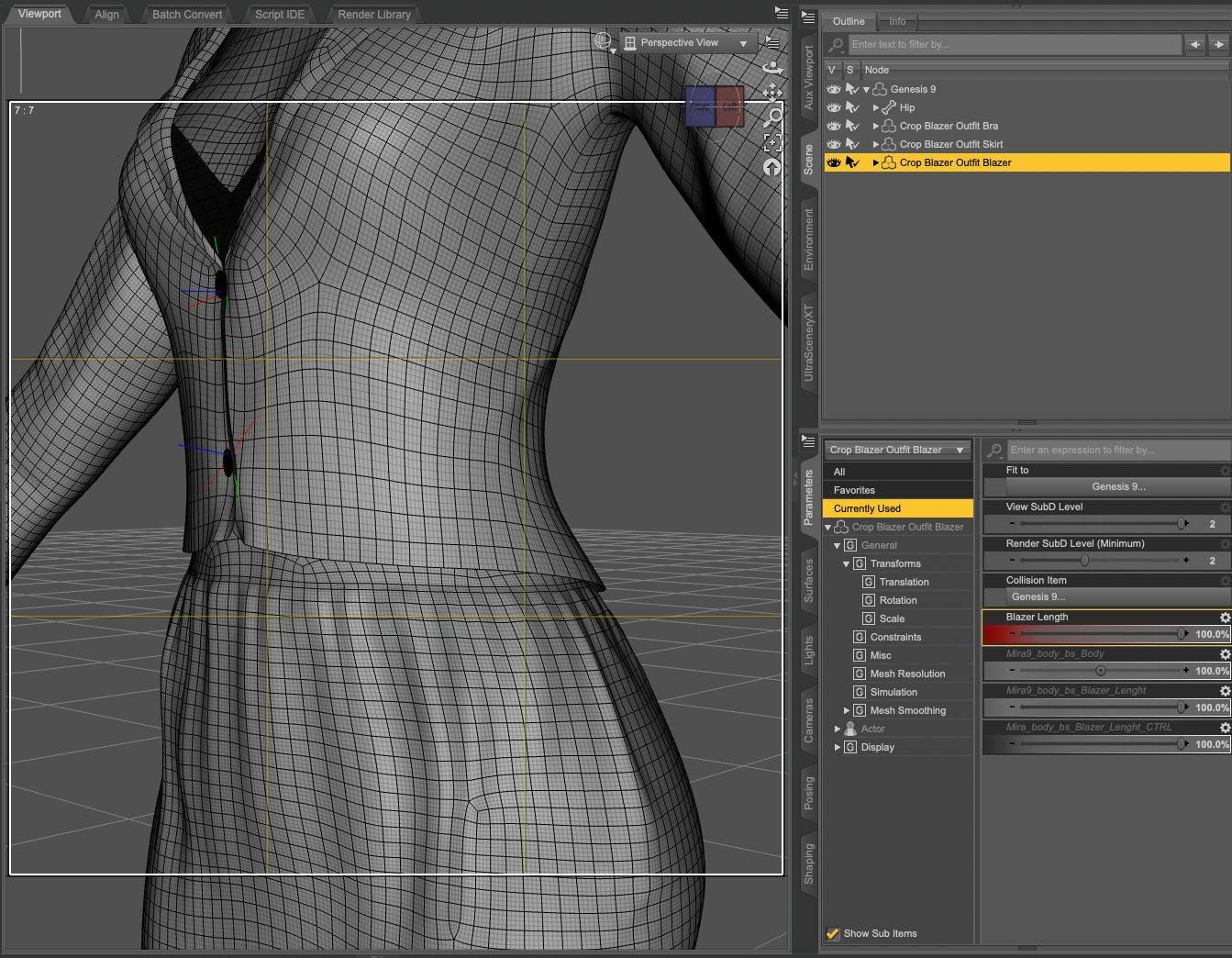
Back then, I thought it was because I did something wrong while creating the lenght morph, but the problem also happens with morphs created by PAs, so either it's a problem between a lot of chairs and keyboards, or it's not possible or hard to do. Maybe crosswind / barbult / Richard Haseltine know a super trick, but in the meantime, I'll continue to use the same approach (a controller to automatically dial the morph adjusting the lenght morph to a body shape).
The process of creating the controller property (and some of its pitfalls) is summarised, with a link to the video I watched to learn how to do it, in the wall of text of my last render: Morning stroll in New York.
could also do what I do in real life with such tops, layer another one under it
or use a geoshell camisole on the character that covers the tummy
Or a bodysuit with the top part hidden by an opacity map. Or a stylishly wide belt. As a photographer, filmaker, and tech theater major, I've had to deal a lot of last minute costume issues, but generally, as long as it looks good to the eye, you can get away with murder.
Also even more excellent suggestions! Thanks
Introduce Yourself, Hello, my name is.....Welly welly well, hello there you Dazgenerates! My name's Sean, and I started my little Daz journey back in July of 2025. Was originally just looking to learn some basic 3D stuff and ended up with Daz's hooks in me. It's given me an outlet for some of my old ideas artistically that I never even imagined when I had them (I'm old I guess). So now i'm seeing things I've been ruminating on for over 20 years come to life on the screen in front of me and it's honesly satisfying AF. Currently learning how to properly transfer things over to Unreal Engine for animation and such, so it's been a pretty cool experience and not nearly as stressful as wrestling with Blender's navigation nonsense (although I do still use that to clean up geometry and such). Got some art up in the gallery now,m so feel free to stop by,have a look, and tell me how bad I'm doing.
Let's appreciate/discuss today's new releases - more ongoinger threadWendyLuvsCatz said:
Elor said:
memcneil70 said:
I loaded the outfit on Victoria 9 and then started switching out skirts. Except for the dForce Pulp Safari Outfit skirt, so far the skirts have the same little gap the included skirt has. So I tried using Mesh Grabber to pull the blouse down to the top of the skirt edge. I didn't try to be finiky but it worked for a rough job. That might be the best solution in this case.
Creating a morph to get a top longer is usually not too hard (at least with Blender: it's been a while since I used Mesh Grabber), but there is a caveat: as far as I can tell, a length morph will not adjust to a different body shape than the one used to create it.
As an example, I created such morph for the blazer from 'dForce Crop Blazer Outfit Outfit for Genesis 9' and created it on Genesis 9 Base. Sadly, once I dialed another shape, let's say Victoria 9, the blazer clipped through her waist
:I didn't check if changing the smoothing modifier target to the skirt worked, and while it's likely possible to create morphs to change the width and depth of the top (I did try but wasnt successful), the solution I'm using is creating a corrective morph taking care of the difference between the base shape and the current one, with a controller property to automatically dial it when both the body morph and the lenght morph are active on the clothes. Here the result on Mira:
Back then, I thought it was because I did something wrong while creating the lenght morph, but the problem also happens with morphs created by PAs, so either it's a problem between a lot of chairs and keyboards, or it's not possible or hard to do. Maybe crosswind / barbult / Richard Haseltine know a super trick, but in the meantime, I'll continue to use the same approach (a controller to automatically dial the morph adjusting the lenght morph to a body shape).
The process of creating the controller property (and some of its pitfalls) is summarised, with a link to the video I watched to learn how to do it, in the wall of text of my last render: Morning stroll in New York.
could also do what I do in real life with such tops, layer another one under it
or use a geoshell camisole on the character that covers the tummy
Or a bodysuit with the top part hidden by an opacity map. Or a stylishly wide belt. As a photographer, filmaker, and tech theater major, I've had to deal a lot of last minute costume issues, but generally, as long as it looks good to the eye, you can get away with murder.
Let's appreciate/discuss today's new releases - more ongoinger threadElor said:
memcneil70 said:
I loaded the outfit on Victoria 9 and then started switching out skirts. Except for the dForce Pulp Safari Outfit skirt, so far the skirts have the same little gap the included skirt has. So I tried using Mesh Grabber to pull the blouse down to the top of the skirt edge. I didn't try to be finiky but it worked for a rough job. That might be the best solution in this case.
Creating a morph to get a top longer is usually not too hard (at least with Blender: it's been a while since I used Mesh Grabber), but there is a caveat: as far as I can tell, a length morph will not adjust to a different body shape than the one used to create it.
As an example, I created such morph for the blazer from 'dForce Crop Blazer Outfit Outfit for Genesis 9' and created it on Genesis 9 Base. Sadly, once I dialed another shape, let's say Victoria 9, the blazer clipped through her waist
:I didn't check if changing the smoothing modifier target to the skirt worked, and while it's likely possible to create morphs to change the width and depth of the top (I did try but wasnt successful), the solution I'm using is creating a corrective morph taking care of the difference between the base shape and the current one, with a controller property to automatically dial it when both the body morph and the lenght morph are active on the clothes. Here the result on Mira:
Back then, I thought it was because I did something wrong while creating the lenght morph, but the problem also happens with morphs created by PAs, so either it's a problem between a lot of chairs and keyboards, or it's not possible or hard to do. Maybe crosswind / barbult / Richard Haseltine know a super trick, but in the meantime, I'll continue to use the same approach (a controller to automatically dial the morph adjusting the lenght morph to a body shape).
The process of creating the controller property (and some of its pitfalls) is summarised, with a link to the video I watched to learn how to do it, in the wall of text of my last render: Morning stroll in New York.
could also do what I do in real life with such tops, layer another one under it
or use a geoshell camisole on the character that covers the tummy
Let's appreciate/discuss today's new releases - more ongoinger threadmemcneil70 said:
I loaded the outfit on Victoria 9 and then started switching out skirts. Except for the dForce Pulp Safari Outfit skirt, so far the skirts have the same little gap the included skirt has. So I tried using Mesh Grabber to pull the blouse down to the top of the skirt edge. I didn't try to be finiky but it worked for a rough job. That might be the best solution in this case.
Creating a morph to get a top longer is usually not too hard (at least with Blender: it's been a while since I used Mesh Grabber), but there is a caveat: as far as I can tell, a length morph will not adjust to a different body shape than the one used to create it.
As an example, I created such morph for the blazer from 'dForce Crop Blazer Outfit Outfit for Genesis 9' and created it on Genesis 9 Base. Sadly, once I dialed another shape, let's say Victoria 9, the blazer clipped through her waist
:I didn't check if changing the smoothing modifier target to the skirt worked, and while it's likely possible to create morphs to change the width and depth of the top (I did try but wasnt successful), the solution I'm using is creating a corrective morph taking care of the difference between the base shape and the current one, with a controller property to automatically dial it when both the body morph and the lenght morph are active on the clothes. Here the result on Mira:
Back then, I thought it was because I did something wrong while creating the lenght morph, but the problem also happens with morphs created by PAs, so either it's a problem between a lot of chairs and keyboards, or it's not possible or hard to do. Maybe crosswind / barbult / Richard Haseltine know a super trick, but in the meantime, I'll continue to use the same approach (a controller to automatically dial the morph adjusting the lenght morph to a body shape).
The process of creating the controller property (and some of its pitfalls) is summarised, with a link to the video I watched to learn how to do it, in the wall of text of my last render: Morning stroll in New York.
Let's appreciate/discuss today's new releases - more ongoinger threadmemcneil70 said:
Cybersox said:
Lorraine said:
memcneil70 said:
Richard Haseltine said:
Does anyone have https://www.daz3d.com/dforce-classy-date-outfit-for-genesis-9 ? I am wondering if the top could be used with other skirts or pants without showing the strip of skin - it looks pretty high so I fear not.
I didn't buy it because of that bare spot. At least not yet. While we are not freezing here, it is cold enough that the idea of exposing skin at that spot is 'chilling'. It is an interesting outfit though. I think I have some pants/skirts with high waistlines, but wouldn't you know I am in the middle of a backup of my content right now.
One of the reasons I like Sveva clothing is there's almost always a make longer morph on her shirts. Would so appreciate other PAs doing this.
I also appreciate that, while Sveva does make a lot of relatively skimpy outfits, they tend to be a lot more realistic in terms of design, fit, and draping than a lot of skimpwear, with most pieces having natural fabric options and looking like something that would be comfortble to wear around the house in real life as opposed to just trying to look sexy. I also really appreciate the synergy she has with her frequent collaborator Lilflame, as I'm often convinced to buy a Lilflame outfit just to use Sveva's textures, and it's normally pretty rare for that to happen with me.
Well the outfit is in my cart today. As a woman who appreciates separates that can mix-and-match with other items in my wardrobe throughout the year, I look for that in my 3D runtime too. It is one reason I buy from esha, outoftouch, and Aeon Soul to name just three of my most purchased.
I loaded the outfit on Victoria 9 and then started switching out skirts. Except for the dForce Pulp Safari Outfit skirt, so far the skirts have the same little gap the included skirt has. So I tried using Mesh Grabber to pull the blouse down to the top of the skirt edge. I didn't try to be finiky but it worked for a rough job. That might be the best solution in this case.
There was an outfit where the blouse was connected at top and bottom with a gap between in the front. That might be a solution for my issue I had with it. Nice outfit except for that.
Mary
Let's appreciate/discuss today's new releases - more ongoinger threadCybersox said:
Lorraine said:
memcneil70 said:
Richard Haseltine said:
Does anyone have https://www.daz3d.com/dforce-classy-date-outfit-for-genesis-9 ? I am wondering if the top could be used with other skirts or pants without showing the strip of skin - it looks pretty high so I fear not.
I didn't buy it because of that bare spot. At least not yet. While we are not freezing here, it is cold enough that the idea of exposing skin at that spot is 'chilling'. It is an interesting outfit though. I think I have some pants/skirts with high waistlines, but wouldn't you know I am in the middle of a backup of my content right now.
One of the reasons I like Sveva clothing is there's almost always a make longer morph on her shirts. Would so appreciate other PAs doing this.
I also appreciate that, while Sveva does make a lot of relatively skimpy outfits, they tend to be a lot more realistic in terms of design, fit, and draping than a lot of skimpwear, with most pieces having natural fabric options and looking like something that would be comfortble to wear around the house in real life as opposed to just trying to look sexy. I also really appreciate the synergy she has with her frequent collaborator Lilflame, as I'm often convinced to buy a Lilflame outfit just to use Sveva's textures, and it's normally pretty rare for that to happen with me.
Well the outfit is in my cart today. As a woman who appreciates separates that can mix-and-match with other items in my wardrobe throughout the year, I look for that in my 3D runtime too. It is one reason I buy from esha, outoftouch, and Aeon Soul to name just three of my most purchased.
Let's appreciate/discuss today's new releases - more ongoinger threadLorraine said:
memcneil70 said:
Richard Haseltine said:
Does anyone have https://www.daz3d.com/dforce-classy-date-outfit-for-genesis-9 ? I am wondering if the top could be used with other skirts or pants without showing the strip of skin - it looks pretty high so I fear not.
I didn't buy it because of that bare spot. At least not yet. While we are not freezing here, it is cold enough that the idea of exposing skin at that spot is 'chilling'. It is an interesting outfit though. I think I have some pants/skirts with high waistlines, but wouldn't you know I am in the middle of a backup of my content right now.
One of the reasons I like Sveva clothing is there's almost always a make longer morph on her shirts. Would so appreciate other PAs doing this.
I also appreciate that, while Sveva does make a lot of relatively skimpy outfits, they tend to be a lot more realistic in terms of design, fit, and draping than a lot of skimpwear, with most pieces having natural fabric options and looking like something that would be comfortble to wear around the house in real life as opposed to just trying to look sexy. I also really appreciate the synergy she has with her frequent collaborator Lilflame, as I'm often convinced to buy a Lilflame outfit just to use Sveva's textures, and it's normally pretty rare for that to happen with me.
New Year, New Sales Thread: Report Issues Here 3 "Reporting Only"I was going to pass on Andre anyway, as being a morph only character where one can't even dial out the pointed ears makes him of incredibly limited utility. However, I put him in my cart to check and he's showing at $3.33 after 8 tokens and with a new item in the cart, so there's definitely something wrong with the way his pricing is being calculated.
Let's appreciate/discuss today's new releases - more ongoinger threadmemcneil70 said:
Richard Haseltine said:
Does anyone have https://www.daz3d.com/dforce-classy-date-outfit-for-genesis-9 ? I am wondering if the top could be used with other skirts or pants without showing the strip of skin - it looks pretty high so I fear not.
I didn't buy it because of that bare spot. At least not yet. While we are not freezing here, it is cold enough that the idea of exposing skin at that spot is 'chilling'. It is an interesting outfit though. I think I have some pants/skirts with high waistlines, but wouldn't you know I am in the middle of a backup of my content right now.
One of the reasons I like Sveva clothing is there's almost always a make longer morph on her shirts. Would so appreciate other PAs doing this.
Daz 3D is part of

Connect
DAZ Productions, Inc.
7533 S Center View Ct #4664
West Jordan, UT 84084Licensing Agreement | Terms of Service | Privacy Policy | EULA
© 2026 Daz Productions Inc. All Rights Reserved.