-
Natural Movements Pack for Genesis 9
takezo_3001 said:
barbult said:
UNBM? I have no idea what that stands for.
Sorry, it's a bit of laziness on my part, it's Ultimate Natural Bend Morphs, I can't type for S*** so I'll take the easier route every time! x^D.
EDIT: I edited my previous post.
Thanks, for the update. I'm not very good at deciphering acronyms.
I have only tried the Natural Movements Pack on one character in one pose so far, but I'm not thrilled at this point.
- There is a control for "Natural Movements Active All". If I turn it to On, lots of morphs get activated, as I expect. But when I turn it to Off, they don't all get reset to 0. The body morphs are left On. Why? This seems like a bug. Edit: I can't reproduce this problem now, even though it happened repeatedly in this one scene. So, it might be fine. Edit 2: Oops the problem is happening again. I don't know what's up.
- The Auto On looks too extreme on my character in her pose. There is no mechanism to attenuate the overall effect. The Auto is simply On or Off. To adust the strength, each individual morph has to be adjusted separately and manually. I would like to just dial down the overall effect.
I'll wait until I try a few more scenes, before I decide whether to keep this.
Natural Movements Pack for Genesis 9I have the product installed, and it works fine, yet it's not as realistic as UNBM, as the realism more stylised than strict, but it does improve the bends somewhat, and it will serve well as a starting point for my morphs, (Plus I got it for under $6) but it will not replace UNBM at all, for example, the scapula is not anatomically accurate, and a lot of PAs (Not all obviously) just copy shapes instead of sculpt from anatomical knowledge, and it shows especially when you know what to look for.
I'm hopefull that we'll be getting UNBM at some point as I just got an update for UNBM for G8.1!
EDIT: I take back what I said about the morph anatomical accuracy, as I was doing a direct comparison with the ultimate morph series, and not on its own merits...
Genesis 9 clothing questions & answersDforcing a chain necklace with actual links would be a lot of work to set up, not something I would attempt because of the time needed - but the rigging would be the same as for a conforming item.
Is this for Genesis 9? If it is then I would use the transfer utility with the tight bodysuit template. I assume you want to chain to fall away from the body when posing - for that I either add morphs, or an extra bone to swing it out from the chest. You won't get the draping effect though.
For the chain slipping off the model during dforce- you can choose a chain link right at the back of the neck and add a dforce weightmap set to a low value - that will keep it in that area and stop it from slipping off. If you're using smoothing set the collision iterations to zero - that will prevent links pushing into itself where they collide with genesis but still give you the smoothing effect.
The best results I got with dforce was to have it all as one tube, and add a morph to turn the shape into beads - and a dynamic surface add on to keep the beads from distorting too much. Because its all one piece I don't have to worry about it seperating during a sim.
Daz bridge to Blender and back to Daz as morphI send OBJ files over from DAZ Studio to Blender every day and I use Blender to create morphs. I have also noticed that change in resolution when switching to Sculpt Mode (which is what I use for making morphs as I am not proficient with the Edit tools). I just thought it was a quirk of Blender and I know that I am limited to the actual base resolution (no subdivision) of the exported OBJ from DAZ Studio. I don't have ZBrush but I had assumed that you would have to work with Base resolution there too - is that not so?
By the way - I don't use any bridges to send content to Blender as I assumed that they (The DAZ bridge and also Diffeomorphic) were intended to transfer scenes for rendering or animation, not for morphing purposes.
Diffeomorphic DAZ Importer version 1.7.0 releasedYou can check the figure if there's a vendor morph for the eyemoisture. If yes then it should be used and the morph should be the same as daz. If no then trasferring is approximated by the nearest vertex and there may be differences with daz. If the issue is limited to a specific figure then may be vendor morphs are not provided. I tried Victoria 9 and everything works fine here.
Then if you believe there's a bug feel free to report at bitbucket for Thomas to check.
https://bitbucket.org/Diffeomorphic/import_daz/issues
Celebrity Look-a-Likes for 3D figures Part 4Pokimane:
https://hanyodaz.gumroad.com/l/pokimane_3dmodel-Daz?layout=profile
Ana Kasperian:
https://hanyodaz.gumroad.com/l/ana-kasparian-G8-3D?layout=profile
Emma Stone:
https://hanyodaz.gumroad.com/l/Emma-Stone-G8?layout=profile
Lauren Boebert:
https://hanyodaz.gumroad.com/l/lauren-boebert-3d-Gensis8?layout=profile/
Thomasin-Mckenzie:
https://hanyodaz.gumroad.com/l/thomasin-mckenzie-3d-daz-g8?layout=profile
Georgia Dow (Youtuber)
https://hanyodaz.gumroad.com/l/ClaireforGenesis8?layout=profile
Shakira:
https://hanyodaz.gumroad.com/l/Shakira-3d-daz?layout=profile
Ebba Busch (Swedish Politician):
https://hanyodaz.gumroad.com/l/EbbyforGenesis8?layout=profile
Annie Loof (Swedish Politician):
https://hanyodaz.gumroad.com/l/AnnikaforGenesis8?layout=profile
Stormfront (The Boys Actress) - Aya Cash:
https://hanyodaz.gumroad.com/l/Stormfront-outfit-the-boys
Victoria Newman (The Boys):
https://hanyodaz.gumroad.com/l/Vicky-for-Genesis-8-Female?layout=profile
Queen Maeve (The Boys)
https://hanyodaz.gumroad.com/l/Vera-Genesis-8-Female-Queen-Maeve?layout=profile
Sanna Marin (Freebie):
https://hanyodaz.gumroad.com/l/Sanna-morph-Genesis-8-female?layout=profileHas Studio changed the way it imports old Poser content?Odd, I suspect it's a synergy (misynergy?) with another product as I have no sign of "circular" in my log from loading Victoria 4.2 and the morph packs listed in my previous post.
Why does Daz3D zombie on?From my own experiments I know that when one has a bunch of duplicate morphs, the shutdown process can literaly take forever. It's like the process knows that it has unloaded a morph from memory and when it stumbles on that same morph again, it doesn't know what to do with it anymore.
In shutting down DS is one of the kind, it is as if it is doing low level formatting to a disk, instead of just Quick Format
3D Model CommissionsThe one click solutions, does not always deliver expected results.
But you can do it with dial spins. You need two images to the face and head of the model you want to make. One straight looking at the camera (no smile) with hair up in a bun, so the head shape can be clearly seen with all the features, and one image in profile, so the exact features on the nose, relative to chin and mouth, and forehead can be accurately referenced, again hair out of the way to see the feature accurately.
then you get morph packages that can be used to move each of these individual features on the 3d model to emulate those features.
You then pick a character figure that is already close to your intended model. In your particular case you would search through characters with search terms like Japanese or Asian
It usually takes about a couple hours. These morph packs are for Genesis 8 Female.
The daz official head morphs package, Genesis 8 Female Head Morphs | Daz 3D
and this morph colletion should get you pretty close. Face Morphs Collection for Genesis 8 Female | Daz 3D
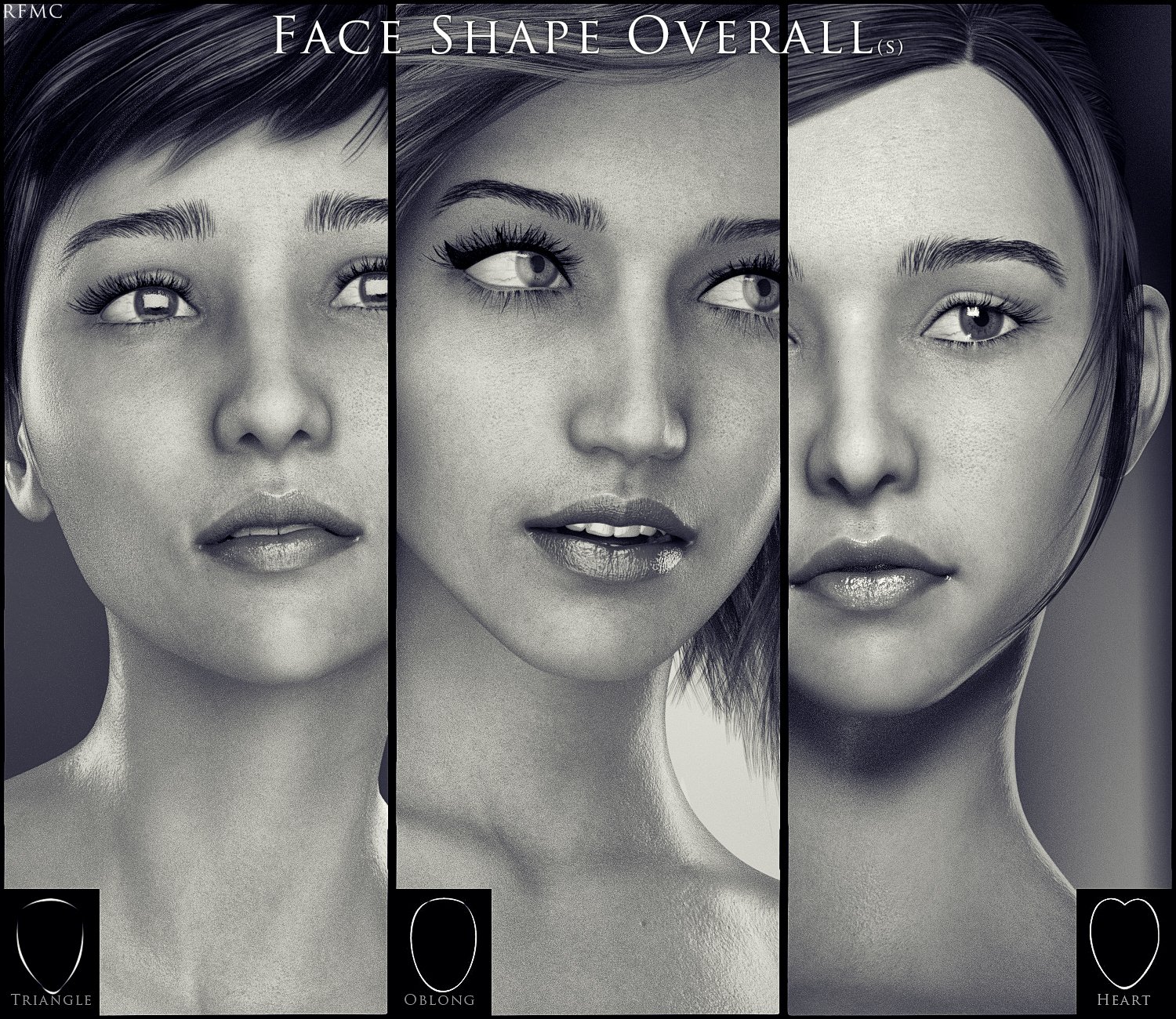
Fine tunig the location of the nose, the lips, and chin/jaw relative to each other will make the shape right. Then depending on the character, you need to remember that a skin texture that has the similar skin tone as your character will help it all look more accurate. try diferent texture with the same morphs and notice the slight differences until you find the one you are happy with. Then you need eye brows and hair.
Do the same for the body.
Saved Morphs, and location issues.Yes, that's right. If you ever saved the scene file in which this morph had a value, the 'old Path' would be permanently saved within the DUF scene file. Even if you changed the Path and saved the morph asset, the path in the old scene file would not be update after loading.
You just need to manually modify the Path and save the scene file. There's a new funtion in the Public Build - "Reset Attributes", just one click to update the dial attibutes as per the latest definitions from DSF.
Diffeomorphic DAZ Importer version 1.7.0 releasedPadone said:
If you trasfer morphs to face meshes that should take care of the eyemoisture too, together with eyelashes and eyebrows. You can check what shapekeys are transferred and eventually transfer manually, it's morphs > transfer shapekeys.
Yeah, i did manually transfer them.
You can replicate it quite easily like this:
Import g9, load arial9 head morph, transfer, dial head morph - deformed eyemoisture.
I have had issues with eyemoisture before, but i always assumed it was because of my lack of understanding of the plugin.
This is just a minor issue and i could just use eyemoisture from a baked import. would be cool if there was a solution though.Hot New (Northern) Season, New Sales Thread: Report Issues Here "Reporting Only"These are listed at 86% off and are 95% off in the cart
The next level is 93% off in the carthttps://www.daz3d.com/jewell-hair
https://www.daz3d.com/winston-dress-for-genesis-2-female-s
https://www.daz3d.com/vista-dress-for-genesis-2-female-s
https://www.daz3d.com/aiko-6-face-morph-resource-kit
https://www.daz3d.com/swamp-witch-for-genesis-2-female-sAt the moment my cart has 55 items for $70.03 at 93.5% off (Subtotal $1080.90) without any freebies
Let's appreciate/discuss today's new releases - ongoing threadOh, finally a morph corrector for Genesis 9: https://www.daz3d.com/natural-movements-pack-for-genesis-9 (I think there's been a few other bits and pieces that do so correction, but this is this first one that's caught my eye)
Does a pretty good job in automatic mode. I'm impressed with the ankles, back and arm adjustments.
(Still waiting for a good rib cage morph for Genesis 9 if anyone knows of one)
Freebie Challenge August 2023 - Fabulous Pink - Main ThreadJackyBrown said:
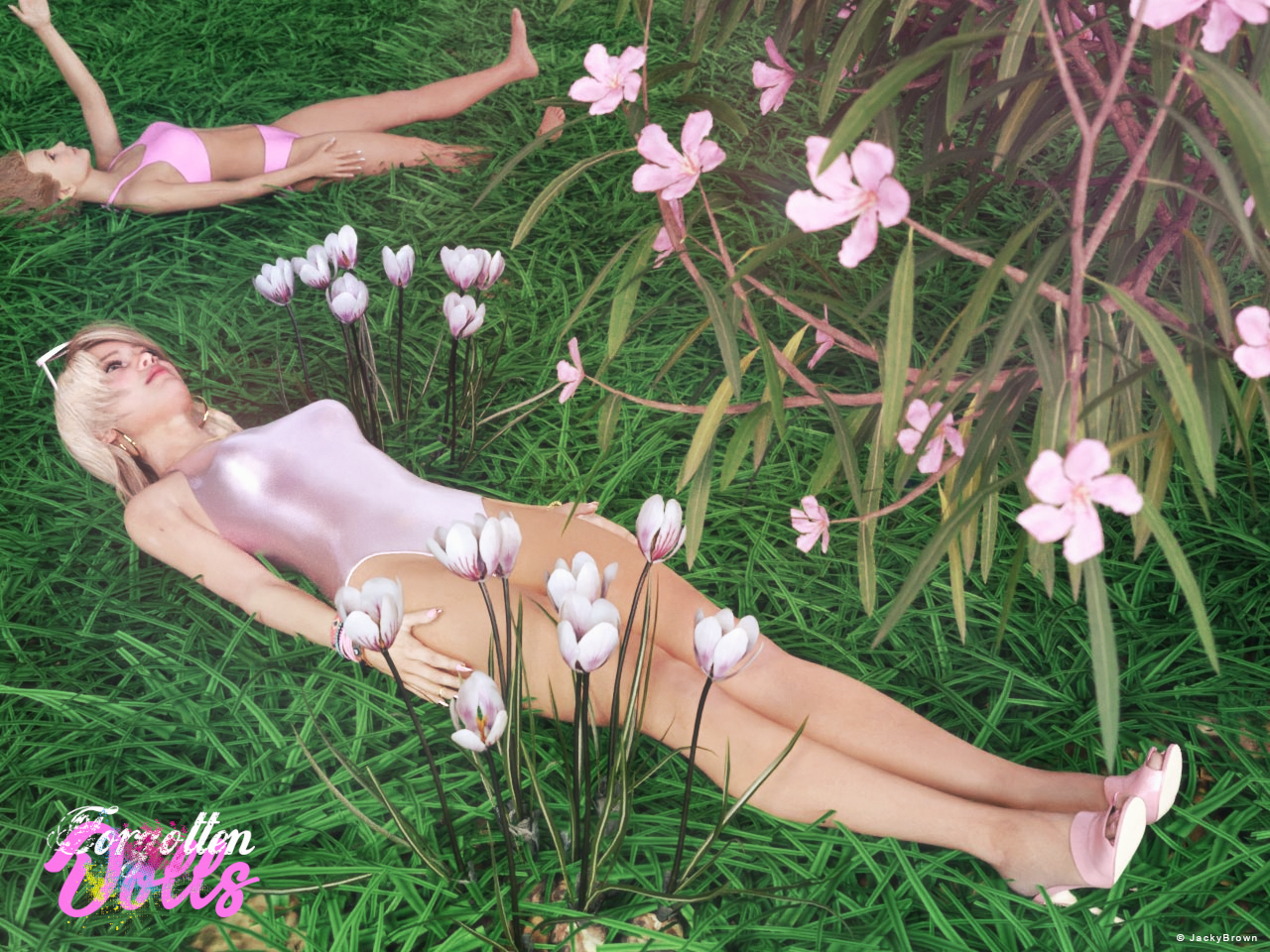
3D Art Freebie Challenge August 2023 "Fabulous Pink"
A bit inspired by my second entry and because it is a full moon (supermoon) I just had to do a third one. :)[Best watched at full size for details.]
"Forgotten Dolls"
Starring: Ella and G8F Basic MATThe tale: (Entirely fictional)
After playing nicely outside in the sun with her Barbie® dolls, Victoria forgot to bring them back in when her mother called her...
Non-motion Picture Soundtrack:
Melanie Martinez - Tunnel Vision (© 2022) https://www.youtube.com/watch?v=P7_4BIzNuJo
COUNTABLE FREEBIES: (Alphabetic order)#01! Barbie High Heel Sandals for Genesis 8/8.1 Female by Tiboza
https://www.renderosity.com/freestuff/items/95810/barbie-high-heel-sandals-for-genesis-881-female **#02! Beach Volleyball Bikini for Genesis 8 Female by amyaimei
https://www.deviantart.com/amyaimei/art/Beach-Volleyball-Bikini-for-Genesis-8-Female-704816788 **#03! Bracelet for genesis 8 female by Valmont59
https://www.renderosity.com/freestuff/items/86004/bracelet-for-genesis-8-female **#04! Chameleon ROse2 for Genesis 8 Female by zoro_d
https://www.renderosity.com/freestuff/items/85859/chameleon-rose2-for-genesis-8-female **
[Head and eyelashes morph]#05! Crocus by Xfrog inc.
https://www.cgtrader.com/free-3d-models/plant/other/xfrogplants-crocus **#06! Ella for Genesis 8 Female by tottallou
https://www.renderosity.com/freestuff/items/77844/ella-for-genesis-8female **#07! Flo Makeup For Genesis 8 Females by AprilYSH
https://shop.aprilsvanity.com/flo-makeup-for-genesis-8-females.html#08! Glitzy Catrim Eyeglasses G9 by LaurieA
https://www.renderosity.com/freestuff/items/93850/glitzy-catrim-eyeglasses-g9 **#09! Green lawn Free 3D model (OBJ) by javadyavari
https://www.cgtrader.com/free-3d-models/plant/grass/green-lawn-8d4341d7-6281-40e9-8872-d429512a3b3b **#10! Iray car related shader presets 'megapack' by Tom2099
https://www.deviantart.com/tom2099/art/Iray-car-related-shader-presets-megapack-539622361 **#11! Iray Jewelry Shaders by AllenArt
https://sharecg.com/v/95893/gallery/21/DAZ-Studio/Iray-Jewelry-Shaders **#12! Kiara Interior HDRI by Poly Haven
https://polyhaven.com/a/kiara_interior#13! Lunafreya for G8F by Shinteo
https://www.patreon.com/posts/lunafreya-for-40600356#14! Lunafreya Summoner Outfit For Daz by Shinteo
https://www.patreon.com/posts/lunafreya-outfit-67676433
[Hair, Add-on to the previous pack]#15! My Heart Necklace for Genesis 8 Female by Amy Aimei
https://www.deviantart.com/amyaimei/art/My-Heart-Necklace-for-Genesis-8-Female-729010047 **#16! Nail Art for Genesis 8 and 8.1 Female(s) by zoro_d
https://www.renderosity.com/freestuff/items/92918/nail-art-for-genesis-8-and-81-females **#17! Nerium Oleander Free 3D model (OBJ) by XfrogPlants
https://www.cgtrader.com/free-3d-models/plant/flower/2021-pbr-oleander-collection-nerium-oleander **#18! OnFleek for Genesis 3 & 8 Female(s) by AprilYSH
https://aprilsvanity.com/shop/onfleek-for-genesis-3-8-female-s.html#19! Oracle for G8F by Shinteo
https://www.patreon.com/posts/oracle-for-g8f-39112022
[Bracelet]#20! Sport Swimsuit Set C1 for Genesis 8 Female by amyaimei
https://www.deviantart.com/amyaimei/art/Sport-Swimsuit-Set-C1-for-Genesis-8-Female-899552820 **#21! SY 200 Morphs for Genesis 8 Head and Body by SickleYield
https://sharecg.com/v/91888/view/21/DAZ-Studio/SY-200-Morphs-for-Genesis-8-Head-and-Body **#22! TLOU2 Ellie for G8F by Shinteo
https://www.patreon.com/posts/tlou2-ellie-for-42575735
[Bracelet]
NO-COUNT ITEMS:--- Casual Outfit 2 for G3M by Tab [Bracelet]
--- Eyes Dilate for Genesis 8 Female by felldude
--- Hoop Earrings for G8F by Lully
--- Iray Fabric shaders by AllenArt
--- Scene Lights for Iray by Lali Kamala (Holiday Loyalty Sale 2021 Free Item)
--- Underwater Hair for G2F by MEC4D
PURCHASED/PAID FOR ITEMS: None 100% Freebies
*1 E-mail address required
** Registration required
#x! Countable Items (Bold ones are used by me for the first time I think.)
--- No longer available freebies
++ Free with DAZ Studio (or the Essentials)
$x. Purchased/Paid For Item
Rendered with DAZ Studio 4.10.0.123 (nVidia Iray®)Other free software used: GIMP v2.10.34 and Irfanview 4.62
Postwork: Used some filters that come with GIMP. Also used mcjDenoise (https://sites.google.com/site/mcasualsdazscripts9/mcjdenoise) and mcjLut by mcasual (https://sites.google.com/site/mcasualsdazscripts9/mcjlut) with the free FilterGrade Cinematic LUTs Pack (https://filtergrade.com/free-cinematic-luts-video-editing/) and the Vintage-Look Photoshop Effects Pack/Light Leaks Effect Pack by Michael Jarrott (https://creativecloud.adobe.com/discover/article/vintage-look-photoshop-effects-pack).
"Forgotten Dolls"
https://www.daz3d.com/gallery/user/6398906262880256#gallery=album8846472&image=1306731 (Post and RAW version)
All freebies checked, hurry up to move into Entries
Simple way of fixing snaggy teeth in G8 import results from HeadShop?Catherine3678ab said:
Federmann said:
... edited ... if only someone would have told me to forget about the expensive headshop hoaxes in this realm.Well, one person's cure can be to another pure poison so we do have to be somewhat careful how we word things. What you may notice over time is that what we can do, and do do, is remind people that if they bought [any product] within the past 30 days it [normally] can be returned. I'll say normally because one has to be careful as so many sales have trigger items. If by purchasing A, B is a very good price; and then one returns A, they'll find B is suddenly not such a good price. So yes, we do end up with a number of products gathering dust.
For use with Face Transfer is a set of morphs which were instant buys for most of us using Face Transfer. They address the most common issues that Face Transfer presents. https://www.daz3d.com/face-transfer-shapes-for-genesis-8
Years back there was one lady who was making some fantastic morphs for the legacy V4 and M4 figures. Basically she just used dFormers. Had a good eye ;-)
It can help [a lot] to use reference images in the scene [put squared picture on a square plane] - whether in D/S or in a modeler. PureRef is a popular utility for such projects. Many of the pros seem to use ZBrush. Now ZBrush plus some additional plugins [not free] seems to me to be the way to go if seriously trying to get very professional about making characters. Can do a marvellous job with matching resource skins to models as well. There are some videos over on YouTube.
[the super serious have way more money and wire people up to computers, etc. all of which is a bit overkill for one little game avatar or whatever]
You're absolutely right, some add-ons, plugins, proggies, figures and accessoiries might work wonderfully and without glitches for some, if not most, people and as you said there is always a rather generous, be it time limited, return policy at the DAZ shop. I recognize and respect the hard work that went in producing these resources and the enormouse skills curve that was travelled by these PA's.
As for (stable and reliable) "Face Transfer" (FT) within a week after purchase I stumbled upon the "Face Transfer Shapes for Genesis 8" addon that you mentioned which gets rid of the oddly flattened faces and faint jaw line. Only today I learned with FT comes a bunch of sliders for finetuning the transfer result. In my case, having bought a shocking amount of items at the DS shop over the last two years or so, I now have so many sliders with often the exact same function that it is difficult to navigate among them but I guess there are ways to organize them that I haven't learned yet. I do like FT for providing a quick way to get going on a character and dependent on luck and/or skills you could (supposedly) come close to your source model (I can't say I have yet accomplished any convincing level of verisimilitude with FT but that's on me not being a wizard with shapes, morphs and sliders).
As for ...shudder ... Head Shop I am tech savvy enough to at some point figure out which files, registry or config settings to restore so after a single succesful run, you could actually have another one; what the program misses sorely is a reset button. Re-installing Head Shop doesn't make any difference for the problems I encountered so it is on another level that I need to fix it.
Thx again for the other tips and suggestions you provided! ZBrush is far at the horizon for me but I'll take a crack at some other proggies soon.
Saved Morphs, and location issues.crosswind said:
You mentioned 'directory' and 'folder'... do you mean the ones in data folder, or 'Path' in Parameter Settings of the morph dial? Or any screenshot?
Sorry, yeah path in the parameters settings. It feels like they've been baked into the character using the wrong path.
Saved Morphs, and location issues.You mentioned 'directory' and 'folder'... do you mean the ones in data folder, or 'Path' in Parameter Settings of the morph dial? Or any screenshot?
Saved Morphs, and location issues.I've created some morphs and saved them as morph assets. I've since using them have moved them to child directory. If I load a default G8F or the Dev Load G8F they are in the appropriate folder. However If I load a custom character using those morphs they are still located in the old directory.
Removing the morphs loading and saving the character, then reinstalling the morph does fix the issue, but is there a simpler way?
I've tried changing the parameter settings and re-saving the morph asset, but that doesn't work.
Simple way of fixing snaggy teeth in G8 import results from HeadShop?Federmann said:
... edited ... if only someone would have told me to forget about the expensive headshop hoaxes in this realm.Well, one person's cure can be to another pure poison so we do have to be somewhat careful how we word things. What you may notice over time is that what we can do, and do do, is remind people that if they bought [any product] within the past 30 days it [normally] can be returned. I'll say normally because one has to be careful as so many sales have trigger items. If by purchasing A, B is a very good price; and then one returns A, they'll find B is suddenly not such a good price. So yes, we do end up with a number of products gathering dust.
For use with Face Transfer is a set of morphs which were instant buys for most of us using Face Transfer. They address the most common issues that Face Transfer presents. https://www.daz3d.com/face-transfer-shapes-for-genesis-8
Years back there was one lady who was making some fantastic morphs for the legacy V4 and M4 figures. Basically she just used dFormers. Had a good eye ;-)
It can help [a lot] to use reference images in the scene [put squared picture on a square plane] - whether in D/S or in a modeler. PureRef is a popular utility for such projects. Many of the pros seem to use ZBrush. Now ZBrush plus some additional plugins [not free] seems to me to be the way to go if seriously trying to get very professional about making characters. Can do a marvellous job with matching resource skins to models as well. There are some videos over on YouTube.
[the super serious have way more money and wire people up to computers, etc. all of which is a bit overkill for one little game avatar or whatever]
Simple way of fixing snaggy teeth in G8 import results from HeadShop?....Thx for your FB. My next attempt with HeadShop had ok teeth. My attempt after that ended in yet another garbled results pane (with an export that will near crash your scene or worse) which means the program has turned unusable again for a long time. One may find that after a year the plugin spontaneously works again and then you can go ahead with one or two head transfers before it dies again. One thing it cannot deal with at all is make a 8.1 transfer and after that try an 8 version (et v.v.). If HeadShop was an actual shop I would suspect people would throw bricks through their windows on probably a daily basis

LOL, that creased me up ! If so, I might be the 1st one... Anyway, forget about it, let's find a way out by ourselves

Daz 3D is part of

Connect
DAZ Productions, Inc.
7533 S Center View Ct #4664
West Jordan, UT 84084Licensing Agreement | Terms of Service | Privacy Policy | EULA
© 2026 Daz Productions Inc. All Rights Reserved.