-
Sleeve Trouble with dForce Mahaut Fantasy Outfit for Genesis 8 Female(s)
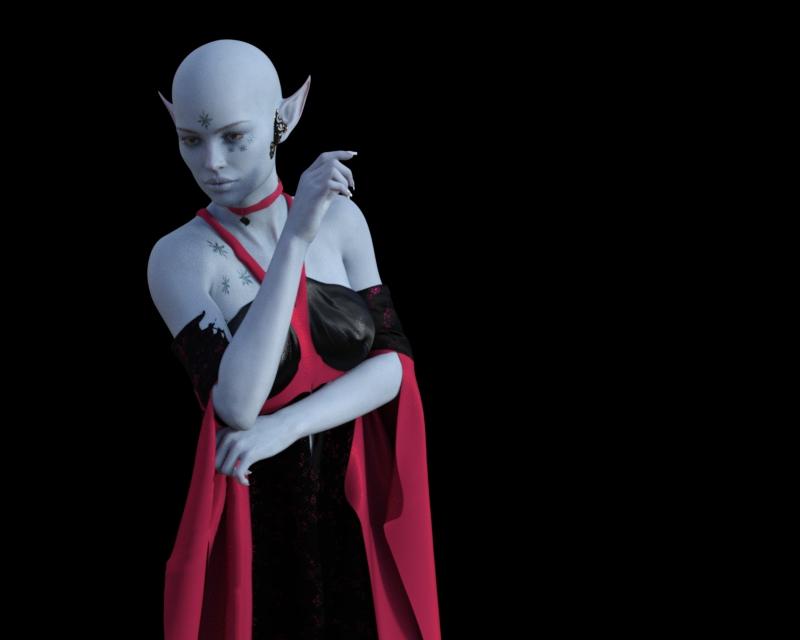
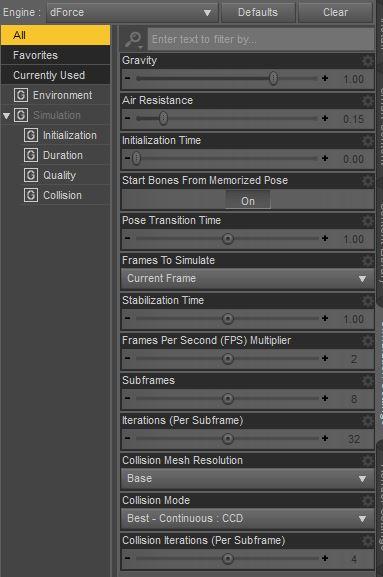
I'm having trouble with the sleeves on dForce Mahaut Fantasy Outfit for Genesis 8 Female(s). I've tried several G8F/V8F poses (this one is from Bedazzling Poses), but after running a dforce simulation (default settings with Better or Best for Collision Mode) the right sleeve on her upper right arm renders like this. I've also tried an animation timeline, but it's not any better. This happens with the base G8F as well as this new character, Neiva HD for Victoria 8.
In addition to the sleeve problem, the crease/opening on the front of the dress extends higher on the red part of the bra.
The read me states: "Items may seem bent or broken when applying certain shapes and or poses but will disappear after simulation" so I must be doing something wrong.
Is there any other simulation setting that will fix this issue? I'm more concerned about the sleeve issue than the bra right now. I've watched the dForce video by Daz and used other dForce products, and so far this is the only dress I'm having trouble with.
Can anyone help?
Fixing the kids 4Actually... I found the hair floating twice as high as the kid but in the heirarchy window its a children of the Kids 4 figure...
So you'd recommend poser 4 over daz3d? I have bought dazToMaya but the figures lose their posing, their realitisticness (of textures), and more...
I am trying to do simple renders, with a macbook pro 2012 and daz is just giving me headache.
It depends how realistic you want it. There is no IRay in Poser and to get anything close to realism, you would need a newer (and expensive) version of Poser. I started with Poser, loved it, used it for years, but when IRay was released in DS, forced myself to learn it (still learning) and hope I haven’t forgotten how to use Poser altogether! If you plan to do artistic work with a lot of postwork, Poser, even early versions, can be fine, but if you want anything close to realism, you really need IRay...
If you're willing to wait for a sale, you can get Poser at a decent price. Last winter I got whatever the new version was for about $36 with their Christmas sale + a birthday gift card.
As far as realism, Superfly(Poser's renderer) should be on par with Iray, the difference is the lack of hd morphs, plus the models are mostly Victoria 4 era quality.
One issue with Superfly is that hardly any products come bundled with Superfly shaders, nor are there many products containing Superfly shader packs. When Iray was released the Daz Studio PAs very quickly embraced it and added Iray shaders, but for some reason that never happened with PA's making Poser products, many of whom still make products compatible with Poser 6 or 7.
Looking for a few plug-in thingsThis will enable you to use V4 textures on G8F: https://www.daz3d.com/legacy-uvs-for-genesis-8-victoria-4
The G3F version is at Rendo.
You will need to convert the pz2 to DS material presets.
For morphs, GenX2 with both G2 and G3 add-ons will enable to convert them from V4 to G3F. Unfortunately the creator passed away so there’s no G8 add-on.
For clothes, you will need a V4 clone for your target figure to use autofit.
This includes one for G3F: https://www.daz3d.com/wear-them-all-autofitting-clones-and-clothing-smoothers-for-genesis-3-female-s
This has one for G8: https://www.daz3d.com/sy-victoria-4-and-michael-4-clones-for-genesis-8
Issues with transferring character from G3F to G8FI've been trying to use SickleYield's guide to transfer morphs in order to move some of my more used characters over from G3F to G8F, but I'm experiencing issues where after I've used the Transfer Utility, some vertices are moving too far or even entirely in the wrong direction in the new G8F morph - here, parts of the fingers are moving completely in the wrong direction, completely wrecking the hands, and vertices around the elbow are moving too far, creating a ridge


I think I've followed the instructions correctly (zeroing the scale of the initial model, using the suggested approach of posing G3F to match G8F, ticking check boxes as instructed), and I've got the G3F merged morph working beautifully (even got the rigging fixed) - but even after several attempts of trying to toggle various settings, this still keeps happening. (Posing G8F to G3F before transferring causes a less obnoxious problem, but still a problem, so I don't think it's just I've managed to interpret those instructions badly).
The body shape I'm using is mostly Victoria 7, albeit with some additional morphs layered on top, and I'm experiencing pretty much exactly the same problem if I try to transfer just the basic V7 shape.
Where have I managed to mess up here? I know people use this method just fine for transferring characters nearly seamlessly between these two very similar generations, but I can't work out what I'm personally doing wrong.
can you use victoria 4 morphs on genesis 3?hello all, i'm looking for fignernail morphs for genesis 3 but the only ones i can find are these ones for m4 and v4 https://www.daz3d.com/m4-and-v4-nail-bundle
Is there a way to transfer these morphs onto my g3 female model?
Getting iRay Shaders onto DAZ Figures with Poser ShadersThe NGS you linked is the first one. NGS2 is more versatile as it can be applied to basically every figure, including non standard figures. This is one of NGS2's biggest advantages over most other products like it. (Sorry, I did not mean to confuse by just saying NGS.) NGS2 also has an additional perk of being able to apply specific shaders to specific surface areas, like only using the cornea shader. Sometimes I use ISC first, and then use the NGS2 cornea shader. So there are times when I use both at once.
https://www.daz3d.com/n-g-s-anagenessis-2-revolution
NGS3 has been "coming soon" for like a year or more. Only Dimension Z knows when it might be releasing, and I am not sure he even knows. I was initially excited, but now it feels like waiting for Half Life 3. He has DeviantArt account, but he has not been updating as much lately. I think he has been having some health issues or something.
Iray Smart Converter has a different product for each generation. The one I use is for Genesis 2, but I also own the Generation 4 version.
https://www.daz3d.com/iray-smart-converter-and-advanced-skin-managers-for-genesis-2
Like I said before, I can use this one on V4 skins because I have products that allow G2 to wear V4 skins. That is this product: https://www.daz3d.com/victoria-4-for-genesis-2-female ; If you are sticking to V4/M4, then you have no reason to get this, you can get the Generation 4 version. If you are only interested in using V4, this is the one,
https://www.daz3d.com/iray-converter-for-generation-4
I just point out how I do it because you have options. If you convert V4 to another generation, then you only need ISC for that generation. Or you can use ISC for Generation 4 first, save as a preset, and THEN convert that to Genesis xyz. You can do it however you wish.
Each of these have topics dedicated to them created by the PA themselves. There are also a lot of user renders in them.
https://www.daz3d.com/forums/discussion/110976/n-g-s-anagenessis-ii-revolution-commercial/p1
I think both products have their merits, and one does something better than the other. But over all I do prefer the look of ISC more. But is just me. A lot of people on the forums seem to like NGS2 more. Honestly I would buy both if on sale, because I do like both, and as I said, I have even used both at the same time. But if I had to pick just one, it would be one of the ISC's for the generation I prefer. I've learned a few things about how surfaces work thanks to these products, and I am very thankful for that.
Fixing the kids 4Actually... I found the hair floating twice as high as the kid but in the heirarchy window its a children of the Kids 4 figure...
So you'd recommend poser 4 over daz3d? I have bought dazToMaya but the figures lose their posing, their realitisticness (of textures), and more...
I am trying to do simple renders, with a macbook pro 2012 and daz is just giving me headache.
It depends how realistic you want it. There is no IRay in Poser and to get anything close to realism, you would need a newer (and expensive) version of Poser. I started with Poser, loved it, used it for years, but when IRay was released in DS, forced myself to learn it (still learning) and hope I haven’t forgotten how to use Poser altogether! If you plan to do artistic work with a lot of postwork, Poser, even early versions, can be fine, but if you want anything close to realism, you really need IRay...
If you're willing to wait for a sale, you can get Poser at a decent price. Last winter I got whatever the new version was for about $36 with their Christmas sale + a birthday gift card.
As far as realism, Superfly(Poser's renderer) should be on par with Iray, the difference is the lack of hd morphs, plus the models are mostly Victoria 4 era quality.
the key to photorealistic charactersI think many pubished artists use Merchant Resource skins (with some variation) and don't include enough customisation to give the imperfections that help deliver realism. You are achieveing great results.
thanks a lot! :)
If i compare my work with the beginning of Carrara it is a great improve to now but i am very critical on my work, i always think it can be better or that people still can see that it's 3D but while i am using some of my artwork as profile pictures on Facebook, there are people who believe that it is me and it's a real person and not 3D, funny somehow but i always think it can be better.
Oh, here are a list of textures that are great for realism, most of them i also use for my characters (non customized)
some from Genesis2 are also useable for Stephanie 6.
(Some Textures should be a little customized as the skin looks great but too clean)
One issue on the Galerie in the store is that you can not look at the textures itself but you can get a little idea what's possible with them.
Most of them doesnt show what's really possible with these textures and if you take a look at just the textures for example and compare to the rendered images you will see that there are capable to do a lot more realism with these.
I will post some example pictures of my 3D work with some of the textures that are listed below to show whats possible.
(Some of the textures are no longer available on daz or renderosity so i will only post those that are still for sale)Genesis 2:
From Aako LelaG2/V4
https://www.daz3d.com/lela-for-victoria-4-and-genesis-2-female-s
Charlize
https://www.daz3d.com/charlize-for-genesis-2-female-character
FWNeomi
https://www.daz3d.com/fw-neomi
Ginger
https://www.daz3d.com/ginger
FWSAKeshi
https://www.daz3d.com/fwsa-keshi
Olympia 6
https://www.daz3d.com/olympia-for-genesis-2-female
FWSA Serena
https://www.daz3d.com/fwsa-serena-hd
Domina
https://www.daz3d.com/domina-character
Taylor (S6/G2)
https://www.daz3d.com/taylor-for-stephanie-6
Teen Jayden
https://www.daz3d.com/teen-jayden-6
Teen Josie
https://www.daz3d.com/teen-josie-6
Genesis (i do not really prefer to use Genesis as there seem to be a little error on the UV Mapping that need to get fixed before using correctly, the lips does not match proper to the skin)
Cat
https://www.daz3d.com/cat-character-and-hair
Gabi
https://www.daz3d.com/gabi-for-v5
Hera
https://www.daz3d.com/divinity-hera
Olivia
https://www.daz3d.com/olivia-for-v5
Prisoner of War
https://www.daz3d.com/dark-apocalypse-prisoner-of-war
Satsuki
https://www.daz3d.com/satsuki-for-genesis
Tori
https://www.daz3d.com/tori-for-v5
Victoria5 standard textures (yes, they are nice and better than V4 standard textures)
https://www.daz3d.com/victoria-5
Vianne
https://www.daz3d.com/vianne-for-victoria-6
Young Teens V5 Julie
https://www.daz3d.com/young-teens-5-julie
Stephanie4/5/6 (i know, this figure isn't really often used as most of the content was made for Victoria and Genesis, good thing is that S6 is the same as Genesis 2 but these figures are worth working with as they have very realistic textures)Joanie (elite textures)
https://www.daz3d.com/stephanie-5-elite-texture-joanie
Stephanie 5 standard textures
https://www.daz3d.com/stephanie-5
Stephanie 6 standard textures
https://www.daz3d.com/stephanie-6
V4 (they've got some of the best textures in my eyes and some of them you can find on renderosity)
For the Elite textures i would recommend to buy them in the bundle toget them all at once.
Alyson
https://www.renderosity.com/mod/bcs/sabby-alyson/102726
Amy (V4 Elite and the skin i am using for my Amy lol with the scar)
https://www.daz3d.com/v4-elite-texture-amy
Angela (these are the skin textures i have used for my character Kaelyn but customized them, changed the eyebrows, lips and nose)
https://www.daz3d.com/angela-for-s4-v4
Ariana (Elite)
https://www.daz3d.com/v4-elite-texture-ariana
Audrie
https://www.renderosity.com/mod/bcs/audrie-for-v4-and-genesis/102032/
Bianca
https://www.daz3d.com/lr-s-bianca-for-v4
Clara
https://www.renderosity.com/mod/bcs/sv7-clara/101657/
Dana
https://www.daz3d.com/dana
Daveigh
https://www.daz3d.com/daveigh-v4
Dolly
https://www.renderosity.com/mod/bcs/dolly/100952/
Erinn
https://www.renderosity.com/mod/bcs/?ViewProduct=100482
Faith (pretty realistic texture)
https://www.renderosity.com/mod/bcs/?ViewProduct=106625
Fumiko
https://www.renderosity.com/mod/bcs/?ViewProduct=101364
FW Yasmin
https://www.daz3d.com/fw-yasmin
Grace
https://www.daz3d.com/grace-for-v4
Katie (Elite)
https://www.daz3d.com/v4-elite-texture-katie
Lana (Elite)
https://www.daz3d.com/v4-elite-texture-lana
Marie (Elite)
https://www.daz3d.com/v4-elite-texture-marie
Maya (Elite)
https://www.daz3d.com/v4-elite-texture-maya
November
https://www.daz3d.com/november-character-for-v4
Rachel
https://www.daz3d.com/rachel-v4
Reby (Elite)
https://www.daz3d.com/v4-elite-reby-sky
Riley
https://www.daz3d.com/riley
Tynashe
https://www.daz3d.com/tynashe-for-v4
Audrey
https://www.daz3d.com/audrey-for-v4
VWEbony
https://www.daz3d.com/ebony
Zaira
https://www.daz3d.com/zaira
One of the best textures comes from the Metropolitian Collection from Danae
https://www.renderosity.com/mod/bcs/vendor/danae
M4 are all Elite textures and also
Kyo
https://www.renderosity.com/mod/bcs/?ViewProduct=91141
SAV Lynn
https://www.renderosity.com/mod/bcs/?ViewProduct=92347My WIP and ReviewsPrivate Performance
Lina by Mousso at Rendo, with some tweaks.
Kimberly Hair for Genesis 2 Female(s) and Genesis 3 Female(s)
Faux Corset from FWSA Teagan HD for Victoria 7 and LF Faux Corset
Cello is by hypnagogia, available on ShareCG.
Celebrations for Baroque Grandeur Iray Addon
InaneGlory's Photo Studio - Point and Shoot Iray
 L'Adair's WIPs
My latest image is an entry in the PCRenderContest2018:

(Links to the gallery page where you can see the full size image.)
I used a long list of products for this, but I didn't link them all on the gallery page. Here's a list of most of the products used.
Qualifying Items:
FWSA Percy HD for Floyd 8 (and Floyd 8)
Vintage Male Hair for Genesis 3 and 8 Male(s)
Pajamas for Genesis
FWSA Blanche HD for Mabel 8 (and Mabel 8)
dForce Granny Nightgown Outfit for Genesis 8 Female(s)
Curl Me Hair for Genesis 3 and 8 Female(s)
Devil May Deluxe Hair for Genesis 2,3 & 8 Female(s)
Resource Saver Shaders Collection for IrayOther "Obvious" products:
Enchanted Dance Poses for Michael 7 and Victoria 7
FWSA Monika HD for Victoria 7 and Her Jewelry
Victoria 7 HD
Leo 7
Michael 7 HD
Polyantha Rose Dress for Genesis 8 Female(s)
Classic Tuxedo for Genesis 3 Male(s)
Commander Hair for Genesis 3 and 8 Male(s)
A Cozy Kitsch Living Room
The Cosy Kitsch Living Room Props
H&C Medical Scrubs Set for Genesis 3 Male(s) (Grandpa's Pajama bottoms)Behind the scenes:
Look At Me Pose Control
Altern8 - Skin Shader System for Genesis 8
BOSS Pro Light Set for Portraits & Promos
Iray Ghost Light Kit
TerraLUNA 3
UltraGenesis Bokeh 2: Into the Night
Mec4d PBS shaders for Iray vol.3 MRSet Dressing:
Vintage Radio (Radio)
Vintage Piano Room* (Piano)
Everyday Coffee (Coffee Mugs)
Everyday Drinks (Coasters)
Everyday Books (Newspaper)
Everyday Fruit ("Clementine" on the piano.)Pictures and Frames on the Piano::
Everyday Frames & Mirrors
Frame Studio
Reflections Vanity Set
French Style Shabby Chic Vol01The Table Lamp:
Ultra Mod Beach House (Lamp base)
Light It Up (Lamp Shade)
Myrddin Outfit for Genesis 3 Male(s) (Staff scaled down to create Lamp finial!)
Messy Laundry Mega Set (Laundry in basket)
Bea Griff's Whatnots 2 Iray Shader Presets and Textures* (Candy Dish)
ColorWerks Hair Shaders for Iray (Mokie, stuffed animal on chair)* No longer available in the store.
From Victoria 3 to Genesis 2GenX2 with the Genesis 2 and V3 add-ons would work to transfer a V3 morph to G2F.
For the texture, Texture Converter 2 with V3 and V4 add-ons would enable you to convert the maps to V4 UVs, then with V4 for G2F you can use those converted textures on G2F.
From Victoria 3 to Genesis 2What products would help me transfer a Victoria 3 model to Genesis 2 level?
Any recommendations regarding textures, UVs, and shapes is much-appreciated.
Really old products made new with Iray!G3F has a V3 option in the Autofit dialog, works quite well with the V3 Mediterranean dress. Select Victoria 3 and Dress/Knee Length in the Autofit dialog, then apply a Smoothing Modifier to the dress, select Generic as Smoothing Type and adjust the number of iterations to your liking. I've used 50 here. Collision Iterations are set to 1, it seems to work and is faster.
The option to fit clothes made for V3 (and other generation 3 shapes) to G3F comes with this product: https://www.daz3d.com/wear-them-all-autofit-clones-expansion-for-genesis-3-male-s-and-genesis-3-female-s
I have that and totally forgot! I did not not have luck putting it on Genesis but I’ll try with G3 with your tips. Thanks!
The best way for organizing materialsI might not understand you fully, but some of the things I do might help. I organize in the Categories section only.:
As an example, one main category is DAZ people, divided into Michael and Victoria, then eg, under Victoria there are the categories of V3 up to V8. Each then would have their own sets of characters, clothing, poses, hair, etc.
A clothing set has separate texture sets put with it there too. Makes it all very easy. Updates of content do not alter the categories then either.
Likewise, under lights I divide that into iray and non-iray.
Under settings, similar divisions are used, such as SF, Indoor, Outdoor, etc.
Unless I misunderstood you, this is how I do it.
Is it okay to mention Daz Studio in fiction?They probably go to Junior's, or buy their takeaway from Cluck-in-a-Bucket, to be safe.
Part of it, I think, is not only product placements but market overlaps. A lot of writers also dabble in art, and vise versa (the best Robin Hood book I remember from childhood was written and illustrated by one of N. C. Wyeth's art teachers, Howard Pyle), including DazStudio these days. Both media channels are explicitly used for storytelling, sometimes concurrently (an author I follow uses DS for her book covers, and a lot of Baen covers and other publishers have recognizable renders on them (not only the "Uncanny-Valley Motel" look that most all 3D has when you've seen enough of it, but the "that's Victoria 3 with an AprilYSH hair and the old Millenium Dragon!" kind of recognizable), with or without postwork filters. The other extreme is nearly identical brand-names for completely different businesses: Sprint cellular service is in no known way affiliated with Sprint Foods convenience stores and gas stations.
V4 morphs to gen2Is this perhaps a required product https://www.daz3d.com/victoria-4-for-genesis-2-female ?
Genesis 1 Eaten by Hideous TrollYay, fixed it. Happened to notice that when uninstalling Genesis for about the sixth time the actual files were still present, eg Genesis.duf, so deleted all the start files for Genesis then went into Data\daz 3d\base and went nuts deleting anything genesis there and installed again. Now all genesis based characters are working, including my favourite: Victoria 5.
Can only assume one of the freebies I downloaded injected (literally) some Orc into my lady.
aLilSideChallenge #05: theme - Playful Grateful Deadnice Bunyip02 !!
here's something unrelated, but of the times

Thanks Headwax !! Is that a Victoria 4 render that I see ?
Bones of geograft displaced when character shape appliedI have created a geograft to replace the right hand of Genesis 3 Female. It is rigged with 20+ bones. It is intended to be non-organic, so to avoid it being distorted by projected morphs I have applied rigidity (via a group with participants and refs and a weight map) to all but a couple of rows of polygons where it joins the G3F figure. This all works well with the base G3F figure: geograft bones can be rotated and the geograft posed as desired.
However, when I apply a full body morph e.g. the Height morph or the Victoria 7 shape, whilst the geograft's mesh is unaffected by the morph (except near the join with G3F) the geograft bones all become displaced from their correct positions. As a result, because the bones and mesh no longer line up correctly any rotation of the geograft bones results in the geograft mesh breaking apart. The amount and direction of the displacement varies with the morph applied to G3F. To be clear, the bones are displaced because they are not moving; the mesh is moving but retaining its shape. When I dial the Height morph, for example, the geograft mesh follows the end of the arm; the geograft bones don't, even though they move when the figures right arm is posed. The geograft has a Right Forearm Twist bone, and I used the Transfer Rigging (Figure Space) to 'weld' that to the same bone in G3F. The geograft bones and mesh follow the forearm when posing.
It seems I have made some mistake in creating the geograft, but cannot figure out what I have done or not done in error. I'll be grateful for any suggestions how I can fix this.
Genesis 9 delayed until at least 2020. Will you be buying it?I'm in the same boat that others are- I have so many characters I could render one a day and five years from now, possibly finish. So I now pick up characters sporadically, and focus on sets to PUT the characters in. I do pick up new characters as an occasional treat, but there's so many Pro Bundles I haven't even explored yet (you know, when they go down to $34 - $43 on Day One, hard to resist) that I won't buy a lot of Genesis 9 for awhile. I'll try it, sure, because their opening volley of prices is always good, but with patience, those items can be picked up much cheaper later.
The exception will be the Pro Bundles, because when you buy those, you get more discounts on the next round, and $40ish for all that content is a no-brainer if you have the funds at the time. So getting the head/body morphs, Victoria 9 etc is a yes, a lot of characters, no, unless deeply discounted.
Daz 3D is part of

Connect
DAZ Productions, Inc.
7533 S Center View Ct #4664
West Jordan, UT 84084Licensing Agreement | Terms of Service | Privacy Policy | EULA
© 2026 Daz Productions Inc. All Rights Reserved.