-
G1 UVs to G8Is there any way to convert Genesis 1 UVs to use on a Genesis 8 character? I have the Legacy UVs products, but they only have an option to get Aiko 5 to Genesis 3. The only Genesis 8 option is Victoria 5. Thanks!Looking for certain products (see attached images)The female figure was used for a recent hair product render (not sure if it's the basic Genesis 8 figure or something else)
I would guess its Victoria 8 herself. Textures might be her as well. Tough to say since Genesis figures can easily mix morphs together.
Does Aiko 3 still need love? AKA Any interest?I am thinking of doing an Aiko 3 project and was wondering if there are still ones interested in Aiko 3. Some questions:
- What software do you use Aiko 3 primarily in?
- Which is your favourite renderer for A3? For Daz Studio; 3Dlight, iray or other? For Poser, FireFly, SuperFly, or other?
- What type of characters are still needed for A3? More realistic or more toon?
- Any morphs for ones who just have A3 base?
- Does there need to be a Hiro 3 companion for A3 products made?
- Is Aiko 3 too old?
1. Daz Studio
2. I've mostly used 3Delight. I've not really got around to using her in an Iray render (yet)..
3. You can never have enough of either. But I prefer toon.
4. I've got most of her morphs (I think). Although, like characters, you can never have too many morphs either.
5. Not necessarily. But it would be great to see new content for Hiro 3 too.
6. There are people out there who still buy items for Victoria 3, so why not release something for Aiko 3. In fact, I bought a couple of A3 outfits back in last month. So no, I don't think she is too old.
V4 eyes in DSPlease switch to Smooth Shaded view, or since this is Victoria 4 use the default materials with painted on underwear.
I suspect that is to do with improperly initialised ExP files, or duplicates. How did you install?
Using M & V muscle maps and skeleton in animationsMy question is about the anatomy 4 pro bundle for Michael 4 and Victoria 4. What I want to do is animate Michael 4 performing an exercise, then after a few repetitions, I want to highlight the targeted muscle/muscles. I just want that specific muscle to be visible after about 10 frames, not the whole muscle map (which I know can be done by playing with the opacity slider). I couldn't find any straightforward way to do that and I really don't want to go through the long process of manually hiding muscles in the scene tab. Am I missing something or is that a dead end?
Thanks in advance!
Associate my custom Antonia morph with Antonia figure.There is a weight-mapped version of Antonia, but it uses the Poser weight-mapping system that is not compatible with DAZ Studio. The various "Standard" versions of Antonia are not weight-mapped, but use legacy rigging similar to Victoria 4, which makes the figure compatible with both Poser and DAZ Studio. The approach that you have been trying to follow in saving your morph is designed for the Genesis series of figures that use DAZ Studio format, while Antonia is a Poser format figure. The auto-loading feature that you seek, which loads all the available morphs for a figure when the figure itself is loaded, does not work for Poser-format figures like Antonia or Victoria 4 (although V4 has its own auto loader that will prompt you for which morphs you want when the figure is loaded). The latter has no equivalent for Antonia that I am aware of. So you really cannot have what you want for that figure. Insofar as saving your morph is concerned, I would load your scene file, select Antonia, and Export as a .cr2, rather than relying on the scene file to load her with your morph. Ideally you would create a morph injection file for your morph that could be applied to your figure, but I don't believe that you can do that from within DAZ Studio (you need Poser). If I am wrong about that, perhaps someone else can chime in if they happen by.
Eva 8Looks like you can even use Eva 8's tattoos on Genesis 2 characters. Here's one of her tats on G2F Victoria 6:
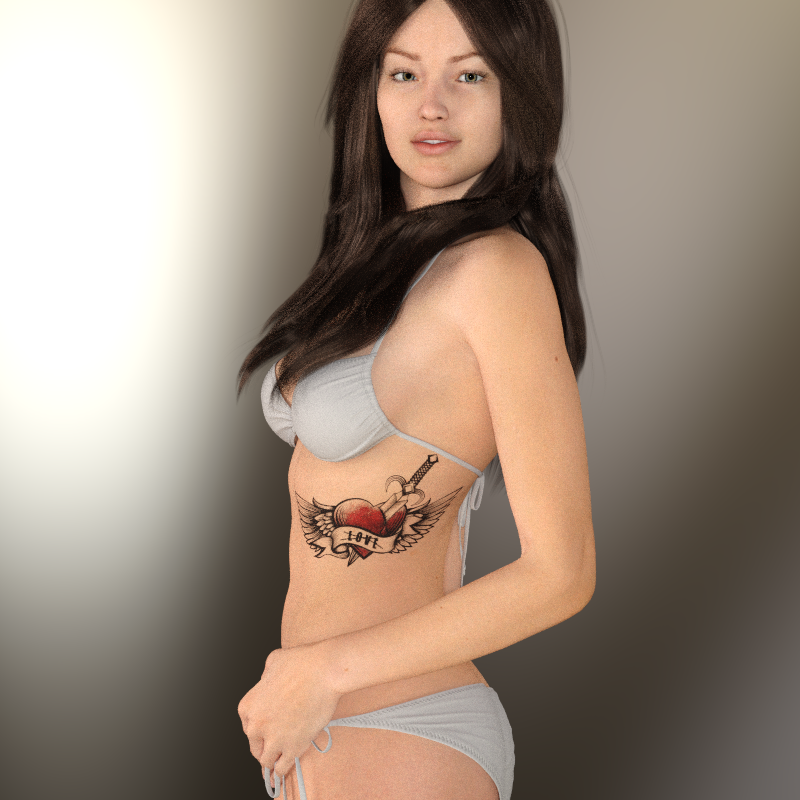
You just have to select the tattoo in the Scene Tab then go to the Surfaces Tab for the tattoo and turn the opacity to zero.
Eva 8Huh. There's been a couple of changes in the packaging. Not sure what that was about.
It's in the Data folder: Instead of everything being in subfolders all under DAZ 3D/Genesis 8/female There's now a DAZStudio folder up at the very top level, where the eyebrows live. And inside the old DAZ 3D folder there's the expected Genesis 8 subfolder *and* an Eva 8 subfolder which holds all of the tattoos.
So does that mean that the tattoos are not tied specifically to the female mesh? The G8 Female and Male subfolders are inside a different main folder (the DAZ 3D folder) and two levels down. Or that they aren't tied even to G8, since the Genesis 8 subfolder is also a level down inside a different folder (along with the G3 subfolder which uses the same UV set). Or have they just been changing things to be changing things?
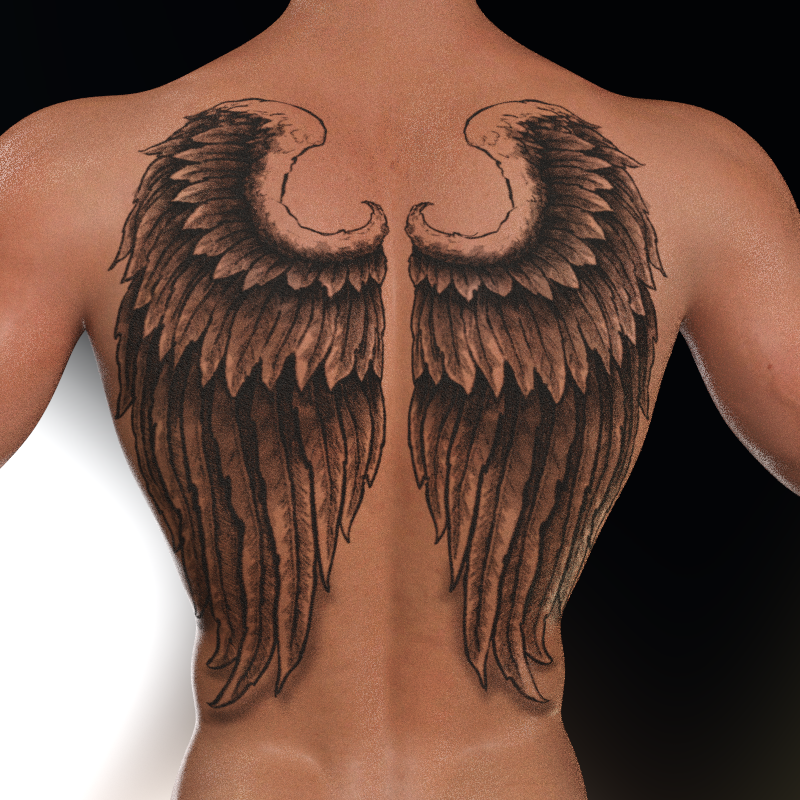
The tattoos are amazing and are, I believe, geoshells (they show up in the Scene Tab) and they're usable on other figures. Here's Eva 8's back wings tattoo on Genesis 8 Male (sorry it's grainy, I stopped it early):
And here are two of Eva 8's tattoos on Victoria 7 (again, sorry for the graininess, I stopped it early):
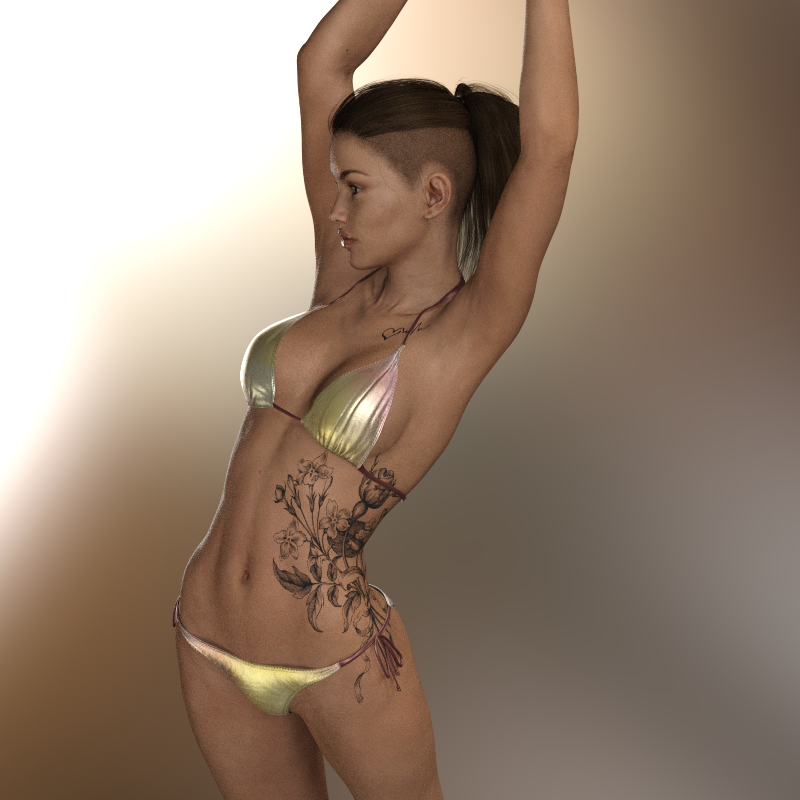
When used with Genesis 3 figures you need to go to the surfaces tab on the geoshell and turn the "eyelashes" surface to zero opacity.
Who's Next to Join the G8 Family?I'm curious to see what figure they will release on Xmas day.
In 2017, it was another female figure Sakura 8 after Charlotte 8 but there were male figures Darius 7 in 2016 and Leo 7 in 2015.
Victoria 9!
 [jk]The Finest Tears HD
Hey all,
I don't get this one. I've tried to use this product a number of ways on a number of different models and it always comes out looking badly. Base Victoria 8 model with the Victoria 8 Fix Slider at 100%, I still have clipping into the face.
Some of them don't even appear.
Any thoughts on how best to utilize this morph? It's kinda pricey for having to draw them in post production.
Product that makes Genesis 8 female default face look like Genesis 3 female default face?The base genesis 8 female model looks basically the same as the base genesis 3 female model.
The difference you are seeing between some gen 8 and gen 3 females is because of the differences in several of the iconic characters in pro bundles eg victoria.
Many of the gen 8 iconic characters tend to be older, and have harder faces with longer chin heights. In other words gen 3 faces are softer/rounder/cuter.
Those gen 8 iconic characters also seem taller in body/head proportions than the average woman where I live, and seem more similar to tall supermodel proportions (irrespective of the actual height of the model in daz - its the proportions that the brain is recognising).
I also think there was something wrong with the early gen 8 smile expression - many of the early pictures show creases on the cheeks in a weird place further back from the smile lines.
However this certainly does not apply to all gen 8 characters. Artists make whatever they like and there are many many good models from them.
Saying this can all be "fixed" with morph sliders, while completely true, defeats the purpose of buying characters for people who are not good with sliders (I am very bad with them)
As I am hopeless with sliders - my simple advice is to mix in from 10% to 30% of Karyssa 8 into the gen 8 character to soften them (remember to reduce the % of the existing character by the amount of Karyssa you mix in so they add up to 100%). Mika 8 would probably also work.
2018 Holiday Loyalty Rewards SaleSo... the loyalty rewards are only for people who want to buy content for Daz's new figures? Ouch.
I was hoping for something that wasn't as old as V4, or as new as G3. That leaves a lot of space in between :-) There's still lots of category-space for the people who only buy new...
@Misselthwaite, Don't shop via the Holiday Rewards sales page.
Go to the main shop page, then click on the link for People and Wearables. You can drill down further using the navigation links, or just go to the filter drop-downs and select the Figures you are interested in. Only the products for the selected figure(s) will be listed.
Now take advantage of your newly installed Daz Deals plugin and select % Off in the Sort By drop-down. All the products that fit your filter criteria, (for example, Genesis, Victoria 5, Michael 5 and The Freak 5,) will be listed with the highest discount first. Only put items in your cart that have a red discount value next to the price.
Go back to the sales page and select a new release, for the best discounts. Then open your cart. Now go through the items in the cart and decide which you want now based on the final price.
Basically, if the product has a discount, it's part of the sale. The exception will be the 70% off products in Fast Grab, but don't let a 70% off discount in the listing stop you from putting it into the cart. Some items are in multiple offers and will get your rewards discount applied in the cart.
ETA: The items in the current Flash Sale are also not part of the Holiday Rewards sale, and don't get the additional discount. Although I'm not seeing the red discount box next to the price either, so that shouldn't throw you off. For now. But you can always cull those out from the Cart page.
Have fun with it.
 The History of DAZ Studio
Here's a webcapture someone posted of the Zygote page when they first offered Victoria.
https://goo.gl/images/niqCTjI remember that screenshot... The original Victoria was the first 3D model I ever bought.
Product that makes Genesis 8 female default face look like Genesis 3 female default face?Well, there's this:
Winter time user baffled by new nuts and bolts1. The various Genesis figurs come with "AutoFit" clones, allowing you to convert (with the loss of any custom bones) older clothing for the new figure - you can AutoFit Victoria or Michael 4 clothing to Genesis, then Auto Fit that to either Genesis 2 or Genesis 8 (there are also add-ons in the store to skip the Genesis stage). Moprhs can also be cnverted, using the Transfer Utility - there's a long thread on the geenral method, though it's mainly about Genesis 3 to Genesis 8. Victoria 4 and Michael 4 maps work on Genesis, using them on later figures requires add-on products.
2. Iray renders do not have a fixed progression the way 3delight does (and 3Delight iss till there - select it in the Editor or Advanced tab of the Render Settings pane), they look to see if the pixels are sufficiently "converged" (have stopped chnaging with each pass). An enclosed scene will usually have less light available, and will rely much more on light rays bouncing around to reach recesses and corners - that slows the convergence process down. More lights to help fill in shadow areas will help.
a universal mesh/pose meant to transfer different shapes between figure generationswith GenX no longer developed due to the creator's passing people were looking for ways to bring their favorite character shapes between the various generations of DAZ figures, with some PAs selling recreations of older core characters for newer generations.
there are countless tutorials that show how to wrap one generation's topology over another's shape to get that shape transferred but due to the different generations' varying zero poses you get weird baked in poses that make subsequent posing have wonky results. so maybe instead of directly transferring one shape to another, we could have a sort of transactional middleman mesh that acts as a bridge between generations.
it will have the same proportions and the same t-pose across all the generations so any new morph applied to on generation will be followed by the other generations or something.
basically, we have one universal mesh that will bridge the generations and maybe act as a merchant resource for "upgrading" abandoned core figures like Callie 6 or Lillith 7 or port brand new characters to older generations.
heck with Zwrap for Zbrush being out now I could see the same universal mesh be used for 3d scans and original sculpts making character creation even easier.voting closed ♥♣♠ᴥCarrara challenge 43 ᴥ♠♣♥♦ the Horror♦♥♣♠ᴥEntry #9
Artist - Vyusur
“Where the wild roses grow”
Entry #17
Title: Shall we proceed, my dear?
Author: UnifiedBrain
Entry 14
title The Last Night
Artist MistySpecial shout out to UB for breathing life into the Millenium Woman (Victoria 1) and the Radiant Jaguar Hair.
Can someone make more characters for Genesis 8 female that look like Lydia(G3)?This is a custom character based off of the Victoria 7 base model. I doubt you're going to get very close to it using a G8 base to build from. I could be wrong, but I do believe they have different bone structures, and certainly different UV maps, which is why you won't find characters like this being offered across dramatically different bases. Plus I highly doubt they would appreciate having their hard work copied and resold on a different base. Your best bet is to put in an open request to the vendor(s) of that character and ask if they can make a similar one available for Victoria 8. You might be SOL though, because it doesn't look like maelwenn has produced anything here recently for any of the newer Genesis 8 bases(Victoria, Olympia, etc.). Maybe try checking Renderosity website since some of these vendors produce content for sale at multiple sites. It won't be the exact same, but you might find something that looks similar.
Genesis 8 as a mesh is not that different to that of Genesis 3, and I am fairly sure the face has the same number of polygons in both (although I think G8 uses less polygons in the internal mouth part).
As such anything that can be modelled in G3 can also be modelled for G8. Bone structure only comes into it when using an expression, so it is possible the smile on the two versions would not look the same.
Using a product like: https://www.daz3d.com/victoria-7-for-victoria-8 of by transferring the V7 morph to G8, plus moving over the Lydia morph, you should be able to recreate Lydia more or less exactly, it is just that the G8 version will bend better and have better expressions.
The older generation: Victoria 2/3, Michael 2/3 and their children rendersThis is a terrific thread, and I hope it keeps going.
Victoria (V1) and The Gremlin head, with a Freak 3/Devourer body. Rendered in Carrara with no postwork.
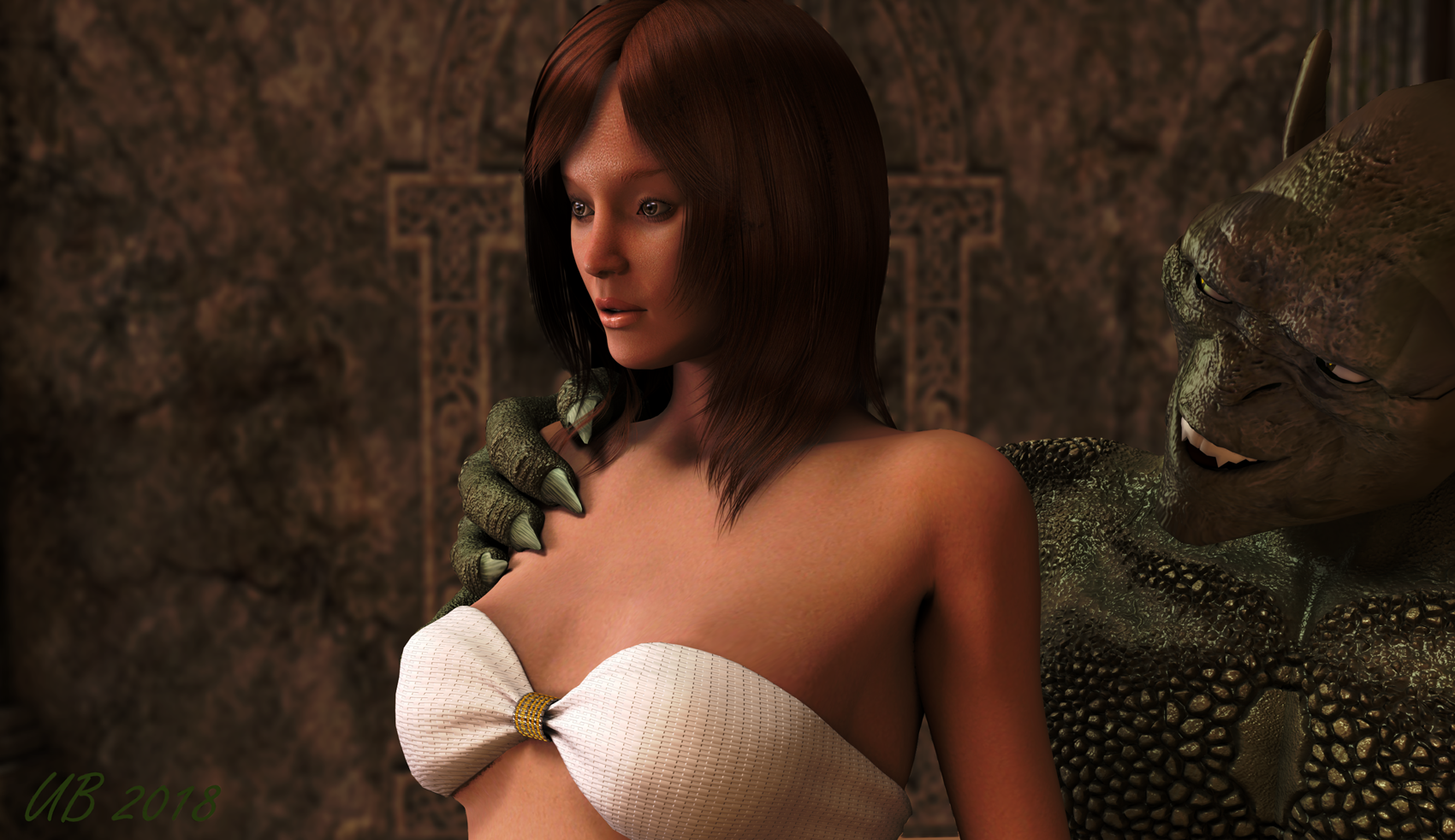
V1 is still available here.
Can someone make more characters for Genesis 8 female that look like Lydia(G3)?This is a custom character based off of the Victoria 7 base model. I doubt you're going to get very close to it using a G8 base to build from. I could be wrong, but I do believe they have different bone structures, and certainly different UV maps, which is why you won't find characters like this being offered across dramatically different bases. Plus I highly doubt they would appreciate having their hard work copied and resold on a different base. Your best bet is to put in an open request to the vendor(s) of that character and ask if they can make a similar one available for Victoria 8. You might be SOL though, because it doesn't look like maelwenn has produced anything here recently for any of the newer Genesis 8 bases(Victoria, Olympia, etc.). Maybe try checking Renderosity website since some of these vendors produce content for sale at multiple sites. It won't be the exact same, but you might find something that looks similar.
They don't have to copy it, just make something as high quality.
That lydia character is higher quality than 95% of Genesis 8 female models and it's Genesis 3, lol.
I'm interested in what you mean by quality.
Daz 3D is part of

Connect
DAZ Productions, Inc.
7533 S Center View Ct #4664
West Jordan, UT 84084Licensing Agreement | Terms of Service | Privacy Policy | EULA
© 2026 Daz Productions Inc. All Rights Reserved.