-
[Resolved] Is there a way to speed up Uninstall in DIM?
Ryuu@AMcCF said:
crosswind said:
Ryuu@AMcCF said:
Well, I guess I can rule out Navicat. Their sign-up requires me to fill in a country/region of origin (apparently beneath the Last Name)--but there's NO entry spot to fill in!

I really think there's something wrong with your Norton... because when I googled issues of Norton yesterday, I saw some guys reported that Norton prevents webpages from being fully loaded... for some reason.
Unfortunately, I'm unable to get any help from Norton on this. And with the trial period for Navicat counting down, I'm running out of options for pursuing this route. I did look around and saw there were other DB manipulators out there with trial periods, like DbGate, pgAdmin, DBeaver, as well as Navicat.
But I'm wondering if it's really worth the effort to chase down whatever such obscure problem that's slowing DIM down, or shouldn't it just be easier to rip all of the cms and downloaded files in DS out by the roots and try starting over and reload from scratch?
You don't have to go for this route though it should've been pretty straigh-forward and faster. Since this way doens't work for you, another option is that you can Reset cms database by using Content DB Maintenance and re-import the metadata of installed products.
However, the cons are: 1) that'll take much more time; 2) if the products with wrong Description data are re-imported, you'll still have to face the issue of slow uninstallation in DIM ~~
Well, if I were you, I would firstly uninstall Norton applicaiton, retry using Navicat.... see if it'll work. Then re-install Norton application after fixing the issue or failing to fix... In this way, at least I can know if Norton is the culprit or not ~~
A weird one with keyboard and DS 4.21.0.5Try Window>Workspace>Customise and use the button at the bottom to Import then select Actions and one of the default layouts.
Problems with hair in blender with diffeomorphic.For SBH and dForce hair the material conversion is approximated so in general you won't get the same as daz studio. For transmapped hair the conversion is quite good and you should get results similar to iray. To convert SBH and dForce you don't need to tessellate as tubes, polylines are preferable for the blender shaders wich work on curves anyway so tubes will not apply.
If the product is using custom shaders, as OOT or others, these will not convert and you get a warning on import.
My personal opinion on hair is to avoid importing daz products, as they are often very heavy for animation and rarely fit blender. Rather do hairs in blender with the blender tools and libraries, this will result in better quality and much faster hairs.
https://bartoszstyperek.gumroad.com/l/hairtool
 Problems with hair in blender with diffeomorphic.
So, I want to import my DAZ models into blende and I'm having problems with the hair. I attached a image of how the image looks when I first import into blender. Also, the hair, I'm prettty sure, is a SBH so I turned on tesselation and PR preview before exporting it to blender. Then I convert the hair with the 'Make Hair' option with tube selected in the Create section, and Particles selected in the Output section. The second attachment shows what happens to the character when I do this. The hair turns white in the material preview mode, and also I just can't select the hair anymore.
And I guess I'm just asking how do I make it look like it did in Nvidia Iray in DAZ. I'm very new to all this so any help would be very much appreciated. Thank you!
Getting shaders to work on imported .obj [SOLVED]I have tried to make a step-by-step instruction for those coming here with the same question:
Steps to undertake for Daz 4.23:
- Import
- Import the wanted .obj-file through File / Import
- Add Iray Decal Node
- Select the imported object in the Scene tab.
- In the Create menu find and click Add New Iray Decal Node.
- Select the Iray decal node in the Scene tab.
- Go to the Parameters tab and select Decal in the list of properties on the left.
- By default, Clip Mode is set to Position. Change this to None. This will ensure that the shader will cover the whole model without worrying about positioning it.
- Go to your Surfaces tab and select the Front surface, then apply your desired shader.
- Et voila!
- If the shader does not cover the object completely, try this:
- Again, select the Iray decal node in the Scene tab.
- Go to Parameters / Decal / General / Face Mode and change it to Front and back.
- The bounding box for the iray decal node seems off
- The bounding box for the Iray decal node might seem off-set in relation to the object it belongs to.
- This has no impact on how it works, so this off-set can be ignored.
- If it bothers too much try to adjust the transform settings of the decal. Setting them to zero should help.
Again, thank you to Silas3D for helping out.
Daz to Unreal Bridge - Meet the TeamCould you bring to a 5.6 project and then migrate those files after import to your 5.7 project
Getting shaders to work on imported .obj [SOLVED]I apologise in advance if this has already been discussed - I searched but found nothing (probably my fault).
A friend of mine has made an .stl-file using one of these websites, that enable you to quickly make a figure for 3D-printing.
He has then used another website to convert it into an .obj-file since I told him that Daz could import .obj-files but not .stl-files.
The .obj-file imports nicely, so no problems there (apart from odd opacity, scale and rotation but all easily corrected).
I want to turn it into marble or granite and use it in a scene as a statue.
My problem is, that I can not add a shader to the figure. Well, I sort'o can. Selecting the figure in the scene tab and in the surface tab I double-click the shader I want (say, a nice granite with red veins) and the result is disappointing. The colour changes to something a bit like the colour in the shader but just a uniform colour, no patterns, bumps or anything.
I have tried the following:
- Add an Uber Shader first (I read somewhere this should add a proper surface property).
- Export the figure as .obj and re-import it (someone mentioned this could do the trick).
- Made a subset of the figure and merged it in afterwards.
Nothing helped - it is quite possible that I did it wrong.
If smeone could point me to a step-by-step tutoral or explain it here, I would appreciate it.
Please take into account, that I am just a happy amateur that dabbles in Daz from time to time; don't assume I know anything.
Oh, I am running Daz Studio 4.23 on Windows 10 if that matters.
Thank you in advance.
How can import facs from daz as arkit blendshapes into blender?Someone told me there is a script that can do this, I didnt know how I could bring in facs as blendshapes that have the right naming convention for arkit. Is anyone familiar with how to this?
Inverted verticescrosswind said:
Lots of artifacts can be seen in your image... what file format did you import into DS... OBJ ?
DS only supports tris and quads topo, but no matter you choose to Triangulate OBJ in Blender when exporting or leave it to DS's OBJ importer to triangulate, you may get the artifacts.
Check this post : https://www.daz3d.com/forums/discussion/comment/9043001/#Comment_9043001
Also check the objects in Blender... their topology as well as some Modifiers can make things more complex ~~
It's the arches, I uploaded the specific arch picture. I did play around with the setting on export, after readin your linked comment, from Blender and the issue resolved itself so thanks!
Inverted verticesLots of artifacts can be seen in your image... what file format did you import into DS... OBJ ?
DS only supports tris and quads topo, but no matter you choose to Triangulate OBJ in Blender when exporting or leave it to DS's OBJ importer to triangulate, you may get the artifacts.
Check this post : https://www.daz3d.com/forums/discussion/comment/9043001/#Comment_9043001
Also check the objects in Blender... their topology as well as some Modifiers can make things more complex ~~
Using the Transfer Utility to move rigs between hard surface modelsLzy said:
I'll check out the plugin. I'm finding that fbx impart results in a mesh where the parts have split apart, rotaton and sclae are all over the place.. I've checked and my scale, rotation and transforms are zero'd, I'm at a bit of a loss to be honest. I've used figure setup alot in the past as I tried the fbx import route and burned countless hours trying to get it to work, with very little documentation to review. Trial an erro where the whole cycle is 15 mintues is soul destroying. I'm now stuck between a rock and a hard place, I want to iterate the model I'm working on but having to redo the figure setup every time is a nightmare...
Understood ~ Well, as for FBX format export / import, the only reliable DS version is 4.23+ for which DS fixed quite a few bugs with FBX Importer.
Importing both softbody and hard surface objects from Blender works well on my side ~~
Using the Transfer Utility to move rigs between hard surface modelsI'll check out the plugin. I'm finding that fbx impart results in a mesh where the parts have split apart, rotaton and sclae are all over the place.. I've checked and my scale, rotation and transforms are zero'd, I'm at a bit of a loss to be honest. I've used figure setup alot in the past as I tried the fbx import route and burned countless hours trying to get it to work, with very little documentation to review. Trial an erro where the whole cycle is 15 mintues is soul destroying. I'm now stuck between a rock and a hard place, I want to iterate the model I'm working on but having to redo the figure setup every time is a nightmare...
Using the Transfer Utility to move rigs between hard surface modelsI'm also a Blender user. As for FBX import/export, default settings will do. But I also recommend this plugin to the folks who're Blender heavy users as well as content creators with DS: https://www.daz3d.com/blender-to-daz-studio-plugin
If you're interested, you can check if there's any big discount in this store as well as superhivemarket.com since Black Friday is approaching ~
 Using the Transfer Utility to move rigs between hard surface models
I'm afraid you have to re-rig or re-weight mapping in DS if the base geometry changes ~~
Instead, you could always rig the item in the software with which you made it. If there's any change / update in terms of base geometry, it should be easier to tweak the rig / weight mapping in the source software rather than DS ~~
After the job is done, export / import FBX into DS. Then finalizing the settings of figure will be much simpler.
DAZ to 3ds Max Bridge support for Genesis 9It looks like the import is working. Perhaps the figure has some unusual material applied? Geoshell, morphs, some child elements... Have you tried exporting a standard Genesis 9 figure from DAZ?
I have eliminated all PA folders!Ron Knights said:
Again, my approach is simple. Once I'vwe eliminated the PA folders, I have very little work to do.
I use the Content Library pane. Here is what I get. No need for search, metadata etc.
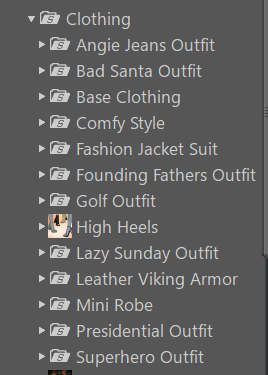
Which is, at least for now, fine for you and your decision. But others need to be aware of the potential issues, and that there are alternatives which don't involve throwing out the whole feature.
I have eliminated all PA folders!Again, my approach is simple. Once I'vwe eliminated the PA folders, I have very little work to do.
I use the Content Library pane. Here is what I get. No need for search, metadata etc.
I have eliminated all PA folders!Torquinox said:
takezo_3001 said:
Richard Haseltine said:
The name and location of the content directories are not functionally significant, it's the relative paths within that matter. Zips which include My Library/My Daz 3D Library as a root folder are very annoying.
Indeed, it is, as I have to open the folder within to be able to copy the "people/props/scripts/etc" over to my own content directory, so it's a bit of a pain…
I'm not going to sugar coat the hassle factor - It's a hassle! I use PeaZip to open all the zips from other sites into their own folders and then I combine and reconfigure the content as needed for installation and storage. Then I copy/paste into my content library. Then, I actually load the product to make sure it works and to see what it does. That last part... There are products in my library I have never loaded! Anyway, I've been doing that for so long that it doesn't bother me at all - It's just what I have do to install the product. As for Daz items installed with DIM, I use Everything (a search program @WendyLuvsCatz recommended) to find the items in my library and then I find them in DS, browse to folder and move/modify whatever needs moving to make me happy with the arrangement.
I generally unzip, discarding excess folders, into a testing content directory to make sure it is working and to set up metadata, then I move into the real content directory (or not, as the case may be)
There's no free lunch. Even if one is using Smart Content, the metadata may need modification to suit people, as well - People do rearrange their stuff! Items from other sites may not even have any metadata! Is it quicker and easier to go through Smart Content? I don't know. Maybe? I think it's all in what one gets used to doing. I'm used to rearranging files, so I do that. I might reach a point in the future where I need or want to get Smart Content to work for me, and then I'll see.
Don't forget options like links (.djl files), and of course the Smart Content pane is not the only metadata-using content view (Categories/Products in the Content Library pane, Presets tabs in most property panes) so it isn't an either/or.
I have eliminated all PA folders!takezo_3001 said:
Richard Haseltine said:
The name and location of the content directories are not functionally significant, it's the relative paths within that matter. Zips which include My Library/My Daz 3D Library as a root folder are very annoying.
Indeed, it is, as I have to open the folder within to be able to copy the "people/props/scripts/etc" over to my own content directory, so it's a bit of a pain…
I'm not going to sugar coat the hassle factor - It's a hassle! I use PeaZip to open all the zips from other sites into their own folders and then I combine and reconfigure the content as needed for installation and storage. Then I copy/paste into my content library. Then, I actually load the product to make sure it works and to see what it does. That last part... There are products in my library I have never loaded! Anyway, I've been doing that for so long that it doesn't bother me at all - It's just what I have do to install the product. As for Daz items installed with DIM, I use Everything (a search program @WendyLuvsCatz recommended) to find the items in my library and then I find them in DS, browse to folder and move/modify whatever needs moving to make me happy with the arrangement.
There's no free lunch. Even if one is using Smart Content, the metadata may need modification to suit people, as well - People do rearrange their stuff! Items from other sites may not even have any metadata! Is it quicker and easier to go through Smart Content? I don't know. Maybe? I think it's all in what one gets used to doing. I'm used to rearranging files, so I do that. I might reach a point in the future where I need or want to get Smart Content to work for me, and then I'll see.
Sagan: A DAZ Studio to Blender Alembic ExporterOk I've installed the plugins, but still by default it behaves the same. I import the abc in the content drawer, select either static mesh or geometry cache. Is there something extra I need to do to get it to work, or it should work out of the box like in blender? To be clear I exported the entire figure, hair and everything together.
Daz 3D is part of

Connect
DAZ Productions, Inc.
7533 S Center View Ct #4664
West Jordan, UT 84084Licensing Agreement | Terms of Service | Privacy Policy | EULA
© 2026 Daz Productions Inc. All Rights Reserved.