-
HDRI lighting goes dark when set to scene only in enviornments tab
crosswind said:
7starswingin said:
crosswind said:
HDRI environment will not work with the mode of 'Scene Only'. You may see that after choosing Scene Only in Environment Mode, the option of Environment Map is gone. So if you wanna use an HDRI map, pls use Dome and Scene or Dome Only.
I see, but is there a reason why the textures ive applied to my GEN 8 models appear so fuzzy when i set to either dome and scene or dome only when looking at the privew render or rendered image? Also ive applied wet textures to my models and the shell comes up as white all over the models skin.also im using Orestes Iray HDRI Skydomes and i also added a denoiser to the render, would the denoiser be interfering with the hdri?
You may check:
1) If you set Depth of Field in the currently-used Camera... if yes, finetune Focal Distance and F/Stop to make your figure well focused;
2) Go to Render Settings Pane - Filtering - Pixel Filter: Set value to mitchell, Pixel Filter Radius: Set value to 0.75 - 0.85And Orestes Iray HDRI Skydomes you used is a daytime or a night time HDR env.? Better post a screenshot if there's any issue.
i was running it as a daytime HDRI but had no luck, the donoiser still makes it look like a painting in some way here are the render settings as well as what i set the enviiornment intensity to be
HDRI lighting goes dark when set to scene only in enviornments tab7starswingin said:
crosswind said:
HDRI environment will not work with the mode of 'Scene Only'. You may see that after choosing Scene Only in Environment Mode, the option of Environment Map is gone. So if you wanna use an HDRI map, pls use Dome and Scene or Dome Only.
I see, but is there a reason why the textures ive applied to my GEN 8 models appear so fuzzy when i set to either dome and scene or dome only when looking at the privew render or rendered image? Also ive applied wet textures to my models and the shell comes up as white all over the models skin.also im using Orestes Iray HDRI Skydomes and i also added a denoiser to the render, would the denoiser be interfering with the hdri?
You may check:
1) If you set Depth of Field in the currently-used Camera... if yes, finetune Focal Distance and F/Stop to make your figure well focused;
2) Go to Render Settings Pane - Filtering - Pixel Filter: Set value to mitchell, Pixel Filter Radius: Set value to 0.75 - 0.85And Orestes Iray HDRI Skydomes you used is a daytime or a night time HDR env.? Better post a screenshot if there's any issue.
HDRI lighting goes dark when set to scene only in enviornments tabcrosswind said:
HDRI environment will not work with the mode of 'Scene Only'. You may see that after choosing Scene Only in Environment Mode, the option of Environment Map is gone. So if you wanna use an HDRI map, pls use Dome and Scene or Dome Only.
I see, but is there a reason why the textures ive applied to my GEN 8 models appear so fuzzy when i set to either dome and scene or dome only when looking at the privew render or rendered image? Also ive applied wet textures to my models and the shell comes up as white all over the models skin.also im using Orestes Iray HDRI Skydomes and i also added a denoiser to the render, would the denoiser be interfering with the hdri?
Orestes HDRI's with stars out of focusYou better post a render... Orestes star dome HDRIs with 16K resolution are not bad. Some recommended settings as below:
- Pixel Filter: mitchell
- Pixel Radius: 0.65 - 0.75
- Dome Mode: Finite Box (You may have more Dome related parameters to tweak)
- Environment Lighting Resolution: > 4096
- No Environment Lighting Blur !
- No Bloom Filter !
- No Post Denoiser !
- Add some Environment Tint..
- Finetune DOF* Example1: Focal Distance - 800, F/Stop - 50
* Example2: Focal Distance - 550, F/Stop - 40
The dome are not that blurry... (Product: Orestes Iray HDRI Skydomes - A Night in August)PS: These HDRIs cannot be comparable to those HD photos with 200Mil+ pixels even if you render a 16K image...
 Orestes HDRI's with stars out of focus
I've got a bunch of Orestes star domes and am having a ton of trouble trying to get the stars to be bright little in-focus points of light instead of being blurry blobs of light. I'm using depth of field and it really plays havoc when I try to get everything in focus. Am having the same trouble without using depth of field. I've also adjusted the domes sizes and rotations done quite a bit actually and am still having problems, anybody got a suggestion for what I'm doing wrong?
Outfit in promoThe scarf should be an obvious clue, but the DAZ web site's search function no longer seems to read product descriptions.
https://www.daz3d.com/orestes-iray-hdri-environments--winter-bluffs
How do you use Orestes Iray HDRI Skydomes - ErupiterOK. I figured it out. I opened an empty scene and picked one of the Orestes HDRIs. All I saw was an empty sky in iRay. But at the bottom of the view port, I saw the universal selection tool...even though I had added nothing else to the scene. By it's position and angle, I rotated the view port down which turned the universe and brought the sky down and put the heavens into view. Thanks again.
How do you use Orestes Iray HDRI Skydomes - ErupiterWhen I use HDRI, it's helpful to go to Render Settings, Environment, Dome Rotation and adjust the rotation until you get the elements in the scene you need.
I don't own the product you mentioned, but I do own the quite a few of the Orestes Skydomes.
This one is Oblivion.
When loaded you see the first image, but then rotate the dome to the 0 setting and the planet is viewable.
How do you use Orestes Iray HDRI Skydomes - ErupiterKevinH said:
Yes. Thank you for trying to help. I found the product under the light presets folder and there are only icons for loading the render settings. (Icons are marked RENDER.) I also found the product under the Product Folder in the Content library and the only icons that show are for loading the render settings. I also looked up the product to see if there was pdf or anything, but there was not.
I have several product by Orestes and everyone I've loaded has just given a gradient colored back ground. It's more random than that, but are no objects or images in the sky.
I also own several HDRI products by Orestes, and none of them result in a "gradient coloured background". Are you using depth of field to blur the background? Please post a screenshot of your Environment and Camera settings.
How do you use Orestes Iray HDRI Skydomes - ErupiterI don't have that one, but several others from Orestes Graphics. Those render settings load an environment dome for Iray, no need for other products for the celestial bits. Be sure you are in Dome and Scene for Environment mode. Even if you are not, when you load another one, it will set it up that way. Check to see if the Environment map is what you are expecting.
How do you use Orestes Iray HDRI Skydomes - ErupiterYes. Thank you for trying to help. I found the product under the light presets folder and there are only icons for loading the render settings. (Icons are marked RENDER.) I also found the product under the Product Folder in the Content library and the only icons that show are for loading the render settings. I also looked up the product to see if there was pdf or anything, but there was not.
I have several product by Orestes and everyone I've loaded has just given a gradient colored back ground. It's more random than that, but are no objects or images in the sky.
How do you use Orestes Iray HDRI Skydomes - ErupiterDid you check under Light Presets:Orestes Iray HDRI Skies ? I don't have the product to check. I'm just going by the readme.
How do you use Orestes Iray HDRI Skydomes - ErupiterHow do you use Orestes Iray HDRI Skydomes - Erupiter or other products by Orestes. All I find are files to load render settings. When I do a iRay preview all I see is a fuzzy varible colored sky. I don't see any planets or moons like what shows on the product page. Do you need to buy other products to get those celestial things? Do you need to load a skydome or something? And where would you find that? Thanks.
2022 Christmas at DAZ & PA GiftsFeralFey and Orestes Graphics, thank you so much for this christmas freebie! I'm sure I'm not the only one who will find a use for it!
Oooohhhh . . . and wearable preset expressions and poses for G9 Base & Michael & Victoria 9 core characters.
2022 Christmas at DAZ & PA GiftsThe 2022 Christmas Holiday Sale
A huge thank you to all of the PA's, for their generous gifts.
Also a big thank you to Barbult who faithfully, each year, renders appreciation art for those PA gifts.
November 30 2022: Renfaire Tiaras by AprilYSH
December 01 2022: Santa's Normal Maker by Code66
December 02 2022: Digital Xmas Viewer by Silent Winter
December 03 2022: Antique Locket for Genesis 8 and 8.1 Females and Genesis 9 by Hypertaf
December 04 2022: Sexy Skinz Xmas Freebie for Genesis 9 2022 by Vyktohria
December 05 2022: Small Earrings for Genesis 8 Female and Genesis 9 by Esha
December 06 2022: My Christmas Tree by Muscleman
December 07 2022: Mushroom Hat for Genesis 9 by Amaranth
December 08 2022: Christmas Garland by David Brinnen and ForbiddenWhispers
December 09 2022: MMX Sporty Sunglasses by Mattymanx
December 10 2022: PreT Holiday Wreath by Elleque
December 11 2022: ZK Bear Vase by ZKuro
December 12 2022: Festive Snow Globe by Wicked Creations
December 13 2022: Bennu the Asteroid by Alvin Bemar
December 14 2022: NG Not Your Mother's Pear Earrings for Genesis 8 and 8.1 Female and Genesis 9 by NewGuy
December 15 2022: dForce Leggings for Genesis 9 by Karth
December 16 2022: LIE Knuckle Tattoos for Genesis 8 and Genesis 9 by Ensary Esid FenixPhoenix
December 17 2022: M3D Christmas Fireplace by Matari3D
December 18 2022: MD Nodes Notes by MikeD
December 19 2022: The Vintage Sleigh by Daz Originals
December 19 2022: Vintage Sleigh Iray Textures Addons by 3djoji
December 20 2022: 2022 Xmas Freebie by Wee Dangerous John
December 21 2022: ND dForce Mushroom Hood for Genesis 9 by Nathy Design
December 22 2022: Closet for Your Gifts by Sylvan
December 22 2022: Up 2 No Good Prop and Poses for Genesis 9 by FeralFey & Orestes Graphics
December 23 2022: M3D Semibald Hair for Genesis 9 by Martari3D
December 25 2022: dForce Unionsuit for Genesis 8 Male by Destiny's Designs & Lyrra Madril
whats going wrong with this HDRIIve been trying to get Orestes Iray HDRI Environments - Autumn Hills to work but all I am getting is a blur (see attached pic) stating with a new scene clicking on autumn farm 01 and the camera 01 thats all I can getting no settings i can change make it any better though its quite easy to make it even worse I think I must be doing something wrong but no idea what that might be any help would be much appreciated
UltraScenery - new territory [Commercial]Gogger said:
Just mucking about with the new ecosystems. This is a bit more post-processed than I normally would like, but somehow it just worked for me.
This was rendered for my INSANELY Ultra wide (5120x1440) 49" curved screen! (Yes, I love it! I thought it was ABSURD at first, then I got it home.)
UltraScenery Britain
UltraScenery - Stone Features
And an Orestes lighting and backdrop (you may have noticed the 'filled in' background). Unfortunately I don't recall which one I used after trying SO MANY.That is just Greeeeeeeeeeeat Gogger ... Who doesn't need a 49" curved screen? lol Bet it's great for gaming... Like you are really there without the 3d glasses... lol
UltraScenery - new territory [Commercial]Gogger said:
Just mucking about with the new ecosystems. This is a bit more post-processed than I normally would like, but somehow it just worked for me.
This was rendered for my INSANELY Ultra wide (5120x1440) 49" curved screen! (Yes, I love it! I thought it was ABSURD at first, then I got it home.)
UltraScenery Britain
UltraScenery - Stone Features
And an Orestes lighting and backdrop (you may have noticed the 'filled in' background). Unfortunately I don't recall which one I used after trying SO MANY.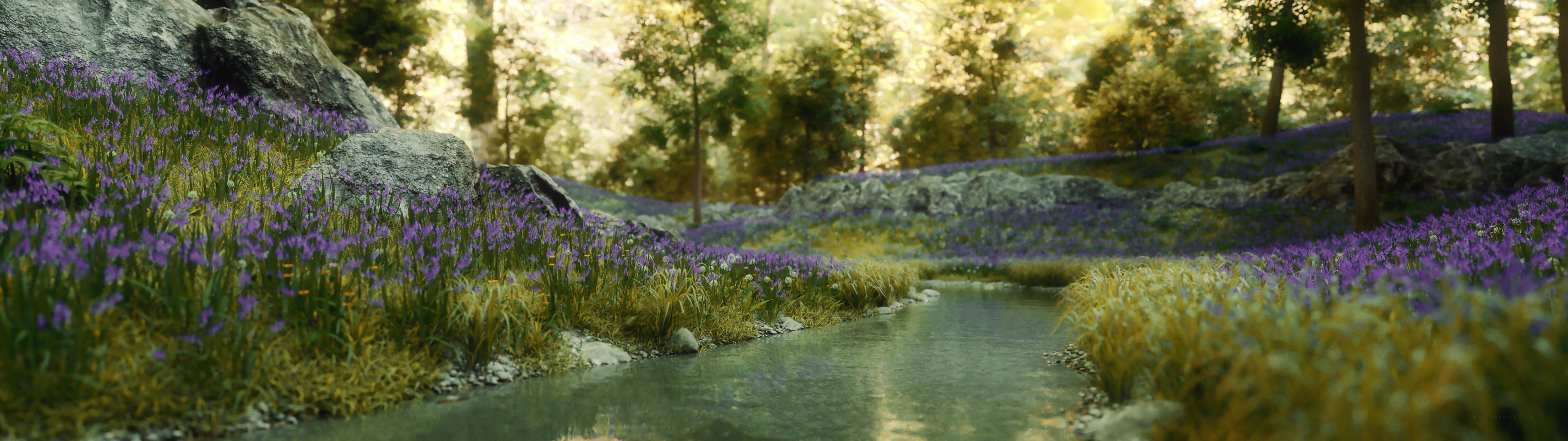
Wow, that must be some monitor! Does it take up the whole room LOL? That render looks lovely. I'm rendering with stones and Britain right now, too, but mine are more test renders and not nearly that scenic.
UltraScenery - new territory [Commercial]Just mucking about with the new ecosystems. This is a bit more post-processed than I normally would like, but somehow it just worked for me.
This was rendered for my INSANELY Ultra wide (5120x1440) 49" curved screen! (Yes, I love it! I thought it was ABSURD at first, then I got it home.)
UltraScenery Britain
UltraScenery - Stone Features
And an Orestes lighting and backdrop (you may have noticed the 'filled in' background). Unfortunately I don't recall which one I used after trying SO MANY.
Halloween Candy Buckets/BagsI don’t have many ‘Halloween’ specific items, but in the spirit of scrambling to put something together without spending money for the kids to go out trick or treating I have some ideas:
This is no longer in the store, but if you have it from Emma and Jordi, it has a great brown paper shopping bag with a handle, that has materials, a unparented and poses for character’s hand.
dForce Personal Shopper Outfit, Accessories and Poses for Genesis 8 Female(s)
It seems that every surface can be changed with shaders.
Check your runtime for baskets or large bowls you can use shaders on, these are a few I have:
https://www.daz3d.com/the-alchemist-workshop-props--barrels-and-basketshttps://www.daz3d.com/potters-workshop
There is a caldron and a two tiered bowl that might work as a candy bowl?
https://www.daz3d.com/halloween-whimsey-props
Not sure if you saw these but they are just fun:
https://www.daz3d.com/morphing-jack-o-lanterns
https://www.daz3d.com/orestes-epic-pumpkins-bundle
https://www.daz3d.com/the-halloween-candle-pack
Daz 3D is part of

Connect
DAZ Productions, Inc.
7533 S Center View Ct #4664
West Jordan, UT 84084Licensing Agreement | Terms of Service | Privacy Policy | EULA
© 2026 Daz Productions Inc. All Rights Reserved.