-
Daz Studio 6 Beta - version 6.25.2026.19821! (Updated July 23, 2026)
Some of my DAZ purchased DAZ content is not showing up in my directories in DAZ 6. I have checked my directory paths, updated and reimported my metadata, but with no luck. An example is attached.
Tips on making scene file smaller?Hey,
So this has been bothering me for a long time, sometimes my scene files are about 5-20 MB's depending on amount of charachters i've got and also the enviorment. However I noticed when I started to import to blender that the scene file gets big but if I use save as figure/prop asset it makes the scene file go from 50 MB to around less than a MB (exagrating). Then I got thinking because I noticed some smart content assets I have downloaded sometimes aren't optimised it feels like? Like I had a exterior which was alone 5 MB, it's got a lot of props so I couldn't really save as a figure/prop.
Like I noticed also that there were some eyebrows which brought the save file up to 8 MB, which was just baffling, I luckily managed to fix it by saving as figure/prop.
My question is this, is there a way to save as figure/prop asset while having multipule assets selected? So the scene file gets smaller? Or do I have to manually do it?
Is there any tips for optimizing my workflow, because saving takes a lot of time from me not to mention adding iray and posing etc. But I want to remove one issue at least from the equation which is the save time which usually for me with the renders I do is 15-30 seconds.Do I make some parts of the scene a scene subset then import them back in 2 renders after I need it (if I'm making sense here) or is there a simpler way?
If there is also an asset that I can purcahse that can handle this, it would be amazing. But I have a feeling there isn't any.
Also question does Persona file save the sub division? Like if I made 20 scene's, 2 charachters are both in base but then in render queuer In extra render properites I load a persona, will that make it so the persona overrides the base and sets the charachters to high? Or am I is this just complicating things? I know persona removes well like a glass or a bottle from the model etc since it's not contained in the persona, but if it works like this maybe this will benefit me a lot more working.
I might be asking much here but I really want to be more efficent and quicker, without viewport slowing down.
For your information
Specs:
Daz 4.24.
3090 TI
48 GBEZFinder - Advanced Content Manager for Daz Studio [Commercial]Mosk the Scribe said:
Hi Rex. Thanks for all the work you've put into EZFinder. Excited about being able to organize and access my content in an efficient manner.
Have started organizing thing in v1.03 and eager for 1.05 to arrive.
Is there a way (in current version or soon to be released one) to mass delete or automatically delete duplicate files within a folder? (if not, that would be a great feature for the future)
I understand you can easily end up with two (or more) files named 'pose 1' or 'standing' in the same folder, where these are actually different files from different products. But if a file has the same name and same metadata, it would seem to be a genuine duplicate that could safely be removed. Doing this manually gets tedious (though alphabetical sort feature may make things easier by placing direct dups right next to each other)..
Appreciate your availability on the forums and the little touches you've put into the program to make it user-friendly.
As Mosk indicated above, I'm also hoping the update you've submitted gets approved soon. FWIW, while I *know* it's not your fault, waiting this long (DAZ QA *soon*, etc.) for the fix to a basic program feature (HDRI scans) isn't really optimal. Perhaps you can post your own updates and betas somewhere else, in a way that they're only useful to legitimates owner who have the base system purchased and installed - e.g. maybe figure out a way to post the updates as patches/modules to your program base, rather than figuring out a way to post a complete package and manage the risks of piracy, etc.
Per Mosk's comment on duplicates, please be careful on this and maybe offer an optional 'hide duplicates' button or similar, as in my use-case, I am *certain* to have perceived duplicates in my libraries when a PA product offers versions of their product for multiple figures (e.g. Zeddicus often has poses for G8 and G9, or some PAs offer hair for G3 and G8, etc.). Because I separate my figures into distinct libraries (G8 vs G9, ...), I explicitly install such dual-products in *each* figure library.
Using this figure isolation, I often only enable the relevant figure libraries in my various DAZ Studio startup profiles (I use many). So, in my case, the mentioned assumption that clearing out duplicates won't hurt is not a safe assumption for some of us, given your tool creates appropriately references specific item in their distinct paths. 'Cleaning' out these may lead to the only available reference point to an unmounted library in DAZ Studio instance I'm working in/on. I hope this makes sense. Maybe there's a quick/clever solution (right-click menu->hide-item ?) but I'm guessing that making it automatic and non-disable-able will cause frustration if such duplicate 'hiding' can't be controlled manually as well.
Thanks for your efforts! Looking forward to the update.
--ms
EZFinder - Advanced Content Manager for Daz Studio [Commercial]Hi Rex. Thanks for all the work you've put into EZFinder. Excited about being able to organize and access my content in an efficient manner.
Have started organizing thing in v1.03 and eager for 1.05 to arrive.
Is there a way (in current version or soon to be released one) to mass delete or automatically delete duplicate files within a folder? (if not, that would be a great feature for the future)
I understand you can easily end up with two (or more) files named 'pose 1' or 'standing' in the same folder, where these are actually different files from different products. But if a file has the same name and same metadata, it would seem to be a genuine duplicate that could safely be removed. Doing this manually gets tedious (though alphabetical sort feature may make things easier by placing direct dups right next to each other)..
Appreciate your availability on the forums and the little touches you've put into the program to make it user-friendly.
Morphs sub categories?You can move morphs among categories and add remove or rename categories, apart the bug already reported for mesh drivers.
setup > morphs > categories
Once you're done organizing your morphs, you can save and load them as json favorites, to use on multiple figures.
As a word of advice, don't try and use blender as you use daz studio. In daz studio you have hundred of morphs for a figure, possibly driving each other. This is not what blender is designed to handle. In blender you should only import the morphs you need for animation, then bake all other morphs, as actor morphs, to dbz when you export the scene. As for expressions it's the same, instead of importing hundreds of expressions as it is in daz studio, you should try and import only the basic face morphs then make the expressions yourself in blender when you animate.
The G8.1 face rig works also for G8 and G9 in blender. So generally you don't need to import expressions at all. You generally only import the FACS and the JCMS then you're ready to animate. But of course yes, you can import all the morphs you want if you really need them.
Use G9 skin on G8Hi so Sorry for the wait I just checked that you sent a message as I was hoping for it to show on gmail but anyways let's get to the point. So I setted everything as "Crosswind" said to copy the head and finger materials and name them to Mouth Cavity, Fingernail and Toenail respectively. But when I try to import the texture in faceform it doesn't follow the character and sticks on it as a sticker. I don't know sometimes it shows flawlessly and sometime nt. Right now it is perfect. Does the name matter like keeping mouth cavity instead of mouth
Maybe this could have been the problem".
Content Catalog - Windows/macOS (Commercial) - Out nowdonniekeidic said:
thanks @barbult for your response. One more thing regarding the tags, are these something we have to do manually for all products or are some of these tags propagated from metadata from the store?
The tags are taken from a number of places in the DIM package, e.g. the embedded Supplement.dsx as well as other files and folder structure in the zip. You can always add your own if needed.
Morphs sub categories?Is there a way to add morphs sub categories like how the "Head" category has sub categories to make parts of the morph grouped together?
I want to import expressession morphs, but have it categorized under the "Expressions" category. That way I can look through the expressions and add/organize morph expressions in its own subcategories.[SOLVED] Thumbnail MysteryOkay, first, Daz Connect installs support files (metadata json + product thumbnail images) into Cloud folder while DIM installs them into runtime\support\ folder. If a product was ever installed or updated via Daz Connect, Smart Content will firstly load the thumbnail images from Cloud folder.
If product have no cloud metadata, Smart Content loads thumbnail images from runtime\support\.
The hair product you named just has a wrong metadata file name specify in DSX file.
If you go to runtime\support folder, locate 117149, you'll find DAZ_3D_117149_dForce_FE_Straight_Bangs_Long_Strand-Based_Hair_for_Genesis_9_8_and_81.dsx
Open it with Notepad++, line 4133, you'll find the file name DAZ_3D_117149_dForce_FE_Straight_Bangs_Long_Strand-Based_Hair_for_Genesis_9,_8_and_8_1.dsx which is different from the above correct one. (see screenshot down below) DIM / DS uses this code line to import metadata.
Change 8_1 to 81, save the DSX file, re-import metadata. Or, replace the DSX file in the product IM package > runtime\support with this corrected DSX file, reinstall in DIM, thumbnail image will be seen.
Then fill a ticket if you'd like to ~
Content Catalog - Windows/macOS (Commercial) - Out nowdonniekeidic said:
thanks @barbult for your response. One more thing regarding the tags, are these something we have to do manually for all products or are some of these tags propagated from metadata from the store?
The initial tags are already there. I don't think they come from metadata, though. I think they come from the DIM Zip file information. I don't know much about the internals of this program, so again, DoctorJellybean would have to give more details.
Here is an example. I clicked on the thumbnail for Bull for Daz Horse 3. It already had 11 tags automatically included. Also, it you decide one of those tags is wrong, you can edit it or remove it, as well as add new tqgs.(Oh, there is also a choice for dark theme or light theme in the program. I have the dark theme selected.)
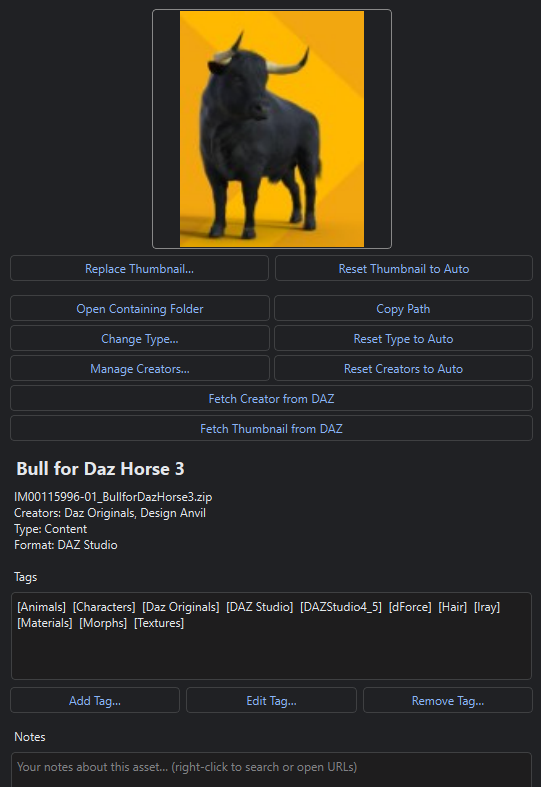
That bull thumbnail could be sharper. I'm going to fetch a better one from Daz. (Even though I can see what it is, I like crisp thumbnails. OCD?)
Content Catalog - Windows/macOS (Commercial) - Out nowthanks @barbult for your response. One more thing regarding the tags, are these something we have to do manually for all products or are some of these tags propagated from metadata from the store?
Need help with dForce necklacekit6961 said:
crosswind said:
kit6961 said:
Just a quick update, I don't get too much time in the day to work on this, but right now, I am struggling to weld the beads together. I have welded them in Blender and using the L command selects the complete chain, but when I import them into Daz, I can't select more than one bead with Ctrl++. So still at it. Thanks all of you for your comments and help. I will keep you posted.
You made the necklace or just got it from other sources ? Since you use Blender, better show the mesh of the necklace you have... to avoid wasting your time. Wrong ways of welding geometry may bring you unexpected result. Also be noted that denser mesh may bring the object an explosion in DS simulation...
Besides, if Ctrl + L worked in Blender, Ctrl + + or Ctrl + * should also work in DS ~~
I made this myself. I made 10 beads, assigned 5 beads black material and 5 beads gold material, then created a Bezier curve, added array and curve modifier to the row of beads. Gave the bezier curve a thickness and converted it to a mesh. Now the Bezier curve is a string inside the beads. Then used the boolean modifier to weld them together. Also used merge by distance.
Now it selects the adjacent bead in Daz with Ctrl++. I am attaching a picture of what my necklace looks like in Blender.
Then it should be okay, looks fine. You also need to check its topology, better all quads, as well as check polycounts to make sure they're optimal.
And I fully agree with Fabiana , dForce sometimes is unpredictable, better have more experiments with it. Good luck !
Edit: You can futher import a Genesis Base figure into Blender, tweak the necklace around the figure's neck by using sculpt tools...so as to give it a better initial shape and position.
Need help with dForce necklacecrosswind said:
kit6961 said:
Just a quick update, I don't get too much time in the day to work on this, but right now, I am struggling to weld the beads together. I have welded them in Blender and using the L command selects the complete chain, but when I import them into Daz, I can't select more than one bead with Ctrl++. So still at it. Thanks all of you for your comments and help. I will keep you posted.
You made the necklace or just got it from other sources ? Since you use Blender, better show the mesh of the necklace you have... to avoid wasting your time. Wrong ways of welding geometry may bring you unexpected result. Also be noted that denser mesh may bring the object an explosion in DS simulation...
Besides, if Ctrl + L worked in Blender, Ctrl + + or Ctrl + * should also work in DS ~~
I made this myself. I made 10 beads, assigned 5 beads black material and 5 beads gold material, then created a Bezier curve, added array and curve modifier to the row of beads. Gave the bezier curve a thickness and converted it to a mesh. Now the Bezier curve is a string inside the beads. Then used the boolean modifier to weld them together. Also used merge by distance.
Now it selects the adjacent bead in Daz with Ctrl++. I am attaching a picture of what my necklace looks like in Blender.
How to add / Save as my color palette ???I don't know if there is a way to import a color palette. Hopefully one of the more experienced Brycers will be able to answer this question,
Help with dforce morph not savingim trying to save a morph for Genesis 8 Kensington hair but when i try to import the morph i get this error? -daz 3d Warning: Geometry did not match, failed to create morph.does anyone know how i may fix kinds regards
Need help with dForce necklacekit6961 said:
Just a quick update, I don't get too much time in the day to work on this, but right now, I am struggling to weld the beads together. I have welded them in Blender and using the L command selects the complete chain, but when I import them into Daz, I can't select more than one bead with Ctrl++. So still at it. Thanks all of you for your comments and help. I will keep you posted.
You made the necklace or just got it from other sources ? Since you use Blender, better show the mesh of the necklace you have... to avoid wasting your time. Wrong ways of welding geometry may bring you unexpected result. Also be noted that denser mesh may bring the object an explosion in DS simulation...
Besides, if Ctrl + L worked in Blender, Ctrl + + or Ctrl + * should also work in DS ~~
Import morph?The figure must be complete before converting the rig, you can't add morphs after. For this reason it is advised to always keep a "daz rig" version of the figure, should any modification be necessary, you do the modifications on the daz rig then convert to MHX or rigify again, as a last step. Other than that MHX tends to change over time, so saving a daz rig version allows to update the MHX rig, eventually.
Finalize is another thing, it removes the extra metadata so most edit tools won't work anymore, only the animation tools will work. Typically this is done when the figure is complete and ready for animation, we don't need to edit it anymore. That is, with a finalized figure you can't add new morphs, neither on the daz rig.
Need help with dForce necklaceJust a quick update, I don't get too much time in the day to work on this, but right now, I am struggling to weld the beads together. I have welded them in Blender and using the L command selects the complete chain, but when I import them into Daz, I can't select more than one bead with Ctrl++. So still at it. Thanks all of you for your comments and help. I will keep you posted.
Official : Vue to become open-sourceDoesn't need to be .DUF since the remapping of material channels is a feature of Substance Painter.
Not having it installed at the moment (as well as being a Substance Painter noob), there's nothing much I could advise other than to try exporting a basic prop from Daz Studio using .OBJ format, and make sure you set the export options to "Collect" all the texture maps. Then, once you have the prop imported into Substance Painter with the materials mapped to the correct channels, try exporting in a mode that uses Standard PBR mapping.
The whole point of the suggestion is that Substance Painter allows you to create your own mappings for every material channel (and type) and save it as a custom export preset. You might need to look into the Import and Export mapping options of Substance Painter to get an idea of what I'm getting at. But basically, you can map any of Substance Painter's texture channel to any channel you like on export. You can even set the bit depth and format of each texture channel's output individually if you like.
Once you have it all set up, you would then need to save the settings as an Export Preset, and use that preset whenever you want to use the textures in Vue.
Official : Vue to become open-source3DIO said:
Don't quote me on this, but I have a feeling Substance Painter might come in handy there, since you can map material types to output types, and Substance Painter supports them all as far as I can tell. It makes me wonder if importing a Daz object in Daz-Mapped mode and exporting in Standard-PBR mode, would fix that.
Sadly I'm still learnng my way around it and don't have it installed at the moment due to messing around with Linux.
Nice images by the way!
I tried to import a Daz prop into Daz but there is no option to import any model with the .DUF extension.
Daz 3D is part of

Connect
DAZ Productions, Inc.
7533 S Center View Ct #4664
West Jordan, UT 84084Licensing Agreement | Terms of Service | Privacy Policy | EULA
© 2026 Daz Productions Inc. All Rights Reserved.