-
issue with newgen script(SOLVED)
So earlier this weeks, I had to reinstall windows 7 again, so had to also install DS again naturally. I did not have to reinstall my content, because that is on a seperate hard drive from the OS. Today I fired it up to do some renders, a script to load and it will not work.
This is what comes up in the log:
2019-03-30 13:44:45.081 Loading script: E:/G8F/People/Genesis 8 Female/Anatomy/!!New Genitalia For Victoria 8/New Genitalia For Victoria 8.dsa
2019-03-30 13:44:50.045 Script executed successfully: E:/G8F/People/Genesis 8 Female/Anatomy/!!New Genitalia For Victoria 8/New Genitalia For Victoria 8.dsa
2019-03-30 13:45:39.806 Loading script: E:/G8F/People/Genesis 8 Female/Anatomy/!!New Genitalia For Victoria 8/New Genitalia For Victoria 8.dsa
2019-03-30 13:45:42.716 Script executed successfully: E:/G8F/People/Genesis 8 Female/Anatomy/!!New Genitalia For Victoria 8/New Genitalia For Victoria 8.dsa
2019-03-30 13:45:45.854 WARNING: QAccessibleWidget::rect: This implementation does not support subelements! (ID 8 unknown for DzActionMgr)
Not sure how to troubleshoot this one.
I came up with what sounded like a dumb idea to me, and just drag and dropped the script and associated files exactly where I had them already. It worked for an unkown reason. If anyone else has the issue with reinstalling OS and or daz studio, and a script in your library that hasn't changed at all not working, try a reinstall lol
Rune 7 to G8 - skin issuesOkay. I'm back home. Please note that you must do this on G3F because G8F doesn't have that particular UV, by default.
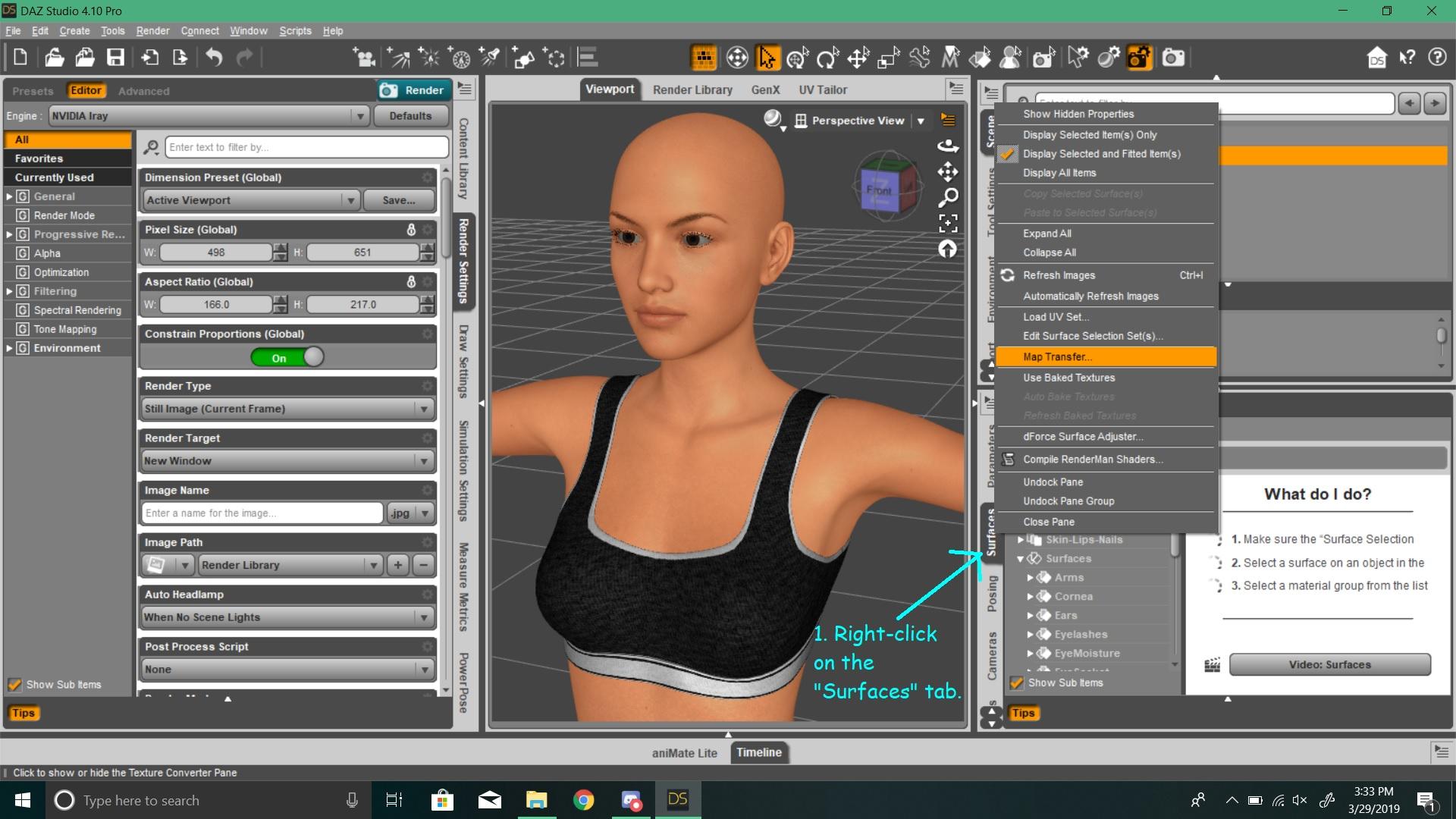
1. You right-click on the "Surfaces" tab and click on Map Transfer.
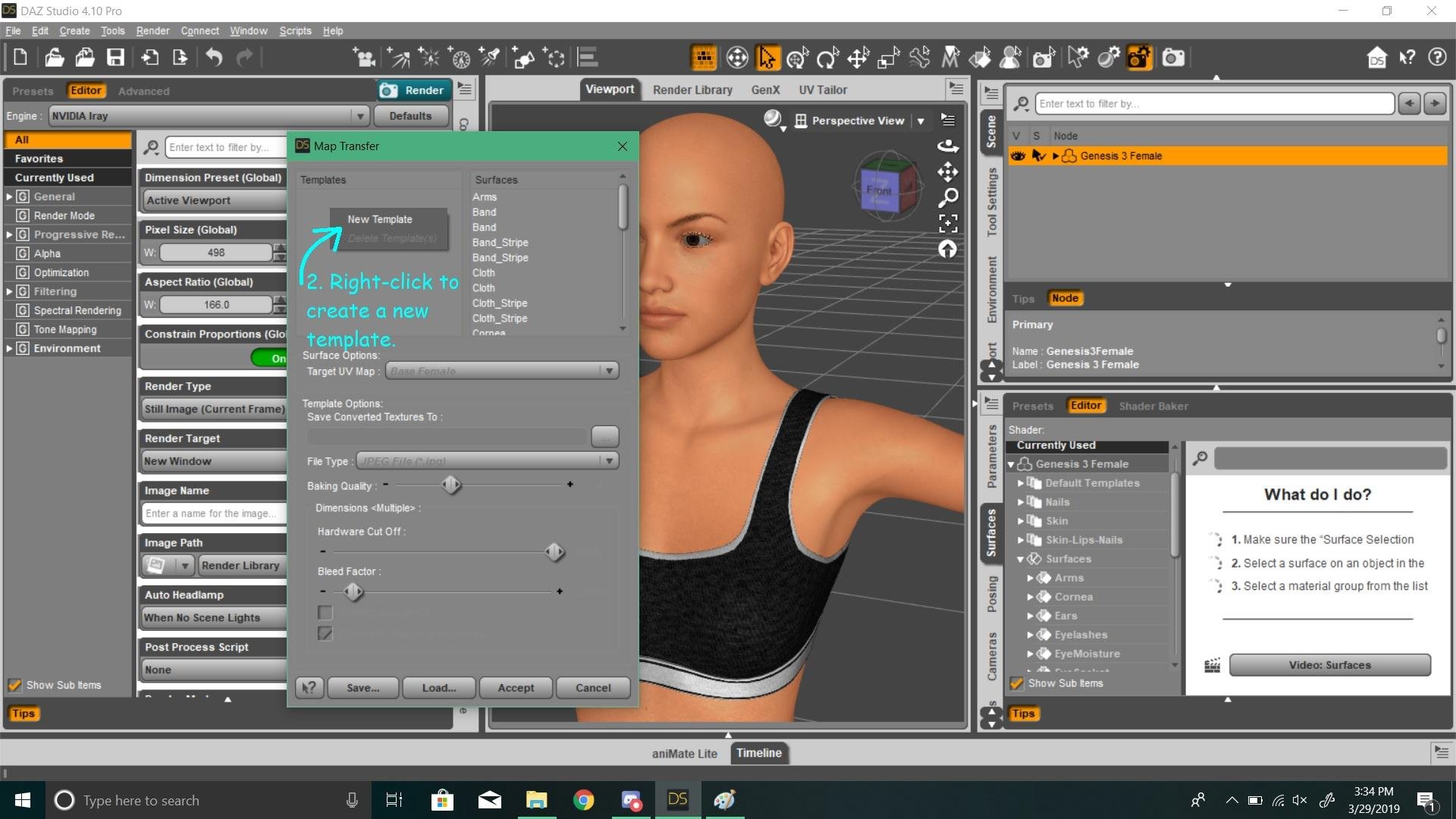
2. In the pop-up, right-click and create a new template.
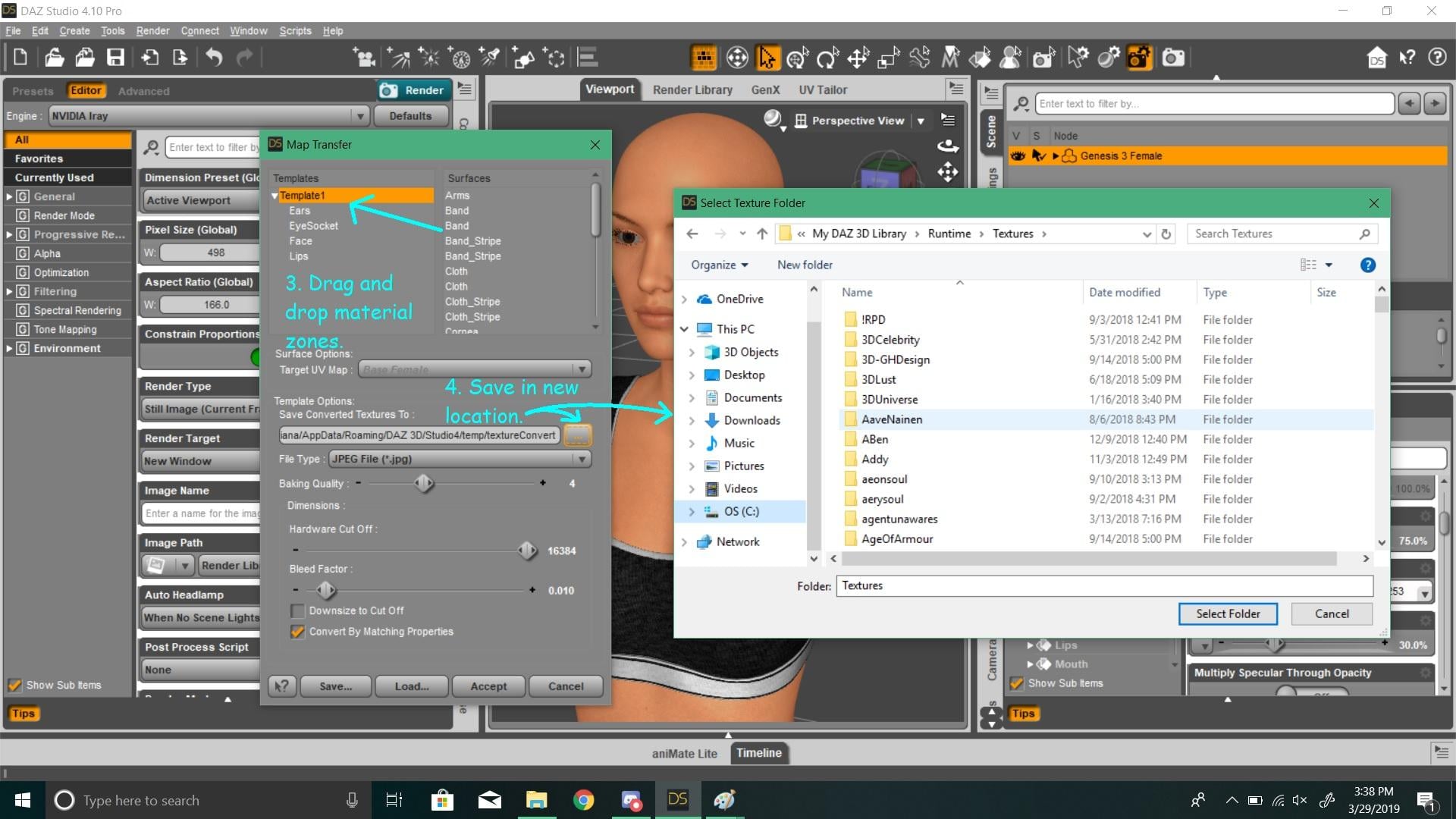
3. Select this new template and drag and drop material zones. (In my example, I will do the face. Which consists of the "Face", "Lips", "Ears" and "Eye Socket".) For other body parts, like the torso, I think it's the back of the head, neck, etc. Arms and fingernails are together, as are legs and toenails, etc.
4. By default, this will save to some strange temporary location. So you you'd have to find a new location for the new generated texture files. Preferably, it would be best if you create a new folder in the Runtime, where the rest of the DS textures are saved. That way, you know where to find them.
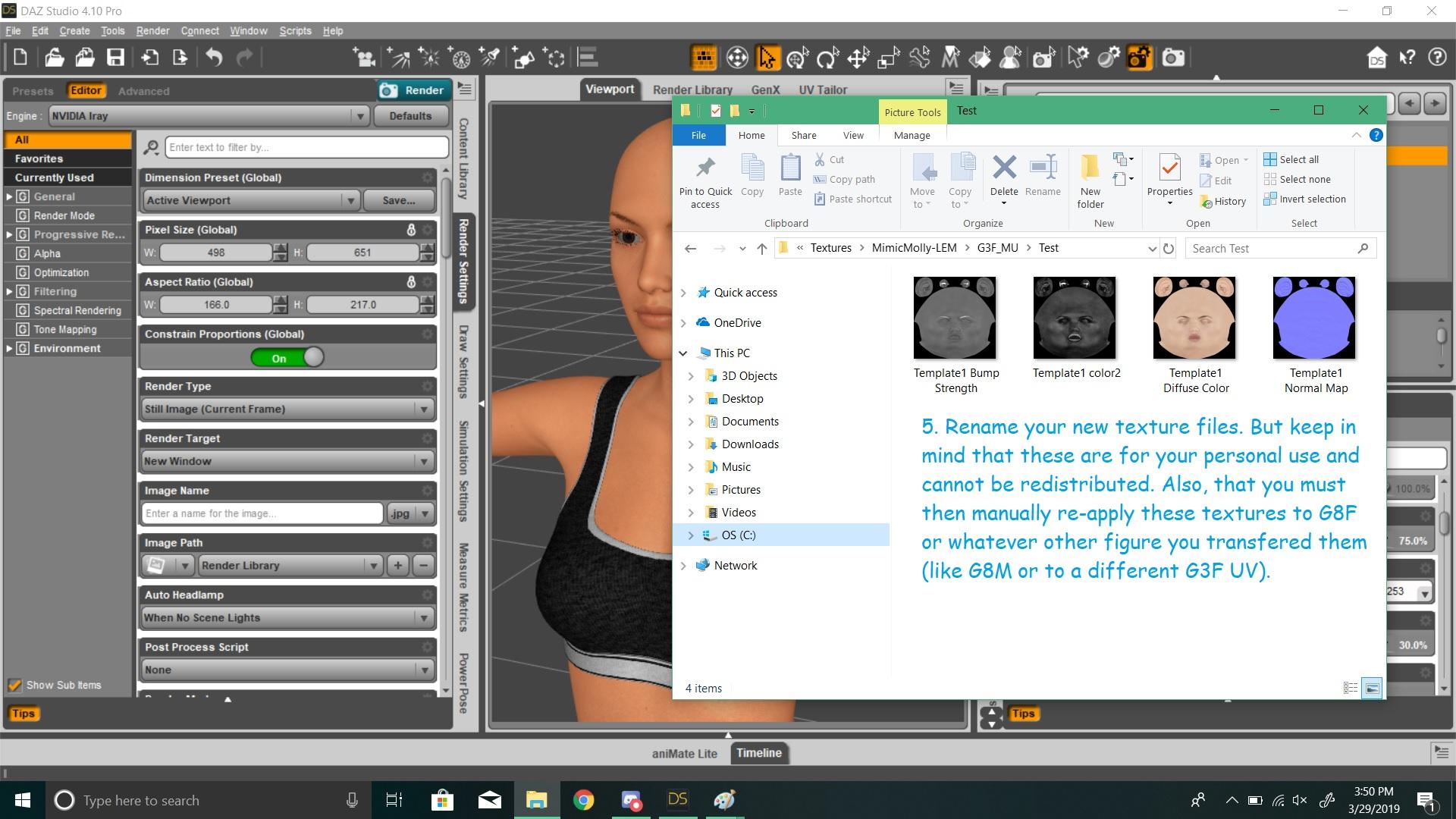
5. Finally, once it saves, you could rename the mat files. But please remember that you cannot redistribute these new Rune 7 textures with base UVs (or Victoria 7 textures with base UVs, from my example). These are for your personal use such as commercial and non-commercial renders. (To comply with DAZ 3D's EULA.) And once you get everything saved. You have to go to the Surfaces tab and re-apply every single mat file (diffuse, normals, etc) and the colors used in the original or how you have your character set up. That's why Redz Studio product is easier.
 South-Asian morphs
Was looking for a South Asian figure.
I have observed Victoria 8 which is based on western look. When you say Asian figures- it is mostly East Asian (chinese/japanese) models like Mei Lin.
But Daz do not have a proper South-Asian base figure (E.g. Indian).
I've attached a comparision of Victoria 8 and Mei Lin 8 , both which are mostly lacking some of facial features which are more common on South-Asian faces (the last one)Cheek area looks more fuller in South Asian faces, than East Asian faces. Even a morph can do this effect perhaps.
Anyone has any idea, or Daz might have such figures/ morphs in future?
Another Dolly, Another Love of my LifeI used to enjoy playing with Poser and Daz Studio back when Victoria 4 was still ruling the roost. I fiddled a little with Genesis, but found the first version a bit "squishy" looking. I made simple pictures and had fun. I was rubbish, but hey, it was for me, no one else :-)
Then ill health, work and life in general took over and 3d art took a back seat.
Just before Christmas I got a marketing email from Daz, and poked it out of curiosity. Oh my, look at the quality of Genesis now! Look at how it has all come on!
And so the draining of my purse began. I have bought quite a few G8, and G3 "dollies" and am having so much fun pootling about with them.
Victoria and Michael 8 from the PC for a day sale - well, yes, they are nice, but perhaps a bit, erm, well, typical of 3d figures, if you know what I mean. A little too perfect to be real, maybe. But they pose beautifully, and form the basis of so many fantastic PA characters.
Then I bought Edward. Oh yes, here is my dream man. My first render of him and my mother honestly believed he was my new "real life" boyfriend, lol. If only!
Then came Floyd, who is just adorable (though perhaps in a rather different way). He has been drafted in to play a wizard character for a series of fantasty illustrations I have long been planning on making. The character Henry for Floyd is also fantastic. These old boys are going to be working hard for me.
Then I fell for Bridget, who has a wonderful freckly texture and makes a great "girl next door". I spent so long rendering pictures of her, posing with a bike, in a forest (a new take on NVIATWAS).
Mrs Chow was a must have. She is so full of character and so very realistic. I suspect Floyd chases after her, in my runtime when I am asleep, and she waves a rolling pin at him and tells him he is a "dirty old man".
Sakura and Teen Josie were freebies with Mrs Chow. Sakura is such fun, and works well with all my old Aiko 4 stuff. I like a bit of anime space heroine now and then.
Teen Josie is going to be great for some horsey pictures I want to make. I am a kid at heart and still love to read my collection of vintage pony books. Josie and her add on characters will be perfect for bringing my horsey dreams to life. I am too old, too ill, and too fat to ride a horse now. But I still look back on when I spent my summer holidays on the back of my best friend, my horse. Josie will be doing it for me now :-)
And finally, Mei Lin has just joined my rapidly growing new gang. She was free with the Dragon Girl Bundle. And she is amazing. I dithered between her and Lee, but thought she might be more useful as I have now got so many Asian girls and their clothes. She mixes so well with Mrs Chow and Josie too.
I had forgotten how much pleasure all this bought me. The never-ending excitement of learning new 3d skills and discovering new tricks that the software can do. I am getting back into 3d modelling too, I have some ideas of things I really need that no one seems to sell. I feel a bit like a noob again, learning about iray and dforce and shaders and stuff, but it is slowly making sense.
Thank you to everyone who has helped me with my silly questions here on the forums. And thank you Daz and the PAs for filling a slightly-eccentric, and a little lonely, woman's world with new loves.
Yes, I know I am daft :-)
so if an animation is saved using genesis it works on Genesis 3Thanks for clarifying, but I did find this out already since I made my last post in this thread, and I couldn't delete that post for some reason.
I have to admit, I never would have thought Genesis 1 animation would work on Genesis 3 as well. Though from what I gather, I assumed Genesis 1 animations would not work on Genesis 2.
they work on 2 as well
2 won't work on 3 or Micheal, Victoria 1,2,3,4 etc but all of those work on genesis with some foot adjustment needed
VIctoria 4 Anatomy to Genesis 8Sorry for the double post, take hours for these posts to get approved.
Figured out the workflow for anyone who comes across the thread.
1. Add V4 Skeleton, G1 and G8 to the scene.
2. Autofit V4 Skeleton to Genesis.
Figure Design dropdown: Victoria 4
Item Type: None
3. Autofit V4 Skeleton to Genesis 8.
Figure Design dropdown: Genesis
Item Type: None or Full body, doesn't seem to matter.
I did just discuss with someone that told me the V4 is based on G3, if thats true I can't believe the autofit figure design doesn't have a Victoria 4 listed for going V4 to G3, seems like that would actually be the shortest and best route to go but it's not possible.
Now to try fix some of this geo, keen to see if anyone has anymore tips getting this to work too.Need help identifying a character
lol, thanks.Judging by the hair I would guess at Victoria 8, but don't quote me on that ha. You could always message the creator though and ask, hopefully they will reply for you :-)
Yeah I think so too. Guess I will try 'dialing' Victoria 8 and see if I can get her to look like that.My guess is a custom dialed character using the morphs in the pack.
Need help identifying a characterJudging by the hair I would guess at Victoria 8, but don't quote me on that ha. You could always message the creator though and ask, hopefully they will reply for you :-)
Carrara Challenge 45: Extinction and De-extinction! Voting Thread:Entry #:24
Title: Not all extinctions are bad news
Artist: Alberto (Alvin Bemar)Entry #25
Title: Resurrection of Victoria One
Artist: UnifiedBrainEntry #: 26
Title: Artificial Intelligence To The Rescue!
Artist: DesertDudemy HM
Entry #: 10
Title: Money first...
Artist: DUDU (Marc DURIEUX)Help me figure out anatomical elements for Genesis 8I can't think of a way that a GeoGraft would not work on the base if it worked on the Victoria shape, but it may be that the shaping of the model works as designed only with Victoria. However, as others have said, you need to contact the vendor. It is not going to be easy to discuss this topic iwithin the ToS of the Daz forums.
Help me figure out anatomical elements for Genesis 8On the product requirement, you may need to contact the vendor or store for clarification on whether it should say it requires G8F, rather than Victoria 8. Unless it doesn't morph at all and only fits her shape, I can't think of why it would require her but not the pro bundle.Carrara Challenge 45: Extinction and De-extinction! Voting Thread:Entry #3 Title: PC Story Artist: Stezza
-the unreeled casette tape,mann brings back memories lol
Entry #: 10 Title: Money first... Artist: DUDU (Marc DURIEUX)
-is poignant
Entry #25 Title: Resurrection of Victoria One Artist: UnifiedBrain
-number 1! i still love her
H.M.
Entry # 11 Title: Raising Mammath from the Dead Artist: Diomede (Ted Murphy)
-hairy!Help me figure out anatomical elements for Genesis 8Hello.
I am aware that genitals come with Pro bundles, and are also available on Renderotica. There is one on Renderotica which looks like what I need, but the requirement list confuses me. I will quote it, and then ask my question.SledgeHammer proudly brings you a Female Genitalia figure for Genesis8 Female.
Finally a proper Genitalia figure for your Genesis8 Female, Geo-Grafted figure for perfect blending to your G8 females, fluid geometry added, figure weight mapped and vagina, anus and fluid parts for better posing, also with lots of morphs and tuned features.
You'll need:
Victoria8 (YES NO PRO, NOR STARTER KIT NEEDED)
(https://www.daz3d.com/victoria-8)Okay, so, I do not have nor do I want Victoria. I am unclear why Victoria might be required, since it specifies the Pro bundle is not needed.
I would like to be able to find a female genital that can go on any figure, including males.
If anyone can help me to find a good solution that does not require any Pro character bundle, I will be grateful.
The money is only part of the issue. None of the characters suit my uses, and I have a character already designed who needs genitalia. I will get a Pro bundle only if it is the only option, and it is unclear to me if Victoria Pro genitals can be added to a Michael Pro body anyway.IRay Blush tool for G3 and G8Yeah, I was actually asking for a blush LIE layer thingy some while back.... might have been a year or more ago, since I needed a character to get various levels of red-faced with embarrassment for a comicbook narrative.
Thing is, there used to be one for Victoria 4 way back in the day. well, not IRay, and doesn't play nice with subsurface scattering, but such a product existed.
VIctoria 4 Anatomy to Genesis 8Maybe this may help? https://www.daz3d.com/sy-victoria-4-and-michael-4-clones-for-genesis-8
I don't have the product, but maybe someone else could verify if it works or not.
Thanks! I've already spent a significant amount of money on the anatomy bundle and not too keen to roll the dice with more purchases.
Anyone have experience using this product?VIctoria 4 Anatomy to Genesis 8Maybe this may help? https://www.daz3d.com/sy-victoria-4-and-michael-4-clones-for-genesis-8
I don't have the product, but maybe someone else could verify if it works or not.
VIctoria 4 Anatomy to Genesis 8Hi All,
Trying to get the V4 Skeleton to fit into a Genesis 8 model
I've been following a few different threads and have seen some good V4 to Genesis to G8, but can't quite find anyone who's done the skeleton specifically.
Is it possible using this method?
https://www.daz3d.com/forums/discussion/193296/freebie-how-to-create-a-v4-clone-and-transfer-other-figures-for-g8f-now-with-video/p2
I can seem to get the V4 Skeleton into a Genesis correctly, but struggle to get it to go to a G8 from there. Any help would be much appreciated!Victoria 4.2 & Morphs ++ Show as not Installed in Studio Via DIM InstallationWe need more info. A screenshot of Studio's Content Management Directory with DAZ Studio Formats and Poser Formats expanded and a screenshot of DIM's Installation tab.
As requested - see attached. As you can see DIM is only used to install DS Content and the reason for 2 separate directories - Drive G: G1-G2 is older Studio Content for Genesis 1&2 content and Drive P: is everything else. This was necessary due to drive space limitations as drive G is 1 TB in size internal SSD drive and Drive P is an external 2 TB USB 3 drive... Also when downloding and installing content in DIM I use the drop down box that shows where each item is installed and in the case of multiple installs I 1st select the correct items to the correct drives as indicated by their respective install paths.
As for your earlier inquiry about the "DAZ Michael 4" and a "DAZ Victoria 4" content those refer not to charcters but other content like clothing and hair...
Hope this additional info is helpful in getting this resolved and thanks for your help so far.
EULA ClarificationWhat you are depicting doesn't matter (except with the Anne Marie Goddard digital Clone for Victoria 3)
Can I copy material and texture to another character?I assumed the character in question was Ravyn for Genesis 8 . As a teen character, she doesn't come with gens textures. But yeah, you'll need a Pro Bundle, probably Victoria 8, in order to have the genital prop in any case.
Daz 3D is part of

Connect
DAZ Productions, Inc.
7533 S Center View Ct #4664
West Jordan, UT 84084Licensing Agreement | Terms of Service | Privacy Policy | EULA
© 2026 Daz Productions Inc. All Rights Reserved.