-
Morphs from G3 to G8
I wonder if this product offers a solution to get V4 / M4 morphs straight to G8?
https://www.daz3d.com/sy-victoria-4-and-michael-4-clones-for-genesis-8
For my understanding the autofit clones can be used as morph shapes. This will turn a G8 figure into V4 / M5 shape right?
No ,the clones for auto fit don't change G8 shape they are more behind the scene things,that allow/help auto fit to fit the generation 4 clothing to Genesis8,but it is not a shape morph for Genesis 8
Morphs from G3 to G8I wonder if this product offers a solution to get V4 / M4 morphs straight to G8?
https://www.daz3d.com/sy-victoria-4-and-michael-4-clones-for-genesis-8
For my understanding the autofit clones can be used as morph shapes. This will turn a G8 figure into V4 / M5 shape right?
I wish it had wings, but...maybe
Kayless's other demon character Tara 2 wings might work https://www.daz3d.com/tara-2-hd-for-victoria-7-victoria-8
 How to create a morph based around another morph rather than the base figure?
I've been out of the daz loop for a good while, and for some reason my brain doesn't want to wrap around this.
Let's say theres So and So for Victoria 8. V8 is a morph for G8F. What's the right way to go about creating such a morph so that V8 herself doesn't get baked into my own morph and would still remain an ownership requirement? I've only done it against base figures, and just realized I've never thought about the process when another morph is involved.
Latinx CharactersJohn Haverkamp Help! "Photogrammetry: Creating DAZ Studio Assets from Photos"I'm thinking of purcahsing John Haverkamp's "Photogrammetry: Creating DAZ Studio Assets from Photos" tutorial. However, before I do I need to know if the process he describes in it will also work to create terrains/ landscapes ( -not just individual props like a rock, tree or flower ) using a Googe Earth 3D Height Map ( -or similar topographic map that gives land height, width, depth contours data ) as the source. Or failing that -could several standard photos taken of the same landscape scene ( -taken from different angles? ) be used to accomplish this -turning this map or photo data into an actual DAZ landscape ( -that DAZ Genesis/ Michael/ Victoria characters can be put into and interact within via "Animate 2", etc. )? Has anyone out there done this yet using John's tutorial instructions? If so, any tips or guidance would be appreciated.
[Released] RSSY Hair Converter from Genesis 2 Male to Genesis 8 Male [Commercial]Are Michael 4 and Victoria 4 hair converters planned?
That is still up in the air. Since I started with Daz way after M4/V4, I don't have a lot of those hair items. It will be up to how well the converters keep selling and to Sickleyield.
Thanks, I'll wait
An V4/M4 hair converter is something I would get.
That is good to know. Thanks.
[Released] RSSY Hair Converter from Genesis 2 Male to Genesis 8 Male [Commercial]Are Michael 4 and Victoria 4 hair converters planned?
That is still up in the air. Since I started with Daz way after M4/V4, I don't have a lot of those hair items. It will be up to how well the converters keep selling and to Sickleyield.
Thanks, I'll wait
[Released] RSSY Hair Converter from Genesis 2 Male to Genesis 8 Male [Commercial]Are Michael 4 and Victoria 4 hair converters planned?
That is still up in the air. Since I started with Daz way after M4/V4, I don't have a lot of those hair items. It will be up to how well the converters keep selling and to Sickleyield.
[Released] RSSY Hair Converter from Genesis 2 Male to Genesis 8 Male [Commercial]Are Michael 4 and Victoria 4 hair converters planned?
Using a specified figure character using another figureHello All,
Another newbie question. I have come across many times where a character is specified for particular figure. For instance:
https://www.daz3d.com/xenogirl-hd-for-zelara-8
This character specifies having Zelara as a prerequisite. So the question I am have is what if someone uses this on the base Genesis 8 figure or let's say Victoria 8?
Would it:
1) Just not work?
2) Work, but oddly?
3) Would it work fine, but just in the figure type used as the base?
4) Explode?
Thank you,
Geo
Blender-anyone imported a Daz character and used its textures to make a principled bdsf skin?Hi,
I was wondering if anyone has taken a G8 or even a G3 character and a set of high quality Daz textures (diffuse, normal, bump and spec) into Blender and managed to make a good looking principled bdsf skin texture with it? I took the textures from the product below because its the best quality ones i have, plus i hear that Raiya makes good textures anyways and i used those on a G8F character I imported into Blender. However i'm having a hard time getting it to look good. Probably cause i dont know what settings to use for the bump and normals. I do also have the G8F skin builder so if needed i could use that to make the Leony textures a little more detailed by adding in pores or something. I also included a blender render of the character i've been working on. It was my first time making a principled shader so i was pretty much just adjusting stuff and eyeballing the appearance. But couldnt get it quite right cause wasnt sure what settings to tweak to get it to look right.
https://www.daz3d.com/leony-hd-for-victoria-8
 Bringing older generations up to modern standards - might be fun ;)
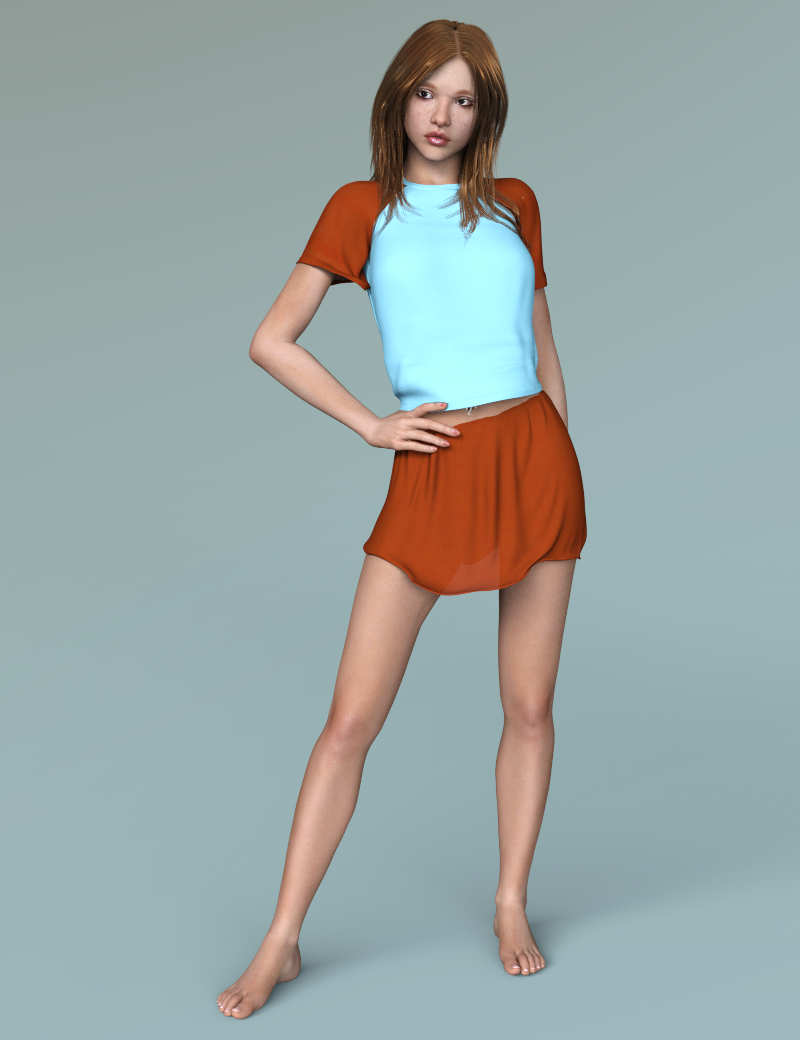
Here's a Victoria 4 character I converted to Iray.
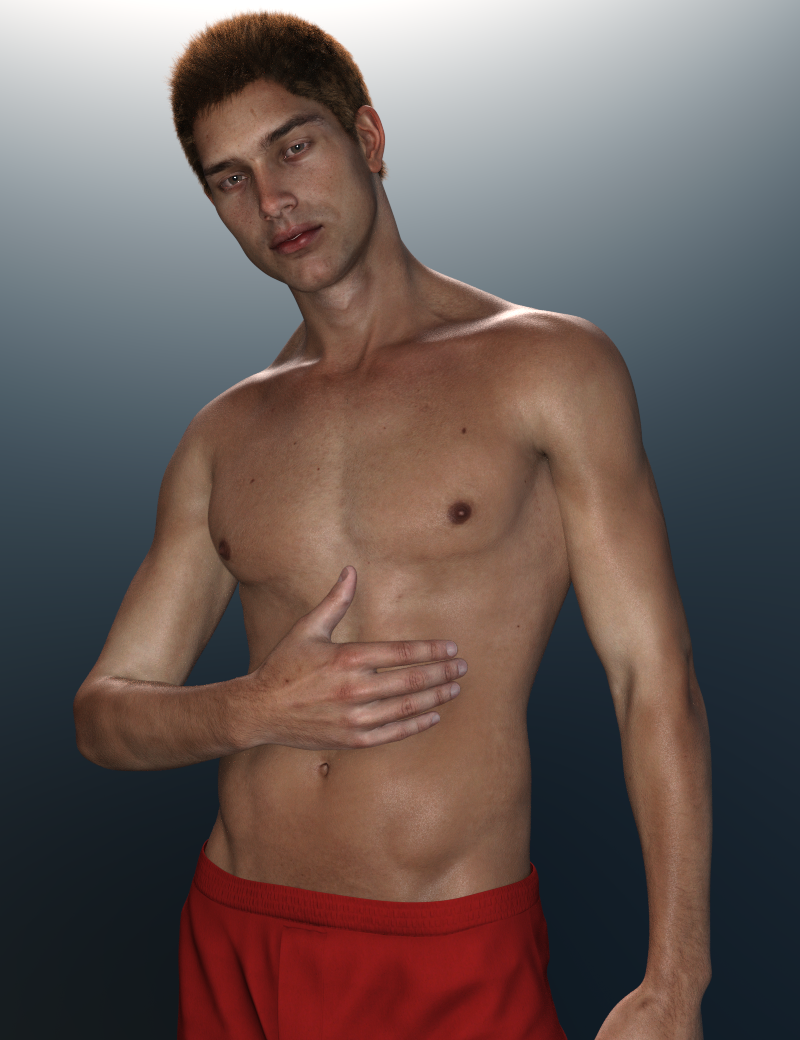
And I know you've seen this one, but I love how it came out, so here's Michael 6 (I think I also dialled in a bit of Brodie 6 to get rid of some of his "bulk") converted to Iray.
 What inspired you to start purchasing 3D content?
Hmm, the very first 3D content (or "assets" as thye call it now) was an optical disk with data called "Manga Babes". It was a manga inspired single envelope wireframe figure which could, in theory, have been "rigged" within TrueSpace. This was sometime in the latter 90s and I never accomplished much, the "falloff zones" causing the torso to collapse upon itself trying to bend the arms.
My first DAZ purchase was the Victoria 1 "reduced resolution" figure on May 16, 2002 and two weeks later, June 1, I purchased the original "Aiko" figure based upon the wireframe that made Michael 1 and Stephanie Petite. I guessI've always veered towards more stylized body sahpes than "realistic" figures. There was, of course, no "Aiko 2", but I purchased "Aiko 3" when she debuted.
Sincerely,
Bill
What inspired you to start purchasing 3D content?Todd started way before me, which was prior to Daz as he was playing in Bryce quiet a bit and then started porting human figures (early Victoria iterations) into his artwork.
What had me coming here was my eternal fight with Blender. I was still on Linux/Ubuntu and wanted to try 3D animation of the likes of Pixar and Disney as I was totally enamoured by it. Girl 4 base was offered free of charge at the time and kept popping up in my ads wherever I went online, so I made an account and grabbed Girl 4, Aiko 4 and V4 in the store but had no idea what I was doing and it didn't match my beginnings in Blender so I let it go pretty quick. Ads remained though, so with the release of Genesis and Daz Studio 4 I finally decided to come back and get my toon on. My first figure I loved was Aiko 5 and all the 3DUniverse toons at the time, but soon I morphed my first girl and started rendering and learning 3Delight and basis of Daz creation. My love for toons still shows through my artwork even now, but I've eventually settled on having couple of my original characters which caught Todd's eye to recruit me into the promo team Elite Models 3D as the promo artist, and soon after to start being a PA and sharing my creations here with his support and encouragement :)
My life completely changed after that. I left my job of 7 years, came to US, we got married and now this is pretty much my job now for the past 4-5 years. I still fight with Blender on daily basis ;)
What inspired you to start purchasing 3D content?"free modelling app called something like "spatch". "
Not something like, exactly like, Leana. Or pretty nearly so, anyways. I remembered it as soon as you mentioned it. I still have a copy of it on an old archive CD of ancient software.: it is a spline modeller called sPatch by Mike Clifton.
What product or purchase was your first?
My first paid purchase at DAZ3D was the Victoria 4 Pro Bundle. I had a bunch of free stuff that I had collected, including a number of the generation 3 figures, but when the V4 package came on sale I opened the wallet. My purchase habits have tended to be sporadic since then, but the marketing early on was not quite as aggressive as it is today.
What brought you in and made you "take the plunge" to start purchasing 3D content?
Since I was using DAZ Studio and Poser and Victoria 4 was compatible with both, in addition to becoming a kind of defacto standard for 3D female figures, with a ton of content even back then, it was a "no-brainer". Especially since it was on sale (worth it for the Morphs++ alone, I think).
Do you still use the product that drew you in?
Yes I still use Victoria 4, not to mention the free generation 3 figures that I also had. Why not? Its still fun, and part of the fun, for me at least, is the challenge of overcoming the limitations of the software and content, so what's not to like?
What program did you start with?
I got started by dabbling in a number of different graphics programs, too numerous to mention. Jack of infinite curiousity, master of nothing. Eventually my collection included a copy of Poser 6 and DAZ Studio 2.1. Very slowly I tended to gravitate towards these two, although it was simply something that I liked to toy with occasionally, rather than a passion. I guess any progress that I may have made was hampered by my tendency to bounce back and forth between the two. I now still have and use both DAZ Studio 4.x and Poser Pro 2011. Not to mention Carrara and Bryce, and others. I believe that I may just have become a perennial dabbler. I just enjoy playing with them. A few renders even manage to sneak out from time to time.
Problems with Export Gen 3 Male and FemaleHelo.
I have a little Problem here. I try to export a Genesis 3 Female and Male into Cinema 4d.
If i export Whillis Gen 3 into Cinema i only got the Original Genesis 3 Male.
If i export it as a Obj, it works well at the most cases. But i need my Model as a FBX because i have Problems to setup the Weights.
Why does it not work ? If my Model has Armor or Clothing i just use the Option merge clothing into Skeleton. It works well but not the Modified Morph.
What should i do ? Has it something to do how i setup my Mesh ? I can either just Click on Victoria 7 or maybe Chandra the Mesh is good in Daz3d Studio but not in Cinema. If i just load the Gen 3 Mesh and pull the Modifyers it wrks good too. But only the Export makes trouble.
V4 clone to G8F clothing questionsI really wouldn't try going Victoria 3 to Victoria 4, then AutoFitting that - goign from one figue with Parametric Rigging to another you potentially have to tweak the fall-off spheres, which is a pain - going straight to a weight-mapped figure you don't have that (though there may be other issues, of course)
Yeah, I've pretty much given up on the V3 items. And this weekend has been spent going through the store and adding items to my wishlist... All 587 pages of 60 items a page, (yes, I have a headache, and my wishlist is almost as big at the catalog now.)
But this does actually get back to my original point, I DID find an update to one V4 outfit The Sunarian Priestess outfit, I never really did find a place to use it at the time, but I think I may have a place for it in a future render. Thing is, that's it. 587 pages of items from V3 to G8F and that was the only item I have that I could find an update for. Even DAZ is negligent in this area, the "Conforming" anatomy hasn't been updated since V4, and remember V4.2 changed her model structure. So generation 8 on the Main Daz figures and there is no update to a base feature that, heck based on how many zombie textures, props and gore items there are out there, Internal organs and Brains might be something someone would want...
The question is though, since it was a conforming item to V4.2, G8F with a V4 clone, looks at the V4 Skeleton as a clothing item, so it can and DOES, get fit to G8F, (see image, BTW G8F is very much a resource in both images.) But now what, I've used it in a render, but G8F MUST be in the image and used to "pose" the skeleton. (to be honest i think that was the way it was for V4.2 as well.)
But is this now a G8F Skeleton?
Can I apply all the different morph forms to it and save it off as G8F Skeleton, or is it forever just a V4.2 "fit" to G8F item. Same for the internal organs and brain... Michael had his own versions, if I clone him into G8M, the same question applies. What about V4 Jeanz... if I put them on G8F do they become G8F clothing, forever, or just a fit item. V4 Pharoah, Winter Wear, Domino... etcetera, literally hundreds of V4/V4.2 clothing items that i can now fit to G8F.
Could I post them up someplace as a freebee? V4.2 Domino for G8F. (would ask permission first, I'm not trying to step on anyone just trying to figure out what happens to the model iteself and if that can be shared to other folks, that might also have that item, but not cloned V4 into G8F.)
Anyway, my own brain hurts after going through the entire DAZ catalog, which there was more to update than just a few sets (to iRay shaders) and the Sunarian Priestess outfit... that one could be really interesting with dForce on it...
Anyway, thanks for reading.
What inspired you to start purchasing 3D content?First product was Victoria 3 and Poser 5, did try Daz Studio way back then but it was clunky and laggy, so I stuck with Poser for a very long time.. I still use Poser for searching for some of the content I have as Daz Studio's search is so so.. I moved over to Daz Studio after getting stuck into Genesis 2..
And the main reason for going 3D is I have the creative bug but can't draw for quids..
What inspired you to start purchasing 3D content?What product or purchase was your first?
My first "purchase" at Daz was the DS beta (the first public beta ever, before DS1). My first non-free content prurchases were SP3 base and starter pack, with MFD for SP3, the kimono add-on, and a texture set for it. Both of those were in 2004. And I've been a PC member since 2004 too (good way to get great content cheap ^^).
What brought you in and made you "take the plunge" to start purchasing 3D content?
I took a Computer Graphics class when I was in first year in Engineering School (that was in 2001-2002). We used POVRay among other programs, and had to create a short animation with it as part of the class. Mine was a walk in Tulgey Woods from Alice in Wonderland, and while I managed to model the forest creatures I wanted, Alice herself was proving a challenge.
While looking for ideas and resources to use for my little project I stumbled upon Poser, Victoria and Daz. I couldn't afford Poser at the time so I didn't use those for my class, but I still registered at Daz as I found it interesting (and there were freebies ^^).A few years later Daz created DS, and it was free, so I started to play with it. I used only freebies at first, with the reduced resolution figure included in the beta content, and finally decided to invest in a "better" figure when Daz released SP3 (I never really liked V3). Most of my purchases at the time were PC items.
I started purchasing more content after A3 was released, as I loved the figure.Do you still use the product that drew you in?
Very occasionally for SP3, but I never got that much content for her in the first place. I still use quite a few of the sets I purchased at the time though (Redhouse Studios sets in the PC, for example).
What program did you start with?
Initially POVRay and a free modelling app called something like "spatch". At Daz, DS since first public beta.
Daz 3D is part of

Connect
DAZ Productions, Inc.
7533 S Center View Ct #4664
West Jordan, UT 84084Licensing Agreement | Terms of Service | Privacy Policy | EULA
© 2026 Daz Productions Inc. All Rights Reserved.