-
Is it possible to convert a morph for G8 female into a morph for G8 male?
Catherine3678ab said:
yuyu.atem said:
Hello,
I would like to know if it's possible to use morphs for Genesis 8 female with a Genesis 8 male. I ask it because in some G8 female morph pugin, in found morphs that woulbe useful for my character, but I don't find their equivalent for G8 male.
Thank you in advance for your answer!
Yes it is! I'll refer you over to this thread wherein lies the instructions :-) Click Here
Ah ha, I forgot there's an option of using G8M's clone.... That's great!

But G8.xM has different polycount and vertex position, partial morph will be weird on it, especially PHM. Personally I still suggest use separate morph packages.
 Is it possible to convert a morph for G8 female into a morph for G8 male?
yuyu.atem said:
Hello,
I would like to know if it's possible to use morphs for Genesis 8 female with a Genesis 8 male. I ask it because in some G8 female morph pugin, in found morphs that woulbe useful for my character, but I don't find their equivalent for G8 male.
Thank you in advance for your answer!
Yes it is! I'll refer you over to this thread wherein lies the instructions :-) Click Here
Help w hairFSMCDesigns said:
Personally I would get the ManFriday morph converter and transfer my 8.1 character over to G9
That didn't work too well ... mind you I haven't quite figured out the sizing options yet. Making the figure morph appeared to work but when it came to adjusting the rigging things went a little haywire with the dialed out morph actually shrinking the target.
Can I use a Gen 8.1 or Gen 9 skin on Gen8 + any good brows? Trying to make drow.G9 skins won't work on G8 or 8.1 as is, and at the moment there's no "legacy UVs" product which would enable you to use them.
Regarding G8.1 skins:
G8.1 is basically G8 with additional UVs, the "torso" surface split into "head" and "body", and the new expression system. G8.1 can use all the morphs, skins and clothes from G8 without needing conversion.
Skins made for G8.1 won't work on G8, however you could use G8.1 as the base for your drow character instead of G8 if you want to use a G8.1 skin (if it was already built on G8, save a preset with morph settings then apply it to G8.1 base)Regarding the brows:
They're most likely distorting because you're autofitting them to G8.
You could always try parenting them to the head instead of fitting them. Or maybe the "changing scene ID" method you can use for G3 hair might work.
Or you could use mesh brows made for G8, there are multiple packs available.Can I use a Gen 8.1 or Gen 9 skin on Gen8 + any good brows? Trying to make drow.1. The Torso surface on G8.0 is splitted into two separate surfaces on G8.1 - Body and Head. You can use a Torso map of G8.0 on G8.1's Body and Head with changing UV Sets from Base 8.1 Female to Base Female.
2. I have Oh My Brows product. There's no problem to use them on G8.x no matter you use auto-fit or transfer rigging methods. Besides, there're quite a lot morphs on Oh My Brows. They could be tweaked pretty well.
3.G9's surface / UVs are quite different from G8. At present, the only way is to project G9's UVs on G8 in external software and bake the texture maps for being used on G8, but that'll require some knowledge and skills. There'll be a new product made by Cayman Studios with which you may directly apply G9's material presets on G8. You may wait for a while.
Too many morphs or should I just give up on this?crosswind said:
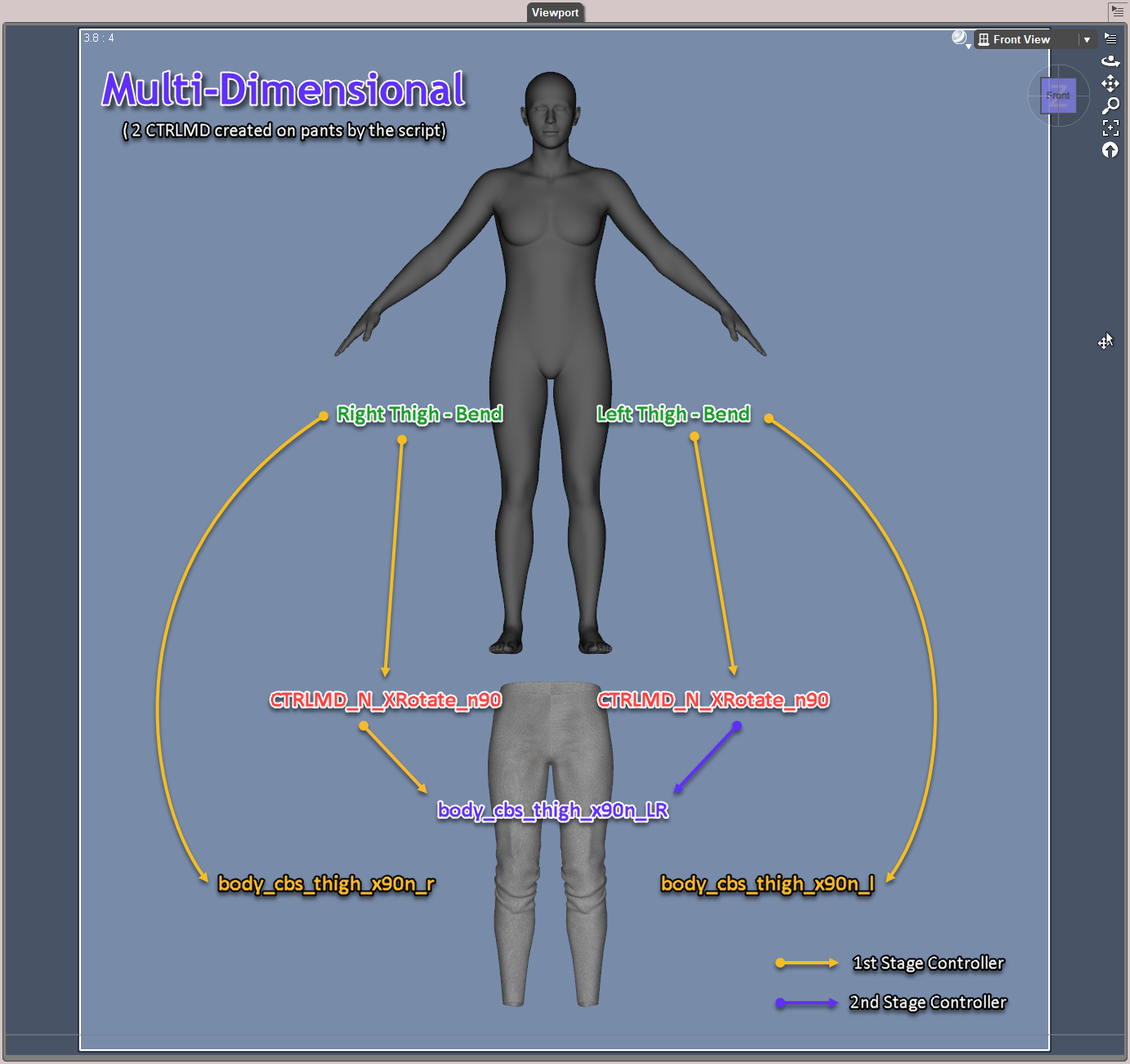
Okay, I'm finished with testing the multi-dimensional script as what OP wanted and did. Here's the wrap-up: (as per the case of G9's both thighs bend forward 90 degrees, aka - XRotates of L / R thighs, plus 'the 3rd cbs' )
MultiDimensional Way:
1. It works with no problem though the workflow is different from Catherine's and mine. I attached 2 diagrams for your reference. In general, the script creates two CTRL morphs on the pants (same name but on each thigh), their controllers are figure's L / R thigh Bend, their sub-components are 'the 3rd cbs'. CTRL on right thigh goes to 1st stage, the one on left thigh goes to 2nd stage. So it's a 'two layers' control. Such a mechanism could be also found on G9 itselft, for a combo rotations - thighs Bend and Side-Side (X / Z Rotates).
2. Fit to Mode of the pants has to be switched to 'Auto Follow Transforms', then you'll see the hidden 'Bend' dial on the pants, only in this way, you're able to use the script to automatically create CTRL dials. (I haven't used such a way before)
3. As for ERC Freezing, only after you manually enter a value to cbs morph, there'll be a Raw value, then you can see 'cbs' in ERC Freeze dialogue.
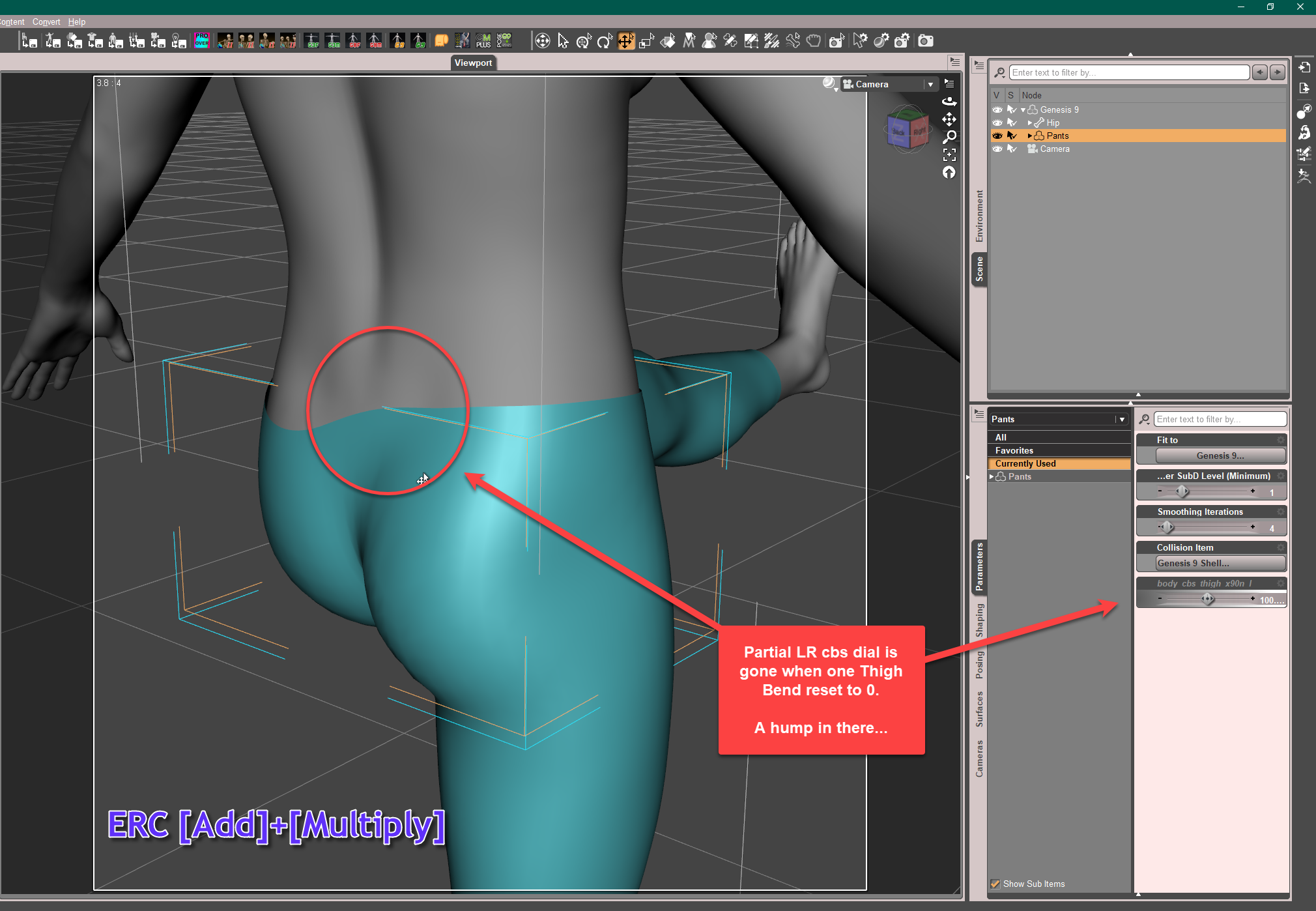
4. ERC Types : ERC [Add]+[Multiply]Our Simple Way:
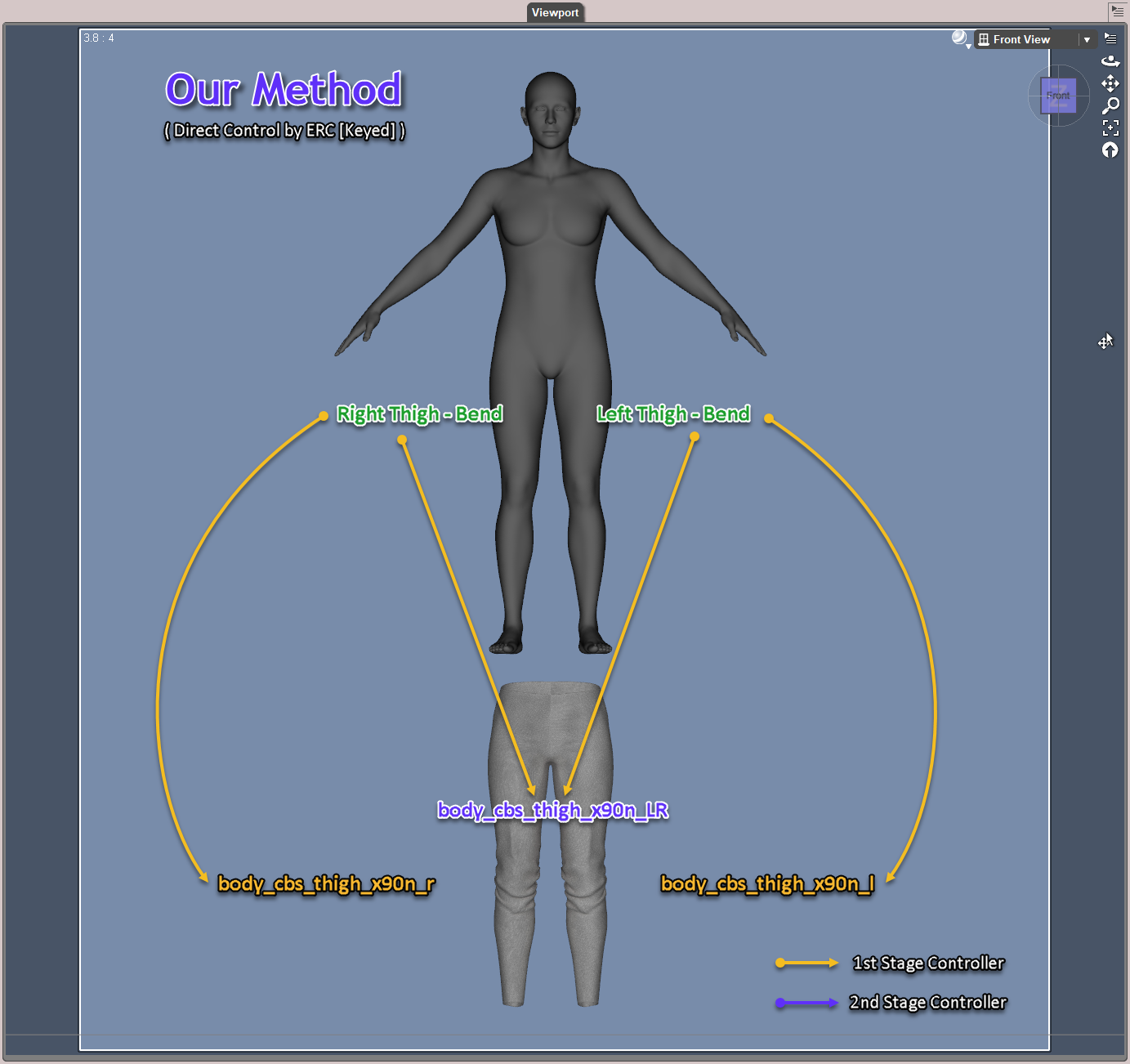
1. One layer control: no CTRL dials, the Controllers are figure's L / R Thigh Bend or two 'cbs'
2. No need to manually ERC Freeze, all ERC links are set within Property Hierarchy
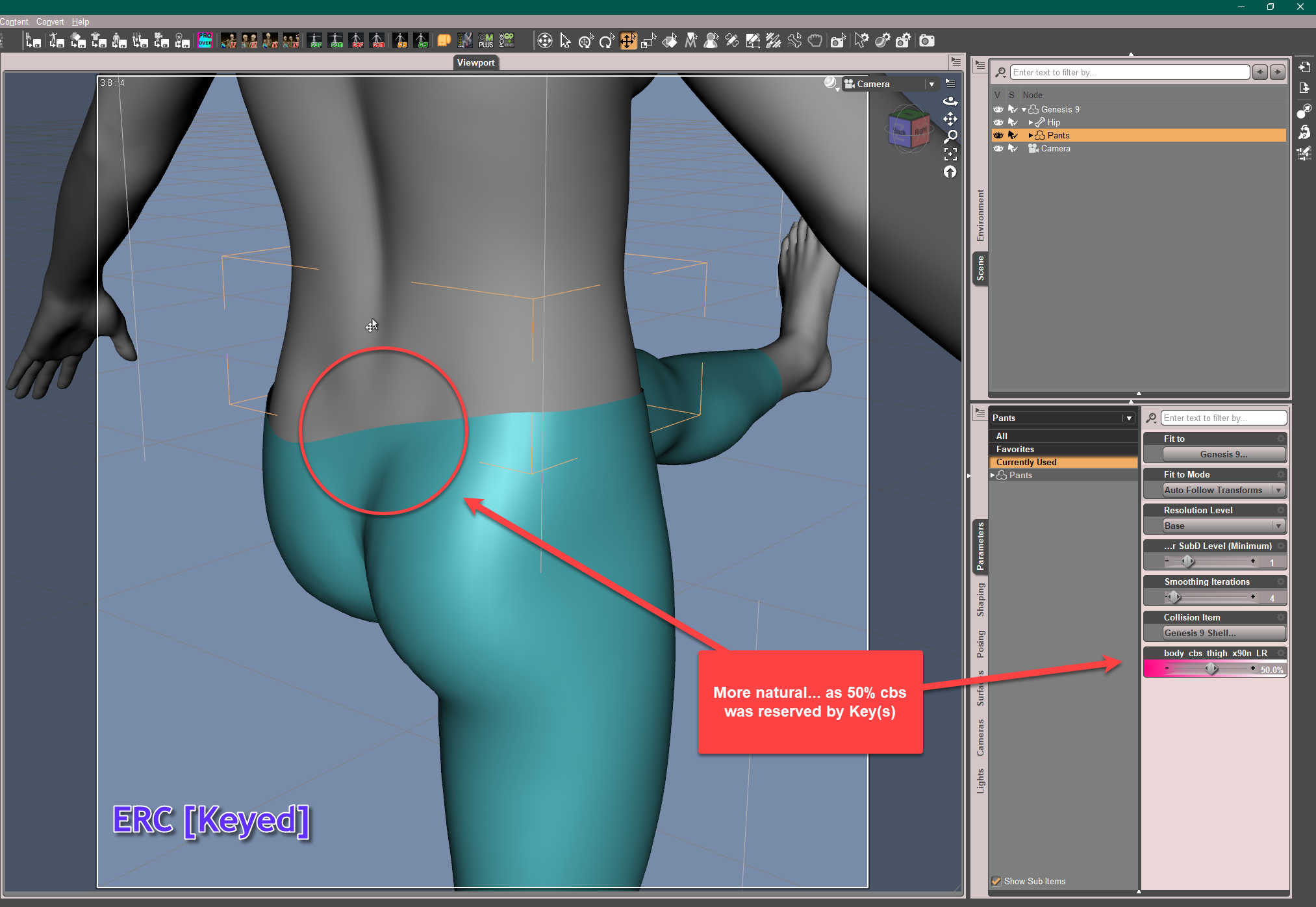
3. ERC Type : ERC [Keyed]Conclusion for the time being -:
1. IMHO, I'm not 100% sure if creating CTRL dials on the pants and manual ERC Freeze are really needed, but as per the testing results, seemingly they're not. I live in Asia and have quite a few PA friends in here. I've checked with some of them, they don't use these methods either.
2. For two stages controlling, technically there's no problem at all. But with ERC[Keyed] on 1st Stage only, we can make various subtle changes on the corrective result(s), though that may not be really necessary. Anyway, will go for more experiments.
3. As Catherine mentioned, there're various methods anyway... All roads lead to Rome. However, I really want to know the reason and if there's any difference in terms of results by using these different methods.PS: I specifically tested the difference of partial corrective result from ERC [Add]+[Multiply] and ERC [Keyed], as attached. Pls be noted that I found there was no problem around the crotch of my pants when both thighs bend, so I made a symmetrical corrective morph on the back. Well it still depends on the garment design, its geometry and the fixed area..SS are just for your ref.
Taking notes ;-)
{and making sure that the forum glitch doesn't devour the pics}
Genesis 8 eye lashes do not follow face morph (updated/solved)tmtmtm_f56c8d4bda said:
I've tried this but it does not work for me on a base figure morph - the lashes and tears are not following at all.
Whoa, that is way, way too much work to do for something that should just WORK. Yikes.
LUCKILY in my own case I figured out that a morph *I* made, was not set to autofollow.. I guess. It's hard to tell with that icon if it's "on" or "off". So in Edit Mode I hit the opposite, undid the Fit To for the eyelashes, then did fit to again and it worked.AIUTO...CHI CONOSCE L’ITALIANO? PARTE QUATTORDICIMuscleman said:
No, non mi piacciono le repliche di persone reali perchè ho già visto cosa fanno con personaggi inventati... e non mi sembra giusto.
In effetti hai ragione, c'è Amyaimei che fa i morph di se stessa (almeno cosi dice), e c'è un tipo su DA che si è fissato con lei, e posta render dove viene legata o vestita da sposa. Una specie di psicopatico.
Commission for head morphHello, I am looking to commission the creation of a head morph. I would like to be able to use the head from this 3d model (Mod edit: offsite commercial link removed; please show an image of the target animal instead) on genesis 9 and create an anthropomorphic character. Please let me know if interested.
Thanks!Face transfer does not appearI installed DAZ, but there is no Face Transfer text in the Window or Panes tabs.
I also tried purchasing the paid product Face Transfer Unlimited, but Face Transfer does not appear in "About Installed Plugins..." in Help.
Anyone who knows the solution please tell me.
Too many morphs or should I just give up on this?Okay, I'm finished with testing the multi-dimensional script as what OP wanted and did. Here's the wrap-up: (as per the case of G9's both thighs bend forward 90 degrees, aka - XRotates of L / R thighs, plus 'the 3rd cbs' )
MultiDimensional Way:
1. It works with no problem though the workflow is different from Catherine's and mine. I attached 2 diagrams for your reference. In general, the script creates two CTRL morphs on the pants (same name but on each thigh), their controllers are figure's L / R thigh Bend, their sub-components are 'the 3rd cbs'. CTRL on right thigh goes to 1st stage, the one on left thigh goes to 2nd stage. So it's a 'two layers' control. Such a mechanism could be also found on G9 itselft, for a combo rotations - thighs Bend and Side-Side (X / Z Rotates).
2. Fit to Mode of the pants has to be switched to 'Auto Follow Transforms', then you'll see the hidden 'Bend' dial on the pants, only in this way, you're able to use the script to automatically create CTRL dials. (I haven't used such a way before)
3. As for ERC Freezing, only after you manually enter a value to cbs morph, there'll be a Raw value, then you can see 'cbs' in ERC Freeze dialogue.
4. ERC Types : ERC [Add]+[Multiply]Our Simple Way:
1. One layer control: no CTRL dials, the Controllers are figure's L / R Thigh Bend or two 'cbs'
2. No need to manually ERC Freeze, all ERC links are set within Property Hierarchy
3. ERC Type : ERC [Keyed]Conclusion for the time being -:
1. IMHO, I'm not 100% sure if creating CTRL dials on the pants and manual ERC Freeze are really needed, but as per the testing results, seemingly they're not. I live in Asia and have quite a few PA friends in here. I've checked with some of them, they don't use these methods either.
2. For two stages controlling, technically there's no problem at all. But with ERC[Keyed] on 1st Stage only, we can make various subtle changes on the corrective result(s), though that may not be really necessary. Anyway, will go for more experiments.
3. As Catherine mentioned, there're various methods anyway... All roads lead to Rome. However, I really want to know the reason and if there's any difference in terms of results by using these different methods.PS: I specifically tested the difference of partial corrective result from ERC [Add]+[Multiply] and ERC [Keyed], as attached. Pls be noted that I found there was no problem around the crotch of my pants when both thighs bend, so I made a symmetrical corrective morph on the back. Well it still depends on the garment design, its geometry and the fixed area..SS are just for your ref.
Help w hairFSMCDesigns said:
Personally I would get the ManFriday morph converter and transfer my 8.1 character over to G9
Thank you so much for the reply
 . I'm staying on G8 and G8.1 as I have invested so much in those. I managed to get it to work by making the skalp hair visible in the view port, then export as obj, then import, strangely enough it kept all the hair materials and everything.Then I could w no issues parent it to the head. There were 2 morphs that was lost in the obj of course, but those I can most likely make dform morphs to get similar recult. She looks amazing in the hair . Another problem is that the hair materials is hirecal materials, or whatever it's called, to tired to gogle. So I have to load a G9, load the hair, load the materials, all of them, them save as material preset. NOT a fan of the h materials. But I made a quick edit of the top coat and the hair diffuse color to get a nice look. If someone knows of a way to make the hair scalp work with parenting to the head without having to export to obj I would be very grateful . Will share an artwork w the hair and my charcter in it when it's done to show that it looks great even w this solution. Help w hair
Personally I would get the ManFriday morph converter and transfer my 8.1 character over to G9
Is it possible to convert a morph for G8 female into a morph for G8 male?As for Shrinkwrap in Blender, you may feel free to learn and try. No harm indeed. Just a reminder, if you wrap a banana, a bust, monkey Susanne or sth., more or less you can get what you want. For wrapping a full body Genesis figure from Daz and then send back for creating a morph, that'll be a different thing. The resolution of floating mesh has to be high enough otherwise the wrapping will be in vain, but in that way you're not able to import it back to DS, let alone various artifacts you may encounter, etc. (G8's geometry is still unique to a certain extent...)
I'm also a Blender user, but just imagine a modifier from a free software comparing to a pro. software with the price from 100 USD ( ZWrap plugin for ZB ) to 1500 USD (Node-based, flow wrapping for Expressions, etc. nearly all-mighty ).
Too many morphs or should I just give up on this?Catherine3678ab said:
Might not all be exactly how the PAs do things, but this was working for me:
https://www.deviantart.com/catherine3678ab/art/Making-pJCMs-for-Clothing-872454630
In it I make a third morph as a controller morph for the 2 thigh morphs if doing the splits ;-)
I"m completely checking this out, but for the record I've ended up making CTRL morphs for the thigh jcms. If I ever am making another complex piece like this again (it's complex because I want folds to move around), I'll have to try to remember NOT to replace the base morphs. It's a great tactic for simple things, but I never said I knew how to be simple about anything. ;-)
Let's open up this link and see what wisdon it affords.
Too many morphs or should I just give up on this?Richard Haseltine said:
If I undrstand correctly I think you are OK - you set up the correctives for each separtate bend, then you make a morph to remove the doubled effect when both are applied and you need it linked to one of the correctives at first stage and oen at second - that way if both are at 100% so will the corrective be (100% * 100% = 100%) and if one or both are only partially applied yiu get the required partial correction (100% * 50% = 50%, for example).
That's the way I had originally understood it, but for some reason that method stopped working. Maybe it's my software: I have been having a lot of problems, so I'm ready to blame my configuration before I'm willing to blame DAZ.
What I'm doing NOW is putting every controlling morph under the multimorph and ERC'ing every time. That seems to be holding.
So far.
Too many morphs or should I just give up on this?Catherine3678ab said:
crosswind said:
...Might not all be exactly how the PAs do things, but this was working for me:
https://www.deviantart.com/catherine3678ab/art/Making-pJCMs-for-Clothing-872454630
In it I make a third morph as a controller morph for the 2 thigh morphs if doing the splits ;-)
@Catherine, yea I've ever read that. But if I remember correctly, the 3rd morph you created was not a controller morph other than a corrective morph still... then 2 pjcms are its controller, n'est-ce pas?
And you might've used Scalar, I guess ~~
Good catch, that sounds more like it. It had its own morph which was dialed if required by the 2 pjcms.
Okey dokey ~ we used the same method but just the controllers and ERC type were different, so far so good.
Shape Rigger Plus G9 Edition (Commercial)Josh Darling said:
barbult said:
ChangelingChick providfed these instructions here for adjusting G9 rigging to shape and adjusting the eyes. This technique works very well. Does Shape Rigger Plus G9 edition follow the same strategy?
- Make your head shape
- Use the Adjust Rigging to Shape. For a head, ONLY select the Neck 1 and Children bones to adjust and ONLY select the Head as Influencing. Be sure that the *only* active morph is the one you've made. If you intend to have the Base Feminine or Masculine heads ERC'd in, do NOT have those active. They already have rigging in them. Uncheck the following bones:
- Right Eye
- Left Eye
- Left Eyelid Upper
- Left Eyelid Lower
- Right Eye
- Right Eyelid Upper
- Right Eyelid Lower
- Put your parameters in Edit mode,
Yes, that is the core method we use, of focusing the adjustments on the localized areas to get best results. When we originally set out to build this tool our main goal was to automate that process because it is so tedious to do repeatedly. We ended up going way beyond that, though. The artists at Daz have a much longer list of requirements they follow to get the best results so we built it to meet those requirements. Also, we didn't like how adjust rigging to shape moves all selected bones, even if they don't need to move, so we built a filtering system that evaluates whether each bone should move and cleans things up before it ERC Freezes the bone movementsThank you for the reply, Josh. I've been using the Shape Rigger Plus and it is working great!
MSAD Skin Plus Merchant Resource for Genesis 9 texture problemFSMCDesigns said:
Well technically it is a merchant resource and the user is expected to edit it. The main reason a user purchases a merchant resource is to "create" a unique skin for a character product they intend to sell (they can't be used unless the user edits them). Shouldn't be a big deal to fix in an image editor.
Of course, I know that I have to edit it.
But why add them in the product if they don't fit the base morphs?
I'm just wondering if this is a issue that maybe needs to be fixed or if this is wantend (what I couldn't understand..) Maybe the PA isn't aware of it.. I don't know I just think this is a bit weird because it has great normal maps but I can't use them if I change the position of the nipple in the base maps..I don't want to sh*t talk the product.. it's great in many ways but this bothers me. Please tell me if I'm wrong with my statement about the nipple position. But I'm pretty shure because I added a set of female LIE nipples and they were at a different position. The LIE set perfectly fitted the morph.
Too many morphs or should I just give up on this?crosswind said:
...Might not all be exactly how the PAs do things, but this was working for me:
https://www.deviantart.com/catherine3678ab/art/Making-pJCMs-for-Clothing-872454630
In it I make a third morph as a controller morph for the 2 thigh morphs if doing the splits ;-)
@Catherine, yea I've ever read that. But if I remember correctly, the 3rd morph you created was not a controller morph other than a corrective morph still... then 2 pjcms are its controller, n'est-ce pas?
And you might've used Scalar, I guess ~~
Good catch, that sounds more like it. It had its own morph which was dialed if required by the 2 pjcms.
Daz 3D is part of

Connect
DAZ Productions, Inc.
7533 S Center View Ct #4664
West Jordan, UT 84084Licensing Agreement | Terms of Service | Privacy Policy | EULA
© 2026 Daz Productions Inc. All Rights Reserved.