-
Plugin does not work in C4D R23
chweintr said:
Some of the code has been updated for R23 - for instance, the DRAWFLAGS_NO_REDUCTION has been removed and they tried to change floats for integers, but the script still does not run.
I still can't get files to transfer. OIn the C4D side it says 'nothing to import'. On the DAZ side when trying to run the script, the screen flashes but does not go through the prep process. Any thoughts?
That's cos the C4D Bridge script is pointing to an empty location. Fix for Mac:
1. Replace the .pyp in the C4D scripts folder with the one posted earlier in the thread
2. Make a folder called 'temp3D' in Users/Shared
3. Export an FBX from Daz to the temp3D folder titled "DazToC4D.fbx".
It will import now with a nice IK rig but the face will be screwed up. I guess you can just replace the head with the one from the fbx file you made. idk, I'm gonna try going through blender.Diffeo vs FBX when to switchwolf359 said:
I tried a Diffeo import but the textures were a nightmare
Did you convert to uber first as explained above for legacy figures ?
Don't know about chip, but below it's cookie just converted and exported. Rendered in eevee. Did nothing else. Looks the same as daz studio to me and the textures are good.
Discovered an Introduction to Shader Mixer :-)Lucked into this discovery hiding over on YouTube! It covers a few topics including a decent introduction to Shader Mixer :-)
00:30 How to set up a boolean property morph
[including at 7:18 Enum property]
22:30 D-formers and weight maps (transferring to a different mesh)
22:50 Customising navigation to match other programs
35:17 Shader Mixer: creating texture rotation
[including at
37:50 Q&A: Distributing shaders (Iray Uber/MDL licensing)
44:39 Shader Mixer overview
53:33 Meaning of node lettering
56:29 Changing input types
58:01 Bulk adding properties
01:01:08 How to set up the rotating texture
01:11:32 How to import your own custom MDL, and layering materials
01:20:20 Q&A creating mappable properties]Enjoy :-)
 Every product tagged as 'New'
Phatmartino said:
I'm not at my PC to give exact details, but I just experienced this, too.
You can click in the area where the products are so that the focus is in that window/tab, then hit CTRL-A to Select All, then Right Click, Group As -> None.
EDIT: I'm not fully awake, didn't read to the end of your post... Hadn't noticed it in the Content Library, myself. Apologies, you must have already known what I mentioned above and if there isn't some similar way in the Content Library then I don't know either.
Hopefully someone knows because I agree there's something annoying about it!
I was thinking there must be some way to highlight everything in content library, just haven't found it yet.
Or maybe some way to do it through metadata. I'm pretty sure it marked them as new during the metadata update but I realised too late to stop it.
Diffeo vs FBX when to switch@Padone For clarification I only use matcap for quick and easy global anime shading because IMHO the node based toon shading techniques I have seen are extremely labor intensive and don't produce the look I prefer for anime.
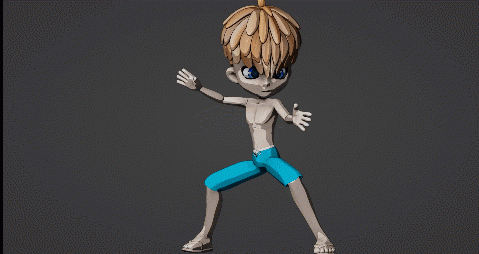
I actually still have the chip figure by lady littlefox.
I tried a Diffeo import but the textures were a nightmare and there was some other error message regarding his shoes and shorts that did not Want to trouble shoot.
So I baked a legacy aniblock to the figure in Daz studio and exported him as FBX.
There were some problems with his fake mesh object eye reflections being offset from the rest of the eye but I easily fixed by simply deleting the
Animation from the fake eye reflection meshes And repositioning them in place.
 What are some good tutorials on posing DAZ imports in Blender?
If you using DIffeo there is cool feature so you can keep doing or creating pose in DAZ then import them with easy
An Attempt of a "Limited Time Freebie" Message Only Email Alert ThreadI did the download and installed the files as usual. Loaded the exhaust trail, and did a render, took about three min with nothing in else scene. That's not the problrm. on the DAZ page is the following:
How to Use VDB Files in Daz Studio
The easiest way to try your hand at volumetric rendering in Iray is to check out the collection of ready-made VDB items available in the Daz Store. However, you’re also able to import your own VDB files!
Before getting started, you can learn about the VDB file format at OpenVDB.org and browse a selection of free sample files. JangaFX also provides VDB samples you can download for free.
Importing a VDB File in Daz Studio
First, make sure you’re in the Iray render viewport so you can see what you’re doing. Your VDB files won’t show up in any other view. Next, follow the steps below to import your volume file.I downloaded a file (fire) from the listed site. The rar file only had vdb files. What I wanted to know is where to extract the files to, so DAZ can use them. Instruction given after that on the DAZ page doesn't say where to put the so you can use them in the shader. I tried following the instruction but it didn't do anything. I went to the "smart content" (I think) but I couldn't open the DAZ Default Resources because there is nothing there,so I couldn't find the 'Simple OpenVDB MDL Volume' shader. Don't have a clue what I did wrong.
Thanks for the help anyway.
An Attempt of a "Limited Time Freebie" Message Only Email Alert ThreadBronzeDragon said:
Being a bit slow about things, I have question. On the on turning up the heat page here at DAZ, a link is given for the free files (talk about monster sizes), anyway I down loaded one of the small ones. All that is in the ".rar" file are ".vdb" files. No structure, just files. So where in the **** do I put them for DAZ to use?
@BronzeDragon Just scroll down and follow the steps, “How to Use VDB Files in Daz Studio” located here: https://www.daz3d.com/turn-up-the-heat
Here's the section, “Import Your File” (Note: This step is after applying the OpenVDB shader):
1. Go to the 'Surfaces tab'
2. Click on the newly named surface 'Volume'
3. Find 'Volume File"
4. Open a .vdb file you’ve downloaded.So, you can keep the sample VDB files you downloaded anywhere on your storage drive, and then just navigate/browse to that folder.
Every product tagged as 'New'I installed Daz to a new machine and got everything up and running easily enough but, after updating the products (all of them) metadata, every item in my content library is marked as 'new'. It's really bugging me, is there some way to remove this 'new' tag from every item all at once? There are thousands of products in there so one at a time is going to take forever.
It was easy to solve in the Smart Content but I haven't found a way to do it for Content Library.
Thanks
Importing .max files into daz studioActually, using the DAZ preset in 3ds Max 2016 doesn't work. It seems to lose surface selection options, and remapping becomes impossible. I'm still trying different methods to get an import that's remappable.
Best 3dsMax obj export settings for DAZ import?Hi, I have an arcade scene made in 3ds max 2016 with cabinets I want to export to .obj and transfer to my DAZ scenes. I would like to know what the best settings are to ensure a smooth import. I'm aware that I need to edit the "Tr" property in the .mtl files.
The trouble I'm having when importing is a loss of mapping coordinates. I'm using default export options, and am switching options trial-and-error and getting nowhere.
Blender Addon: Daz For Blender Bridge: Everything from DTB 2022 + 14 more featuresDoes it import a figure with geo-grafts into Blender? I mean third party add-ons, not DAZ only.
DIM installed files and Smart ContentZatetic said:
Aaargh! Updated to the Studio 4.2 and now I have even more installation symbols in my Smart Content Directory and my Lost and Found Directory overfloweths. The display indicates that I am not logged on within Studio.
I assume you mean 4.20(.0.2) since 4.2 was a beta version about a decade ago.
Lost and Found is related to categorisation, not installation state, so might be accounted for by updating metadata; if you have connected to Daz then the database will have been updated with the products you purchased since your last connection, which might well tag things as available for install.
Diffeo vs FBX when to switchPadone said:
To import legacy figures with diffeomorphic you have to convert both the rig and the materials first. That's two steps.
- edit > figure > rigging > convert to weight mapping
- shader presets > iray > daz uber > iray uber base
I thought from Genesis 1 onto Genesis 8.1, they are all, already, weight mapping?
Error Loading Asset?Hey all,
Whenever I try to load a scene (through File>Open, or double clicking the file), I get "Error opening file".
The log file reads the following:
2022-03-09 23:10:50.104 [INFO] :: Prepare asset load (open): /Scenes/My Scenes/S3.duf
2022-03-09 23:10:50.104 [INFO] :: Locking viewport redraw...
2022-03-09 23:10:50.105 [INFO] :: Viewport redraw locked.
2022-03-09 23:10:50.154 [INFO] :: Native format content directories: 2
2022-03-09 23:10:50.154 [INFO] :: Poser format content directories: 1
2022-03-09 23:10:50.154 [INFO] :: Other import format content directories: 0
2022-03-09 23:10:50.154 [INFO] :: Begin asset load (open): /Scenes/My Scenes/S3.duf
2022-03-09 23:10:50.154 [INFO] :: Error loading asset: G:/Daz3d/Studio/My Daz 3d Library/Scenes/My Scenes/S3.duf
2022-03-09 23:10:50.154 [INFO] :: Operation failed
2022-03-09 23:10:50.202 [INFO] :: Unlocking viewport redraw...
2022-03-09 23:10:50.202 [INFO] :: Viewport redraw unlocked.
If anyone could please give me any information on why this is happening or how to fix it. I can't work out anything from the log file aside from "error loading asset"

Some extra information: Daz Studio 4.20 Pro, NVIDIA Geforce RTX2070, Intel Core i7-9700
Diffeo vs FBX when to switchTo import legacy figures with diffeomorphic you have to convert both the rig and the materials first. That's two steps.
- edit > figure > rigging > convert to weight mapping
- shader presets > iray > daz uber > iray uber base
How to bring and Daz Character back into Daz Studio after modificationsYes, that's what the morph loader in daz studio is for. This is the same for blender or any other modeler you may want to use.
edit > figure > morph loader pro
steps:
- Export the figure in rest pose at base resolution in obj format. You don't need normals and materials, just the geometry at base resolution.
- Import in blender preserving the vertex order.
- Edit the mesh as you wish. Do not add or remove vertices, the topology must not be changed.
- Export in obj format preserving the vertex order.
- Import in daz studio with the morph loader.
How to bring and Daz Character back into Daz Studio after modificationsIs it possible to create a character morph in Blender, and just import the morph into Daz and apply it to the base figure?
Cannot get Duke hair to work with Mark Kids 4Duke Hair for Millennium Generation 4 (V4, A4, G4, M4, H4, K4) is the one that appears in Products -> D because that is the Product name and is installed as such. The Genesis version of Duke Hair is part of Genesis Starter Essentials, and does not have its own installer, so it will not show in Products -> D, but under G -> Genesis Starter Essentials (with a whole lot of other stuff)
On the other side of the coin, the Generation 4 version has no metadata, hence no default category (well, it is in Lost and Found as a result), so it is not the version you see under default categories. The Genesis version does have metadata, and has a default category of Hair -> Short.
Confusing, in that both have the same icon and filename, but one has extension .hr2 and the other .duf. You can set your preferences to show file extensions (F2 - Content - Show file extensions) if you want, it helps to identify the Poser files from the DSON files.
DAZ and world creator?Hi :)
world creator seem very nice, I try Terra Dome but I think iy was nice in 2015, but in 2022 not.....
Some one try Import world creator Terrains in DAZ?
Thx.
Daz 3D is part of

Connect
DAZ Productions, Inc.
7533 S Center View Ct #4664
West Jordan, UT 84084Licensing Agreement | Terms of Service | Privacy Policy | EULA
© 2026 Daz Productions Inc. All Rights Reserved.