-
Morphs from G3 to G8
When you say "addon" are meaning there's an add-on to the script or are you referring to the script itself? I've heard the term "addon" bandied about on here a few times as of late and I feel like I'm behind the curve somewhat.
yeah i mean the script, is really hard how to proper call it, normally this type of script i see being called addon or mod in others places then is complicated know what to call him here.
Bummer, I thought I found a solution for a replacement for GenX but the script freezes after %27. Can you please help me?
srry i not tried yet use this script yet, then i can't help for now.
hey guys going back to my "crossgender" talk back, here my first attempt to make a "female reptilian and i can say which it worked really nice:
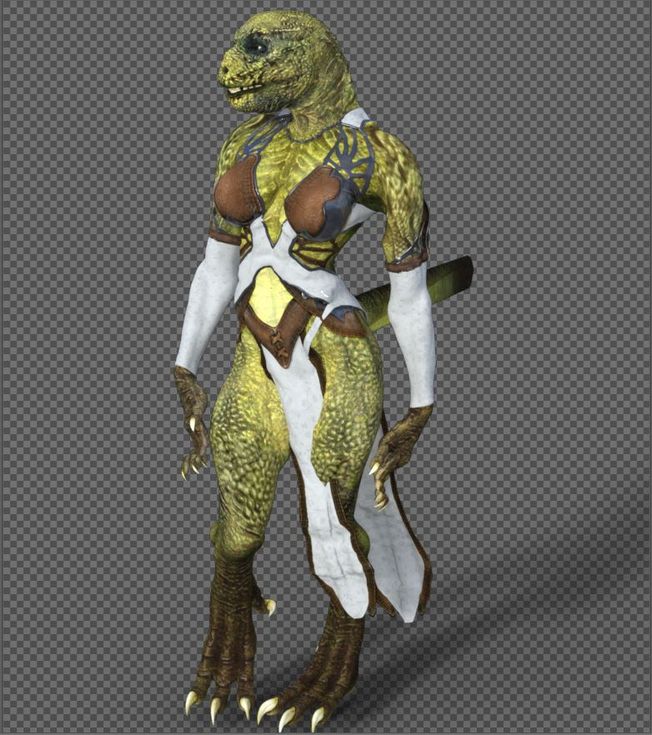
the only issues i get where on the tail, because the tails is a "male acessore" and i used the autofit on it and the other issue i noticed was some poses with the hands, like the fingers streching too much but overal, the transfer was almost a sucess, to make the repitilian "more round and big breast" i've used victoria 6 body as base, but i'm planning to use the true genesis 2 female body as mold base then add the body later, because when i was making the morph for head and body it ended a little bugged because the head also morphed the body a little more due to victoria morph but i'm planning to fix it later, if everything works fine then it's really possible to make a cross gender, even without need to use teh xgen script, i did that following the tutorial video someone posted few pages ago and this is a full female character which can use any "female morph" or cloth for genesis 2, soon i'm fix the lizard i will get my hands on the minotaur to test it too, if everything goes as planned then it can be done with any genesis from 2 to 8, the only issue would be which for the "texture" you would need to use a swap uv addon from here for genesis 3 and 8 characters, genesis 2 looks like don't have that issue since it's seens which both male and female share exactly the same uv form, then you can use a male texutere in female character and the opposite while g3 and 8 would need a addon from here to work(well so far at last the lizard base male texture can be used without any trouble for a female character).
Aiko 4 missingLoad Victoria 4 and go to her morphs (either from the Parameter or Shaping tab). Aiko 4 should be there. Dial it to 1.
[Released] RSSY Clothing Converter from Victoria 4 to Genesis 8 Female [Commercial]Forgive me for not reading all 338 replies, but how to people figure out what your Victoria 4 content even is?
I have loads of old content, but a lot of it just is in a path like "runtime\figures\JoeVendor\LittleBlackDress" with no indication of whether it was Vicky 4 or Aiko 3 or The Girl 2. And since it's almost all in Poser format, installed without metadata, I just mostly end up giving up on figuring out what those outfits are. Sometimes even Google searches don't help if the name of the outfit is too generic.
GENERAL FREEBIE REQUESTS part 3The clone of P4 for V2 is in this package - Victoria 2.0 Store #83 and in this package Victoria 2.0 Reduced Resolution Figure #659.
Just so newer users don't get mistaken, it's not a clone as in "autofit clone", it's an alternate figure based on V2, with the same body shape and rigging as P4 woman, and V2 head.
Autofit was introduced in DS4, figures before Genesis can't use it.MT5 in DS ???Can anyone point me toward a procedure to convert mt5 files to DS compatibility?
If you meant "transform the settings for poser material room into equivalent settings for one of DS render engines", then there's no universal procedure for that.
DS and Poser render engines and materials are very different, getting equivalent results in both products is usually possible but how to do it really depends on the results you want to achieve, there's no automatic conversion.Also, there's a product on here that'll do it for you, depending that your goal originated in Poser with Victoria 4/Michal 4. https://www.daz3d.com/v4-skins-batch-converter-to-genesis-2-female-s . There is another for Michael 4 as well.
https://www.daz3d.com/v4-skins-auto-converter-for-genesis-2-female-s and there is a Michael 4 version.
These products don't work with mt5, only with pz2.
GENERAL FREEBIE REQUESTS part 3The clone of P4 for V2 is in this package - Victoria 2.0 Store #83 and in this package Victoria 2.0 Reduced Resolution Figure #659.
MT5 in DS ???You wanna search for Poser to DUF .
That should bring you to a world of O..O
Also, there's a product on here that'll do it for you, depending that your goal originated in Poser with Victoria 4/Michal 4. https://www.daz3d.com/v4-skins-batch-converter-to-genesis-2-female-s . There is another for Michael 4 as well.https://www.daz3d.com/v4-skins-auto-converter-for-genesis-2-female-s and there is a Michael 4 version.
Basically, to do this material to DUF(daz studio compatible) thing, all you need to do is load your item and material into Daz Studio and then File>Save As>Material Preset.
Keep in mind that shaders are not transferable from Poser to Daz Studio and vice versa, yet this is a good place to start your journey!A RSSY Clothing Converter from Victoria 4 to Genesis 8 Female questionIs it possible to convert the newly converted G8F clothing to G3F? I just recently converted the Shadowcaster suit for G8F and it works great but the character I want to use it on is G3F. Just wondering before I move on to another bodysuit.
GENERAL FREEBIE REQUESTS part 3...actually there was a K4 clone for the original Genesis, even ones for Sam and Sadie. With the gender split that G2 introduced, basic fit clones were far more limited (I remember I had to purchase a V4 fit clone).
The clones have, up until Genesis 8, been for the previous generation (of the same sex) and he current generation of the opposite sex.
Actually that was the policy since Victoria 3 - there is a cr2 included that lets V3 wear V2 clothes.
Yes, and Victoria 2 (which was Victroia 1 as far as rigging went) had a similar figure that would wear clothes from the Poser 4 Nude Woman (and Michael 2 likewise for the Poser 4 Nude Man). Michael 4 was the only oen that didn't get soem kind of backward-compatible figure.
GENERAL FREEBIE REQUESTS part 3...actually there was a K4 clone for the original Genesis, even ones for Sam and Sadie. With the gender split that G2 introduced, basic fit clones were far more limited (I remember I had to purchase a V4 fit clone).
The clones have, up until Genesis 8, been for the previous generation (of the same sex) and he current generation of the opposite sex.
Actually that was the policy since Victoria 3 - there is a cr2 included that lets V3 wear V2 clothes.
New Dude - Elios 8I'm seriously p******. No Victoria-00 coupon for me. But a 70$ instead of 40$ banner to get 30% discounted DAZ originals which often had been Plat Club freebies before. Thanks, just cancelled my Elios 8 cart. If DAZ thinks to cut back on extras (no more bundles in the products to pick from, 4 instead of 3 add-ons to even qualify for further discounts and so on) I think I'll cut back on purchases altogether for a while.
Report sales errors here. Missed it? No worries. "There's Always Another Sale™"Are any of the freebie Runtime DNA items compatible with Daz Studio?
I got Papillon and although it just says poser the butterfly & banners work i n DS. Also the included poses can be used in DS on Victoria 4.2. Some of the others, especially those that are props, will probably work in DS
Who's Next to Join the G8 Family?An updated list for page 24:
- 44. Elios 8 2019-06-06
- 43. Kala 8 2019-05-23
- 42. Sanjay 8 2019-05-09
- 41. Tika 8 2019-04-25
- 40. Mr. Woo 8 2019-04-04
- 39. Mrs. Chow 8 2019-03-19
- 38. Bridget 8 2019-03-05
- 37. Landon 8 2019-02-19
- 36. Tasha 8 2019-02-05
- 35. Sydney 8 2019-01-15
- 34. Christian 8 2019-01-02
- 33. Nix 8 2018-12-18
- 32. Eva 8 2018-12-04
- 31. Lee 8 2018-11-22
- 30. Mei Lin 8 2018-11-06
- 29. Vladimir 8 2018-10-18
- 28. Gia 8 2018-10-01
- 27. The Brute 8 2018-09-18
- 26. Latonya 8 2018-09-04
- 25. Toon Dwayne 8 2018-08-21
- 24. Zelara 8 2018-08-10
- 23. Mabel 8 2018-07-17
- 22. Teen Kaylee 8 2018-07-03
- --. Daz Dog 8 2018-06-18
- 21. The Girl 8 2018-06-05
- 20. Floyd 8 2018-05-23
- 19. Mika 8 2018-05-09
- 18. Edie 8 2018-04-24
- 17. Penny 8 2018-04-11
- 16. Ollie 8 2018-03-27
- 15. Aiko 8 2018-03-13
- 14. Edward 8 2018-02-22
- 13. Alexandra 8 2018-02-13
- 12. Karyssa 8 2018-01-23
- 11. Owen 8 2018-01-09
- 10. Sakura 8 2017-12-26
- 09. Charlotte 8 2017-12-12
- 08. Darius 8 2017-11-28
- 07. Monique 8 2017-11-14
- 06. Lucas 8 2017-10-17
- 05. Stephanie 8 2017-10-03
- 04. Teen Josie 8 2017-09-19
- 03. Michael 8 2017-08-22
- 02. Olympia 8 2017-07-25
- 01. Victoria 8 2017-06-15
G3 characters on G8?I was wondering if there is a way to get G3 characters to work on G8. For example if you have a character that is based off Victoria 7 and you have the Victoria 7 for Victoria 8 product, can the V7 based character be applied to V7 for V8?
Thanks in advance for any replies.
nabob21
Bonus from VictoriaIt's interesting, I haven't spent much the last month, but I bought Elios (just the base) and a few add-ons for around $35 and now all of a sudden I have a Victoria B-day coupon. Maybe they're rolling the coupons out in stages? To minimize any possible issues people may have trying to use it. Instead of everyone at once, it's staggered in groups? IDK. I don't even know if I'll use the coupon, but I have a week to decide.
Bonus from VictoriaNo Vicky coupon for me. Again. Even though I have Victoria bases 2-5 and 8, plus the V6 & 7 pro bundles.
I mostly make small purchases, seldom buy G8 content, never buy pro bundles*, and haven't been able to use some of the recent banners. So maybe it's one or more of the above.
*unless it's an older bundle that's a better deal than the base
**delayed too long, site issues, unclear terms, didn't care for offer
GenX not transferring morphsHi all
I'm trying to transfer as many of my character morphs from Genesis 3 to Genesis 2 as I can using GenX.
Most work fine, but some don't. Specifically I'm trying to transfer Victoria 7 to G2F. The morph appears on G2F, but when I dial it in, there's no change.
Can anyone suggest why this may be happening?
New Dude - Elios 8So I spent $323.02 last month and that’s not enough to get the coupon??? I think I’m going to just return it all.
I don't think the banner is at all related to the amount you spent last month, or more recently. I have only spent 20-30 or so in the last month, and I still got the banner. However I did not get the 20% off Victoria birthday banner, which I would have much preferred compared to the one I did get, despite the fact I own all the Victorias.
You have to consider the banners as pot luck, nice when the arrive, annoying when they don't, but a lot are likely to be connected to marketing strategies, or just random samples, then any prior activity or purchases.
Bonus from VictoriaI just got the Victoria 10% off purple banner today. I had checked my messages and exclusive offers but nothing before this morning. I'm very glad I didn't get around to pushing the buy button on Elios yet. Very strange that this seems to have been given out in phases.
I got 20%. Spent around $120 from may 1 until now.
Sorry, a typo - it was from June 1 and until now I spent $120 (as my previous post also says). Hope you feel better now... ;)
Bonus from VictoriaI just got the Victoria 10% off purple banner today. I had checked my messages and exclusive offers but nothing before this morning. I'm very glad I didn't get around to pushing the buy button on Elios yet. Very strange that this seems to have been given out in phases.
I got 20%. Spent around $120 from may 1 until now.
I spent $202 in May. It's inconsistencies like this that annoy customers. Perhaps they are calculating on a weekly basis? No real way to know though as Daz don't bother to tell any of us. It would be better if there was some warning e.g., "Spend $100 this week to get 10% off next weeks purchases, spend £200 to get 20% off next week..." and so on.
However, I don't begrudge you your 20% off - hope you enjoy it.
Not sure I'm going to use it actually, unless something really exciting comes around. Spent way too much already, $550+ / 24 orders in may and $120 since then, that may be one of the reasons for the 20% and other top discount coupons I've got the last couple of weeks. Like they say, there's no free lunch.
Daz 3D is part of

Connect
DAZ Productions, Inc.
7533 S Center View Ct #4664
West Jordan, UT 84084Licensing Agreement | Terms of Service | Privacy Policy | EULA
© 2026 Daz Productions Inc. All Rights Reserved.