-
Does Daz to Blender Bridge work with Blender 3.1?
I can use it on figures in blender 2.92, but for some reason the rig does not import into Blender 3.0.1 or 3.1. Also there is no ability to 'go rigify'. Is there something I'm missing? As I said, it works with blender 2.92.
I can't get the morph loader pro tool to work.SUbD Level or Base resolution is on the Figure itself, on the parameters pane, before export. Although as I remember it, DAZ will just unsubdivide your morph model to base resolution, and as long as you haven't added or deleted any vertexes in your sculpting process it will still work fine. With that said it's really a lot easier to sculpt in base resolutiuon anyway, since DAZ does not give us the ability to make our own HD morphs.
You may want to uncheck Write Seperate Objects. I'm not sure if that matters, but I checked the settings I use and I don't have that checked. Also for this purpose surfaces are not needed, so you could uncheck that if you want.
The important parts are the import into, export out of, and sculping itself in whatever modeling program you're using. That's where you get the options to Preserve Vertex order and Polygroups. I'm assuming you're using Blender, since that's the import and export scale you've chosen.
Depending on what version of Blender you're using there may or may not be Keep Vertex Order and Polygroups options for both import and export, but there will be for either import or expot, I can't remember which one now. Screenshots here are from Blender 3.0.1.
As far as the sculpting goes, you need to make sure that whatever tool you are using does not add or subtract any vertexes. This means no Remesh, Retopo, or Dynotopo. You can only move vertexes around.
Hopefully this helps.
Dresden Circle Not Created at Proper Daz Figure SaleThanks for schooling me.Richard Haseltine said:
PerttiA said:
Greybro said:
Respectfully, If I want to sit a Genesis 8 character in that chair it should be the correct size without my having top alter the scale manually. As a PA, this is something I was shown as a standard very early on in creating products for this market place and others, so...not sure what you mean, "Real World Scale.""
1 unit is 1 centimeter, if the items, props and/or environment are created with this in mind, they are always the correct scale.
Poser used the height of the figure as the base unit (sort of), ie. it had no real scale and nothing really fit together - This can still be seen on some products.
Poser's OBJ importer was odd - it wasn't that it used the figure height as a scale, but the scale option in the importer adjusted the items to that percentage of the stock figure's height. If you turned the scaling option right off the OBJ would import at the size it was made at, though there were disputes about what that scale should be (1 unit = 8.6 feet is the official value, but that was not stated for a long time and Daz used 1 unit = eight feet for its content - which is, I would think, why the Millennium people are taller than the default Poser figures).
where is this building from?(its not Daz)Thanks all for the help and info.
the model is from Kitbash 3D.
so whent and had a look and signed up to the news letter and joined the site,
get an email confirming the join and a free mondel "neo city"
nice, I can try out the import and see how it gos,
well, FBX loads all the city parts, but they are very small dots far off in the distance, all around the center of Daz studio and the scales are all way too small.
OK.
So I tried OBJ. better scale wise ( still needs to be made bigger, but no problem)
but all the models are one prop.
may have to look at the Blender route
Dresden Circle Not Created at Proper Daz Figure SalePerttiA said:
Greybro said:
Respectfully, If I want to sit a Genesis 8 character in that chair it should be the correct size without my having top alter the scale manually. As a PA, this is something I was shown as a standard very early on in creating products for this market place and others, so...not sure what you mean, "Real World Scale.""
1 unit is 1 centimeter, if the items, props and/or environment are created with this in mind, they are always the correct scale.
Poser used the height of the figure as the base unit (sort of), ie. it had no real scale and nothing really fit together - This can still be seen on some products.
Poser's OBJ importer was odd - it wasn't that it used the figure height as a scale, but the scale option in the importer adjusted the items to that percentage of the stock figure's height. If you turned the scaling option right off the OBJ would import at the size it was made at, though there were disputes about what that scale should be (1 unit = 8.6 feet is the official value, but that was not stated for a long time and Daz used 1 unit = eight feet for its content - which is, I would think, why the Millennium people are taller than the default Poser figures).
How to make Simple Morph creation workflow just like we have when using Hexagon Bridge ?DaremoK3 said:
I'm working on it, but it won't be a 'live' bridge like the Hexagon one.
However, it does circumvent using manual OBJ import/export, and Morph Loader Pro -- It utilizes straight vertex (point cloud) return files with delta changes from a simplified facet mesh export through an exchange folder with Blender.
First gen prototype :
https://www.daz3d.com/forums/discussion/comment/6389836/#Comment_6389836
Oops, sorry Ken, I must have been responding as your post appeared.
where is this building from?(its not Daz)That's definitely a Kitbash 3D Gaea building. I own the package.
I imported by opening up the file in Blender then selected the building I wanted. Export as a Collada file (.DAE).
Make sure you specify that you only one the selected item and you want the texture files. This will create a DAE file with the textures included.
When you import into DAZ, it should ask for the location of the textures once. Then automatically find all of the files.
You will need to go into the Shaders of each surface and tweak them, but I've found the easiest way is to use the default DAZ Iray Shaders. Apply using a Control click and specify that you want to retain the existing textures. After that you may need to apply the additional Blender texture file in some of the Shader options (Bump maps and Normals come to mind).
(For this part just use common sense... I.e. for a wood wall use one of the default "Wood" Iray textures. This will get you the basic Iray settings to start from.)
If for some reason the export doesn't seem right / is missing textures, open Blender and use the "Find Missing Files" option. This helps connect any missing textures.
Whats the best format to import to Daz StudioIs OBJ not an option? That's the ideal way to go, because then you could import them directly into DS instead of having to load them into one of the other programs and then export them. And I'm sorry, but there's no getting around having to do a bunch of texture work on a Kitbash set. It would be easier to download one of the other formats, load it into whatever program you have access to, and just render it there, but I understand if you don't want to do that.
Whats the best format to import to Daz StudioHi all
After a post about "what building is this"
I would like to know what is the best format to import into Daz Studio (open pandora's box and stands back) from this list
3DS MAX
BLENDER
CINEMA 4D
HOUDINI
UNITY
UNREAL
the less work I have to do with texturs the better
I may be doing some kit bashing in Hexagon with it,
thanks ahead of time
How to make Simple Morph creation workflow just like we have when using Hexagon Bridge ?DaremoK3 said:
I'm working on it, but it won't be a 'live' bridge like the Hexagon one.
However, it does circumvent using manual OBJ import/export, and Morph Loader Pro -- It utilizes straight vertex (point cloud) return files with delta changes from a simplified facet mesh export through an exchange folder with Blender.
First gen prototype :
https://www.daz3d.com/forums/discussion/comment/6389836/#Comment_6389836
Cool I`l checking out !! And also thanks for @marble for information
any way to get this to look better without texturing it myselfI am using a free 3d print mask, and I use it quite frequently now 'n days, but it always gives me trouble considering when I import it into DAZ it has no texture, and I don't think it ever had one. I am not confident on making my own image map especially because idk how to accurately unwrap a thing that is not supposed to be textured in the first place.
I thought that using a metal shader on it would help but most of the time it's flat and doesn't look right depending on the lighting.
It is supposed to metallic but not overly so.
Is there anything I can do to make it look less plasticy? Is there a metal shader someone can recommend?
 Blender Addon: Daz For Blender Bridge: Everything from DTB 2022 + 14 more features
butaixianran said:
opppoe_c02b0d86 said:
sorry for another problem
After DAZ export,
Blender pressing Import New Genesis Figure Supports Genesis3, 8, and 8.1 displays "Appropriate FBX does not exist!"C:\Users\c\Documents\DAZ 3D\Bridges\Daz To Blender\Exports\FIG\FIG0
There are four files such as B_FIG.fbx and FIG.objIt looks like there is something wrong with your installation.
In this addon, there is a Global.py file in it. Every time when your opening blender, it will run a getRootPath() function, to get your model's folder path.
Seems in your installation, it does not run at all.
So, you better try to re-install it.
The best way to install this addon in blender, is copy DTB folder into:
C:\Users\Your User Name\AppData\Roaming\Blender Foundation\Blender\3.0(your blender version)\scripts\addons
Then go to this DTB folder, delete "__pycache__" folder.
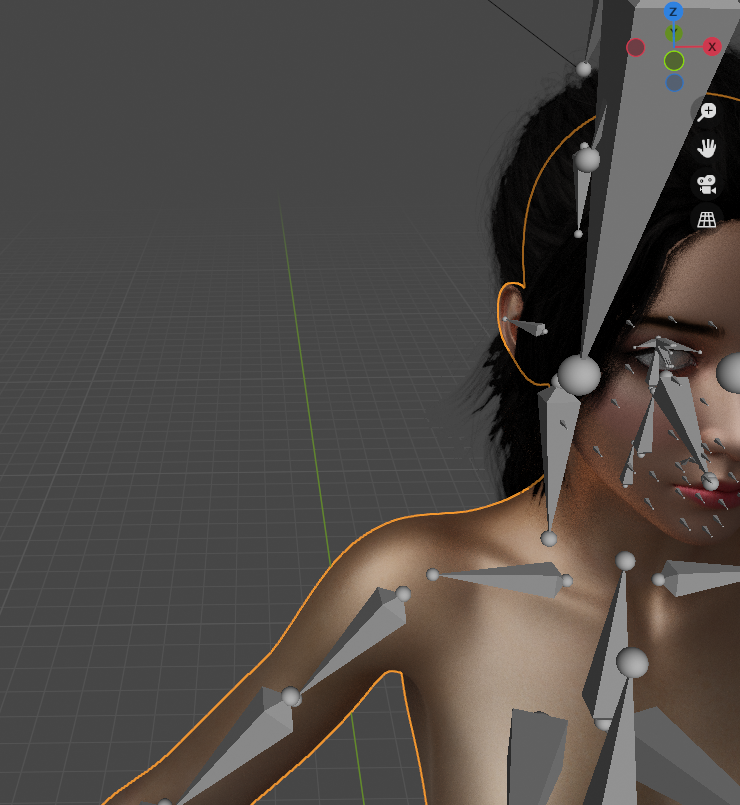
Thank you very much for your reply, I downloaded the code you updated on github yesterday and put it in the folder, now the characters can be imported, but there will be some errors, the material is still metal. Hope your code gets better and better.
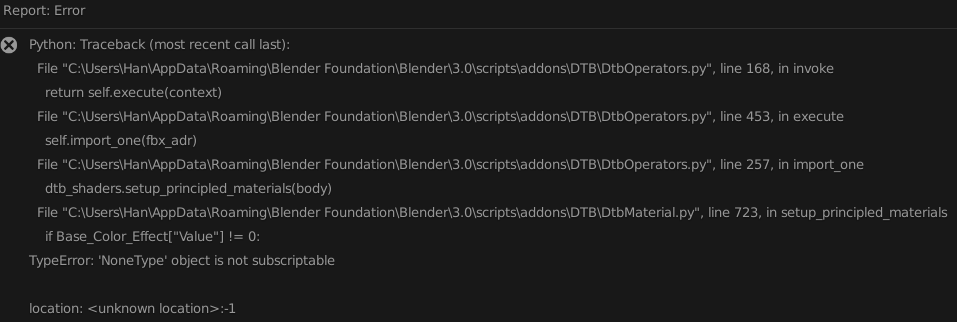
 Diffeomorphic DAZ Importer version 1.6.0 released
I'm having an issue trying to import things into Blender (using the most recent 3.1 version). I keep getting this error message when I try to import a file into the program. I've read the documentation, but it only makes my head hurt more. How do I fix it so that this error doesn't pop up. (for the record I'm also using the most recent version of the addon too)
Daz Studio Pro BETA - version 4.20.0.17! (*UPDATED*)Richard Haseltine said:
second_technician_rimmer_9571136c47 said:
Richard Haseltine said:
second_technician_rimmer_9571136c47 said:
While 4.20.0.6 seems capable of retaining the way you set it up between sessions, it looks like it's still unable to import the UI settings (layout, toolbars, actions, menus) created from a 4.16.
As a result; one would have to readjsut all of these settings manually and recreate all custom actions again.
What do you mean - Window>Workspace>Select Layout? Or trying to copy from another release channel? Or something else?
Ok Richard, I just gave it another go and it looks like it could just me not understanding how this works. I managed to export from 4.16 my layout, toolbars, and menus but not my actions. And I did it through Window>Workspace>customize. On the other hand, it works with the script you once linked to me named "Copy_UI_From_Channel.dsa" . So of course, I can always add my stuff to a beta from the main channel, but why won't exporting actions manually work? I cranked the actions export open in notepad++ and it even seems like the file didn't take in my list of customa ctions. Isn't that odd? O_o
I'm not sure that the GUIDs used to identify Custom Actions, which are how they are referenced in the other files, are universal or if they are generated in a way that is machine-specific.
The GUID is random, so the references in the Actions, Menus, and Toolbars files will not carry over unless the CustomActions file is also carried over.
Problem with environment in Daz/Blender Bridge.Well, for every scene I tried except one, it just works, without having to do much if anything. I mean I set up my lighting and cameras in blender, rather than trying to set it all up in DS then port all that over. So far, the only scene that has given me issues is Arch Cove scene. For some reason, base resolution, or high resolution import just hangs forever and I end up having to taskbar quit blender when I get tired of looking at the stupid animated circle thingie.
How to make Simple Morph creation workflow just like we have when using Hexagon Bridge ?I'm working on it, but it won't be a 'live' bridge like the Hexagon one.
However, it does circumvent using manual OBJ import/export, and Morph Loader Pro -- It utilizes straight vertex (point cloud) return files with delta changes from a simplified facet mesh export through an exchange folder with Blender.
First gen prototype :
https://www.daz3d.com/forums/discussion/comment/6389836/#Comment_6389836
Daz Studio Pro BETA - version 4.20.0.17! (*UPDATED*)second_technician_rimmer_9571136c47 said:
Richard Haseltine said:
second_technician_rimmer_9571136c47 said:
While 4.20.0.6 seems capable of retaining the way you set it up between sessions, it looks like it's still unable to import the UI settings (layout, toolbars, actions, menus) created from a 4.16.
As a result; one would have to readjsut all of these settings manually and recreate all custom actions again.
What do you mean - Window>Workspace>Select Layout? Or trying to copy from another release channel? Or something else?
Ok Richard, I just gave it another go and it looks like it could just me not understanding how this works. I managed to export from 4.16 my layout, toolbars, and menus but not my actions. And I did it through Window>Workspace>customize. On the other hand, it works with the script you once linked to me named "Copy_UI_From_Channel.dsa" . So of course, I can always add my stuff to a beta from the main channel, but why won't exporting actions manually work? I cranked the actions export open in notepad++ and it even seems like the file didn't take in my list of customa ctions. Isn't that odd? O_o
I'm not sure that the GUIDs used to identify Custom Actions, which are how they are referenced in the other files, are universal or if they are generated in a way that is machine-specific.
How to make Simple Morph creation workflow just like we have when using Hexagon Bridge ?Lately I`ve been playing with Hexagon Bridge and find it easy for creating simple character morphs
Any special tools or workflow for Blender which works just like that ? (Send to Blender - Move vertex/polygon using Sculpt tools thenn send back into DAZ wihout need/using maual OBJ export - import )
Daz Studio Pro BETA - version 4.20.0.17! (*UPDATED*)Richard Haseltine said:
second_technician_rimmer_9571136c47 said:
While 4.20.0.6 seems capable of retaining the way you set it up between sessions, it looks like it's still unable to import the UI settings (layout, toolbars, actions, menus) created from a 4.16.
As a result; one would have to readjsut all of these settings manually and recreate all custom actions again.
What do you mean - Window>Workspace>Select Layout? Or trying to copy from another release channel? Or something else?
Ok Richard, I just gave it another go and it looks like it could just me not understanding how this works. I managed to export from 4.16 my layout, toolbars, and menus but not my actions. And I did it through Window>Workspace>customize. On the other hand, it works with the script you once linked to me named "Copy_UI_From_Channel.dsa" . So of course, I can always add my stuff to a beta from the main channel, but why won't exporting actions manually work? I cranked the actions export open in notepad++ and it even seems like the file didn't take in my list of customa ctions. Isn't that odd? O_o
Daz Studio Pro BETA - version 4.20.0.17! (*UPDATED*)second_technician_rimmer_9571136c47 said:
While 4.20.0.6 seems capable of retaining the way you set it up between sessions, it looks like it's still unable to import the UI settings (layout, toolbars, actions, menus) created from a 4.16.
As a result; one would have to readjsut all of these settings manually and recreate all custom actions again.
What do you mean - Window>Workspace>Select Layout? Or trying to copy from another release channel? Or something else?
Daz 3D is part of

Connect
DAZ Productions, Inc.
7533 S Center View Ct #4664
West Jordan, UT 84084Licensing Agreement | Terms of Service | Privacy Policy | EULA
© 2026 Daz Productions Inc. All Rights Reserved.