-
DForce
Use a dForm with a weight map to better cotrol what is affected, then in the dForm pane turn that into a morph (or not, for rotations). There is also Mesh grabber, if you have a version of that, or Geometry Sculptor, if you are a Premier member.
Mushra half-headed?Mushra for Genesis 9 | Daz 3D Does anybody know if there is a morph to get the whole head back? I sure can't find one, and the lady would like to take het cap off once in a while, LOL... Any help is much appreciated!
DForceRichard Haseltine said:
anders869 said:
3 questions about it:
1- There's a way to apply dforce in clothes or hair that actually don't have? If yes, how?Yes, though the rsults wil vary. Select the clothes, Edit>Figure>Goemetry>Add dForce Modifier Dynamic Surface (it is also in the Simulation Settings pane's option menu)
2- Another question about dforce, there's a way to accelerate the simulations?
There are various options in Simulation Settings, but in general they are about as low as is safe.
3- Dforce can be applied on bodies to simulate better movement (like a breasts moving while walking/jumping or D*cktator moving the member, you know...)?
It is a surface effect, so the results can be unexpected, but people have done it 9and there are products available). You would need to limit the area affected (with a weight map, Create>New dForce Weight node) and probably create new dForce add-ons to stop the model from collapsing.
1 and 3- I tried here, but the proccess was absurd, there's a way to create movement, you know something like a morph?
2- Okidoki, thanks!Render your buys! Use buys from the current month and the previous month of salesRenders of a couple of sets I got over the last few days.
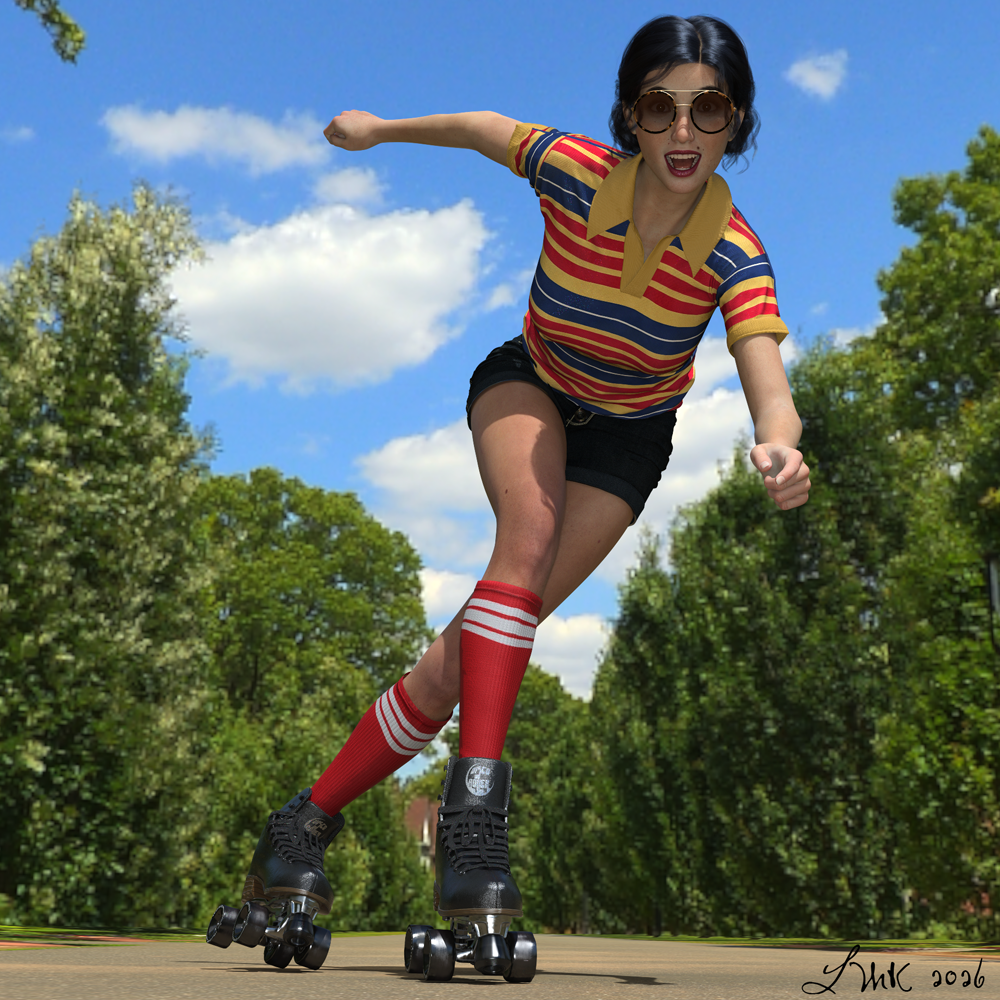
The first is https://www.daz3d.com/ajc-boogie-roller-girl-outfit-and-boombox-for-genesis-8-and-81-females This was annoying...the jacket collar folded onto itself and unlike the shirt had no morph to move it so got ditched. The boots are so high poly, 525,611 EACH! at base level. The pose is from https://www.daz3d.com/igd-flow-poses-for-genesis-8-female And Silas3D's https://www.daz3d.com/pearly-whites-teeth-materials used on teeth, REALLY happy with them.
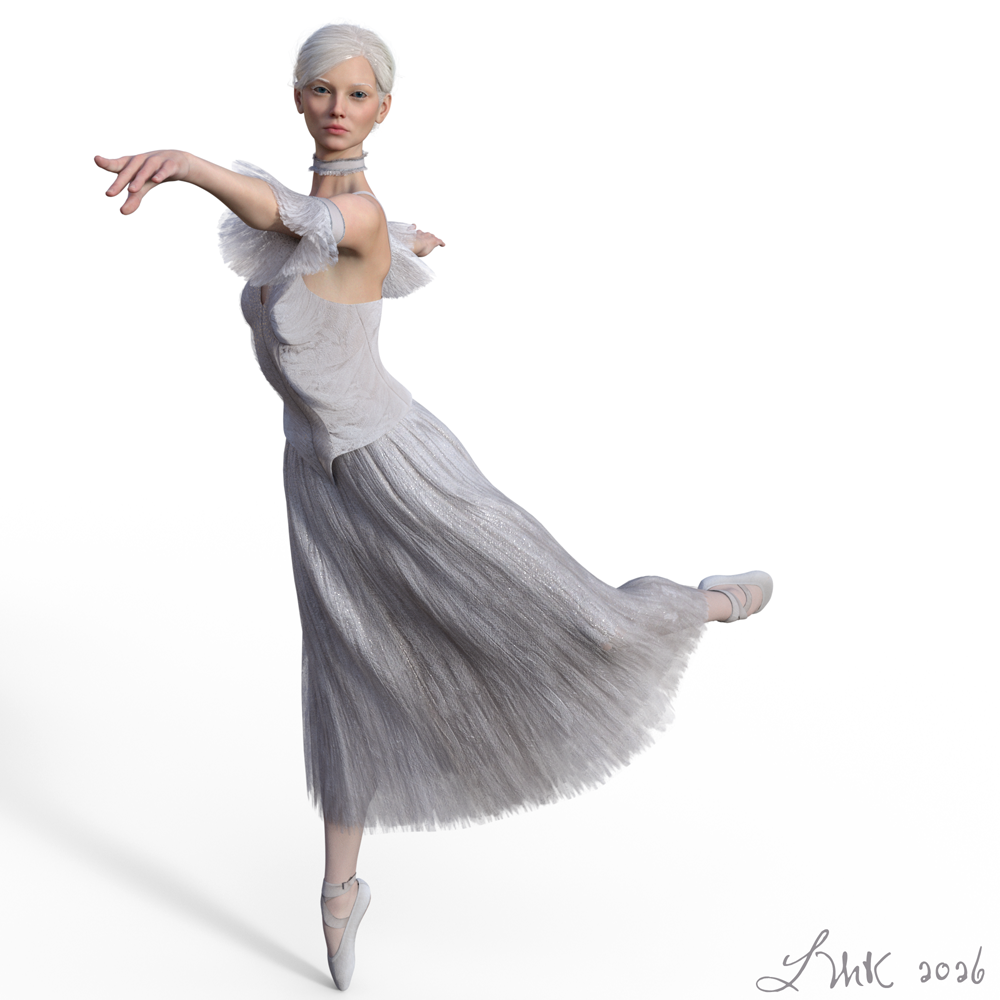
And the other https://www.daz3d.com/dforce-ballet-dreams-for-genesis-81-female a freebie I got during the MM Easter weekend. Another annoyance...the skirt persisted in poking out over the edge of the corset until I made the fit over skirt morph to 200%. Pose from https://www.daz3d.com/classical-dance-poses-for-genesis-3-female-s
 New Year, New Sales Thread: Report Issues Here 4 "Reporting Only"
Elor said:
DanaTA said:
I don't get it. Where is the write-up about this. Coupon? Details.
It was the offer for the first six hours of today but has now been replaced by the offer about the free Genesis 9 morph if you have a star.
Oh, thank you. I lose. Oh, well, no big deal.
New Year, New Sales Thread: Report Issues Here 4 "Reporting Only"DanaTA said:
I don't get it. Where is the write-up about this. Coupon? Details.
It was the offer for the first six hours of today but has now been replaced by the offer about the free Genesis 9 morph if you have a star.
Celebrity Look-a-Likes for 3D figures Part 4Not sure if M3GAN counts as a celebrity, but Orazia looks - to me - like a great fit if one wants to make the horror go on. We would only need a robot morph to make it perfect. Funny enough, she doesn't look that close to the actor Amie Donald who played M3GAN in both movies. I guess there was a lot of CGI work done after the film shooting.
Problem with Transfering Figure With heelsThat looks like a case that a morph (or Pose Control property) of feet / toes on the figure is dialed. Some vendors make default feet / toes pose by using this way. So, check if you have such a case... by: Select your figure, in Parameters pane > Currently Used, any properties dialed for the shoes ? like what I show in screenshot 1 down below ~~
Then you can easily fix it by:
1) in DTB export options dialogue, export the feet / toes morph (screenshot 2) before Send to Blender.
2) you should be able to get the correct result in Blender (sceenshot 3)Also check this post in this thread if the above way doesn't work for you : https://www.daz3d.com/forums/discussion/comment/9271911/#Comment_9271911 i.e. check Include Animation in FBX export dialogue when Send to Blender ... (as DTB also uses FBX format)
Misfiring corrective morphsSave Modofoed Assets, with the corrected figure selected, wil list everything not in its base state (which will probably be multiple items). Deselect everything but the fixed morph (actually you need to open it in the Property Hierarchy pane and make a note, under the attributes for the link, of which property it is set to save with) and make sure that the morphs are zeroed (or you will save them with a non-zero default, which means they will be applied on load).
Daz horse 2 lCannonHind DistortedWhat I did was to modify two files:
1) "M32DZH Horse", line 56401 to change "Current Value" from 1 to 0. That will take care of the base Zombie horse.
2) "M3DZH Leg Back Left Bone 01.dsf", line 32 to change "Current Value" from 1 to 0. That will take care of DAZ Horse 2.
Now that the morph is corrected, the Zombie Horses 01-07 will not have the emaciated lower left leg, since it was set to 1 by default with the original morph, and is not set in the actor's .duf file. So, either add a new modifier to the Zombie Horses 01-07, or set the value on the morph and save over the character presets (don't update modified assets, or it will overwrite the morph file, and we'll be back where we started).
I hope that makes sense.
ETA: Note that the Zombie Horse shaping presets all work properly on the base Horse.
Daz horse 2 lCannonHind DistortedOk. Now that I know I'm lucky enough to have at least two items that have morph weirdness, how does one actually fix the problem on the Daz horse so that it doesn't crop up every time the horse is loaded?
Let's appreciate/discuss today's new releases - more ongoinger threadjmucchiello said:
ANGELREAPER1972 said:
jmucchiello said:
What is with the bug-eyed Shooting Stars?
they be toon characters
If only there was a rendering engine specifcally for toon renders that could be used with these monstrosities.
I know they're toon characters. I have no use for them. And they've been the only thing available for days now. I don't expect everything to be to my taste. But I find it disappointing that they think to put a toon for sale but don't support filament when they do it.
Um... given that all of these MM $2.99 characters don't really have skins of their own, as they're essentially morph only characters that come with presets to reuse the generic G9 base skins, I'd be surprised if DAZ went to the trouble and effort of creating Filatoon specific skins for them when they didn't do new skins for any of the others. That said, there's no reason that you can't you can't use an existing filatoon ready skin or use the base Filatoon shaders, which is really what anyone buying any of the MM special characters will end up doing eventually anyway..
Let's appreciate/discuss today's new releases - more ongoinger threadANGELREAPER1972 said:
WendyLuvsCatz said:
I think it's showing the morphs
the clothing is just a bonus for a garment producing those morphs
mmmm looking closer you could be right cleavage does look more pushed together in some so that makes sense and usefull for realism but the belly arrows can't tell still the differences
I don't think the arrows are meant to be pointing at a specific area to highlight the morph effect, just saying "from this to this" in general.
thankyou DAZ for the Easter giftsnonesuch00 said:
I can't find any Easter Eggs on the DAZ sales page or the new deleted email from 2026-04-04. Is it "Bun-Tastic" or is it "thankyou"? What's eligible? It's tried the oldest DAZ Originals on my wish list as a reasonable guess and the item that worked for @WendyLuvCatz Quickmod Apra Stock Version | Daz 3D or @3DIO DD PBR Vintage Lace Shaders for Iray | Daz 3D and they ddn't work. I guess the purchases I made as not good enough for "thankyou" or "Bun-Tastic"? I''m not sure of the purchase threshold.
As MelanieL pointed, they're listed on today's sale page. Under the header "Offer ends in..." Currently, it's not a code but a free character morph. Once the timer ends, the offer will change. It might be a code and then it'll be specified what can you use it for, it might be something else. It's not just "here's a code and use it on any DO on your wishlist."
What you're trying are things from yesterday: there was a code for a free item from Outlet Store, and one for a free item from Quick Grab. They might repeat today (so far, the two offers repeated), but there's no guarantee.
Daz horse 2 lCannonHind DistortedThe errant morph is "M3DZH Leg Bag Left Bone 02" on "DAZ Horse 2" Parameters, in file "M3DZH Leg Bag Left Bone 01.dsf"
or
"M3DZH Leg Back Left Bone 01" on "M32DZH Horse" on M3D Horse for Daz Horse 2, in file "M3DZH Leg Back Left Bone 01.dsf"
or (like DAZ Horse 2)
M3DZH Leg Bag Left Bone 02" on "M32DZH Zombie Horse [01-07]" Parameters, in file "M3DZH Leg Bag Left Bone 01.dsf"
Tha node names and label names never seem to match up.
Daz horse 2 lCannonHind DistortedI have yet to find the active applied morph filter. I did find one marked zero with an option for zero figure shape, and I used that. It offers a warning that I might want restore instead, but I went with zero and that worked. Whatever the issue is with the zombie horse, it's still there!
Creating JCMs for programs using Linear Skinning (Blender, Unity, 8.1F)I'm currently using 8.1F in my Unity game via the Daz to Unity Bridge. The bridge is super helpful, thanks Daz!
There are some quite noticeable skinning issues around the shoulders (primarily), but also the knees and elbows, which I'd like to improve with custom JCMs for use in Unity. 8.1F has JCMs but they don't work well with linear skinning. I'm facing several issues creating these.
The first is the mismatched bone axes. In Daz Studio, the x/y/z differs from the exported FBX consumed by Unity/Blender. In Unity, I need to make a corrective morph for the lShldrBend x-rotation. I had to open an FBX of the character in Blender, create this pose, export as OBJ into Daz Studio, and then match it closely using the three rotation sliders that in Daz Studio, use different axes. Ok, it's doable.
I then export this posed character from Daz Studio using OBJ, and import into Blender to make the corrective morph for the desired pose. At this point, I realise that the skinning issue is not present, because the skinning to reach this pose was done in Daz Studio. Even if I disable corrective morphs in Daz Studio, the pose skinning remains pretty good - however, I will be posing in Unity/Blender, where this issue will occur.
Can anyone give guidance on how I can make this JCM, if I have to first create the pose in Daz Studio, but if Daz Studio doesn't produce the skinning issue? As far as I can tell, I need to export the posed mesh from Daz Studio via OBJ, then re-import via OBJ, to import corrective morphs.
I want to send my corrective morphs back to Daz Studio so that I can do further exports of the character whilst keeping everything intact.
Here's a demonstration of the issue:
Photoshop substitutesThread Necro Alert ...
This thread isn't terribly old and my question is pretty much an expansion on material already here, so it seems fair to bring this thread back to life.
Like the OP, I use Photoshop, primarily for fiddling with textures. (In my case, it's mainly for fixing Face Transfer relics on face texture files, though I do sometimes customize other textures.) Unlike OP, I'm not involved in Adobe rentware - I have been clinging to my fully owned Adobe CS6 since I bought it ... oh, like more than 10 years ago. I occasionally consider alternatives, since I get that CS6 does not exactly offer cutting-edge features.
I make a lot of use of some of the features that kenmo mentions, particularly Content Aware Fill and Healing Brush. Does Affinity do those things, or do you have to use the subscription version? Does ON1?
[TIP] Golden Palace misplaced, script for material inactive when opening scene in PublicBuildHey everyone,
After a lot of trial and error, I found the cause of a frustrating issue when working between DAZ 4.24 and the Public Build.
My workflow: I use 4.24 as the public build does not support tools like Mesh Grabber or Golden Palace and its script for material.
Saving a morph thanks to mesh grabber allows to export a scene with the morph to the build, same for the Golden palace script for material.The problem I had: The Golden Palace was always slightly misplaced when opened in the Public Build, making any material correction impossible — the geograft was visually off and wouldn't weld properly.
The cause: Saving the scene while Mesh Grabber was the active tool. It appears DAZ serializes the active tool state into the .duf file, and Mesh Grabber leaves a pending transformation on the mesh at save time. This shifts the geograft slightly.
The fix: Before adding the golden palace in 4.24, simply switch Mesh Grabber to any other tool (Selection Tool, Node Selection, anything neutral). With a clean active tool, the Golden Palace is fitted exactly — correct placement and materials intact — when opened in the Public Build.
Hope this saves someone a few hours of head-scratching!
OcarinemFace Transfer files are disappearingMy face transfer is suddenly saving the textures to temp and not to runtime. Anyone know how to specify where to save the textures?
Daz 3D is part of

Connect
DAZ Productions, Inc.
7533 S Center View Ct #4664
West Jordan, UT 84084Licensing Agreement | Terms of Service | Privacy Policy | EULA
© 2026 Daz Productions Inc. All Rights Reserved.