-
Silly question… Why would you ever create a morph without reverse deformations?
Mada said:
AndrewJJP said:
felis said:
I almost always model items towards the base character, so I very seldomly use "reverse deformation".
Maybe it should remember what it was last set to like the import dialog does.
You can set up a preset that always load by default, I made one for reverse deformation. To set it up you open the Morph Loader Pro import menu, select a morph you want to use, and set all the settings you'd like to use as a default ie reverse deformation to yes etc. Once its all selected right click on the morph name you imported (at the top of the options) and then choose "Save as preset" and give it a name.
Select it under the preset dropdown and accept, DS will always use the last preset you loaded so now it will always be the default option.Brilliant, thanks!
Morph target not imported in UnrealDryreL said:
I have same problem. Morphs are visible on Maya but Unreal Engine does not show any of them. Any idea?
Daz3D 4.20
Unreal Engine 4.26.2
what version you are using and you are sure unreal plugging settings are proper marked to import morph targets? you must check the pluging configurations or unreal itself importing menu if morph targets is being proper marked, if you by any means disable it importing others stuffs not daz related it will also affect daz too, you must make sure import morph target is proper marked.
Help Importing .obj'sSome work will need to be done with an imported OBJ, even in other programs. You're definitely at the mercy of whoever made the OBJ in terms of the UV mapping, surfaces and texture types included. You can often get diffuse texture maps to import, but any bump, normal, specular etc. will have to be added manually. The OBJ you imported that had multiple surfaces but only one texture file was probably UV mapped in such a way that different UV islands just drew from different parts of the texture, rather than giving each surface its own texture, which is more common than you might think. I'd advise getting Map Master Pro if you intend to do a lot of this, as it really speeds up the process of loading all your maps.
Help Importing .obj'sI'm very confused about how to import .obj files. Many people talk about all of the great assets you can get on these third-party websites by importing .obj's. I am running up against brick walls here.
I've spent some time on the internet looking for instructions on how to do this. Some responses say you just import the .obj file and voila, it's ready to go. I have yet to see an .obj file imported with the textures attached. Everything imports gray.
I saw one response that said you have to open up the textures folder that will come with the .obj and assign each texture to its corresponding surface in Daz. After I read that, the next few .obj's I imported only had a single surface, despite having multiple texture files.
Then I imported one that had multiple surfaces, but the texture folder only had one file.
Then there have been a couple of .obj's I've imported that simply imported a white shape with no surfaces.
I've read that somehow an .mtl file, if the download has one, will tell the textures where to go when it gets imported. I've downloaded some .mtl files and there's no magic happening.
I don't have a million dollars to give you, but if anybody can explain this to me like I'm five-years-old, you'll have my thanks.
Silly question… Why would you ever create a morph without reverse deformations?AndrewJJP said:
felis said:
I almost always model items towards the base character, so I very seldomly use "reverse deformation".
Maybe it should remember what it was last set to like the import dialog does.
You can set up a preset that always load by default, I made one for reverse deformation. To set it up you open the Morph Loader Pro import menu, select a morph you want to use, and set all the settings you'd like to use as a default ie reverse deformation to yes etc. Once its all selected right click on the morph name you imported (at the top of the options) and then choose "Save as preset" and give it a name.
Select it under the preset dropdown and accept, DS will always use the last preset you loaded so now it will always be the default option.Released : Wet And Tanned Skins For Genesis 8.1 Bundle (Commercial)V3Digitimes said:
Understood, if you need super precise tan lines, you need to be able to paint your mesh (this can be done in blender which is free).
The tuto to make an exact tan line is simple :
1. export Genesis 8.1 figure as obj, export the swimming suit as obj (with surfaces + UVs, no need to export maps).
2. import both objs in your painting software (you can use the free blender if you have no painting software). If you have a painting software which imports only one model, export figure+swimming suit as a single obj)
3. set all figure surfaces black, then paint in white everything under the swimming suit (many blender tutos for painting are avaible on the web). Export images and load them in all the mappable "tan lines" properties.
PS : I cannot make a video tuto because not allowed to show nude clays, which would be necessary for the explanation.
And that's all.
We do allow clay-renders to be nude for the forums.
It might also work to bake occlusion onto the figure with the swimsuit in place - that is, after all, what tan-lines are.
I don't like this modeling methodDiomede said:
ProPose said:
I could'nt even get the model into Carrara from the prop folder in duf format, I get a nil pointer error. the obj from the runtime folder comes in properly, I used these import options
Thanks, @ProPose. I missed your solution at first. I had forgotten that Poser-format content includes the OBJs in a geometry folder. I wonder why the result is getting inverted in the X axis if the OBJ is not. Hmmm.
Saves some steps.

Bringing the item in as the Poser obj loses the colour info, you then need to reapply the colours in Carrara.
As to why it's inverting the model in the DUF file is a mystery !!!
Released : Wet And Tanned Skins For Genesis 8.1 Bundle (Commercial)Understood, if you need super precise tan lines, you need to be able to paint your mesh (this can be done in blender which is free).
The tuto to make an exact tan line is simple :
1. export Genesis 8.1 figure as obj, export the swimming suit as obj (with surfaces + UVs, no need to export maps).
2. import both objs in your painting software (you can use the free blender if you have no painting software). If you have a painting software which imports only one model, export figure+swimming suit as a single obj)
3. set all figure surfaces black, then paint in white everything under the swimming suit (many blender tutos for painting are avaible on the web). Export images and load them in all the mappable "tan lines" properties.
PS : I cannot make a video tuto because not allowed to show nude clays, which would be necessary for the explanation.
And that's all.
I don't like this modeling methodProPose said:
I could'nt even get the model into Carrara from the prop folder in duf format, I get a nil pointer error. the obj from the runtime folder comes in properly, I used these import options
Thanks, @ProPose. I missed your solution at first. I had forgotten that Poser-format content includes the OBJs in a geometry folder. I wonder why the result is getting inverted in the X axis if the OBJ is not. Hmmm.
Saves some steps.
Silly question… Why would you ever create a morph without reverse deformations?felis said:
I almost always model items towards the base character, so I very seldomly use "reverse deformation".
Maybe it should remember what it was last set to like the import dialog does.
Folder path for preview pop-up imageCatherine3678ab said:
In the same folder:
Product.duf
Product.duf.png [small icon]
Product.tip.png [popup]
Those are for individual asset tip thumbnails, the OP is looking for the Product preview images, which are from the metadata (or missing from it, in this case). All should be in Runtime/Support, with all the other metadata files. The graphic MUST be named the same as the .dsx file (either a .jpg or .png) for the Product in question, usually DAZ_3D_#####_yada_yada_yada.dsx. (Assumes DIM or DAZ Central installation).
I don't like this modeling methodI could'nt even get the model into Carrara from the prop folder in duf format, I get a nil pointer error. the obj from the runtime folder comes in properly, I used these import options
I don't like this modeling methodimport it flipped or flip it and the normals in the vertex room
yeah, mesh letters can be overkill but if a separate mesh not hard to remove
Where did it go?Yea, I don't have/want photoshop. I am trying to get it to work with GIMP. I did find the file, but I am still working on how to import it to GIMP.
How to export FBX import max using highest subdivision (fixed mesh)?The export of FBX is not the highest level of subdivision, and the key is that it will deform. I have set it many times, but there is no way to solve this problem.
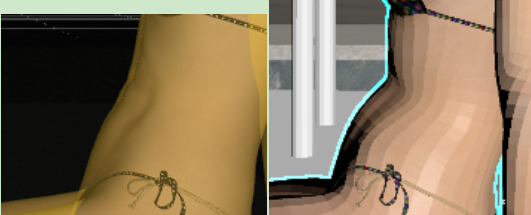
OBJ can save the highest subdivision and has no problem with distortion, but it will error
ERROR - invalid texture index
It can be imported only if "Import as a single mesh" is checked, but in this case, the objects will be glued together into one, and the material will be used as a whole multi-dimensional sub-material.does anyone know a software that can change formats from vob to obj and othersi know these posts are pretty old but i have a solution if you have both versions of eon vue.
vue creator (2021) can save terrain, rocks, etc as vob. import the vob into vue 2016 (complete) and export as an obj and reload them into vue 2021.
this is not perfect but if you mess with the materials and poly count a bit its not bad. this way allows you to ray trace materials that are procedurally generated (roughly).currently, to modify terrain material scale you must go into the material color mapping mode and adjust scale.
Modifying a wearable item - The Templar HelmSave out your altered Helm as an OBJ. Then import that OBJ as a prop, add the textures if necessary with the surfaces pane and then save as a prop asset.
Now you should be able to parent the Helm prop to the Head of the figure and save as a wearable.
How to create a seamless animation loop with dforce cloth?- to do it manually delete the eyelashes
- make sure base resolution
- apply the punch to your A posed base G8 (or t posed other figures)
- export the frame you want as an obj
- use edi-figure-morphloader pro to import the obj morph
- optional if wanting to isolate to just the one part use Attenuate rightclick by surface or weight
- save as morph asset

Diffeomorphic DAZ Importer version 1.6.0 releasedPadone said:
highStrangeness said:
What about transfering a shapekey with the HD mesh's shape to the base resolution mesh, with multires?
When you import HD expressions or any HD morph they're already transferred to the base mesh. This is what the new morph system in 1.6 was for. But this is limited to the base mesh since multires doesn't support HD shapekeys. Again this is a limit with multires itself, not with diffeo.
The alternative is to bake to displacement with the addon by Xin.
https://diffeomorphic.blogspot.com/p/hd-meshes-version-16.html
I don't think HD Morphs is going to be a solution here, as I have two geografts on my figure. Apparently it only will allow for one.
However, it is possible to get the whole figure mesh, with the geografts merged at subdiv3 (which is what I saved it at), into Blender, if I don't save in Daz with the Geometry Mode fix. When it imports, the HD mesh is merged - would I be able to bake displacements from that, without a Multires modifier? Otherwise I'm stuck again because I don't know how I'm supposed to get the subdiv 3 detail onto the base figure.
Diffeomorphic DAZ Importer version 1.6.0 releasedI'm not sure it has been reported but if you have OCIO installed via an environment variable, import will fail.
Daz 3D is part of

Connect
DAZ Productions, Inc.
7533 S Center View Ct #4664
West Jordan, UT 84084Licensing Agreement | Terms of Service | Privacy Policy | EULA
© 2026 Daz Productions Inc. All Rights Reserved.