• Daz 3D
  • Shop
  • 3D Software
    • Daz Studio Premier
    • Daz Studio
    • Install Manager
    • Partnerships
    • AI Training data
    • Exporters
    • Daz to Roblox
    • Daz to Maya
    • Daz to Blender
    • Daz to Unreal
    • Daz to Unity
    • Daz to 3ds Max
    • Daz to Cinema 4D
  • 3D Models
    • Genesis 9
    • Genesis 8.1
    • Free 3D Models
  • Community
    • Gallery
    • Forums
    • Blog
    • Press
    • Help
  • Memberships
    • Daz Premier
    • Daz Plus
    • Daz Base
    • Compare
  • Download Studio
ADVANCED SEARCH
  • Menu
  • Daz 3D
ADVANCED SEARCH
Add image
  • Shop
  • 3d Software
    • Daz Studio Premier
    • Daz Studio
    • Install Manager
    • Partnerships
    • AI Training data
    • Exporters
    • Daz to Roblox
    • Daz to Maya
    • Daz to Blender
    • Daz to Unreal
    • Daz to Unity
    • Daz to 3ds Max
    • Daz to Cinema 4D
  • 3D Models
    • Genesis 9
    • Genesis 8.1
    • Free 3D Models
  • Community
    • Our Community
    • Gallery
    • Forums
    • Blog
    • Press
    • Help
  • Memberships
    • Daz Premier
    • Daz Plus
    • Daz Base
    • Compare

Notifications

You currently have no notifications.

Loading...
    • Categories
    • Recent Discussions
Daz 3D Forums > 3rd Party Software > 3ds Max Discussion

How to export FBX import max using highest subdivision (fixed mesh)?

opppoe_c02b0d86opppoe_c02b0d86 Posts: 59
March 2022 in 3ds Max Discussion

The export of FBX is not the highest level of subdivision, and the key is that it will deform. I have set it many times, but there is no way to solve this problem.
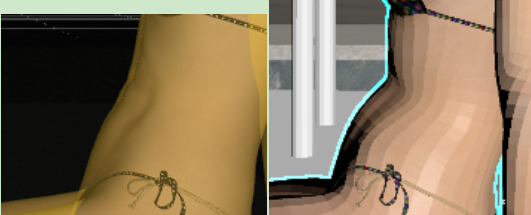
OBJ can save the highest subdivision and has no problem with distortion, but it will error

ERROR - invalid texture index
It can be imported only if "Import as a single mesh" is checked, but in this case, the objects will be glued together into one, and the material will be used as a whole multi-dimensional sub-material.

Comments

  • Richard HaseltineRichard Haseltine Posts: 107,972
    March 2022

    Apply SubD in Max rather than trying to send the mesh over that way - the rig is designed to work on the low-polygon cage, then have SubD aplied, so baking to a high-resolution mesh would degrade the results.

  • opppoe_c02b0d86opppoe_c02b0d86 Posts: 59
    March 2022

    Richard Haseltine said:

    Apply SubD in Max rather than trying to send the mesh over that way - the rig is designed to work on the low-polygon cage, then have SubD aplied, so baking to a high-resolution mesh would degrade the results.

     Can I get rid of bone skinning bindings? Even with a mesh smooth modifier in max, the deformation is still wrong.

    Just like the picture, the belly is still protruding, but it is more delicate.

  • Richard HaseltineRichard Haseltine Posts: 107,972
    March 2022

    Without the bindings it wouldn't bend at all, if you just want a higher resolution statue simply export an OBJ.

    Daz Studio makes extensive use of JCMs - morphs that are linked to the joint bends to improve their look. FBX doesn't support JCMs, or morph linking in general, as far as I am aware so the equivalent links between bends and blendshapes would need to be reestablished in Max in order to match the DS results.

  • opppoe_c02b0d86opppoe_c02b0d86 Posts: 59
    March 2022

    Richard Haseltine said:

    Without the bindings it wouldn't bend at all, if you just want a higher resolution statue simply export an OBJ.

    Daz Studio makes extensive use of JCMs - morphs that are linked to the joint bends to improve their look. FBX doesn't support JCMs, or morph linking in general, as far as I am aware so the equivalent links between bends and blendshapes would need to be reestablished in Max in order to match the DS results.

    alright, I understand. 

Sign In or Register to comment.
Adding to Cart…

Daz 3D is part of Tafi

Connect

DAZ Productions, Inc.
7533 S Center View Ct #4664
West Jordan, UT 84084

HELP

Contact Us

Tutorials

Help Center

Sell Your 3D Content

Affiliate Program

Documentation Center

Open Source

Consent Preferences

JOIN DAZ

Memberships

Blog

About Us

Press

Careers

Bridges

Community

In the Studio

Gallery

Forum

DAZ STORE

Shop

Freebies

Published Artists

Licensing Agreement | Terms of Service | Privacy Policy | EULA

© 2025 Daz Productions Inc. All Rights Reserved.
