-
Redacted
If it is just the character file (not the whole folder, that's another kettle of fish) what I have done is to install one, copy and rename the main character .duf file with an artist identifier or something distinct. It will be orphaned from the product, so you can go throught he motions of adding it to the Product and copying the metadata from the original to retain Smart Content, if you want.
Then, install the second product (overwriting the first character) and copy the main character .duf and rename it if you want to know which is which, and process it like the first, if you want. Then delete the original (second) character .duf to avoid any further confusion.
You can also edit the archive to rename the files before installing, taking care to change the manifest and metadata files. If you need to re-install at some point, you won't have to wory about it again.
Or, wait until the Product is updated.
Diffeomorphic DAZ Importer version 1.6.0 releasedsurody said:
speaker-60 said:
Is there a way to use both daztoblender bridge and Diffeomorphic, Id like to import with daztoblender bridge and get the rig/model to be recogniced by Diffeomorphic
As i want to use its rig features ect
My reason is i find that corrective morphs that auto blend with bone drivers seem to work better with importing daztoblender bridge
Iv tried several times with Diffeomorphic and they just often dont work, were as they always work when improting with bridge so for the sake of it wroking for me now id like to know how to get Diffeomorphic to recognise the rig and model from bridge for use with the riging features and the morphing features of Diffeomorphic
Basicly what it is about your imported rig and mesh vs the bridge one that grays out options in Diffeomorphic
A lot of characters in Daz have their own corrective morphs, keep that in mind. That's probably why you think that they don't always work because as far as I know the JCMs morph category under morphs just imports the base mesh correctives. You can import the custom ones as custom morphs.
Yer i know i am spesificly loading them as custom morphs, for example blend control has switches to turn all its morps on and off, these never get impored just the individual ones
Imprting with bridge there there and work fine, im experiencing this on and off randomly with Diffeomorphic wich is why id just like to import with bridge and then connect it to Diffeomorphic and be done with it
A best of both situations, im just not sure what it is that Diffeomorphic is set to recognise and if i can force to recognise as bridge import as if it imported it it
Diffeomorphic DAZ Importer version 1.6.0 releasedspeaker-60 said:
Is there a way to use both daztoblender bridge and Diffeomorphic, Id like to import with daztoblender bridge and get the rig/model to be recogniced by Diffeomorphic
As i want to use its rig features ect
My reason is i find that corrective morphs that auto blend with bone drivers seem to work better with importing daztoblender bridge
Iv tried several times with Diffeomorphic and they just often dont work, were as they always work when improting with bridge so for the sake of it wroking for me now id like to know how to get Diffeomorphic to recognise the rig and model from bridge for use with the riging features and the morphing features of Diffeomorphic
Basicly what it is about your imported rig and mesh vs the bridge one that grays out options in Diffeomorphic
A lot of characters in Daz have their own corrective morphs, keep that in mind. That's probably why you think that they don't always work because as far as I know the JCMs morph category under morphs just imports the base mesh correctives. You can import the custom ones as custom morphs.
Export-import Issue Daz-Blender.Seeing your import and export settings would help - it looks as if you don't have belnder's option to preserve vertex order checked in at least oen place, and I think your axis options are not matching somewhere too - in Daz Studio make sure you use the same preset in both exporter and importer, that will ensure any scale or axis adjustments are correctly reversed.
Diffeomorphic DAZ Importer version 1.6.0 releasedIs there a way to use both daztoblender bridge and Diffeomorphic, Id like to import with daztoblender bridge and get the rig/model to be recogniced by Diffeomorphic
As i want to use its rig features ect
My reason is i find that corrective morphs that auto blend with bone drivers seem to work better with importing daztoblender bridge
Iv tried several times with Diffeomorphic and they just often dont work, were as they always work when improting with bridge so for the sake of it wroking for me now id like to know how to get Diffeomorphic to recognise the rig and model from bridge for use with the riging features and the morphing features of Diffeomorphic
Basicly what it is about your imported rig and mesh vs the bridge one that grays out options in Diffeomorphic
Export-import Issue Daz-Blender.Hi everybody,
I'm a newbie, I know, sorry for that... I try to morph this saddle (first image). Imade this modification on Blender (second image) I think (but of course not) I do every steps like I had to do... but I got this result (see 3th image).
Someone could help me?
ThanksProduct installs that cannot be foundI had no problems installing either one, but I use DIM exclusively, so Connect is a grey zone for me. What is your usual install method? I do know that if metadata gets messed up, it stays in the database and further installation attempts do not always clear it up. Check the file system to see if the files are actually where they should be (depending on how you want to install). If you only use Smart Content, and the metadata is bad, chances are you won't see it. It should show up in the Content Library in any case. When they are uninstalled, go to the Products view of Content Library and navigate to the products in question in the alphabetic list. Look for any remnants of metadata in the listings. It could be in proper order, or at the bottom of the list as a greyed-out icon. In either case, right-click on the icon and delete. Confirm and re-install.
Need help exporting from Daz to BlenderI just got Daz Studio to export a model for someone's commission to me to port to Gmod, and found the tools to export from Daz to Blender as a DBZ file, but when I try loading the sample model (Hailey) into Daz Studio, it returns the errors for missing assets in the first image. However, when it loads fully, it shows the character fully nude of course, but has nothing else for her. I tried exporting her as a DBZ file for Blender, tried importing her DUF file with the DBZ file and it returned this error in the second image. The third image shows more missing assets. Is there a way I can fix this to make the Blender import work?
Create Objects in Blender based Daz FigureI don't know if you're still interested in getting an answer since it's been a few months since you made this post but, yes, there is a "simpler way" of doing this.
Unlike DAZ Studio, Blender can do almost anything (I'm using Blender 3.1.2, DAZ to Blender Bridge 2.4.0, & DAZ Studio 4.2 to demonstrate this).
Once you're finished creating your mask in blender,
Select your mask, then use Object > Apply > All Transformations (better known as Crtl + A on your keyboard).
This will freeze all the transformations you made on your mask so when you're exporting/importing, all the transformations you made would carry over as well.
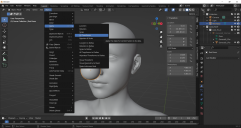
Make sure your mask is still selected and Export as a Wavefront(.obj) file.
I don't know if you noticed but, the DaztoBlender Bridge converts the scale of models to 1/100 when importing into Blender.
At some point we would need to rescale your mask to the 'DAZ Studio size' when exporting out of Blender or importing into DAZ Studio.
Personally, I would re-scale when Exporting from Blender.
Select 'Selection Only' next to 'Limit to' and type '100' next to 'Scale' to re-scale your mask.
Those two things are the most important when exporting from Blender in my opinion (you can select 'Keep Vertex Order' in Geometry as stem_athome sgueested but it isn't really necessary for non-morphs).

Since we did all the important things, press OK when importing back to DAZ Studio (There's no need to change much of the importing settings in DAZ Studio).
I have my import settings set as 'Custom' and 'Scale: 100%'.

Hope this helps anyone who was wondering about this as well.
 Looking for Metadata file specification
Hi Folks,
I realize I'm waking up a 10-year-old thread, but I'd very much like to find a copy of the current metadata spec if it's circulating out there somewhere :) I've downloaded the SDK and can't find any reference docs about it in there either. Are you still around, Kat? :)
New Computer and Daz Connect problemDo the Pro bundles have their own files? If not they will not show as instalalble - you just get the constituent products.
No icon and coloured thumbnail means either isntalled through Connect or installed through another emthod and Daz Studio not allowed to update metadata online since before the item was purchased.
UltraSceneryXT - large terrain/landscape generatorAnEye4Art said:
I thought that I had the terrain banding in USXT figured out but I am still getting very terrible banding mostly from imported maps and I think I know why. The greyscale hight map is the a scaled down version of the high resolution hieghtmap that I imported. Well the scaled down version is what's causing the banding. What ever compression method being employed by USXT is causing the severe banding. My imported heightmaps are 4096x4096 but USXT's version is only 1024x1024, which causes the banding. The greyscale is from the USXT's map folder and the *red map is the imported one. A closer look at USXT's map one can see the visible banding and image tiling squares. No smoothing is fixing it. Any smoothing above 2 only washes out the details for me. Plus I've tried all acceptable image formats and the results are the same. I really hope Howie will fix this soon.
*Please note that this site did compress the red heightmap and so the slight banding in the image is because of this.
An update to the USXT terrain banding issue: While USXT does compress larger imported textures down to 1024x1024, this may not be causing the severe banding. I say this because there's no banding if i import a maptiler sattelite heightmap into USXT - even when compressed to 1024x1024. But if I create some mountain terrains using filters in WC, import into USXT, the banding is there. 8 or 16 bit float will not help either no matter what image format. I am currently seeking info about this issue on the WC forum.
New Computer and Daz Connect problemThat sounds as if OneDrive has moved the files in your documents folder, which would include the metadata and product files used by Connect by default, and Adddata folder, which has the database, to the OneDrive folder where DS doesn't know to look. You would either need to move them back (so stop using OneDrive, which may be wise for content) or correct the paths in Content Directory Manager. Adding the path as the last dialogue suggests should certainly help.
GraffitiWorx decal disappearing from West Park Wall when adding charaters [solved]Something must have "corrupted" my scene. I have loaded the iray version of the West Park asset into a new empty setup, imported my characters there and the decal is now showing. Something is still missing because the lights are not 100% as they used to be, but I can import step by step from the old scene until I hopefully got everything as in the old setup. So I consider this issue to be solved up to a point. Thanks for your help!
Plugin does not work in C4D R23I FIGURED OUT HOW TO GET THE C4D BRIDGE TO WORK IN R23! It's messy but it works. Basically you have to use the Blender Bridge to make a file for the C4D Bridge to open.
1. Replace the .pyp in the C4D scripts folder with the one posted earlier in the thread
2. Make a folder called 'temp3D' in Users/Shared
3. Export your character to Blender using the Blender Bridge
4. Find the .fbx file you just created here: /Users/eddykatt/Documents/DAZ 3D/Bridges/Daz To Blender/Exports/FIG/FIG0/
5. Copy the .fbx file to here: /Users/Shared/temp3d
6. Rename the .fbx file DazToC4D.fbx
7. You can now import it to C4D using the C4D Bridge plugin. Your character should come in fully rigged with eyelashes that follow the facial morphs.How to get older versions of DazToMaya?I am testing these older versions, I can import figures, but I don't see control rigs.
Daz to Blender Bridge - Meet the TeamMy first DAZ to Blender import obviously needs some work. Perhaps I was too confident to import a posed, morphed figure on my first try? LOL
Any tips would be most welcome!
Setup Materials for Filter by Context in SmartContentA more advanced Content DB Editor is used in the Products view (either Smart Content or Content Library) when you rigk-click and Edit Metadata. You get a two-panel dialog that has Product indormation on the first tab, and the familiar Asset info on the second. The Product info shows how the Asset (.duf), the Compatibility Base and the Scene ID are linked together. If you Export the metadata for the Product, you will see the part that ties it all together is called ObjectCompatibility, which you can't edit directly in the Content DB Editor, but is generated when using the Scene Identification dialog.
Cascadeur 2022.EA1I've just watched the tuto and then imported daz model in casca, made a pose and imported back in daz. There are things you can do more easily than explained in the tutorial
When exporting you better be sure the knees are a little bit bend, otherwise casca get confused about knee bend direction. same for elbows
For quickrig tool you can choose the predefined quickrig template for daz (they are in C:\Program Files\Cascadeur\resources\autorig_templates). The problem with this template is that it has Gensesi8Male as root, so you copy it, edit (it's a text file) and replace Genesis8Male by Genesis8Female, then it will fill the autorig.
I aligned box controllers to arms and legs, just rotated and you can copy paste the raotation from the properties from one side to another if you want precise match of left and right sides. Also changed the size of some rigid bodies, like explained in tutorial. Other than that I didn't move anything like the tuto does.
Before exporting, to avoid problems in daz, you can choose which bones you want to export. You go into "bone" mode or in the hierarchy pane, select all face bones and toes and uncheck Fbx export -> is exported. Then you select all bones and uncheck export translate and scale, finally you choose root (Genesis8MAle/Female) and hip and check the export translate. This way you export only rotation for all the bones and for root/hip also translation.
Then you import it in daz like the tuto explained
The BIG problem I see, are the twist bones in arms and legs, Cascadeur is not using them, it will try to twist the shoulder directly instead of shoulder_twist, which is not how daz is expected to work. If somebody can fix that then it will be perfect. Please let me know if you know how to fix it!
Diffeomorphic DAZ Importer version 1.6.0 releasedThomasLarsson said:
Now I managed to import the mesh hair correctly. You need to update the HD export script with the last commit. Here is what I did.
- Export from DS with the updated HD exporter in the last commit.
- Make sure that the global setting Add Armature To HD Meshes is enabled.
- Import the scene.
- Advanced Setup > Mesh > Transfer Vertex Groups from the body to the hair meshes.
I haven't tried to convert the hair to particles yet.
Edit: Hair conversion seems to work too, with the strand type set to Tube.
It doesn't work for me. I downloaded the newest daz importer files. In Daz I replaced the scripts and in Blender I made sure I checked add armature to HD meshes. When I import it with that I get the same as before and the HD version of the body hair is "invisible"? I can't see any mesh.
Edit: Never mind, it works. I'm not sure what the issue was, it suddenly works. Maybe I had to restart one of those programs. Thank you Thomas!
Daz 3D is part of

Connect
DAZ Productions, Inc.
7533 S Center View Ct #4664
West Jordan, UT 84084Licensing Agreement | Terms of Service | Privacy Policy | EULA
© 2026 Daz Productions Inc. All Rights Reserved.