-
Importing OBJs Oddities
Ugh. This is making my brain hurt... It all makes sense to what I have been seeing.
Let me see if this makes sense to anyone.
Essenentially, the OBJs have been importing "inside out." With no obvious reference, and not having made the original models, it was impossible to notice.
The symptom was that the models looked "plain" and "flat." I attributed this to texturing issues that I would have to manually resolve.
When I would apply DS shaders, things would look better, but never "great." This I attributed to low polygon models that needed custom maps.
The import process would come in one of two ways: inside out or inside out and flipped.
"Inside out" is actually over simplfying it as the models were also flipped, making the the inside out state seem normal because the textures were flipped. Kind of like if you have an inside out t-shirt, the design on it would look backwards. Except if you look in a mirror, then everything seems normal?
"Inside out and flipped" is how I noticed the issue because the text in the textures was mirrored. In essence, this was a half way correct import because the models weren't also flipped.
Now that I resolved the import configuration, the Normal and Bump maps are working properly. The models no longer look flat / low polygon.
Does this sound vaguely correct?
Exporting Zev0's Growing Up as an animation in an FBX fileHi there. I am working on a project where I'd liike to animate a boy turning into a man over time. I animate the youth morph slider in Daz and everything looks fine. When I export to FBX and import into C4D, I am only seeing the adult state of the character. Other animations seem to be working OK. Does anyone have any insight into why this is happening and how I could achieve the result I am looking for? Thank you so much. .
Anyone tried this turbo render stuff?OK guys, this thing looks legit...... I bit the bullet and grabbed it. I really need to figure out this diffeomorphic and get a workflow to be able to get people from DS to blender easily. Still not there yet as you can see from her lack of hair......
First trial I didn't really know what I was doing, tested wtih time, not all that useful a benchmark I realised after.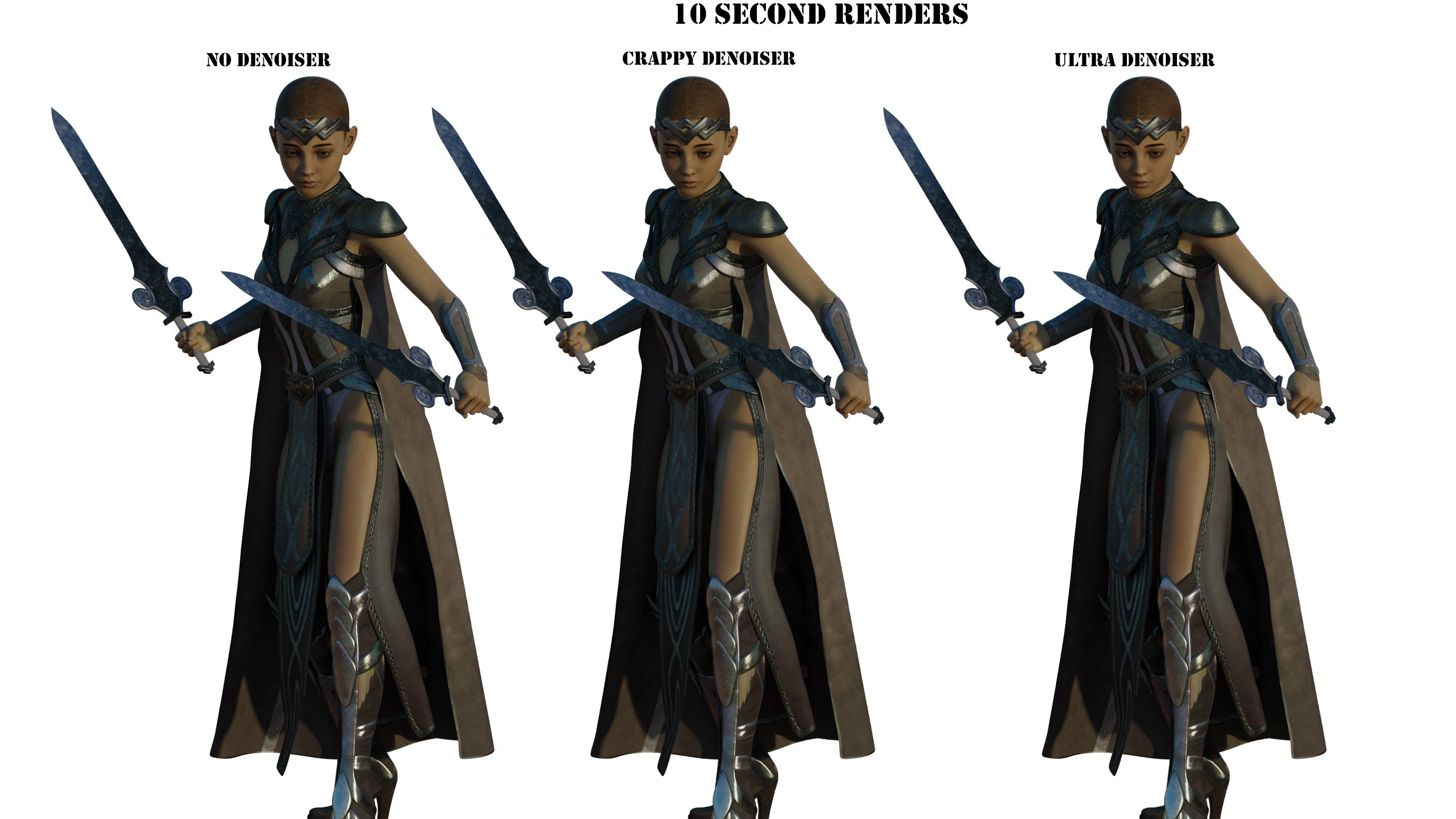
Second trial did 12 samples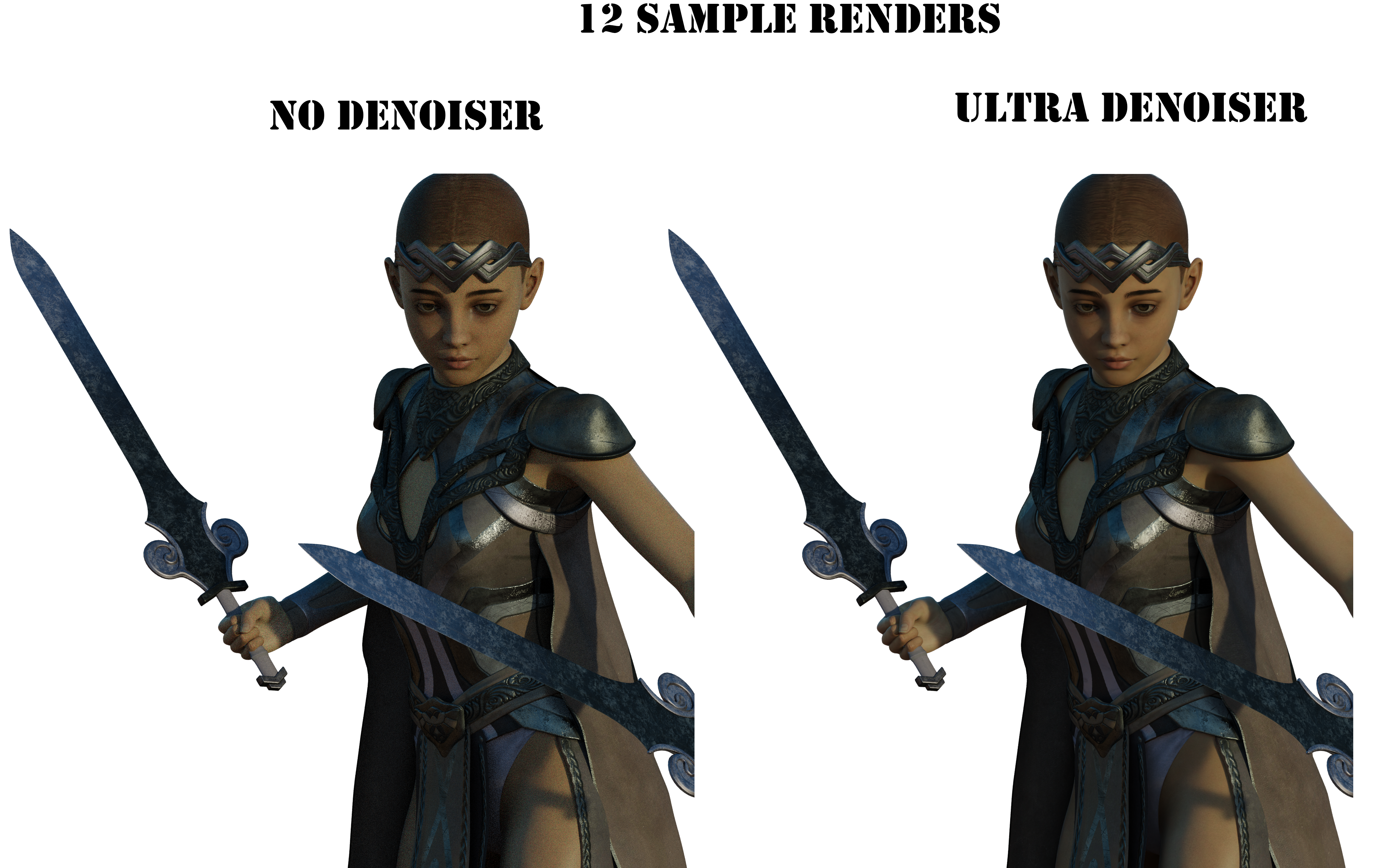
Third trial did 64 samples
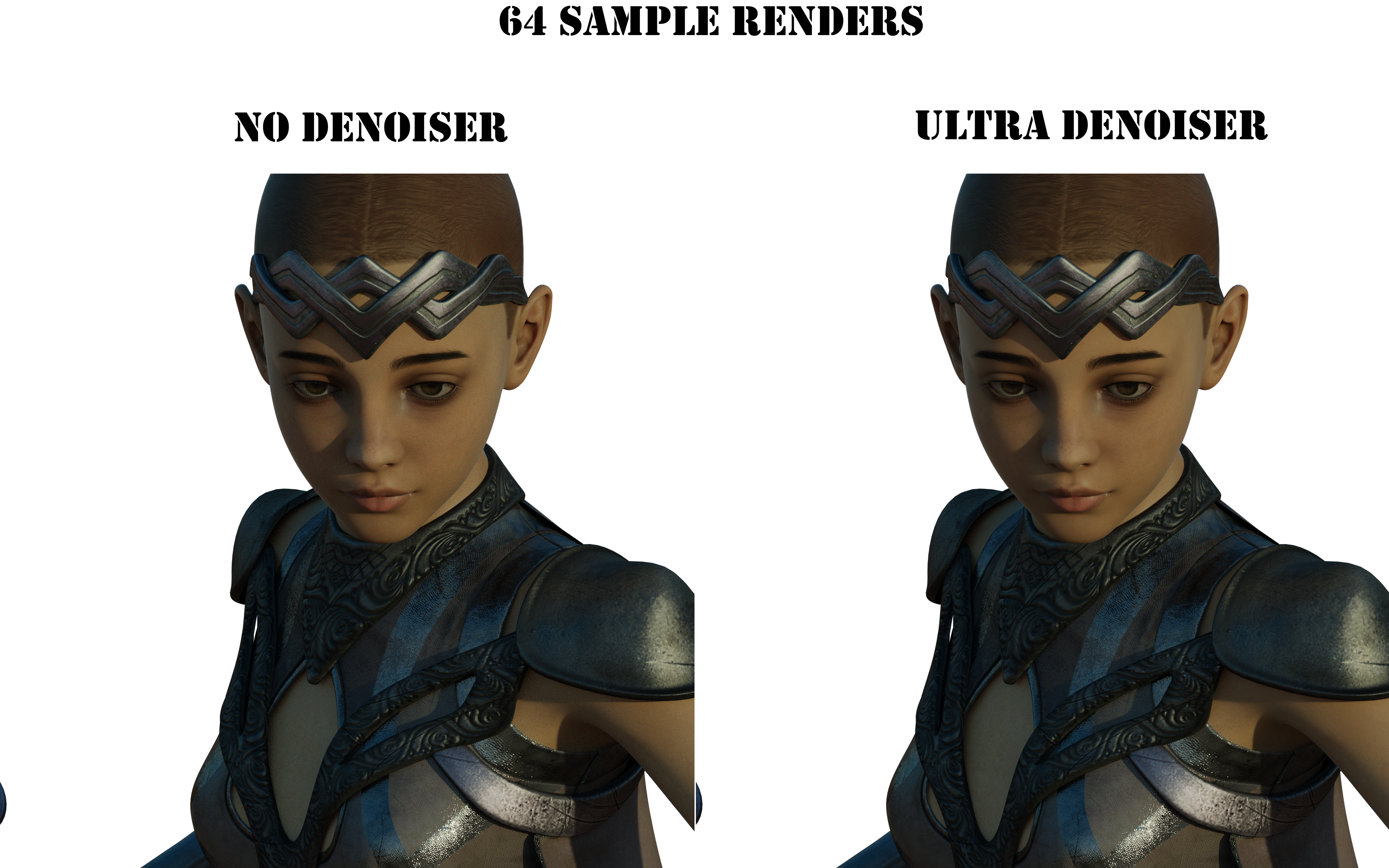
All these renders took about 1 minute 30 seconds. I didn't tweak nothin in blender, other than hiding the non-hd crap diffeo brings in on import.
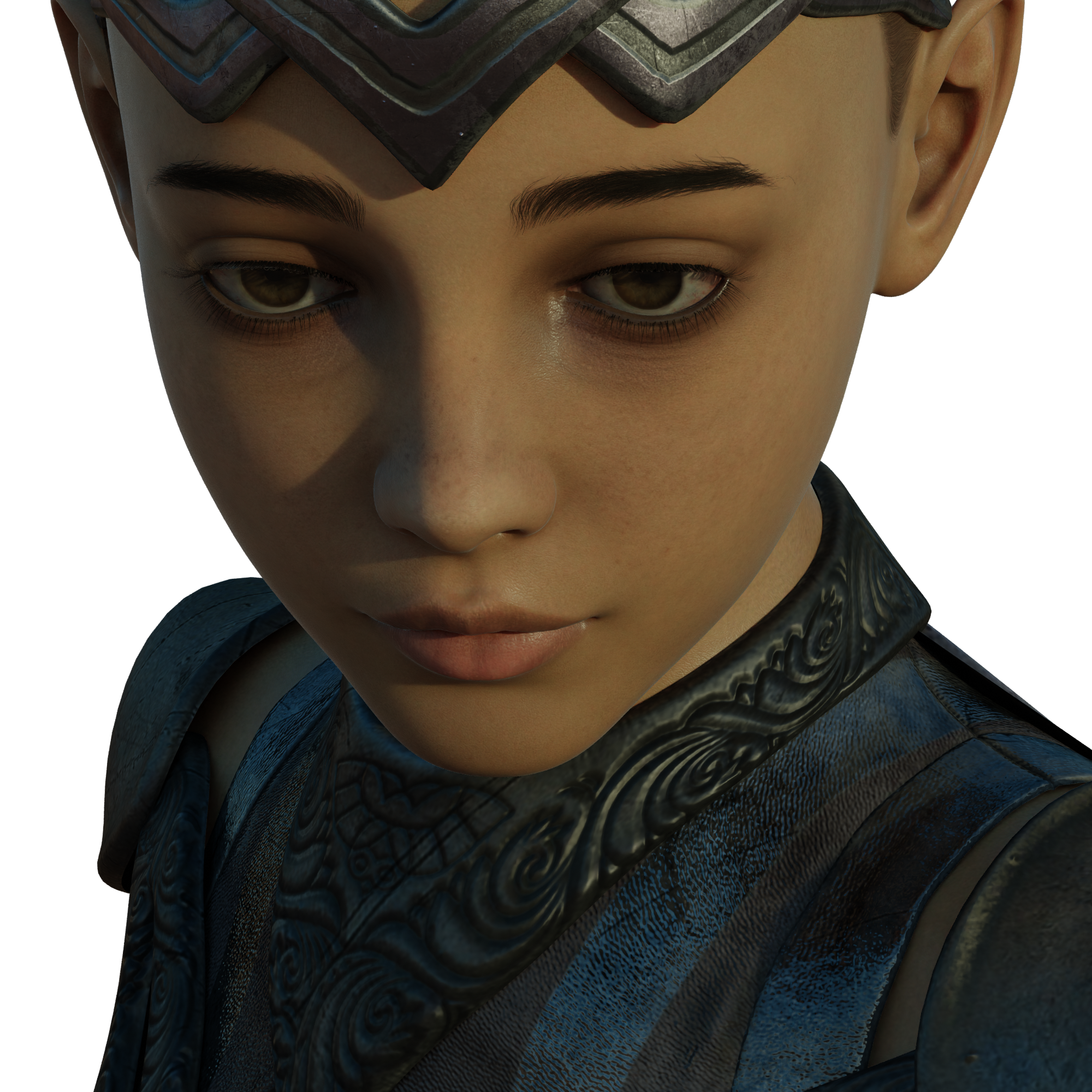
I thought the optix denoiser in e-cycles was great, this is even better!Importing OBJs OdditiesJason Galterio said:
Kainjy said:
The answer for the problem 2 is because not all 3d softwares use the self world reference axis orientation:
softwares like Maya put Y as the vertical axe (X and Z are the plain axes), while in 3D studio Max is Z (X and Y in plain).For invisible parts maybe the problem is the imported material, you can fix it applying a new material to whole object or editing the imported one
You are a genius...
I would have never noticed what the problem was if you hadn't sniffed out a place to poke.
For whatever insane reason, the OBJs were importing with Opacity set to 0. All of the other materials were fine, but Opacity was set at 0 across the board.
Once again I was looking for a more complicated solution and missing the obvious. Never had anything import like that before.
I see the reverse of that all the time in C4D: since Daz figures have an opacity slot, C4D brings them in with transparency active on all the textures (rather than alpha, which is where opacity maps should go).
Iron Scale Armor Bundle incomplete? (SOLVED)leemoon_c43b45a114 said:
Try restarting DIM, if that's your installation method. That's what Support had me do after they fixed things on the store side. They also reset my downloads, so that *might* be needed in your case as well, which will likely require a ticket. Don't know if uninstalling the original incomplete installation and then refreshing the downloads will get all the files to show up or not.
Lee
I download all my stuff through Smart Content (I can never rememeber the correct name for it, but it isn't DAZ Install Manager or DAZCentral). The past work around for that was to uninstall the item, Update Metadata, then close DAZ Studio and redownload said product. It would work in the past, but not now.
I can't even download it manually in my product library.
Thanks though, Lee!
Importing OBJs OdditiesKainjy said:
The answer for the problem 2 is because not all 3d softwares use the self world reference axis orientation:
softwares like Maya put Y as the vertical axe (X and Z are the plain axes), while in 3D studio Max is Z (X and Y in plain).For invisible parts maybe the problem is the imported material, you can fix it applying a new material to whole object or editing the imported one
You are a genius...
I would have never noticed what the problem was if you hadn't sniffed out a place to poke.
For whatever insane reason, the OBJs were importing with Opacity set to 0. All of the other materials were fine, but Opacity was set at 0 across the board.
Once again I was looking for a more complicated solution and missing the obvious. Never had anything import like that before.
Error occurred while reading fileummm,your first post..
It was step 3 actually.
Apparently your PC restarted before DS(or Windows.Not all file operations are instantly written to disk) finished writing/compressing the file.
Also , you should look into why your PC is randomly restarting it self while under heavy load.
It shouldn't be.
That can corrupt your entire harddrive and make your system unusable depending on what Windows was doing in the background when the sudden reboot happened.
In the meantime I would put together an Windows Installer on a USB stick or CD/DVD what ever you have.You might need it if those random reboots keep happening.
Windows installers are free and a tool to make them is free from Microsoft.
Jason Galterio said:
Well, it appears that I lost all my work from this morning. This is my last resort to recover the work.
Has anyone seen this error before?
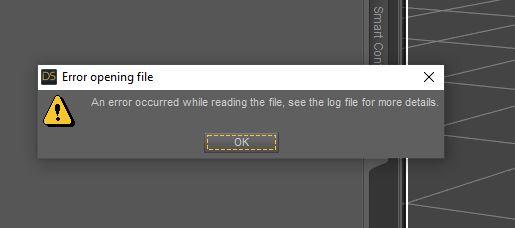
Here is what the log says:
2022-04-22 10:29:28.662 [INFO] :: *** Scene Cleared ***
2022-04-22 10:29:28.711 [INFO] :: Prepare asset load (open): /2022.04.20/US_XT_Setup_v02.duf
2022-04-22 10:29:28.711 [INFO] :: Locking viewport redraw...
2022-04-22 10:29:28.711 [INFO] :: Viewport redraw locked.
2022-04-22 10:29:28.761 [INFO] :: Native format content directories: 8
2022-04-22 10:29:28.761 [INFO] :: Poser format content directories: 8
2022-04-22 10:29:28.761 [INFO] :: Other import format content directories: 0
2022-04-22 10:29:28.761 [INFO] :: Begin asset load (open): /2022.04.20/US_XT_Setup_v02.duf
2022-04-22 10:29:29.815 [INFO] :: Json Parser (2461529,32): Syntax Error - expected ',' or ']'
2022-04-22 10:29:29.989 [INFO] :: Error loading asset: D:/DAZ Installs/Projects/2022.04.20/US_XT_Setup_v02.duf
2022-04-22 10:29:29.989 [INFO] :: Operation failed
2022-04-22 10:29:30.025 [INFO] :: Unlocking viewport redraw...
2022-04-22 10:29:30.025 [INFO] :: Viewport redraw unlocked.Here is what happened:
1. Scene was rendering fine.
2. Changed the Z-axis of my camera to lower it a bit.
3. Saved the file.
4. Started a render and walked away.
5. Came back to my system having rebooted. Which isn't that unusual. If I render too many times without a restart, this will happen. (Some idiosyncracy with UltraScenery I believe.)
6. Logged back in. Started DS. Tried to reopen the file. Error.
7. Shut down completely. Restarted. Tried again. Same error.
The file was rendering just fine before moving the camera of all things. So I don't understand why that would cause this.
I had been saving the file with the icredmental changes. I'd rebooted a couple of times. No issues up until this.
Importing OBJs OdditiesKainjy said:
The answer for the problem 2 is because not all 3d softwares use the self world reference axis orientation:
softwares like Maya put Y as the vertical axe (X and Z are the plain axes), while in 3D studio Max is Z (X and Y in plain).For invisible parts maybe the problem is the imported material, you can fix it applying a new material to whole object or editing the imported one
Thanks, that's the train of thought that led me to experiment with the import functions. Previous imports I did today had the same problem, only I didn't notice because there was no text in the textures. When the text was there, I realized things were reversed. I was missing the forest for the trees by not going back to the import process to begin with.
I *kind of* noticed that the objects looked flat... but I just assumed that that was texturing changes I needed to make. In reality, it was the texture being inverted, so the bump maps were extruding / intruding the inside of the models.
I'm still puzzling through the invisible surfaces. Changing the surfaces themselves makes no difference, which is why I am thinking the exports might be the problem.
[Released] Substance Painter Assistant [Commercial]RiverSoftArt said:
RAMWolff said:
This MAY be useful for those of us that work in Poser but have used DS in the past for working on figures like Dusk, Dawn, L'Homme or L'Femme by having their obj's imported from Poser and then sending via your script to SP?
It is a Daz Studio script so you would need DS to run it.
Also what version is needed of DS for this script to work?
Right now, v4.20. I am working with Silent Winter to at least get it down to 4.15 (I was using an undocumented function so I have NO IDEA when it was added)
I can confirm the fix that RiverSoftArt sent me makes this work in DS 4.15 so if you're not on 4.20 and the script isn't working, you can confidently buy it now (to get the intro discount) and just hang on. (The export script was fine before, just the import had a hiccup - but all good now and going to save me lots of time)
Importing OBJs OdditiesOkay, I resolved #2 by experimenting with the orientation of the import settings. It took three or four import attempts, but I finally found the combination that fixed the backwards images.
Still can't fix the invisible OBJs, but I will come back to that another time.
Edited to Add: I would provide the orientation settings, but I have a feeling that it is different based on the exported OBJs. In my case, I changed the first one to X, Y, and Z. Then changed the second one to one of the remaining ones. And just kept trying different combinations until it clicked. 3! = 6 different possible configurations, it wasn't as time consuming as it sounds.
Importing OBJs OdditiesI'm just batting 1000 today...
Importing OBJs into DS and seeing behavior that I haven't experienced before.
1. Some import invisible. If the object is highlighted, the surfaces ghost into appearance. Otherwise they will not appear.
2. Images are coming in reversed. Text is backwards, etc.
These both seem to be related; as if the objects are one sided and I am on the wrong side of them.
Has anyone seen this before? And is there an easy way to fix it?
Diffeomorphic DAZ Importer version 1.6.0 releasedokay... I figured it out myself.
just sleced Principled as the import material method
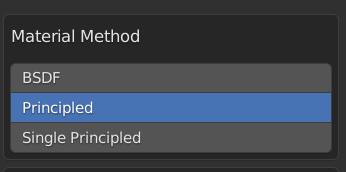
And I'm getting this
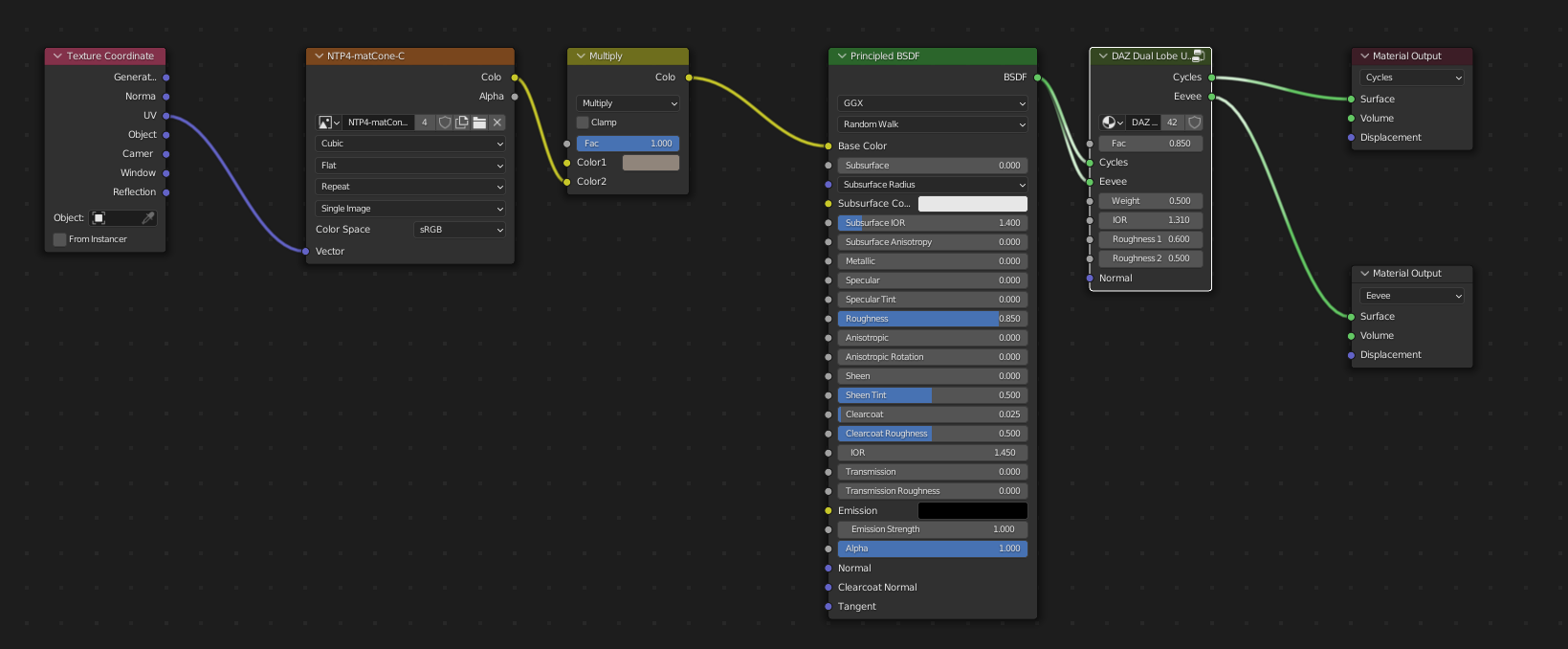
I can even remove the nodegroup and the result stays the same.
But it looks like that the normal map is missing. Is this intended?
Error occurred while reading fileWell, it appears that I lost all my work from this morning. This is my last resort to recover the work.
Has anyone seen this error before?
Here is what the log says:
2022-04-22 10:29:28.662 [INFO] :: *** Scene Cleared ***
2022-04-22 10:29:28.711 [INFO] :: Prepare asset load (open): /2022.04.20/US_XT_Setup_v02.duf
2022-04-22 10:29:28.711 [INFO] :: Locking viewport redraw...
2022-04-22 10:29:28.711 [INFO] :: Viewport redraw locked.
2022-04-22 10:29:28.761 [INFO] :: Native format content directories: 8
2022-04-22 10:29:28.761 [INFO] :: Poser format content directories: 8
2022-04-22 10:29:28.761 [INFO] :: Other import format content directories: 0
2022-04-22 10:29:28.761 [INFO] :: Begin asset load (open): /2022.04.20/US_XT_Setup_v02.duf
2022-04-22 10:29:29.815 [INFO] :: Json Parser (2461529,32): Syntax Error - expected ',' or ']'
2022-04-22 10:29:29.989 [INFO] :: Error loading asset: D:/DAZ Installs/Projects/2022.04.20/US_XT_Setup_v02.duf
2022-04-22 10:29:29.989 [INFO] :: Operation failed
2022-04-22 10:29:30.025 [INFO] :: Unlocking viewport redraw...
2022-04-22 10:29:30.025 [INFO] :: Viewport redraw unlocked.Here is what happened:
1. Scene was rendering fine.
2. Changed the Z-axis of my camera to lower it a bit.
3. Saved the file.
4. Started a render and walked away.
5. Came back to my system having rebooted. Which isn't that unusual. If I render too many times without a restart, this will happen. (Some idiosyncracy with UltraScenery I believe.)
6. Logged back in. Started DS. Tried to reopen the file. Error.
7. Shut down completely. Restarted. Tried again. Same error.
The file was rendering just fine before moving the camera of all things. So I don't understand why that would cause this.
I had been saving the file with the icredmental changes. I'd rebooted a couple of times. No issues up until this.
Renders have become impossibe 9 out of 10 timesI run a Ryzen 7 3700X with a RTX 3060, no tweaks. I will gety black renders or black renders in scenes which previously worked. I could set up to three figures in a big scene by PW productions and the machine too kit. Not anymore.
I often get something like this in the log:
2022-04-22 15:10:11.038 Iray [INFO] - IRAY:RENDER :: 1.0 IRAY rend info : Updating geometry.
2022-04-22 15:10:11.038 Iray [INFO] - IRAY:RENDER :: 1.0 IRAY rend info : Updating motion transforms.
2022-04-22 15:10:11.038 Iray [INFO] - IRAY:RENDER :: 1.0 IRAY rend info : Importing scene graph.
2022-04-22 15:10:11.038 Iray [INFO] - IRAY:RENDER :: 1.0 IRAY rend info : Importing geometry for motion time 0
2022-04-22 15:10:27.081 Iray [INFO] - IRAY:RENDER :: 1.0 IRAY rend info : Geometry import (1 triangle object with 115 M triangles, 0 fiber objects with 0 fibers (0 segments), 1 triangle instance yielding 115 M triangles, 0 fiber instances yielding 0 segments) took 16.043 s
2022-04-22 15:10:27.081 Iray [INFO] - IRAY:RENDER :: 1.0 IRAY rend info : Updating section objects.
2022-04-22 15:10:27.081 Iray [INFO] - IRAY:RENDER :: 1.0 IRAY rend info : Updating materials.
2022-04-22 15:10:29.204 Iray [INFO] - MATCNV:RENDER :: 1.0 MATCNV rend info : found 474 textures, 0 lambdas (0 unique)
2022-04-22 15:10:29.214 Iray [INFO] - IRAY:RENDER :: 1.0 IRAY rend info : Updating volumes.
2022-04-22 15:10:29.214 Iray [INFO] - IRAY:RENDER :: 1.0 IRAY rend info : Updating environment.
2022-04-22 15:10:29.214 Iray [INFO] - IRAY:RENDER :: 1.0 IRAY rend info : Updating lens.
2022-04-22 15:10:29.214 Iray [INFO] - IRAY:RENDER :: 1.0 IRAY rend info : Updating lights.
2022-04-22 15:10:29.214 Iray [INFO] - IRAY:RENDER :: 1.0 IRAY rend info : Updating object flags.
2022-04-22 15:10:29.215 Iray [INFO] - IRAY:RENDER :: 1.0 IRAY rend info : Updating backplate.
2022-04-22 15:10:29.218 Iray [INFO] - IRAY:RENDER :: 1.0 IRAY rend info : Updating caustic portals.
2022-04-22 15:10:29.218 Iray [INFO] - IRAY:RENDER :: 1.0 IRAY rend info : Updating decals.
2022-04-22 15:10:29.222 Iray [INFO] - IRAY:RENDER :: 1.0 IRAY rend info : Using iray core convergence estimate.
2022-04-22 15:10:29.223 Iray [INFO] - IRAY:RENDER :: 1.0 IRAY rend info : Allocating 1-layer frame buffer
2022-04-22 15:10:29.227 Iray [INFO] - IRAY:RENDER :: 1.0 IRAY rend info : Using batch scheduling, caustic sampler disabled
2022-04-22 15:10:29.227 Iray [INFO] - IRAY:RENDER :: 1.0 IRAY rend info : Initializing local rendering.
2022-04-22 15:10:29.230 Iray [INFO] - IRAY:RENDER :: 1.0 IRAY rend info : Initializing OptiX for CUDA device 0
2022-04-22 15:10:29.319 Iray [INFO] - IRAY:RENDER :: 1.0 IRAY rend info : Rendering with 1 device(s):
2022-04-22 15:10:29.319 Iray [INFO] - IRAY:RENDER :: 1.0 IRAY rend info : CUDA device 0 (NVIDIA GeForce RTX 3060)
2022-04-22 15:10:29.319 Iray [INFO] - IRAY:RENDER :: 1.0 IRAY rend info : Rendering...
2022-04-22 15:10:29.319 Iray [INFO] - IRAY:RENDER :: 1.17 IRAY rend progr: CUDA device 0 (NVIDIA GeForce RTX 3060): Processing scene...
2022-04-22 15:10:31.290 [WARNING] :: ..\..\..\..\..\src\pluginsource\DzIrayRender\dzneuraymgr.cpp(367): Iray [ERROR] - IRAY:RENDER :: 1.16 IRAY rend error: Unable to allocate 2.289 GiB from 464.402 MiB of available device memory
2022-04-22 15:10:31.297 [WARNING] :: ..\..\..\..\..\src\pluginsource\DzIrayRender\dzneuraymgr.cpp(367): Iray [ERROR] - IRAY:RENDER :: 1.17 IRAY rend error: CUDA device 0 (NVIDIA GeForce RTX 3060): Scene setup failed
2022-04-22 15:10:31.297 [WARNING] :: ..\..\..\..\..\src\pluginsource\DzIrayRender\dzneuraymgr.cpp(367): Iray [ERROR] - IRAY:RENDER :: 1.17 IRAY rend error: CUDA device 0 (NVIDIA GeForce RTX 3060): Device failed while rendering
2022-04-22 15:10:31.297 [WARNING] :: ..\..\..\..\..\src\pluginsource\DzIrayRender\dzneuraymgr.cpp(367): Iray [WARNING] - IRAY:RENDER :: 1.17 IRAY rend warn : CUDA device 0 (NVIDIA GeForce RTX 3060) ran out of memory and is temporarily unavailable for rendering.
2022-04-22 15:10:31.322 [WARNING] :: ..\..\..\..\..\src\pluginsource\DzIrayRender\dzneuraymgr.cpp(367): Iray [WARNING] - IRAY:RENDER :: 1.17 IRAY rend warn : All available GPUs failed.
2022-04-22 15:10:31.322 [WARNING] :: ..\..\..\..\..\src\pluginsource\DzIrayRender\dzneuraymgr.cpp(367): Iray [ERROR] - IRAY:RENDER :: 1.17 IRAY rend error: Fallback to CPU not allowed.
2022-04-22 15:10:31.322 [WARNING] :: ..\..\..\..\..\src\pluginsource\DzIrayRender\dzneuraymgr.cpp(367): Iray [ERROR] - IRAY:RENDER :: 1.17 IRAY rend error: All workers failed: aborting render
2022-04-22 15:10:31.322 [ERROR] Iray :: Internal rendering error.
2022-04-22 15:10:31.441 [INFO] :: Saved image: K:\TEMP DAZ\render\r.png
2022-04-22 15:10:31.450 [INFO] :: Finished Rendering
2022-04-22 15:10:31.472 [INFO] :: Total Rendering Time: 4 minutes 52.39 seconds
2022-04-22 15:11:26.945 Iray [INFO] - IRAY:RENDER :: 1.0 IRAY rend info : Device statistics:
2022-04-22 15:11:26.945 Iray [INFO] - IRAY:RENDER :: 1.0 IRAY rend info : CUDA device 0 (NVIDIA GeForce RTX 3060): 0 iterations, 2.066s init, 0.025s render
dForce Chic Club Outfit Textures IssueThis looks as if the files have not decrypted correctly when installed through Daz Studio. Try this, and if the eror persists open a support ticket:
- right-click on the product's container>Unisntall
- right-click on the product's container>Delete
- then from the Connect menu either refresh meatadata or go offline and then log back in, which should refresh the metadata thoroughly,
- reinstall the product
Daz Studio and the DAE Format? Better than FBX and OBJ????im always downloading stuff from online vendors and sketchfab etc. Often they will be in FBX and DAE and i always have problems with both these formats. Obj is the only format i trust Daz to import correctly. I systematically convert files to obj before importing them - i dont even bother testing DAE and FBX to see if they work anymore.
Projection Morph Manager (Commercial)Zev0 said:
In a nutshell fit clothing to figure. Dial up figure shape, modify clothing projections.
Now, on clothing, favourite the desired projection morph, remember its value.
Now zero figure, clothing will be zeroed as well. On clothing click favourites, the projection morph you favourited will still be there, dial in the value you remembered.
Now hide figure, export clothing only with projection morph dialed up, now import that as a new clothing morph onto clothing item.
Thank you very much, I will try it.
Daz Studio and the DAE Format? Better than FBX and OBJ????I am aware of that link but sadly I lack the skill, I would (and actually did back in the day for D|S3 export only) pay for a decent Import plugin
https://web.archive.org/web/20140220204003/https://www.daz3d.com/fbx-plug-in-for-daz-studio
Daz Studio and the DAE Format? Better than FBX and OBJ????WendyLuvsCatz said:
well DAZ FBX import sucks more than collada but that's not saying much
I have actually gotten dae files rigged into D|S not mangled but it depends on where from, Carrara rigging for example imports animated as dazcollada a specific form of dae for D|S
Have fun https://github.com/daz3d/StudioFbxImporter if you (or anyone else) wish to improve it
[Released] Substance Painter Assistant [Commercial]SnowSultan said:
Can the importing of textures be done in a separate work session, without Substance Painter needing to be open? For example, if I send an object to SP from Studio using this, work on a texture over a few days, then open Studio and just import and quickly apply the maps I generated earlier from Substance Painter based on their filenames? It sounds like you can, I just ask because I have a Blender plugin that is finicky about having both open at once in order to transfer anything between them.
Looks like a useful product, will be waiting for it. :)
Substance Painter does not need to be open or even installed. Substance Painter Assistant works with files... exporting the OBJs for use in Substance Painter and importing graphics files to be used in DS.
(tiny edit: also is there any reason why this would not work with the standalone Steam version of SP?)
It will work with the steam version.
Daz 3D is part of

Connect
DAZ Productions, Inc.
7533 S Center View Ct #4664
West Jordan, UT 84084Licensing Agreement | Terms of Service | Privacy Policy | EULA
© 2026 Daz Productions Inc. All Rights Reserved.