-
Where to put maps from AMBIENTCG?
alaltacc said:
Gordig said:
The slots that Richard and I are referring to are part of the Iray Uber shader, which you can find in the Default Resources. You can stick with the shader that's on there now, and it will render, but you're better served having a shader made for the rendering engine you're using.
I wil sound dumb ;-), but how do I do that? I found the shader inside the content library, but I clicked in each of the surfaces, apçplied it (double-clicked), and the "default DAZ) is still there.
Did you have the object selected too? Shader presets need both the object and one or mroe surfaces on the object selected.
Though if you import the model while Iray is the active render engine it should aply Iray Uber Base anyway.
Anyway, I started to play with the sliders inside the Surfaces tab and things are starting to look better. I still didn't find the right textue for the walls nor the windo frame (these are temporary), but the floor looks good (the lighting is also temporary, only a HDRI and one single light to help). The objects aren't mine (all freebies), I put them there to help evaluate the contrasts.
I'll finish the structure (I still have to finish the windows frame, put some big doors in another wall, a "normal" door in another, etc) and get back to Daz. And I thought the hard part would be modelling insode Blender . I believe I've spent more time trying to texture things in Daz then creating the structure in Blender,
If you can point me to a tutorial explaining how to change the shader, It'll help. :-)UltraScenery - new territory [Commercial]UltraScene Creator crash
I have used UltraScenery successfully many times and own a number of add-ons for it.
Recently, when I run it (on a new machine), the progress bar starts but then freezes (screenshot attached). It stays frozen at that position no matter how long I allow it to run. I have run a number of different scenarios. This screenshot was taken after I ran UltraScene Creator on the default setup that it boots to, using only the default assets on the first Grasslands setting.
I have tried it with the C66 Graphics plug-in enabled and disabled. I have tried it with the Accelerator for UltraScenery Studio Content plug-in enabled and disabled. I have tried it with all add-ons installed and uninstalled. Every time I get the same result.
I hope there's a fix! I rely on UltraScenery. Thanks for any help or suggestions.
My PC stats are as follows:
Processor Intel(R) Core(TM) i9-10900KF CPU @ 3.70GHz 3.70 GHz
Installed RAM 128 GB (128 GB usable)
System type 64-bit operating system, x64-based processor
Edition Windows 10 Enterprise Version 20H2
OS build 19042.1526
NVIDIA GeForce RTX 3070 driver version 30.0.15.1179
Processor Intel(R) Core(TM) i9-10900KF CPU @ 3.70GHz, 3696 Mhz, 10 Core(s), 20 Logical Processor(s)These are the final lines of the log file (those which seems to pertain to this problem):
2022-02-20 17:01:14.154 [INFO] :: Prepare asset load (merge): /environments/landscapes/ultrascenery/ecologies/usc grassland 01/USC Grassland 01 MAT.duf
2022-02-20 17:01:14.154 [INFO] :: Locking viewport redraw...
2022-02-20 17:01:14.154 [INFO] :: Viewport redraw locked.
2022-02-20 17:01:14.172 [INFO] :: Native format content directories: 2
2022-02-20 17:01:14.172 [INFO] :: Poser format content directories: 2
2022-02-20 17:01:14.172 [INFO] :: Other import format content directories: 0
2022-02-20 17:01:14.172 [INFO] :: Begin asset load (merge): /environments/landscapes/ultrascenery/ecologies/usc grassland 01/USC Grassland 01 MAT.duf
2022-02-20 17:01:14.194 [INFO] :: Determining missing assets...
2022-02-20 17:01:14.212 [INFO] :: Setting textures...
2022-02-20 17:01:14.212 [INFO] :: Creating materials...
2022-02-20 17:01:14.236 [WARNING] :: ..\..\..\..\..\src\sdksource\general\dzscript.cpp(1189): Unhandled error while executing script.
2022-02-20 17:01:14.236 [WARNING] :: QScriptEngine::popContext() doesn't match with pushContext()
2022-02-20 17:01:14.239 [INFO] :: Script executed successfully: G:/My Daz Library/Applications/Data/DAZ 3D/My DAZ 3D Library/environments/landscapes/ultrascenery/ultrascenecreator.dseAuto Muscle Enhancer HD [Commercial]I am sure someone can give a clearer answer, but for me, saving as a scene subset, allows me to import that scene subset into another scene. I believe it isn't all that much different than saving as a scene, and saving as either will work. It just ensures that all your modified settings, morphs and ERC freezes are stored on that character, even it they haven't been saved into DAZ for use on other characters. So if you have not saved the morphs as File--Save As-Support Asset-Morph Asset, then it is still stand alone from all your other characters. You can always delete any morphs you make at:
C:\Users\Public\Documents\My DAZ 3D Library\data\DAZ 3D\Genesis 8\Male\Morphs\(Your User Name Folder)
TD
The Marvelous Designer Threadfelis said:
Try to import this, scale 10000%.
Then run transfer utility, with a G8F as donor and this as target, and then see if it behave if morphed.
see attached screenshot :-)
The Marvelous Designer ThreadTry to import this, scale 10000%.
Then run transfer utility, with a G8F as donor and this as target, and then see if it behave if morphed.
Am I missing the point on the new volumetric rendering?Petra said:
I do not even know how to use it at all.
I have a shader preset in a Folder called Volumetric * I think * but that does nothing.
If I apply it to a sphere, the whole thing disappears.
Loaded VDB's, free ones, but no clue where to put them or how to open or import them.
I wish there were tutorials to follow.:(
Just to let you know.
Apply the Simple OpenVDB MDL Volume shader to an object. Yep. It disappears.
Then under the Surfaces tab expand the objects surfaces out, and select the Volume node. You should then see a Volume File option. Just select browser and load a .vdb file. Alter the density multiplier for the desired effect. That’s pretty much all you can do at the moment.
I’ve attached an example. You need to download the Gasoline Explosion from here:
https://jangafx.com/software/embergen/download/free-vdb-animations/
Just use one of those .vdb files. I used 72 in my example.
Weird Loading Times on G8FHere's the complete log. Still taking nearly 2 minutes after thinning down the runtime/content directories to the official stuff and my nearly empty (no data folders) "my library"
2022-02-20 08:41:47.500 [INFO] :: Prepare asset load (open): /People/Genesis 8 Female/Genesis 8 Basic Female.duf
2022-02-20 08:41:47.500 [INFO] :: Locking viewport redraw...
2022-02-20 08:41:47.500 [INFO] :: Viewport redraw locked.
2022-02-20 08:41:47.694 [INFO] :: Native format content directories: 3
2022-02-20 08:41:47.695 [INFO] :: Poser format content directories: 3
2022-02-20 08:41:47.695 [INFO] :: Other import format content directories: 0
2022-02-20 08:41:47.695 [INFO] :: Begin asset load (open): /People/Genesis 8 Female/Genesis 8 Basic Female.duf
2022-02-20 08:42:15.414 [INFO] :: *** Scene Cleared ***
2022-02-20 08:42:15.414 [INFO] :: Determining missing assets...
2022-02-20 08:42:16.193 [INFO] :: Setting textures...
2022-02-20 08:42:17.053 [INFO] :: Scanning for addons...
2022-02-20 08:43:13.218 [INFO] :: Creating node geometry...
2022-02-20 08:43:13.237 [INFO] :: Creating UV sets...
2022-02-20 08:43:13.240 [INFO] :: Creating materials...
2022-02-20 08:43:14.049 [INFO] :: Resolving legacy figures...
2022-02-20 08:43:14.049 [INFO] :: Preparing modifiers...
2022-02-20 08:43:14.241 [INFO] :: Creating modifiers...
2022-02-20 08:43:16.894 [INFO] :: Creating property aliases...
2022-02-20 08:43:16.989 [INFO] :: Creating sum stage formulas...
2022-02-20 08:43:37.403 [INFO] :: Creating multiply stage formulas...
2022-02-20 08:43:37.770 [INFO] :: Processing scene data...
2022-02-20 08:43:37.770 [INFO] :: Finalizing modifiers...
2022-02-20 08:43:37.771 [INFO] :: Finalizing channels...
2022-02-20 08:43:37.771 [INFO] :: Finalizing materials...
2022-02-20 08:43:37.772 [INFO] :: Sorting property groups...
2022-02-20 08:43:37.781 [INFO] :: Finalizing scene data...
2022-02-20 08:43:37.874 [INFO] :: Begin Loading Character Addons...
2022-02-20 08:43:37.883 [INFO] :: Prepare asset load (merge): /data/DAZ 3D/Genesis 8/Female Eyelashes/Tools/Script Loads/Genesis 8 Female Eyelashes.duf
2022-02-20 08:43:37.883 [INFO] :: Locking viewport redraw...
2022-02-20 08:43:37.883 [INFO] :: Viewport redraw locked.
2022-02-20 08:43:37.886 [INFO] :: Native format content directories: 3
2022-02-20 08:43:37.886 [INFO] :: Poser format content directories: 3
2022-02-20 08:43:37.887 [INFO] :: Other import format content directories: 0
2022-02-20 08:43:37.887 [INFO] :: Begin asset load (merge): /data/DAZ 3D/Genesis 8/Female Eyelashes/Tools/Script Loads/Genesis 8 Female Eyelashes.duf
2022-02-20 08:43:37.927 [INFO] :: Determining missing assets...
2022-02-20 08:43:38.075 [INFO] :: Setting textures...
2022-02-20 08:43:38.423 [INFO] :: Scanning for addons...
2022-02-20 08:43:38.761 [INFO] :: Creating node geometry...
2022-02-20 08:43:38.766 [INFO] :: Creating UV sets...
2022-02-20 08:43:38.767 [INFO] :: Creating materials...
2022-02-20 08:43:38.841 [INFO] :: Resolving legacy figures...
2022-02-20 08:43:38.842 [INFO] :: Preparing modifiers...
2022-02-20 08:43:38.868 [INFO] :: Creating modifiers...
2022-02-20 08:43:39.049 [INFO] :: Creating sum stage formulas...
2022-02-20 08:43:39.051 [INFO] :: Creating multiply stage formulas...
2022-02-20 08:43:39.051 [INFO] :: Finalizing modifiers...
2022-02-20 08:43:39.051 [INFO] :: Sorting property groups...
2022-02-20 08:43:39.054 [INFO] :: Setting up follow targets...
2022-02-20 08:43:39.054 [INFO] :: Start following: Genesis 8 Female << Genesis 8 Female Eyelashes
2022-02-20 08:43:39.055 [INFO] :: Following started: Genesis 8 Female << Genesis 8 Female Eyelashes
2022-02-20 08:43:39.055 [INFO] :: Connect base morphs: Genesis 8 Female << Genesis 8 Female Eyelashes
2022-02-20 08:43:39.104 [INFO] :: Base morphs connected: Genesis 8 Female << Genesis 8 Female Eyelashes
2022-02-20 08:43:39.113 [INFO] :: Creating morph projection map: Genesis 8 Female << Genesis 8 Female Eyelashes
2022-02-20 08:43:39.176 [INFO] :: Finished asset load (merge): 0m 1.290s - /data/DAZ 3D/Genesis 8/Female Eyelashes/Tools/Script Loads/Genesis 8 Female Eyelashes.duf
2022-02-20 08:43:39.276 [INFO] :: Unlocking viewport redraw...
2022-02-20 08:43:39.276 [INFO] :: Viewport redraw unlocked.
2022-02-20 08:43:39.279 [INFO] :: Loaded morph deltas: 0m 0.1s - /data/DAZ 3D/Genesis 8/Female/Morphs/DAZ 3D/Head/PHMEyelashesLengthUpper.dsf
2022-02-20 08:43:39.284 [INFO] :: Loaded morph deltas: 0m 0.1s - /data/DAZ 3D/Genesis 8/Female/Morphs/DAZ 3D/Head/PHMEyelashesLengthLower.dsf
2022-02-20 08:43:39.288 [INFO] :: Loaded morph deltas: 0m 0.1s - /data/DAZ 3D/Genesis 8/Female/Morphs/DAZ 3D/Head/PHMEyelashesCurl.dsf
2022-02-20 08:43:39.314 [INFO] :: Loaded morph deltas: 0m 0.4s - /data/Daz 3D/Genesis 8/Female Eyelashes/Morphs/DAZ 3D/Head/PHMEyelashesLengthUpper.dsf
2022-02-20 08:43:39.322 [INFO] :: Loaded morph deltas: 0m 0.4s - /data/Daz 3D/Genesis 8/Female Eyelashes/Morphs/DAZ 3D/Head/PHMEyelashesLengthLower.dsf
2022-02-20 08:43:39.333 [INFO] :: Loaded morph deltas: 0m 0.7s - /data/Daz 3D/Genesis 8/Female Eyelashes/Morphs/DAZ 3D/Head/PHMEyelashesCurl.dsf
2022-02-20 08:43:39.341 [INFO] :: Loaded morph deltas: 0m 0.6s - /data/Daz 3D/Genesis 8/Female Eyelashes/Morphs/DAZ 3D/Base/PHMEyelashesExpand.dsf
2022-02-20 08:43:39.394 [INFO] :: Prepare asset load (merge): /People/Genesis 8 Female/Materials/Base Materials/Iray/Base MAT Eyelashes.duf
2022-02-20 08:43:39.394 [INFO] :: Locking viewport redraw...
2022-02-20 08:43:39.394 [INFO] :: Viewport redraw locked.
2022-02-20 08:43:39.402 [INFO] :: Native format content directories: 3
2022-02-20 08:43:39.402 [INFO] :: Poser format content directories: 3
2022-02-20 08:43:39.402 [INFO] :: Other import format content directories: 0
2022-02-20 08:43:39.402 [INFO] :: Begin asset load (merge): /People/Genesis 8 Female/Materials/Base Materials/Iray/Base MAT Eyelashes.duf
2022-02-20 08:43:39.472 [INFO] :: Determining missing assets...
2022-02-20 08:43:39.808 [INFO] :: Setting textures...
2022-02-20 08:43:39.810 [INFO] :: Creating materials...
2022-02-20 08:43:39.894 [INFO] :: Applying animations...
2022-02-20 08:43:40.235 [INFO] :: Setting up follow targets...
2022-02-20 08:43:40.235 [INFO] :: Finished asset load (merge): 0m 0.833s - /People/Genesis 8 Female/Materials/Base Materials/Iray/Base MAT Eyelashes.duf
2022-02-20 08:43:40.262 [INFO] :: Unlocking viewport redraw...
2022-02-20 08:43:40.263 [INFO] :: Viewport redraw unlocked.
2022-02-20 08:43:40.266 [INFO] :: Finished Loading Character Addons
2022-02-20 08:43:41.023 [INFO] :: Finished asset load (open): 1m 53.328s - /People/Genesis 8 Female/Genesis 8 Basic Female.duf
2022-02-20 08:43:59.788 [INFO] :: Unlocking viewport redraw...
2022-02-20 08:43:59.788 [INFO] :: Viewport redraw unlocked.
2022-02-20 08:44:00.217 [INFO] :: Loaded image: G8FBaseLegsMapD_1003.jpg
2022-02-20 08:44:00.281 [INFO] :: Loaded image: G8FBaseEyes01_1007.jpg
2022-02-20 08:44:00.494 [INFO] :: Loaded image: G8FBaseArmsMapD_1004.jpg
2022-02-20 08:44:00.563 [INFO] :: Loaded image: G8FBaseMouthMapD_1005.jpg
2022-02-20 08:44:00.785 [INFO] :: Loaded image: G8FBaseFaceMapD_1001.jpg
2022-02-20 08:44:01.001 [INFO] :: Loaded image: G8FBaseTorsoMapD_1002.jpg
2022-02-20 08:44:01.097 [INFO] :: Loaded image: G8FBaseEyelashes_1006.jpgDAZ To Blender doesn't work for meDAZStudio 4.15.0.30
Menue=>Scripts=>Blender=>Daz To Blender
Select Export Type
Genesis8/3 Checked
Subdivision Level0 Checked =>accept
Over to Blender 3.0
DazToBlender
Import New Genesis 3/8
Popup in Blue "Import New Genesis 3/8/
Nothing happens, no pop up, no figure, no message nada.
What ever has to do with Blender, just doesn't work for me.
Any idea, what is going wrong here?Diffeo and VDB@brainmuffin Now I see the new 4.20 supports vdb with some limited features. And no animation. As for "rocket launch" by its description it uses an emissive mesh for the fire and vdb for the smoke. The emissive mesh should import into blender, though the new iray in 4.20 treats the emissive opacity differently. This also breaks any previous daz asset using emissive meshes, so most "baked effects" in the shop will not work fine anymore with 4.20.
So long story short. For now it is better to use vdb directly in blender, rather than importing it from daz.
edit. note. And, if you want your old scenes to work fine, do not update to 4.20 since it breaks both emission and top coat, other than tone mapping.
Am I missing the point on the new volumetric rendering?I do not even know how to use it at all.
I have a shader preset in a Folder called Volumetric * I think * but that does nothing.
If I apply it to a sphere, the whole thing disappears.
Loaded VDB's, free ones, but no clue where to put them or how to open or import them.
I wish there were tutorials to follow.:(
Workflow Question - New Pose Shape KeysThat will work fine. You just have to use "erc morphs" in the global settings to fit the armature. The main drawback is that every figure has its own materials, so it's not just a matter of morphs. Also every figure usually has it own custom jcms that you may want to import to get the exact figure deformations.
There's a new tool to import materials but it has issues and Thomas didn't fix it yet.
https://bitbucket.org/Diffeomorphic/import_daz/issues/857/material-import-issues
Workflow Question - New Pose Shape KeysDaz to Blender workflow for me is currently just like it is set up in Diffeo - Import Character from Daz, Corrections, Materials, Import Morphs, Finishing, and Rigging.
I was wondering if anyone has tried keeping a base G8 in Blender with all shape keys and morphs applied, then morphing that G8 base with each new imported character using a 'join as shapes' shape key. For example, let's say I set up a G8 base with all my favorite morphs, shape keys, custom shape keys, and corrective pose shape keys (new with Blender 3.1, see link below). I don't want to have to do that with every character, right? So can I import a custom character, let's say Victoria 8, and morph my finished G8 base to the Victoria 8 shape? Diffeo allows us to morph the armature and retarget the outfit. The lashes, brows, and hair would need re-parented. We could merge geografts last so we have a G8 base that we can constantly import new shape keys as they come out on the Daz store if we want, and also create our own.
Has anyone tried this or see any reason why it might not work?
https://studio.blender.org/training/blender-studio-rigging-tools/pose-shape-keys/
https://diffeomorphic.blogspot.com/2021/09/morphing-armatures.html
https://diffeomorphic.blogspot.com/2021/07/changing-outfits.html
Diffeo and VDB
Thanks for the vids. This is Blender 2.83. I wonder if it still works in 3.x.SDev said:
brainmuffin said:
I'm in the process of learning smoke and flames in Blender, but I do wonder if perhaps Diffeo can convert the VDB based items in KA Rocket Launch VDB (https://www.daz3d.com/ka-rocket-launch-vdb) to something usable. Anyone have a notion?
If it uses OpenVDB then have a look here (embergen import):
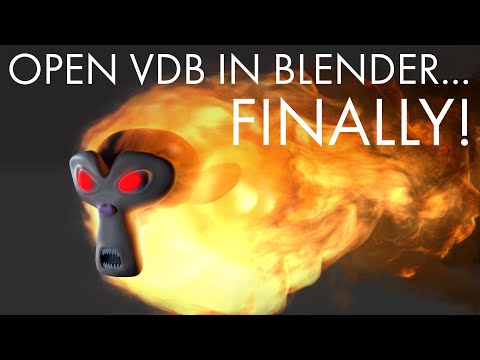
I prefer a more or less khaotic approach :)
 Diffeo and VDB
brainmuffin said:
I'm in the process of learning smoke and flames in Blender, but I do wonder if perhaps Diffeo can convert the VDB based items in KA Rocket Launch VDB (https://www.daz3d.com/ka-rocket-launch-vdb) to something usable. Anyone have a notion?
If it uses OpenVDB then have a look here (embergen import):
I prefer a more or less khaotic approach :)
How to make all edges straight when opening an areaOne thing to check, you see on the first image you have the 2 export options, the right hand one is what I use. The thing is the "collect" option saves a file in the folder you exported to called Maps, in there you will find the textures DS exported.
As you will see from the screen grab when I import the prop I choose "plastic1" from the Shading Domains, this highlights the material and I choose load texture and open the Maps folder then I just select the texture. Remember to Flip Vertically.
Note, I keep getting a weird error message while typing this so I better post this before anything goes wrong :)
Daz Studio Pro BETA - version 4.20.0.17! (*UPDATED*)Slippery_Jimm said:
superzairus said:
Slippery_Jimm said:
superzairus said:
But how to import the .vdb files, i have some for example, but the normal importer doesn'r allow to import the vdb, with some plugin?
I imported on via the Volume File button in Surfaces tab
Have you create a primitive, applied volume shader and load the vdb file in the surface tab?
Yes, that's how I did it
Thanks for the clarifications, doesn't work with me, for some reasons.
Daz Studio Pro BETA - version 4.20.0.17! (*UPDATED*)superzairus said:
Slippery_Jimm said:
superzairus said:
But how to import the .vdb files, i have some for example, but the normal importer doesn'r allow to import the vdb, with some plugin?
I imported on via the Volume File button in Surfaces tab
Have you create a primitive, applied volume shader and load the vdb file in the surface tab?
Yes, that's how I did it
Daz Studio Pro BETA - version 4.20.0.17! (*UPDATED*)Slippery_Jimm said:
superzairus said:
But how to import the .vdb files, i have some for example, but the normal importer doesn'r allow to import the vdb, with some plugin?
I imported on via the Volume File button in Surfaces tab
Have you create a primitive, applied volume shader and load the vdb file in the surface tab?
Daz Studio Pro BETA - version 4.20.0.17! (*UPDATED*)superzairus said:
But how to import the .vdb files, i have some for example, but the normal importer doesn'r allow to import the vdb, with some plugin?
I imported on via the Volume File button in Surfaces tab
Daz Studio Pro BETA - version 4.20.0.17! (*UPDATED*)But how to import the .vdb files, i have some for example, but the normal importer doesn'r allow to import the vdb, with some plugin?
Daz 3D is part of

Connect
DAZ Productions, Inc.
7533 S Center View Ct #4664
West Jordan, UT 84084Licensing Agreement | Terms of Service | Privacy Policy | EULA
© 2026 Daz Productions Inc. All Rights Reserved.