-
Can someone convince Maelwenn to make Lydia HD for Genesis 8 female?
Can someone please convince Maelwenn to make a Victoria 8 (G8F) version of Lydia HD for Victoria 7?
Just convert this to a compatible version for G8F?
https://www.daz3d.com/lydia-hd-for-victoria-7

https://www.daz3d.com/character-converter-from-genesis-3-female-to-genesis-8-female
They released a character converter for Gen 3 characters that will convert her for you! I hope that helps!
Can someone convince Maelwenn to make Lydia HD for Genesis 8 female?Can someone please convince Maelwenn to make a Victoria 8 (G8F) version of Lydia HD for Victoria 7?
Just convert this to a compatible version for G8F?
https://www.daz3d.com/lydia-hd-for-victoria-7
converting textures between male and femaleYou can use some male textures on female, and vice versa, with this product: https://www.daz3d.com/genesis-3-uv-swap-male-and-female-base
The texure you start with has to use Base Male or Base Female UV for this to work. If you try to work with any of the Daz-produced main figures -- Victoria, Michael, Ivan, Lucian, Elijah, Mika, Olympia, Gia, etc. -- it will not work.
So, for example, with this character -- https://www.daz3d.com/drako-for-ivan-7 -- in the "Whats Included and Features" section, it says, "This product uses the Genesis 3 Base Male UV maps." That statement, or something very close to it, is what you need to look for. It should explicitly say something about "Base Male" or "Base Female" UV maps. (For reasons that surpasseth all understanding, a lot of them seem to say, "This product uses the Genesis 3 Base Male Female UV maps." That also works, but it should really say either Male or Female, not both.)
This character -- https://www.daz3d.com/gianni-7 -- would NOT work for what you want, without sending him through a map transfer (a process that is too detailed to get into). In his "Whats Included" section, it notes that Gianni uses the "Gianni 7 custom UV set", which is just different enough from Base Male to cause problems.
Hope this helps.
Confused about what I needFor Genesis 8 (the latest model) you'll need Genesis 8 male body morphs and Genesis 8 female body morphs. This will give you the basics and it will get you quite far already. I'd recommend getting those first and play around with them, and only get further products if you feel you still need more possibilities.
For the two previous Generations the equivalent products are called the same: Genesis 3 male/female body morphs and Genesis 2 male/female body morphs. They are all the same price, so why not go with the most recent model? Genesis 3 and 8 are very similar. I personally haven't worked with Genesis 2 but I heard the posing is a little less sophisticated.
You could save a little bit of money by going even further back. For Genesis you'd need Genesis Evolution: Body Morphs. It covers both genders, so you'd have to get only one product and not two.
The generation before Genesis would be Victoria 4 and Michael 4, the products you'd need are Victoria 4 Shapes++ and Michael 4 Shapes++. V4 and M4 don't come with the base program, but both figures and their morph packs sometimes show up in the freebie section. I wouldn't spend money on this generation, but if you're very patient/thrifty/desperate you could get it for free.
Btw the above products are all just for shaping bodies. To shape faces you'll need Genesis 8/3/2 male/female head morphs.
suggestions for Genesis 9I am ready for G9 release next year. Can't wait. Seriousley, with all these "please don't upgrade, because I've spent so much money for it" you will end up in this Victoria 4/Poser trap, that allmost killed Poser. I do like it, how DAZ does it.
The "trap" as you call it, is all of DAZ's making to ensure profits. There is very little difference between Genesis 3 and 8 DESPITE the ludicrous number jump. Genesis was a major step forward. Genesis 2 was okay, Genesis 3 was needed, I feel and although they have there reasons to change the figure setup, I don't think the advancement was enough to warrant a whole new figure but.... salaries have to be paid.
IMHO Daz did not "trap" poser users into clinging to an eleven year old figure
Daz continued to move forward with G-1,2,3 etc and provided a FREE Posing and rendering application to enable people to move forward with them.Some people chose to continue to pay another company for software that did not support the improving Daz figures
and did not offer native figures that most of their users& vendors felt compelled to support with clothing and other content.IMHO Daz does not "trap" people into buying the latest genesis figure content as Studio still supports Genesis version 1.
The Daz PA's move on to the latest version and eventually drop support for the older ones.
Anyone who does not wish to move on with the Daz PA's have a simple choice.
Accept that you wont see any new content for your older figures
or learn to model your own content and support whatever generation you prefer.Fair enough. I was, at the time, bent out of shape as I did not believe at the time that Gen 8 was a significant change (still don't for the most part) but I see why changes were made to bring the figure more in line with figures used in the game industry and the like. I am happy they DON'T have current plans for a Genesis 9 and we have nested on 8 for a while allowing it to breath and expand.
They are a business. It does boil down to that. But staying technologically relevant is a wise business decision as well.
Anatomical Elements IssueThanks, magog.
I see this issue though when I use the Victoria 8 skin base with the Victoria 8 anatomical elements skin, so they're both from the same skin set.
As a work around I copied the torso surface to the anatomical elements and used a UV for G8F anatomical elements I found on renderosity. When I renedred this using 3DL there was no visible boundary between the torso and anatomical elements. That's ok, but I'd like to be able to use the actual V8 gens skin.I'll have another go with it later.
I Forgot What My Complaint Was - Complaint ThreadMy model has a weird hip crease...
I was going to attach the image but I'm not comfortable posting it here even with toxic zones covered. I posted it on my deviant art page. .
That is a weird looking crease. I think Victoria 4 has a similar issue.
Anatomical Elements IssueFor any adult G8 F base having the anatomical elements added, you have to use the same skin set. You cannot, for example, use the Olympia 8 or Aiko 8 skin base on a character and use the anatomical elements skin textures from Victoria 8 and expect them to match. Also, some adult characters do not come with textures for the anatomical elements, in which case, you'll need to use a different skin set(from another character) that does have the anatomical elements textures.
Keep in mind that the anatomical elements is simply an added geograph to the character and requires its own texture separate from the torso. Some characters require you to either select the character or anatomical elements node in the scene tab and then double clicking on the genitals MAT found in the content pane under Materials --> 3Delight --> Feminine --> relevant character, if I recall correctly. You should also be able to go into your product library and find the texture options there.
I don't recall Victoria 8 having any issues with the gens & torso textures not matching up, but then again, I use Iray, so I can't say for sure.
Anatomical Elements IssueI 'm having an issue with the G8F anatamical elements - there is a distinct boundary between the anatomical elements and the torso.
I do the following steps:
1. Create a new project.
2. Add G8F basic female
3. Add G8F anatomical elements
4. Apply Victoria 8 skin all MATSSometimes this succesfully applies the skin to the anatomical elements, sometimes not. If it doesn't, I apply the specific V8 anatomical elements skin MAT.
In the Viewport, using Texture Shaded view, eveything looks ok. However, when I render using 3DL (cannot use iRay on my machine) there is a distinct boundary between the anatomical elements and the torso. The skin on the anatomical elements is slightly darker. I've attached a heavily cropped image to show what's happening.
The shaders for the anatomical elements and torso are both AoA_Subsurface and both have the same settings. I've made no changes to any other settings.
Any ideas why this is happening and how to fix it?
Thanks
has Vicki lost her iconic status?Has Victoria lost her iconic status?
Yes, no question.
This is largely due to G8F being the base figure, and Victoria is only one of many figure options. And not the most attractive/interesting/best at that. Many PA's have got very skilled at modelling up other characters, and possibly the available tools are better, so there is a great deal more variety of character available than there used to be.
has Vicki lost her iconic status?I'm sure Vicky is happy for the company and not having to do all the heavy lifting anymore. The model making and rendering community is a lot bigger than when Victoria and Michael first made their appearances. It's only normal that there would be more diversity. I still think that Victoria is the first among equals, though.
has Vicki lost her iconic status?has Vicki lost her iconic status?
Probably, but that's because all the Genesis figures aren't built off of Victoria, but off of the base Genesis figure.
I've only been doing 3D art for about 3 years, so I wasn't around for the days that Victoria 4 was the base figure. By the time I got here, there was already Genesis 1 as the base figure, Genesis 2 as the base figure, and Genesis 3 as the base figure. To this day though you still get people who think that all of the Genesis 8 figures are built off of Victoria 8. lol Victoria has only been a morph of the base figure since Genesis 1, not the base figure herself. She and Michael are still the flagship figures though.
I see more "raw Genesis 8" renders then I do of Victoria 8 - I'm sure if Victoria 8 was the first thing that pops up when you load the base figure, we'd see more V8 renders.
has Vicki lost her iconic status?Well, for one thing Victoria 8 isn't the base figure - Genesis 8 Female is.
How can I tell which parameters are not set to the default?I played with morphs, shapes and after applying 5-10 things, something came out that I like.
How can I tell which morphs I ended up with without having to go through the whole G8 parameter list?
I want to know something like this:
Victoria 8 is at 80%
Big smile 30%
etc...August 2019 – DAZ 3D New User Challenge – Free Month (With a Twist)Okay, I chose the lovely Elliandra image of the wailing woman. I used Victoria 4.2, the Art of the Dance/Swan Lake ballerina tutu, and Pyrit hair. What I thought could be improved in the image was more of a sense of the drama to add to the scene and the feel of the image. By taking it overhead, I thought it would give a new perspective and focus right on her tortured face, and the addition of the colored lighting helps add to the mood. I wanted my model more sad than openly wailing. This is what I pictured when I thought about this challenge. Be kind; I literally started doing renders just a few weeks ago. Thanks!
While I haven't had a chance to look at your render, I'd like to take a moment to welcome you to the community. Best of luck to you with the challange, and above all, have fun with things.
XTransfer Module 1- Genesis 3 to Genesis 8 Morph Converter (Commercial)Say you choose Victoria 7 character dial, the script will look at all linked morphs that dial requires and select those, Eg head and body etc, then it will look at head and see what morphs is linked to that and select those etc. Basically it will transfer all morphs the selected character requires. You can also just select manually what morphs you want to transfer. This is a morph transfer product, not a character transfer product, but if you select Character A, it will transfer character A and all morphs required to get character A working. So yes if head propagating scale is part of the character it should select all those, or you can simply favourite all currently used and transfer those and make a matching character preset. We still working out some things, but in theory that is how its drafted.
[Released] Character Converter from Genesis 3 Female to Genesis 8 Female(Now Conv JCMs) [Commercial]Yeah, no way am I going to uninstall G3. I have Victoria 7 and the majority of her Daz-O sisters converted to G8, but HD morphs cannot be converted. Plus some morphs cannot be moved over, such as all the options for Aarki's Lady Rune for G3. I'm not converting everything to G8 and I have way too much invested in G3 to simply cast it aside. I like having them all, right where they are waiting to be used. ;-)
This is nothing like what Artini has been sharing with us, but the image here is of my first character I converted with the Scene Converter. She has a full Victoria 4 GenX figure dialed in. While she's pretty basic, and nothing extreme at all, the GenX morph converted perfectly and I've had no problems fitting clothes to her nor any issues with any poses I've tried.
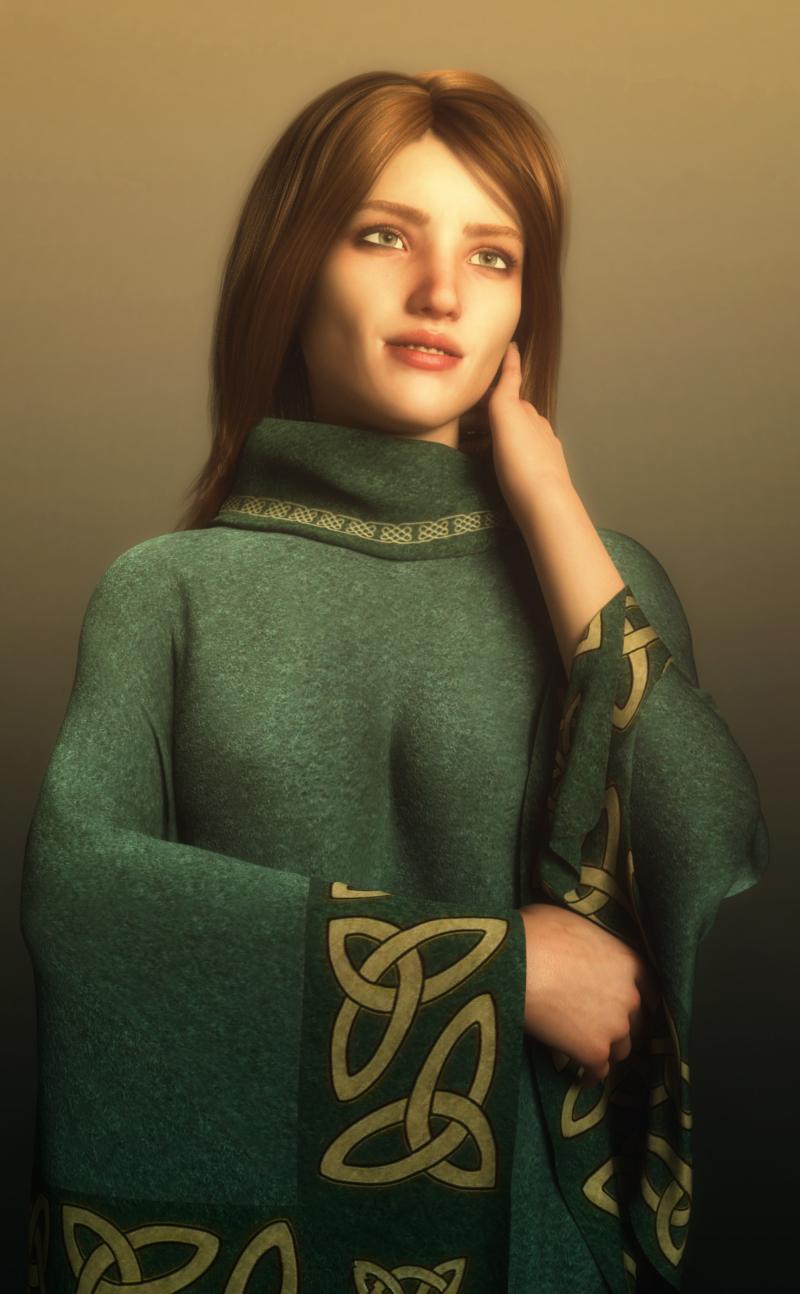
Well that seemed to work well! Incidentally what is that outfit she's wearing, I don;t recognise it at all?
https://www.renderosity.com/mod/bcs/dforce-classic-poncho-for-genesis-8-females/135117/
Thank you for the info - it looks so different with that texture set from the main promo picture!
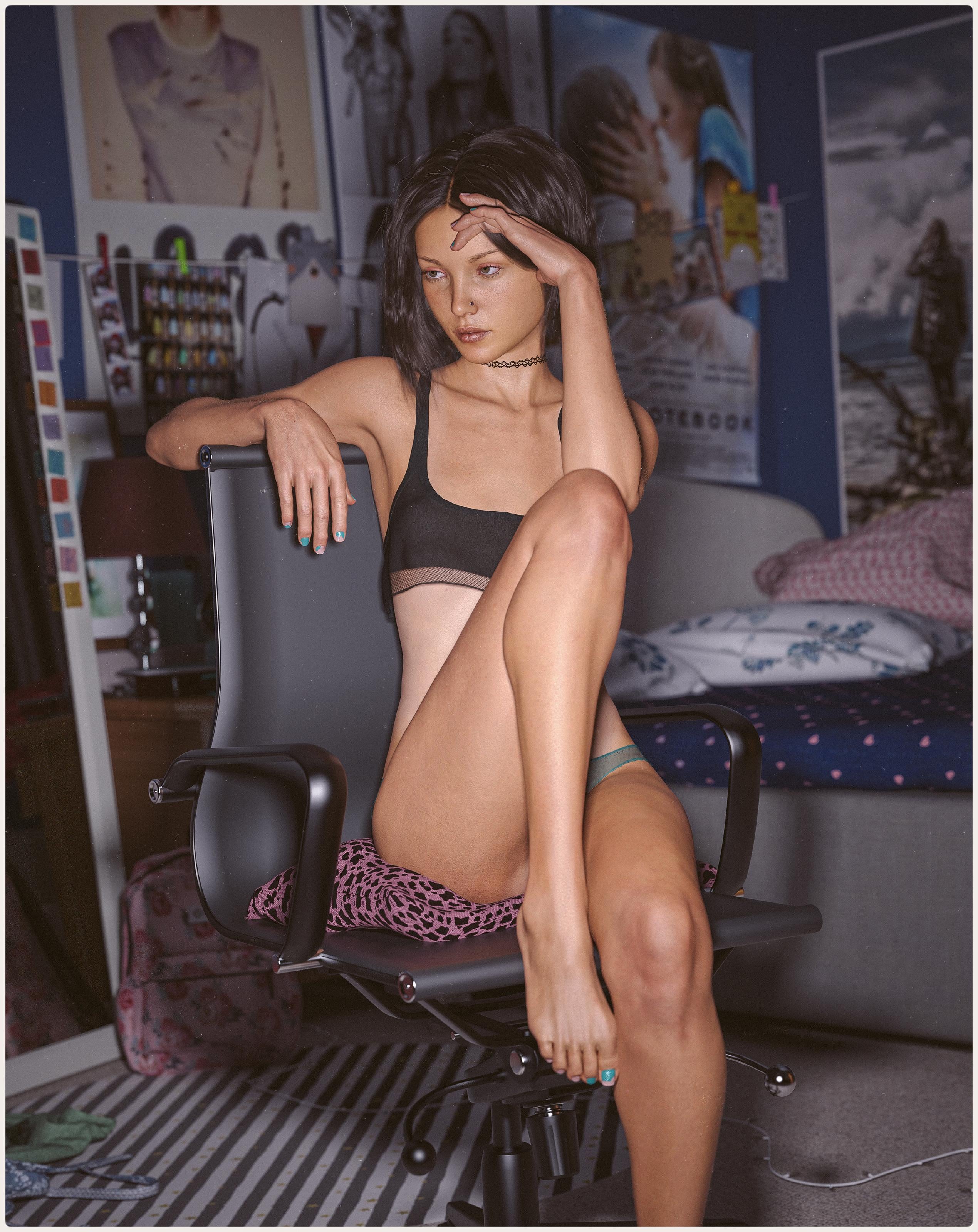
Show Us Your Iray Renders. Part VIIoc Victoria
Been using Daz a little over a year now, been a lot fun using/learning it. Nice to have a creative outlet

I really like this, nice pose and lighting!
Once you upload the attachment, you can click on it to open it up. Then copy the URL and then edit your post and add it as an image in the tools menu at top of the post. A new window will popup where you paste the URL and then set the width to 800, like so. Look forward to more from you!
 August 2019 – DAZ 3D New User Challenge – Free Month (With a Twist)
Okay, I chose the lovely Elliandra image of the wailing woman. I used Victoria 4.2, the Art of the Dance/Swan Lake ballerina tutu, and Pyrit hair. What I thought could be improved in the image was more of a sense of the drama to add to the scene and the feel of the image. By taking it overhead, I thought it would give a new perspective and focus right on her tortured face, and the addition of the colored lighting helps add to the mood. I wanted my model more sad than openly wailing. This is what I pictured when I thought about this challenge. Be kind; I literally started doing renders just a few weeks ago. Thanks!
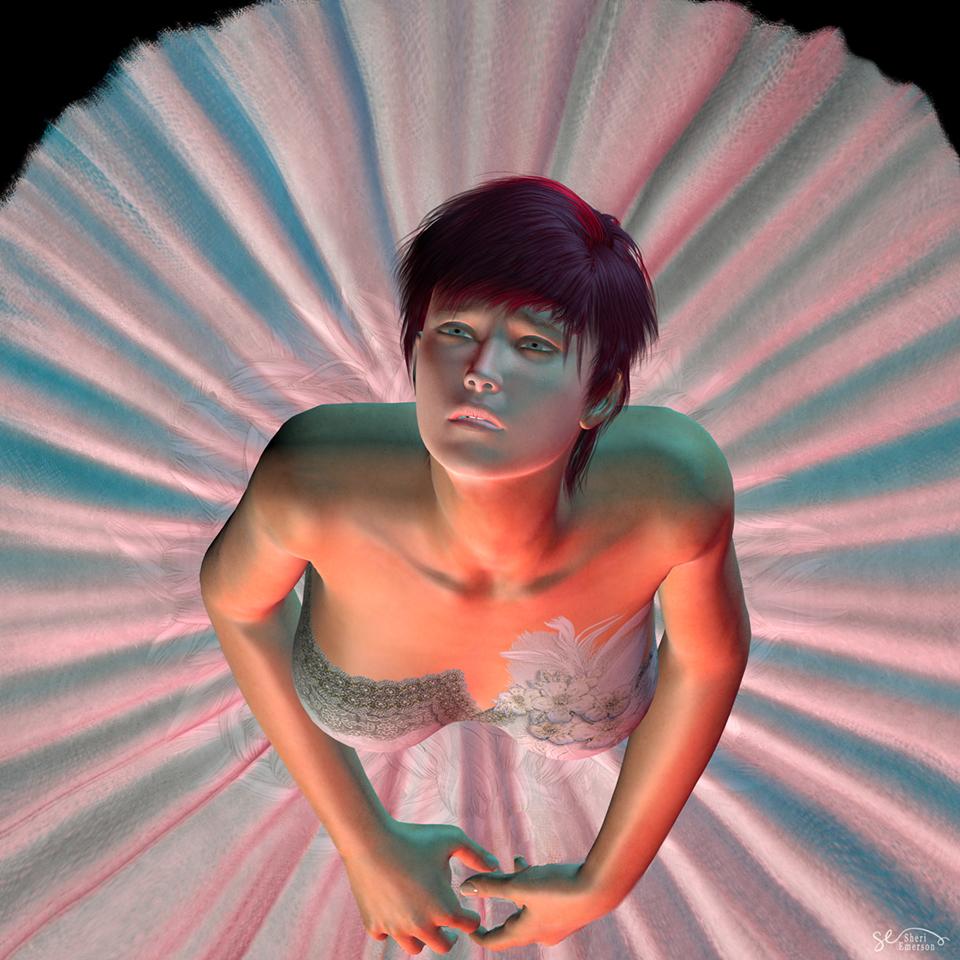
Brilliant job on the render the expression and lighting they're really nice! I also like how the hair looks like it's flopping back as she's looking up!
The only things I might change really nit-picky but I'm OCD like that lol.
1. If you place a spotlight set to Specular Only in the light options pointing at her eyes then you'll get some more depth to them and make them really pop. I'd suggest sticking with a mid to darker grey for the light color so it doesn't blow them out on render.
2. The dress bodice could use a stronger bump or displacement addition to it, this can be done in the surface tab in Studio I would suggest using Bump as you don't have to worry about it poking into the figure. If the dress doesn't have a bump map you can always just plug the color map into the Bump Image location and fiddle with the strength!
Elli
[Released] Character Converter from Genesis 3 Female to Genesis 8 Female(Now Conv JCMs) [Commercial]Yeah, no way am I going to uninstall G3. I have Victoria 7 and the majority of her Daz-O sisters converted to G8, but HD morphs cannot be converted. Plus some morphs cannot be moved over, such as all the options for Aarki's Lady Rune for G3. I'm not converting everything to G8 and I have way too much invested in G3 to simply cast it aside. I like having them all, right where they are waiting to be used. ;-)
This is nothing like what Artini has been sharing with us, but the image here is of my first character I converted with the Scene Converter. She has a full Victoria 4 GenX figure dialed in. While she's pretty basic, and nothing extreme at all, the GenX morph converted perfectly and I've had no problems fitting clothes to her nor any issues with any poses I've tried.
Well that seemed to work well! Incidentally what is that outfit she's wearing, I don;t recognise it at all?
https://www.renderosity.com/mod/bcs/dforce-classic-poncho-for-genesis-8-females/135117/
Daz 3D is part of

Connect
DAZ Productions, Inc.
7533 S Center View Ct #4664
West Jordan, UT 84084Licensing Agreement | Terms of Service | Privacy Policy | EULA
© 2026 Daz Productions Inc. All Rights Reserved.