-
Daz Central breaks my databases
Nope. No customization involved. I've never intentionally used this option.
When I reset the database I made it a point to not backup the user data.
When I reimported the metadata I unclicked the user data option as well.
For the screenshots I believe I was in the Default window, it just got cut off during the screen snip.
I know SY Starry is behind the issue; uninstalling it fixes the issue in DS Smart Content without having to do anything. In other words, after restarting DS the Smart Content is back to normal, with no need to do anything to the database or reimport metadata.
Edit to add, I see what you mean about the third image. I have no idea why that would be, to be honest.
Daz Central breaks my databasesThat sounds like (very) bad metadata - please report it via a ticket (assuming you are sure you have the current version of the package - I have it, installed through Connect, with no deleterious consequences)
Daz Central breaks my databasesHere are some screenshots as evidence.
The first two are some of the products with metadata problems.
The third shot shows my current Smart Content appearance.
The fourth shot is the result when I exit DS, start DIM, install SY Starry Nights, then restart DS.
Whatever is causing the issue with SY Starry Nights might not be an isolated situation. The same cause and effect may be happening with other products.
Daz Central breaks my databasesHere is what I saw.
1. Smart Content populated properly. Everything is defined and in its place.
2. Install SY Starry Sky Lights thru DIM. Start DS. All Smart Content definition is gone. Everything is in "Default" and nothing else.
3. Tried re-importing metadata. Tried clearing the database. Tried starting and stopping CMS. No change.
4. Exit DS. Uninstall SY Starry Sky Lights.
5. Return to DS. All Smart Content is back to being catagorized. No database operations were needed to fix it.
I've been fighting with this for a week. I only discovered today that SY Starry Sky Lights was the root cause.
I've uninstalled and reinstalled. Everything was working up until SY Starry Sky Lights was installed. That's when I realized where the problem was.
What was obfuscating the problem was the number of recent products that have Smart Content problems:
X-Fashion Stylish Outfit Shorts for Genesis 8 and 8.1 Females
The Alchemist Workshop Props
The Young Wizard Outfit
King's Magister dForce Outfit
Trending Socials Outfit for Genesis 8 and 8.1 Females
FG Construction Props
Virgo Zodiac Tattoo for Genesis 8.1
etc. etc. etc.All of these have issues where the metadata information isn't coming up properly. Missing icons, missing catagorization, etc.
Opinions on character look when using geoshells...outrider42 said:
I use Hexagon a lot for little stuff like this. Hexagon has issues, but if you take a couple steps they can be avoided. Hex has a memory problem that causes it to crash easy. The best way to deal with this is to remove all textures before export. You can throw the old Daz Default Shader on them, which is 3DL based. Hex being old doesn't like Iray materials much either. I made a material preset for Hexagon to speed this up.
The smoothing tool in Hex can your best friend in this situation. It does exactly what it says. Plus since you are using basic shaders you don't really need to worry about warping the texture.
You could also do this in Blender or whatever, too. It just takes some prep to export correctly so you can import back.
Thank you very much outrider42! I'll follow those steps - remove the textures and use the default shader. Very helpful to know. I appreciate it!
 Opinions on character look when using geoshells...
I use Hexagon a lot for little stuff like this. Hexagon has issues, but if you take a couple steps they can be avoided. Hex has a memory problem that causes it to crash easy. The best way to deal with this is to remove all textures before export. You can throw the old Daz Default Shader on them, which is 3DL based. Hex being old doesn't like Iray materials much either. I made a material preset for Hexagon to speed this up.
The smoothing tool in Hex can your best friend in this situation. It does exactly what it says. Plus since you are using basic shaders you don't really need to worry about warping the texture.
You could also do this in Blender or whatever, too. It just takes some prep to export correctly so you can import back.
Genesis Problem in Unreal Engine 5hi! i was looking for some tutorials about to import genesis 8.1 to UE5 and i finally did it.
now the problem its that when im on the edge of builds, gravity acts but not in every part of my character so her torso stays the same and her entire body acts (i put a video so i you can understand me).
please help.
thanks! link .https://www.youtube.com/watch?v=mgww-R_H6LQ
Carrara content in Daz Studio?How do I use Carrara content in Daz Studio? I've searched the documentation & FAQs. I tried Open & Import, but there is no .Car option. I just can't figure it out.
Daz3D to Unreal Engine 5 using the UE4 bridge.I normally export/import the old school way but I would like to use the DAZtoUnreal (UE5) to make things faster but I keep getting an error:
---------------------------
Missing Modules
---------------------------
The following modules are missing or built with a different engine version:DazToUnreal
DazToUnrealDeveloper
DazToUnrealRuntimeEngine modules cannot be compiled at runtime. Please build through your IDE.
---------------------------
OK
---------------------------Its been a while since i used either program together so some pointers here would be apprieciated.
Thank you.
Any chance of seeing NEW characters for G3? G2?there are those who want to do animations too
legacy figures and Genesis 1 and 2 import BVH easily from softwares like iClone 3DXchange or FBX exported as BVH from many other programs inclucing the Plask.ai video mocap
good luck with Genesis 3 and 8 and if you succeed I hope you like foot skating

yes I save from Genesis 1 to 3, works almost flawlessly for static poses, moving the root bone to 0,0,0 certainly helps but it's never as good
if you can get it to work you can use arm pose down 45 and leg pose out 6 on genesis 8 but it won't imporove a crappy footsliding animation at all
Products installed on a new location not showing up in Smart ContentI have added a new hard drive to my PC. I'm installing products through DIM, and in DIM's Advanced Settings I've added the new folder location on the new hard drive. In DAZ, I went to Content Directory Manager and added the new folder location to DAZ Studio Formats. The new content I install shows up in Content Library, but it doesn't show up automatically in Smart Content. In order to make it show up, I have to go to Content DB Maintenance and then re-import metadata where I check the newly installed product. Installing same content in any of the old locations works fine.
What am I doing wrong?Downloading OptionsYes, you already have a database - but that shows what you have been doing/instaling on this machine. If you have any chnages (fils saved etc.) that you want to keep you need to export metadata (Content Library option menu, the lined/hamburger button or right-click the tab, select Content DB Maintenance, then check Export user data) before replacing the existing database with the old one, then use the same dialogue to Reimport Metadata. You can also do the export metadata on the old machine, copy the modified /Runtime/Support folder from the old machien to the new, and then Reimport Metadta there. Copying the database over will preserve groups (e.g. New) and Connect installs.
Metadata tutorial - Adding new items to your smart contentBonjour
J'ai DAZ3D version 4.20 et j'ai du mal à m'y retrouvé les copies d'écran qui figurent dans vos explications ne correspondant absolument pas à ce que j'ai moi à l'écran.Mais j'ai aussi une petite question. Peut-on appliquer la creation des metadatas après avoir utiliser Content Package Assist?
Je m'explique : J'achète un asset chez Renderosity, bien sûr il ne s'installe pas avec DIM. J'utilise donc Content Package Assist qui me crée un fichier IMxxxxxxxx-01 et je peux ensuite l'installer et le désinstaller sans problème avec DIM.
Est-ce qu'une fois installé, je peux appliquer ce qui figure dans votre tutoriel.Cette question en entraîne une autre. Est-il possible de sauvegarder ces metadonnées et de les incorporer dans mon fichier IMxxxxxxxx-01?
Hello
I have DAZ3D version 4.20 and I have trouble finding my way around the screenshots in your explanations, which do not correspond at all to what I have on the screen.But I also have a small question. Can we apply the creation of metadatas after using Content Package Assist?
I buy an asset from Renderosity, of course it doesn't install with DIM. So I use Content Package Assist which creates an IMxxxxxxxx-01 file for me and then I can install and uninstall it without any problem with DIM.
Once installed, can I apply what is in your tutorial.This question leads to another one. Is it possible to save this metadata and incorporate it into my IMxxxxxxxx-01 file?
Translated with www.DeepL.com/Translator (free version)
AIUTO...CHI CONOSCE L’ITALIANO? PARTE TREDICIPiù che altro non vedo asset per alcuni prodotti:
- DAZ Dragon
- DAZ Horse
- DAZ Big Cats/Dog
- Centaur Male/Female
Li vedo abbandonati a loro stessi.
Gli asset nuovi (vestiti e capelli) sono belli, iper-texturizzati (con texture a 8K) ma privi di funzionalità... li prendi e li fai indossare alla figura e stop. Gli asset vecchi erano molto più modulari e ti permettevano di giocare molto coi morph o i settaggi (e contenevano molte più variazioni di colore), quelli di adesso hanno solo il supporto a Dforce e stop (se vuoi la colorazione diversa è venduta a parte).
Inoltre c'è questo continuo inseguire il fotorealismo.. se vuoi fare qualcosa stile anime/manga/comic, non ci sono moltissimi prodotti (devi usare i vecchi Aiko/Star/Hero per avere figure stilizzate).
L'altro giorno facendomi un giro per lo store ho visto ad esempio che ci sono molti edifici/palazzi ma sono quasi tutti uno più orribile dell'altro, magari avere 4 muri con un tetto decente potrebbe essere utile a qualche artista. Solo gli ambienti stile tunnel/corridoi di astronave sono fatti bene.
Anche figure stile robottoni (che un tempo erano molti) mancano tra le nuove uscite.
O ancora manca un prodotto per l'anatomia che ti aggiunge scheletro e organi interni al tuo G8/G8.1A livello di plugin non capisco perchè non fanno qualcosa di simile a Skin Builder per figure maschili o i G8.1.
Oppure un bell'aggiornamento dell'import da FBX, o aggiornare i plugin bridge (uno più rotto dell'altro).
O ancora un bel nuovo plugin per le animazioni facciali catturate da video/dirette cam o ancora un plugin per creare avatar virtuali per streamer.. sai i soldi che farebbero !PS domani escono i bi weekly-freebie... vedremo se saranno quasi tutti texture (come 2 settimane fa) o ci sarà qualche oggetto utile
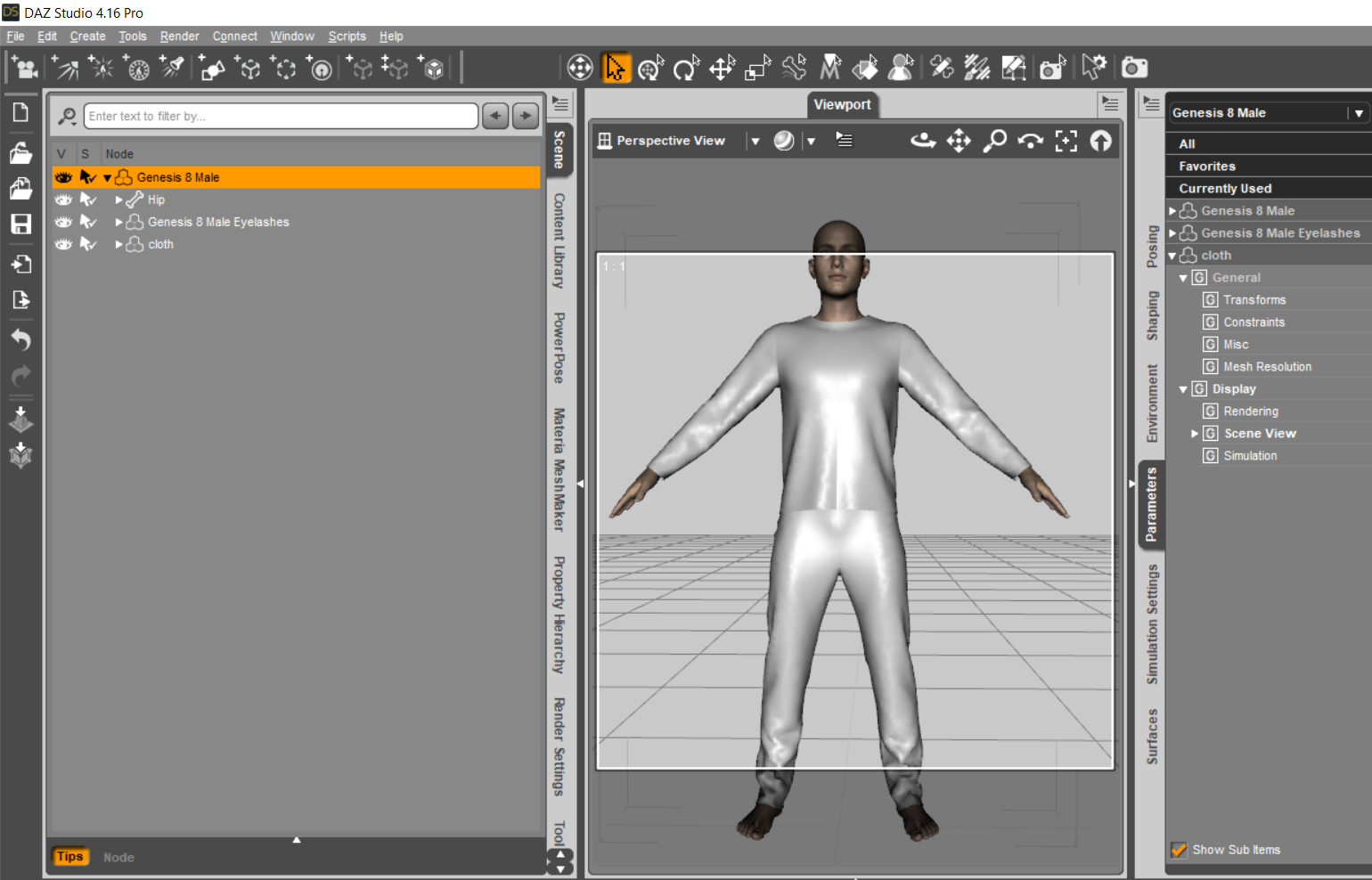
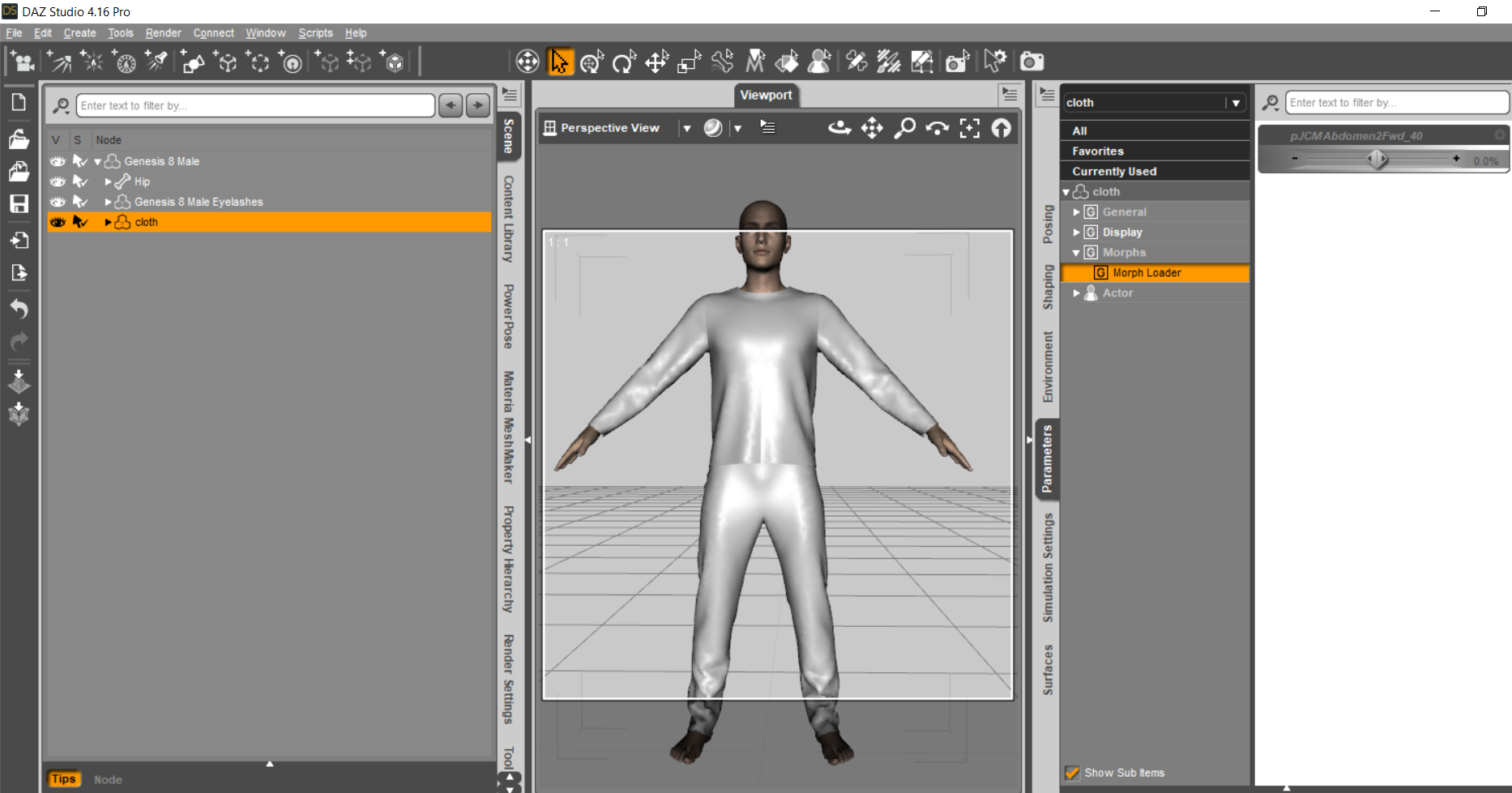
Defect on the joints of the clothesOkay you have the top and pants as one clothing piece. Might be more advantageous to make them as 2 separate pieces.
I saved the "cloth" obj as a clothing piece. And then using your morphed .obj made one pJCM. Images attached to post.
I tried to make a couple more BUT the morphed .obj files you have, some of them need to be redone. If you pose the figure, then do a straight import of the morphed .obj file, you will quickly see which ones need to be redone.

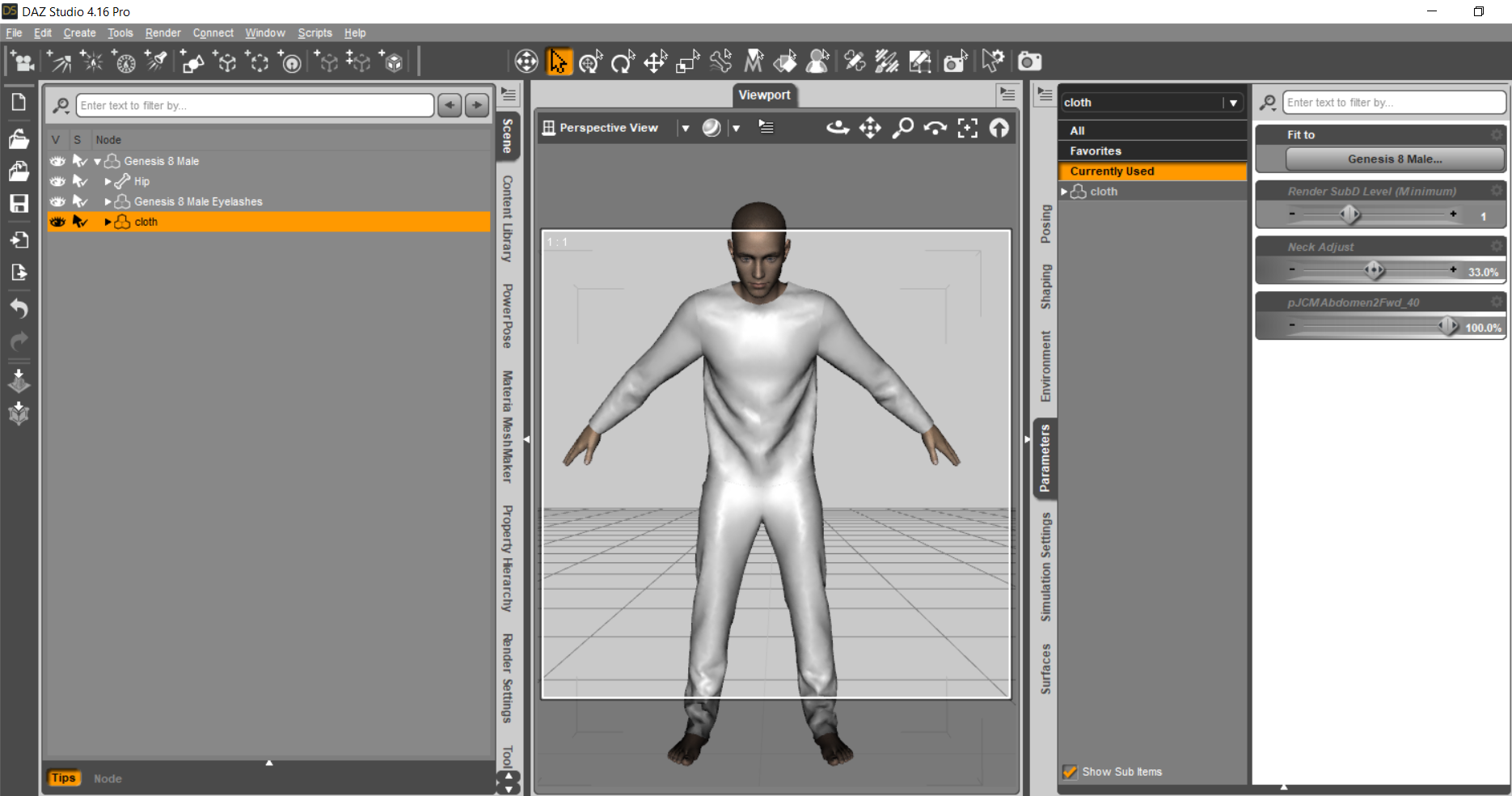
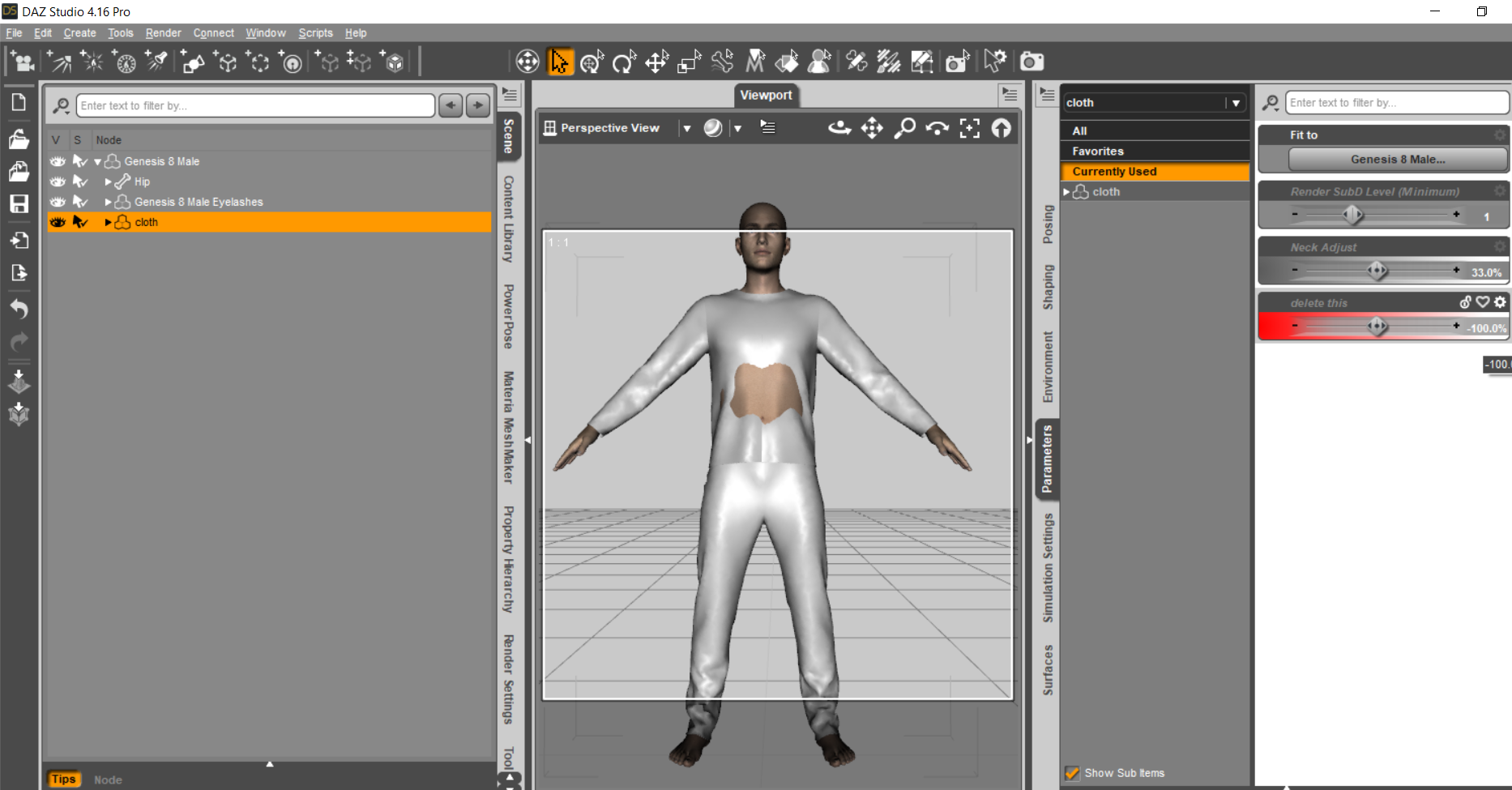
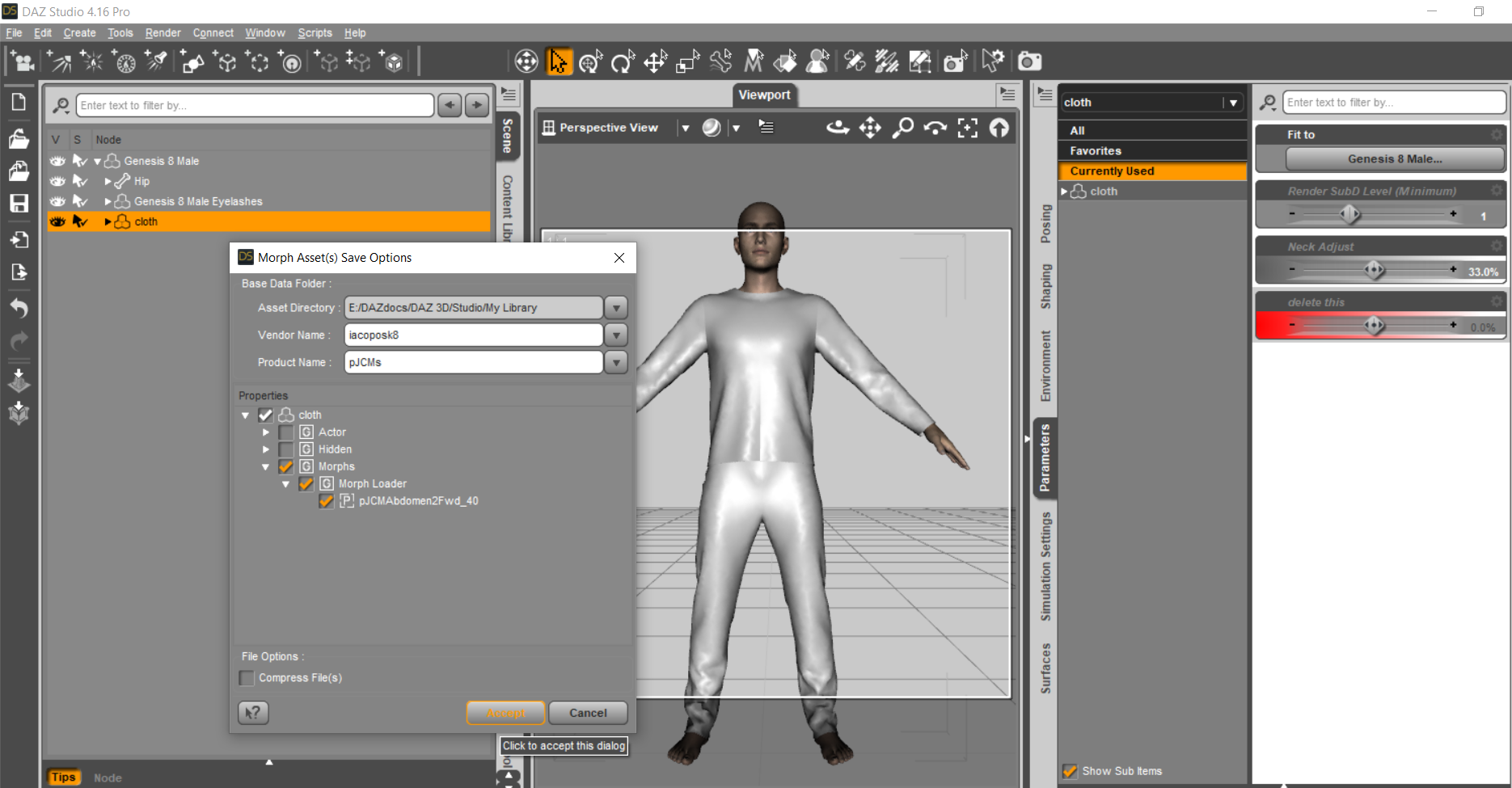
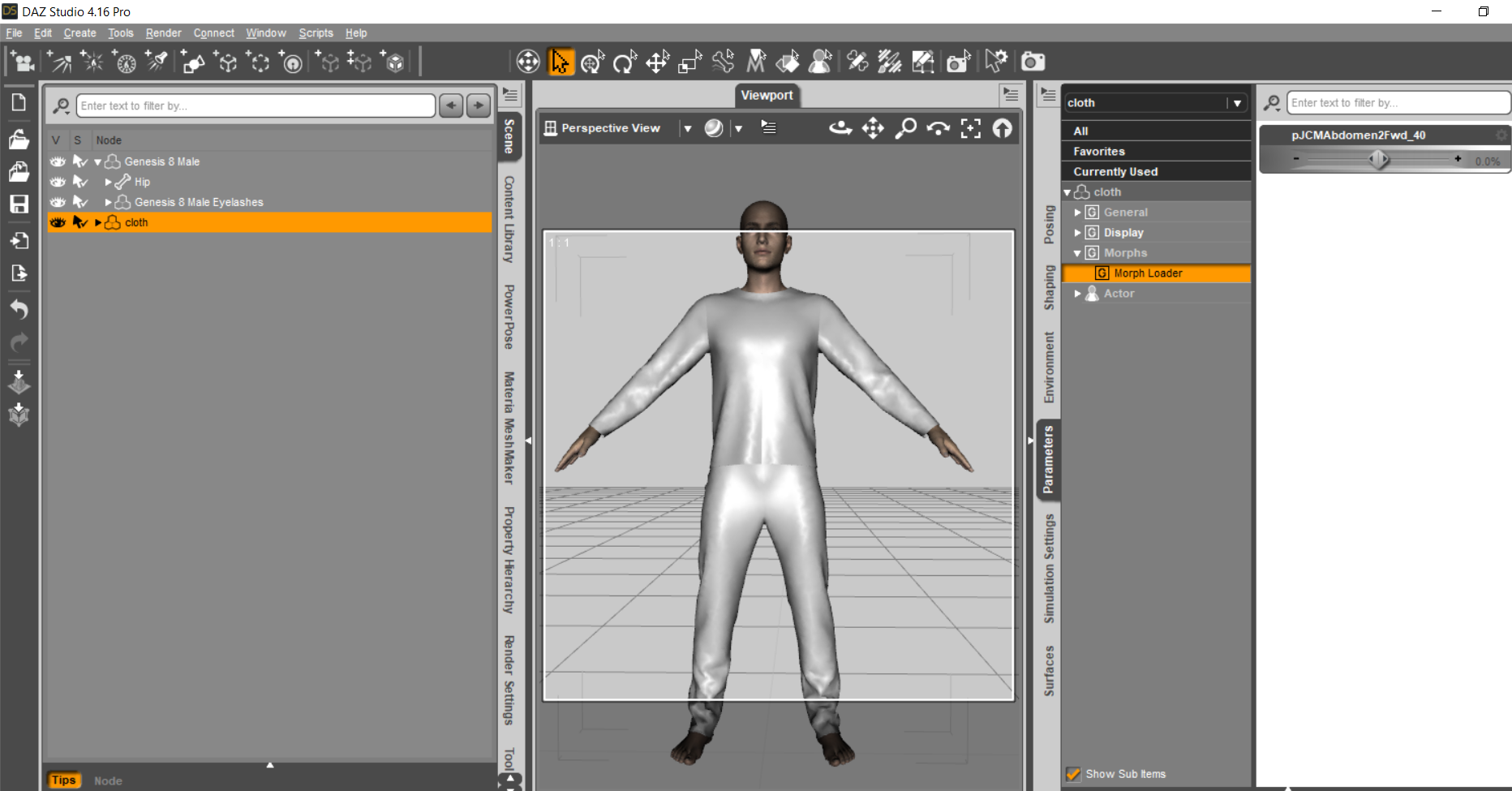
 How to print a part (torso) of a character?
TimberWolf said:
Full disclosure - I know nothing about 3D printing but I did do an .stl conversion for a colleague at another company as a favour and it worked perfectly, I'm told.
Export your geometry as an .obj but set the scale to Blender in the options. Import the .obj into Blender (File -> Import -> Wavefront), after first having deleted the default cube, camera and light, and then simply export it (File -> Export -> Stl) as an .stl. If you've used Blender before then you'll know what you're doing but, if not, you can do this with absolutely zero knowledge of how it works.
I'm not exactly sure what you mean by the measurements not being the same as I assume you're not trying to print out a life-size human torso! Do you mean the geometry gets compressed in one or more axes, something like that?
Thanks a lot for these explanations... I will convert with blender...
Yes, I want to print in real size (it's a gift for my wife), the height of the torso is 95 cm on Daz.
On Daz studio, when exporting the file (.obj)
Daz => 1 unit = 1 cm
Blender => 1 unit = 50 cmBut in the software of the 3D printing service (Materialise software) the torso is 95 mm.
How to make the 3D printing service have 95 cm and not 95 mm?
Thanks
How to print a part (torso) of a character?Full disclosure - I know nothing about 3D printing but I did do an .stl conversion for a colleague at another company as a favour and it worked perfectly, I'm told.
Export your geometry as an .obj but set the scale to Blender in the options. Import the .obj into Blender (File -> Import -> Wavefront), after first having deleted the default cube, camera and light, and then simply export it (File -> Export -> Stl) as an .stl. If you've used Blender before then you'll know what you're doing but, if not, you can do this with absolutely zero knowledge of how it works.
I'm not exactly sure what you mean by the measurements not being the same as I assume you're not trying to print out a life-size human torso! Do you mean the geometry gets compressed in one or more axes, something like that?
Downloading OptionsIn what way did it not work to copy things over? For Install Manager or Daz Central to see installed content you need the Manifests folder from the old machine; for the database-driven views (everything except the ... Formats containers in the Content Library, and not the Daz Connect container within those) you need the database from the old machine or to reimport the metadata (having exported the userdata on the old machine if you want your own files to be shown in those views).
Old DSON and file locating system question for DAZ DevsGIWP Media said:
Richard,
I had a couple of questions about your last reply if you don't mind clarifying them for me.
(1) You stated the DUF file is the only one wth real importance as the Cr2 that DSON Importer creates is really just a go-between that lets Poser understand the data in the DUF. I get that and that's exactly what I assumed was happening, but the auto_adapter files and the other locations I'm finding files are inside the Studio directories. So Studio (via the DSON Importer app) is creating these files. And when inside Poser resaving a Cr2 that's been imported, Poser cannot write to a DAZ directory --- so I'm still stuck asking why these files exist to start with. In simpler terms if Studio doesn't need anything but the files we install during product installation (say the files that come with a shirt we buy from DAZ and then install) then Studio isn't using these auto_adapter files for itself. And if DSON Importer is only directing Poser on how to use the original DUF files --- again, what are these other files doing? Surely someone with DAZ has an answer for this. If that person would supply an explanation it would making cleaning up un-needed files much more effective and safe. That's all I'm basically asking. I don't want to start random-deleting files or moving them to see if it crashes anything. If they're all just temp files, great - tell us so we can delete them. If they're needed, then an explanation is really important here.
I thought the topic was the CR2s created by the DSON Importer in the Poser folderstructure (which, as the documents linked above state, are a perfomance aid). Daz Stufio creats files for imported Poser content in the Auto_Adapted folder, again for performance reasons.
(2) You made an addendum there at the last about Poser compatible files which I guess you're talking about the Genesis 1/2 content that had Poser specific versions/addons - but that's not what I'm talking about here. I'm specifically talking about modern, DAZ-only, Genesis 3 and 8 content. I convert it over to make a Cr2 file for Poser. I go to Poser and load it using DSON Importer plugin. I swap it over to Poser format and adjust any missing textures and whatnot, then I resave it via Poser so that I don't have to readjust everything again later to use it. So in a perfect world, Studio should only be making a DUF of the conversion and a Cr2 for Poser. Poser utterly relies on a base OBJECT file(s) and its own Cr2 file (which contains all data it needs including materials as you noted). So where does the auto_adapted directory and the other various treasure troves of files come from? Poser is not making them and putting them in the Studio directories. It cannot write there. It can only write to its own directory unless you manually save something elsewhere. So again, the DSON Importer is creating and scattering files to:
Users / User Name / AppData / Roaming / DAZ3D / Studio4 / temp (which has a Cr2Assets file in it?)
My selected Runtime Directory / Runtime / DSON / auto_adapted (where all the junk accumulates...50+ GB)
These are the fils created by the importer - doing other things to the imported content after import to turn it into native content (if I am following you) has no bearing on that. What I said above was about Genesis and Genesis 2 content because that is all that Daz supports - .it still applies to any other content you export companion files for and load into Poser.
As mentioned, the auto_adapted is the biggest offender location...and we really, really need to know what's going with this so we (as users) can avoid build-up and clutter of our limited hard drives. Please inquire about this to the programmers if possible or whomever might have been on the Importer development team. Surely someone knows what is happening with this. Thanks again for your continued discussion on this and I appreciate your time and efforts.
I apologize if I offended any other users with my insistence on this thread remaining sort of closed to non-DAZ staff. I meant no insult towards anyone - and intended this request only to ensure that misinformation is not inserted or the topic does not veer off and derail the original purpose. As you all know that happens a lot in open forums. In this case the sensitivity of the discussion and topic simply needs to remain focused and informed to prevent bad information from causing users to damage their runtime files and lose data. My only intent was to preserve and protect users from invalid information.
[Released] Turbo Loader Booster Utilities [Commercial]greg_82000392 said:
In my random playing with these wonderful tools I ran into a perplexing issue. I can enable or disable the character HP Uki succesfully in the main G8F manager interface. However if she is disabled and I use the "enable and load" utility it enables some eyelashes but fails to enable the three main files. Every other character I've tried works fine. I think this is the releavant section of the log file:
2022-05-17 23:42:29.403 [DEBUG] :: Turbo Loader Open File START E:/Public Folders/Public Documents/My DAZ 3D Library/Scripts/RiverSoft Art/Turbo Loader/Turbo Loader Open File.dse
2022-05-17 23:42:29.405 [DEBUG] :: Enabling morphs for asset, Uki: L:/DAZ 3D Libraries/Character Library/People/Genesis 8 Female/Characters/Uki.duf
2022-05-17 23:42:29.449 [DEBUG] :: Find Related Morphs Hidden Morphs /data/DAZ%203D/Genesis%208/Female/Morphs/Hinkypunk/HP_PHMLashes.dsf
2022-05-17 23:42:29.449 [DEBUG] :: Morph 0 /data/DAZ 3D/Genesis 8/Female/Morphs/Hinkypunk/HP_PHMLashes.dsf
2022-05-17 23:42:29.452 [DEBUG] :: FRM: E:/Public Folders/Public Documents/My DAZ 3D Library/data/DAZ 3D/Genesis 8/Female/Morphs/Hinkypunk/HP_PHMLashes.tlOff
2022-05-17 23:42:29.453 [DEBUG] :: Hinkypunk 1
2022-05-17 23:42:29.453 [DEBUG] :: FRM: /data/DAZ 3D/Genesis 8/Female/Morphs/Hinkypunk/HP_PHMLashes.tlOff
2022-05-17 23:42:29.530 [DEBUG] :: 0 /data/DAZ 3D/Genesis 8/Female/Morphs/Hinkypunk/HP_PHMLashes.dsf
2022-05-17 23:42:29.530 [INFO] :: HP_PHMLashes
2022-05-17 23:42:29.531 [DEBUG] :: Enabling data/DAZ 3D/Genesis 8/Female/Morphs/Hinkypunk/HP_PHMLashes.dsf
2022-05-17 23:42:29.532 [DEBUG] :: Renamed E:/Public Folders/Public Documents/My DAZ 3D Library/data/DAZ 3D/Genesis 8/Female/Morphs/Hinkypunk/HP_PHMLashes.tlOff to E:/Public Folders/Public Documents/My DAZ 3D Library/data/DAZ 3D/Genesis 8/Female/Morphs/Hinkypunk/HP_PHMLashes.dsf
2022-05-17 23:42:29.533 [DEBUG] :: 1 /data/DAZ 3D/Genesis 8/Female/Morphs/Hinkypunk/HP_PHMLashes.tlOff
2022-05-17 23:42:29.533 [INFO] :: HP_PHMLashes
2022-05-17 23:42:29.533 [DEBUG] :: Enabling data/DAZ 3D/Genesis 8/Female/Morphs/Hinkypunk/HP_PHMLashes.tlOff
2022-05-17 23:42:29.534 [DEBUG] :: data/DAZ 3D/Genesis 8/Female/Morphs/Hinkypunk/HP_PHMLashes.tlOff NOT FOUND.
2022-05-17 23:42:29.581 [DEBUG] :: 2 morphs were searched for
1 Enabled (0 failed to enable)
0 Disabled (0 failed to disable)
1 unchanged
0 skipped
in 179 msecs
Note: Multiple files may exist for a morph if you use Daz Connect
2022-05-17 23:42:29.582 [DEBUG] :: Merging true
2022-05-17 23:42:29.582 [DEBUG] :: Apply Preset L:/DAZ 3D Libraries/Character Library/People/Genesis 8 Female/Characters/Uki.duf
2022-05-17 23:42:29.583 [INFO] :: Prepare asset load (open): /People/Genesis 8 Female/Characters/Uki.duf
2022-05-17 23:42:29.583 [INFO] :: Locking viewport redraw...
2022-05-17 23:42:29.583 [INFO] :: Viewport redraw locked.
2022-05-17 23:42:29.680 [INFO] :: Native format content directories: 5
2022-05-17 23:42:29.680 [INFO] :: Poser format content directories: 3
2022-05-17 23:42:29.680 [INFO] :: Other import format content directories: 0
2022-05-17 23:42:29.680 [INFO] :: Begin asset load (open): /People/Genesis 8 Female/Characters/Uki.duf
2022-05-17 23:42:29.708 [WARNING] :: ..\..\..\..\..\src\sdksource\general\dzundostack.cpp(739): DzUndoStack::clearAll() called with a non-zero hold level. Possible unclosed beginHold().
2022-05-17 23:42:29.713 [INFO] :: *** Scene Cleared ***
2022-05-17 23:42:29.713 [INFO] :: Determining missing assets...
2022-05-17 23:42:29.714 [ERROR] :: Open File Failed - Could not read file: /data/DAZ 3D/Genesis 8/Female/Morphs/Hinkypunk/Uki/Uki.dsf
2022-05-17 23:42:29.790 [WARNING] :: Could not resolve: /data/DAZ 3D/Genesis 8/Female/Morphs/Hinkypunk/Uki/Uki.dsf
Something in Uki.duf is messing the script up I think. The relevant problem is not much is found in that file for some reason, your log states:
2022-05-17 23:42:29.449 [DEBUG] :: Find Related Morphs Hidden Morphs /data/DAZ%203D/Genesis%208/Female/Morphs/Hinkypunk/HP_PHMLashes.dsf
If I run it on something like Angel HD for G8F, I get a lot more morphs found in the original file:
2022-05-18 06:20:45.979 [DEBUG] :: Find Related Morphs Hidden Morphs /data/DAZ%203D/Genesis%208/Female/Morphs/Mousso/Angel/MSO%20Angel%20Lashes.dsf,/data/DAZ%203D/Genesis%208/Female/Morphs/DAZ%203D/Base/PHMMouthRealism_HD_div2.dsf,/data/DAZ%203D/Genesis%208/Female/Morphs/DAZ%203D/Base/PBMNavel.dsf,/data/DAZ%203D/Genesis%208/Female/Morphs/Mousso/Angel/MSO%20Angel.dsf
Please PM me.
Daz 3D is part of

Connect
DAZ Productions, Inc.
7533 S Center View Ct #4664
West Jordan, UT 84084Licensing Agreement | Terms of Service | Privacy Policy | EULA
© 2026 Daz Productions Inc. All Rights Reserved.