-
Diffo error when exporting Daz to Blender?
When you install a new version you have to replace both the blender and daz parts. Then export/import via dbz. If you use a old exporter with a new importer you may get issues.
Is it possible to reinstall daz with only the products that I useYou install and uninstall with DIM (or DAZ Central), or you install and uninstall with Connect (through Smart Content), don't mix the two. If you installed with DIM, you cannot uninstall from Studio in the Smart Content tab, and vice versa.
Smart Content will see the assets and provide the necessary associations and dependencies regardless of how it got the metadata, from DIM or from Connect.
If the icon is greyed out, Studio does not see the product as installed, so you couldn't uninstall it even if you tried, but it shows as available. If you are using DIM, do not ever install from Smart Content. I can't say that often enough.
To remove the greyed-out icon, go to the Content Library tab (NOT Smart Content). Select Products on the left. You will see the alphanumeric headings. Pick one. Wait for it to refresh the view. Go to the bottom of the list. Any uninstalled products will be there as greyed-out icons. Right-click on one and DELETE it (you cannot do that from the Smart Content tab). Studio will process for a few seconds and the view will clear. You have to pick the alphanumeric heading again and return to the bottom of the list if there are more to delete. Repeat for each uninstalled product you want to make disappear. I do not know of any way to do more than one at a time.
After deleting the product from the database, they should not appear in the Smart Content All or Available tab anymore. (I say "should", but I have never let Studio log in, so I cannot say for sure, but when I do this procedure on my Content Library, the greyed-out icons for uninstalled products in the Smart Content views also disappear).
Diffeomorphic DAZ Importer version 1.6.0 releasedI'm having a small issue with importing to Blender. I've got it all set up, and I did have it working correctly a couple times, but I don't know what's changed or what step I am missing.

The MHX rig is not complying with the character's morphed size, it seems to only be coming out as the default G8F body. Again I have done it correctly before where the rig properly followed the character. I just didn't save it because I wasn't ready to work on the "complete" character yet.

These are the settings I am selecting when I hit "Easy Import Daz". Basically just copied what I saw in a tutorial video. I also don't get any errors saying "missing content" or anything like that. Just the warning that I may not have enough lighting for cycles.
Carrara Challenge #62 "Clowns and Other Circus Stuff" -Diomede said:
Had to rattle my memory a little because I don't use V4/M4 much anymore. Here is a workflow to get a mesh from Carrara to Daz Studio and convert it into a conforming figure for the V4 generation, or any similarly rigged figure. The key is to load a V4 (or whichevr figure) in Daz Studio and convert the rigging to weightmapping, and then convert to triax weights. Once V4 is converted to triax weightmapping, the transfer utility in Studio can be used to transfer the rigging to your mesh.
- to start - load your V4 figure in Carrara along with whichever mesh you want to use. I modeled a quick shirt. You could load anything you want and then use Carrara's vertex modeler to adjust to V4.
- export the mesh as an obj from Carrara using the Daz Studio Full Scene preset.
- start the free plugin known as Daz Studio. Load a V4. Edit, Figure, Rigging, Convert to General Weight, Convert to Triax
- import the mesh obj. use the preset labeled Carara. It will match the export Daz Full Scene preset from the second step.
- the mesh should align as per your scene in Carrara
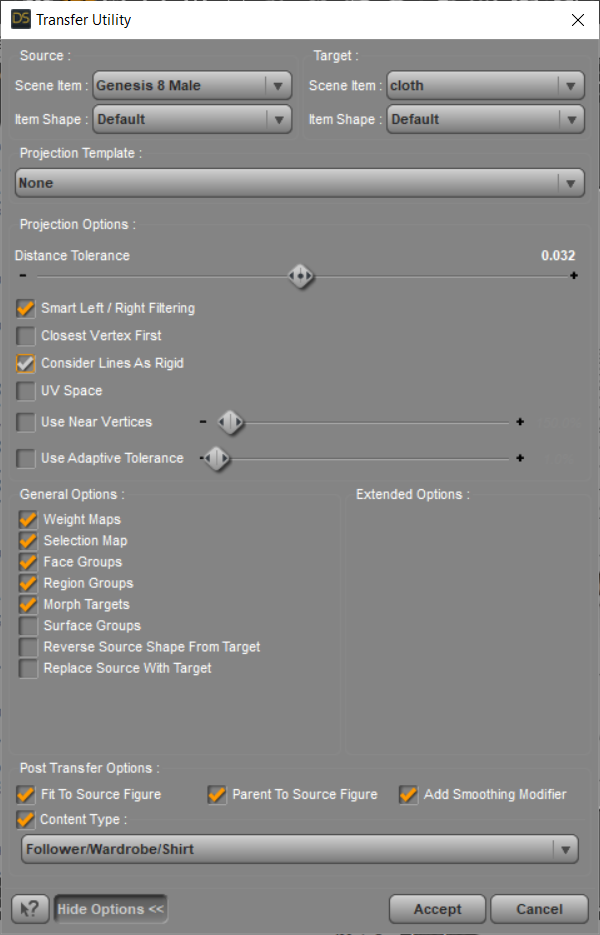
- select the mesh. Use the transfer utility. Edit, object, transfer utility. V4 is the source object. Your mesh is the target. If desired, show option and choose if any useful.
- Result in Studio, mesh should be a figure and conform to poses of V4.
- Save your converted mesh. I unconformed the mesh, deleted the V4, and then saved as a scene preset. Not sure if that is best but it worked.
- Start a new Carrara scene. Load V4. Load your saved converted mesh figure. Use Fit To to conform your new cloth item to V4.
** There is bound to be some rough fits with weightmapping etc, especially with sucky mesh like my test mesh.
To be honest, I was just going to give up and compromise by using a product already designed for V4. But since you went to so much trouble... :)
Between you and Chris Foxes comments, and Dart's old video, I was able to figure it out. Many thanks! Not sure how it will look animated - not that far yet - but the clothing definitely moves with V4. The process was kind of amazing, and kind of a PITA. But for sure a strange new world for me.
No, I don't have either Poser or VWD, unfortunately.
Even though there are several options for saving the finished product in DS, I used Scene Subset as you suggested, and it worked fine.
Any chance of seeing NEW characters for G3? G2?wolf359 said:
(I have not tested cascadure but I am not hopeful as it relies upon FBX import into DS)
Ironically, despite the "export to Daz Studio" command being the only export option that seems to work in the free version of Cascadeur, I have yet to figure out how to successfully import animation into DS and onto a G8 character (but have no problem getting them to work in C4D and Houdini). The arm rotations are really wonky, as if I were applying a T-pose animation, but I built the animations on a G8 to begin with. Granted, I've spent very little time even attempting to animate in DS, so there's probably something really obvious I'm missing.
[Released] Morph Editor for ManFriday's Mesh Grabber [Commercial]lamoid_5f20d3e469 said:
Dumb question, perhaps: I've created a morph by saving the MG deltas using the MG morph add-on. Now I want to use that saved morph on a new figure in a new scene. The documentation reads:
- The "Load" button allows you to import the deltas of any existing morph into Mesh Grabber for editing. Simply mark one or several morphs as "favorites" in the properties pane and press "Load".
Q: how can I mark the the morph as a favorite it I have not yet loaded it?
After originally creating the morph with the Save button, did you follow the instructions in the Mesh Grabber manual to write the morph out to disk as a permanant moprh file (“File” → “Save as” → “Support asset” → “Morph asset”)?
[Released] Morph Editor for ManFriday's Mesh Grabber [Commercial]Dumb question, perhaps: I've created a morph by saving the MG deltas using the MG morph add-on. Now I want to use that saved morph on a new figure in a new scene. The documentation reads:
- The "Load" button allows you to import the deltas of any existing morph into Mesh Grabber for editing. Simply mark one or several morphs as "favorites" in the properties pane and press "Load".
Q: how can I mark the the morph as a favorite it I have not yet loaded it?
Any chance of seeing NEW characters for G3? G2?“Legacy figures and Genesis 1 and 2 import BVH easily from softwares like iClone 3DXchange or FBX exported as BVH from many other programs inclucing the Plask.ai video mocap
good luck with Genesis 3 and 8 and if you succeed I hope you like foot skating
“
I was a G2 holdout for years until I migrated from C4D to Blender.Understand this: You can get flawless G8 animation data imported into Daz studio as baked FK….but not from any FREE source IMHO ….only via $$$Autodesk MOBU and RL 3DX tools$$$
(I have not tested cascadure but I am not hopeful as it relies upon FBX import into DS)
If you render your G8 figures animated in Blender (via diffeo)
the world of Character animation is at your feet (without sliding LOL!!)My youtube channel has multiple Videos on retargeting options to G8 in Blender including to the G8 figures converted to rigify.
The issue of animation of Genesis 8 is resolved for me.
Is it possible to reinstall daz with only the products that I useWhen you uninstall something that was previously installed (at least with DIM), the product icon remains at the bottom of the Product list, greyed-out, because the metadata isn't truly deleted.
Do not even look at the Smart Content tabs for installation guidance. Continue to use DIM as you have been, and do not mix with Connect (through Smart Content). Just use the Installed tab to use what you actually have installed.
If you really want to remove the greyed-out icons, go to the Content Library - Product list and select each alphanumeric folder. The uninstalled products will be at the bottom of the list. You can delete all trace from the database by deleting (right-click -> Delete) the greyed-out icons (unfortunately only one at a time). There's a cause looking for a script... (You cannot remove them from the Smart Content pane directly).
A little tutorial for making stuff useable for Victoria4.2 figures.It's easier for Genesis figures to use the Transfer Utility function in Daz Studio but if you like me and love the Victoria 4.2 figures, than you might want to know how to fit stuff to the figure and at the end you could use about anything that will load into carrara to fit on V4.2.
After some research i found a topic in Daz Forum with a little tutorial for that thanks to the User jktarwater_8568c339b9
Original Thread: https://www.daz3d.com/forums/discussion/52699/need-tutorial-for-making-clothes-for-victoria-4-2)
I have now used this method for clothing and hair, will test it out with figures later too but i think this should work too.
So first step, take the 3D object you like, any cloth or hair. If you already have the item as an .obj file, it's easy but if you don't you just need to export it as an object file.
- So in Carrara i load my morphed figure, if i want to place a dress that was modeled to the figure, or i just load a normal V4.2 figure into the scene.
No morphs or textures needed for this.
- Than i import the object i want to fit on the figure, like a Haircut or a Dress and set the size (Overall) and position where it should be, with a Dress, i might model it into position that no skin shines through.
- After that is done i export the object as WaveFront Obj. and use the Target DazStudio (Full Scene). Textures aren't that important right now as you can do it later in Daz Studio or in Carrara if you have finished the whole process.
- Open Daz Studio and first load V4.2 figure or your custom figure into the Scene (no morphs needed). Click the Figure in the scene Tab, than go to Edit > Figure > Rigging > Convert Figure to Weight Mapping.
Than choose the option TriAx Weight Mapping and click ok.
- The next Step is just load the item you like to fit, the .obj file into the Scene as import, Convert to Daz Studio from Carrara. No other settings have to be done, just click ok and the object should than load in place.
Best thing to put or save the obj file into ...\Documents\My DAZ 3D Library\Runtime\Geometries\ (you can than create a folder you like to use). Be careful where to put the files as Daz Libary will be in public and in user documents, that can be a little confusing, you can also use both of them but you should know where the files are.
- After importing the obj. file you can than if you like add textures to it or you go directly to the next step.
- Select the Hair in Scene and Editor Tab and click: Edit > Object > Transfer Utility, As Source Scene Item you can now choose Victoria 4.2 and as Target the object you like to fit and hit ok.
- Select the Hair again in the Scene and Editor Tab and export it as a Poser CR2 File in this location: ...\Documents\My DAZ 3D Library\Runtime\Libraries\Character\...
You can also create a folder you like for this and hit ok. As Export Options nothing have to be changed, just click Ok.
- Daz might ask you for the location of the Object file as if you already have set it to the Geometries Runtime you can just click the file there, otherwise you should add the file there now as Daz will say that it's not the correct location if you put it somewhere else.
- After that is done there is only one step left. The hair still selected, or if not select it again and go to File > Save As > SupportAsset > Figure/Prop/Asset and save the file here: ...\Documents\My DAZ 3D Library\Runtime\Libraries\Character\... you can create your own folder again where you want to have it within the libary and just save the file.
As options for saving you can just take a look at the Metadata, the first option is SetContent Type, if you click Follower, you can than click for example Hair.
SetCompatible With should be activated, there should be Generation4/Victoria4 if it is, than just click Accept.
That was the last step, the file is now in your libary and you can update your Folders within Carrara, than just go to the location where you have saved it and you can load it directly into the scene and fit it to V4.2 figures.
I like to test out later to import a custom figure (from game for example) to make it like a full dress for the figure, than adding it, making V4.2 invisible and it sould be like an own figure where you can use all the V4 poses you have (but you still need to select V4.2).Converting obj to Conforming ClothingI have tried to design clothing in marvelous designer for daz studio for genesis female characters, but when I import the clothing .obj file into daz studio. It's to rigid on the character and doesn't fit properly after I "tranfer utilizes" to my character. I zero out all the current settings in parameters tab, and what I'm left with is very rigid. Is there a way to change the surface settings to make it less rigid? But not DForce: I've tried DForce and get nowhere with it.
Daz to Blender not installing correctly?I am having a huge issue with D2B bridge. On Daz Central it lists version 2.4.0 'Daz 3D Genesis 3/8 transfer to Blender"
However, when I install it, Blender describes the plugin as "Import Export DAZ (.duf, .df) Importer" ver 1.6.2
I have tried to uninstall/reinstall but nothing seems to work. Am I doing something wrong? I can't import my Daz Gen 8 female to Blender on this current version.Carrara Challenge #62 "Clowns and Other Circus Stuff" -Had to rattle my memory a little because I don't use V4/M4 much anymore. Here is a workflow to get a mesh from Carrara to Daz Studio and convert it into a conforming figure for the V4 generation, or any similarly rigged figure. The key is to load a V4 (or whichevr figure) in Daz Studio and convert the rigging to weightmapping, and then convert to triax weights. Once V4 is converted to triax weightmapping, the transfer utility in Studio can be used to transfer the rigging to your mesh.
- to start - load your V4 figure in Carrara along with whichever mesh you want to use. I modeled a quick shirt. You could load anything you want and then use Carrara's vertex modeler to adjust to V4.
- export the mesh as an obj from Carrara using the Daz Studio Full Scene preset.
- start the free plugin known as Daz Studio. Load a V4. Edit, Figure, Rigging, Convert to General Weight, Convert to Triax
- import the mesh obj. use the preset labeled Carara. It will match the export Daz Full Scene preset from the second step.
- the mesh should align as per your scene in Carrara
- select the mesh. Use the transfer utility. Edit, object, transfer utility. V4 is the source object. Your mesh is the target. If desired, show option and choose if any useful.
- Result in Studio, mesh should be a figure and conform to poses of V4.
- Save your converted mesh. I unconformed the mesh, deleted the V4, and then saved as a scene preset. Not sure if that is best but it worked.
- Start a new Carrara scene. Load V4. Load your saved converted mesh figure. Use Fit To to conform your new cloth item to V4.
** There is bound to be some rough fits with weightmapping etc, especially with sucky mesh like my test mesh.
Show Us Your Bryce Renders Part 12Horo - Amazing terrain in that spaceship render. Your treetrunk render reminded me a bit of a ct scan
 A remarkable render! Rendering realistic looking windows is no small task, but you have managed it beautifully! Sizing has also always been a problem for me, it just has to be done as a feels-about-right. The plane render has an amazing landscape, very detailed.
Mermaid - Misty day rerender looks even much better. Very nice to look at. The ship and lighthouse render is just about perfect.
adbc - That bamboo and ferns are an absolute perfect combination. Together with the terrain material and eastern gate, this is a real beauty of a render. Good job! That mirror/tree/sphere render has something menacing about it, like Horo said, like a metal ninja spider on steroids. Beautifully done. The oriental junk render is just amazing.
---
I have been playing around with exporting from UE5 to Bryce but unfortunately this proves to be almost(?) impossible. Every time Bryce gets a complicated mesh to chew on it smacks me in the face with an error-and-automatic-exit message. Here, Bryce shows its age alas. But I'll keep chipping away at this problem and maybe one day...
Meanwhile I am falling heavily in love with UE5 and almost exclusively work with it now despite its complexity. To be honest, Bryce is a much easyer program to master for a beginning landscape artist and is still a lot of fun to use. I still use Bryce for landscapes and/or meshes that I can import in UE5. Here is one example, I call it "Dune".

edit: added some comments.
Is blender right for me & is it possible to animate daz scene in blender & export animation to daz.Blender is an animation software in the first place. I don't get why you're talking about it this way. You don't need nothing else after you figure it out. I can import mixamo animations to Daz G8 and export it with hd morphs in 3 subdivision level with over 10K frames all with visemes, expressions etc.
3D stuff isn't something like graphic designing or painting. You have to deal with the technical stuff for sure. If you have a problem in Blender like you need something not implemented yet, you just can open the shell and fix it yourself so I never had difficulties like you guys are mentioning. You can't use the software without knowing what it's all about and as I said this is not Photoshop.
I use Daz just to model the character and if I need humanoid animation I import the mixamo fbx to Daz bc all the vertex weights are perfectly assigned there. I take care all the rest in Blender and I think you guys are really really underestimating it. After a while you got used to it you're probably going to have extremely specialized workflow, custom own made features, ui and plugins. Just don't think the problem is with the Blender. It's probably just you are looking for something straightforward. I mean I've been using it for a while and I feel like I have the control in full in Blender. Right down to the deepest attribute of a point because the software itself got adapted to me. You're never going to toss a wall like there always will be a solution unlike the others. You can't improve yourself much if you start to put blame over the software.
Daz to Blender and Diffeomorphic both are useful but if you take a look to the codes it's already not that much complicated to understand the difference between Daz and Blender rigs. And after you understand it you can implement solutions. Not just scripting but playing with the import/export settings or using multiple plugins.Daz3D to Unreal Engine 5 using the UE4 bridge.I'm using v.5.0.0.75 of the plugin and I'm getting the following errors when trying to export a sphere primitive from DAZ to Unreal Engine 5.0.1.
'Could not find any node''Import failed'
Defect on the joints of the clothesCatherine3678ab said:
Okay, took a look at the new files. It's okay to delete all of those now 'cause friend you're going to need to start over anyways.
Couple of tips: .duf files do not import. There's a folder arrangement required when sharing those which can be covered later. Esp. while learning, it would be an idea to NOT encrypt your files - makes finding where you put everything a little easier ;-) Also save the files to the appropriate locations.
I imported the cloth which now is just the top. Okay. I ran the utility and made it into a clothing piece. Not so okay. BUT the good news is, that once you get all the necessary steps figured out, yes with M.D. you can make marvellous clothing "for" use in Daz Studio.
The curves on the seams illustrate that the seams are not welded together. You want these welded together.
Now while I do not own M.D., I have imported a number of clothing .obj files made in M.D. - and sadly most of them are not worth the time required to 'fix' them. So far, you have it right -- single mesh! Yes. It just needs to be welded.
Now, this I do not know, but if there's a way to make the clothing, single mesh, welded together and NO seam tubes ... paradise!!!
Otherwise it's a trip to the modeler to remove all the seam tubes and weld the sections together. Then the uvmap would need to be redone too of course.
Headus UVlayout is 'the' uvmap maker of many {industry standard somebody said}. Or of course in the modeler of your choice. {if the model can be made all in M.D. and it does the uvmap too, that's great.}
Once you get just the top finished, saved, THEN work on just 2 arm morphs. Let's get the workflow happening first.
To share product files: Collector folder > Content or My Library > data > your name > the relevant subfolders AND {Content or My Library} > People > Genesis 8 Male > Clothing > your name > the relevant subfolders.
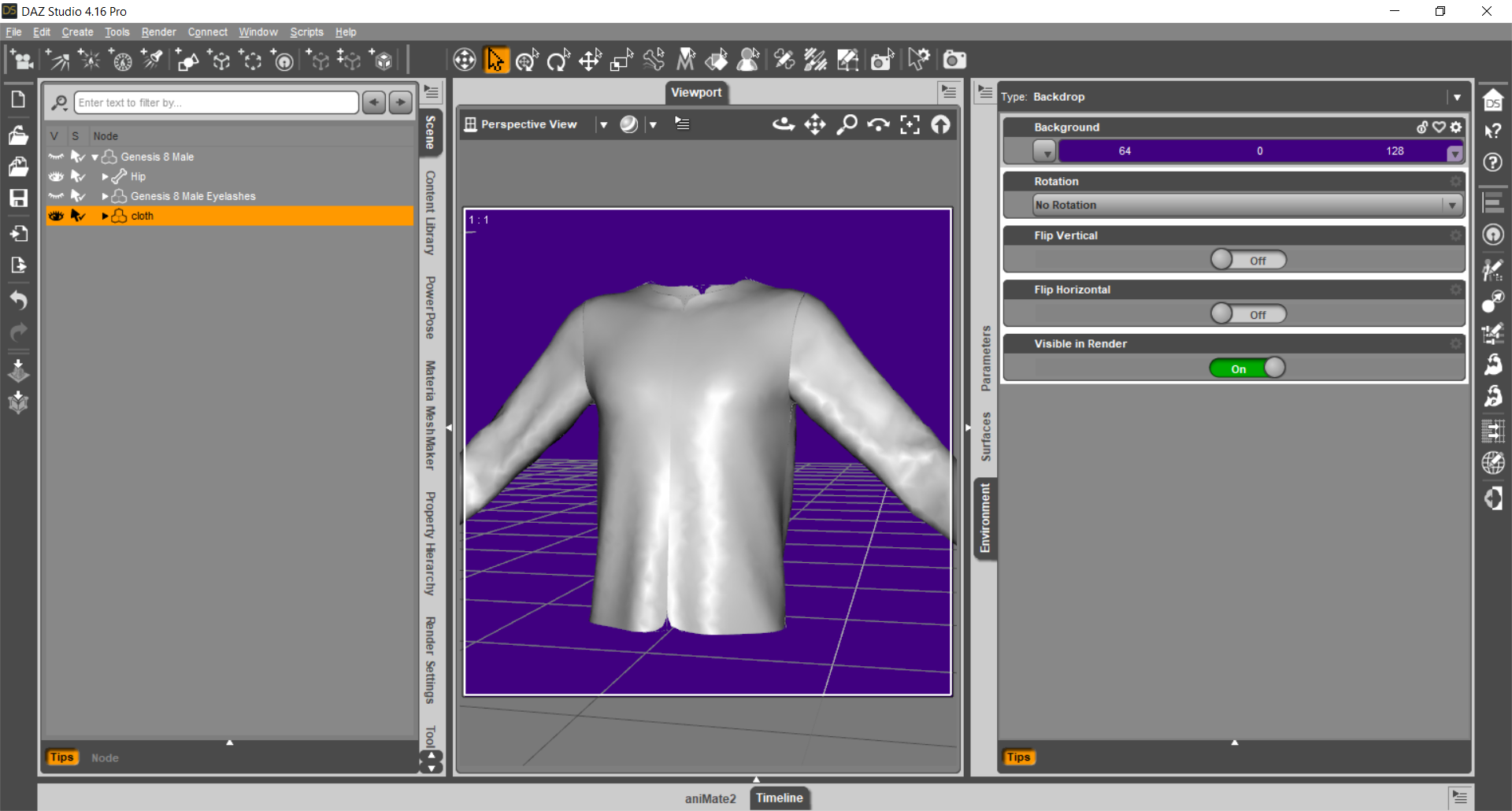

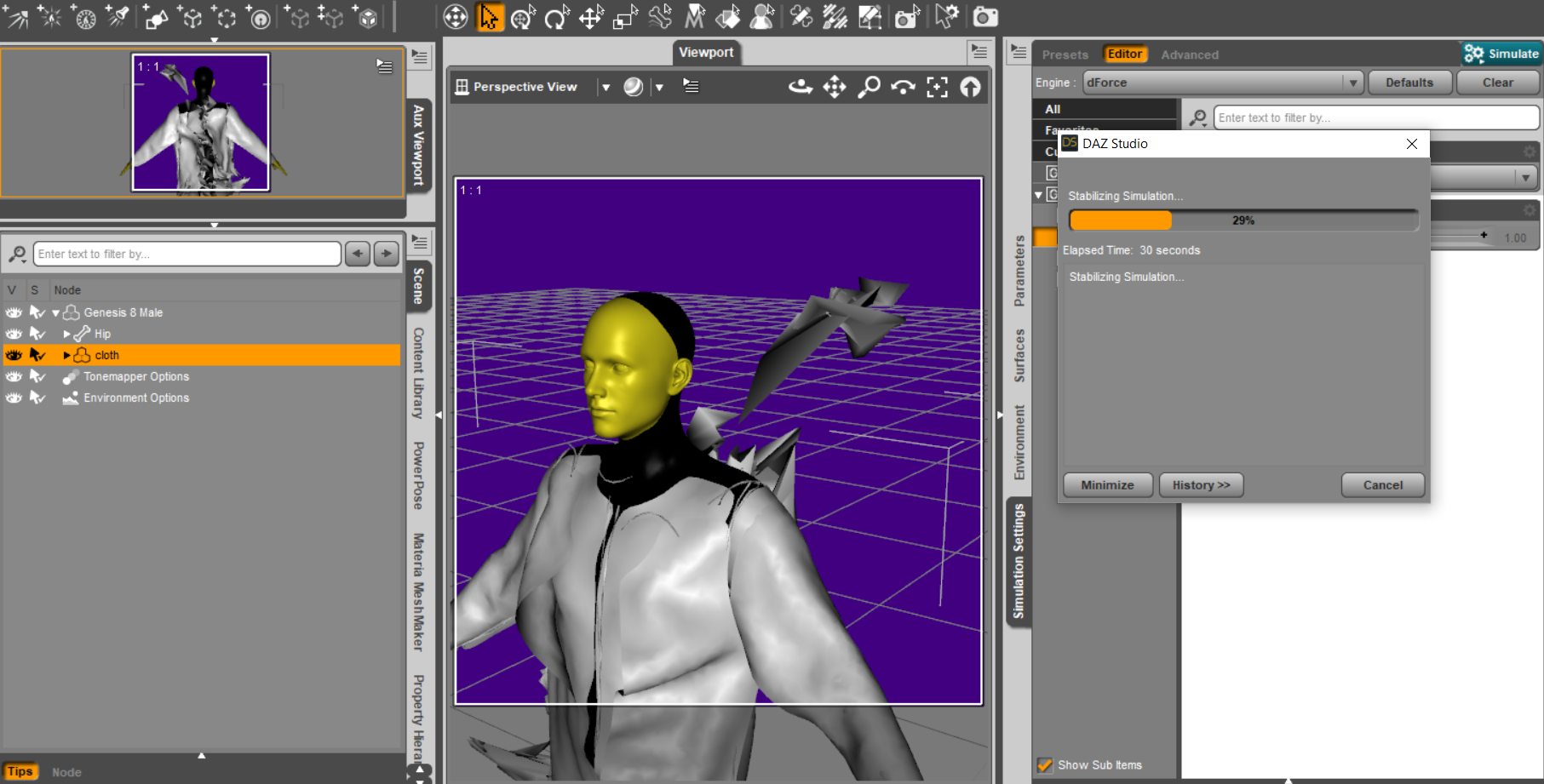
I will never stop thanking you, if you come to Italy I will offer you a beer :)
So the problems you have found are mainly two if I understand correctly:
1) The morph must not modify the whole object but ONLY the interested part
2) For the "fault" of the marvelous seams it is as if the shirt were several objects close together, not a single object. All seams or just the back seams?
Carrara Challenge #62 "Clowns and Other Circus Stuff" -Spent the day looking at free sculpting programmes, settled on Zbrush mini until I started to look for an import dialogue for obj's and discovered that it doesnt have one
I wanted to bring m4 head in and sculp it then export as an obj back to carrara (Goz wouldn't work I think as Zbrush mini seems toonly import zpr files (question mark)
Meshbox was a little simple compared to z brush
Finally downloaded blender and di half a tut - so I sculpted m4's head to make hin even more beautiful then brought him back into carrara and applies my clown texture
Tried to use softbodt physics on the new head to melt it onto a real m4's head - and carrara crashed - too many poys I guess.
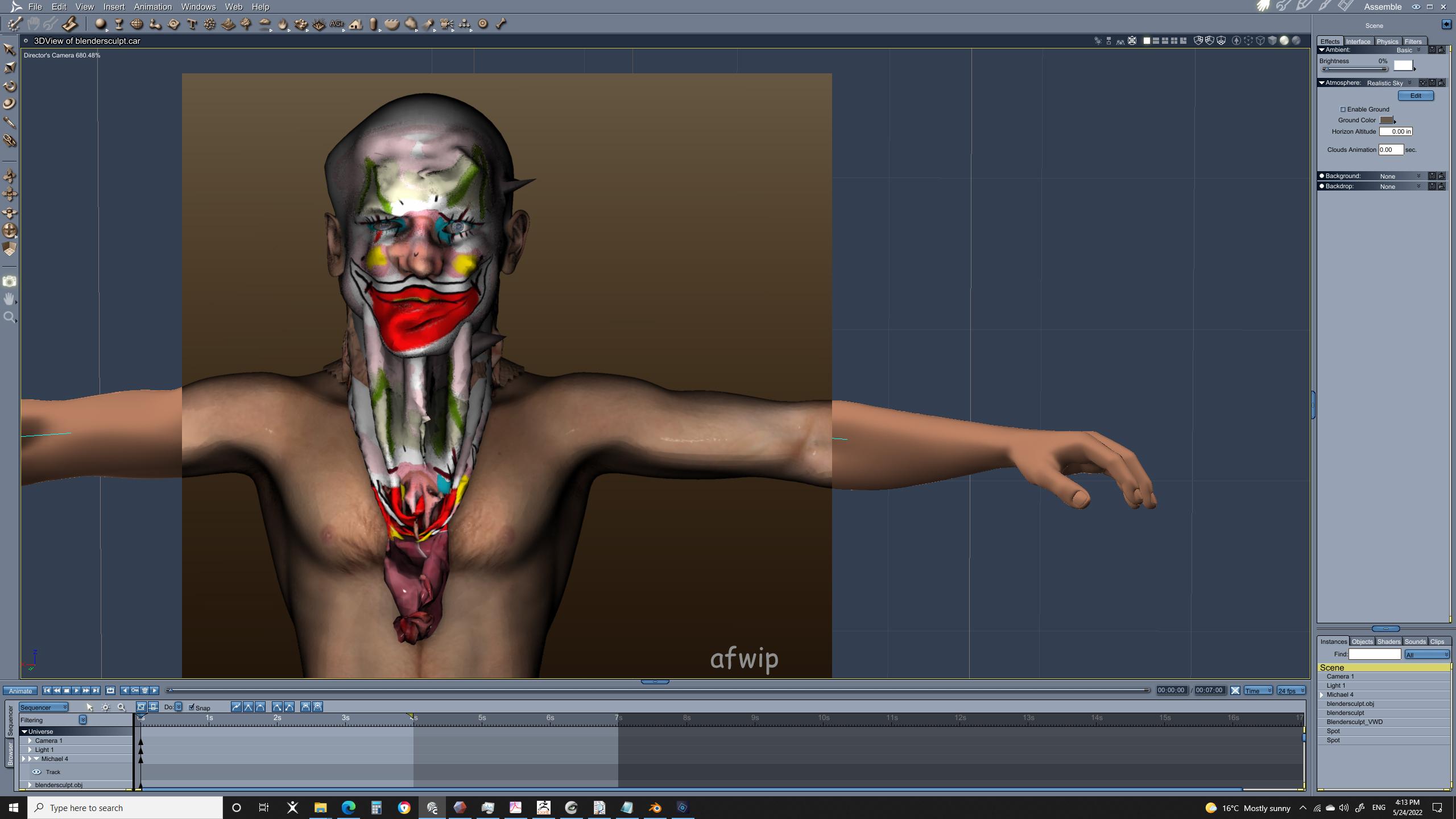
then i used vwd that which must not be named programe and melted the sculpted head on to m4 and end up with very anatomical visceral effect from the eyballs and inner mouth
this image has the sculpted head and the melted one
edit - i've just ordered a 3d printer hence the sudden interest in sculpting for eg a chess set , it will also do carbon fibre impregnated nylon - so surfboard fins hopefully, but it's a slo boat from china...
Creality Ender-3 S1 Pro | Full Metal Direct Drive | CR Touch Auto Leveling (creality3dofficial.com)
 Loading normals with an OBJ's MTL?
DAZ studio is probably the program that imports the least maps out of everything I have used
Carrara imports the most
 including glow channel for emissions from other sources (not DAZ studio) but it hates Unreal exports as it truncates the long names and I lose all the maps and materials saving, at least DAZ studio doesn't do that
 I usually use a go between for both, Ultimate Unwrap3d and edit the crap out of it as those long names are a right pain in DAZ studio too even it if reads them, fitting them all in the names on the surface tab is not easy
Blender might be a good go between or Substance if you prefer as you use it
also DAZ loads obj as one mesh so you really don't want to export a whole Unreal scene to it

FBX won't export any maps so you probably don't want to use that but it will import as separate meshes
Loading normals with an OBJ's MTL?My experience importing things into various programs has taught me not to expect anything but diffuse maps to import, if even those.
Daz 3D is part of

Connect
DAZ Productions, Inc.
7533 S Center View Ct #4664
West Jordan, UT 84084Licensing Agreement | Terms of Service | Privacy Policy | EULA
© 2026 Daz Productions Inc. All Rights Reserved.