-
Daz to maya not exporting environments and props?
Hi. I am trying to export props and environments sets from daz to maya, but when importing in Maya in doesnt import any environments or props, just characters hairs and clothing.
How to manage Smart Content (remove, change drives, etc)?I'm getting a new, faster drive to put my 3D content on, but it won't have room for everything, so I want to split things across to drives, with stuff I use most frequently on the faster one. Is there a way to manage the move so I keep my smart content? I've done a lot of work with a large amount of 3rd party products to ensure they're in my smart content the way I want, so I don't want to lose that. And I have some duplicates I want to get rid of.
Is it possible to split content over several folders without losing metadata? And can old metadata be removed? Some of the stuff I've made but deleted still has blank icons.
Any tips or links to guides on doing this would be deeply appreciated!
Ctrl R don't work and missing filesDo any of the shortcuts show next to commands in the menus? Does the delete key work? It may be an issue with your layout - if so, reload through Window>Workspace>Select Layout (or Window>Workspace>Customise and use the Import button to import the actions only).
The product thumbnails are missing or unreadable - can you open the product? If so are its thumbnails readable, and can you use the files?
Exporting surfaces from 3ds maxleo_bear said:
The situation is: I am using someone else's products created in 3ds max. With textures files and a max file. I successfully exported the model as obj file from 3ds max, but in daz studio the obj file only have one surface. I couldn't apply all the diffuse texture files come with the 3d model. What should I do in this situation, if I want to apply the texture file that came with the model?
I just happened to have a similar situation recently.
Import the .obj into D/S. Go to geometry editor tool, and on the tool pane, see if there are listed what would be the names for the materials but in the area called "groups."
If yes, then begins the journey of selecting each group [in the viewport] and assigning it to a new material. Eventually that wire mat surface will become 0 and it can then be deleted [right click option on the tool panel].
Once all the surfaces have been made, then on the tool panel, make a new group. [one group for each section or whatever you want, one piece is okay too] Depends what the model is. Mine was for 3 trees. So I made 3 groups. Then in the viewport I selected one complete tree at a time and switched it over to the new group made for it. When all the old groups become "0" then they too can be deleted/removed via the tool pane.
Then on the Surfaces Tab [switch back to the normal pointer tool or surfaces tool] select the appropriate fields to apply the existing textures to. Hopefully they were all named the same as the material zones so it's relatively painless.
When finished, remember to SAVE the new prop file. If this is something you want to rig, it can be rigged later. However also export out a new .obj file being sure to 'write surfaces' and 'write groups' so you don't have to do this all over again.
................
If you have 3DMax, seems to me that it should be able to write a proper .mtl file when exporting .obj files, so there must be a setting somewhere to check. The .obj I acquired had for some reason, all the materials written inside the .obj file instead of the .mtl file.
Daz Studio Postgresql And No Database Found ErrorI installed everything again, even daz central, and deleted even appdata folders before install. But when i open the daz it gived the same error. But it showed login screen too but also ended up on an error message without any title or text in it.
Whatever, i saw that i can click on start or stop cms buttons(I were cant before the reinstallation) so i stopped it and start it back. It doesnt solve the problem for sure so i decided to reset the database via content db maintenance. When it finished i processed metadata queue and re-import metadata trought the same path. It also didnt solve the problem because i were still cant login or cant see my files.
But whatsoever when i exit from daz and run it back when i got reply from you it showed me the same error as usual, but beyond that when i try to sign in from the page that appears at the first time you open the app it just didnt give any error and i logged in. So now i can get acess to all my files.
Dont know what solved the problem, probably reinstalling and resetting database and running the app after closing it, but here we are and i hope it helps anyone gets the same issue as me.
And thanks for your interraction with me too Richard. take care
Don't know what this means ...Gordig said:
Compatible with the bridges only means exactly that: they can be sent via bridge to another program. If a product lists Poser compatibility but not DS compatibility, that might mean that it's an older product made for Poser, but most Poser products (at least in the Daz store) will still work in DS, albeit without metadata for Smart Content.
Thanks. That's one of the mysteries cleared up!
Don't know what this means ...Compatible with the bridges only means exactly that: they can be sent via bridge to another program. If a product lists Poser compatibility but not DS compatibility, that might mean that it's an older product made for Poser, but most Poser products (at least in the Daz store) will still work in DS, albeit without metadata for Smart Content.
DAZ To BlenderCan anyone tell what version of DAZ Studio and Blender they are using to successfully import a Genesis 8 figure into Blender? I have the latest DAZ Studio 4.20 and Blender 2.93, but I cannot get a figure into Blender! The DAZ side of the script exports ok and the DAZ To Blender script shows in Blender.But no figure will import. Any help appreciated. Cheers
CAR AND BIKE LOVERS THREAD - MARK V...so this thread continues. Nice. Most of the cars I have are from the store here or Rendo as on other sites they are usually in formats that don't import and I just don't have the skill to convert and clean up any issues in a modeller (and if not free, usually out of my budget).
Still looking for a good original Mini Cooper with RH drive. The one sold here years ago has some smoothing and Ngon issues.
Also looking for a good 25 window VW Safari. My old grade school had a couple which they used as school buses.
Script for grouping back together in unrealI am trying with this:
https://www.daz3d.com/fairytale-collection-darktale-castle
If I select all from content Browser and drag in, they all overlap each other and create a big blob. Like they all goto 0,0,0. I think they is related to my import issue, as when I import other items, it seems to keep the coordinates (worlkd vs local?) and the translate gizmo is offset, however with this castle the translate gizmos are properly placed
Script for grouping back together in unrealIs there an easy way on import to create a full shape of meshes on import.
Example:
I am importing a castle, and I get all the pieces fine. In Daz the castle is fully built with all the pieces, in unreal they are all the individual componets and I have to reassemble them by hand. Is there a way to auto create the scene from daz(The prebuilt caslte )?
I am exporting with default settings as static mesh.
Daz 4.20.0.2
Unreal 5.0.2
"VersionName": "5.0.0.69",
"FriendlyName": "DazToUnreal",
gizmo handles are offset on importWhen I drag/drop the imported static mesh from the content browser, the gizmo/handle for transforms is offset from the mesh. Is there something I need to do on import to get them to line up?
I am exporting with default settings as static mesh.
Daz 4.20.0.2
Unreal 5.0.2
"VersionName": "5.0.0.69",
"FriendlyName": "DazToUnreal",
DAZ to Blender Bridge - Pose/Animation Import ProblemI'm using DAZ 4.20 and Blender 2.83
I was able to import DAZ character. But when I imported a pose, it seem only a small portion of the pose that get imported or translated to the character.
I had tested with base poses, it works, but Not with my own pose and some other poses from different people.
How to get this right?
Or is this a bug?Daz to Unity not workingrockit said:
Hello !
Unhoppely nothing work for me... XD
Daz to Unity is instaled but there is no more install Unity file option. Is it normal ? My latest bridge of DazUnity is 2.0 and Daz 4.15
(PS: i tried to do the famous Read The F...... Manuel but the only thing i found was the readme txt file i put in attachement file).
When i try to import on Unity, the Unity file (scripts,ressources,etc) seem's to import themself (so i guess there is no more option install Unity file to turn on), but the fbx model is not imported.
Hi rockit,
The DazToUnity Bridge UI has been slightly re-organized: The Unity Assets Folder (aka Project Folder) is now the first line at the top instead of at the bottom. This is to remind people that verifying you have selected the desired Unity project is the first step you should always take when using the Daz To Unity Bridge... maybe I need to put a big STEP 1: next to it.
 Anyway, I notice in your screenshots that your Unity Assets Folder path is not the typical path to a Unity Project folder. Please set the Unity Assets Folder to your Unity Project's Assets Folder. This is the same process as with previous versions of DazToUnity Bridge. You may see there is a new option that is in the same place as where "Install Unity Files" would be: immediately below the project folder path (Unity Assets Folder).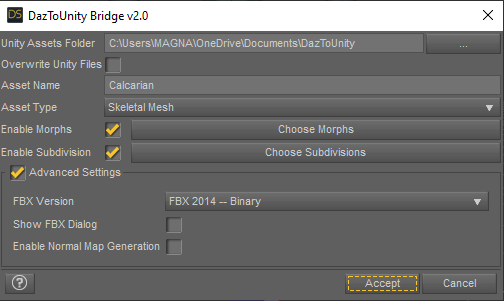
If the Bridge detects that Unity Files have already been installed, the label will change from "Install Unity Files" to "Overwrite Unity Files". You have already updated the Bridge in Daz Studio, but you must also "OVERWRITE Unity Files" to update your personal project folder as well. This will put the latest UnityPackage installers for HDRP, URP and Built-In pipelines into the "Assets\Daz3D\Support" folder. The HDRP Installer will be automatically run -- that is the window you see in Capture5.png.
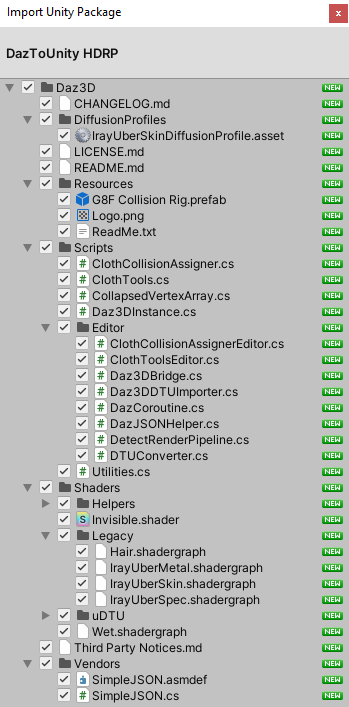
If you are using another render-pipeline, you will need to go into Assets\Daz3D\Support and manually double-click that correct file (either URP or Built-In/Standard Shader files). On the Import Unity Package Window, you must also click Import Files at the bottom, otherwise files will not be updated. If you are using Unity version greater than 2019, you will then get a pop-up dialog asking you if you want to Update Script API. You must click YES, otherwise the scripts will not run. This behavior is exactly the same as with previous versions of the Unity Bridge.
Once you have updated script API (if necessary), the model should automatically import (but only if you have selected the correct Unity Assets Folder for your desired Unity Project). If not, you can manually find the DTU in your Daz3D folder and click "reimport" or just do the Send To DazToUnity from Daz Studio again, and it should autodetect and start your import process.
Hope this clears up the confusion!
DAZ to Blender Bridge - Pose/Animation Import ProblemI'm using DAZ 4.20 and Blender 2.83
I was able to import DAZ character. I had also include all the morphs along with the character.
But when I imported a pose, it seem only a small portion of the pose that get imported or translated to the character.
How to get this right?
Daz Studio Postgresql And No Database Found ErrorGuys please help me. when i open daz 4.20 iget the postgresql cms error that is shown at the attachments and cant use any of my already installed files and cant even login.
It gives me no database found error when i try to login. Also i tried to changing content files' direction and process metadata queue and reimport metadata.
Also i downloaded the latest version of postgresql from the official website and opened ports on firewalls for it (port 5432) and it still hasnt changed.
Next step for Diffeo?@marble Yes Marvelous Designer is actually the best cloth simulator around, just as Houdini is the best for volumetrics, and Cascadeur is the best for assisted animation, and ZBrush is the best for sculpting, and UE5 is the best for real-time rendering etc etc. So most professional people just use those for what they are good for then import/export things with blender. Personally I have little time and no big needs so I stay within blender, waiting for it to improve, being aware that there are always better alternatives out there.
Daz Studio Pro BETA - version 4.21.0.5! (*UPDATED*)lutherdan_f779727b4f said:
I have been trying to render an animation. I have tried several times and get the same error message. Anyone ever ran across this?
using an iMac, M1 processor Daz Studio 4.20 Beta fully updated to the newest build.
16GB of Ram with over 500GB of hard drive space
I've seen this on both my Intel and M1 Macs. You need to save the animation as individual renders and combine them into a movie later. I believe QuickTime player will import a series of images and make a .mov file from them.
Lee
Carrara Challenge #62 "Clowns and Other Circus Stuff" -UnifiedBrain said:
Any chance that you can do a Mimic Lite tutorial? :) Is Mimic Lite a standalone product? Basically, I know nothing about it.
Does anyone know why Daz pulled the Carrara Mimic plugin from the store?
can try, not sure I have it installed on my Win10 with my Nvidia card for Shadowplay but of course could install it
it's on my Win7 AFAIK
you basically load a cr2 from your Poser Runtime, the corresponding dmc (Mimic Configuration file)
import a wav file
then you can export a watermarked video and or a pz2 pose (to your Runtime library Poses)
it cannot create dmc files like Mimic pro
and the latter, because DAZ and all the Carrara stuff they discontinued
Thinking about learning how to make props. What do I need in 2022?I'd love to get into making my own props too - I have some ideas that I'm itching to manifest into 3D (if only in a virtual world). I've followed tutorials for Hexagon and Blender and, TBH, I don't see why Hexagon is even a consideration now that Blender is so advanced, more user-friendly and always free. Hexagon also crashes for me at crucial moments so I abandoned it early on. Blender is still daunting though - mainly because it attempts to be all things to all people so the only way to approach it is to learn it bit by bit. I've just downloaded Bforartists which is even more user-friendly than the official Blender. A DAZ to Blender bridge just for export/import for these purposes (like the Hexagon bridge or GoZ for ZBrush) would be ideal.
However, what continues to discourage me from prop building is not the actual modelling but the texturing. I can't get my head around UV mapping. I'd love to make my own human figures but UV mapping, UDIMs and seam matching is an occult art that seems to be beyond my ken. I have the utmost respect for the artists who texture the characters we buy from the DAZ Store.
Daz 3D is part of

Connect
DAZ Productions, Inc.
7533 S Center View Ct #4664
West Jordan, UT 84084Licensing Agreement | Terms of Service | Privacy Policy | EULA
© 2026 Daz Productions Inc. All Rights Reserved.