-
Multiple skeletons when importing a model
Padone said:
Assuming you're asking about Diffeomorphic, If you use easy import then "merge rigs" is enabled by default. Otherwise you can merge by hand after.
setup > corrections > merge rigs
That's right, I'm talking about Diffeomorphic
I've gone through the process of merging the skeletons, but when I merge them and import the expressions, the same thing keeps happening
Expressions break when importing “Standard Morphs” expressions
Multiple skeletons when importing a modelAssuming you're asking about Diffeomorphic, If you use easy import then "merge rigs" is enabled by default. Otherwise you can merge by hand after.
setup > corrections > merge rigs
Is there AI that can analyze an image pose and apply it to DAZ char?all require import and conversion, even https://www.rokoko.com/products/vision
if you are not against ai, changing the pose on a rendered image using a reference is faster
often free for limited goes, too many options to list but most ai websites do it
Is there AI that can analyze an image pose and apply it to DAZ char?WendyLuvsCatz said:
James said:
I would be great if I can just take a pic, and the character automatically pose the way I pose, without needing export import etc.
well that you actually can do using ai and Openpose, Facebook's Meta Ai or Google's Gemini will do it for you with the 2 pictures and a prompt too
I don't get it.
What I have in mind is the character in DAZ3 posing as I pose.Is there AI that can analyze an image pose and apply it to DAZ char?James said:
I would be great if I can just take a pic, and the character automatically pose the way I pose, without needing export import etc.
well that you actually can do using ai and Openpose, Facebook's Meta Ai or Google's Gemini will do it for you with the 2 pictures and a prompt too
Multiple skeletons when importing a modelIs there a way to import a model into Blender without this model importing more than one skeleton?
I want to import a model into Blender so I can use it with its expressions. However, since all the skeletons are separate. I decide to join all the model skeletons and merge the separate models.
But because I did that, when I try to import the facial expressions/morphs (FACS) from Daz Studio to my model in Blender, for some reason they break.
Edit: I forgot to mention that I use the Diffeomorphic add-on to import models from DAZ to Blender.Does anyone recognize this?SofaCitizen said:
Just to check, did you do the Export on it's own and click accept and then go back in and do the reset? I am not sure what happens if you check Export and Reset at the same time :/
If you did do them separately then you should have had a option right at the top of the import list named USER_DATA or USER_DATA1 (or similar - it's been a while since I have done that) and providing that is checked then it should have imported all your custom database changes.
I did not do them separately. So I never saw any import list.
Is there AI that can analyze an image pose and apply it to DAZ char?I would be great if I can just take a pic, and the character automatically pose the way I pose, without needing export import etc.
Shrink WrapWhat sort of distortion? If the mesh is jagged like a bale of broken glass within the outlines of the desired shape then yes, it probably is vertex order. If it's a mayyer of scale or oreintationthen you might have had the preset used on import changed. If it is a morph on a posed or shaped figure then you might not be selecting Reverse Deformations in the moprh loader options for the morph.
Shrink WrapCan anyone help me with a problem I'm currently trying to solve with DAZ Support? Since the last update (DAZ Studio), my OBJs created with Blender can no longer be loaded with the Morph Loader. Everything seems to be okay, no warning/error message, but when you move the slider to 100%, everything suddenly becomes completely distorted. I received the following response from DAZ Support. "Old objects might be a problem, but newly exported objects shouldn't be. Are you trying to use old objects exported from Blender as morphs? I also know Blender has a function to fix vertex orders when something like this happens. I believe it might be Sort Elements? I'm not really certain. It also has a shrink wrap function so if you have the old shapes as objects, you can export a new figure from DS and shrink wrap it to the old object to create a new one to import into Daz Studio. Are all your shapes saved as morphs or objects" Can anyone also explain to me what the current workflow is from DAZ to Blender and Blender to DAZ? Maybe I'm doing something wrong after all.Smart Content not appearing (solved)Let me rephrase that...
DrunkMonkeyProductions said:
First, check if assets are showing up in the Content LIbrary pane/tab.
If they're there, skip to the second part of this.
1. Check that your file paths in DIM and Studio are the same.
FOr DIM:Click the Gear icon and select Basic Settings. The Content Base Path will tell you where items are being installed to.
Default is C:\Users\Public\Documents\My Daz 3D LIbrary.
In studio, Click the Content LIbrary menu button in the upper right corner and select Content Directory Manager, or F2>Content(tab)>Content directory manager.
Expand the DAZ Studio Formats and check that the file path matches DIM.
So yes, THAT is correct and (mostly) working. I'm not sure if I just wasn't looking in the right spot or if something was shaken loose. Probably the former :P
I'm guessing the lack of content in some of the products is due to improper original configuration. What a pain going through ALL of the products, though, and having to try and find where the missing files are. :( You would have thought that coming from the store, there would have been more QA to have better consistency, which Daz claims to enforce. It's so annoying seeing all the wild and varied non-standard ways they have been configured. Maybe newer packages are better, since I do have a lot of older ones.
2.For Smart Content, Click the Pane Menu in the upper right corner, select Content Database Maintenance and check Re-Import Metadata then click Accept.
In the Import Metadata popout, you can, generally, just click Accept and studio will just reprocess all the items currently installed.
If there's not problem, items should now show up in smart content.
Ok, so THIS part still isn't working. At least, as far as I understand it as working. After the import, there were a dozen packages listed on the Install tab, which I did do. (Another gripe - it was nice it was importing in the background, and, Oh! It's showing the status of the install on the very bottom status line! But I didn't know to look there at first. There should be a popup box that at least notifies you of the fact it is working in the backround. I expected a modal box, like almost everything else in this thing.
I want to use that vastly simplified interface that Dreamlight created - but I'm just afraid that something else will "break" or become unavailable, and nobody will be able to help me.
Any other suggestions?
Smart Content not appearing (solved)First, check if assets are showing up in the Content LIbrary pane/tab.
If they're there, skip to the second part of this.
1. Check that your file paths in DIM and Studio are the same.
FOr DIM:Click the Gear icon and select Basic Settings. The Content Base Path will tell you where items are being installed to.
Default is C:\Users\Public\Documents\My Daz 3D LIbrary.
In studio, Click the Content LIbrary menu button in the upper right corner and select Content Directory Manager, or F2>Content(tab)>Content directory manager.
Expand the DAZ Studio Formats and check that the file path matches DIM.
2.For Smart Content, Click the Pane Menu in the upper right corner, select Content Database Maintenance and check Re-Import Metadata then click Accept.
In the Import Metadata popout, you can, generally, just click Accept and studio will just reprocess all the items currently installed.
If there's not problem, items should now show up in smart content.
Smart Content not appearing (solved)SOLVED: I had to choose Empty the CMS database (from the same menu described below) and then reimport all the metadata.
---------------------
Since I installed Daz 4.24.0.3 a couple months ago on my new Win11 machine, I'm having a LOT of difficulty with DIM-installed products not appearing in the Install pane, the Smart Content pane (only a couple items!) and even missing from the Content Library. And I have "Filter by context" off. I've installed several thousand products from the DIM.
I tried copying back manually downloaded zips to the installation folder - but I think only the products not already "installed" would show up. After I removed G9 for example, finally it was an option again.
Despite installing, removing, and reinstalling, the Gen 9 content is nowhere to be found.
I tried stopping and restarting the CMS (which was not that easy to get running again) and so on.
What is going on?!
If it wasn't for all the latter day Gen figure content I've bought, I'd go back to Poser. DS is such a terrible UI experience. Nothing is intuitive. It feels like it was cobbled together by programmers instead of artists or even designers.
FLUIDOS II for Daz Studio - update 2.2 [commercial]tistur said:
Hi, I was hoping I could get some help. I've been trying to run FLUIDOS for a few days and it's been crashing every time. I tried the first example in the manual a few times and then I downloaded the honey scene from Renderosity and tried that several times. No luck, it jsut keeps crashing DAZ (once, it crashed and wouldn't open DAZ at all until I restarted the computer, which was a very weird experience on a mac).
I'm on a Mac M3 with DAZ Studio 4.24.0.4 .
The logs from DAZ:
2026-01-10 12:10:44.599 [INFO] :: Prepare asset load (open): /Scenes/Alvin Bemar/Honey/Honey-FluidosII Iray.duf
2026-01-10 12:10:44.599 [INFO] :: Locking viewport redraw...
2026-01-10 12:10:44.599 [INFO] :: Viewport redraw locked.
2026-01-10 12:10:44.940 [VERBOSE] :: Native format content directories: 9
2026-01-10 12:10:44.940 [VERBOSE] :: Poser format content directories: 2
2026-01-10 12:10:44.940 [VERBOSE] :: Other import format content directories: 0
2026-01-10 12:10:44.940 [INFO] :: Begin asset load (open): /Scenes/Alvin Bemar/Honey/Honey-FluidosII Iray.duf
2026-01-10 12:10:44.960 [INFO] :: Clearing the scene...
2026-01-10 12:10:45.074 [INFO] :: *** Scene Cleared ***
2026-01-10 12:10:45.162 [INFO] :: Determining missing assets...
2026-01-10 12:10:45.285 [INFO] :: Setting textures...
2026-01-10 12:10:45.418 [INFO] :: Scanning for addons...
2026-01-10 12:10:45.435 [INFO] :: Creating node geometry...
2026-01-10 12:10:45.444 [INFO] :: Creating UV sets...
2026-01-10 12:10:45.445 [INFO] :: Creating materials...
2026-01-10 12:10:45.464 [INFO] :: Resolving legacy figures...
2026-01-10 12:10:45.464 [INFO] :: Applying animations...
2026-01-10 12:10:45.464 [INFO] :: Processing scene data...
2026-01-10 12:10:45.541 [WARNING] :: QColor::setRgb: RGB parameters out of range
2026-01-10 12:10:45.553 [INFO] :: Sorting property groups...
2026-01-10 12:10:45.572 [INFO] :: Setting up follow targets...
2026-01-10 12:10:45.572 [INFO] :: Setting current camera...
2026-01-10 12:10:45.581 [INFO] :: Finalizing scene data...
2026-01-10 12:10:45.587 [INFO] :: Finished asset load (open): 0m 0.646s - /Scenes/Alvin Bemar/Honey/Honey-FluidosII Iray.duf
2026-01-10 12:10:46.114 [INFO] :: Unlocking viewport redraw...
2026-01-10 12:10:46.115 [INFO] :: Viewport redraw unlocked.
2026-01-10 12:10:46.181 [INFO] :: Loaded image: WoodDiffuse.jpg
2026-01-10 12:10:46.195 [INFO] :: Loaded image: ringDiffuse.jpg
2026-01-10 12:11:30.096 [WARNING] :: QWidget::setMinimumSize: (/QLabel) Negative sizes (0,-536870910) are not possible
2026-01-10 12:11:30.100 [WARNING] :: Object::connect: No such slot ABRunSimulationDialog::changedUnionVDB() in /Volumes/HDD/Sources/DAZStudio4.5+SDK/samples/interface/abFluidosII/abFluidos.cpp:2147
2026-01-10 12:11:30.100 [WARNING] :: Object::connect:  (sender name:   'BoolBtn')
2026-01-10 12:11:30.100 [WARNING] :: Object::connect:  (receiver name: 'FLUIDOS simulation')
2026-01-10 12:11:30.100 [WARNING] :: Object::connect: No such slot ABRunSimulationDialog::changedOnlyRemeshing() in /Volumes/HDD/Sources/DAZStudio4.5+SDK/samples/interface/abFluidosII/abFluidos.cpp:2148
2026-01-10 12:11:30.100 [WARNING] :: Object::connect:  (sender name:   'BoolBtn')
2026-01-10 12:11:30.100 [WARNING] :: Object::connect:  (receiver name: 'FLUIDOS simulation')
2026-01-10 12:11:49.912 +++++++++++++++ Daz Studio 4.24.0.4 starting +++++++++++++++++
And the logs from FLUIDOS:
Simulating liquid
	Solver = PIC_FLIP	Narrow band: no
------------------------------------------------------------
10-Jan-2026 12h11m35s

Initializing Simulation Grids:
	Grid Dimensions: 99 x 93 x 99
	Cell Size:       0.3
	Constructing MACVelocityField: 	0.2346
	Constructing FluidMaterialGrid:	0.0178
	Constructing LevelSet:         	0.0558
10-Jan-2026 12h11m35s setSurfaceSubdivisionLevel: 1
10-Jan-2026 12h11m35s set CFL Condition Number 5
10-Jan-2026 12h11m35s set Particle Jitter Factor 0.1
10-Jan-2026 12h11m35s set PIC/FLIP ratio 0.05
10-Jan-2026 12h11m35s setMarkerParticleScale: 2
10-Jan-2026 12h11m35s set engine: Fluidos II
10-Jan-2026 12h11m35s set Enable saving VDB type fog true
10-Jan-2026 12h11m35s set Removing isolated particles false
10-Jan-2026 12h11m35s set better meshing
10-Jan-2026 12h11m35s addAnythingFluidSource: 0x600003c45ea0
10-Jan-2026 12h11m35s addSolidMesh - triangles:5302 T = 298.15
10-Jan-2026 12h11m35s addSolidMesh - triangles:256 T = 298.15
10-Jan-2026 12h11m35s addSolidMesh - triangles:8832 T = 298.15
10-Jan-2026 12h11m36s addSolidMesh - triangles:173600 T = 298.15
10-Jan-2026 12h11m36s addBodyForce: 0 -981 0
10-Jan-2026 12h11m36s enableDiffuseMaterialOutput
10-Jan-2026 12h11m36s setMaxNumDiffuseParticles: 100000
10-Jan-2026 12h11m36s setMaxDiffuseParticleLifetime: 2.8
10-Jan-2026 12h11m36s setDiffuseParticleWavecrestEmissionRate: 175
10-Jan-2026 12h11m36s setDiffuseParticleTurbulenceEmissionRate: 175
10-Jan-2026 12h11m36s setScalingFactor: 1000
10-Jan-2026 12h11m36s disableAnisotropicSurfaceReconstruction
10-Jan-2026 12h11m36s enableIsotropicSurfaceReconstruction
10-Jan-2026 12h11m36s enablePreviewMeshOutput: 1.2
10-Jan-2026 12h11m36s initialize

Initializing Simulation:
	Initializing Solid Cells:    	0.0007
	Initializing Fluid Material: 	0.015
I'm sure I've missed a step or am soing something wrong here, but can't figure it out myself. I'd appreaciate any help!

Thanks
Is OpenCL enabled (in the Fluidods Domain)? If so, disable it . OpenCL might not function on macOS, as it was deprecated for recent macOS versions.
What is the Fluidos II edition you have? LITE, Complete, an upgrade?
Diffeomorphic Add-ons Version 5.2.0 ReleasedYou can't edit the shapekeys values by hand because they are driven, removing the drivers will break the rig. If you don't want to import the armature then you can uncheck the armature option in the global settings.
Remove JMC files within Daz Studio?lilweep said:
realhumanartists said:
DrunkMonkeyProductions said:
Joint Corrective Morphs(JCMs) exist for a reason, and unless you understand what's gonna break by not using them, and how to fix it, you shouldn't mess with them.
With that said, you can remove them, but it will make joints look weird, regardless of movement direction.
IF you're referring to the base JCM's in genesis 9, you can disable them by moving the Base Joint Correctives morph to 0.
Any JCM's associated with other products, will need to be removed manually.
You can use something like Turbo Loader to keep studio from loading them.
What if we create a new Genesis without those fixes? Or whatever is slowing down the animations?
I think you can export as FBX and then import that dummy to use for making animations, i assume. I dont really know what that workflow would look like and how it works. But probably easier to just turn off correctives as described earlier by various people.
You mentioned your animation workflow many times but never fully described what it was. You mentioned blender, but I assume you are trying to animate in Daz. If you are animating in Daz, note that it will be slow with SubD (high res) on. Daz is famously bad for animating, and real time feedback is not going to make it much better.
Also please stop saying "JMC" instead of JCM/CBS.
I always get confused and don't know what to call it: JCM, JMC, MCJ. I don't know, but I think I hate them, hahaha. The best thing I found was exporting from FBX to Blender without the morph rules. Also, the Diffeomorphic add-on leaves the model clean and ready to animate in Blender, but I admit that it's easier for me to animate in Daz Studio, and I think it's a shame that something can't be done because the tools are there, and it's much easier for me to do it there within Daz Studio than in Blender.
Remove JMC files within Daz Studio?realhumanartists said:
DrunkMonkeyProductions said:
Joint Corrective Morphs(JCMs) exist for a reason, and unless you understand what's gonna break by not using them, and how to fix it, you shouldn't mess with them.
With that said, you can remove them, but it will make joints look weird, regardless of movement direction.
IF you're referring to the base JCM's in genesis 9, you can disable them by moving the Base Joint Correctives morph to 0.
Any JCM's associated with other products, will need to be removed manually.
You can use something like Turbo Loader to keep studio from loading them.
What if we create a new Genesis without those fixes? Or whatever is slowing down the animations?
I think you can export as FBX and then import that dummy to use for making animations, i assume. I dont really know what that workflow would look like and how it works. But probably easier to just turn off correctives as described earlier by various people.
You mentioned your animation workflow many times but never fully described what it was. You mentioned blender, but I assume you are trying to animate in Daz. If you are animating in Daz, note that it will be slow with SubD (high res) on. Daz is famously bad for animating, and real time feedback is not going to make it much better.
Also please stop saying "JMC" instead of JCM/CBS.
More questions about using Cascadeur with DAZ StudioSnowSultan said:
Thank you for the replies. I did end up getting the Indie plan and it seems like an extremely powerful animation tool so far. I do have a few questions if you wouldn't mind though because seemingly EVERYTHING I try to learn, the tutorials and Youtube videos are somewhat outdated and never seem to solve the issues that I have. ;)
- The attached image show what the Cascadeur manual recommends the FBX export settings are from DAZ Studio. Is this still accurate?
Yes, those should still be accurate (at least they worked for me).
- When importing the exported FBX from DAZ Studio into Cascadeur, should you use the preset Add Mode, Model, or Scene?
IIRC, I used "Model" the last time I did it.
- Is it possible to export a single frame from Cascadeur to use as a pose in Studio?
I don't know if that is possible, but it's really easy to save a single frame as a pose in DAZ.
- Recent DAZ figures are recognized and rigged automatically, but when I use Export from DAZ, I get a large message that says "Exporting without mesh requires your model's skeleton to have a Model Pose. To set the Model Pose, select your DAZ model's whole hierarchy while the characters is standing in their default A-pose and run the command at "Commands -> Transform -> Set Model Pose". The question I have here is that as soon as Cascadeur rigs the figure, it changes to Cascadeur's slightly hunched default pose. How do we set the default A-pose, do we even need to, and what is the best way to answer this message for accurate animation export?
I use the "Export selected frames with mesh" option. It makes the exported fbx a bit larger since it includes the mesh data, but when you save the animation as a DAZ format, the mesh data isn't saved with it.
Thank you very much for any help.
Hope this helps.
As a side note there is a post from another user having some difficulty exporting an animation to DAZ. It might be that you need the pro version to use the "Export to DAZ" feature, that is what the video I linked in that thread states (I don't know, I have the pro version so I can't check). They are getting some odd joint rotations with the exports using export to DAZ. It could be that they are exporting using the option without the mesh, and an improper zero pose (I'm not sure how to set that, maybe import a static Genesis9/8.1/8 mesh, and move everything to match), or that you need the pro version. The OP did mention that exporting directly to FBX worked.
Does anyone recognize this?Just to check, did you do the Export on it's own and click accept and then go back in and do the reset? I am not sure what happens if you check Export and Reset at the same time :/
If you did do them separately then you should have had a option right at the top of the import list named USER_DATA or USER_DATA1 (or similar - it's been a while since I have done that) and providing that is checked then it should have imported all your custom database changes.
Does anyone recognize this?Do you mean this? If you do, yes I did that.
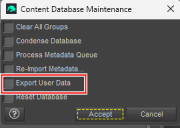
After I finished reseting the DB I then reimported the Metadata using the box above that.
(I did check the export DB and Reset DB at the same time)
But perhaps I don't understand the process...
Thanks.
Daz 3D is part of

Connect
DAZ Productions, Inc.
7533 S Center View Ct #4664
West Jordan, UT 84084Licensing Agreement | Terms of Service | Privacy Policy | EULA
© 2026 Daz Productions Inc. All Rights Reserved.