-
Moving a obj model that has bones in Blender to Daz 3D
Daz Studio does not import bones in any usuable way in my experience. Anything you import that needs bones will have to be rerigged in DS.
iClone 8 and CC4 anyone?It's easy to export as Fbx and in CC4 as cc3+
import , done .
At least that's how I did it with the G3F.
You just have to load a T_Pose that comes with CC4.The "Animators Assemble!" thread for Daz animation WIPs, clips, and tipsLooks good. If only the import to daz worked better
 I was all excited too. I think I'll learn to animate in Cascadeur anyway though and hope things improve. I noticed and "export to daz button" in cascadeur commands menu but it doesnt seem to work either at the moment.The "Animators Assemble!" thread for Daz animation WIPs, clips, and tips
This is more or less how it turns out when I tried to do it, as well. For reference, this is the animation inside Cascadeur:
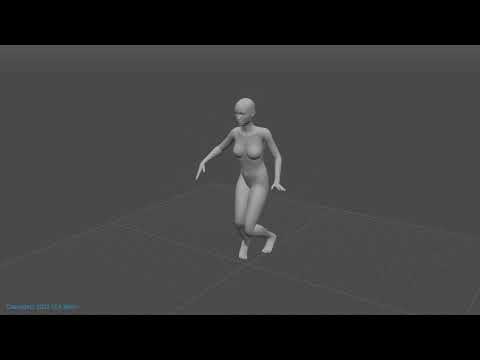
It's built on a G8F, and I definitely didn't do anything with the pectorals, so I don't know where that's come from. Like I said, I can get the animations I've made onto G8 figures in C4D and Houdini, but DS is thwarting all my efforts to import. Hopefully Cascadeur adds a BVH export option soon, because that's what I've had the best luck with when importing animations into DS.
Loading old scenes after hard drive replacementThis is one of those "it depends" situations.
Normally with DS4 native content, pathways should start "data", "runtime", "people" etc, so if it's installed correctly then it should load without issue on any machine.
Doesn't always work like that though, as I have seen Scene/Subset files with full pathways in them including the drive letter, so those are going to cause issues.
Imported content (Poser, FBX, OBJ, DAE) can also cause issues, when you save a scene or subset with imported content, DS writes a lot of data into the DUF file, but it also writes a lot of DSF files into the "data/auto_adapted" folder.
With Poser content DS writes pathways into the DUF file, that way if the files in the "auto_adapted" folder go MIA, then DS knows where to go looking to find the original Poser files, normally those pathways start with "runtime", but I have seen them start with the drive letter.
No idea about the other 3 import formats as they either end up going through "Figure/Prop Asset" or the trash can.
The "Animators Assemble!" thread for Daz animation WIPs, clips, and tipsYeah, the aniblock thing didnt work on that one. Poor G8F was flung around the scene. And I can't replicate one I tried earlier that worked. Weirdness! Back to the drawing board -facepalm-
Here's your animation using the copy figure way.
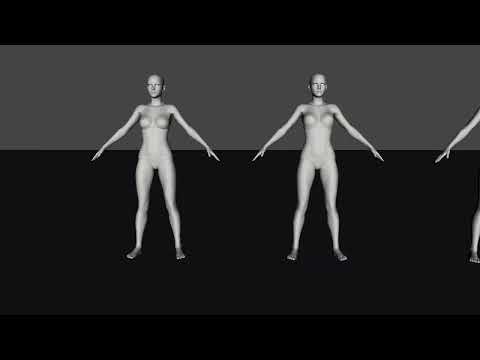
on the fbx import - edit>copy figure
on Genesis 8 - edit>paste>Paste figure pose
Is this how it looks when you've tried it? Seems still some foot slippage. I cleared animation on the pectorals. The figure on the right, I tried moving the hip bone/points roughly into same position as normal genesis 8 on the fbx first. seemed to make a slight difference.
The "Animators Assemble!" thread for Daz animation WIPs, clips, and tipsExport from Cascadeur as "fbx without meshes" then import the fbx into daz, lower to ground and save as animated pose preset
 Advanced product development questions: spurs (freebie)
Hi. If there's a better place to put these questions, I'm happy to oblige. I'm working on something I think others might like, so I'm considering making it available as a freeibie. But I didn't create this model in the usual way. I'm finally after several years really getting the hang of more of Daz Studio's tools. I really don't want to start from scratch learning Blender or Z-brush. So this was created entirely in Daz from primitives, and it does make use of this one additionally: https://www.renderosity.com/freestuff/items/84312/super-torus-derived-primitives. (So therefore if I'm prevented from distributing it because of EULA stipulations, please do let me know.)
Honestly I never thought I'd get as far as I have; I was just trying to see if I could mock up something for my own renders. It's almost ready for that, but with a bit more work I could also make it easier for others. As you can see in the screenshots, it's still a collection of separate objects. I'd like to know if there's a way to connect them all into one single one. I'm picturing an iterative process: save all the brass parts as one object file, import it into Daz, add whatever morphs I want for fitting various boots, and save it as a Prop Asset. Then figure out the strap parts which I stilll don't know how to affix to the brass so they morph when it does.
Another question is about poly count. It looks best with at least SubDivision Level 3. That seems like a lot - most models use base resolution and most High Resolution use 2 unless I have that wrong.. But I guess as long as users know what they're getting before they download it, it's fair. It's a small item on its own so the final file size shouldn't be outrageous. But I have no experience at all. Is my assumption correct?
I'd share it untextured but with surfaces pre-assigned. I envision a standalone prop meant to be parented after loading into a scene. It'll be tedious to match a figure's pose, less so to fit it to the right and left boots, but equally possible for any human figure wearing any boot, within reason. (Orcs and aliens are advised to look elsewhere for spurs!) I designed it around the https://www.daz3d.com/dforce-bolero-style-outfit-for-genesis-8-males boot, but it doesn't require that one or even auto-fit it. (I have no idea how to do that.)
But anyone willing to put in the work would find it looks great. As a plus, the brass shape is the US Civil War pattern used throughout the mid- to late-19th century. I can't promise the same about the strap and strap buckle dimensions, but anyone could replace a broken leather strap with one of their own so I'm not worried about that :)
If there are already videos or threads answering some of these, I'd love to know.Last question: is it even worth it for me to proceed in this way so others might use it? Or am I wasting my time without Blender or something designed to churn out a finished product worthy of the Daz store?
Ctrl R don't work and missing filesRichard Haseltine said:
Do any of the shortcuts show next to commands in the menus? Does the delete key work? It may be an issue with your layout - if so, reload through Window>Workspace>Select Layout (or Window>Workspace>Customise and use the Import button to import the actions only).
The product thumbnails are missing or unreadable - can you open the product? If so are its thumbnails readable, and can you use the files?
Just tried the missing items for Michael 4 that's listed. I clicked on the blank icon and it did show morphing shapes. But i just realized I don't have Michael 4 so I can't test them out to see if they will work. I only have Michael 5 and 6. I'm also have blank icons for Bob Hair: Rachel for Genisis 2 Female, uh, wait. There's too many to list. I'm gonna add pics showing them with their surrounding files I do have to see if they could offer a clue.
I still would like to know why Ctrl R doesn't work.
Not sure what you mean about my delete key. I have deleted images in the viewport, as well as it's working in other programs.
Diffeomorphic DAZ Importer version 1.6.0 released@AliPop select the daz rig in the easy import panel, then convert to mhx after import: "setup > rigging > convert to mhx".
p.s. I tried both with a scaled figure and ERC morphs but I can't reproduce the issue. Here everything works fine. May it be that you changed the figure size then forgot to re-export the dbz ?
Diffeomorphic DAZ Importer version 1.6.0 releasedI'm not sure I understand. Selecting the MHX rig happens during the import, so there is no armature to apply to before this point.
iClone 8 and CC4 anyone?I took the plunge and upgraded to CC4 and iClone 8 just a day or so ago... Still downloading and making sure I have everything I'm entitled to, as I do get free upgrades to the plug-ins I already own, which is good.
I love Studio and I even love iRay (most of the time) but sometimes I just want my stories to move! I have never figured out Filament,and while I have achieved very moderate success in Blender, there are now so many versions of this software, I don't know which one I'm supposed to use? Animation is hard work, so if there are tools around that make it easier, I am happy to partake.
There are dozens of videos on YouTube showing what CC4 and iClone 8 software can do. It is quite overwhelming, really, almost too much to comprehend and of course, the big question is whether I can do any of it??? Well, probably not, but I'll have a go, I guess.
I did try my first import from Studio into CC4 yesterday and everything was fine - up to a point. I had shoes and socks on the character and the feet with socks were out of the shoes when the import finished, so I'm not sure what went wrong there - I need to hunt down a fix for that. Also, my characters shirt looked like it had been painted on him, not beeing worn, like a shirt would - again I have to work out fixes - there are probably ones I had with CC3 but i just can't remember, so I'll have to go back and refresh my memory.
But otherwise everything, including clothing, eyes and hair looked good. I imported into iClone 8 and had my character walking around a forest set I built pretty quickly, with HDR - well, I was pretty happy with the very basic results, considering my effort input was minimal.
The big difference I notice between Daz and Reallusion is the price of the software and anything you might want to add. Even a package of just plain old expressions for CC4 is around US$100, so a big jump up from Daz' prices, especially if you pick things up here on the many sales here!
I have achieved some (very moderate) level of success with CC3 and iClone 7, so maybe my investment will inspire me to plunge forward with iClone 8. Of course, all those features videos are done by people who actually know what they are doing, something that I am sadly lacking in. But if it is as easy to do animations in iClone 8 as they are claiming, I should be putting Pixar in the shade by oh, next week.
Daz to Unity not workingHello,
First of all a huge thank you for the time and the patiance you took to help me in the Daz to Unity quest.

I've been 2 day's to look at the script of the import of daz file in Unity, and yes you're right. The bridge look only the reglar way (C,D...:\Unity...) but even with the good way the option Overwrite unity file was lock,and same for the Support file, he was not unpackage (bug)... So i had uninstall and reinstall everything (2 times...and the second i clean registry before install everthing) and took an older version of Unity (2019.4.39f1) because a had other problem with HDRP....and IT'S WORK !
I will try with the latest of Unity to how it's gonna go !
Thank's a lot to you danielbui78 ,Artini and winmath
Daz to Unity not workingdanielbui78 said:
rockit said:
Hello !
Unhoppely nothing work for me... XD
Daz to Unity is instaled but there is no more install Unity file option. Is it normal ? My latest bridge of DazUnity is 2.0 and Daz 4.15
(PS: i tried to do the famous Read The F...... Manuel but the only thing i found was the readme txt file i put in attachement file).
When i try to import on Unity, the Unity file (scripts,ressources,etc) seem's to import themself (so i guess there is no more option install Unity file to turn on), but the fbx model is not imported.
Hi rockit,
The DazToUnity Bridge UI has been slightly re-organized: The Unity Assets Folder (aka Project Folder) is now the first line at the top instead of at the bottom. This is to remind people that verifying you have selected the desired Unity project is the first step you should always take when using the Daz To Unity Bridge... maybe I need to put a big STEP 1: next to it.
 Anyway, I notice in your screenshots that your Unity Assets Folder path is not the typical path to a Unity Project folder. Please set the Unity Assets Folder to your Unity Project's Assets Folder. This is the same process as with previous versions of DazToUnity Bridge. You may see there is a new option that is in the same place as where "Install Unity Files" would be: immediately below the project folder path (Unity Assets Folder).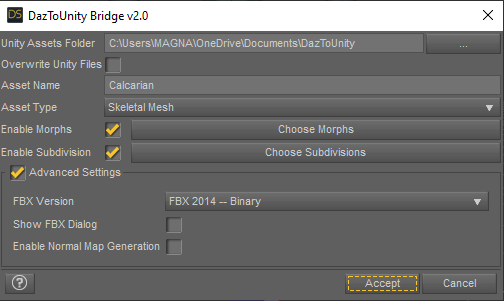
If the Bridge detects that Unity Files have already been installed, the label will change from "Install Unity Files" to "Overwrite Unity Files". You have already updated the Bridge in Daz Studio, but you must also "OVERWRITE Unity Files" to update your personal project folder as well. This will put the latest UnityPackage installers for HDRP, URP and Built-In pipelines into the "Assets\Daz3D\Support" folder. The HDRP Installer will be automatically run -- that is the window you see in Capture5.png.
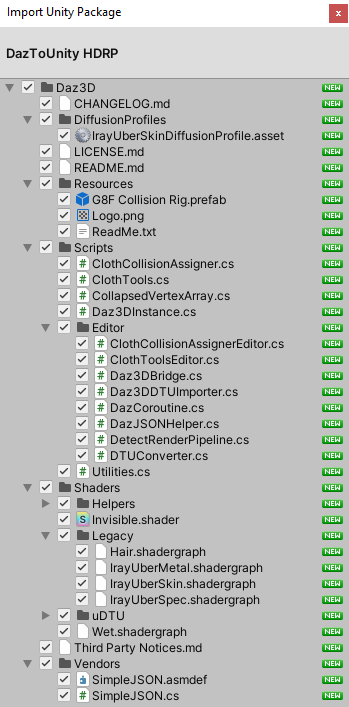
If you are using another render-pipeline, you will need to go into Assets\Daz3D\Support and manually double-click that correct file (either URP or Built-In/Standard Shader files). On the Import Unity Package Window, you must also click Import Files at the bottom, otherwise files will not be updated. If you are using Unity version greater than 2019, you will then get a pop-up dialog asking you if you want to Update Script API. You must click YES, otherwise the scripts will not run. This behavior is exactly the same as with previous versions of the Unity Bridge.
Once you have updated script API (if necessary), the model should automatically import (but only if you have selected the correct Unity Assets Folder for your desired Unity Project). If not, you can manually find the DTU in your Daz3D folder and click "reimport" or just do the Send To DazToUnity from Daz Studio again, and it should autodetect and start your import process.
Hope this clears up the confusion!
Hello, I never leave these kinds of comments but I wanted to mention that in addition to this I was getting the same error for a while and didn't understand why-- As it turns out it was because I was trying to import my Daz Character to a 3D project and not a (HDRP) folder so I was getting the error: Assets\Daz3D\Scripts\Editor\DTUConverter.cs(2594,4): error CS0234: The type or namespace name 'HighDefinition' does not exist in the namespace 'UnityEditor.Rendering'
So basically the type of project you have matters and if you open up your 3d project and don't see a Settings folder-- you're likely importing to an incompatible project.
Daz To 3DSMax seem to work in Daz, but won't appear in 3DS Max - is there a way to import the model?Hi all,
I have successfully installed DazToMax script, and it would show up and work in Daz, but it just wouldn't work in 3DS Max. I tried every way like in this official tutorial, but it is just not there, it won't appear in my 3DS Max.
I tried to uninstall and reinstall the script, to reset the computer - nothing helps.
If you had such problem - how did you manage to resolve it?
Or is there any way to just import to 3DS Max somehow the model previously exported with DazToMax?
Ctrl R don't work and missing filesRegarding the missing thumbnail pictures, if you can load the product’s contents, then the problem is simply a matter of either no thumbnail in the Runtime/Support folder or a thumbnail that has a different name than that beneath the missing icon. I have encountered this very many times in the past several weeks in redoing content organization on my computer. Some content (particularly some older content, some content from third part sites, and some free content) may not even come with a picture file to be used as a thumbnail.
I use Daz Install Manager to install content from the DAZ3D.com store.
In both cases above, I have corrected the issues as follows:
- No thumbnail file in the Runtime/Support folder: I downloaded the picture from the product’s store page (or loaded the product in Daz Studio and created a screen capture and file of the product), resized it if needed, changed its name to exactly that listed in its metadata file, and placed the JPG format file in the Runtime/Support folder. To get the metadata image filename, while in the Products tab of Smart Content or the Product section of Content Library, right click on the product and select Edit Metadata. For the thumbnail’s needed filename, use the Support field of the metadata window and copy everything after Support and before .dsx. Paste the copied text as the new filename of the saved thumbnail image file. The filename of the thumbnail icon has to exactly math the metadata.
In the example below of a Daz3D.com store product, the metadata is /Runtime/Support/DAZ_3D_24324_Talk_Show_-_Late_Night_Set_and_Poses.dsx and the needed filename for the thumbnail is DAZ_3D_24324_Talk_Show_-_Late_Night_Set_and_Poses.jpg. In the example below of content from a different store/site that has been installed manually and a product manually created from the content in the mapped folder(s), the metadata is /Runtime/Support/LOCAL_USER_J-scooter.dsx and the needed filename for the thumbnail is LOCAL_USER_J-scooter.jpg .
- Thumbnail in Runtime/Support has different filename than metadata name: Change the Runtime/Support thumbnail filename to its metadata filename as discussed above.
If the files that the missing thumbnail icon point to won’t load in Daz Studio, then the problem is deeper than just the missing thumbnails. You might try an uninstall/reinstall to see if that works; this process is straightforward in DIM. For content that was manually installed, you’ll have to reverse the process by finding and deleting those folders/files. In an uninstall/reinstall doesn’t result in a product that will load in Daz Studio, then’ you’ll need to look more deeply at what is causing the problem.
I made some awesome skin tones but when i port it to blender or any other program the skin tones goDaz has Iray as render engine, many softwares don't have it.. so when you import from daz, materials are automatically converted and the look changesHow to Convert different poses from different Generations?probably way too much work, and relies on DS, but, there are a few G2 to V4 pose converters (e.g. cridgit's, now at rendo, and maybe draagonstorm's here at DAZ?) that can be used to do that sort of conversion, then use Wendy's export advice, or save the resulting V4 pose as a duf (?) and import into your Carrara V4?
cheers,
--ms
Daz to Unity Update 4.0The new updated Daz to Unity bridge has 3 Unity packages available in Utils subdirectory,
that appears after the first export from Daz Studio to Assets folder in Unity project.
Just import the one, that relates to the render pipeline and the prefab will be created
with the proper shaders.
Wrong Export as FBXI downloaded the actual Version of DAZStudio. As soon i export a Mesh as a FBX and import it into Cinema 4d r23 i got Wrong Angles of the Joints.
I try to righten them but i am not able to set them in the Right Angle on 0 Degrees at all Achses. I need to set the Anchles into Horizontal and Vertical Position on 0 Degrees but i cant.
I need to Setup the Heel IK and the Achses must be Horizontal and Vertical at 0 Degrees.
Is it a Bug from the actual Studio Version, or did i di anything wrong ?`I deleted the Last Joint behind Foot and set two new ones. LFoot/LToe/LToe end.
Daz 3D is part of

Connect
DAZ Productions, Inc.
7533 S Center View Ct #4664
West Jordan, UT 84084Licensing Agreement | Terms of Service | Privacy Policy | EULA
© 2026 Daz Productions Inc. All Rights Reserved.