-
G8.1 Expressions - Where Do We Stand Now?
Not metadata Richard, in the data folder there are two files, one for 8.1 female and the other for 8.1 male, these two files tell DS to add 8.0's content as addons for 8.1.
Only time I let the CMS run is when I'm saving using any of the options under "File > Save As > Support Asset", as DS hard crashes without it. So 8.1 has no problems using 8.0's content, morphs and UVs without the CMS or metadata.
I've done a fair bit of messing about trying to create files to go from 8.1 to 8.0, so far without any success, which makes me think there is also code in DS that makes this one way only.
Nightmare! All files in my Content Library Categories have disappeared. HALP!Richard Haseltine said:
Do they have any metadata tags in the Content Library>Daz Studio Formats list (e.g. the tags like Material or Actor)?
No. I think I did just update CMS but wasn't that supposed to solve issues with metadata?
Richard Haseltine said:
Have you backed up your database, or exported user data? Or are these actually set up as new products, in which case they will have been exported when you created them.
No backup or export.
Nightmare! All files in my Content Library Categories have disappeared. HALP!Do they have any metadata tags in the Content Library>Daz Studio Formats list (e.g. the tags like Material or Actor)?
Have you backed up your database, or exported user data? Or are these actually set up as new products, in which case they will have been exported when you created them.
G8.1 Expressions - Where Do We Stand Now?kyoto kid said:
Richard Haseltine said:
kyoto kid said:
...so much for "backwards compaitbility".
The expressions were clearly stated to be an exception.
...still it seems to be reliant on the 8.1 mesh itself. As I understand unless a product mentions both G8 and G8.1, content and characters specified as compatible for just for 8.1 only work with 8.1.
Aside from the surface groups the meshes are the same. They are, however, separate items - daz has added metadata so that * items will work on 8.1, and possibly tweaked the loading code to cover morphs, but not vice versa - 8 would not be able to handle 8.1 content using the new UVs, for example - so using 8.1 content on 8 may require some - generally minor - workarounds.
Nightmare! All files in my Content Library Categories have disappeared. HALP!mikael-aronsson said:
Did you change anything when this happened ?
Not that I can remember. I thought I was updating metadata for a few of the items.
as said, check that your files are there (DS would not remove them though), but the drive can go bad or something else.
The files are there, just the Categories section has nothing in it.
Do you see all the categories in the tree and they are all empty or are the categories gone also in the tree pane ?
Yes the categories are all there, just the files missing from them.
check that nothing happened to the configuration so it point to wrong folder or something, once again this almost never happen by itself (unless your drive is history), so make sure you did not do something that could cause the problem.
How do I correct that?
Check the log file and see if there is anything there.
Thank you. But what am I looking for?
Cannot import in C4dWhen using plug-ins to import in C4d, the following window will appear. How can I solve it?
The Cloud.dramenon said:
No, I did not even use it for installing this time around
 this is a new box, and that was the way to install now... so I thought. It seems to work for the most part aside from being ineffecient eg no mass install all my content.
 In the end it might be moot, some work some do not.
Thank you for the feedback... My question - if I were to do this again what would be the best away to approach this?
Didn't use what?
If I were to start fresh, I would download the manual installation files for DS and install it like any other windows program.
Then I would use the DIM (DAZ Installation Manager) to install my content to some other (any other) drive than CDAZ Central, which DAZ is trying to push, is just dummied down version of DIM, it's not something better than DIM.
The most important thing would be never to log in to DS and never giving your DAZ log in information to DS, since that allows DAZ Connect within DS to contact DAZ servers and download metadata updates by itself and as we have seen countless of times here in the forums, fooling people to install products and product updates for no reason, causing the products to be installed twice, taking twice the space on the drives, using non traditional paths for those installations (the cloud folder), suffering from decryption errors and preventing functional DIM installed versions from working.
Strand-based Hair Editor Not Working (sometimes)I imagine you have it as an obj-file.
Have you tried to import a new and just try to add SBH - not that it should be any different, but one never knows.
I am not aware of any settings that should prevent you from painting SBH.
If nothing works, then maybe try to attach the obj, then I can look at it.
Carrara Challenge #62 "Clowns and Other Circus Stuff" -Philemo_Carrara said:
I've decided to enter this challenge.
Whenever I do, I always try something new and take the opportunity to learn something.
This time, as there is a possibility to submit an animation, my take was to try to build a workflow to import animations from Mixamo. My first tests were disappointing as FBX importer/exporter in Carrara are really out of date. Therefore, I had to use a third party software. It happens I have a nice plugin for Carrara called Daz Studio.
It works up to Genesis 2. G7 and G8 have double articulations for thigh and shoulder and Mixamo has trouble with that.
So, this is how it goes.
- From the latest version of studio, export your base figure (in my case Genesis) as FBX using the latest version of the exporter.
- In Mixamo, upload a new character using this export.
- Apply the animation you want. Tune it the way you want. In Genesis, you can fiddle with the Arm space slider.
- Export it still using the latest version of FBX.
- Back in studio, import the resulting FBX and save it as a scene subset.
- Now, in Carrara, create a new scene and add the scene subset from your content.
- select the figure
- In the NLA tab of this figure, click on "create master clip"
- Drag the resulting clip in the clip tab of the browser
- You're done with this scene, you may close it.
- in your project, drag this saved clip to the clip tab of the project
- drag it from there to the NLA line of your figure in the time line. It's done.
Carrara expects translation to be on the model or on the hip. Mixamo export translation on the figure. So, if you're looping an animation, you have to use the override master clip option. The offset from previous clip part doesn't work.
Philemo, how's this one tracking ?
OFFICIAL DazToBlender Bridge 2022 (SEPTEMBER UPDATE): What's New and How To Use Itbutaixianran said:
Your github's DTB repo does not have an issue list enabled, so I'll just ask this here:
In Blender, how to modify your morph driver's value with python?
I tried following code, but doesn't work on your DTB 2022. And this code works on the old DTB Blender addon.
import bpy
obj = bpy.context.object
obj["Eyes Closed"] = 1.0
def updateDrivers(rna):
if rna:
rna.update_tag()
if rna.animation_data:
for fcu in rna.animation_data.drivers:
if fcu.driver.type == 'SCRIPTED':
fcu.driver.expression = str(fcu.driver.expression)
updateDrivers(obj)The Blender 3.x UI API is still very new to me. Here is how I implemented the morph drivers UI:
https://github.com/daz3d/DazToBlender/commit/4a7c77761d0acc7db25b59e50d83e1d1d91d3022
As you can see, for Blender 3.x, I'm not using the old RNA system to access the UI. I think you need to use the "mesh_obj.id_properties_ui(morph_label)" call to get a UI Manager. Unfortunately, there's no API documentation for that UI Manager except for the little bit here:
https://wiki.blender.org/wiki/Reference/Release_Notes/3.0/Python_API
That page talks about using ".update()" and ".as_dict()", but I ended up just using many hours of trial and error to get the code to do what I wanted. This person's post tries to explain it. Maybe it will help you: https://blender.stackexchange.com/questions/248786/with-the-rna-ui-changes-on-blender-3-0-how-do-you-set-up-edit-custom-properties
Good luck.
OFFICIAL DazToBlender Bridge 2022 (SEPTEMBER UPDATE): What's New and How To Use ItYour github's DTB repo does not have an issue list enabled, so I'll just ask this here:
In Blender, how to modify your morph driver's value with python?
I tried following code, but doesn't work on your DTB 2022. And this code works on the old DTB Blender addon.
import bpy
obj = bpy.context.object
obj["Eyes Closed"] = 1.0
def updateDrivers(rna):
if rna:
rna.update_tag()
if rna.animation_data:
for fcu in rna.animation_data.drivers:
if fcu.driver.type == 'SCRIPTED':
fcu.driver.expression = str(fcu.driver.expression)
updateDrivers(obj)Why does the Filtering system not have this???Don't confuse the Content Library folders structure and the Default Categories. They are absolutely unrelated. The Content Library structure comes from the way the PA has laid out the contents in the .zip, in a semi-standard way. The Default Categories are built from the metadata that is added after the fact by DAZ, which also loosely follows some standards, but seems to be subject to interpretation at times. You can make your own Custom Categories to organize things the way you want.
@Websoul, yes you can export your customization. Right-click the Content Library tab, or click the pane's context menu (the hamburger), and select Content DB Maintenance. From there select Export User Data. One or more UserData_nn.dsx files will be saved in the Runtime/Support folder of the first library in your setup.
DAZ to UE 5 Error: Failed to find any bone hierarchy. Try disabling the "Import As Skeletal" optionI had a similar problem with UE 5.02, DS 4.20.0.17 and Vodhanel's 5.00.75 and plugin 2.0. I got around the problem by unistalling and reinstalling UE 5 and adding DazToUnreal manually. I also unconfigured the plugin in DS, re-copied it, then reconfigured the plugin. "Failed to find any bone hierarchy..." went away and I was able to import my DS character. Now I am running into retargeting problems. One battle at a time!!
[Help] models from Source film maker to Blender to DazBecause Daz has its own rigging system and no matter the format bones don't import properly. You would need to re-rig in daz studio after the OBJ import
Discontinued productsThanks for all the advice.
I have put together a short guide on migrating DAZ to a new PC but I have not tested these instructions yet as I have not purchased a new PC.
So I hope this works when it is needed...
Restoring DAZ Studio to a new PC
When you migrate to a new PC desktop, follow these instructions:
1. First be sure to export your user data (favorites) by right-clicking the Content Library pane and selecting 'Content DB Maintenance' from the context menu. Check the box for 'Export User Data' and press [Accept]. The information will be written here:
C:\Users\Username\Documents\DAZ 3D\Studio\My Library\Runtime\Support\UserData_1.dsx
2. The DAZ Studio installed content is in the My Daz Connect Library under your Username directory, and the DAZ Install Manager data is the Public Documents folder. So be sure to backup all of these folders, which will also backup the user data mentioned above:
C:\Users\Username\Documents\DAZ 3D
C:\Users\Public\Public Documents/DAZ 3D
C:\Users\Public\Public Documents/My DAZ 3D Library
C:\Users\Username\AppData\Roaming\DAZ 3D
3. After powering up your new desktop, install the DAZ Studio and DAZ Install Manager software programs.
4. Restore the backed up folders - from step 2 - to the new desktop.
5. Run DAZ Studio and ensure that it is recognizing all products and user data (such as your custom Favorites categories). If so, then you are done; otherwise, proceed to the next step.
6. Restore the custom Favorite categories by right-clicking the Content Library pane and selecting 'Content DB Maintenance' from the context menu. Check the box for 'Re-Import Metadata...' and press [Accept]. You will see a new window that shows all the content with metadata that DAZ Studio detects. Make sure that UserData / UserData 1 are the only boxes checked and press [Accept]. You will now see a progress bar move as DAZ Studio re-imports your user data.
7. If DAZ Studio is not recognizing the other products that belong in the Smart Content pane, then repeat step 6 and check all the metadata content boxes.
8. Note that anything that installs as a plug-in (actual plug-ins, plus some scripts and older shaders) will need to be reinstalled on the new system.
DazToUnity 2022 Bridge (SEPTEMBER UPDATE): What's New and How to Use ItThe September Update for the Daz to Unity Bridge is now available on Daz Central and Daz Install Manager. These are the new features and some video tutorials on how to use them.
- Bugfixed URP shader code
- Updated to latest Daz Bridge Library v2.2
- Fixed morph undo bug (distorted faces on export)
- Improved Geograft material support
- Preliminary steps for Geograft Morph support (exports blendshapes)
You can find out more about DazToUnreal Bridge and Daz Bridges from these resources:
- Download latest updates and bugfixes (Github Release Page)
- DazToUnity Main Github page
- How to Install DazToUnity
- How to Use DazToUnity
- DazToUnity FAQ
- Daz Bridges
The steps to install the Unity Plugin have changed from previous versions. Please make sure you follow these directions to fully install the Unity Plugin component:
How to Install the Unity Plugin
- Start your Unity Project and leave it in running in the background.
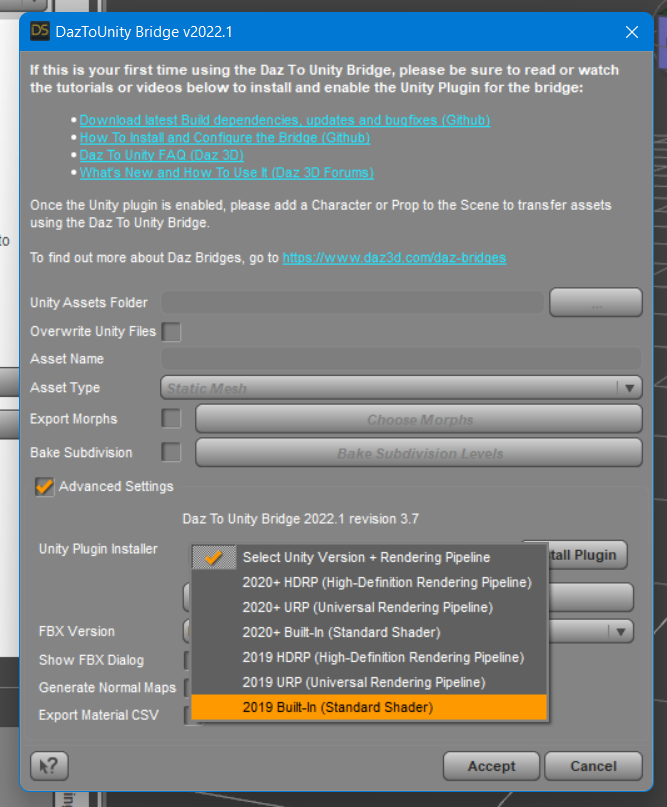
- Start Daz Studio and select File -> Send To -> DazToUnity.
- Enable the Advanced Settings checkbox.
- Select your Unity Version and Rendering Pipeline from the dropdown.
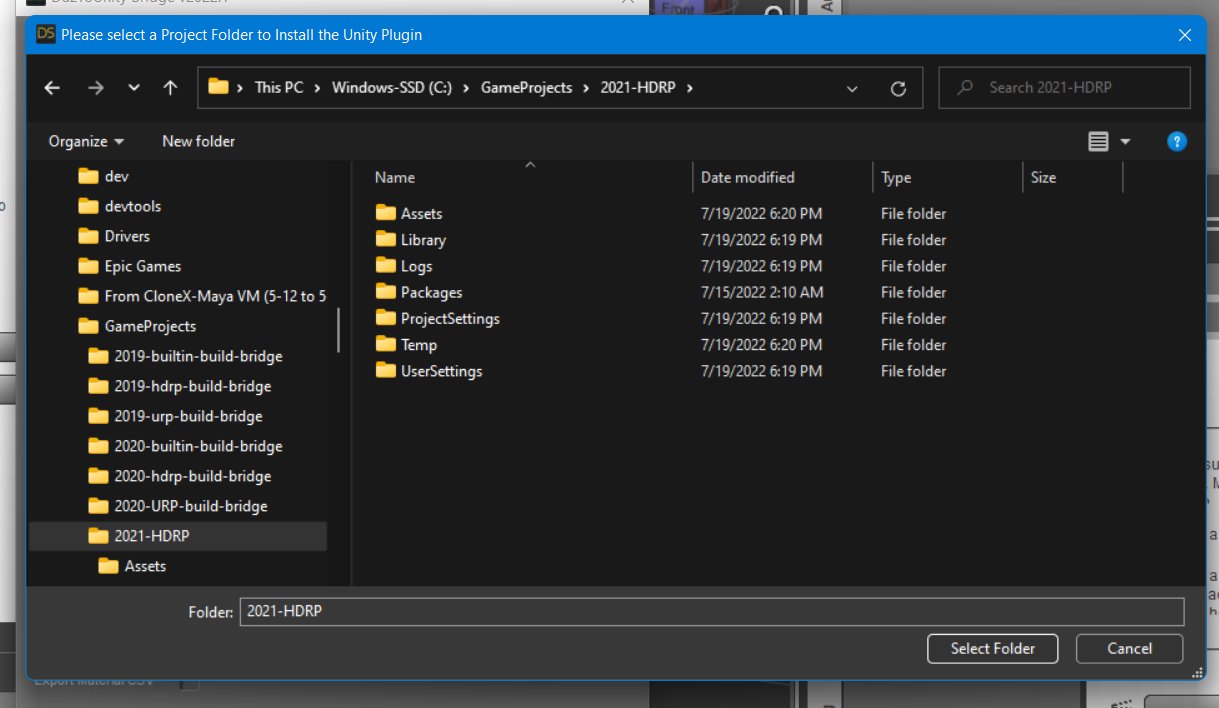
- Click "Install Plugin". A window will popup for you to select a Unity Project to which to install the Unity plugin.
- Navigate to your Unity Project's root folder.
- Click "Select Folder". You will see a confirmation dialog stating if the plugin was successfully copied to your Unity Project.
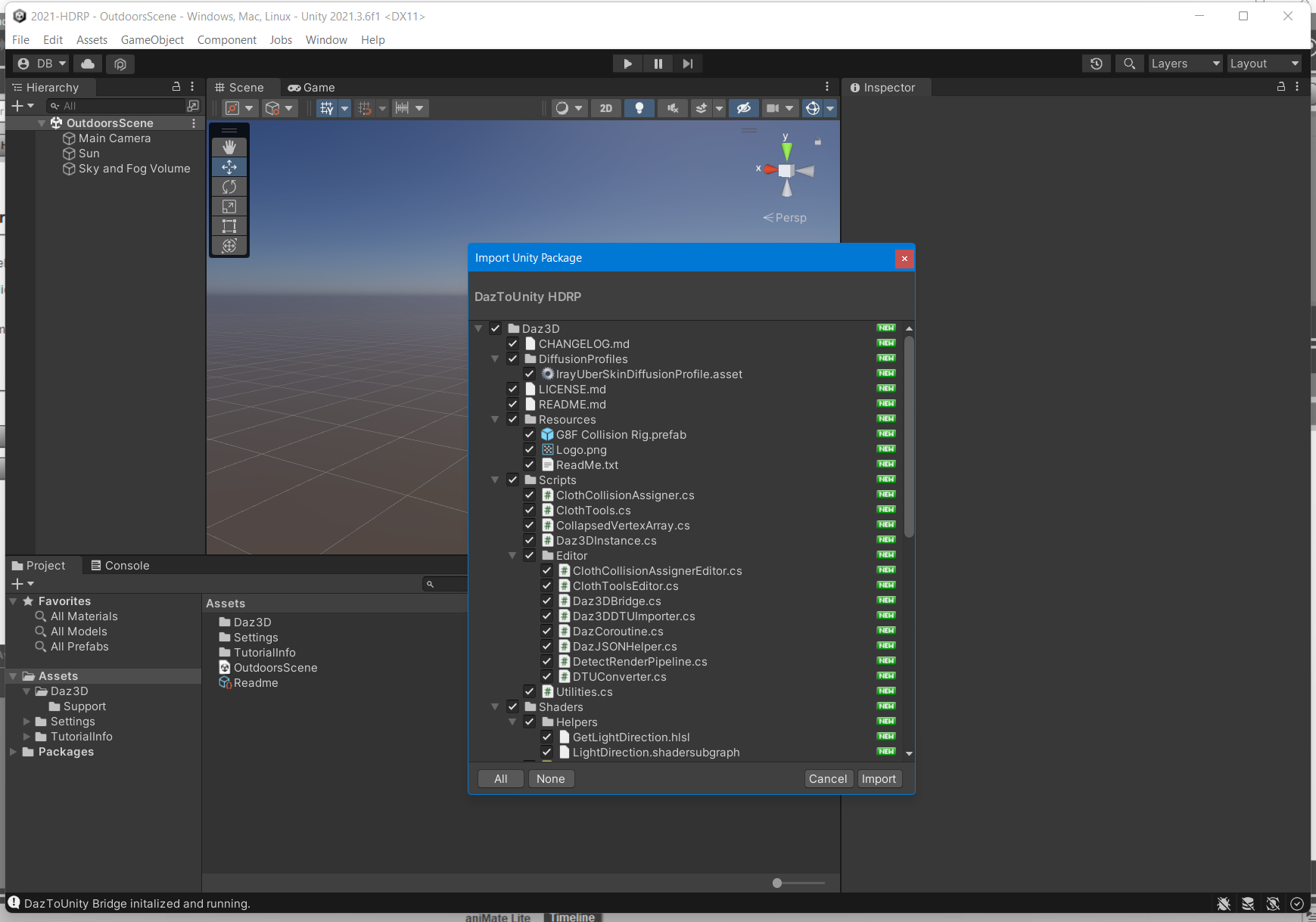
- Depending on your machine and setup, a Unity Import Package dialog may automatically appear. Click Import.
- If an Import Package dialog does not appear, switch to your Unity Project and navigate to the Assets\Daz3D\Support folder.
- Inside that folder, you will find installation packages for all render-pipelines:
- For HDRP: double-click "DazToUnity HDRP.unitypackage" and click Import.
- For URP: double-click "DazToUnity URP.unitypackage" and click Import.
- For Built-In Render-pipline: double-click "DazToUnity Standard Shader.unitypackage" and click Import.
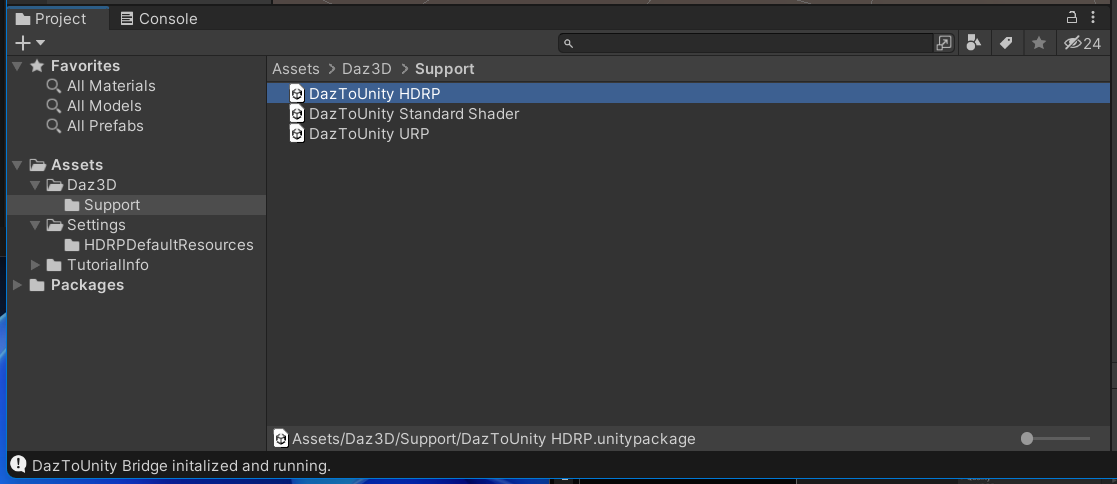
- If a popup window asks you to Update the Scripts or API, then click "Yes, for these and other all files".
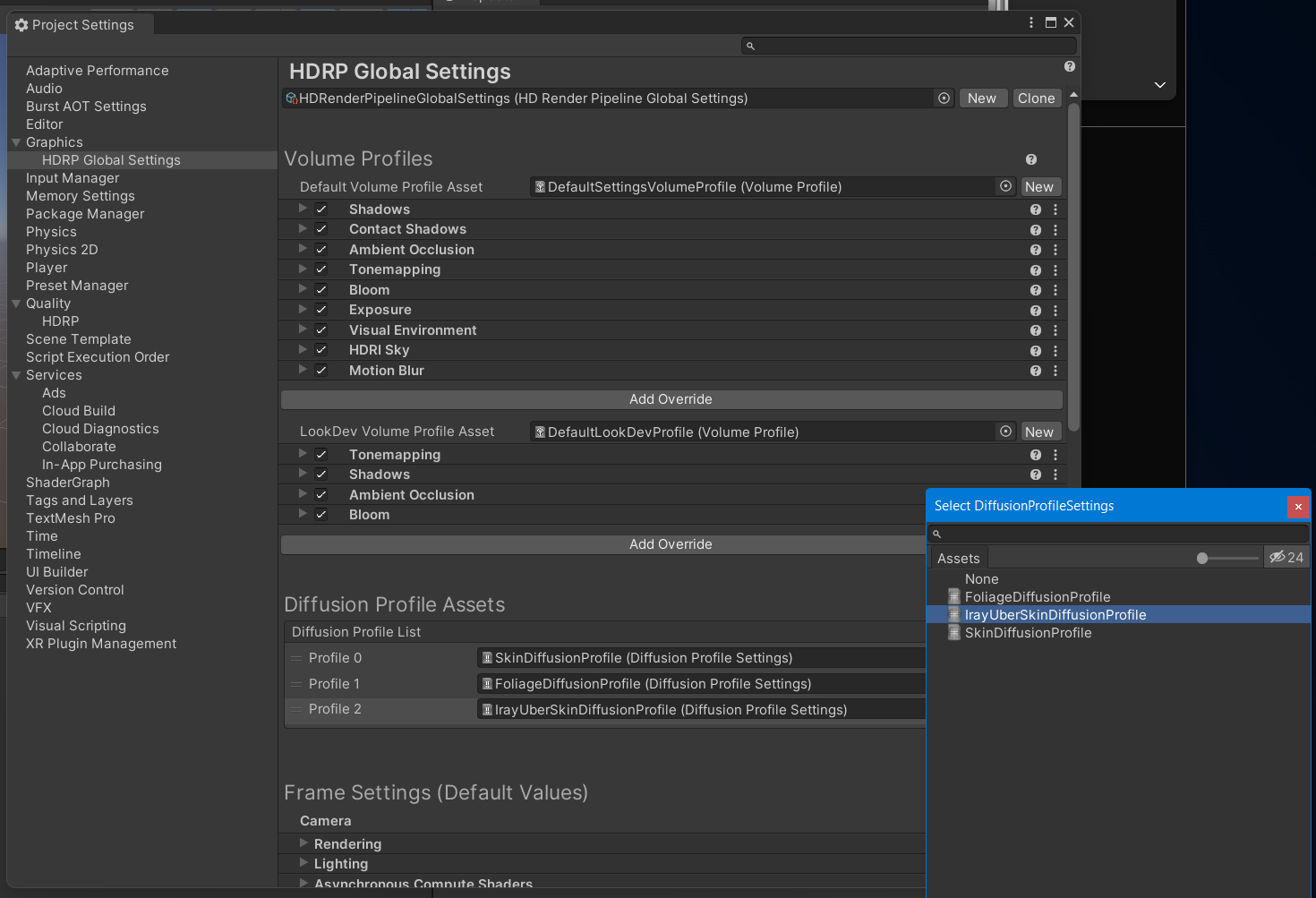
- For HDRP, you will also need to add a diffusion profile: Unity 2019: This list is found in the Material section of each HD RenderPipeline Asset, which can be found in the Quality->HDRP panel of the Project Settings dialog. Unity 2020: This list is found at the bottom of the HDRP Default Settings panel in the Project Settings dialog. Unity 2021: This list is found in the Graphics -> HDRP Global Settings panel.
Here is a video demonstrating the above steps for Unity 2021 LTS + HDRP:
1. How to Install DazToUnity Bridge with Unity 2021 LTS + HDRP:
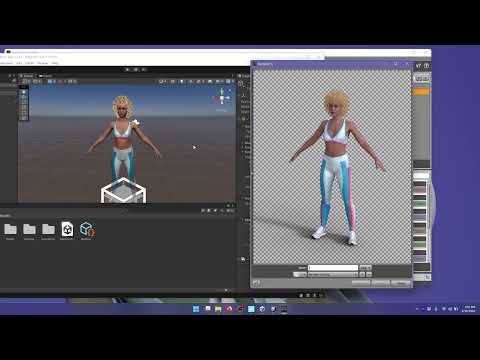
Does the skin look too shiny or oily? Is the complexion too red? Are the hair strands or eye-lashes too blocky or pixelated? Check out how to modify these things in video #2...
2. How to tweak Materials in Unity that were generated by DazToUnity Bridge:
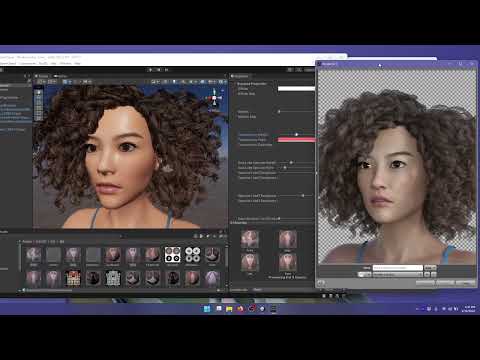
more videos coming soon...
DAZ to UE 5 Error: Failed to find any bone hierarchy. Try disabling the "Import As Skeletal" optionI use UE5 plugins v5.0.0.75 https://github.com/David-Vodhanel/DazToRuntime/releases
And DAZ to UE Bridge plugin.
But I kinda confuse with the version of this plugin. Is it version 4 or is it version 2?And after installation the version change again 2.4.0
Meanwhil DAZ youtube video shows its version 4.12?
https://prnt.sc/ZE4TL5-MAlFyIs the latest 4 or 4.12 or 2.4.0?
When I installed DAZ plugin, there's installation dialog to choose which UE I want to use.
But it only shows for UE 4 available.
So I choose it since there's no other option, and there's only one bridge on the marketplace and I don't know will that be a problem.After I activate the UE5 plugin and start to export a figure from DAZ, I got this error over and over on UE5:
Failed to find any bone hierarchy. Try disabling the "Import As Skeletal" option to import as a rigid mesh.
Import failed.
So what to do?
I have followed some tutorials on youtube, it just not working as theirs.Splitting Expressions? (Upper and Lower)Your best option I guess is to follow tutorials about DFormer. Which will enable you to load morphs and partially assign their influence to only parts of the mesh. Idea in a nutshell is to export Genesis 8 as obj with only 1 expression loaded. Then on a base Genesis 8 in DAZ, create a DFormer that will influence only the upper head. Load the export Genesis 8 obj (morph loader pro) with the expression you want, and use the DFormer influence at 1 or -1 to influence upper or lower face (tutorials thereafter so that you understand what that means)
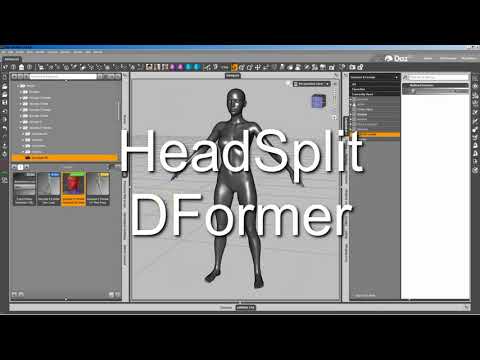
Good tutorials on the subject are ultra rare and focus mostly on how to import head and body separately (FHM, FBM). Meaning that they use the default DFormer already set-up in DAZ for content creators (My DAZ 3D Library>People>Genesis8>Developer Kit>Genesis 8 HeadSplit DFormer). But by making your own DFormer you can for the morphs to apply to any given part of the body.
I'd advise you to follow those tutorials and take notes. It might sound a bit complex at first if you've never dont that. But it's extremely necessary DAZ knowledge to acquire ;) Those expression bundles you talk about have been very probaby made this way. Once you made a DFormer that influence half the head, you can save it and easily re-use it to split upper/lower face the influence of all expressions you want.
1/ First option, good tutorial (except for head/body morphs it doesn't talk about characters taller or smaller than the default G8) :
2/ Second option, in my opinion a more in depth and definitely more advanced tutorial on head/body morphs :

Again, both those tutorials are about head/body, but you can make what you need UpperHead / Lower Head, using the same exact technique except you'll have to create your own DFormer (which is pretty simple really).
Good luck !
P.S : you could also support a vendor and buy : https://www.daz3d.com/shape-splitter
But the same can be done following tutorials I linked thereabove.
Can I create a custom pose morph from asset I bought on the marketplace?Hi Richard, thanks for you answer.
I tried to import my .obj scultp with Morph loader pro - put reverse deformations at Yes ans used the ERC Freeze but I'm still getting exploded geo. Here what I got :
Any idea how to solve this problem, I really want to make it work. Thanks
Problem with OOT Heroic Curly Style HairSevrin said:
I don't own the product, but you might want to check Lost & Found. If it's there, you can right-click categorize it properly until support gets it fixed, which could take months.
Lost & Found was my first thought, but it's not there. Another oddity is that in rge materials folders the hair beads are caregorized as 'vwhicles' so I think maybe something went wrong with the metadata when the product was packaged.
Daz 3D is part of

Connect
DAZ Productions, Inc.
7533 S Center View Ct #4664
West Jordan, UT 84084Licensing Agreement | Terms of Service | Privacy Policy | EULA
© 2026 Daz Productions Inc. All Rights Reserved.