-
Thanks AM for the Stoat/Ermine/Weasel...so cute
Gordig said:
Doc Acme said:
I really really want him, but unfortunately I can't use dForce hair as I export.
What do you export to? I know C4D can import dForce hair as splines, and I imagine other programs can as well.
And yes, this is super cute, and makes it apparent that I didn't know the difference between a weasel and a badger.
Out of Daz using FBX & into Lightwave. I can then transfer weight maps to the fur, making the posable with fur, but no morphs. At least yet.
dForce hair exports as polys. They're almost splines in that they are all separate, & are single points with beginning & end points. But they get closed somewhere in the process.
I'll have to check into that with CD4.
Should I use Blender for animations?Hi there,
I'm using Daz Studio for about 6 month. I have a little 3d-background using 3dsmax/Poser about 20 years ago (holy sh*t 20 years? really? wait Star Wars 1 just came in to the cinemas (the new 1 not the old 1)).
So I'm quite impressed with the quality and the huge amount of stuff which is available for Daz Studio. The software is quite easy to use and if you can deal with some quirks you can get great results in a very short time. Very nice....until you try to animate stuff. Nevermind.
So I asked myself:
Should I animate the with blender? I know I would have to start from scratch and there is a steep learning curve because of a lot of key commands. But things like vertices, faces, modifiers, shaders aren't soo new for me
So when (if?) I learned this blender stuff (which will take some weeks/months/lifetime) how complicated is it to import Daz Characters / Props?
- Do I have to re-rig everything? (detention work)
- Are the materials/textures working correctly or at least ok?
- What about the facial expression moprhs of Daz, can I import them too? (no, I don't want to re-model everything)
- Do I have to rebuild things like JC-Morphs? (forget it, I just can't do those things)I know, there are a lot of youtube tutorials about the daz to blender bridge or diffeomorphic plugin. But I would like to get an "real-world" opinion.
I would like to make use of all this sassy 21first (late 20th) century stuff, like softbody, collision, dynamics, liquid simluations and a viewport with more than 1.0 fps (wireframe would be ok).
Or would it be better to take a look at unreal or unity?
Is it worth it to enter the rabbit hole? (the answer, I know: it depends ;) )
Best regards
Sorry in advance for my grammar, english isn't, obviously, my first language.
[Released] Substance Painter Assistant [Commercial]RiverSoftArt said:
SnowSultan said:
Alright I think I found the problem with the issue I mentioned above. One of the surfaces had an underscore in it, which blocked the script's ability to automatically apply the textures. That explains why your export script renames the surfaces. I don't particularly want to do that because then it screws up MATs created in DAZ Studio, but at least I know why it happens.
I am not sure the issue. The Substance Painter Assistant script renames surfaces for Substance Painter to comply with its needs. The Import Maps does not rename surfaces. Your file naming scheme uses {ObjectName}_{SurfaceName}_{ChannelName}. If you are saying that blocks its ability because your Surface Name is wrong, you don't have to use the {SurfaceName} substitution. You can explicitly name the bad surface (or just use the Anything button instead of SurfaceName, i.e., {ObjectName}_.*_{ChannelName}).
I'll do a bit more testing with the exported geometry, but for the three items I tested the export script on, it triangulated the mesh and caused problems in Substance Painter once the mesh maps were baked.
I have asked esha to comment on this.
Additional info from esha:
The procedure is this:
- Load an item.
- Run the Assistant to export the meshes for use in SP. Substance Painter needs triangulated meshes, so that's why they are exported this way.
- Create a new scene.
- Load the item again - none of the changes that the Assistant has done are permanent. Nothing will be messed up. The item will load as it was before.
- Use the Import Maps to apply your maps.
Yes, you will have to change the export settings in SP to match the acronyms used by the importer, or you can tweak the script to use your preferred acronyms. Since everybody uses different naming conventions it was impossible to find a setup that will work for all.
[Released] Substance Painter Assistant [Commercial]SnowSultan said:
Alright I think I found the problem with the issue I mentioned above. One of the surfaces had an underscore in it, which blocked the script's ability to automatically apply the textures. That explains why your export script renames the surfaces. I don't particularly want to do that because then it screws up MATs created in DAZ Studio, but at least I know why it happens.
I am not sure the issue. The Substance Painter Assistant script renames surfaces for Substance Painter to comply with its needs. The Import Maps does not rename surfaces. Your file naming scheme uses {ObjectName}_{SurfaceName}_{ChannelName}. If you are saying that blocks its ability because your Surface Name is wrong, you don't have to use the {SurfaceName} substitution. You can explicitly name the bad surface (or just use the Anything button instead of SurfaceName, i.e., {ObjectName}_.*_{ChannelName}).
I'll do a bit more testing with the exported geometry, but for the three items I tested the export script on, it triangulated the mesh and caused problems in Substance Painter once the mesh maps were baked.
I have asked esha to comment on this.
What's happened here?Hey all,
So after successfully moving all my G8/8.1M characters over to their new hard drive, I have encountered a strange issue. Quite a lot of the characters are now greyed out in smart content. Like this:

It wont let me update the metadata, or install the file. Saying that, his files are installed (originally with DIM but moved across to new drive via Win 10) as I can use his textures no problem, and his shaping sliders appear in the parameters tab. This is true of all the greyed out characters.
I'm guessing its something to do with the files no longer being in the place they were originally installed? That being said, there are loads of other characters who have gone through the exact same process that show up just fine! I have tried the database reset and re-import but it hasn't fixed the issue.
Any ideas? It's more of an annoyance really, as I'm used to using Smart Content for browsing usually.
Thanks AM for the Stoat/Ermine/Weasel...so cuteDoc Acme said:
I really really want him, but unfortunately I can't use dForce hair as I export.
What do you export to? I know C4D can import dForce hair as splines, and I imagine other programs can as well.
And yes, this is super cute, and makes it apparent that I didn't know the difference between a weasel and a badger.
DAZ doesn't read the normals, or "smoothing groups" of an FBX file correctly.I have started to model jewelry in (an older version of) 3DS Max and export it as FBX so I could use it in DAZ 3D. I plan to do this more in the future. However, if I'm going to do it there's something I really need to solve first.
The FBX file itself seems fine – when I re-import it to 3DS Max all the normals are rendered exactly as they're supposed to. I have been googling for the older threads of the same problem and I do understand now that "smoothing groups" that I use are rather a 3DS Max feature. Still, I haven't either found a solution to my problem or I'm really missing something that's more obvious to others.
Here's what the groups are supposed to do: you can choose a group of polygons that are huddled together and if they share a number they will render as a single, smooth surface. Likewise if you group neighboring polygons they will render as a different smoothing surface and form a sharp line between the surfaces. If the surfaces share the same numbers somewhere in between then the line in that spot is also smoothened out.
Here's what the shape is meant to look like, it's made of clear ridges:

Here's how it imports as FBX into DAZ 3D. For some reason it works partially, while the other areas look like they melted in a forge:

Any ideas? I'd rather save my future jewelry from the forge heat.
 issue on the option "Rig or Re-target Skeleton" - DazToMaya 1.8 with Maya 2020 or 2022 versions.
Hi guys,
Unfortunately setting to "None" the "source" only partially fixes the problem, the rig created with "Rig or retarget skeleton" breaks if I move it with "source" set as "control rig" (image 2) or with another animation (image 3).
Steps to reproduce the issue:
1) Open a Genesis 8.1 character in Daz, click on the plugin window (without morphs/without clothes)
2) in Maya, click Auto import and import in a new scene
3) in Human IK, click on "None" as source
4) Click Rig or Re-target skeleton, select an empty folder when asked
5) Character comes out with a rig in A-pose as in image 1 attached. It is movable if "None" is set as source, but breaks with "Control rig" set as "source"
Has anyone solved this? The DaztoMaya plugin needs some love, I'd really like to use it in my workflow as it'd save me hours.
[Released] Turbo Loader for Genesis 8 and 8.1 [Commercial]DoctorJellybean said:
NorthOf45 said:
DoctorJellybean said:
Rod Wise Driggo said:
Well a second question regarding the "unknown products" and the "logged in"-state. So I do need to login in studio do make sure that the database is current, right? Should I be logged in during scan? Do I need to trigger any DB update manually? Thanks!Yes, login in Studio so that the database can be updated. You don't need to be logged in during a scan, once a week should be fine.
Now, why would I have to log in to update the database when I have everything installed and up to date with DIM? What is being updated exactly, and why should it make a difference? I have no intention of ever Connect-ing. Sounds like DIM-only users are being left out of the loop.
Metadata gets updated via DAZ Connect.
That has been know to cause problems from time to time, and I expect it will again. What part of the metadata is updated? Are you saying that the metadata from Connect is different than what is in the DIM-downloaded packages? If so, why is it different? How is it that every single product has different versions of metadata? Why can't the DIM downloads have the same metadata as Connect? Sounds like DIM is treated as second-class.
[Released] Turbo Loader for Genesis 8 and 8.1 [Commercial]NorthOf45 said:
DoctorJellybean said:
Rod Wise Driggo said:
Well a second question regarding the "unknown products" and the "logged in"-state. So I do need to login in studio do make sure that the database is current, right? Should I be logged in during scan? Do I need to trigger any DB update manually? Thanks!Yes, login in Studio so that the database can be updated. You don't need to be logged in during a scan, once a week should be fine.
Now, why would I have to log in to update the database when I have everything installed and up to date with DIM? What is being updated exactly, and why should it make a difference? I have no intention of ever Connect-ing. Sounds like DIM-only users are being left out of the loop.
Metadata gets updated via DAZ Connect.
[Released] Substance Painter Assistant [Commercial]SnowSultan said:
I am having nothing but problems with this product. Exports mess up the geometry of many objects and I cannot get any textures to automatically be applied back into Studio no matter how many times I adjust the parameters or rename the textures themselves. I will keep trying though, and if I can get it to work, I will try to post exactly what worked for me.
I am sorry you are having difficulty!
I am not sure what you mean about Export messes up the geometry? How?
For the import, what are the filenames you are trying to import from SP? What is your file naming scheme?
Quick way to retrieve name of figure when all you see "Genesis 8 Female" in the scene panel?This may help http://docs.daz3d.com/doku.php/public/software/dazstudio/4/referenceguide/scripting/api_reference/samples/metadata/list_products_used/start - open/paste it into the ScriptIDE pane and its output will appear below the script, or you can download and then check the log (Help>Troubleshooting>View Log File).
Wacky Modelling ~ In Carrara ~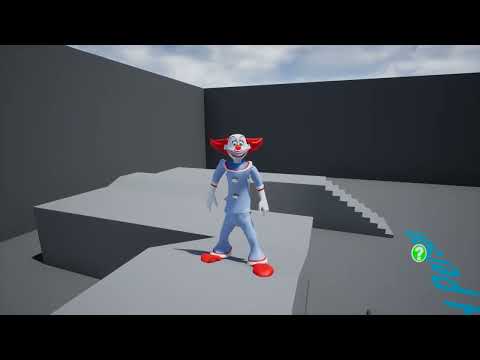
I added the curves to the idle motion

Stezza, Unreal is free, no Spaz Studio or other programs used, this is straight Carrara export and Unreal import
so you could make games with your characters
 only pay once you earn a million USD a yearThe "Animators Assemble!" thread for Daz animation WIPs, clips, and tips
Maybe a weird question, but how do you actually import FBX animation into DS? I built my Cascadeur animations on G8 characters, and I have no problem using them in C4D or Houdini, but the only way I've found to get them into DS is to import the FBX, then Copy Figure and paste to a G8, but the results always look wonky, like I'm trying to use G3 animation on a G8 or something.
Frame around yellow triangle with exclamation markThe same product was also installed with Connect inside DS.
2022-05-05 11:54:37.448 [INFO] :: D:/My DAZ Connect Data/data/cloud/1_62385/environments/architecture/ansiko/california summer/cs beach bag set.duf (1,1): Syntax error - expected '{' or '['

2022-05-05 11:54:37.448 [INFO] :: Error loading asset: D:/My DAZ Connect Data/data/cloud/1_62385/environments/architecture/ansiko/california summer/cs beach bag set.duf
Connect also updated the metadata for the product to look for it in the Connect Library, which is in a totally different location, with a totally different folder setup.Which why you are seeing the "can't find it" icons for everything in that product that uses the database driven view(Smart).
Connect doesn't play well with others.So you will need to decide which install method you want to use.
I suggest DIM and never login inside DS again to protect the metadata/database from this type of install salad. :)
edit:manual install/DIM/Central + never login inside DS again works for Daz Store content also.
Content downloaded/bought at a different store most likely won't have any metadata included with it, nor would the Daz store have any metatdata for it, so there wouldn't be any to mess up.
Frame around yellow triangle with exclamation markI know this has been addressed before but I've tried all of the solutions I found and nothing is helping.
I'm trying to use the California Summer Beach Props that I bought yesterday but everything - props, materials, shaders and script all have the frame with the yellow triangle and exclamation point.
When I double-click on a prop I get the error message - An error occurred while reading the file, see the log for details. The log is below.
I've downloaded the zip file and unzipped it with 7zip without a problem so there's nothing wrong with the compressed file. I've double-checked that all of the files are where they belong. Frankly I'm stumped. Any help would be greatly appreciated.
Thanks!
022-05-05 11:54:37.386 [INFO] :: Prepare asset load (open): /Environments/Architecture/ANSIKO/California Summer/CS Beach Bag Set.duf 2022-05-05 11:54:37.386 [INFO] :: Locking viewport redraw... 2022-05-05 11:54:37.386 [INFO] :: Viewport redraw locked. 2022-05-05 11:54:37.448 [INFO] :: Native format content directories: 8 2022-05-05 11:54:37.448 [INFO] :: Poser format content directories: 5 2022-05-05 11:54:37.448 [INFO] :: Other import format content directories: 0 2022-05-05 11:54:37.448 [INFO] :: Begin asset load (open): /Environments/Architecture/ANSIKO/California Summer/CS Beach Bag Set.duf 2022-05-05 11:54:37.448 [INFO] :: D:/My DAZ Connect Data/data/cloud/1_62385/environments/architecture/ansiko/california summer/cs beach bag set.duf (1,1): Syntax error - expected '{' or '[' 2022-05-05 11:54:37.448 [INFO] :: Error loading asset: D:/My DAZ Connect Data/data/cloud/1_62385/environments/architecture/ansiko/california summer/cs beach bag set.duf 2022-05-05 11:54:37.448 [INFO] :: Operation failed 2022-05-05 11:54:37.480 [INFO] :: Unlocking viewport redraw... 2022-05-05 11:54:37.480 [INFO] :: Viewport redraw unlocked.Importing Camera data INTO Daz Studiodoes it import VooDoo?
https://sites.google.com/site/mcasualsdazscripts/mcjvoodoodaz-for-ds1-2-3-4
Importing Camera data INTO Daz StudioHi, just read... I'd got the same problem although I have switched to Houdini. I'need to import a camera animation in Daz in create enviroments and render into it before coming back to Houdini and postprocess in Nuke. But at the moment I can't be able to manage this workflow...Daz Studio Pro BETA - version 4.20.0.17! (*UPDATED*)Anarkia333 said:
WendyLuvsCatz said:
OK this is new and exceedingly annoying.
the animation range reverting to 217 on reopening scenes is always annoying and stopped for a few builds
now it is back with sprinkles on top, it does it on the fly everytime I do something like pan a camera

OMG guys use DAZ for animation is soo ridiculous
yeah, just spent 17 hours rendering the New Sponza Atrium from Intel with iray 1800 frames
https://www.facebook.com/wendy5/videos/3939049862886761
back to Filament and sanity now

BTW DAZ does not import the FBX nicely so unless you have something that does Like Carrara with textures and glow on bulbs! to export an obj, don't bother
[Updated] Database issues after moving library (and frustration venting)The best way to avoid surprises is to only install with DIM and NEVER log in to your account from inside Daz Studio.
Never, ever, ever install a product with DIM and then install it again (or update it) from inside Daz Studio (i.e. with Daz Connect)! If you do, the result will result be duplicated files, products that used to work suddenly not working or having screwed up metadata or missing thumbnails. By never logging in, you can avoid those issues. You need to disable autologin in preferences. Don't let those symbols on the thumbnails fool you into thinking you have to install again inside Daz Studio after installing with DIM. That is not what those symbols mean. They mean that the product is available to be installed with Daz Connect. If you've installed it with DIM, you don't care that it is also available to install with Daz Connect, because doing so only causes problems.
Daz 3D is part of

Connect
DAZ Productions, Inc.
7533 S Center View Ct #4664
West Jordan, UT 84084Licensing Agreement | Terms of Service | Privacy Policy | EULA
© 2026 Daz Productions Inc. All Rights Reserved.