-
Smart Content not appearing (solved)
First, check if assets are showing up in the Content LIbrary pane/tab.
If they're there, skip to the second part of this.
1. Check that your file paths in DIM and Studio are the same.
FOr DIM:Click the Gear icon and select Basic Settings. The Content Base Path will tell you where items are being installed to.
Default is C:\Users\Public\Documents\My Daz 3D LIbrary.
In studio, Click the Content LIbrary menu button in the upper right corner and select Content Directory Manager, or F2>Content(tab)>Content directory manager.
Expand the DAZ Studio Formats and check that the file path matches DIM.
2.For Smart Content, Click the Pane Menu in the upper right corner, select Content Database Maintenance and check Re-Import Metadata then click Accept.
In the Import Metadata popout, you can, generally, just click Accept and studio will just reprocess all the items currently installed.
If there's not problem, items should now show up in smart content.
Smart Content not appearing (solved)SOLVED: I had to choose Empty the CMS database (from the same menu described below) and then reimport all the metadata.
---------------------
Since I installed Daz 4.24.0.3 a couple months ago on my new Win11 machine, I'm having a LOT of difficulty with DIM-installed products not appearing in the Install pane, the Smart Content pane (only a couple items!) and even missing from the Content Library. And I have "Filter by context" off. I've installed several thousand products from the DIM.
I tried copying back manually downloaded zips to the installation folder - but I think only the products not already "installed" would show up. After I removed G9 for example, finally it was an option again.
Despite installing, removing, and reinstalling, the Gen 9 content is nowhere to be found.
I tried stopping and restarting the CMS (which was not that easy to get running again) and so on.
What is going on?!
If it wasn't for all the latter day Gen figure content I've bought, I'd go back to Poser. DS is such a terrible UI experience. Nothing is intuitive. It feels like it was cobbled together by programmers instead of artists or even designers.
FLUIDOS II for Daz Studio - update 2.2 [commercial]tistur said:
Hi, I was hoping I could get some help. I've been trying to run FLUIDOS for a few days and it's been crashing every time. I tried the first example in the manual a few times and then I downloaded the honey scene from Renderosity and tried that several times. No luck, it jsut keeps crashing DAZ (once, it crashed and wouldn't open DAZ at all until I restarted the computer, which was a very weird experience on a mac).
I'm on a Mac M3 with DAZ Studio 4.24.0.4 .
The logs from DAZ:
2026-01-10 12:10:44.599 [INFO] :: Prepare asset load (open): /Scenes/Alvin Bemar/Honey/Honey-FluidosII Iray.duf
2026-01-10 12:10:44.599 [INFO] :: Locking viewport redraw...
2026-01-10 12:10:44.599 [INFO] :: Viewport redraw locked.
2026-01-10 12:10:44.940 [VERBOSE] :: Native format content directories: 9
2026-01-10 12:10:44.940 [VERBOSE] :: Poser format content directories: 2
2026-01-10 12:10:44.940 [VERBOSE] :: Other import format content directories: 0
2026-01-10 12:10:44.940 [INFO] :: Begin asset load (open): /Scenes/Alvin Bemar/Honey/Honey-FluidosII Iray.duf
2026-01-10 12:10:44.960 [INFO] :: Clearing the scene...
2026-01-10 12:10:45.074 [INFO] :: *** Scene Cleared ***
2026-01-10 12:10:45.162 [INFO] :: Determining missing assets...
2026-01-10 12:10:45.285 [INFO] :: Setting textures...
2026-01-10 12:10:45.418 [INFO] :: Scanning for addons...
2026-01-10 12:10:45.435 [INFO] :: Creating node geometry...
2026-01-10 12:10:45.444 [INFO] :: Creating UV sets...
2026-01-10 12:10:45.445 [INFO] :: Creating materials...
2026-01-10 12:10:45.464 [INFO] :: Resolving legacy figures...
2026-01-10 12:10:45.464 [INFO] :: Applying animations...
2026-01-10 12:10:45.464 [INFO] :: Processing scene data...
2026-01-10 12:10:45.541 [WARNING] :: QColor::setRgb: RGB parameters out of range
2026-01-10 12:10:45.553 [INFO] :: Sorting property groups...
2026-01-10 12:10:45.572 [INFO] :: Setting up follow targets...
2026-01-10 12:10:45.572 [INFO] :: Setting current camera...
2026-01-10 12:10:45.581 [INFO] :: Finalizing scene data...
2026-01-10 12:10:45.587 [INFO] :: Finished asset load (open): 0m 0.646s - /Scenes/Alvin Bemar/Honey/Honey-FluidosII Iray.duf
2026-01-10 12:10:46.114 [INFO] :: Unlocking viewport redraw...
2026-01-10 12:10:46.115 [INFO] :: Viewport redraw unlocked.
2026-01-10 12:10:46.181 [INFO] :: Loaded image: WoodDiffuse.jpg
2026-01-10 12:10:46.195 [INFO] :: Loaded image: ringDiffuse.jpg
2026-01-10 12:11:30.096 [WARNING] :: QWidget::setMinimumSize: (/QLabel) Negative sizes (0,-536870910) are not possible
2026-01-10 12:11:30.100 [WARNING] :: Object::connect: No such slot ABRunSimulationDialog::changedUnionVDB() in /Volumes/HDD/Sources/DAZStudio4.5+SDK/samples/interface/abFluidosII/abFluidos.cpp:2147
2026-01-10 12:11:30.100 [WARNING] :: Object::connect:  (sender name:   'BoolBtn')
2026-01-10 12:11:30.100 [WARNING] :: Object::connect:  (receiver name: 'FLUIDOS simulation')
2026-01-10 12:11:30.100 [WARNING] :: Object::connect: No such slot ABRunSimulationDialog::changedOnlyRemeshing() in /Volumes/HDD/Sources/DAZStudio4.5+SDK/samples/interface/abFluidosII/abFluidos.cpp:2148
2026-01-10 12:11:30.100 [WARNING] :: Object::connect:  (sender name:   'BoolBtn')
2026-01-10 12:11:30.100 [WARNING] :: Object::connect:  (receiver name: 'FLUIDOS simulation')
2026-01-10 12:11:49.912 +++++++++++++++ Daz Studio 4.24.0.4 starting +++++++++++++++++
And the logs from FLUIDOS:
Simulating liquid
	Solver = PIC_FLIP	Narrow band: no
------------------------------------------------------------
10-Jan-2026 12h11m35s

Initializing Simulation Grids:
	Grid Dimensions: 99 x 93 x 99
	Cell Size:       0.3
	Constructing MACVelocityField: 	0.2346
	Constructing FluidMaterialGrid:	0.0178
	Constructing LevelSet:         	0.0558
10-Jan-2026 12h11m35s setSurfaceSubdivisionLevel: 1
10-Jan-2026 12h11m35s set CFL Condition Number 5
10-Jan-2026 12h11m35s set Particle Jitter Factor 0.1
10-Jan-2026 12h11m35s set PIC/FLIP ratio 0.05
10-Jan-2026 12h11m35s setMarkerParticleScale: 2
10-Jan-2026 12h11m35s set engine: Fluidos II
10-Jan-2026 12h11m35s set Enable saving VDB type fog true
10-Jan-2026 12h11m35s set Removing isolated particles false
10-Jan-2026 12h11m35s set better meshing
10-Jan-2026 12h11m35s addAnythingFluidSource: 0x600003c45ea0
10-Jan-2026 12h11m35s addSolidMesh - triangles:5302 T = 298.15
10-Jan-2026 12h11m35s addSolidMesh - triangles:256 T = 298.15
10-Jan-2026 12h11m35s addSolidMesh - triangles:8832 T = 298.15
10-Jan-2026 12h11m36s addSolidMesh - triangles:173600 T = 298.15
10-Jan-2026 12h11m36s addBodyForce: 0 -981 0
10-Jan-2026 12h11m36s enableDiffuseMaterialOutput
10-Jan-2026 12h11m36s setMaxNumDiffuseParticles: 100000
10-Jan-2026 12h11m36s setMaxDiffuseParticleLifetime: 2.8
10-Jan-2026 12h11m36s setDiffuseParticleWavecrestEmissionRate: 175
10-Jan-2026 12h11m36s setDiffuseParticleTurbulenceEmissionRate: 175
10-Jan-2026 12h11m36s setScalingFactor: 1000
10-Jan-2026 12h11m36s disableAnisotropicSurfaceReconstruction
10-Jan-2026 12h11m36s enableIsotropicSurfaceReconstruction
10-Jan-2026 12h11m36s enablePreviewMeshOutput: 1.2
10-Jan-2026 12h11m36s initialize

Initializing Simulation:
	Initializing Solid Cells:    	0.0007
	Initializing Fluid Material: 	0.015
I'm sure I've missed a step or am soing something wrong here, but can't figure it out myself. I'd appreaciate any help!

Thanks
Is OpenCL enabled (in the Fluidods Domain)? If so, disable it . OpenCL might not function on macOS, as it was deprecated for recent macOS versions.
What is the Fluidos II edition you have? LITE, Complete, an upgrade?
Diffeomorphic Add-ons Version 5.2.0 ReleasedYou can't edit the shapekeys values by hand because they are driven, removing the drivers will break the rig. If you don't want to import the armature then you can uncheck the armature option in the global settings.
Remove JMC files within Daz Studio?lilweep said:
realhumanartists said:
DrunkMonkeyProductions said:
Joint Corrective Morphs(JCMs) exist for a reason, and unless you understand what's gonna break by not using them, and how to fix it, you shouldn't mess with them.
With that said, you can remove them, but it will make joints look weird, regardless of movement direction.
IF you're referring to the base JCM's in genesis 9, you can disable them by moving the Base Joint Correctives morph to 0.
Any JCM's associated with other products, will need to be removed manually.
You can use something like Turbo Loader to keep studio from loading them.
What if we create a new Genesis without those fixes? Or whatever is slowing down the animations?
I think you can export as FBX and then import that dummy to use for making animations, i assume. I dont really know what that workflow would look like and how it works. But probably easier to just turn off correctives as described earlier by various people.
You mentioned your animation workflow many times but never fully described what it was. You mentioned blender, but I assume you are trying to animate in Daz. If you are animating in Daz, note that it will be slow with SubD (high res) on. Daz is famously bad for animating, and real time feedback is not going to make it much better.
Also please stop saying "JMC" instead of JCM/CBS.
I always get confused and don't know what to call it: JCM, JMC, MCJ. I don't know, but I think I hate them, hahaha. The best thing I found was exporting from FBX to Blender without the morph rules. Also, the Diffeomorphic add-on leaves the model clean and ready to animate in Blender, but I admit that it's easier for me to animate in Daz Studio, and I think it's a shame that something can't be done because the tools are there, and it's much easier for me to do it there within Daz Studio than in Blender.
Remove JMC files within Daz Studio?realhumanartists said:
DrunkMonkeyProductions said:
Joint Corrective Morphs(JCMs) exist for a reason, and unless you understand what's gonna break by not using them, and how to fix it, you shouldn't mess with them.
With that said, you can remove them, but it will make joints look weird, regardless of movement direction.
IF you're referring to the base JCM's in genesis 9, you can disable them by moving the Base Joint Correctives morph to 0.
Any JCM's associated with other products, will need to be removed manually.
You can use something like Turbo Loader to keep studio from loading them.
What if we create a new Genesis without those fixes? Or whatever is slowing down the animations?
I think you can export as FBX and then import that dummy to use for making animations, i assume. I dont really know what that workflow would look like and how it works. But probably easier to just turn off correctives as described earlier by various people.
You mentioned your animation workflow many times but never fully described what it was. You mentioned blender, but I assume you are trying to animate in Daz. If you are animating in Daz, note that it will be slow with SubD (high res) on. Daz is famously bad for animating, and real time feedback is not going to make it much better.
Also please stop saying "JMC" instead of JCM/CBS.
More questions about using Cascadeur with DAZ StudioSnowSultan said:
Thank you for the replies. I did end up getting the Indie plan and it seems like an extremely powerful animation tool so far. I do have a few questions if you wouldn't mind though because seemingly EVERYTHING I try to learn, the tutorials and Youtube videos are somewhat outdated and never seem to solve the issues that I have. ;)
- The attached image show what the Cascadeur manual recommends the FBX export settings are from DAZ Studio. Is this still accurate?
Yes, those should still be accurate (at least they worked for me).
- When importing the exported FBX from DAZ Studio into Cascadeur, should you use the preset Add Mode, Model, or Scene?
IIRC, I used "Model" the last time I did it.
- Is it possible to export a single frame from Cascadeur to use as a pose in Studio?
I don't know if that is possible, but it's really easy to save a single frame as a pose in DAZ.
- Recent DAZ figures are recognized and rigged automatically, but when I use Export from DAZ, I get a large message that says "Exporting without mesh requires your model's skeleton to have a Model Pose. To set the Model Pose, select your DAZ model's whole hierarchy while the characters is standing in their default A-pose and run the command at "Commands -> Transform -> Set Model Pose". The question I have here is that as soon as Cascadeur rigs the figure, it changes to Cascadeur's slightly hunched default pose. How do we set the default A-pose, do we even need to, and what is the best way to answer this message for accurate animation export?
I use the "Export selected frames with mesh" option. It makes the exported fbx a bit larger since it includes the mesh data, but when you save the animation as a DAZ format, the mesh data isn't saved with it.
Thank you very much for any help.
Hope this helps.
As a side note there is a post from another user having some difficulty exporting an animation to DAZ. It might be that you need the pro version to use the "Export to DAZ" feature, that is what the video I linked in that thread states (I don't know, I have the pro version so I can't check). They are getting some odd joint rotations with the exports using export to DAZ. It could be that they are exporting using the option without the mesh, and an improper zero pose (I'm not sure how to set that, maybe import a static Genesis9/8.1/8 mesh, and move everything to match), or that you need the pro version. The OP did mention that exporting directly to FBX worked.
Does anyone recognize this?Just to check, did you do the Export on it's own and click accept and then go back in and do the reset? I am not sure what happens if you check Export and Reset at the same time :/
If you did do them separately then you should have had a option right at the top of the import list named USER_DATA or USER_DATA1 (or similar - it's been a while since I have done that) and providing that is checked then it should have imported all your custom database changes.
Does anyone recognize this?Do you mean this? If you do, yes I did that.
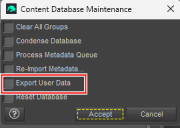
After I finished reseting the DB I then reimported the Metadata using the box above that.
(I did check the export DB and Reset DB at the same time)
But perhaps I don't understand the process...
Thanks.
Does anyone recognize this?leo04 said:
Well [botheration] I reset my data base and lost it again! Grrr. Why didn't it remain?
Did you export your custom changes before resetting the database? If not, then that is why your custom character no longer shows in Smart Content. This is because when you reset the database and reimport it goes through all the dsx files in your mapped folder /Runtime/Support/ folders and builds the database up from those files. There will not be a file for your custom changes unless you specifically use the export feature of Content DB Maintenance to write a UserData.dsx file.
The physical files will still be where they were before so you'll just have to recreate the metadata for it.
FLUIDOS II for Daz Studio - update 2.2 [commercial]Hi, I was hoping I could get some help. I've been trying to run FLUIDOS for a few days and it's been crashing every time. I tried the first example in the manual a few times and then I downloaded the honey scene from Renderosity and tried that several times. No luck, it jsut keeps crashing DAZ (once, it crashed and wouldn't open DAZ at all until I restarted the computer, which was a very weird experience on a mac).
I'm on a Mac M3 with DAZ Studio 4.24.0.4 .
The logs from DAZ:
2026-01-10 12:10:44.599 [INFO] :: Prepare asset load (open): /Scenes/Alvin Bemar/Honey/Honey-FluidosII Iray.duf
2026-01-10 12:10:44.599 [INFO] :: Locking viewport redraw...
2026-01-10 12:10:44.599 [INFO] :: Viewport redraw locked.
2026-01-10 12:10:44.940 [VERBOSE] :: Native format content directories: 9
2026-01-10 12:10:44.940 [VERBOSE] :: Poser format content directories: 2
2026-01-10 12:10:44.940 [VERBOSE] :: Other import format content directories: 0
2026-01-10 12:10:44.940 [INFO] :: Begin asset load (open): /Scenes/Alvin Bemar/Honey/Honey-FluidosII Iray.duf
2026-01-10 12:10:44.960 [INFO] :: Clearing the scene...
2026-01-10 12:10:45.074 [INFO] :: *** Scene Cleared ***
2026-01-10 12:10:45.162 [INFO] :: Determining missing assets...
2026-01-10 12:10:45.285 [INFO] :: Setting textures...
2026-01-10 12:10:45.418 [INFO] :: Scanning for addons...
2026-01-10 12:10:45.435 [INFO] :: Creating node geometry...
2026-01-10 12:10:45.444 [INFO] :: Creating UV sets...
2026-01-10 12:10:45.445 [INFO] :: Creating materials...
2026-01-10 12:10:45.464 [INFO] :: Resolving legacy figures...
2026-01-10 12:10:45.464 [INFO] :: Applying animations...
2026-01-10 12:10:45.464 [INFO] :: Processing scene data...
2026-01-10 12:10:45.541 [WARNING] :: QColor::setRgb: RGB parameters out of range
2026-01-10 12:10:45.553 [INFO] :: Sorting property groups...
2026-01-10 12:10:45.572 [INFO] :: Setting up follow targets...
2026-01-10 12:10:45.572 [INFO] :: Setting current camera...
2026-01-10 12:10:45.581 [INFO] :: Finalizing scene data...
2026-01-10 12:10:45.587 [INFO] :: Finished asset load (open): 0m 0.646s - /Scenes/Alvin Bemar/Honey/Honey-FluidosII Iray.duf
2026-01-10 12:10:46.114 [INFO] :: Unlocking viewport redraw...
2026-01-10 12:10:46.115 [INFO] :: Viewport redraw unlocked.
2026-01-10 12:10:46.181 [INFO] :: Loaded image: WoodDiffuse.jpg
2026-01-10 12:10:46.195 [INFO] :: Loaded image: ringDiffuse.jpg
2026-01-10 12:11:30.096 [WARNING] :: QWidget::setMinimumSize: (/QLabel) Negative sizes (0,-536870910) are not possible
2026-01-10 12:11:30.100 [WARNING] :: Object::connect: No such slot ABRunSimulationDialog::changedUnionVDB() in /Volumes/HDD/Sources/DAZStudio4.5+SDK/samples/interface/abFluidosII/abFluidos.cpp:2147
2026-01-10 12:11:30.100 [WARNING] :: Object::connect:  (sender name:   'BoolBtn')
2026-01-10 12:11:30.100 [WARNING] :: Object::connect:  (receiver name: 'FLUIDOS simulation')
2026-01-10 12:11:30.100 [WARNING] :: Object::connect: No such slot ABRunSimulationDialog::changedOnlyRemeshing() in /Volumes/HDD/Sources/DAZStudio4.5+SDK/samples/interface/abFluidosII/abFluidos.cpp:2148
2026-01-10 12:11:30.100 [WARNING] :: Object::connect:  (sender name:   'BoolBtn')
2026-01-10 12:11:30.100 [WARNING] :: Object::connect:  (receiver name: 'FLUIDOS simulation')
2026-01-10 12:11:49.912 +++++++++++++++ Daz Studio 4.24.0.4 starting +++++++++++++++++
And the logs from FLUIDOS:
Simulating liquid
	Solver = PIC_FLIP	Narrow band: no
------------------------------------------------------------
10-Jan-2026 12h11m35s

Initializing Simulation Grids:
	Grid Dimensions: 99 x 93 x 99
	Cell Size:       0.3
	Constructing MACVelocityField: 	0.2346
	Constructing FluidMaterialGrid:	0.0178
	Constructing LevelSet:         	0.0558
10-Jan-2026 12h11m35s setSurfaceSubdivisionLevel: 1
10-Jan-2026 12h11m35s set CFL Condition Number 5
10-Jan-2026 12h11m35s set Particle Jitter Factor 0.1
10-Jan-2026 12h11m35s set PIC/FLIP ratio 0.05
10-Jan-2026 12h11m35s setMarkerParticleScale: 2
10-Jan-2026 12h11m35s set engine: Fluidos II
10-Jan-2026 12h11m35s set Enable saving VDB type fog true
10-Jan-2026 12h11m35s set Removing isolated particles false
10-Jan-2026 12h11m35s set better meshing
10-Jan-2026 12h11m35s addAnythingFluidSource: 0x600003c45ea0
10-Jan-2026 12h11m35s addSolidMesh - triangles:5302 T = 298.15
10-Jan-2026 12h11m35s addSolidMesh - triangles:256 T = 298.15
10-Jan-2026 12h11m35s addSolidMesh - triangles:8832 T = 298.15
10-Jan-2026 12h11m36s addSolidMesh - triangles:173600 T = 298.15
10-Jan-2026 12h11m36s addBodyForce: 0 -981 0
10-Jan-2026 12h11m36s enableDiffuseMaterialOutput
10-Jan-2026 12h11m36s setMaxNumDiffuseParticles: 100000
10-Jan-2026 12h11m36s setMaxDiffuseParticleLifetime: 2.8
10-Jan-2026 12h11m36s setDiffuseParticleWavecrestEmissionRate: 175
10-Jan-2026 12h11m36s setDiffuseParticleTurbulenceEmissionRate: 175
10-Jan-2026 12h11m36s setScalingFactor: 1000
10-Jan-2026 12h11m36s disableAnisotropicSurfaceReconstruction
10-Jan-2026 12h11m36s enableIsotropicSurfaceReconstruction
10-Jan-2026 12h11m36s enablePreviewMeshOutput: 1.2
10-Jan-2026 12h11m36s initialize

Initializing Simulation:
	Initializing Solid Cells:    	0.0007
	Initializing Fluid Material: 	0.015
I'm sure I've missed a step or am soing something wrong here, but can't figure it out myself. I'd appreaciate any help!
Thanks
content manager SQL not working.Richard Haseltine said:
>>The log-in is to your account<<, Connect will use it to download content (you will need to update metadata for it to have the full list of what you own at that point), check membership for the Premier features (which matters only if you are a Premier member), get personalised notifications to show in the File>New dialogue. The PostgreSQL message is not directly related to that - it is trying to access the database so that it can populate the content panes that use it.
Connect does install files locally, though it uses a different location and puts each product in its own folder.
That would seem to be what was NOT happening. It couldn't login because it couldn't establish a connection which I think was "password" related?
It never asks for the password (like win 7 does).
Would being unable to complete a login to daz mean not only that connect was not available but that the CMS connection was not available.
---
Was the cms connection enabled because the connection to daz was finally working?
The first fail seemed to be any login to the entire daz system from the program and second message about fixing postgre was trying to launch the character conversion script which uses the CMS data base.
---
If the cms data base is broken should that interfere with the program "login" from the connect menu happening?
Imported Poser (.pz3) model messed-up handsHi guys,
I would need a little help in fixing this. I created my custom model in Poser Pro (and a LOT of work went into it, so starting over is a very last resort), and I tried importing it in different ways and formats, and so far I've found the best result to be when I simply import the Poser scene file with the .pz3 extension.
I'm completely new to DAZ 3D, so I know very little, and I can't even begin to guess where one would go to try and fix this. I tried scaling and messing with some parameters but I haven't found anything that affected this.I have no other issues with the model as far as I can tell, which is admittedly not very far.
Anyone has any ideas? Thank you!
content manager SQL not working.The log-in is to your account, Connect will use it to download content (you will need to update metadata for it to have the full list of what you own at that point), check membership for the Premier features (which matters only if you are a Premier member), get personalised notifications to show in the File>New dialogue. The PostgreSQL message is not directly related to that - it is trying to access the database so that it can populate the content panes that use it.
Connect does install files locally, though it uses a different location and puts each product in its own folder.
content manager SQL not working.Richard Haseltine said:
The ContentCluster folder is the database - by removing it you removed the existing content data, you will be able to reimport the product metadata but unless you exported user data or have a back up you can restore the entries for your own files and any customsiation you made to store entries have been lost (the files themselves are still there, of course). Uninstalling the PostgreSQL didn't touch the AppData folder because unisntalling should not (at least by default) touch user data.
I am unclear as to whether the clean database is now allowing you to connect successfully - if it is then it may well be that the database was corrupt anyway.
when you click the login from the connect drop down menu is that to connect to the Content Cluster (folder/database) or is it to connect to Daz for using Connect content etc?
The Connect content would not be on my computer? So instead of loading it from my computer via DIM it's loading via an online conection?
I've never used connect and it wasn't until I tried to use Riversofts Character Converter have I had a script or anything that complained the cms --- database wasn't available.
----
As for the login from the connect menu on the windows 7 machine it opened a dialogue for me to put in my password and then completed the connection.
So the win 10 machine it never offers that option just said "it failed to created an active postgreSQL connection which meant it couldn't talk to daz for Connect?
---
Upon starting now it doesn't say "it couldn't create a postgreSQL connecion any more and Riversofts character creator works because it can look up all the characters to convert.content manager SQL not working.The ContentCluster folder is the database - by removing it you removed the existing content data, you will be able to reimport the product metadata but unless you exported user data or have a back up you can restore the entries for your own files and any customsiation you made to store entries have been lost (the files themselves are still there, of course). Uninstalling the PostgreSQL didn't touch the AppData folder because unisntalling should not (at least by default) touch user data.
I am unclear as to whether the clean database is now allowing you to connect successfully - if it is then it may well be that the database was corrupt anyway.
Dforce hair flick issue anyway to fix it?Probably... but it'll still depend on how you make the morph. You may try a static simulation with the hair on a certain key frame, export the result to OBJ, then import as a morph. Then dial the morph properly in between an animated range.
Install/Folder issues and questionsnemesis10 said:
morrisonmp said:
I appreciate the information. Unfortunately, "Refresh" doesn't seem to do anything when I click it. I still have to do that weird database refresh every time. As you said, I do not install while DAZ is open.
And I figured I was just out of luck with the Lost and Found items. I understand the basics of setting up install folders and getting 3rd party items into the content library, but I do not feel technically skilled enough to monkey around too much with the "under the hood" parts of DAZ.
DIM is probably the most straightforward of all of these. The most important thing is to make sure that DIM is set up correctly i.e. your Daz content is going to the appropriate folders and the database is in the correct location. Click on the gear on the upper right corner and check the configurations of the installations. Next, go to Daz studio and Daz Studio Preferences, and Content Manager, and make sure Daz Studio can see the installation locations. When you install via DIM, Dim retrieves a zipped file, decompresses it, ideally doles out the contents to the appropriate locations such as geometry info to data, textures to Runtime>Textures>specific texture folder, sends a file to the shared Daz 3d> Install Manager> Manifest files where DIM looks to figure out where and if a product is installed, adds files to Runtime>Support which include the product name and image, and I think lets the CMS know that this product exists in your inventory. When the locations are wrong, this breaks down.
The Lost and Found is a bit more complicated. Products generally end up there because they don't have the proper metadata or broken metadata. The repair is suprisingly simple. The first thing to try is to delete and reinstall the product because sometimes the the installation garbles the metadata. Other products such as products from other stores may have no metadata. I suggest learning a little familiarty with selecting the lost and found item, right click on the product, edit metadata, and setting the item to be for a prop for Genesis 8 female for example. There are endless Youtube videos on how to do this and set up DIM if you would like some visual examples. We can supply those. It is all reversible and shouldn't be too scary.I bought a desktop computer last summer and eventually downloaded all of my DAZ3D assets via DIM. I have 1,300 products in the Lost and Found folder. I know that I can manually categorize the Lost and Found items but might there be a way to resolve this more automatically. I tried uninstalling one of the products with DIM and reinstalling it to see if that cleared the Lost and Found items in that product. It did not. Any advice? Thanks.
Daz Studio BETA - version 4.24.0.4!Leana said:
crosswind said:
What does Fixed a regression in the script that backs the “Create Poser Companion Files…” action mean ? What does “Create Poser Companion Files…” do ?
A regression is when a new version breaks a feature that was working previously. So they mean that they fixed a bug that was introduced by a previous update.
"Create poser companion files" creates files that the DSON Importer plugin for Poser uses to import content in DS format in Poser.
Great ! Thanks ! Then I just let go this latest version as I'm never a Poser user.
Daz Studio BETA - version 4.24.0.4!crosswind said:
What does Fixed a regression in the script that backs the “Create Poser Companion Files…” action mean ? What does “Create Poser Companion Files…” do ?
A regression is when a new version breaks a feature that was working previously. So they mean that they fixed a bug that was introduced by a previous update.
"Create poser companion files" creates files that the DSON Importer plugin for Poser uses to import content in DS format in Poser.
Daz 3D is part of

Connect
DAZ Productions, Inc.
7533 S Center View Ct #4664
West Jordan, UT 84084Licensing Agreement | Terms of Service | Privacy Policy | EULA
© 2026 Daz Productions Inc. All Rights Reserved.