-
Free Hair and Hair related Items List
Hair
Thank you, AprilYsh!
She made a lot of older hairs free.Allure Curls
Michael 3, Victoria 3 (and Victoria 3 Male), The Freak, Stephanie Petite 3, Michael 2, Victoria 2
http://shop.aprilsvanity.com/classics/allure-curls.htmlAlysadae Hair
Stephanie Petite 3, Victoria 1-2, or Victoria 3
http://shop.aprilsvanity.com/classics/alysadae-hair.htmlAnrhea Hair
Stephanie Petite 3, Victoria 1-2, or Victoria 3
http://shop.aprilsvanity.com/classics/anrhea-hair.htmlCorsair Hair
Michael 3, Victoria 3 (and Victoria 3 Male), Stephanie Petite 3
http://shop.aprilsvanity.com/classics/corsair-hair.htmlFauxHawk Hair
David 3, Micheal 3, Luke
http://shop.aprilsvanity.com/classics/fauxhawk-hair.htmlMontero Hair
David, Michael 3, Victoria 3 (also fits V2), Stephanie Petite 3
http://shop.aprilsvanity.com/classics/montero-hair.htmlNissa Hair
Posette (P4 Nude Woman), Victoria 1-2, Stephanie 1, Victoria 3 fit
http://shop.aprilsvanity.com/classics/nissa-hair.htmlQylan Hair
Stephanie Petite 3, Victoria 1-2, or Victoria 3
http://shop.aprilsvanity.com/classics/qylan-hair.htmlSamurai Sting
Michael 3, Michael 2
http://shop.aprilsvanity.com/classics/samurai-sting.htmlShimada Hair
Stephanie Petite 3, Victoria 1-2, or Victoria 3
http://shop.aprilsvanity.com/classics/shimada-hair.htmlSiren Hair
Victoria 1-2, or Victoria 3
http://shop.aprilsvanity.com/classics/siren-hair.htmlSpiral Curls
Victoria 3, Aiko 3, Stephanie Petite 3, or P6 Jessi
http://shop.aprilsvanity.com/classics/spiral-curls.htmlTheone Hair
David 3, Michael 1-2, Michael 3, Stephanie Petite 3, Victoria 1-2, or Victoria 3
http://shop.aprilsvanity.com/classics/theone-hair.htmlWarkanan Hair
David 3, Michael 1-2, Michael 3, Stephanie Petite 3, Victoria 1-2, and Victoria 3
http://shop.aprilsvanity.com/classics/warkanan-hair.htmlV4 QuestionDAZ Studio did not even exist when the first Victorias were released. It all started out with Poser only, and DAZ made and sold Poser content..
At the time Victoria 4 was released, almost everything DAZ sold worked in both Studio and Poser, with both using cr2 and pp2 formats. Studio was at version 2 in those days. The main differences were only in lighting and advanced shaders. At the time V4 was released, the duf format did not yet exist.
The great devide only began with Studio 4 and Genesis, and the introduction of the duf-format, then later with the introduction of iray.
Victoria 4 had a much longer life span in Poser, due to the fact thet the native Poser characters were never very popular, and Genesis never really worked natively in Poser. (Only when jumping through hoops with the DSON exporter, and even then not fuilly) There are even weightmapped versions of V4 for Poser, that I still use. I think, to Poser users, V4 is still the most popular character, and still very much alive. They still make new content for V4 outside of DAZ3D.
August 2019 – DAZ 3D New User Challenge – Free Month (With a Twist)L'Adair:
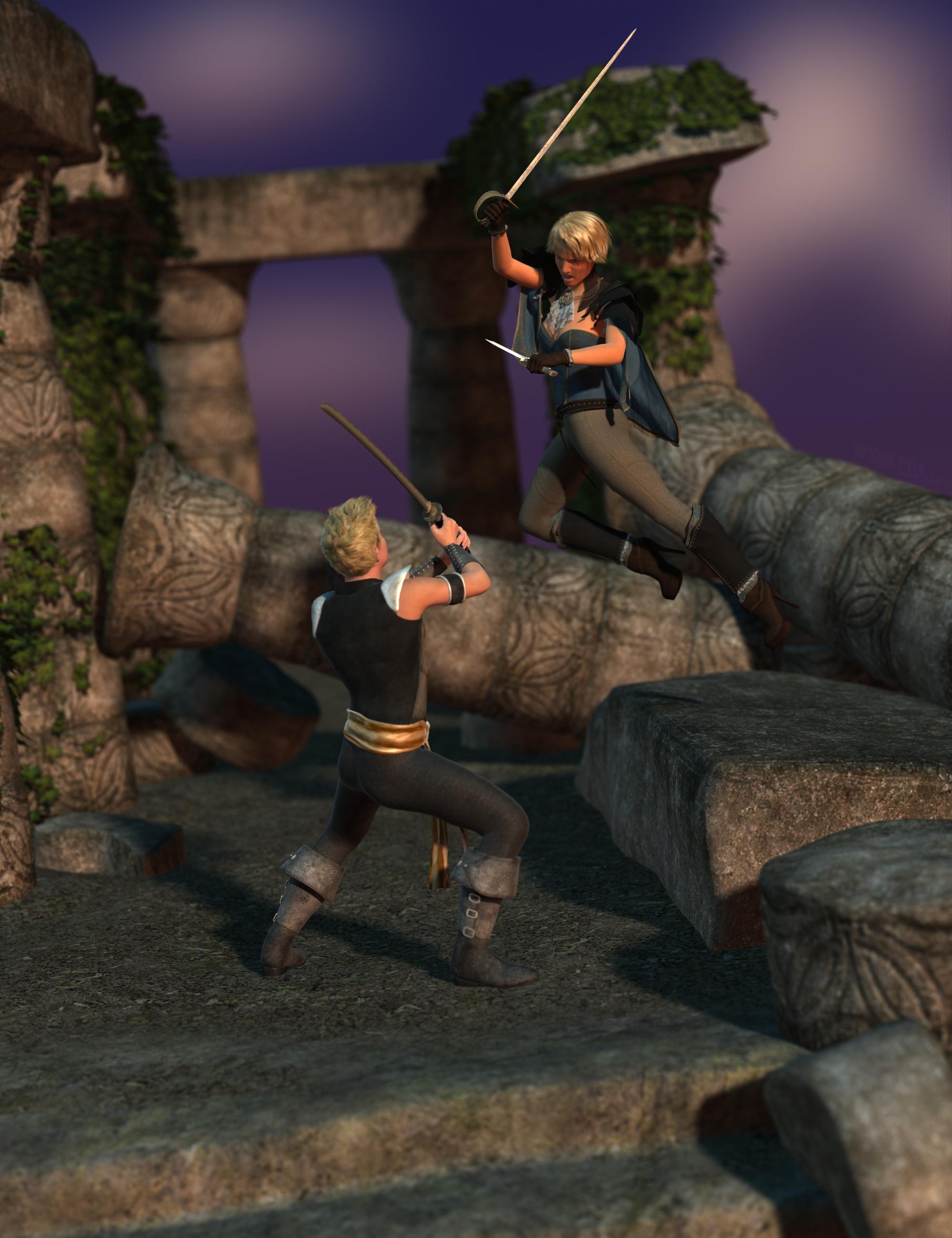
Items Used:
Products Included with Daz Studio:
- Genesis Starter Essentials
- Genesis Male
- WildMane Hair
- Journeyer Scout Outfit
- Journeyer Scout Textures
- Genesis 3 Female Starter Essentials
- Genesis 3 Female
- Dark Storm Outfit
- Toulouse Hair
- DM's Memorium
- Scene 04, modified set
- Scene 04 lighting
Not included with Daz Studio
- Props
- Utilities/Scripts
This looks like a fun game even If it is too late to play. One item jumps right out at me. It looks like 2 males fighting but one has boobs. I never cared for that toulouse hair.
I got the background from google images, does that count at a freebie? The girl is Victoria 8 which I got when daz gave away all the victorias, Most of the other items and clothes came in one or another starter pack. The male is brenden and I have no idea where he came from, some bundle I am sure. I have lots of content I don't know where it came from and some that is in lost and found that I have not been able to find the base for. But hey, gotta learn sometime.
V4 QuestionDaz started out selling content for Poser. Victoria 4, or V4 for short, was made before they created Daz Studio. The early versions of Daz Studio used .cr2 files for characters, .duf files weren't invented until later, I think it was around Daz Studio 4.something and by then Daz weren't making new stuff for Vicky 4 anymore.
I think that Daz and the PAs think that the newer figures are better so it's more worthwhile making new stuff for them but if you like using her she isn't dead. And you can probably still find new stuff for Vicky 4 in other online stores. I'm pretty sure Daz still sell Vicky 4, and if you bought her from Daz you can always redownload her. I've got stuff in my library that is older than Vicky 4 and I can still download it.
5'10" is really tall.Greetings,
I love Lyoness' characters more than almost any other provider of Genesis people. So many of them have great character, and are unique in ways that a lot of times I find lacking elsewhere, and Lyoness has one of my favorite characters of all time, Moxie Sparks. The latest bundle, Sterling's Nightwear, is great and includes some really useful clothes, along with good textures for it.
Like almost all DAZ characters, however, the main character is 5'10" tall. I don't mean to call out Lyoness...it's just a pattern across ALL characters that frustrates me. That's a half foot taller than the average US adult woman, and 7" more than what I can find of the average worldwide adult woman. Shrinking isn't just a matter of scaling down, as humans aren't...that simple to scale down. This results in 'petite' characters that are average height, or worse, much less Eva 7 who is advertised as 'petite' and is 5'11" tall. Even Teen Josie 8 is taller than an average adult.
Again, some characters who call themselves petite are at least a lot smaller, but even those are still just USA average height. There are some good characters (with great character!) who are a tiny bit shorter, but not many. And outside of explicitly 'youth' characters (4'9"), few if any are shorter than 5'3" tall, the worldwide average.
It's worth noting that Michael 8 and (randomly picked, Elios 8) are 6'2" tall, which is 5" taller than the average US adult man. Still proportionally less difference, but Victoria 8 is 6'0"! Diego 8 is only 5'10", the same height as most G8F characters, and only a sconce taller than an average guy.
I'm sure this is because DAZ's default G8F characters are 5'10"-ish, which is why almost every character creator goes with it, because making morphs that shrink the height is probably difficult. I'm guessing it compresses the texture wherever you decide to take height off, which can look wrong, especially because there was a backlash against custom UV sets.
I don't have a solution, other than using stuff like Growing Up which I know has proportional body scaling based on age/limb/torso length tables (but also has the tendency to de-age them slightly, at the same time, unfortunately), and I definitely don't want folks to go the route of not putting height in their character descriptions. I'd really like it if it were...easier to make average people, or even shorter than average adult people.
I'm going to go buy Sterling's Nightwear bundle, because it looks really cool, and has lots of utility clothing pieces, and don't take this as discouraging that at all.
I just want to encourage folks to make more average height or even shorter (since average means around half of folks are shorter!) characters, to capture the entire range of humanity, and if DAZ could find ways to encourage or help them do that.
-- Morgan
Total agreement! I brought this up in a previous thread-
https://www.daz3d.com/forums/discussion/120886/tiny-petite-g3fs/p1
In that thread, Fisty made a morph that models petiteness and it really worked for me...
How to delete "helpers" on the V4 SkeletonAre you using the skeletons alone, or with Victoria 4, or have yu used AutoFit in Daz Studo to make them fit another figure?
Hi Richard, Indeed I am attempting to fit the V4 skeleton to a Genesis 8 Female (Victoria 8 to be precise) By using some of the few instructions I was able to find searching various forums on the subject. The method that I am following is to first fit teh skeleton to the regular Genesis 1 figure and then fit to Genesis 8 (in may case Victoris 8 which I am hoping woudl have the same results as Genesis 8 but am not sure) the results are so so but these does seem to be substantial distortion when reshaping the character's shape. I am quite good with Zbrush so I will be attempting to bring the skeleton into Zbrush to edit and fix distortion but my first attempt to do so was not successful. so I shall keep hammering away to get it right. (Wish there was an updated anatomical character or set of character's ala Zygote's offerings. This would substantially increase Daz's value as a valuable tool for medical simulation and studies.
When you AutoFit the original bones are ignored, DS just projects the bones from the base figure into the model - as a result the helpers can no longer be switched off, and the bones cannot be posed individually. If your ZBrush skills are up to the job I'd just take the exported skeleton (hide the helprs and export as OBJ - then they will be gone), adjust it in ZBrush to fit inside the Genesis 8 figure, export the result as OBJ from ZBrush, import that into DS (making sure that you use the same preset in the options dialogue, so everything is scaled correctly) and then use Edit>Figure>Transfer Utility to rig the model (set the Source to Genesis 8 female, the target to your imported OBJ). It won't be perfect, and you may want to use the rigging tools in DS to enhance it, but it should be better than the AutoFit.
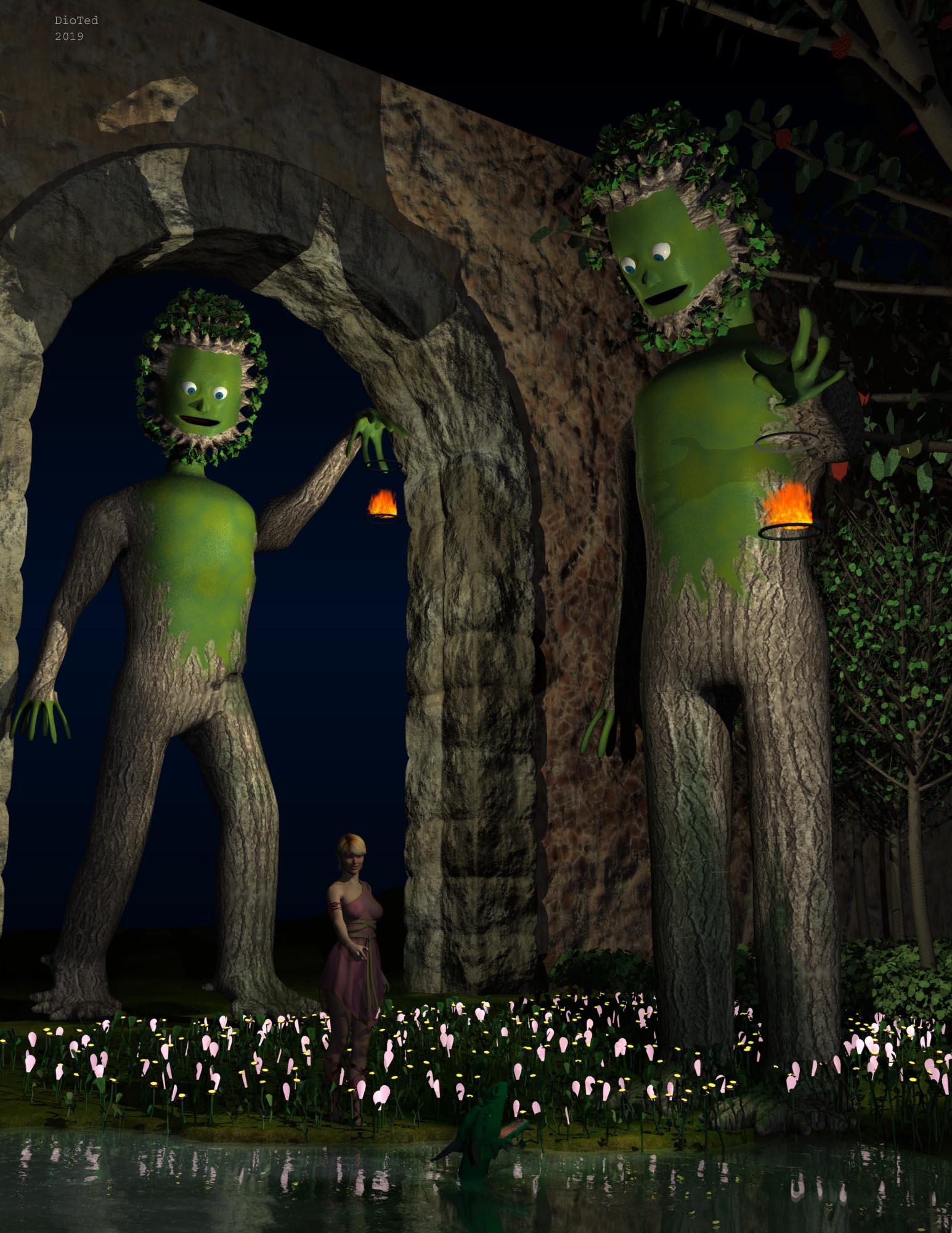
Carrara Challenge #50: A Special Carrara Anniversary Celebration - Results AnnouncedEntry: #3
Title: Vicky in a Garden with Two Plantmen
Artist: Diomede (Ted Murphy)
Category: Welcome to My Garden
WIP Links:
-Creating the Plant Man - https://www.daz3d.com/forums/discussion/comment/5151996/#Comment_5151996
-Garden elements, arch background, and composition - https://www.daz3d.com/forums/discussion/comment/5165706/#Comment_5165706
-Adding a Vicky and pond dweller- https://www.daz3d.com/forums/discussion/comment/5187506/#Comment_5187506
Products Used: Victoria 6 (G2F), Caledora Dress, Actual Hair, Dragonfolk (look closely at lake surface)
Additional Notes:
 VIctoria 4 Anatomy to Genesis 8
Sorry for the double post, take hours for these posts to get approved.
Figured out the workflow for anyone who comes across the thread.
1. Add V4 Skeleton, G1 and G8 to the scene.
2. Autofit V4 Skeleton to Genesis.
Figure Design dropdown: Victoria 4
Item Type: None
3. Autofit V4 Skeleton to Genesis 8.
Figure Design dropdown: Genesis
Item Type: None or Full body, doesn't seem to matter.
I did just discuss with someone that told me the V4 is based on G3, if thats true I can't believe the autofit figure design doesn't have a Victoria 4 listed for going V4 to G3, seems like that would actually be the shortest and best route to go but it's not possible.
Now to try fix some of this geo, keen to see if anyone has anymore tips getting this to work too.Hi Time
Thanks for your post. A question though. in item 3 do you mean to Autofit V4 Skeleton to Genesis 8 - OR - do you mean Autofit Genesis to Genesis 8?
Thanks
How to delete "helpers" on the V4 SkeletonAre you using the skeletons alone, or with Victoria 4, or have yu used AutoFit in Daz Studo to make them fit another figure?
Hi Richard, Indeed I am attempting to fit the V4 skeleton to a Genesis 8 Female (Victoria 8 to be precise) By using some of the few instructions I was able to find searching various forums on the subject. The method that I am following is to first fit teh skeleton to the regular Genesis 1 figure and then fit to Genesis 8 (in may case Victoris 8 which I am hoping woudl have the same results as Genesis 8 but am not sure) the results are so so but these does seem to be substantial distortion when reshaping the character's shape. I am quite good with Zbrush so I will be attempting to bring the skeleton into Zbrush to edit and fix distortion but my first attempt to do so was not successful. so I shall keep hammering away to get it right. (Wish there was an updated anatomical character or set of character's ala Zygote's offerings. This would substantially increase Daz's value as a valuable tool for medical simulation and studies.
Help looking for forearm+hand and shin+feet wrappingsI can't direct link because the product images violate DAZ TOS, but there is Exnem Mummy for Genesis 8 Female at Renderosity.
And there are some for V4 if you are able to convert them to G8: https://www.daz3d.com/catalogsearch/result/?q=bandages%20for%20v4
You may be interested in https://www.daz3d.com/wear-them-all-autofit-clones-expansion-for-genesis-3-male-s-and-genesis-3-female-s which converts V4/M4 (and more) to G3, then you can autofit to G8, or use https://www.daz3d.com/rssy-clothing-converter-from-victoria-4-to-genesis-8-female
Genesis to G2F or G3F pose converter?I have some poses for Victoria 5 Genesis that I want to convert to either G2F or G3F - is there a converter? (or will Genesis poses work natively on G2? I can't recall)
I have pose converters that will go from V4 to Genesis and Genesis 2, and from Genesis 2 to Genesis 3, and then Genesis 3 to Genesis 8....ultimately I want to use these Victoria 5 poses on G8.
How to delete "helpers" on the V4 SkeletonAre you using the skeletons alone, or with Victoria 4, or have yu used AutoFit in Daz Studo to make them fit another figure?
How to delete "helpers" on the V4 SkeletonI have it installed in Poser rather than DS, as I don't use DS. In Poser their is a purpose built mat pose to remove the helpers. You have to remember that this is quite an old product, and was built with Poser in mind. Apparently you should find files in these locations according to the read me for DS
-
You can find new icons for this product in the following DAZ Studio Categories:
-
“Anatomy:External”
-
“Figures:Creatures:Land”
-
“Materials:Anatomy”
-
“Materials:Feminine:V4 Skeleton”
-
“Materials:Feminine:Victoria 4 Skeleton”
-
“Poses:By Function:Fits”
-
“Poses:By Region:Full Body”
-
“Utilities:Visibility”
-
I suggest maybe the last one (which I underlined) is what you are looking for.
Oh and If you need the read me it is here http://docs.daz3d.com/doku.php/public/read_me/index/8962/start
How to delete "helpers" on the V4 SkeletonHello
I've spent over an hour to try to remove the "helpers" on teh Victoria 4 Skeleton. https://www.daz3d.com/v4-skeleton
The Product promo page says "Easily Hide-able Helpers to Simplify Posing"
However there is zero instructions on how to "Easily Hide" them. And not a single search on the intrnet has a solution. There are suggestions to go into the materials surfaces settings and change teh color manually to transparent but that is not the kind of solution that is suitable. I will be needing to remove the geometry entirely. There is no purpose for these weird handles because Daz3d already has probably the most comprehensive slider control and character posing controls of any character software. How can I loose these useless "helpers"
Thanks in advance
Christina
Please, can you identify the texture?For morph sets, I like to use Victoria 7/8 with a modified shader.
Those brows were from a freebie set by AprilYSH "fleek"
Thank you so much! ♥♥♥
Thank you to all other who answered, too!
All the best and keep rendering vor 2020!
Shape Splitter - Divide, Combine and Save (The new version is already available. 1.2.1)[Commercial]Two open tech support questions directed at the vendor and he’s been AWOL since October (aside from never providing the promised manual). I for one won’t be buying anything from him again, as the documentation is (as others have stated) wholly lacking. This problem is *not* going to happen to me again.
That's your right. Your problem isn't a technical issue that the vendor needs to patch; it's a rather brash request for a personalized tutorial within a 4 day time frame during the holidays. It seems like most people in this thread have tinkered and found out how to use this product to make some amazing things. The documentation cannot cover step-by-step every permutation of vertex/bone/plane splitting for edge cases. Hobbyist software or not, some trial and error goes a long way.
No step by step screenshots here, just good old reading and deduction using what we know of Daz figures in general. This product assumes the user knows a thing or two about that.
I assume by "morph creation of a character’s feet" you want to separate the feet morphs from a character to use elsewhere. First load in a default G8 and run the script. In Step 1, the product needs a way to know how to divide a character. Right away when we launch the script, we see the Easy panel doesn't divide the target part; we want the feet only, not the entire legs. The Material panel also doesn't do what we want because the feet don't have their own material surface zone (check it). But in the Bones panel we can scroll down and see that, lo and behold, there is a heirarchy for the feet bones (left and right feet). Select all the child bones for the left and right feet (including all the toes).
In Step 2, click where it says "Select a property..." and start typing the morph you want to separate. So if you like Victoria 8's feet, you would write "Victoria 8" and choose FBMVictoria8 (Victoria 8 Body). FBM = female body morph. Don't choose FHM as that's the head only.
The video then clearly shows how to preview and save out the morph for use with other characters. You can tinker with including more bones when transplanting the feet, as some characters are taller than their base counterparts, so the ankles can get distorted if you don't also include the shin bones. Victoria 8, for example, has this problem.
There are more advanced uses of this product to do the same thing, but this is the quick and dirty, figure-it-out-in-15-minutes method of transplanting feet.
Very useful tips. I like them.
"How to" neededIf you drag and drop, or otherwise attempt to load, any V4 clothing item onto a Genesis 8 Female base figure, you should get the drop-down list as shown in the attachment. This assumes you have installed SY Victoria 4 and Michael 4 Clones for Genesis 8.
Genesis 3 needs a different product to get the V4 and M4 clones, Wear Them All - Autofitting Clones and Clothing Smoothers for Genesis 3 Female(s) and Wear Them All - Autofitting Clones and Clothing Smoothers for Genesis 3 Male(s), respectively. They also give clones for G2 and Genesis, with a few new tools.
Here are a few threads to get a little more background on how to use them and what to expect.
Difference between Sickleyield's Ultra Templates and Clones?
500 Pages in Content Library - Am I the first to hit this landmark?Those more than 300 pagers, still you feel something is still require to finish the art exactly as your imagination? Or facing difficulty to instantly find what you require from your content library?
For me it's a longevity thing. I've been buying things here since the Victoria 2 days and then you get new innovations, Dynamic Clothing, Iray and dForce to name but a few.
Please, can you identify the texture?For morph sets, I like to use Victoria 7/8 with a modified shader.
Those brows were from a freebie set by AprilYSH "fleek"
Report sales errors here. "There's Always Another Sale™"There's a lot of odd stuff going on with this sale. Today, everything from the countdown section lists as $9.95 for me, no matter in what combination, what amount, or whether I have a new item included or not.
In my current cart on the Checkout page, Magazine Cover Poses for Genesis 8 Female & Victoria 8 lists a "new" icon in front of the wishlist symbol.
At the same time, dForce Winter Frolic for Genesis 8 Female(s) does *not* have a "new" icon in front of the wishlist symbol there.
It'll probably fix itself when I refresh the checkout page or update my cart..Earlier today, Pix Merana for Genesis 3 Female not only had a "new" icon, but also an "owned" icon in front of the wishlist symbol. It fixed itself when I removed and re-added her to my car. Sadly, the prices didn't fix themselves, so she's still in my wishlist. I truelly never saw that red "owned" icon on that page before. Makes sense that it exists, though.
But, it's also a bummer, now that there's so much nice stuff in that list. I eventually bought some stuff, but nothing from the countdown section, hoping that part would fix itself during the day. Apparently not, though.
Daz 3D is part of

Connect
DAZ Productions, Inc.
7533 S Center View Ct #4664
West Jordan, UT 84084Licensing Agreement | Terms of Service | Privacy Policy | EULA
© 2026 Daz Productions Inc. All Rights Reserved.