-
2020 "There's Always Another Sale™" (Report sales errors here.)
Well, I own everything in the $5 group too, but I tested the cart to see what the prices were.
Plopped Victoria 7 in, went to $5
Then two new releases which were 30%
https://www.daz3d.com/jeans-jacket-mayhem was 15.37 30% off and went to 12.30 and 44% off. So that's $3.07 saved
https://www.daz3d.com/dforce-greyson-hair-for-genesis-8 was 30% off and 17.47 and went to 13.97 and 44% off. So that's 3.50 savedTa-Dah, I'm saving....6.57 minus $5 had to spend equals....
$1.57 "SAVED" and having to SPEND 31.27 to do it!
PASS. Not to mention the featured artist stores only go to 55% off. Having to spend 31.27 to get that percentage is a no-go.I don't quite see your logic here. You spent $5 to save an extra $6.57, as presumably you would want to buy the two new items. You got the Character for $5 regardless, you don't need to go on and trigger extra discounts unless you actually want the products on offer.
I think you may have missed the fact she already owns all the characters. The only way she can access the extra discounts for the new releases and/or the featured artists is to purchase a core character she's purchased in the past. Of course we've seen offers like this in the past, but then Daz would provide an exclusive offer to those who already owned everything that was free, or triggered the discounts. They didn't do that with this offer, which is surprising.
Personally, I think most offers in January seem a bit lackluster. It isn't the sales as much as the period of adjustment coming off the Holiday Rewards sale with the additional Loyalty discounts and amazing offers every single day. (Even if not all the offers hit my sweet spot of great price and must have products!)
44% off new releases is a good offer. 55% off featured artist products is also a good offer. In another week or two, we'll get used to 'normal' sales again, (and by "we" I mean me,) where the new releases get a straight 30% discount, and I'll be longing for an offer that makes it 44% instead.
2020 "There's Always Another Sale™" (Report sales errors here.)Well, I own everything in the $5 group too, but I tested the cart to see what the prices were.
Plopped Victoria 7 in, went to $5
Then two new releases which were 30%
https://www.daz3d.com/jeans-jacket-mayhem was 15.37 30% off and went to 12.30 and 44% off. So that's $3.07 saved
https://www.daz3d.com/dforce-greyson-hair-for-genesis-8 was 30% off and 17.47 and went to 13.97 and 44% off. So that's 3.50 savedTa-Dah, I'm saving....6.57 minus $5 had to spend equals....
$1.57 "SAVED" and having to SPEND 31.27 to do it!
PASS. Not to mention the featured artist stores only go to 55% off. Having to spend 31.27 to get that percentage is a no-go.I'll be honest in saying I didn't even get as far as running the numbers that far. As soon as I see that I see that a sale doesn't apply to me, I stop reading and wait to see if there is an alternate deal. If there isn't, then DAZ gets no business that day... especially since Renderosity has been running at least two vendors everyday at 70% off.
2020 "There's Always Another Sale™" (Report sales errors here.)Well, I own everything in the $5 group too, but I tested the cart to see what the prices were.
Plopped Victoria 7 in, went to $5
Then two new releases which were 30%
https://www.daz3d.com/jeans-jacket-mayhem was 15.37 30% off and went to 12.30 and 44% off. So that's $3.07 saved
https://www.daz3d.com/dforce-greyson-hair-for-genesis-8 was 30% off and 17.47 and went to 13.97 and 44% off. So that's 3.50 savedTa-Dah, I'm saving....6.57 minus $5 had to spend equals....
$1.57 "SAVED" and having to SPEND 31.27 to do it!
PASS. Not to mention the featured artist stores only go to 55% off. Having to spend 31.27 to get that percentage is a no-go.I don't quite see your logic here. You spent $5 to save an extra $6.57, as presumably you would want to buy the two new items. You got the Character for $5 regardless, you don't need to go on and trigger extra discounts unless you actually want the products on offer.
2020 "There's Always Another Sale™" (Report sales errors here.)Well, I own everything in the $5 group too, but I tested the cart to see what the prices were.
Plopped Victoria 7 in, went to $5
Then two new releases which were 30%
https://www.daz3d.com/jeans-jacket-mayhem was 15.37 30% off and went to 12.30 and 44% off. So that's $3.07 saved
https://www.daz3d.com/dforce-greyson-hair-for-genesis-8 was 30% off and 17.47 and went to 13.97 and 44% off. So that's 3.50 savedTa-Dah, I'm saving....6.57 minus $5 had to spend equals....
$1.57 "SAVED" and having to SPEND 31.27 to do it!
PASS. Not to mention the featured artist stores only go to 55% off. Having to spend 31.27 to get that percentage is a no-go.Linday appreciationResized some more renders so I could fit em here:
Is the Kate from your last render from the shop? All your render looks nice but she looks really nice .
Thanks!
Nothing "out of the box". It's a character that I started working with in September when I finally got a computer and could get back into DAZ. She's "evolved" over time, as I get new items, & fiddle with settings.
I have no idea what morphs I've applied anymore lol - she's a blend of a whole bunch of different ones from morph packs and characters. Materials-wise, here's the current make-up.
The skin is slightly modified from Penny 8 by DAZ (two faces - one for the skin, one for the lips), with Kala 8 normal maps and Victoria 8 HD morphs (body and head)
The eyes are from Elysa from Raiya. I can't remember what I use for her nails. I think they're usually something from Mousso, or sometimes left alone.
And of course I usually couple that with some awesome Linday hair!
Glad you like her!
Yes, she's really beautiful, nice job on her! Penny has the brows included in the texture right?
And which hair is it? Is it https://www.daz3d.com/classic-long-wavy-hair-with-dforce-for-genesis-8-females but somehow not wavy anymore?
Oh right, the brows! Yes, Penny comes with brows & textures, but they don't line up with the Kala normal maps, so I'm using Kala's brows to match up.
One of the hairs is https://www.daz3d.com/side-layered-messy-hair-with-dforce-for-genesis-8-females and the other is https://www.daz3d.com/classic-long-hair-with-dforce-for-genesis-8-females
It's funny how those 2 pieces of hair were the ones ones from Linday that I didn't already own or were not in my wishlist. They are in my wishlist now :).
Linday appreciationResized some more renders so I could fit em here:
Is the Kate from your last render from the shop? All your render looks nice but she looks really nice .
Thanks!
Nothing "out of the box". It's a character that I started working with in September when I finally got a computer and could get back into DAZ. She's "evolved" over time, as I get new items, & fiddle with settings.
I have no idea what morphs I've applied anymore lol - she's a blend of a whole bunch of different ones from morph packs and characters. Materials-wise, here's the current make-up.
The skin is slightly modified from Penny 8 by DAZ (two faces - one for the skin, one for the lips), with Kala 8 normal maps and Victoria 8 HD morphs (body and head)
The eyes are from Elysa from Raiya. I can't remember what I use for her nails. I think they're usually something from Mousso, or sometimes left alone.
And of course I usually couple that with some awesome Linday hair!
Glad you like her!
Yes, she's really beautiful, nice job on her! Penny has the brows included in the texture right?
And which hair is it? Is it https://www.daz3d.com/classic-long-wavy-hair-with-dforce-for-genesis-8-females but somehow not wavy anymore?
Oh right, the brows! Yes, Penny comes with brows & textures, but they don't line up with the Kala normal maps, so I'm using Kala's brows to match up.
One of the hairs is https://www.daz3d.com/side-layered-messy-hair-with-dforce-for-genesis-8-females and the other is https://www.daz3d.com/classic-long-hair-with-dforce-for-genesis-8-females
Linday appreciationResized some more renders so I could fit em here:
Is the Kate from your last render from the shop? All your render looks nice but she looks really nice .
Thanks!
Nothing "out of the box". It's a character that I started working with in September when I finally got a computer and could get back into DAZ. She's "evolved" over time, as I get new items, & fiddle with settings.
I have no idea what morphs I've applied anymore lol - she's a blend of a whole bunch of different ones from morph packs and characters. Materials-wise, here's the current make-up.
The skin is slightly modified from Penny 8 by DAZ (two faces - one for the skin, one for the lips), with Kala 8 normal maps and Victoria 8 HD morphs (body and head)
The eyes are from Elysa from Raiya. I can't remember what I use for her nails. I think they're usually something from Mousso, or sometimes left alone.
And of course I usually couple that with some awesome Linday hair!
Glad you like her!
Yes, she's really beautiful, nice job on her! Penny has the brows included in the texture right?
And which hair is it? Is it https://www.daz3d.com/classic-long-wavy-hair-with-dforce-for-genesis-8-females but somehow not wavy anymore?
Linday appreciationResized some more renders so I could fit em here:
Is the Kate from your last render from the shop? All your render looks nice but she looks really nice .
Thanks!
Nothing "out of the box". It's a character that I started working with in September when I finally got a computer and could get back into DAZ. She's "evolved" over time, as I get new items, & fiddle with settings.
I have no idea what morphs I've applied anymore lol - she's a blend of a whole bunch of different ones from morph packs and characters. Materials-wise, here's the current make-up.
The skin is slightly modified from Penny 8 by DAZ (two faces - one for the skin, one for the lips), with Kala 8 normal maps and Victoria 8 HD morphs (body and head)
The eyes are from Elysa from Raiya. I can't remember what I use for her nails. I think they're usually something from Mousso, or sometimes left alone.
And of course I usually couple that with some awesome Linday hair!
Glad you like her!
CMS Connection & How Do I Get It?I'll attach the message that pops up when I open DAZ Studio. Maybe this is why by database of content seems invisible and why my metadata is nowhere to be found and no smart content?
Is this Valentina? I find i get that on my mac after a crash; have you never been able to see your smart content? I would check in DIM if the CMS is howing as downladed first (see attached). Next check in Daz Studio's Content Manager to see if everything is properly configured (see attached). For all this to work, you have to have a working PostGreSQL CMS (the database manager), a proper content folder with a Data folder, runtime tec... and finally, there should be a Daz 3d folder in your Shared User account on your Mac that contains the Install Manager> Manifest Files and the files that tells Smart Content what is smart content... make sure that that isn't empty.
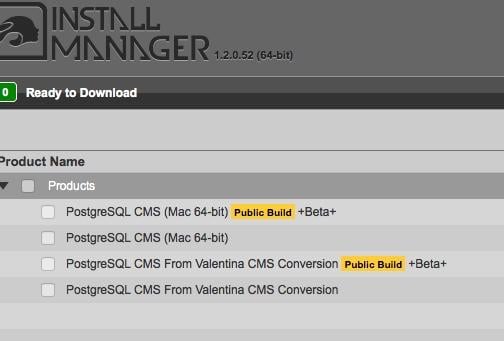
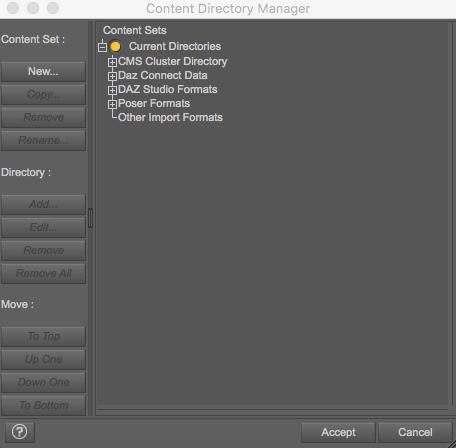
I think I have a ton of the SQL stuff installed, both on my computer, and on the external hard drive where I keep the content. I'll attach screenshots. I have a feeling I need to check a box in the Content Directory Manager?
Yep, Daz Studio knows where things are by the mapping of content folders and runtimes on your hard disk. Smart Content uses the mapping of the location, the metadata of the product, and manifest files to decide "ah, this is Victoria 8 hair!" for example. There are a million tutorials but here is a start... skip down to the content manager portion: http://docs.daz3d.com/doku.php/artzone/pub/software/dazcontentconfiguration
HD Body Shapes & Head MorphsI guess I'm being misunderstood because I'm not suggesting we don't need HD morphs or that we can accomplish sculpt-like mesh deformations with maps. All I want to know is why aren't we using maps to create the kinds of things that current DAZ HD morphs give us - lip, knuckle, and knee detail, small wrinkles, moles, and such. Do we really need to use high definition morphs at subdivision 3 to see large veins in an elderly figure's hands?
There are a few out there -
https://www.daz3d.com/ultra-detailed-displacement-maps-for-victoria-7
https://www.daz3d.com/ultra-detailed-displacement-maps-for-genesis-3-base-female
I use these often, but you really have to crank up the subd in Iray to make the details shine.
I guess I'm being misunderstood because I'm not suggesting we don't need HD morphs or that we can accomplish sculpt-like mesh deformations with maps. All I want to know is why aren't we using maps to create the kinds of things that current DAZ HD morphs give us - lip, knuckle, and knee detail, small wrinkles, moles, and such. Do we really need to use high definition morphs at subdivision 3 to see large veins in an elderly figure's hands?
Could be that DAZ wants to have a hold on something DS specific which would be the HD tool only avaliable to PAs. Since using HD mesh to create quality maps is the norm outside of DAZland, maybe this method isn't accepted in the store, you never know. DAZ is a business afterall.
It's less of an issue now we have the Iray preview mode, but most preview modes won't show displacement while they will show HD morphs (albeit, by default, at a lower maximum resolution).
HD Body Shapes & Head MorphsI guess I'm being misunderstood because I'm not suggesting we don't need HD morphs or that we can accomplish sculpt-like mesh deformations with maps. All I want to know is why aren't we using maps to create the kinds of things that current DAZ HD morphs give us - lip, knuckle, and knee detail, small wrinkles, moles, and such. Do we really need to use high definition morphs at subdivision 3 to see large veins in an elderly figure's hands?
There are a few out there -
https://www.daz3d.com/ultra-detailed-displacement-maps-for-victoria-7
https://www.daz3d.com/ultra-detailed-displacement-maps-for-genesis-3-base-female
I use these often, but you really have to crank up the subd in Iray to make the details shine.
I guess I'm being misunderstood because I'm not suggesting we don't need HD morphs or that we can accomplish sculpt-like mesh deformations with maps. All I want to know is why aren't we using maps to create the kinds of things that current DAZ HD morphs give us - lip, knuckle, and knee detail, small wrinkles, moles, and such. Do we really need to use high definition morphs at subdivision 3 to see large veins in an elderly figure's hands?
Could be that DAZ wants to have a hold on something DS specific which would be the HD tool only avaliable to PAs. Since using HD mesh to create quality maps is the norm outside of DAZland, maybe this method isn't accepted in the store, you never know. DAZ is a business afterall.
Victoria 8 pro bundleNone of the genesis pro bundles came with the default head and body morphs. Victoria 6 or 7 didn't
Victoria 8 pro bundleDoes the probundle include the body morphs like the previous versions? It doesn't seem to be a pagage.
HD Body Shapes & Head MorphsI guess I'm being misunderstood because I'm not suggesting we don't need HD morphs or that we can accomplish sculpt-like mesh deformations with maps. All I want to know is why aren't we using maps to create the kinds of things that current DAZ HD morphs give us - lip, knuckle, and knee detail, small wrinkles, moles, and such. Do we really need to use high definition morphs at subdivision 3 to see large veins in an elderly figure's hands?
There are a few out there -
https://www.daz3d.com/ultra-detailed-displacement-maps-for-victoria-7
https://www.daz3d.com/ultra-detailed-displacement-maps-for-genesis-3-base-female
Genesis 8 Female example and improvement discussionThis is Zariah HD for Victoria 8
See the full resolution on DA: http://fav.me/ddo76cr
OT: Samsung's Neon Artificial Humandunno how much is scripted though, as they themselves pointed out the mocap video game characters look convincing until you try using a lipsync type function, I have seen facial mocaps using Victoria 4 that looked convincing because it's the micro expressions with that particular narrative.
The Pixar toon characters even look believable because real actors voice them and they use mocap.
Otherwise you get a lot of very photorealistic corpses and wax museum exhibits.
New Installed Morphs Not AppearingHi, I'm fairly new to Daz Studio. I have been exploring and trying to learn. Its very confusing, but I'm beginning to learn my way around.
I purchaced Victoria 4.2 Base Studio CF, shapes and muscle morphs to start with and using the installer button on the website to install them. It opened the Daz installer and I installed them. I selected the Victoria base and it opened the power loader to add the morphs, which I did. They all appeared in the parameters and shapes tabs and all work fine. All these appear in the left panel under Products V.
Later I bought the Genesis 8 Female body morphs, head shapes and the HD muscle morphs which I installed from the website install button as well. The muscle morphs all show up in the parameters and shaping tabs and work fine. I was excited to explore them and I didn't notice until much later the body and head morphs were missing. It wasn't until the other day when I wanted to make the legs longer I could not find slider for it and then noticed none of the body morphs and head morphs where there. I checked again to see if the power loader was appearing when selecting the Genesis 8 Female and it does not. I don't recall it opening when the muscle morphs were installed.
I could not find any usefull info on this. I tried using the installer to see if they were installed. It confirms they are installed as well as visual check in the folder location which they are. They still are not appearing in the parameters or shaping tabs. I can only find them in the left hand panel under products G. Nothin happens when I left click them. Right click menu shows uninstall. I did try uninstalling using the install manager and reinstalling, but that didn't work.
I have noticed that sometimes slider seem to vanish and appear again. I don't know why. I then realized I still had a search word, but that wasn't always the case. Sometimes it seemed like some sliders would just vanish. I don't know if I was doing something wrong but I know I have to have Genesis 8 female selected.
Can someone please help to get the body and head morphs to appear.
ZZ
Did Vairesh set up "shop" elsewhere?I think the subject line pretty well states the question. When Vairesh left DAZ as a vendor, did he (or she) set ip shop at another site?
To the point, I'd like the purchase the "Aisha Hair for Victoria 3" which "vanished" when Vairesh did. I'm planning a composition that will depict the Na'vi from James Cameron's "Avatar" and the and "CS" at ShareCG provides a texture that uses that hairpiece.
I know what somebody likely recommend, the "Wild Dreads" package. I have that item already and will rely upon that as a "backup" if my search turns up goose eggs, but I'd rather employ something a tad more "screen accurate" if possible.
Sincerely,
Bill
Any of these do.
https://www.daz3d.com/catalogsearch/result/?q=vairesh aisha hair
Did Vairesh set up "shop" elsewhere?I think the subject line pretty well states the question. When Vairesh left DAZ as a vendor, did he (or she) set ip shop at another site?
To the point, I'd like the purchase the "Aisha Hair for Victoria 3" which "vanished" when Vairesh did. I'm planning a composition that will depict the Na'vi from James Cameron's "Avatar" and the and "CS" at ShareCG provides a texture that uses that hairpiece.
I know what somebody likely recommend, the "Wild Dreads" package. I have that item already and will rely upon that as a "backup" if my search turns up goose eggs, but I'd rather employ something a tad more "screen accurate" if possible.
Sincerely,
Bill
Are you sure you have the name right I have Ayiana hair by Vairesh
 Genesis 9 delayed until at least 2020. Will you be buying it?
I am still very excited about what a Genesis 9 would look like. actally can't wait. Always happy about new figures to explore. If it was always been like "wait, no upgrade please, payed so much", we would be still stuck with Victoria 2. Every money I pay here is for making software and figures better.
Daz 3D is part of

Connect
DAZ Productions, Inc.
7533 S Center View Ct #4664
West Jordan, UT 84084Licensing Agreement | Terms of Service | Privacy Policy | EULA
© 2026 Daz Productions Inc. All Rights Reserved.