-
RRRR - But You Promised - Render Contest *closed*
@dennisgray41: Nice Entry! Don't forget to post it in the enties only thread (following the instructions in the first post, with a tag (used later in voting)
Entry thread is linked in first post but I put a link here tooThanks again. Now how do I manage to find 3 youg ladies, at least one of whom is in a bikini in a dark grungy industrial environment?
You need to edit your entry to follow the guidelines:
Should look like (example)Tag: Dennis#1
But Santa, you promised me a Victoria 8! This is a V4.
<Image>
This is bacause it takes ages to setup the voting of every entry looks differentWhy won't my picture work right?
RRRR - But You Promised - Render Contest *closed*@dennisgray41: Nice Entry! Don't forget to post it in the enties only thread (following the instructions in the first post, with a tag (used later in voting)
Entry thread is linked in first post but I put a link here tooThanks again. Now how do I manage to find 3 youg ladies, at least one of whom is in a bikini in a dark grungy industrial environment?
You need to edit your entry to follow the guidelines:
Should look like (example)Tag: Dennis#1
But Santa, you promised me a Victoria 8! This is a V4.
<Image>
This is bacause it takes ages to setup the voting of every entry looks differentRRRR But You Promised - Entries only threadTag: Dennis#1
But Santa, you promised me a Victoria 8! This is a V4.RRRR - But You Promised - Render Contest *closed*I finally got this to render! It crashed 4 times. how did I do?
merry making style for genisis8, fairie's lipstick
Christmas decorations, big red bell
v4 hooded cloak, worn by V4 doll
juggling act for V4, worn by V4 doll.
"But Santa, you promised me a Victoria 8! This is a V4.
 Weird problem with Victoria 4.2 randomly changing body part positions.
DAZ 4.12.0.86
I load Victoria 4.2 into my scene. When I move her around, with Victoria v4.2 selected, using xtranslate, ytranslate and ztranslate, her arms and legs start to automatically change into different poses. Does anyone know what's causing this? If I use xrotate, yrotate and zrotate, her hips, legs and arms start randomly changing positions? This is so bizarre.
Can Genesis 2 Duf's be made to work with V4?If you apply a native .dsa, .dsb or .pz2 MAT to V4, you can then save it directly as a .duf MAT (File > Save As > Material Preset). Because the original surface names are retained the .duf will load OK back onto V4.
I know that .duf files cannot be viewed from the Poser Formats library, but I think native V4 MATs (.dsa, .dsb and .pz2) can be viewed in the DAZ Studio Formats library. So if the concern is easy access to MATs all you really need to do is put a set of copies in the DAZ folders.
Draagonstorm's batch converter changes the surface names to Genesis 2 names. If you need to apply these MATs to V4 you can do so by creating a Surface Selection Set for V4 which will include all the Genesis 2 surface names mapped back to the original V4 names. Unfortunately this takes a bit of time to do, and there does not seem to be a way to save them, so each time you load a new V4 you will need to recreate the Surface Selection Sets anew, so I have written a brief script which will load Genesis 2 Surface Selection Sets onto Victoria 4 in a jiffy (attached). Let me know if you have any problems with it.
YAWIQ (Yet Another Wardrobe Identification Question)The first set I believe is here https://www.daz3d.com/fwsa-erynn-hd-for-victoria-8-and-lf-erynn-lingerie searched under 'lingerie'

The second not sure
Second is here https://www.daz3d.com/dforce-vivacious-chemise-for-the-genesis-8-females
 with the texture here: https://www.daz3d.com/dforce-vivacious-chemise-add-on-textures
 IRAY Photorealism?
I figured out the appearence of the UV seams .. They appear when rendering with spectral.
Never used spectral but it's good to know, thank you. Then on other discussions it seems chromatic sss works fine only with spectral. It's a shame since chromatic is used with some characters as Victoria 8 for example. Nevertheless depending on the settings it seems sometime you can switch to mono without too much of a difference.
As a side note for exporting skins to cycles it is good to avoid chromatic as well, since it isn't converted fine by diffeomorphic. To be fair it is also not documented at all in the iray documentation.
Thus the more I know about iray the more I see iray is not ready for production, from the black eyes issue to the blurry denoiser and now spectral seams .. that's a mess.
Best skin quality-wise for young characterProbably Josie because of the eyebrows. Younger women usually have thicker eyebrows. Or any of them if you remove the eyebrows and use other thicker ones. Freckles can also make a character seem younger but 18-20 is not really that young...
I plan to remove the brows for sure and use other ones whichever the skin.
Do you really believe the quality of all maps is the same?
I think Elizabeth.
Any particular reason?
I have some of those characters. Give me some time and I'll render them using the same face morph and light conditions. That way you can better compare which one would serve your character first.
I am also rendering them all with same lighting, different skins, it is still hard to choose just from appearance in one light. I plan to use the character in a VN so it will be under a lot of lights in the end, but I am not experienced enough to judges a skin just from one or two light sets.
Best skin quality-wise for young characterI think Elizabeth.
Best skin quality-wise for young characterHi there,
I created a new character and I now want to add a skin to it.
I have narrowed it down to quite a few, that more or less match the colour I want (with little tweaking to translucency).
It is very hard for me to choose only one from these so if you guys could say which from these are of higher quality, so that I have few left to choose from.
My character is around 18-20 years old, if that matters (maybe some skins have details for higher age).
Babina, Bridget, Elizabeth, Gilia, Josie, Kimm, Myriel, Olivia, Psionne, Sharah, Victoria.
Thanks
Dain 8
I think the male figures are great. It's the modern male clothing that usually falls short in terms of looking real to me - especially when it comes to anything with a tailored shirt collar, necktie and coat lapels.I'm not going to return it because I want to support male content, but my gosh the only good thing about the bundle is Dain himself. I am a sad panda.

I've been a Daz customer for over 16 years now, my days of buying something I think is substandard 'to support male content' are past. From what I have seen, it only perpetuates the 'eh, good enough' attitude in it's production. That's just my opinion, everyone should spend their money how they see fit.
I do agree in part, but since I got two other pro bundles that had more stuff in them that is better/I'll use, I'll take it as a wash and just be done with daz at this point. I'm sure when Victoria 9 eventually comes out with "super realistic boob bounce and glute squish" the males will be pushed aside anyways. ¯\_(ツ)_/¯
(Lock) Difference V4 and V4.2Victoria 4.2 has been the current version of Victoria 4 for ages - since before Genesis (1) was released. 4.1 added the eyebrow element (as a bone parnted to the head), 4.1 or 4.2 switched from embedded morphs to the ExP system to allow more expansions. Anything that works for Victoria 4 should be fine with 4.2.
Questions from an Ex Poser UserConforming prop? In D/S we save File > save as > Support files > figure/prop ... save it to an intelligent location {not in the Runtime structure but in My Library someplace} Props don't conform. Clothing conforms. If it's a clothing prop then first it needs to be made into a clothing piece [rigged using the transfer utilities].
I have to check that out. What I want to achive is: I have a prop which a figure should hold in it's hand when loaded. Or a piece of jeweltry which autoconnects to the right place of the figure and is also parented to it. It works if I load a Poser prop that was conforming to Victoria 4. Not exactly, but ok. But I don't know how to create and save such thing in DS.
I am a week on business trip now and cannot check right away. So sorry, if I answer delayed.
Are there any Bouffant hairstyles from the 50's , 60's or 70's ?I really like this one : https://www.daz3d.com/juliet-hair-for-genesis-3-female-s-genesis-2-female-s-and-victoria-4
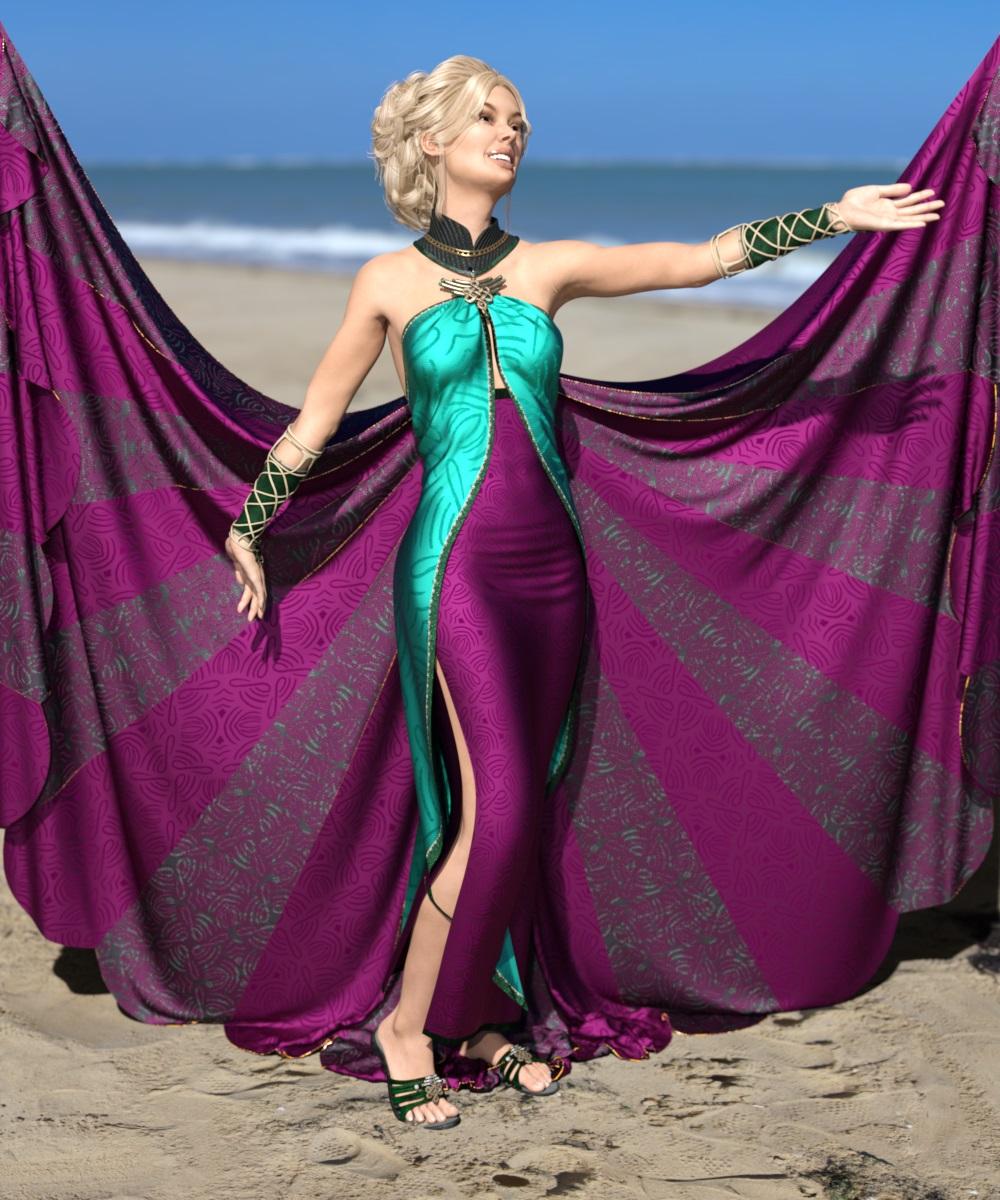
Artwork from SpaceVagabondTable Posing
Content used:
Chace Hair for Genesis 3 Female(s) and Genesis 2 Female(s)
Cut Out Heels for Genesis 2 Female(s)
Postwork in Photoshop
 Unique Fabrics - Shaders and Merchant Resource [Commercial]
I have used shaders on https://www.daz3d.com/jade-dream-outfit-for-genesis-3-female-s
and https://www.daz3d.com/jepe-s-wondersheetz-for-victoria-7
 Auto Face Enhancer [Commercial]
I bought the "Auto Face Enhancer HD With PowerPose for Genesis 8 Male(s)" but not the other two products. I had already bought "Auto Face Enhancer" for G8F and it seems that the PowerPoser works so much better in the AFE for G8F than for "Auto Face Enhancer HD With PowerPose for Genesis 8 Male(s)".
Is that true or is that just me have a bit of bad luck? Do I need the "AFE - Real Male HD Expressions for Genesis 8 Male(s)" product as well to make it work as well as the "Auto Face Enhancer" for Genesis 8 Females product does all by itself?
I do think that the geoshell skin materials after being assigned do work better on "AFE - Real Male HD Expressions for Genesis 8 Male(s)" then on the "Auto Face Enhancer" for Genesis 8 Females product but that may of been just the odd angle the camera used to render through in my scene.
Will there be a
a) AFE - Real Female HD Expressions for Genesis 8 Female(s)
b) Auto Face Enhancer Skin HD Details for Genesis 8 Female(s)
or will that be a part of the "Auto Face Enhancer" for Genesis 8 Females product update when you publish it?
I'm not sure I will update if it doesn't keep the same excellent PowerPose capabilities it has now really.
+++ BUG+++BUG+++
Also, there is some type of conflict between Auto Face Enhancer.
a) I installed the AFE for G8F it works OK.
b) I installed the AFE for G8M, it works OK but AFE for G8F is broken.
c) I reinstall AFE for G8F and it works OK again. I had already applied AFE for G8M in the scene and didn't change that but it didn't mess up.
d) I save scene. I exit DAZ Studio.
e) I open DAZ Studio & open the saved scene. The AFE for G8F works OK still but now the AFE for G8M is a grey block head (and the AFE for G8M no longer shows in Accessories and the (Apply AFE for G8M Preset) in props is in DS Lost & Found!
f) I deinstall AFE for G8M & reinstall AFE for G8M via DIM. I refresh the Smart Content / Content Library via "refresh" instead of restarting DAZ Studio.
g) I again apply the AFE for G8M prop to G8M in my scene & they both work again. I deleted and re-added both props on the G8F & G8M without restarting DS and they still worked. I will try to save to scene, exit DAZ, start DAZ & re-open the scene and see if they break again.
h) I saved scene, exited DAZ Studio, opened DAZ Studio, loaded the scene & this time again the AFE for G8F was a grey blockhead. So it seems for those that own both products the last product installed of those two will be the one that works when you create, save, and reopen a scene using those products but the 1st one installed will be broken grey blockhead after you save & reopen the scene with both of them.
By the way, there is a naming conflict that might cause your product to be buggy if DS has bugs. Both AFE props are named simple Auto Face Enhancer when applied in a scene to a character. The AFE for G8F should load in a scene with a unique name as compared to AFE for G8M. Even though DS will postpend a (2), (3), ...(n) number to the name if it's assuming these are 2nd, 3rd, & so on instances of the 1st Auto Face Enhancer loaded into the scene it's probably going to cause problems because the AFE for G8M & the AFE for G8F are not seperate instances of the same AFE but completely different products. It's best not to take chances and simply name them differently from the start: eg AFE for G8F and AFE for G8M. To be extra safe clear, you could have a dialogue popup to use for the user to give a name to postpend to the AFE prop being loaded, eg a popup asks user for a name & they type Victoria 8 so when loaded the AFE is named AFE for G8F (Victoria 8) and a second AFE for Olympia 8 could wind up with a name like AFE for G8F (Olympia 8).
+++BUG+++BUG+++
Thanks for your assistance in fixing these matters. It would be nice to see AFE for G8M PoserPose work as good as it does with AFE for G8F.
Unique Fabrics - Shaders and Merchant Resource [Commercial]I needed a break, thank you for this! I dug into my runtime and picked out five outfits that offered challenges or a chance to change their original usage to something else. For one outfit that had metal and jeweled aspects, I had to go to other shader packs to upgrade it from 3Delight to Iray. I also tried to keep track of what I used, but lost track, even when working on separate pieces of an outfit.)
Left to Right:
https://www.daz3d.com/dforce-flared-layer-outfit-for-genesis-8-females
(I wanted to take this casual outfit to a dressier one. Just before I rendered, I changed the blouse again. It had been a white/grey pattern and the masks just didn’t do very much, so I upped the color.)
Jacket: UF Beaded 2; Beaded Mask 3; Beaded Mask 2; Scale 15 x 15
Blouse: UF Beaded 2; Art Patten Mask 2A: Pattern Mask 2; Scale 40 x 40; I lowered the cutout opacity of the skirt to the blouse down to 0.
Pants: UF Beaded 2; Scale 40 x 40
https://www.daz3d.com/penny-dreadfull-outfit-for-genesis-2-female-s
Blouse and Skirt: UF Pattern 4; Pattern 4 Mask 2; Pattern 4 Mask 3; Normal Square 3; Scale 15 x 15
Lace: UF White Base Grey 01
https://www.daz3d.com/dforce-1920s-evening-gown-outfit-for-genesis-8-females
(I wanted to try for another style than an evening gown, lost the little jacket. Came up with a 1970s vibe sundress.)
Dress: UF ART Flower 02 Tan; Flower Mask 2; Flower Mask 3; Scale 5 x 5; I used the horizontal offset for the bottom and top bands to try to match the pattern as best as possible.
https://www.daz3d.com/fwsa-teagan-hd-for-victoria-7-and-lf-faux-corset
Corset: UF ART Pattern 12R; White base color purple 06; scale 30 x 30
Skirt and Lacing: Changed color only: UF White base color grey 07.
Panties: UF ART Pattern 12R; White base color purple 06; scale 30 x 30
https://www.daz3d.com/dakota-for-a3
This outfit has a number of items, I used only two and even those had a large number of material zones. And I can remember my younger sister wearing things like this in the 1970s as well.
Pants and Belt Loops: UF Art Pattern 01 Blue; Scale 4 x 4
Pants Belt: UF White Base Color Orange 02; Normals UF Square 2
Pants Belt Buckle: https://www.daz3d.com/elaborate-metals-iray-shaders
Shader 20; Scaled 30 x 30; Stone: https://www.daz3d.com/uhd-minerals--shaders-and-merchant-resource Mineral N
Pants Conchos: https://www.daz3d.com/elaborate-metals-iray-shaders
Shader 20; Scaled 30 x 30;
Top: UF Art Pattern 07 Dark Coral; Scale 4 x 4
Lacing: UF White Base Color Grey 01
Yours are really fun too. The first reminds me of sort of like a 1950s sort of feel. I really love the jacket on that one especially. And the next one suits that style dress really well I think. IDK that I would have come up with that but it looks very victorian and the color choices look really good on that one. (You did a nice job custom coloring it to fit the time period). And last but not least may I just say Id not ever thought of doing jeans with it. That is also very cool...I may have to try that
 Novica & Forum Members Tips & Product Reviews Pt 12
As someone who joined the Daz family in November 2019 I can't bring myself to buy G4 stuff.
I bought I think a victoria 4.2 pack/bundle at christmas time for under 2$ that had a lot of stuff but most of the old stuff really doesn't look well enough for me to get.
At one point I considered buying a lot of stuff because it is cheap and then buying a converter to G8 but I think I'm better off just sticking to G8 stuff (some few G3s if they looks really good and don't have a G8 counterpart).
It's funny but when people outside of Daz or the 3D community see my old art with V4 I get tons of compliments but when I show them new stuff they just say " But that's a photograph!." I explain, no, it's not. Then I try to explain for 15 minutes what it is, but I don't actually get compliments like I did on my old art. So I end up taking everything into Photoshop and doing arty postwork to make it not look real after spending hours on a render that would have taken me minutes in Poser...
That is hilarious!
I guess it depends who your target audience is :D .
Daz 3D is part of

Connect
DAZ Productions, Inc.
7533 S Center View Ct #4664
West Jordan, UT 84084Licensing Agreement | Terms of Service | Privacy Policy | EULA
© 2026 Daz Productions Inc. All Rights Reserved.