-
Tennessee for G8M
I picked up Tennessee straight away and have big plans for him. The mix-value with other characters is worth far more than the cost of this character.
Who says there are no native figures for Genensis 8??! (Hint: Search "Native" on the DAZ website.)
https://www.daz3d.com/sequoia-for-genesis-8-female
https://www.daz3d.com/qx-chooli-for-eva-8
https://www.daz3d.com/phx-ohanzi-for-genesis-8-male
https://www.daz3d.com/ej-ethnic-male-beauty-for-genesis-8-male
https://www.daz3d.com/hp-uki-for-genesis-8-female
https://www.daz3d.com/nuka-for-genesis-8-female
https://www.daz3d.com/ej-ethnic-beauties-for-genesis-8-female-s
https://www.daz3d.com/ultimate-make-up-tribal-for-genesis-8-female
And don't forget these, they are Genesis 3 and can be converted, but at least they ar not Michael 4 or Vickie 4!
https://www.daz3d.com/anicinabe-for-genesis-3-female
https://www.daz3d.com/anna-hd-for-victoria-7
https://www.daz3d.com/anicinabe-for-genesis-3-male
https://www.daz3d.com/awan-hd-for-michael-7Older:
https://www.daz3d.com/fwsa-wachiwi-and-aiyana-bundle
https://www.daz3d.com/wachiwi-s-finery-for-genesis-2-female-s
https://www.daz3d.com/western-gearThe problem I see with most of these is that they look nothing "native" OR even realistic (most are stylized characters...not that there's anything wrong with that). For folks that want more authentic Native American morphs those aren't an option.
Exactly. Most of those characters look as much like actual native Americans as Disney’s Pocahontas did. The female figures especially look, at best, generically “ethnic”. Arguably the best native-styled female figure, Xochil, doesn’t even come up in a search for “native”.
Trouble is some people are expecting them to all look like they was run off a xerox machine but they weren't and can look quite different. There are certain traits that are unique to certain populations but those unique traits aren't distributed to 100% of the people in those populations at any rate.
Tennessee for G8MI picked up Tennessee straight away and have big plans for him. The mix-value with other characters is worth far more than the cost of this character.
Who says there are no native figures for Genensis 8??! (Hint: Search "Native" on the DAZ website.)
https://www.daz3d.com/sequoia-for-genesis-8-female
https://www.daz3d.com/qx-chooli-for-eva-8
https://www.daz3d.com/phx-ohanzi-for-genesis-8-male
https://www.daz3d.com/ej-ethnic-male-beauty-for-genesis-8-male
https://www.daz3d.com/hp-uki-for-genesis-8-female
https://www.daz3d.com/nuka-for-genesis-8-female
https://www.daz3d.com/ej-ethnic-beauties-for-genesis-8-female-s
https://www.daz3d.com/ultimate-make-up-tribal-for-genesis-8-female
And don't forget these, they are Genesis 3 and can be converted, but at least they ar not Michael 4 or Vickie 4!
https://www.daz3d.com/anicinabe-for-genesis-3-female
https://www.daz3d.com/anna-hd-for-victoria-7
https://www.daz3d.com/anicinabe-for-genesis-3-male
https://www.daz3d.com/awan-hd-for-michael-7Older:
https://www.daz3d.com/fwsa-wachiwi-and-aiyana-bundle
https://www.daz3d.com/wachiwi-s-finery-for-genesis-2-female-s
https://www.daz3d.com/western-gearThe problem I see with most of these is that they look nothing "native" OR even realistic (most are stylized characters...not that there's anything wrong with that). For folks that want more authentic Native American morphs those aren't an option.
Exactly. Most of those characters look as much like actual native Americans as Disney’s Pocahontas did. The female figures especially look, at best, generically “ethnic”. Arguably the best native-styled female figure, Xochil, doesn’t even come up in a search for “native”.
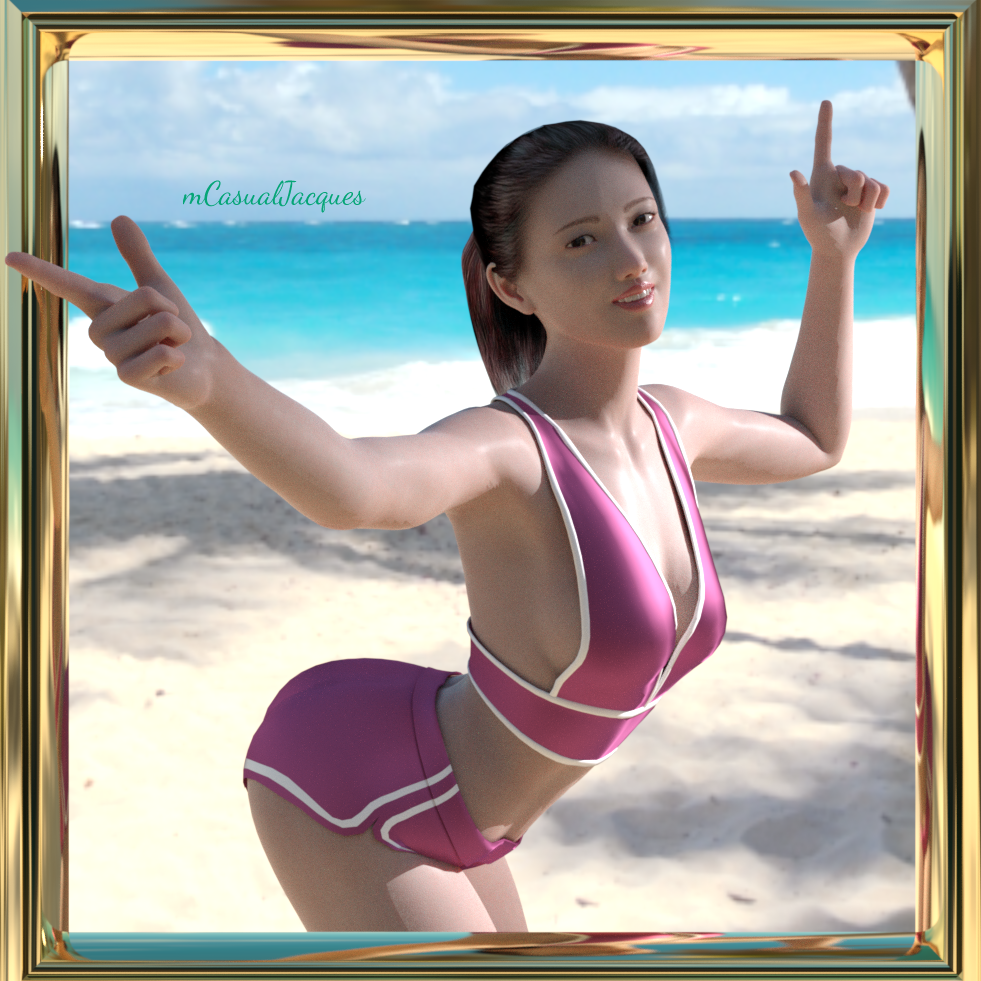
Crop-Top for Genesis 8 Base and Kim Seohyun + 10 perfect-fit morphsLINK: https://sites.google.com/site/mcasualsdazscripts9/mcjg8croptop
note for Genesis 3 / Victoria 7 / Aiko 7 it's https://sites.google.com/site/mcasualsdazscripts9/mcjg3croptop
Introduction
A crop-top for Genesis 8, Base, Kim Seohyun
The crop top looks about OK when fitted on Genesis 8, but looks distorted when you resize the breasts
i supply 10 fix-morphs to get a perfect fit with different breast settings
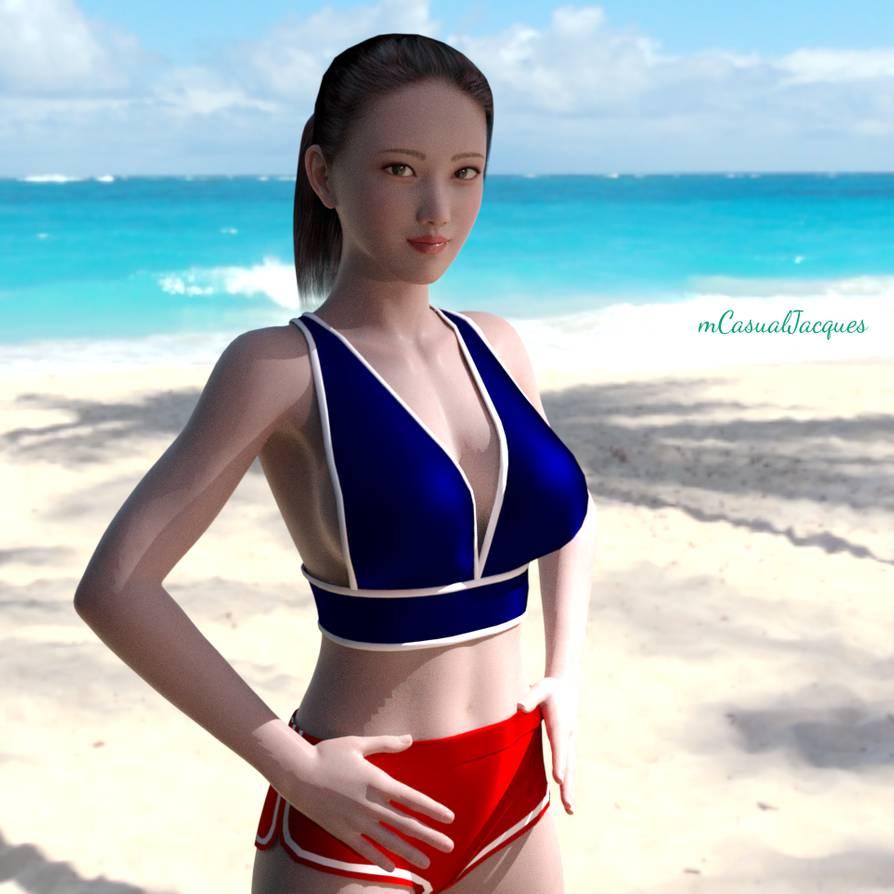
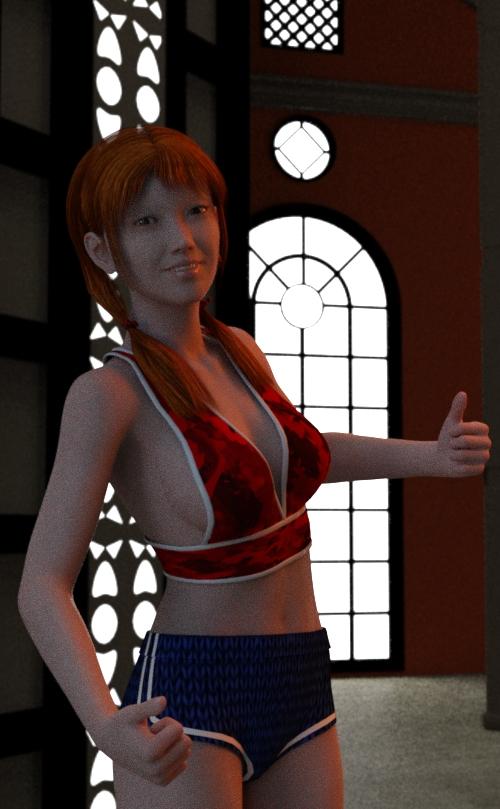
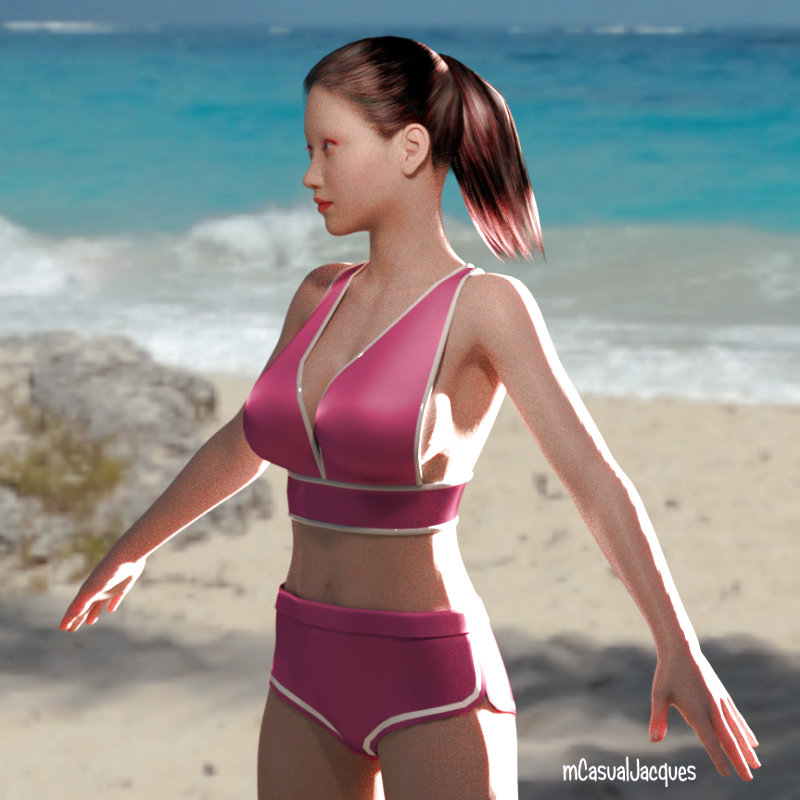
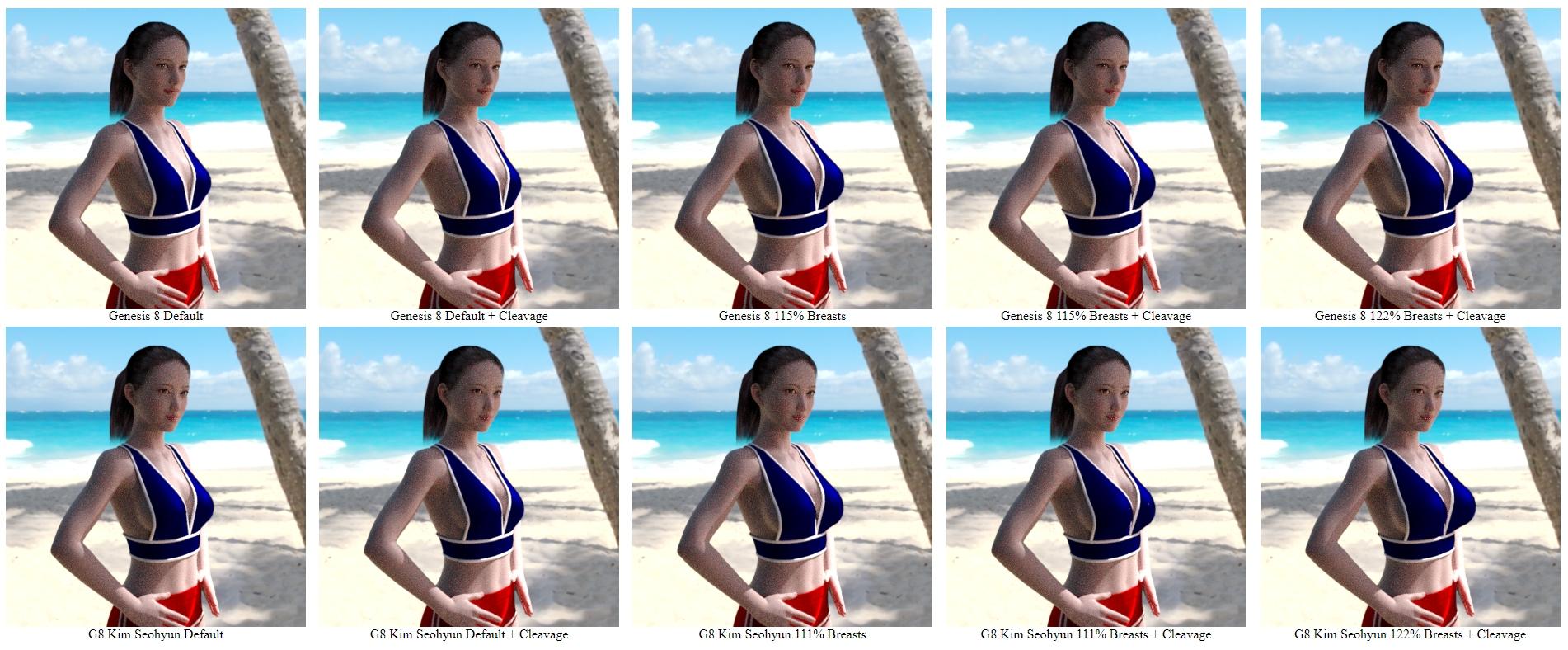
 AR characters- 3d renders mixed with Real Puppet/Model/Robot
Here's my latest vid. It's sort of a Visual Novel Concept. It uses the Daz Victoria 7 head with some android hands and legs I made in blender.
V8 (and others) texture improvement discussionSome personal thoughts on the examples in my large G3 comparison above. Let me know what you think if you have time.
Bethany 7 is a decent texture, lip specular needs fixing though.
Ceridwen's eyes are really detailed, but the skin could probably benefit from better SSS and maybe some Skin Builder details.
Disappointing how similar Elisse and Hannah are, I do like Elisse's face morph though.
Joline has some nice details, but I have no idea what's going on with her nose. Crazy normals or intentional?
I like Lien's eyelashes and it's a pretty good Asian morph too.
Marianne is a good very pale texture, but those starburst eyelashes may have to go. ;)
I think Olympia looks too pink by default, but I really need to check and see if she has a custom SSS map that lets more light in on the ears, hands, and such than on thick skin. That could be very useful on other characters.
Tara has good eyes, need to try the other colors.
Are Victoria 7's earlobes supposed to be that crinkly?G3 male renders are done (I only have a few of them), working on G8 male renders now)
Tennessee for G8MI picked up Tennessee straight away and have big plans for him. The mix-value with other characters is worth far more than the cost of this character.
Who says there are no native figures for Genensis 8??! (Hint: Search "Native" on the DAZ website.)
https://www.daz3d.com/sequoia-for-genesis-8-female
https://www.daz3d.com/qx-chooli-for-eva-8
https://www.daz3d.com/phx-ohanzi-for-genesis-8-male
https://www.daz3d.com/ej-ethnic-male-beauty-for-genesis-8-male
https://www.daz3d.com/hp-uki-for-genesis-8-female
https://www.daz3d.com/nuka-for-genesis-8-female
https://www.daz3d.com/ej-ethnic-beauties-for-genesis-8-female-s
https://www.daz3d.com/ultimate-make-up-tribal-for-genesis-8-female
And don't forget these, they are Genesis 3 and can be converted, but at least they ar not Michael 4 or Vickie 4!
https://www.daz3d.com/anicinabe-for-genesis-3-female
https://www.daz3d.com/anna-hd-for-victoria-7
https://www.daz3d.com/anicinabe-for-genesis-3-male
https://www.daz3d.com/awan-hd-for-michael-7Older:
https://www.daz3d.com/fwsa-wachiwi-and-aiyana-bundle
https://www.daz3d.com/wachiwi-s-finery-for-genesis-2-female-s
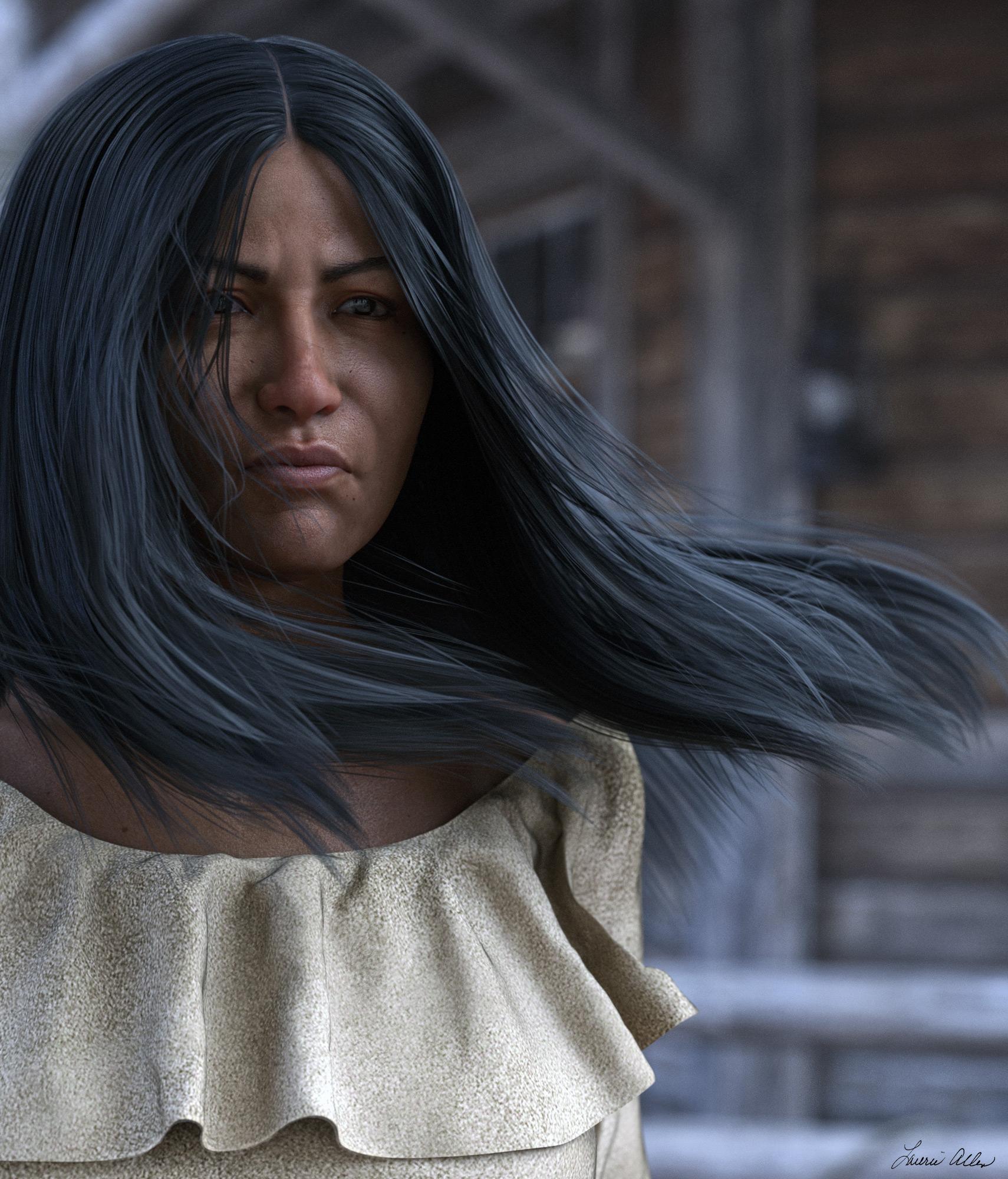
https://www.daz3d.com/western-gearThe problem I see with most of these is that they look nothing "native" OR even realistic (most are stylized characters...not that there's anything wrong with that). For folks that want more authentic Native American morphs those aren't an option. Tennessee fits the bill tho, and Rawart has one that's pretty nice. For a female, Saiyanness' Benita can be morphed to look quite realistic for a native american since she's half the way there already. I used her in an image I did of a Native American woman.
Laurie
Which Character is This?Osuine G8F by Sangriart sold at the other store (R). IRL she's Jenna Coleman who played Clara in Dr. Who (and is in Victoria, etc.)
Using GenX2 to transfer V4 Poses?@Lindsey woould you mind posting your step to convert presets? I have had little success in using the GenX preset tab
Thanks
I have to admit I've only use the pose converter a long time ago just to try it out and at that time it worked on a set of Freak 4 expressions. At that time I had all of my content installed with DIM and the conversion worked. Now that I have DAZ content installed with DAZ Connect with the exceptions of a few Gen4 products such as Victoria 4 Creature creator morphs with were installed with DIM. I received errors it was looking for morphs which are probably in my DAZ Connect folders. A few did work so I'll give you the steps I used to convert the expression morphs that came with the Girl 4 pro bundle.
1. On the GenX2 pane/tab, and click the Presets tab.
2. Click on the Add Pose button and drill down to a Gen 4 folder with expression presets, in this example I used Girl 4 expressions that came with the Girl 4 Pro Bundle. To load all of the files in the folder, select the first .fc preset, hold the shift key down and select the last .fc preset. Click on the Open button to load the presets into GenX2.
3. Shape: Select Victoria 4 from the drop down list
4. Target: Select the Genesis figure to transfer the expressions to. I used Genesis.
5. Preset Folder: Click on the Path button and select a folder to save the converted expressions. You can create folder(s) on the fly if needed. In this example I wanted the save poses to go to E:/DAZ 3D/Studio/My Library/People/Genesis 1 Female/Expressions/Converted Expressions/Girl 4/DAZ's Girl 4/
6. Translate: Click on the items to transfer. I select all three choices, just because.. ha! Morphs, Scalings, Eye Transforms.
7. Click the Translate Button to transfer the expression presets.
You should see generated .duf presets with icons in the folder selected in Step 5. As previously mentioned GenX2 did throw out error messages looking for Victoria 4 morphs on my system, but some of the converted expression presets worked. I'm pretty sure if all of my DAZ content was installed with DIM, I wouldn't have received error messages.
I've attached a pic of applying Girl 4 (left) expression 13 on 3DU Jasmin for Genesis (right).
Buy Something That Doesn't Work in Carrara? Post your Questions and Workarounds here. (please)Thanks Wendy, that was very clear.
Yikes! I had no idea that some of my Carrara hair products would be restricted to a particular figure. :(
Is there any reasonable workaround?
Well... no. Not reasonable. You see, the "Grow Regions" are specific to a mesh. So, for example, if the ReadMe says to drag the hair directly onto the Model line of Victoria 4, then the Grow Region was painted onto V4 somewhere (in this case the scalp of the head).
I have several hair prop products for either V3 or 4 or Michael, whatever, that came with prop or conforming hair to complete the look of the hair. Lilsure Hair, by Aery Soul for example comes with a hair cap scalp. I use that as the mesh that I grow my hair on. Being a simple prop, I am able to model it within the Assemble room to make it fit the proportions of my Genesis 1 actress. The cool part about doing it this way is that I can store this in my browser and add it to anything that I can reshape that hair cap to, and the hair cap also makes sure that we don't see patches of skin through the hair during extreme animations.
[Released] Props & Poses Converter from Genesis 3 Female to Genesis 8 Female [Commercial]Ahhhhh! Got it!
I forgot to look at the date LOL!

Thank you! This is an awesome script!!!!
Is it possible to do it for earlier versions? I don't mean will you do one, but whether it's possible to do it or if it really only works well for G3 -> G8.
Great, thank you!
Does the saved file have a particular name? or is the same as the original character?
well, no, that won't work, it would overwrite the original, yeah? I've got three files in that folder for this particular character, but not sure which ones I created.
Gosh, you were quick! LOL Thank you!
I edited it to add a third question:
3. With the "hide eyes" option - which is mentioned in the manual as giving better results - does that mean the eyes of the G3F character do not transfer over at all? So eyes that are a different shape - not extreme, but say, eyes like Mei Lin 7 - won't transfer at all?
I couldn't find a thread for your "Character Converter from Genesis 3 Female to Genesis 8 Female" so I'll just ask here, and if there is a thread, then I'll delete and post it there....
just picked this one up tonight and have only had a very very quick play with it but I have two questions:
1. Is the "convert scene character" used for when you don't have a full character preset, and the character is a "apply Jane's body morph.duf" and "apply Jane's head morph.duf" deal, whereas the main converter is when you have the full character preset?
2. Will this do any expressions? (for instance, an expression pack such as "Victoria 7 Attitude Expressions") If so, is that "convert scene character"?
1. Yes, "Convert Scene Character" is for when you have created a character in the scene and applied all the morphs (weight, fitness, etc) to it
2. If the expressions are morph and they have been applied to the character, I *think* it will do it. I haven't tried it.
3. No, this refers to an option in the conversion process that Sickleyield had defined. The 2 processes the script uses are similar but can give different results, especially around the eyes.
Bonus answer: Yes, it is in data/Daz 3D/Genesis 8/Female/Morphs/VENDOR/PRODUCT where the root directory is defined as the first directory under Daz formats in the Content manager.
You created all of them with the script (check the creation dates). The original morphs live in My Daz 3D Library.
You're welcome! I have done tests for G2F->G8F. It works but doesn't seem to do as good a job as with G3. For one thing, the materials are hopeless.
Z Expecting - Pregnancy Preset and Poses for Genesis 3 and 8It's not the Victoria 7 Pro Bundle you need for the morph, it's https://www.daz3d.com/genesis-7-female-body-morphs
Thank you - I edited the link correctly when checking it, but then did it wrong when posting, mea culpa.
Z Expecting - Pregnancy Preset and Poses for Genesis 3 and 8It's not the Victoria 7 Pro Bundle you need for the morph, it's https://www.daz3d.com/genesis-7-female-body-morphs
Z Expecting - Pregnancy Preset and Poses for Genesis 3 and 8It's not the Victoria 7 Pro Bundle you need for the morph, it's https://www.daz3d.com/genesis-7-female-body-morphs
Genesis 7 ??? you know something we don't lol ... anyhow that's 404, here's the link I think you meant:
Tennessee for G8MI picked up Tennessee straight away and have big plans for him. The mix-value with other characters is worth far more than the cost of this character.
Who says there are no native figures for Genensis 8??! (Hint: Search "Native" on the DAZ website.)
https://www.daz3d.com/sequoia-for-genesis-8-female
https://www.daz3d.com/qx-chooli-for-eva-8
https://www.daz3d.com/phx-ohanzi-for-genesis-8-male
https://www.daz3d.com/ej-ethnic-male-beauty-for-genesis-8-male
https://www.daz3d.com/hp-uki-for-genesis-8-female
https://www.daz3d.com/nuka-for-genesis-8-female
https://www.daz3d.com/ej-ethnic-beauties-for-genesis-8-female-s
https://www.daz3d.com/ultimate-make-up-tribal-for-genesis-8-female
And don't forget these, they are Genesis 3 and can be converted, but at least they ar not Michael 4 or Vickie 4!
https://www.daz3d.com/anicinabe-for-genesis-3-female
https://www.daz3d.com/anna-hd-for-victoria-7
https://www.daz3d.com/anicinabe-for-genesis-3-male
https://www.daz3d.com/awan-hd-for-michael-7Older:
https://www.daz3d.com/fwsa-wachiwi-and-aiyana-bundle
https://www.daz3d.com/wachiwi-s-finery-for-genesis-2-female-s
https://www.daz3d.com/western-gearConverting Aiko/Genesis Figures to Gen 8The Anime Starter Bundle is still free, so you can get A4. V4 is not free ATM, but they frequently give away V4 bundles.
The old Texture Convertor (TC2) product did a passable job of converting between V3 and V4 textures. If you had that, you could use A3 textures on any figure that can use V4 UVs. Alas, TC2 was pulled from the store. I have it. I use a few V3 textures on G2 via the V4 UVs for G2F.
A3 certainly had her fans. There were some terminally cute characters for A3. The rigging on the 3rd generation base characters was truly horrible, though.
Can one use https://www.daz3d.com/legacy-uvs-for-genesis-3-special-edition-victoria-3 instead of tc2?
No, as those products don't work in the same way at all.
- TC2 converted the textures maps between UVs, which means it creates new maps made for V4 UVs from maps using A3 UVs. After conversion you have actual V4 textures, which can be used on various figures which can "wear" V4 UVs
- The V3 Legacy UVs for G3F product modifies the G3F figure so that you can apply textures made for V3 to her, it doesn't convert the textures. So it only works with G3F, you can't use it to generate textures made for G3F you could then use on G8F.
Converting Aiko/Genesis Figures to Gen 8The Anime Starter Bundle is still free, so you can get A4. V4 is not free ATM, but they frequently give away V4 bundles.
The old Texture Convertor (TC2) product did a passable job of converting between V3 and V4 textures. If you had that, you could use A3 textures on any figure that can use V4 UVs. Alas, TC2 was pulled from the store. I have it. I use a few V3 textures on G2 via the V4 UVs for G2F.
A3 certainly had her fans. There were some terminally cute characters for A3. The rigging on the 3rd generation base characters was truly horrible, though.
Can one use https://www.daz3d.com/legacy-uvs-for-genesis-3-special-edition-victoria-3 instead of tc2?
[Released] Props & Poses Converter from Genesis 3 Female to Genesis 8 Female [Commercial]Ahhhhh! Got it!
I forgot to look at the date LOL!
Thank you! This is an awesome script!!!!
Is it possible to do it for earlier versions? I don't mean will you do one, but whether it's possible to do it or if it really only works well for G3 -> G8.
Great, thank you!
Does the saved file have a particular name? or is the same as the original character?
well, no, that won't work, it would overwrite the original, yeah? I've got three files in that folder for this particular character, but not sure which ones I created.
Gosh, you were quick! LOL Thank you!
I edited it to add a third question:
3. With the "hide eyes" option - which is mentioned in the manual as giving better results - does that mean the eyes of the G3F character do not transfer over at all? So eyes that are a different shape - not extreme, but say, eyes like Mei Lin 7 - won't transfer at all?
I couldn't find a thread for your "Character Converter from Genesis 3 Female to Genesis 8 Female" so I'll just ask here, and if there is a thread, then I'll delete and post it there....
just picked this one up tonight and have only had a very very quick play with it but I have two questions:
1. Is the "convert scene character" used for when you don't have a full character preset, and the character is a "apply Jane's body morph.duf" and "apply Jane's head morph.duf" deal, whereas the main converter is when you have the full character preset?
2. Will this do any expressions? (for instance, an expression pack such as "Victoria 7 Attitude Expressions") If so, is that "convert scene character"?
1. Yes, "Convert Scene Character" is for when you have created a character in the scene and applied all the morphs (weight, fitness, etc) to it
2. If the expressions are morph and they have been applied to the character, I *think* it will do it. I haven't tried it.
3. No, this refers to an option in the conversion process that Sickleyield had defined. The 2 processes the script uses are similar but can give different results, especially around the eyes.
Bonus answer: Yes, it is in data/Daz 3D/Genesis 8/Female/Morphs/VENDOR/PRODUCT where the root directory is defined as the first directory under Daz formats in the Content manager.
You created all of them with the script (check the creation dates). The original morphs live in My Daz 3D Library.
[Released] Props & Poses Converter from Genesis 3 Female to Genesis 8 Female [Commercial]Great, thank you!
Does the saved file have a particular name? or is the same as the original character?
well, no, that won't work, it would overwrite the original, yeah? I've got three files in that folder for this particular character, but not sure which ones I created.
Gosh, you were quick! LOL Thank you!
I edited it to add a third question:
3. With the "hide eyes" option - which is mentioned in the manual as giving better results - does that mean the eyes of the G3F character do not transfer over at all? So eyes that are a different shape - not extreme, but say, eyes like Mei Lin 7 - won't transfer at all?
I couldn't find a thread for your "Character Converter from Genesis 3 Female to Genesis 8 Female" so I'll just ask here, and if there is a thread, then I'll delete and post it there....
just picked this one up tonight and have only had a very very quick play with it but I have two questions:
1. Is the "convert scene character" used for when you don't have a full character preset, and the character is a "apply Jane's body morph.duf" and "apply Jane's head morph.duf" deal, whereas the main converter is when you have the full character preset?
2. Will this do any expressions? (for instance, an expression pack such as "Victoria 7 Attitude Expressions") If so, is that "convert scene character"?
1. Yes, "Convert Scene Character" is for when you have created a character in the scene and applied all the morphs (weight, fitness, etc) to it
2. If the expressions are morph and they have been applied to the character, I *think* it will do it. I haven't tried it.
3. No, this refers to an option in the conversion process that Sickleyield had defined. The 2 processes the script uses are similar but can give different results, especially around the eyes.
Bonus answer: Yes, it is in data/Daz 3D/Genesis 8/Female/Morphs/VENDOR/PRODUCT where the root directory is defined as the first directory under Daz formats in the Content manager.
You created all of them with the script (check the creation dates). The original morphs live in My Daz 3D Library.
[Released] Props & Poses Converter from Genesis 3 Female to Genesis 8 Female [Commercial]Great, thank you!
Does the saved file have a particular name? or is the same as the original character?
well, no, that won't work, it would overwrite the original, yeah? I've got three files in that folder for this particular character, but not sure which ones I created.
Gosh, you were quick! LOL Thank you!
I edited it to add a third question:
3. With the "hide eyes" option - which is mentioned in the manual as giving better results - does that mean the eyes of the G3F character do not transfer over at all? So eyes that are a different shape - not extreme, but say, eyes like Mei Lin 7 - won't transfer at all?
I couldn't find a thread for your "Character Converter from Genesis 3 Female to Genesis 8 Female" so I'll just ask here, and if there is a thread, then I'll delete and post it there....
just picked this one up tonight and have only had a very very quick play with it but I have two questions:
1. Is the "convert scene character" used for when you don't have a full character preset, and the character is a "apply Jane's body morph.duf" and "apply Jane's head morph.duf" deal, whereas the main converter is when you have the full character preset?
2. Will this do any expressions? (for instance, an expression pack such as "Victoria 7 Attitude Expressions") If so, is that "convert scene character"?
1. Yes, "Convert Scene Character" is for when you have created a character in the scene and applied all the morphs (weight, fitness, etc) to it
2. If the expressions are morph and they have been applied to the character, I *think* it will do it. I haven't tried it.
3. No, this refers to an option in the conversion process that Sickleyield had defined. The 2 processes the script uses are similar but can give different results, especially around the eyes.
Bonus answer: Yes, it is in data/Daz 3D/Genesis 8/Female/Morphs/VENDOR/PRODUCT where the root directory is defined as the first directory under Daz formats in the Content manager.
[Released] Props & Poses Converter from Genesis 3 Female to Genesis 8 Female [Commercial]Gosh, you were quick! LOL Thank you!
I edited it to add a third question:
3. With the "hide eyes" option - which is mentioned in the manual as giving better results - does that mean the eyes of the G3F character do not transfer over at all? So eyes that are a different shape - not extreme, but say, eyes like Mei Lin 7 - won't transfer at all?
I couldn't find a thread for your "Character Converter from Genesis 3 Female to Genesis 8 Female" so I'll just ask here, and if there is a thread, then I'll delete and post it there....
just picked this one up tonight and have only had a very very quick play with it but I have two questions:
1. Is the "convert scene character" used for when you don't have a full character preset, and the character is a "apply Jane's body morph.duf" and "apply Jane's head morph.duf" deal, whereas the main converter is when you have the full character preset?
2. Will this do any expressions? (for instance, an expression pack such as "Victoria 7 Attitude Expressions") If so, is that "convert scene character"?
1. Yes, "Convert Scene Character" is for when you have created a character in the scene and applied all the morphs (weight, fitness, etc) to it
2. If the expressions are morph and they have been applied to the character, I *think* it will do it. I haven't tried it.
3. No, this refers to an option in the conversion process that Sickleyield had defined. The 2 processes the script uses are similar but can give different results, especially around the eyes.
Bonus answer: Yes, it is in data/Daz 3D/Genesis 8/Female/Morphs/VENDOR/PRODUCT where the root directory is defined as the first directory under Daz formats in the Content manager.
Daz 3D is part of

Connect
DAZ Productions, Inc.
7533 S Center View Ct #4664
West Jordan, UT 84084Licensing Agreement | Terms of Service | Privacy Policy | EULA
© 2026 Daz Productions Inc. All Rights Reserved.

















