-
Happiness is...
TheMysteryIsThePoint said:
...realizing that your silly script is no longer necessary because someone more enterprising than you actually implemented it :)
Import/Export
- OBJ: support importing multiple files at once (commit ) (Aras Pranckevicius)
Ha!
Silly or not, finding that someone else will be supporting a feature I want is always a win.
... Not having to maintain it, well that is just awesome!
How do you organise your content?I used to set up custom categories but it was too hard to keep up with since I purchase content pretty regularly, and most of it is new and has pretty good Smart Content metadata (so already much easier to find than older content). If you don't purchase much content and/or use a lot of older Poser content then it might be worthwhile to do custom categories. If however you mainly buy newer stuff it's mostly already set up in a pretty intuitive way in Daz Studio. Between Smart Content and the category folders it's not hard to find the products you want when you need them. :)DazToUnreal does not import FBX, only materials and texturesHi!
I'm trying to import my character into Unreal Engine 4.26.2. I tried bunch of times, today my full time wasted into this and I'm still unsuccessful at this because it didn't import as I wanted.
I have a full character which contains clothes, hair, prop and bunch of morphs.
Please check the attachments. I'm having some errors. But I don't understand why.
FBX Scene Loading: Found material name clash, name clash can be wrongly reassign at reimport , material 'Elyssa_zeroPose_v4_Genitalia' was renamed 'Elyssa_zeroPose_v4_Genitalia_ncl1_1' FBX Scene Loading: Found material name clash, name clash can be wrongly reassign at reimport , material 'Elyssa_zeroPose_v4_Anus' was renamed 'Elyssa_zeroPose_v4_Anus_ncl1_1' No smoothing group information was found in this FBX scene. Please make sure to enable the 'Export Smoothing Groups' option in the FBX Exporter plug-in before exporting the file. Even for tools that don't support smoothing groups, the FBX Exporter will generate appropriate smoothing data at export-time so that correct vertex normals can be inferred while importing. The following bones are missing from the bind pose: ik_foot_root ik_foot_l ik_foot_r ik_hand_root ik_hand_gun ik_hand_r ik_hand_l This can happen for bones that are not vert weighted. If they are not in the correct orientation after importing, please set the "Use T0 as ref pose" option or add them to the bind pose and reimport the skeletal mesh. There is no geometry information in mesh Get Import Data has failed. Import failed.Where is the latest version of SAZ StudioHi,
I can't find the latest version of DAZ Studio, I need to upgrade mt old version. I understand that the latest version of Studio has tha ability to export and import to Blender. If this is true, I do not need anything else. Otherwise I need to find the DAZ Studio to Blender bridge so I can export and import.
On an unrelated issue. I am using Windows 7 (for reasons I do not want to get into.) I tried to install Blender and I was told that Blender no longer suports Win 7. Does anyone know of an early version of Blender that cpold work with Win7?
Bill
Can Diffeo use custom visemes?( SOLVED yes it can)Anilip 2, installs/uses its own custom visemes, which can yield great results for an audio base lipsync system.
However the “import action” feature of diffeo, ignores any lipsync animation with anilip ,only recognizing the standard visemes of the base G8 it would seem.
Is there any way to point Diffeo to the directory where the custom visemes of Anilip resides ,and use them as well?
Edit: Yes.. just Direct Diffeo to the custom morphs location with "load custom morphs" option and your Anilip 2 lipsync files will work in Blender
 Installing content in poser
I just purchase the Tropical bundle, the download seems to be made for you to install the product in daz.. but how do you install in poser.
what I have done so far, is unzip all the content in a folder, then I click on add library from poser, but all it seems to import is camera presets, not the content itself.
how do I install the content in poser.
Thanks
issues with Grace Gen8Found this in the README
Resolved Issues
-
2021-08-18 - Metadata fix for Grace showing up in Smart Content when not active.
Blender to Daz3D with G8F modifications?In essence, you cannot import a figure an keep the materials. You will keep the material zone, and some base settings, but materials need to be reapplied in Daz Studio.
If the character isn't build on Genesis 8 character, i.e a morph, you cannot use other G8F morphs.
Altering clothing itemsbstanle said:
Another question...
The shirt I am talking about was bought from DAZ. Can I alter that shirt? What about the ability of that shirt to conform to whatever pose the figure is in? For example. When the figure bends over, can the altered shirt move in sync with the figure?
You can alter a bought asset as long it is for personal use.
And if you do your modification as a morph you can also share the morph.
For the shirt, if you do the modification as a morph, it is essentially the same shirt, just with the modifications that you have made, and will follow the initial rigging when posing.
For a morph you are only allowed to change vertex position; you cannot add or remove verteces.
If you are altering the verteces, then your option is to import as a new shirt , and has to do transfer rigging to make it follow the character. But then you will also loose the additional modifications made by the PA. This shirt must not be shared.
Blender to Daz3D with G8F modifications?Hello! First post here, I wanted to know how I could import a Blender model into Daz3D with all of its textures, and if its possible to edit that model using a G8F face morph modifier. This is the model I am trying to import, I've followed different tutorials detailing how to import it into Daz3D as an obj. file but when being imported, the figure appears like this. Apologies, this is my first time using Daz3D and trying to make some edits to the facial features in Daz using morphs.
DAZ Diffeomorphic how to import "Pose Position" AND "Rest Position"You can import poses from the posing panel.
Altering clothing itemsDitto the above comment on the need for a modelling application.
If you have (or can afford) ZBrush the above instructions will help and it has the advantage of the GOZ bridge which simplifies import and export.
Hexagon also has a bridge but I don't use Hexagon because it crashes repeatedly on my PC and DAZ don't give it much love by way of updates and fixes.
So Blender is a free and reliable alternative with good sculpting and modelling tools. The DAZ-to-Blender bridges are not really designed for use in the same way that GOZ is with ZBrush so it is probably better to look for a tutorial on exporting the OBJ mesh and re-importing as a morph using Morph Loader Pro in DAZ Studio. There are threads on this forum and videos on YouTube showing how to do that. I use Blender for clothing morphs and it will do what you describe.
Is it possible to export Genesis 8 models in T-Pose? (FBX)Joint Editor Tool + Bake.. this is almost perfect!! TYTY! So close yet still not right. Argh!
I was finally able to import a proper T posed character into Unity and rig it correctly. One small problem (isn't there always).. baking the joints causes outfits to no longer fit on export. Tried Adjusting as well, no luck.
Image 1 looks correct but is not baked resulting in rigging issues.
Image 2 looks incorrect but it *IS* baked and results in a properly riggable character.
Any ideas?
DAZ Diffeomorphic how to import "Pose Position" AND "Rest Position"Hey guys! I was wondering how to have both "Pose Position" and "Rest Position" of a model when importing with Diffeomorphic into Blender?
I can only get one "Pose Position". I tried copying a pose from another model.
TY for your help!
[Solved] Need help pJCM problemSo I just learned that after Transfer Utility
pJCM of my G8F also transfered to the cloth, which often make our cloth geometry looks bad/streched badly.We can fix that by making the pose triggering certain pJCM,
export the cloth outside, fix the geometry,
Import it back using morph loader pro.But...but... this happened and I dont know how to fix it...
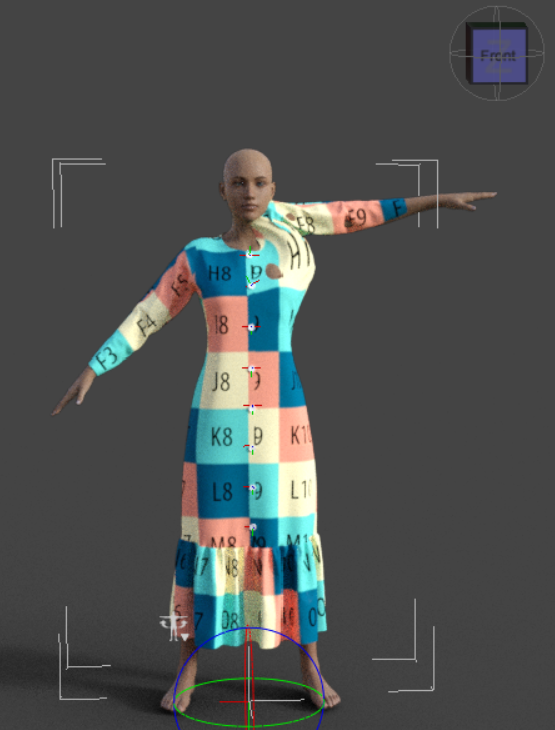
It should be like this.
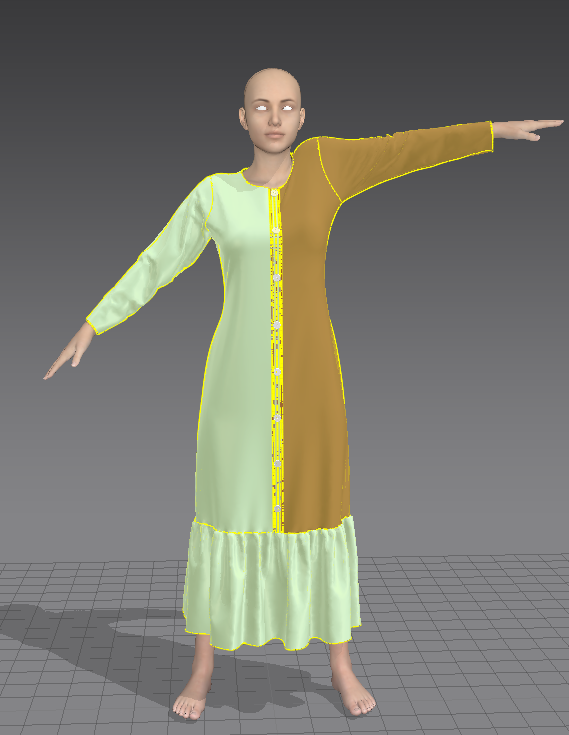
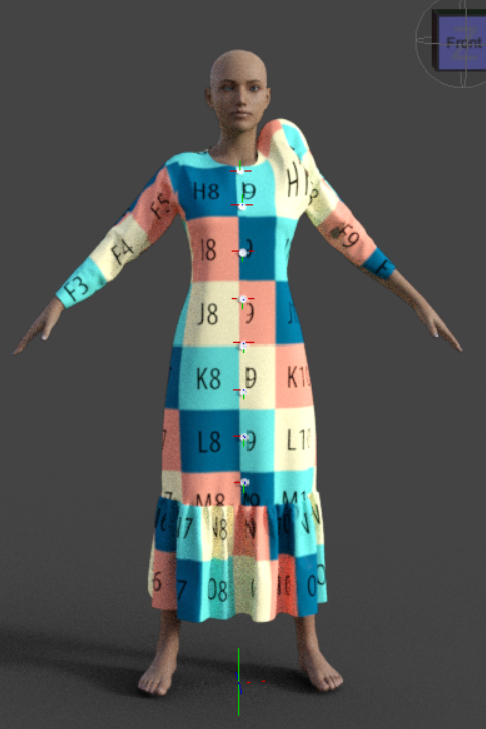
These are the settings I used
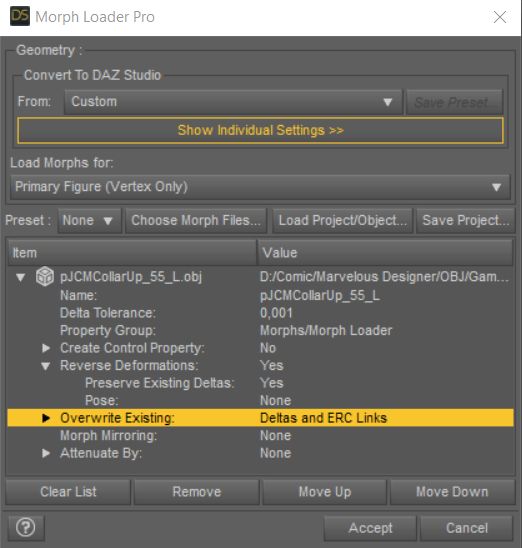
I tried to reload it over and over again, but not working.
And what does 'p' on pJCM stands for?
Solution: Overwrite Existing: Deltas onlyDiffeomorphic DAZ Importer Version 1.5.1joaohenriques said:
I'm using Diffeo for the merge geocrafts function so I can export to Unreal a single mesh.
At the moment I have a almost perfect solution... Diffeo to Blender, apply Morphs to both meshes and then merge geocraft, finally, use the official Blender to Unreal from Epic to export.
its 99% complete... I have a rigged character with all the morphs and 90% of the materials correct! the problem are the materials from the geocrafts (in the case the genitals), I always get the material UV connected to the torso and not the the actual maps of the Genitals (for example Golden Palace or even the official Daz genitalia). I've tried to move the UDIM to layers 2 like in the tutorials from Diffeo, and also the merge UV layers but nothing... I believe its sometrhing to due with the fact that the correct UVs of the genitals are in fact inside that have there one UVmaps but I cannot understand how to use them in unreal... was anyone able to do this?
The new Diffeomorphic version 1.6.2 still doesn't import custom geograft UVs (Those that use geoshells to get materials), however the official Victoria 8 genital map and its UV can be imported, for this reason I have to switch to Victoria 8 genital and create new genital maps for different characters.
Padone said:
@Intycert You have to export the HD version for HD teeth to work fine, otherwise you get the base resolution version of the teeth, that's the same you get in daz studio if you disbale the HD morph.
Most geografts use shells to get their own uv map and mix the geograft material with the figure. DIffeo converts shells to material layers that are not supported by unreal. I know blender gets some baking features and you may try baking all the materials to a single layer, that's probably what unreal is expecting. But I don't know how good this will be, never did it myself.
As a side note, if you're looking for fast rendering you will get a much better material support with eevee. While if you're making a game pay attention to the daz eula because it requires a separate purchase of the interactive licenses, that's usually not viable as a cheap solution. Unless your game uses sprites instead of 3d but in this case I don't see what unreal is good for.
The version 1.6.2 with Single Principled material import option, Diffeomorphic attaches the genital UV to the torso and does not import the geoshell material. Attached images below showing imported Golden Palace maps which are not usable, and the Victoria 8 maps which are correctly imported. (The bump maps were used instead of the skin textures for demonstrating purpose)
File problem ...Richard Haseltine said:
Did you reimport metadata after resetting the database (from the same Content DB Maintenance dialogue)?
I just did it. Thanks, everything back to normal. YOU'RE THE MAN!
File problem ...Did you reimport metadata after resetting the database (from the same Content DB Maintenance dialogue)?
Happiness is...Padone said:
I'm not sure what you mean, didn't notice you made a script to import a obj sequence. Of course this doesn't replace sagan since alembic is far superior.
Independent of Sagan, I'll often buy a base mesh set at, say, Art Station and it'll come as 30 seperate .obj files. Before, it was necessary to use a script to import them all into a scene to be examined. I compiled latest, and now you can select multiple obj files. It's even an order of magnitude faster as well.
UltraScenery - new territory [Commercial]Martinjfrost said:
barbult said:
dawnblade said:
I just noticed an UltraScenery product update in DIM. Is this for your upcoming add-on @HowieFarkes?
The readme file says "2022-08-15 - Updated metadata to set compatibility base for the terrain". I suppose that is to allow the upcoming Martin J Frost dirt track textures to be compatible with the terrain in Smart Content.
Not 100 percent sure , but yes I think that QA wanted to make it more smart content friendly. It was certainly mentioned when QA had the product for testing.
Thank you both.
Daz 3D is part of

Connect
DAZ Productions, Inc.
7533 S Center View Ct #4664
West Jordan, UT 84084Licensing Agreement | Terms of Service | Privacy Policy | EULA
© 2026 Daz Productions Inc. All Rights Reserved.